
Source Audio Soundblox Pro Manuel utilisateur

BASS ENVELOPE FILTER
USER’S GUIDE
SA143

WELCOME
Thank you for purchasing the Soundblox Pro Bass Enve-
lope Filter. The BEF Pro is a highly flexible envelope filter
effect unit specially optimized for the bass guitar. With 23
individual filter types, the BEF Pro contains a wide range of
sounds, from traditional filter effects to advanced & unique
filter sounds.
The BEF Pro offers a unique and useful variety of control
options. The unit functions as either an envelope follower or
an LFO (Low Frequency Oscillator) driven filter, but is also
controllable with a standard expression pedal or our pat-
ented Hot Hand® motion sensor ring,
The Quick Start guide will help you with the basics. For
more in-depth information about the BEF Pro, move on to
the following sections.
Enjoy!
The Source Audio team

OVERVIEW
DIVERSE SOUND PALETTE
Featuring 23 types of envelope filter and phaser effects.
FLEXIBLE ENVELOPE CONTROL
A highly bass-optimized envelope follower with multiple sweep and
speed control options.
MODERN DESIGN
A thoughtfully designed box which features rugged construction and
sleek looks.
STATE-OF-THE-ART DSP
Our proprietary 56-bit Digital Signal Processor, the SA601, and crystal
clear 24-bit converters.
LO-RETAIN
Our unique mixing algorithm carefully preserves the lowest bass
frequencies.
6 USER PRESETS
Easy to configure user presets in two banks selectable via 3 footswitches
for quick access to your favorite sounds.
7-BAND EQUALIZER
Ultra-precise 7-band equalizer for in-depth tone control saved per preset.
FILTER CONTROL
The filter effects can be modulated with an envelope follower, an LFO
(low frequency oscillator), expression pedal, or our patented Hot Hand
Motion Control sensor ring.
BACKPAGE PARAMETERS
a second level of control functions, providing access to different LFO
shapes, Q levels, customized expression pedal routing.
ACTIVE ANALOG BYPASS
Bypass is fully routed around the DSP and active input ensures zero
signal degradation.

QUICK START
1. POWER
To power the unit, connect the included DC adapter power supply to
the 9V DC jack (A) on the back panel. Note: Using a different supply
could damage the unit and void the warranty.
2. GUITAR/AUDIO CONNECTIONS
Next, plug your bass (or other instrument) into the jack labeled GUITAR
IN (B) via a standard ¼" cable. Connect your amp (or other audio device)
to the GUITAR OUT jack (C), again with a standard ¼" cable. Both input
and output are mono signals.
3. SENSOR IN (optional)
To use your BEF Pro with a Hot Hand sensor, connect the sensor to the
SENSOR IN (D) jack and follow any instructions given with the sensor
4. BRIEF KNOB AND PEDAL DESCRIPTIONS
See Controls section for more details.
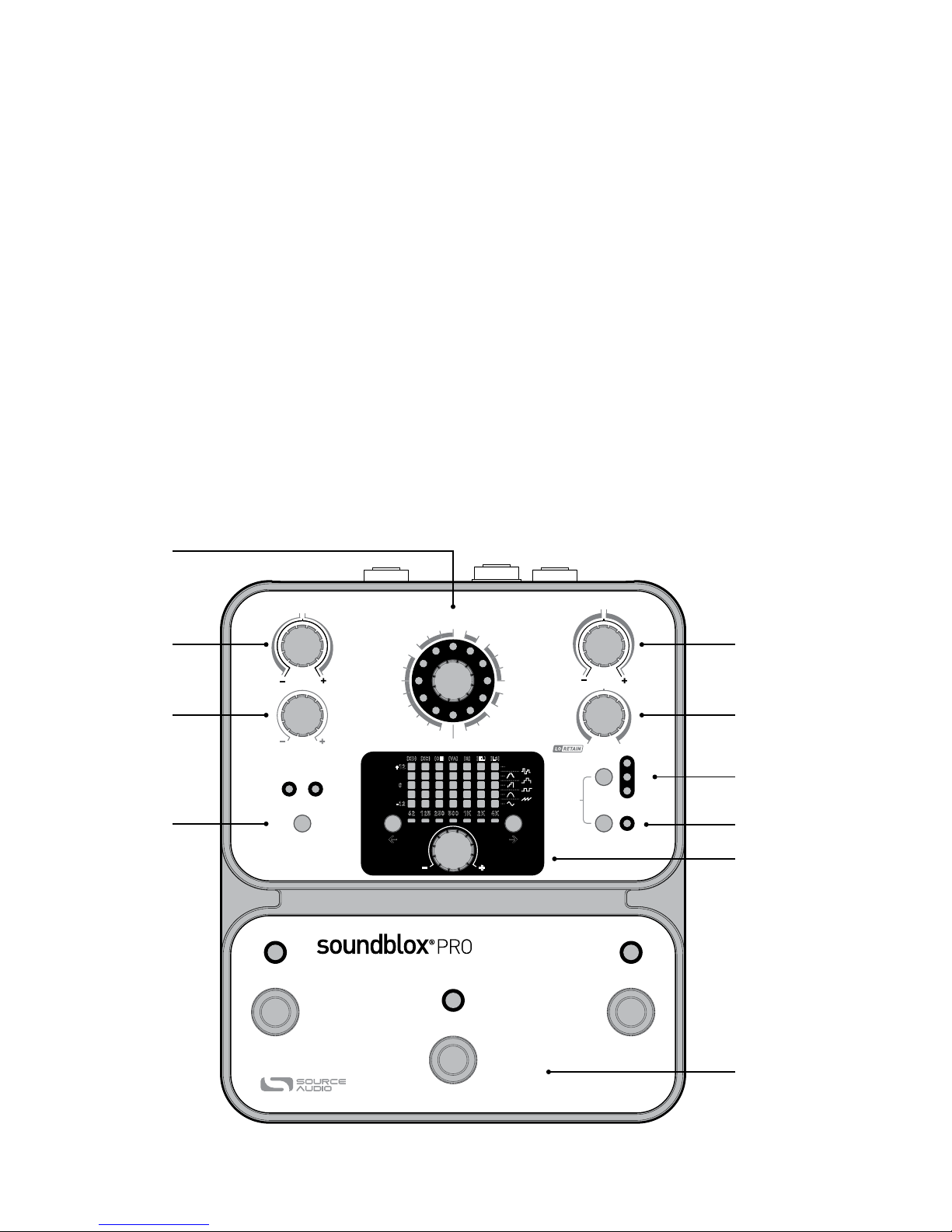
A EFFECT: selects desired filter type
B SWEEP RANGE: adjusts the direction (up/down) and breadth of the
filter sweep or the depth of the LFO and Hot Hand modulation.
C FREQUENCY: adjusts the center frequency of the filter
4 | Quick Start
SENSOR
IN
SENSOR
OUT
GUITAR IN GUITAR OUT
9V DC
EXP IN
MIDI IN
A
CB
D
Quick Start | 5
D SPEED: Controls the attack and decay speed of the envelope fol-
lower, the LFO speed, or the motion-sensitivity of the Hot Hand.
E MIX: adjusts the ratio of clean to wet signals.
F PRESET BANK BUTTON: select preset bank A (presets 1, 2, and 3) or
B (presets 4, 5, and 6).
G MOD SOURCE: selects between ENVELOPE, LFO, and HOT HAND as
the modulation source for the filter effect.
H TAP TEMPO ENABLE: Enables a tap tempo function for use with the
LFO.
I EQ SECTION: the two buttons select the frequency band to edit and
the knob adjusts the value of the selected band.
J FOOTSWITCHES: Enables/Disables a selected preset depending
on the currently selected preset bank. Press and hold to save an
edited preset. The switch to the far right also sets the tap tempo.
17
02
03
04
05
06
07
08
09 10 11 12 13
14
15
16
18
19
21
20
01
EQ ONLY
2 POLE LOW PASS
4 POLE LOW PASS SINGLE PEAK
TRIPLE PEAK
PEAK & NOTCH
PHASERS
62 125 250 500 1K
(XD) (XC) (OE) (VA) (Q) (EL) (LS)
2K 4K
+12
-12
0
< >
MOD
SOURCE
TAP TEMPO
ENABLE
PRESET BANK
4-61-3 (HOLD)
CALIBRATE
BACKPAGE
MODE
ENVELOPE
LFO
HOT HAND
USER
00 22
SWEEP RANGE SPEED
FREQUENCY MIX
FAST FAST
SLOW SLOW
WET
DRY
WET
DECAY
X-AXIS
ATTACK
& DECAY
Y-AXIS
HOT
HAND
LFO
MINMIN
DOWN UP
MAX MAX
BASS ENVELOPE FILTER
14
25
3
(TAP TEMPO)
6
B D
A
C
F
E
G
I
J
H

6 | Features
FEATURES
The Soundblox Pro Bass Envelope Filter is a very flexible envelope filter
effect. The unit features multiple filter types ranging from simple to
complex, which can all be controlled by an Envelope Follower, an LFO
(Low-Frequency Oscillator), the Hot Hand Motion Sensor or an Expres-
sion Pedal.
An Envelope Follower is an algorithm that responds to the amplitude (or
volume) of the incoming signal and creates a control signal based on the
input level. This control signal is used to modulate the filter to create an
auto-wah effect. (Note: The envelope follower signal can be reset to zero
between notes by a very brief moment of silence, allowing the next note
played to experience the full sweep of the filter effect all the way from its
starting point)
An LFO (low frequency oscillator) is an electronic signal that uses a
rhythmic pulse or sweep to create a control signal. This control signal
is used to modulate the filters of the BEF Pro to create an oscillating
filter or sequencer-like effect. The BEF Pro also features a variety of LFO
shapes including sine, square, saw, step and triangle, each of which can
dramatically change the sound of the effect.
The Hot Hand Motion Sensor uses data from an accelerometer placed
inside a wearable ring to modulate the filters of the BEF Pro. Either a
wired or wireless sensor can be plugged into the sensor input on the
back panel. After the sensor is plugged in, use the MOD SOURCE button
to select “Hot Hand Mode”. At this point the controls take on slightly dif-
ferent functions. Note that the calibrate feature is intended for use with
the “Hot Hand Mode” only.
An Expression Pedal can be used to control a variety of selectable param-
eters in the BEF Pro including direct filter modulation like a standard
wah pedal.
The BEF Pro features LO-RETAIN, an algorithm that alleviates the issue of
low-end “tone suck” commonly experienced with bass effects.

Connections | 7
CONNECTIONS
GUITAR IN
Connect your bass guitar or other instrument here using a standard
MONO ¼" cable.
GUITAR OUT
Connect this to your amp, pedal, or other audio device.
EXPRESSION IN (optional)
Connect a passive expression pedal that uses a TRS plug here. The
expression pedal is assignable to a variety of parameters.
SENSOR IN (optional)
Connect an optional Hot Hand sensor here, either wired or wireless.
SENSOR OUT (optional)
Use a Source Audio daisy-chain cable to connect this jack to the sensor
input of another pedal.
MIDI IN (optional)
MIDI program and continuous control input. Connect to a MIDI output
with a standard MIDI cable. Can also be used to sync the LFO with a MIDI
clock.
9V DC
Connect the included 9 Volt DC power supply here. Use of a non-Source
Audio power supply may cause damage and void the warranty.
SENSOR
IN
SENSOR
OUT
GUITAR IN GUITAR OUT
9V DC
EXP IN
MIDI IN

CONTROLS: KNOBS
EFFECT (not labeled)
The effect knob selects which filter type will be used. There are 23 effect
positions (0 through 22) around the knob as well as a setting for EQ ONLY.
In the EQ ONLY mode, the envelope filter effect is bypassed but the
equalizer still applies. For information on the individual settings see the
Effect Types section.
SWEEP RANGE
In Envelope and Hot Hand modes, the sweep range knob controls the
direction and breadth of the filter sweep. The right side of the knob
(labeled UP) adjusts the breadth of the upward sweep, adding greater
range as you turn the knob clockwise. The left side of the knob (labeled
DOWN) adjusts the breadth of the downward sweep, adding greater
range as you turn the knob counterclockwise. In LFO mode the knob also
controls the depth of the upward and downward sweep, but keep in mind
that symmetric LFO shapes (i.e. sine, square, 6 and 8 step triangle, and
random) will sound the same in either sweep direction. Conversely,
non-symmetrical LFO shapes (i.e. rising saw and step sequences) will
sound very different, depending on the direction of the sweep.
17
02
03
04
05
06
07
08
09 10 11 12 13
14
15
16
18
19
21
20
01
EQ ONLY
2 POLE LOW PASS
4 POLE LOW PASS SINGLE PEAK
TRIPLE PEAK
PEAK & NOTCH
PHASERS
00 22
8 | Controls: Knobs
SWEEP RANGE
HOT
HAND
MINMIN
DOWN UP
MAX MAX

FREQUENCY
The Frequency knob sets the center frequency of the filter sweep in all
modulation modes. Turning the knob counterclockwise will result in the
filter moving over lower frequencies for a darker sound. Turning the knob
clockwise will result in the filter sweep moving over higher frequencies
for a brighter sound.
SPEED
The Speed knob controls the attack and decay time of the envelope
follower or the rate of the LFO. In Envelope mode, the range of the speed
control is divided into two parts. Turn the knob to the left of 12 o’clock to
adjust both the attack and decay times—as the knob is turned counter-
clockwise both will slow down equally. Turn the knob to the right of
12 o'clock and the attack will stay fixed at its fastest setting while the
decay time gets slower. In Hot Hand mode, this knob controls the sensitiv-
ity of the motion sensor and selects which axis of the sensor will be used.
MIX
The Mix knob adjusts the ratio of dry to wet signal. This knob is also
divided into two halves. Setting the Mix knob to 12 o’clock results in a
100% dry signal. Turning the knob to the right of 12 o’clock increases the
amount of wet signal while decreasing the dry. The right most position
results in a 100% wet signal. Turning the Mix Knob left of 12 o’clock
increases the amount of wet signal using LO-RETAIN to preserve more
of the low-end bass frequencies.
Controls: Knobs | 9
FREQUENCY
SPEED
FAST FAST
SLOW SLOW
DECAY
X-AXIS
ATTACK
& DECAY
Y-AXIS
LFO
MIX
WET
DRY
WET
10 | Controls: Equalizer
CONTROLS: EQUALIZER
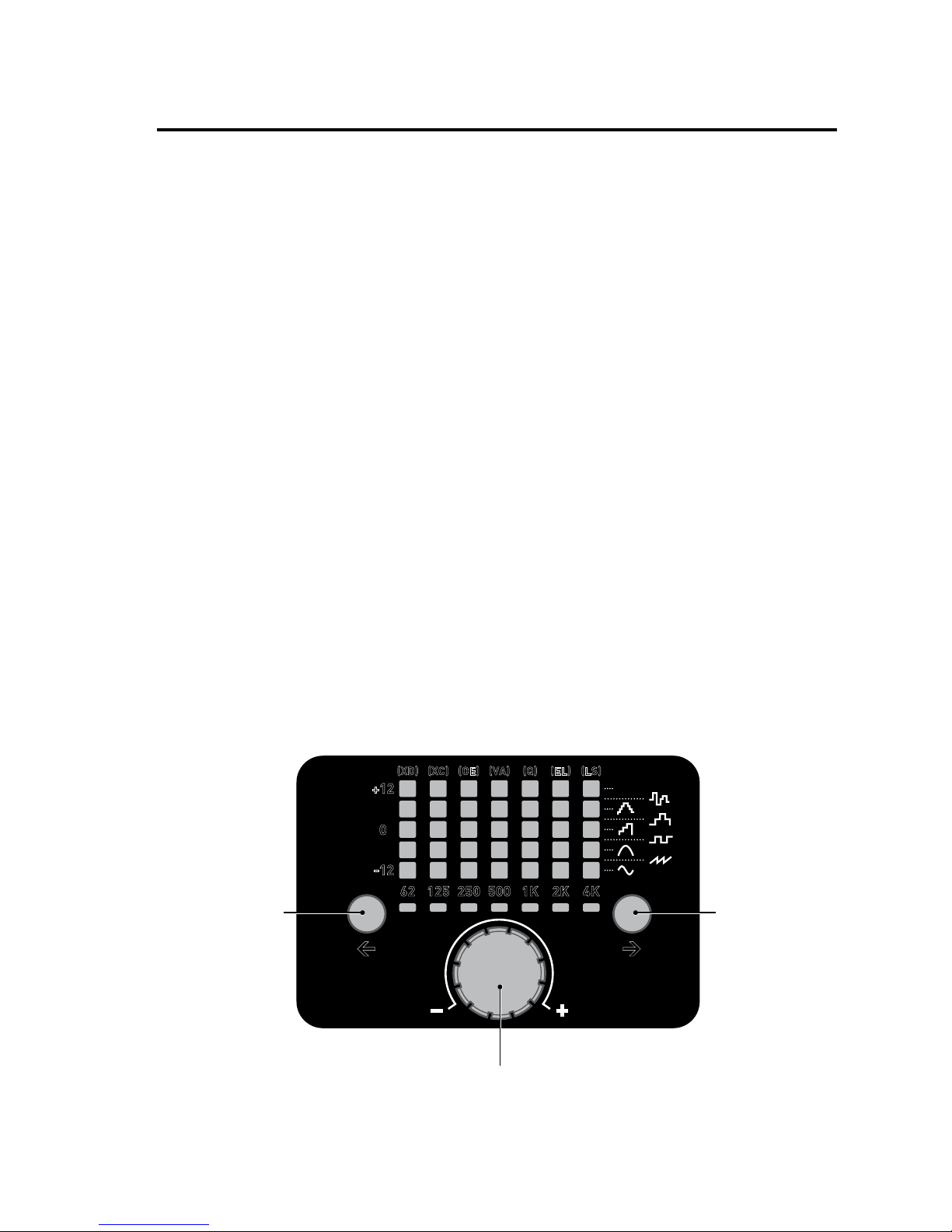
One of the key features of the BEF Pro is the 7-band graphic equalizer.
Each band can be adjusted up or down in 1 dB steps from -12 dB to +12
dB. The display shows 1 dB steps by lighting adjacent LEDs with varying
brightness. The factory default places the EQ after the MIX control apply-
ing the EQ to both the wet and dry signals. Alternatively, a special Back-
page parameter (See Backpages instructions) offers the option of placing
the EQ on just the wet signal. Another Backpage parameter extends the
EQ by an octave and allows access to the adjustment of one additional
high frequency band (8K). The equalizer section has three controls:
BAND SELECT LEFT and RIGHT
The two buttons on either side of the EQ knob select the frequency band
to edit.
EQ knob
The equalizer knob changes the value of the selected band up or down in
1 dB steps.
Tip: You can quickly and easily zero the equalizer by pressing both left
and right band select buttons at the same time. The equalizer display
will reset to a default “flat” setting.
62 125 250 500 1K
(XD) (XC) (OE) (VA) (Q) (EL) (LS)
2K 4K
+12
-12
0
< >
USER
Band Select RightBand Select Left
EQ Knob
Autres manuels pour Soundblox Pro
1
Table des matières


