
SoundMax SM-PS4201 Manuel utilisateur

PORTABLE MINI MUSIC SYSTEM WITH BLUETOOTH
ПОРТАТИВНАЯ МУЗЫКАЛЬНАЯ MINI СИСТЕМА С
BLUETOOTH
SM-PS4201
Instruction manual
Руководство по
эксплуатации

Instruction manual
2
Dear customer!
Thank you for purchasing our product. For safety, it is strongly recommended to read
this manual carefully before connecting, operating and/or adjusting the product and keep
the manual for reference in future.
Description
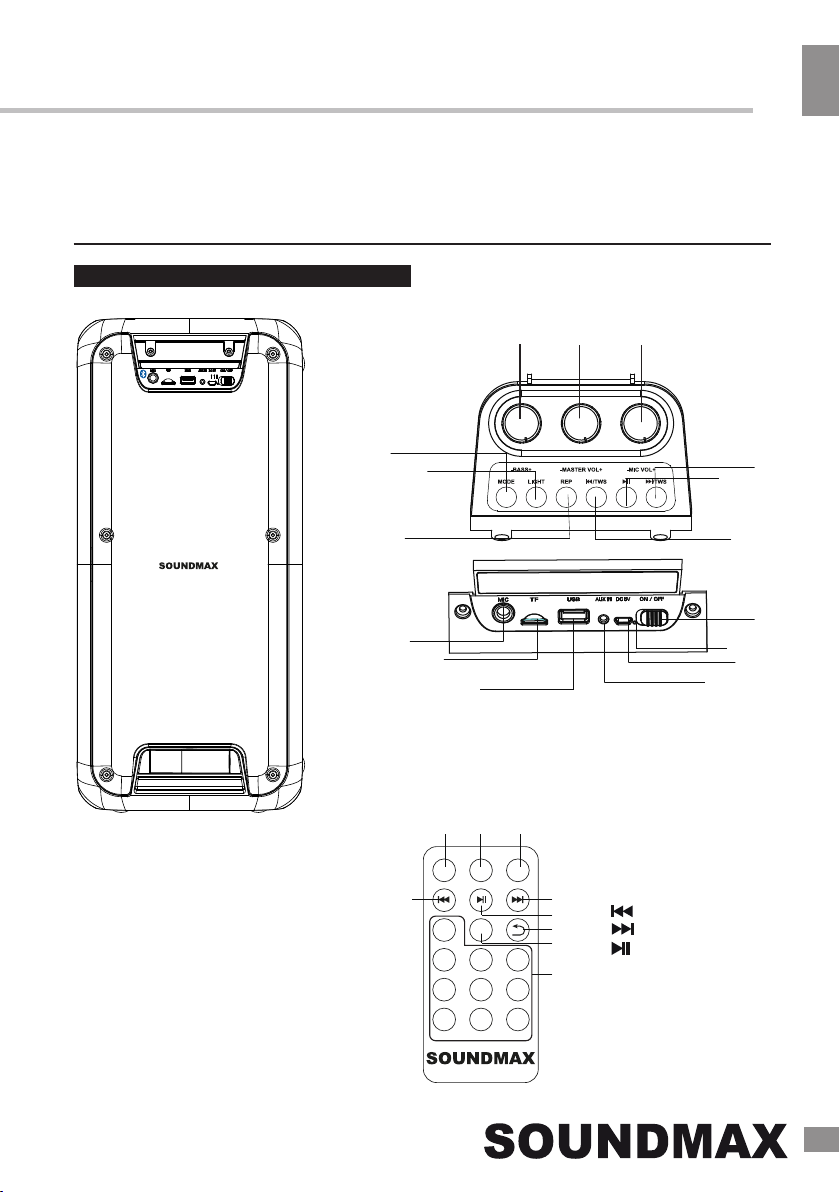
1. Microphone volume knob
2. Master volume knob
3. Bass knob
4. MODE button
5. LIGHT button
6. REP button
7. ⏮ (PREVIOUS)/TWS button
8. ⏯ (PLAY/PAUSE) button
9. ⏭ (NEXT)/TWS button
10. Microphone input 6.35mm
11. TF (microSD) card slot
12. USB port
13. AUX input 3.5mm
14. DC 5V microUSB charging port
15. Charge indicator
16. Power ON/OFF switch
Remote control
STBY
0
123
456
789
VOL+
VOL-
MODE
1 2 3
45
6
7
8
9
1. STBY button
2. VOL+ button
3. MODE button
4.
5.
6.
(PREV) button
(NEXT) button
(PLAY/PAUSE) button
7. Playback mode button
8. VOL- button
9. Numeric buttons
12 3
4
5
6 7
89
10
11
12 13
14
15
16

Instruction manual
3
Connection diagram
Important safeguards
• The instruction manual contains important
operating and maintenance instructions. For
your safety, it is necessary to refer to the
manual. Keep the manual for future use.
• Do not hit or drop the unit
•Do not expose the unit to vibration, direct
sunlight, too high or low temperatures or
humidity.
• Do not disassemble the unit yourselves
Refer servicing to qualified service personnel
All the illustrations in this manual are
schematic images, which may differ from
actual objects.
Power supply
• The unit operates on an internal
rechargeable Li-ion battery and 220V mains.
• The battery can be recharged with the
provided USB charging cable. Before first
plugging the appliance check that voltage
indicated on the rating label corresponds
to the mains voltage in your home.
• Insert the charging cable into the
DC 5V microUSB socket on the unit.
• Connect the charging cable to the power
• For best results, try to fully charge the
battery before each use. If the battery is
drained, please allow it to recharge for a few
hours.
General operations
Bluetooth wireless playback
•This unit can wirelessly playback audio
from any device with Bluetooth A2DP
function.
•The wireless range is approximately
within 10 meters in direct line of sight.
adapter (not included). Plug the
adapter to the power source.
•Put the OFF/ON switch into ON
position (to the left) to switch the unit
on. Put it into OFF position (right) to
switch off.
USB to micro USB
power cable
USB port
3.5mm mini-jack to 3.5 mini-
jack audio cable
Mobile device
PC
Socket

External device connection
Instruction Manual
4
•Wireless audio streaming requires pairing
of a Bluetooth device (e.g. smartphone).
HOW TO PAIR YOUR DEVICE TO
THIS UNIT:
•Make sure the Bluetooth function is
switched on in your device (e.g. smartphone,
tablet).
•Switch on the unit and press the
MODE button repeatedly to select
the Bluetooth mode (selected by default).
•Once the Bluetooth mode is active,
you will find the unit listed in the Bluetooth
connections list of your device (as
SM-PS4201).
•If asked for a passcode, enter “0000”.
•The initial setup is required only once
per device. The unit will automatically pair to
the last paired device.
•When playing files, you can press
button to pause and resume
the
playback.
• Press the or button to go to a
previous or next track. Press and hold
these buttons to adjust volume.
USB/MicroSD operation
• You can connect the audio output of an
external device to this unit, to listen to the
sound of that device through the speaker.
• To connect an external audio device,
please use an audio cable with 3.5mm-to-3.5
mm plugs to connect the headphone out or
audio line-out of the external device to the
AUX input of this unit.
• Press MODE button to select the AUX
mode.
• Turn on the external device. You can
rotate the volume knob or press the volume
buttons on the RC to adjust volume.
Playback
• When playing, you can press
to play/pause the playback.
• During the playback you can press
•
• Turn on the device.
Insert a microSD (TF) card into the slot.
Or insert a USB drive into the USB
port. Press the MODE button repeatedly to
select the USB or MicroSD mode.
the and buttons to go to the previous
and next track. Rotate the volume indicator
to adjust volume.
It may take up to 60 seconds to open
and verify a large microSD card / USB drive
with many files.
General USB/MicroSD notes
•This unit is equipped with a microSD slot
and USB port that can read and play MP3
files stored on standard microSD cards and
USB drives up to 32 GB.
•FAT32 file system is supported
by this unit.
Never remove microSD cards and USB
drives from the unit during playback, always
stop playback, then press the MODE button
to switch to another mode before removing
the storage to prevent damage to your files
and cards/drives themselves.
Slight noise during playback pauses
is not a construction defect, it is
determined by the factory presets of the
dynamic noise reduction system.
•Press the REP button ( on the RC)
to switch between various repeat
modes (one track - folder - random - all
tracks - off).
The SD and USB are available only
when the corresponding storage device is
present.

Instruction manual
5
Maintenance and care
Switch off the unit, unplug from the power
supply. The outside of the appliance can be
cleaned with a slightly damp cloth.
Accessories
1 pc
1 pc
Music system
USB cable
Remote control
Microphone
Instruction manual
1 pc
1 pc
FM radio
• Once the search is finished, you can
•Turn on the device.
•Press the MODE button
repeatedly to select the FM mode.
press the and buttons to go to a
previous or next radio station. Also you
can input the frequency directly using
the numeric buttons on the remote.
Microphone
• You can connect the microphone for
karaoke or other purposes into this unit by
connecting it to the 6.35mm microphone
input jack. Please do not plug the
microphone when the unit is charging.
• While connected, you can
control the microphone volume and bass
by rotating the corresponding knob on
the top panel.
• Press PLAY/PAUSE to automatically
scan and save all available radio
stations. The procedure will take
several minutes and cannot be
interrupted.
• Radio frequency can be set
manually using the numeric buttons on
the remote control.
Mood light
TWS function
•If you have two units at your
disposal, you can pair them to each other
and enable the True Wireless (TWS)
stereo sound.
•Turn the both units on and
switch them into the Bluetooth mode. Press
and hold ⏮/TWS on any of the units. A
beep will sound, indicating that the units are
paired. It is now the auxillary device (left
channel). The other one is the main device
(right channel). Press and hold ⏭/TWS on
the main device to disconnect them.
TWS works only in Bluetooth mode.
•The speakers will light up
during playback. Press the LIGHT button
to switch it on and off.
1 pc

Specifications
Specifications and functions are subject to change without notice. It is connected with continual
improvement of the device.
MANUFACTURED AND DISTRIBUTED BY TECHNO ELECTRIC LIMITED,
Legal address: 801 Luk Yu Building, 24 - 26 Stanley Street, Central, China
Instruction Manual
6
Input voltage 5V ⎓ 1А
Nominal power consumption 10 W
FM radio 87.5 - 108 MHz
Battery / Mains power supply Li-ion, 3.7V, 2400 mAh / 220V
Net weight 2.5 kg
Unit dimensions 235 * 207 * 503 mm
Peak music power output 120 W

Руководство по эксплуатации
7
Уважаемый покупатель!
Благодарим Вас за покупку нашего изделия. Чтобы понять, как правильно и без-
опасно пользоваться изделием, рекомендуется тщательно изучить настоящее
руководство перед включением, регулировкой и эксплуатацией изделия.
Сохраняйте руководство для использования в будущем.
Описание
STBY
0
123
456
789
VOL+
VOL-
MODE
1 2 3
45
6
7
8
9
1. Кнопка STBY
2. Кнопка VOL+
3. Кнопка MODE
4. Кнопка
5. Кнопка
6. Кнопка
7. Кнопка переключения
режимов воспроизведения
8. Кнопка VOL-
9. Кнопки с цифрами
1. Регулятор громкости
микрофона
2. Общий регулятор громкости
3. Регулятор басов
4. Кнопка MODE
5. Кнопка LIGHT
6. Кнопка REP
7. Кнопка ⏮ (PREVIOUS)/TWS
8. Кнопка ⏯ (PLAY/PAUSE)
9. Кнопка ⏭ (NEXT)/TWS
10. Вход для микрофона 6,35 мм
11. Разъем для TF (microSD) карты
12. USB-порт
13. Вход AUX 3,5 мм
14. Разъем питания DC 5V
(microUSB)
15. Индикатор заряда
16. Переключатель ON/OFF
Пульт ДУ
12 3
4
5
6 7
89
10
11
12 13
14
15
16

8
Руководство по эксплуатации
Схема соединений
указания по эксплуатации и уходу. Перед
использованием устройства ознакомьтесь
с руководством и сохраните его для после-
дующего использования.
• Не наносите ударов по устройству, не
роняйте его.
• Не подвергайте устройство вибрации,
воздействию прямых солнечных лучей, вы-
соких или низких температур и влажности.
Не включайте устройство в ванных комна-
тах, около кухонных плит, отопительного
оборудования.
• Не демонтируйте корпус устройства
самостоятельно. Доверяйте ремонт устрой-
ства только квалифицированным спе-
циалистам. В приборе находятся оголенные
провода высокого напряжения. Напряжение
внутри прибора достаточно высокое, чтобы
вызвать удар электрическим током.
Меры безопасности
• В руководстве присутствуют важные
Питание
•Устройство работает от внутренней
аккумуляторной литий-ионной (Li-ion)
батареи и от сети 220В через адаптер
(в комплект не входит).
• Зарядка батареи осуществляется с
помощью кабеля питания, входящего в
комплект. Удостоверьтесь, что напряжение
источника питания соответствует
рекомендуемому напряжению на
устройстве.
• Вставьте кабель в разъем DC 5V
на устройстве.
• Подключите кабель к адаптеру
питания.
• Вставьте вилку адаптера в
электрическую розетку.
• Для наилучшей автономной
работы полностью заряжайте батарею
перед каждым использованием. Если
батарея полностью разряжена,
позвольте ей зарядиться в течение
нескольких часов.
• Чтобы включить устройство,
переведите переключатель
OFF/ON на устройстве в положение ON.
Чтобы отключить устройство,
переведите переключатель в
положение OFF.
Общие операции
Беспроводное воспроизведение
через Bluetooth
• Устройство оснащено функцией
беспроводного воспроизведения с любого
устройства с поддержкой протокола
Bluetooth A2DP.
• Радиус действия беспроводного
Кабель питания
USB-microUSB
USB-разъем
Аудиокабель со штекерами mini-
jack 3,5 мм
Мобильное устройство
ПК
Розетка

Руководство по эксплуатации
9
необходимо сопряжение с Bluetooth-
устройством (например, смартфоном,
планшетом).
СОПРЯЖЕНИЕ УСТРОЙСТВ ЧЕРЕЗ
BLUETOOTH:
• Удостоверьтесь, что передача данных
через Bluetooth включена на Вашем
устройстве (например, смартфоне,
планшете).
• Включите устройство и, с помощью
кнопки MODE, выберите режим
Bluetooth.
•Через некоторое время устройство
появится в списке доступных
Bluetooth-подключений (под
именем «SM-PS4201»).
• Для беспроводного воспроизведения
• Если потребуется код доступа, введите
“0000”.
• Первоначальную настройку соединения
требуется выполнить один раз для каждого
устройства.
• При проигрывании аудиофайлов вы
можете нажать кнопку , чтобы поставить
воспроизведение на паузу или возобновить
его.
Нажимайте кнопки•Нажимайте кнопки
чтобы перейти к предыдущему или
следующему треку. Громкость
регулируется вращением регулятора или
короткими нажатиями кнопок VOL+/VOL-
на пульте ДУ.
Если в устройстве установлены USB-
накопитель или карта памяти microSD (TF),
при включении устройства
воспроизведение автоматически начнется
с этих носителей.
USB/microSD
Воспроизведение
Включите устройство.
Вставьте карту памяти microSD (TF)
в соответствующий разъем. Или вставьте
USB-накопитель в USB-порт. Кнопкой
MODE выберите режим USB или microSD.
• Нажимайте кнопку для
паузы и возобновления воспроизведения.
• В ходе воспроизведения нажимайте
•
•
кнопки и для перехода к
предыдущему или следующему треку,
соответственно.
При открытии microSD карт и USB-
накопителей большого объема с большим
числом файлов может потребоваться до
60 сек.
• Вы можете прослушивать внешнее
аудиоустройство, подключив его к
аудиосистеме.
•Для подключения воспользуйтесь
аудиокабелем со штекерами
3,5мм-3,5мм для подсоединения
разъема для наушников или
линейного разъема внешнего
аудиоустройства к разъему AUX на
аудиосистеме.
• Кнопкой MODE выберите режим AUX.
• Включите внешнее устройство и
начните воспроизведение. Громкость
контролируется вращением регулятора
или кнопками VOL+/- на пульте ДУ.
Подключение внешних устройств
•Нажимайте кнопку REP ( на ПДУ)
для переключения между различными
режимами повтора трека (повторить
один трек, папку, в случайном
порядке, повторить все треки на
носителе или отключить повтор).
Режимы SD и USB доступны
только при наличии соответствующего
носителя.
Table des matières
Langues :
Autres manuels SoundMax Système stéréo

SoundMax
SoundMax SM-PS4202 Manuel utilisateur

SoundMax
SoundMax MS-MSD10 Manuel utilisateur

SoundMax
SoundMax SM-PS5022B Manuel utilisateur

SoundMax
SoundMax SM-PS4405 Manuel utilisateur

SoundMax
SoundMax SM-MSD11 Manuel utilisateur

SoundMax
SoundMax SM-MS4206 Manuel utilisateur

SoundMax
SoundMax SM-PS5015B Manuel utilisateur

SoundMax
SoundMax SM-PS5081B Manuel utilisateur

SoundMax
SoundMax SM-2401 Manuel utilisateur

SoundMax
SoundMax SM-PS5068B Manuel utilisateur


