
Sound Oasis S-002-02 Manuel utilisateur
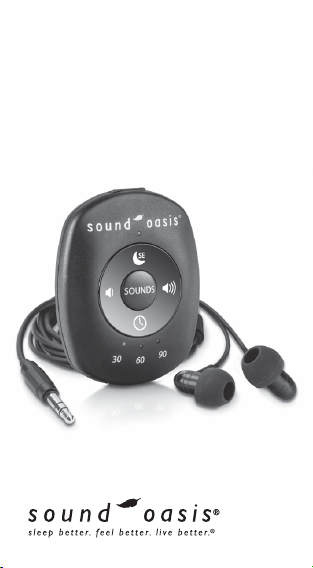
World’s Smallest
Sound Machine®
Instruction Manual
Model S-002
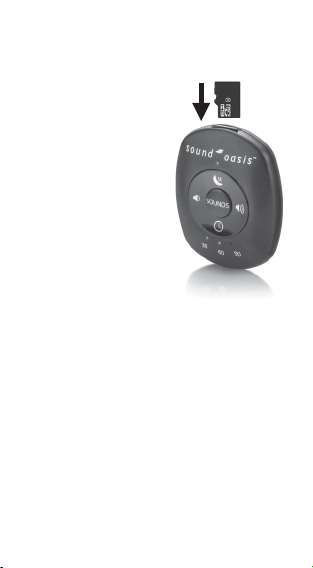
Your SD Card is
removable so you can
change sounds
ADD NEW SOUNDS TO YOUR S-002!
For greater variety and
extra sound therapy, you
can change the sounds on
your World’s Smallest
Sound Machine® by simply
changing the sound card!
New Sound Cards are
available two dierent
ways:
(i) You can purchase your
own blank micro SD card
and download S-002
sounds from the Sound
Oasis web site
(www.soundoasis.com/custom-sound-cards).
Then load the new Sound Oasis sounds onto
your blank micro SD card.
Note: If you record new sounds on your existing
sound card, it will erase the existing sounds.
or
(ii)Purchase a custom made micro SD card directly
from Sound Oasis. Sound Oasis will prepare a
custom made Sound Card for you with every
sound selected by you from the Sound Oasis
web site.
For further information on purchasing new
Sound Cards, please visit
www.soundoasis.com/custom-sound-cards.
2

TABLE OF CONTENTS
• Add New Sounds to Your S-002!......2
• Introduction..............................................4
• About Your Unit.......................................4
• Important Safeguards...........................5
• What Is Included.....................................7
• Key Buttons & Controls.........................7
• How to Use................................................8
• Playing “Coaching Tracks”..................11
• Sleep Enhancement® Technology....12
• 30, 60, 90 Minute Timer......................13
• LED O Control......................................13
• Cleaning Instructions............................14
• Technical Specifications.......................15
• FCC Information.....................................15
• Disposal......................................................16
• Warranty....................................................17
3

Thank you for choosing Sound Oasis®!
Sound Oasis
®
is the world leader in sound
therapy systems and electronic sleep
masks.
We are dedicated to making life healthier
and more enjoyable with creative solutions
that combine superior quality with the
very latest technology.
Your Sound Oasis
®
World’s Smallest Sound
Machine
®
will help you relax, fall asleep
easier, get higher quality sleep, manage
tinnitus and even improve concentration
during the day. Our unsurpassed collection
of sounds are selected to give you the best
possible solution to your specific needs. If
you want to add new sounds, you can
choose from hundreds of dierent sound
options from our Sound Oasis
®
web site.
About Your Unit
Your Sound Oasis
®
World’s Smallest Sound
Machine
®
includes 24 dierent sounds plus
these useful features: earbud headphones,
headphone jack, Sleep Enhancement
®
technology, 30-60-90 minute auto shuto
timer, built-in rechargeable battery, USB
power jack, charge indicator, integral
pocket clip, volume control, on/o button
and deluxe travel case - all in a product
smaller than the palm of your hand!
4

Important Safeguards
• Read and keep these instructions.
• Do not use this product in or around
water. Do not expose it to rain or
moisture. Do not place objects filled with
water, such as a vase, on the product.
•
Do not place on or near any heat sources
such as radiators, heat registers, stoves,
or other apparatus (including amplifiers)
that produce heat.
• This product contains a rechargeable
lithium-ion battery which is not user
replaceable. Tampering with your
product, or attempting to open it, will
void the warranty and can result in a
safety hazard.
• Charge the battery using a computer,
powered hub, or power supply that is
certified by a recognized testing
laboratory.
• Charge the battery in accordance with
the instructions supplied in this user
manual.
• CAUTION: To reduce the risk of fire or
explosion, do not expose battery to
excessive heat such as sunshine, fire or
other heat sources.
•
After extended periods of storage, it may
be necessary to charge and discharge
5

the battery pack several times to obtain
maximum performance.
• In the event fluid from the battery leaks
from the product, do not allow the liquid
to come in contact with the skin or eyes.
If contact has been made, wash the
aected area with generous amounts of
water and seek medical advice.
• Protect the power cord from being
walked on or pinched particularly at
plugs, convenience receptacles, and the
point where they exit from the product.
• Only use attachments/accessories
specified by the manufacturer.
• Refer all servicing to qualified service
personnel or contact Sound Oasis® at
www.soundoasis.com or 1-888-625-3218.
Servicing is required when the product
has been damaged in any way, such as
power-supply cord or plug is damaged,
liquid has been spilled or objects have
fallen into the product, the product has
been exposed to rain or moisture or does
not operate normally.
6
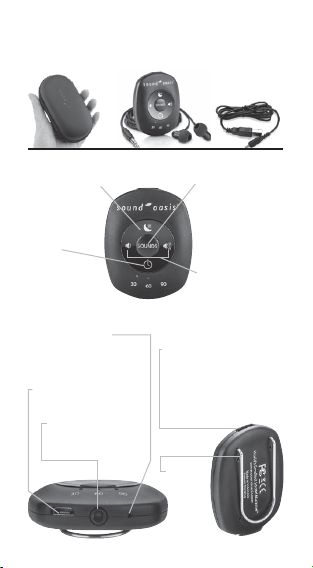
What is Included
Key Features
Travel Case
USB Charge
Cable
Sound Machine & Earbud
Headphones
Sound Selection Button
• Press and hold to turn
unit ON and OFF.
• Press to skip to the next
sound. 24 sounds
available.
Sleep Enhancement
®
Button
• Press to turn Sleep
Enhancement
® on
or o.
Micro SD Card
• Removable card contains 24
sounds. Add new sounds by
inserting a new card containing
dierent sounds (see Purchasing
New Sounds section of this user
manual).
Pocket Clip
• Great for
attaching
to pocket,
clothes,
belt, etc.
Auto-O
Timer
• Press to select
continuous or, auto
shut-o time in 30, 60 or 90
minutes
Volume Control
• Press right side to
increase volume; press
left side to decrease
volume
USB Charge Port
• USB charge cable included
Headphone Jack
• use included earbuds or
your own headphones
Charge /On Indicator
• It is bright red when charging;
dim when charged and green
when unit is on
7
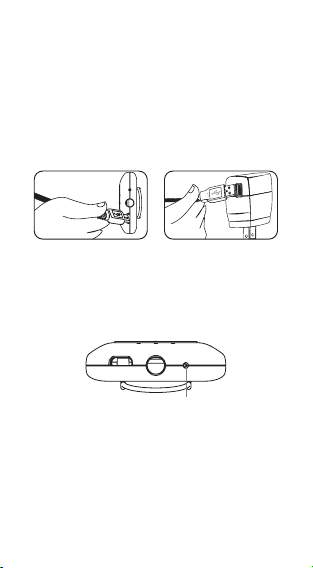
How to Use Your World’s
Smallest Sound Machine®
Charge Your Unit
Charge your unit by plugging the small end
of the included USB CHARGE CABLE into
your unit’s USB CHARGE PORT and larger
rectangular end of the USB CHARGE
CABLE into a USB power source.
• The red CHARGE INDICATOR will
illuminate brightly to indicate your unit is
charging.
• When the battery is fully charged, the red
CHARGE INDICATOR will be o or very dim.
Note: You can use other USB ports to
charge your unit (e.g. your computer USB
port), but some USB ports may not have
enough power output. If you do not see the
red CHARGE INDICATOR illuminate when
the USB CHARGE CABLE is connected, try
another USB source or use a wall charger
with USB port as a power source.
Charge Indicator
8

To Operate
Sounds On The Included Micro SD
Card
Your World’s Smallest Sound Machine®
contains 24 sounds which are stored in the
included, removable micro SD card.
For greater variety and extra sound
therapy, you can conveniently insert a new
Sound Card that has a dierent selection
of sounds.
New Sound Cards are available two
dierent ways:
(i)
Purchase your own blank micro SD card
and download S-680/S-002 sounds
from the Sound Oasis® web site
(www.soundoasis.com/custom-sound-cards).
Then load the new Sound Oasis sounds
onto your blank micro SD card.
or
(ii) Purchase a micro SD card directly from
Sound Oasis®. You can purchase a “ready
made” Sound Card or we can prepare a
custom made Sound Card for you with
every sound selected by you from the
Sound Oasis® web site (but Sound
Oasis®
puts these sounds onto a micro
SD card
for you).
For further information on purchasing new
Sound Cards, please visit
www.soundoasis.com/custom-sound-cards.
9
Ce manuel convient aux modèles suivants
1
Table des matières
Autres manuels Sound Oasis Lecteur MP3

Manuels Lecteur MP3 populaires d'autres marques

Blaupunkt
Blaupunkt Compact Drive MP3 Manuel utilisateur

Memorex
Memorex MMP9008 - 8GB USB 2.0 Manuel utilisateur

Meizu Electronic Technology
Meizu Electronic Technology E5 Manuel utilisateur

Naxa
Naxa NMV-173NX Manuel utilisateur

Philips
Philips PSA250 Manuel utilisateur

Zipy
Zipy go! Waving Manuel utilisateur


