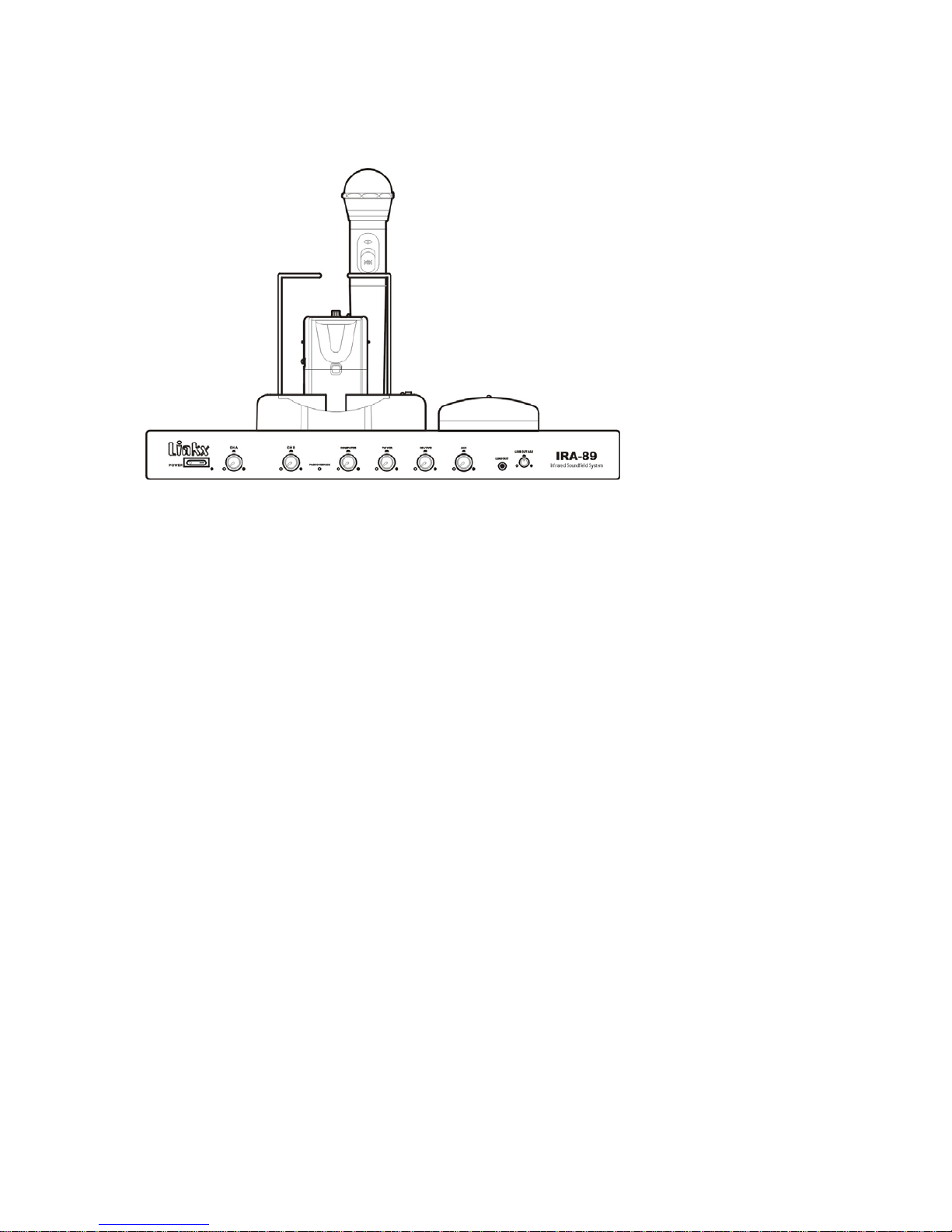
Sound Fields IR-89 Manuel utilisateur

INFRARED SOUNDFIELD SYSTEM
IR-89 User Guide
Thank you for buying this product.
Please read through these operating instructions so you will know how to operate your
equipment properly. After you have finished reading the instructions, put them away in a
safety place for future reference.
TABLE OF CONTENTS
1. SAFETY PRECAUTIONS………………………………………………2﹐3﹐4
2. FEATURES………………………………………………………………5
3. PACKAGE CONTENTS…………………………………………………5﹐6
4. INSTALLING THE SYSTEM……………………………………………7﹐8
5. IR-89 INFRARED SOUNDFIELD SYSTEM, MAIN RECEIVER
UNIT………………………………………………………………………9﹐10
6. TRANSMITTER…………………………………………………………11﹐12
7. CHARGER………………………………………………………………13
8. TROUBLE SHOOTING…………………………………………………14
1

9. DIMENSIONS……………………………………………………………14
10. GENERAL SPECIFICATIONS…………………………………………15
Thank you for your purchase of IR-89 Infrared Soundfield System. Before using the
equipment, be sure to read this entire operating manual so that you can take full advantage of
the IR-89's features. After you finish reading, keep this document and the warranty handy in a
safe place in case you need them in the future. The manual should be very helpful in
understanding the system and solving any difficulties that may arise during use.
SAFETY PRECAUTIONS
To ensure proper use of the equipment, carefully read the Safety Precautions prior to use.
Icon Labels
A variety of icon labels are used in these Safety Precautions section to ensure safe and proper
use of the product, to prevent injury to yourself and others, and to prevent property damage.
Make sure you fully understand the meanings of the icon labels as you read the manual.
Warning
This label is used in cases where there may be a possibility of death of serious injury if the
label is ignored and the equipment is used improperly.
Caution
The label is used in cases where there may be a possibility of injury or just physical damage
if the label is ignored and the equipment is used improperly.
a. A fire or electric shock may result if the equipment is used under abnormal conditions
(e.g., if it is emitting smoke, or strange odors or noises). In such cases, immediately
remove the power plug from the outlet. Make sure the equipment stops emitting smoke,
then contact your dealer to have it repaired.
b. If water enters the equipment, first turn off the equipments' power switch and remove the
power plug from the power outlet, then contact your dealer. Using the equipment under
such conditions may result in fire or electric shock.
c. If a foreign object enters the equipment, first turn off the equipment's power plug from the
power outlet, then contact your dealer. Using the equipment under such conditions may
result in fire or electric shock.
2

d. If you drop the receiver or damage its cabinet, remove the power plug from the power
outlet and contact our dealer. Using the equipment under such conditions may result in
fire or electric shock.
e. If the power cord is damaged (e.g., If the core wire is exposed or if the cord is broken),
have the cord replaced by the dealer. Using the equipment under such conditions may
result in fire and electric shock.
f. Do not use the equipment at voltages other than the supply voltage. Doing so may result
in a fire or electric shock.
g. When you install the equipment, leave a gap of at least 10cm between it and the nearest
well. Also make sure there is a bit of space between it and the other equipment to ensure
proper heat dissipation. If you install the equipment on a rack, make sure there is at least
2cm of free space above the unit, and at least 5cm behind it. If there is not enough free
space around the unit, heat may build up inside of it, possibly result in a fire.
h. Do not use the equipment near bathing areas. Doing so may result in fire or electric
shock.
i. If there is lightning near the equipment, do not touch its power plug. Doing so may result
in electric Shock.
j. Do not allow water to enter the equipment or allow it to get wet. Doing so may result in a
fire or electric shock. Be especially careful when using e equipment when it is raining or
snowing, and when using it near the ocean or other large bodies of water.
k. Do not set flower vases, plant pots, cups, cosmetics, medicines, or any container filled
with water or other liquids, or small pieces of metal, on top of the equipment. In such case,
fire or electric shock my result if the liquid spills on the equipment or metal enters it.
l. Do not set candles or other flame sources on top of the equipment. Doing so may result in
fire.
m. Do not attempt to charge dry cell batteries. Doing so may result in fire or injury if the
batteries burst or Leak.
n. Do not connect the equipment to a direct current (DC) power supply on ships or the like.
Doing so may result in fire.
o. Do not block the ventilation holes on this equipment. If the ventilation holes are blocked,
heat may build up inside the equipment, possible resulting in a fire. There are ventilation
holes on the top and bottom of the equipment's casing in order to prevent the internal
temperature from rising. Do not use the equipment in any of the following ways:
Do not set the equipment so that it faces upward, or set it on its side, or turn it upside
down.
Do not fit the equipment into a bookshelf (except for a special rack), closet or other space
with poor Ventilation.
Do not place a tablecloth, rug, or bedspread on top of the equipment and attempt to use
3

the equipment.
p. Do not set anything heavy on the power cord, or place the cord under the equipment.
Doing so may damage the cord, possibly resulting in a fire or electric shock. If the cord is
placed under a carpet or the like, somebody may not notice the cord and set something
heavy on top of it.
q. Do not insert or drop in anything metallic or flammable through the disc insertion slot on
the equipment.
Doing so may result in fire or electric shock. Be especially careful if there are small
children in our household.
r. Do not damage, modify, excessively bend, twist, or pull on the power cord. Doing so may
damage the cord, possibly resulting in a fire or electric shock.
s. Never remove the equipment's back lid, cabinet, or cover
The equipment contains high-voltage components which could cause electric shock if
touched.
Contact your dealer for internal checks, maintenance, and repairs.
t. Do not modify the equipment. Doing so may result in fire or electric shock.
Caution
a. Do not install the equipment in smoky or steamy locations, such as near kitchens or
humidifiers.
Doing so may result in fire or electric shock.
b. Do not install the equipment in an unstable location, such as a wobbly mount or on a
slanted surface.
The equipment may fall of or tip over if installed in such locations, resulting in injury
c. Do not place the power cord near a heater. In such cases, the cord sheathing may melt,
resulting in fire or electric shock.
d. Do not leave the equipment in a location that could become extremely hot, such as inside
an automobile when the windows closed or in a location exposed to direct sunlight. Doing
so may adversely affect the cabinet and components, possibly resulting in a fire.
e. Do not install the equipment in humid or dusty locations. Doing so may result in a fire or
electric shock.
f. When removing the power plug, do not pull on the power cord. Doing so may damage the
cord, resulting in fire or electric shock. Always grasp the plug as you remove it.
g. Do not move the system with equipment such as a television or audio equipment on top of
it. The system may tip over or fall off, possibly resulting in injury.
4

h. Do not climb on or hang from the equipment. The equipment may tip over or damaged,
possibly resulting in injury. The caution is especially important for children.
i. Do not set anything 5kg or heavier on top of the equipment. Also do not set anything on
the equipment which protrudes beyond the edges of the equipment. In such cases, a loss
of balance may cause the object to tip over or fall, possibly resulting in injury
j. Do not remove or insert the power or plug with wet hands. Doing so may result in electric
shock.
k. If you plan to connect audio equipment or other equipment to the system, carefully read
the operating manuals provided with that equipment. Turn off all equipment power and
connect the equipment according to the instructions in the manuals. Only use the
designated cords in connecting the equipment. Using cords other than those designated or
using extension cords may cause heat to build up, possibly resulting in burn injuries.
l. Before turning on the equipment, set the volume to the lowest setting. At a high volume
setting, the sudden loud output noise could damage your hearing.
m. If you are not going to be using the equipment for an extended length of time, remove the
batteries. Leaking batteries could cause fire, injury, or damage to the surrounding. If a
battery leak occurs, thoroughly wipe the fluid from the battery case, and then insert a new
battery. If battery fluid gets on you, thoroughly rinse it off with water.
n. To prevent accidents, install the equipment near a power outlet so that it can be unplugged
immediately.
o. Contact your dealer about once every five years to have the equipment's interior cleaned.
If dust builds up inside the equipment and it is not cleaned for an extended length of time,
fire or injury may result. Ask your dealer This type of cleaning is especially effective
prior to the rainy season, when humidity rises. for prices on leaning service.
p. If you are not going to be using the equipment for an extended length of time (e.g., if you
go traveling), be sure to remove the power plug from the outlet as a safety precaution.
Failure to do so may result in fire.
q. Before moving the equipment, turn off the power switch, and be sure to remove the
power plug from the outlet and disconnect any antennas and cords (such as cords
connecting different pieces of equipment). If this is not done, the cords may be damaged,
resulting in fire or electric shock.
r. Before cleaning the equipment, remove the power plug from the outlet as a safety
precaution.
FEATURES
◆ Main receiver unit can be free-standing or rack mountable with 1 3/4”rack space.
◆ Four 25 watt amplifiers with eight speaker output connections.
◆ Individual volume control for each amplifier output.
5

◆ Page override technology, speaker level switchable (24V, 80V or 100V)
◆ Dual channel infrared receiver allows two microphone transmitters to be used at once.
◆ Four auxiliary line inputs (stereo) with volume control on the front panel.
◆ Front panel line output for personal listening system with gain control.
◆ Real Panel line output (stereo).
◆ Nine band graphic equalizer.
◆ Three external sensor inputs.
◆ A compressor and expander are used to provide a wide dynamic range.
◆ A tone squelching circuit it is used to eliminate unpleasant noise when a wireless
microphone is tuned on and off.
◆ A noise muting circuit is used to eliminate unpleasant cracking noise when a wireless
microphone moves the maximum distance away from the receiver.
PACKAGE CONTENTS
The package contents are shown below. Make sure the package contains all of the contents
show here.
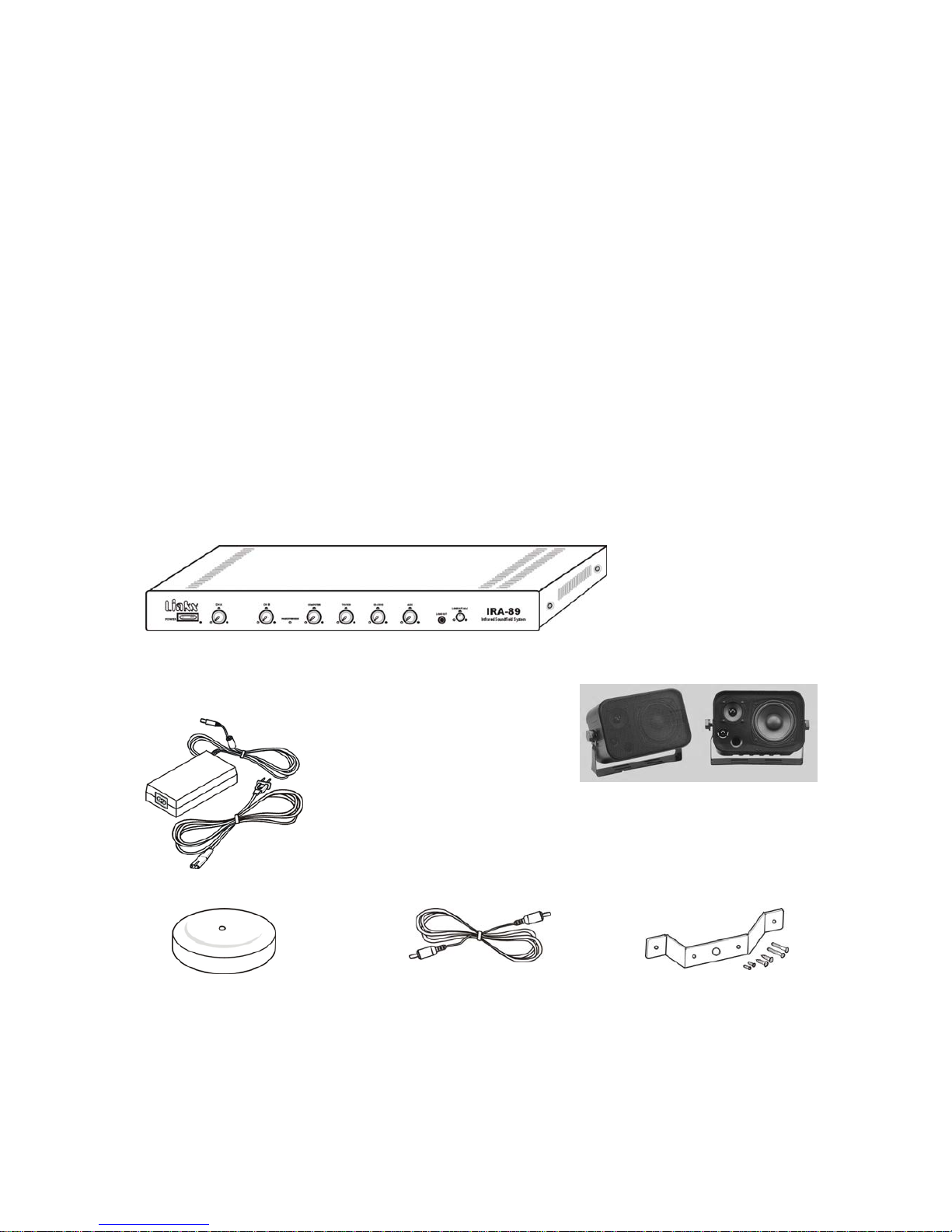
(1) IR-89
Infrared Soundfield System, Main receiver unit
(1) Adaptor for IR-89 (2) Wall Mount Speakers
(1)IRS-30 (1)ISC-15 (1)ISH-30
Infrareddomesensor Infraredsensorcable, Ceilingbracketkit
length-15meters forIRS-30
6

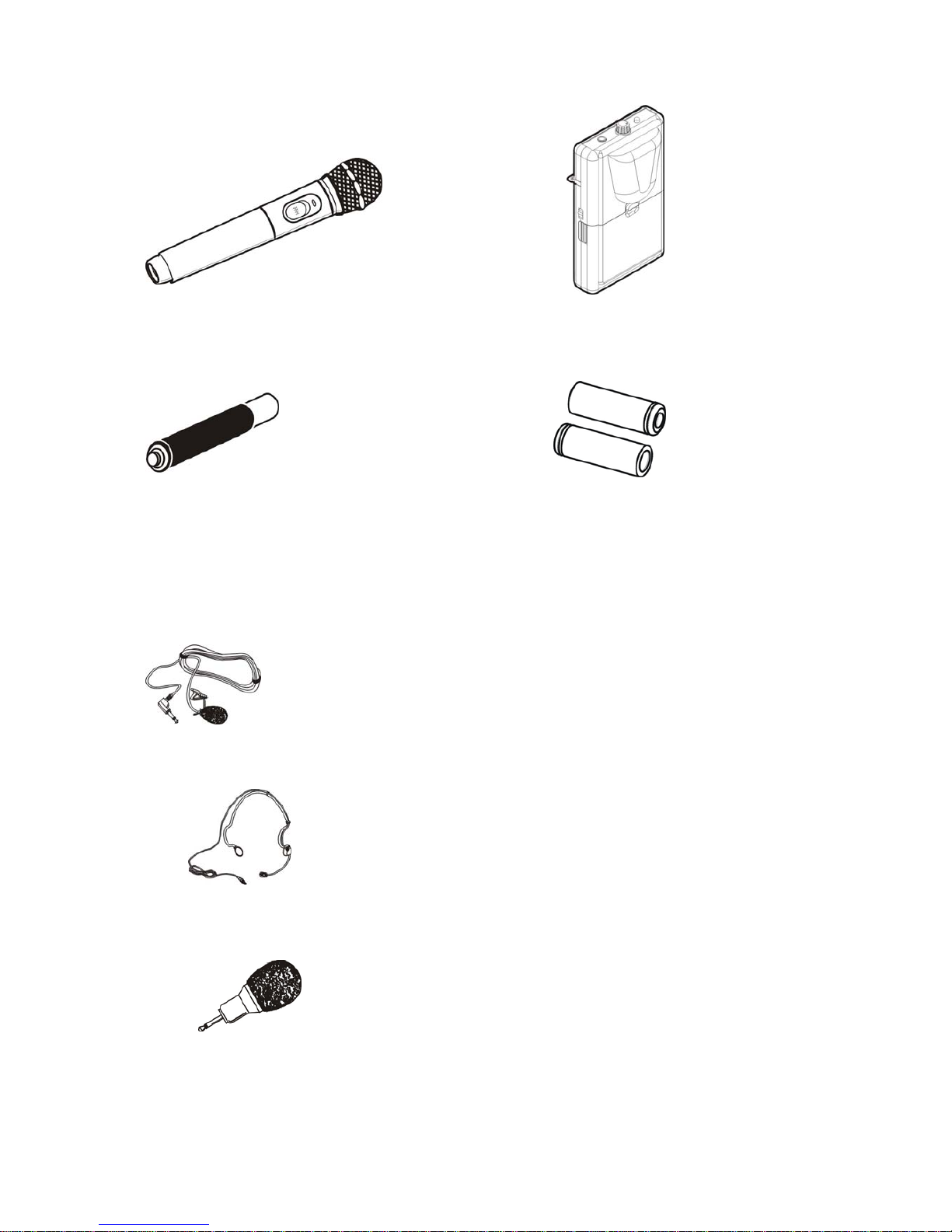
(1)IRM-99 (1)IRT-1
Infrared handheld microphone Infrared bodypack transmitter
(1) Rechargeable battery for IRM-99, (2) Rechargeable battery for IRT-1,
Ni-MH type 2.4V / 26500mAH Ni-MH type 1.2V / 2650mAH
Accessory for IRT-1
(1) LM-10 Lapel microphone for IRT-1.
or
(1) HM-20 Headset microphone for ITR-1
or
(1) PM-30 Plug in microphone for ITR-1
7

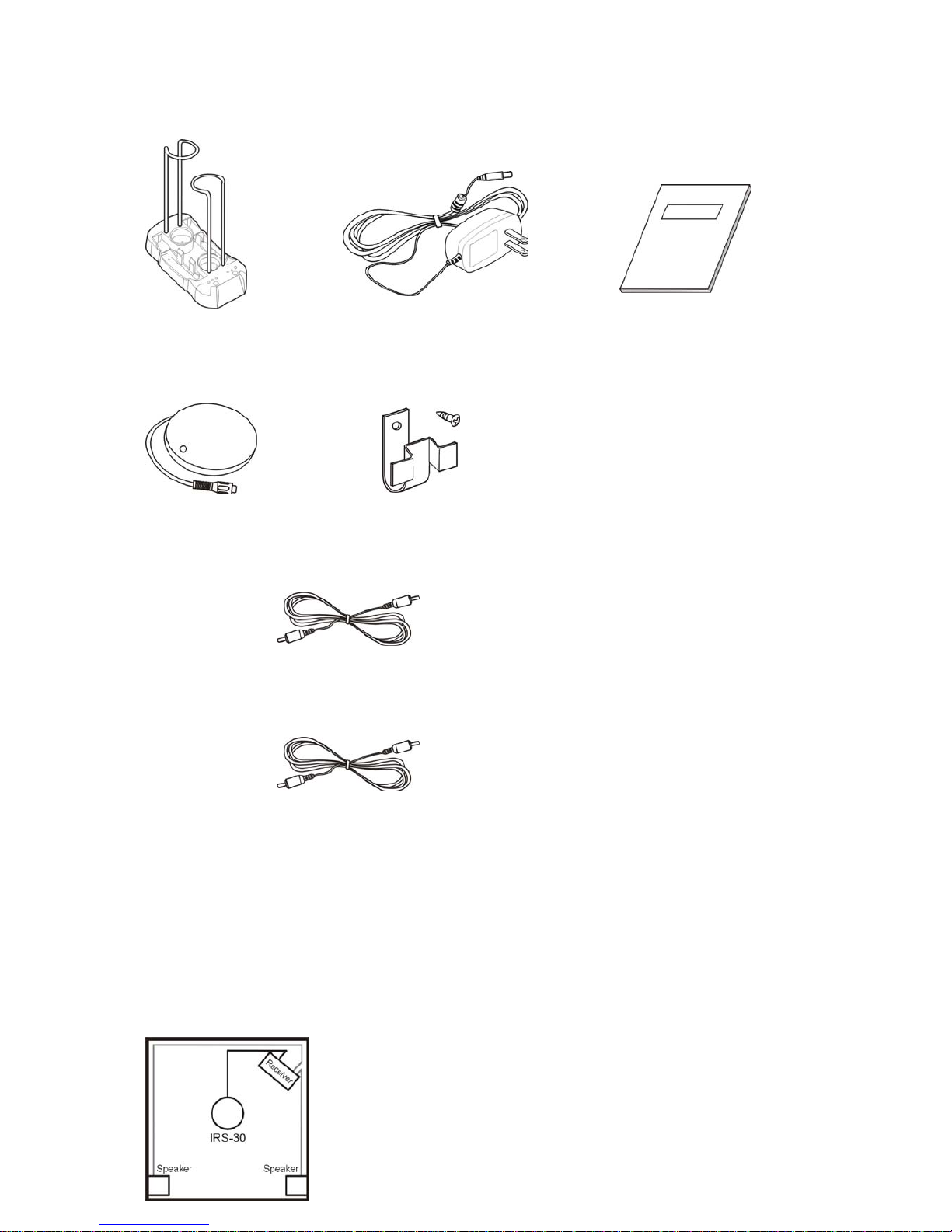
(1) Charger CHR-306 (1) Adaptor for CHR-306 (1) User Manual
Alternative sensors
(1)IRS-02 (1)ISH-02
Infrared wall sensor Wall bracket kit for IRS-02
(1) ISC-05
Infrared sensor cable, length-5meters
(1) ISC-10
Infrared sensor cable, length-10meters
INSTALLING THE SYSTEM
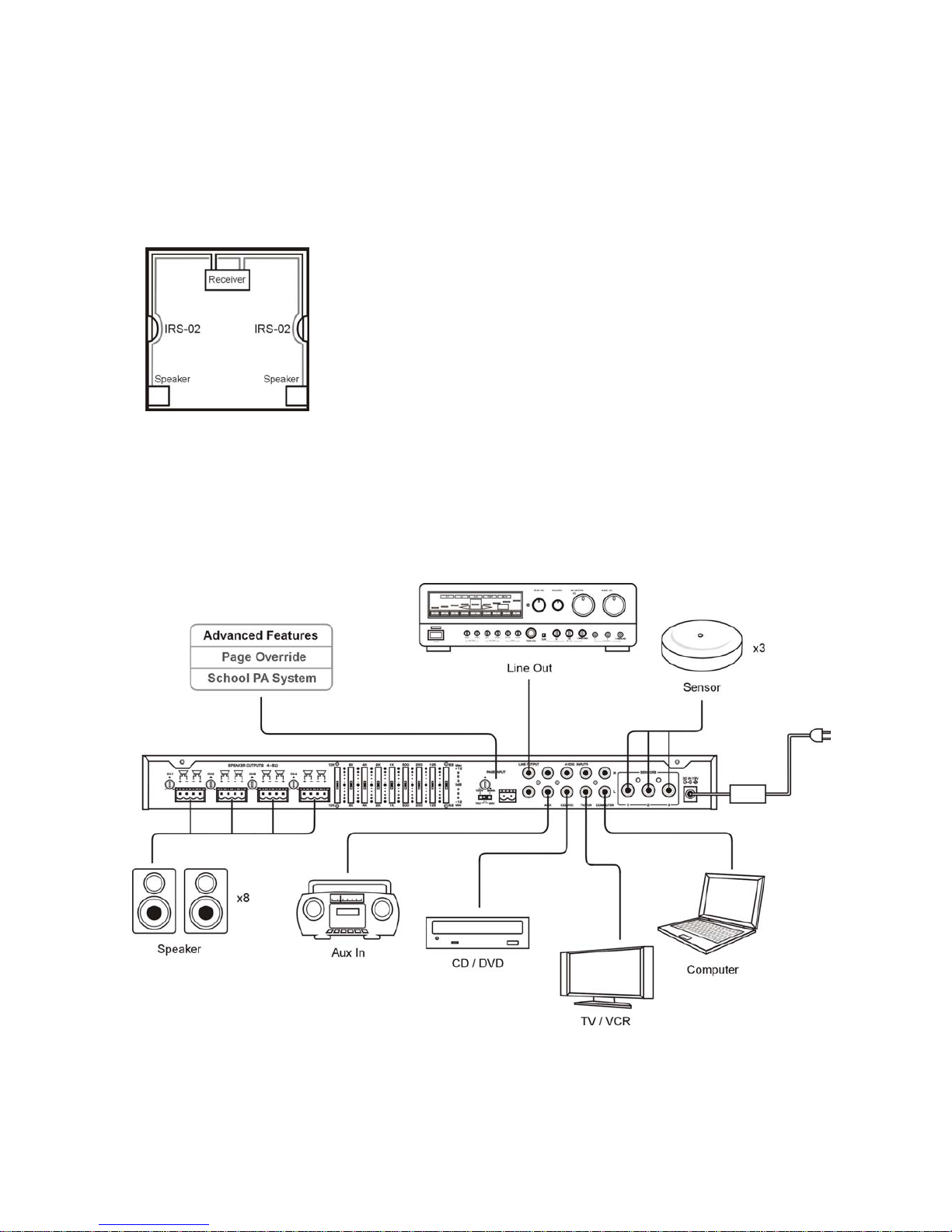
System and Connection Diagram
Install the infrared sensors in high locations so that the infrared sensors will have line of sight
over the entire room and the emitter light from the transmitters is not blocked by people or
other objects.
Installation example(as seen from above)
1.
8

2
Connect the power cord to the system and to the power outlet. Connect the infrared sensors
to the back panel sensor inputs of the main system using the supplied coaxial cable. Then
connect the speakers to the speaker outputs. Turn on the receiver then adjust each volume
knobs to the desired volume.
9

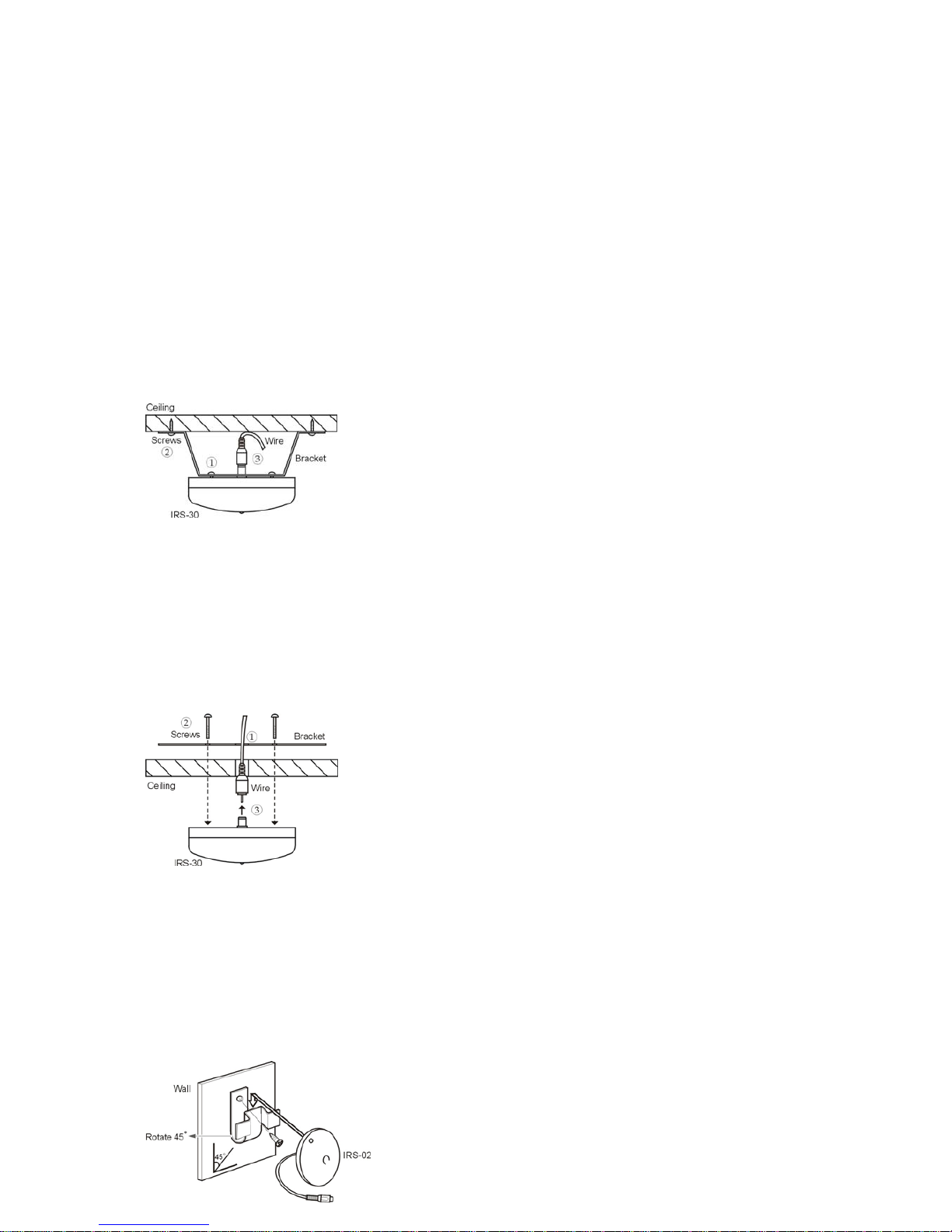
INSTALLING THE INFRARED SENSOR
Attaching the infrared dome sensor
Installation 1
1. Screw the sensor into the bracket to attach it.
2. Attach the sensor bracket to the ceiling using the screw shown in the illustration.
3. Connect the sensor cable to the sensor and tighten securely.
4. The sensor better be installed horizontally face down to the floor.
Installation 2
1. Remove the ceiling tile and drill a hole about Ø 20 mm in it.
2. Push the screw through the ceiling tile and screw them into the ceiling censor by using the
two long screws (Ø 3x25mm) provided.
3. Connect the sensor cable to the sensor and tighten securely.
4. Return the ceiling tile and make sure everything is firm and steady.
Attaching the infrared wall sensor
1. Attach the sensor bracket to the wall using the screws shown in the illustration.
2. Slide the sensor into the bracket to attach it.
3. The sensor can be attached to the bracket from four different directions.
4. The sensor better be installed horizontally face down to the floor.
10
Table des matières