Sony Ericsson MBV-100 Manuel utilisateur

1
Contents
English .......................................3
Čeština .....................................15
Dansk .......................................27
Deutsch ....................................39
Ελληνικά ...................................53
Espańol.....................................67
Suomi .......................................81
Français....................................93
Hrvatski...................................107
Magyar....................................119
Italiano....................................133
Nederlands .............................147
Norsk ......................................161
Português do Brasil ................173
Polski......................................187
Русский ..................................201
Slovensky ...............................215
Slovenščina ............................229
Svenska..................................241
Türkçe.....................................253
简体中文 .................................265
繁體中文 .................................277
This manual is published by Sony Ericsson Mobile
Communications AB or its local affiliated company,
without any warranty. Improvements and changes
to this manual necessitated by typographical
errors, inaccuracies of current information, or
improvements to programs and/or equipment,
may be made by Sony Ericsson Mobile
Communications AB at any time and without
notice. Such changes will, however, be
incorporated into new editions of this manual.
All rights reserved.
©Sony Ericsson Mobile Communications AB,
2006
Publication number: LZT 108 8905 R1A
Some of the services in this manual are not
supported by all networks. This also applies to
the GSM International Emergency Number 112.
Contact your network operator or service provider
if you are in doubt whether you can use a particular
service or not.
The Bluetooth word mark and logos are owned by
the Bluetooth SIG, Inc. and any use of such marks
by Sony Ericsson is under license.
This is the Internet version of the User's guide. © Print only for private use.

2
This is the Internet version of the User's guide. © Print only for private use.

3English
MBW-100 Bluetooth™ watch ........... 4
Icons ................................................. 5
Getting started .................................. 6
Using your watch .............................. 9
Troubleshooting ...............................13
Declaration of conformity ................14
FCC statement ................................14
English
This is the Internet version of the User's guide. © Print only for private use.

4English
MBW-100 Bluetooth™ watch
Congratulations on your purchase
of the MBW-100 Sony Ericsson
Bluetooth™ watch.
The MBW-100 provides you with
intelligent control of calls and music
through your watch.
You are notified when your phone
rings and when you receive a text
message. The name or number of the
caller is displayed in the watch and
you can mute or reject incoming calls.
If your phone has a music player you
can play, pause or forward tracks with
your watch.
You can also use the watch to keep
track of date and time in the phone.
The watch is waterproof down to
30 metres.
Visit www.sonyericsson.com/support
for an overview of which phone
models fully support the MBW-100.
Watch overview
Instruction symbols
The following symbols appear in the
User guide:
Note
%See also page...
Top key
Crown
Bottom key
Display
This is the Internet version of the User's guide. © Print only for private use.

5English
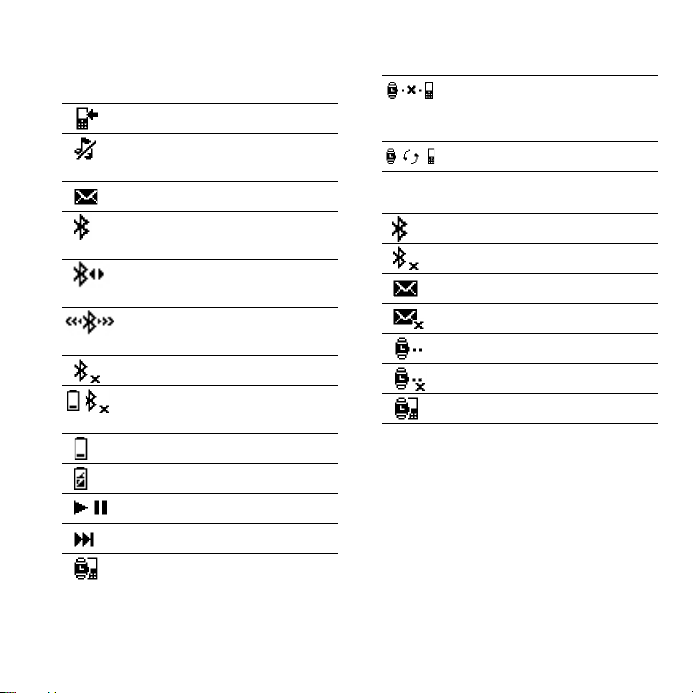
Icons
Status icons
Setting icons
Incoming call
Incoming phone call muted in
the phone
Message received
Bluetooth function on.
No connection to phone
Bluetooth function on.
Watch connected to phone
Bluetooth function
connecting
Bluetooth function off
Battery level low. Bluetooth
function off
Battery level
Battery charging
Play/pause
Next track
Pairing succeeded
Watch is out of range of the
phone, or connection cannot
be established
Watch in pairing mode
Bluetooth function on
Bluetooth function off
Message notification on
Message notification off
Out of range notification on
Out of range notification off
Start pairing mode
This is the Internet version of the User's guide. © Print only for private use.

6English
Getting started
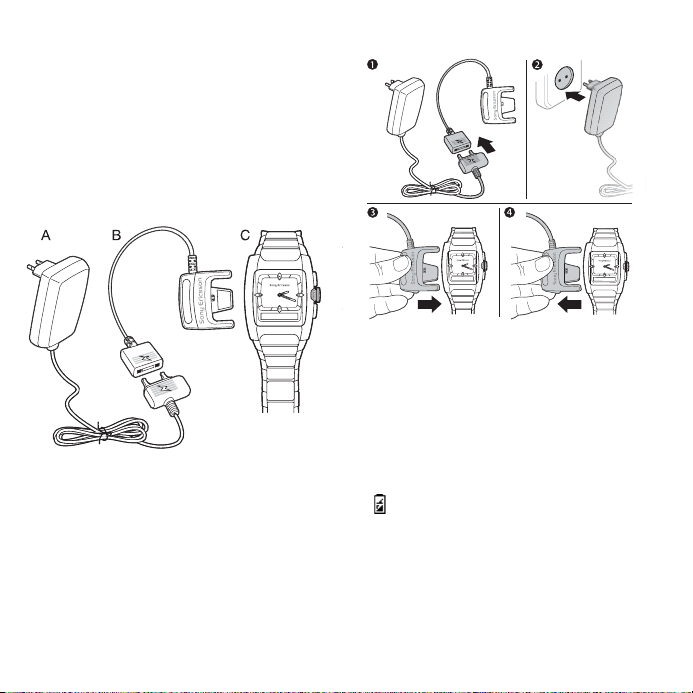
Kit content
Before you start using the watch,
make sure the following items are
in the box:
•Charger (A)
•Charging clip (B)
•The MBW-100 (C)
Charging
Make sure your watch battery is fully
charged.
Minimum charging is 2 hours.
To charge the battery
1Connect the charger to the charging
clip with the symbols on the charger
and clip facing in the same direction.
2Connect the charger to the mains.
3Connect the charging clip to the
watch. Press to open the clip and slide
it over the watch. Make sure that the
contacts of the clip are connected to
the contacts on the back of the watch.
appears. Wait approximately
2 hours or until the battery icon
indicates charging is complete.
4Remove the charging clip.
This is the Internet version of the User's guide. © Print only for private use.

7English
Setting the time
To set the time
•Gently pull out the crown and
rotate it to set the time. When the time
is set, push the crown back in until you
hear a click.
Pairing
Your watch has to be paired with your
phone before you can use it. Your
watch can only be paired with one
phone at a time. Start a new pairing
procedure to use the watch with
another phone.
Follow instructions in the phone User
guide on how to turn the Bluetooth
function on in the phone.
To pair your watch with a phone
1Turn the Bluetooth function on in your
phone.
2Turn Bluetooth visibility on in your
phone. This makes your phone visible
to other Bluetooth devices.
3Press the bottom key repeatedly to
select pairing mode , then press the
top key to turn on pairing mode .
4Press Yes when Add device? appears
in your phone. If Add device? does
not appear, go to step 5. For some
phones you may need to enter a
passcode. The default passcode is
0000.
5Prepare your phone according to the
phone User guide on how to pair a
Bluetooth device.
If pairing is successful, the pairing icon
appears and the watch vibrates.
This is the Internet version of the User's guide. © Print only for private use.

8English
After you have paired your watch with
a phone, the watch will automatically
connect to the phone as soon as the
phone is on and within range.
Phone settings
If the phone is out of range of your
watch, you are asked if you would like
to reconnect again. You can choose
between Always ask and Always
allow in your phone.
•Always ask
If you choose Always ask, you
will always be asked if you want to
reconnect each time the watch and
the phone are within range.
•Always allow
If you choose Always allow, the watch
automatically reconnects to the phone
each time both devices are within
range.
Pairing mode
To pair your watch a second time, for
example, with another phone or if the
first pairing failed, do this manually by
setting the watch to pairing mode.
To set the watch to pairing mode
•Press the bottom key repeatedly to
select pairing mode and then
press the top key. appears.
To stop pairing, press and hold the top
key.
If pairing fails, you need to set the watch
in pairing mode and repeat the pairing
procedure.
This is the Internet version of the User's guide. © Print only for private use.

9English
Using your watch
Settings
Settings are shown as icons in the
display.
To read more about setting icons
%5 Setting icons.
To enter the settings menu
•Press the bottom key.
To turn a setting on or off
1Press the bottom key repeatedly until
the setting you want is highlighted.
2Press the top key to turn the setting
on or off.
Calls
When the phone rings, the watch
vibrates and the name and/or number
of the caller is displayed in the watch.
You can mute or reject the call by
pressing the top key.
To mute an incoming call
•Press the top key.
To reject an incoming call
•Press the top key twice.
This is the Internet version of the User's guide. © Print only for private use.

10 English
Text messages
When message notification is on, the
watch vibrates and appears when
you receive a text message. If you
have unread messages in your phone
inbox, you will not get a notification.
Message notification is on by default.
To change message notification
status
1Press the bottom key repeatedly to
select .
2Press the top key to change between
on and off .
Music
Use the watch to control the music
player in the phone. Play, pause and
forward music tracks by pressing the
crown.
To listen to music
•Press once to start a track. Press
again to pause a track.
To forward to the next track
•Press and hold .
Battery status
To check the watch battery status
•Press the top key. The phone date is
also shown.
For some phones you may need to press
twice to start or pause a track.
This is the Internet version of the User's guide. © Print only for private use.
Ce manuel convient aux modèles suivants
1
Table des matières
Langues :
Autres manuels Sony Ericsson Montre

Sony Ericsson
Sony Ericsson MBW-150 Manuel utilisateur

Sony Ericsson
Sony Ericsson MBW-200 Manuel utilisateur

Sony Ericsson
Sony Ericsson MBW-100 Manuel d'utilisation

Sony Ericsson
Sony Ericsson MBW-100 Manuel utilisateur

Sony Ericsson
Sony Ericsson MBW-100 Manuel utilisateur

Sony Ericsson
Sony Ericsson MBW-200 Manuel utilisateur

Sony Ericsson
Sony Ericsson LiveView micro display Manuel de service