Operation and Maintenance Documentation of GUARD PRO air curtains GUARD PRO v202106
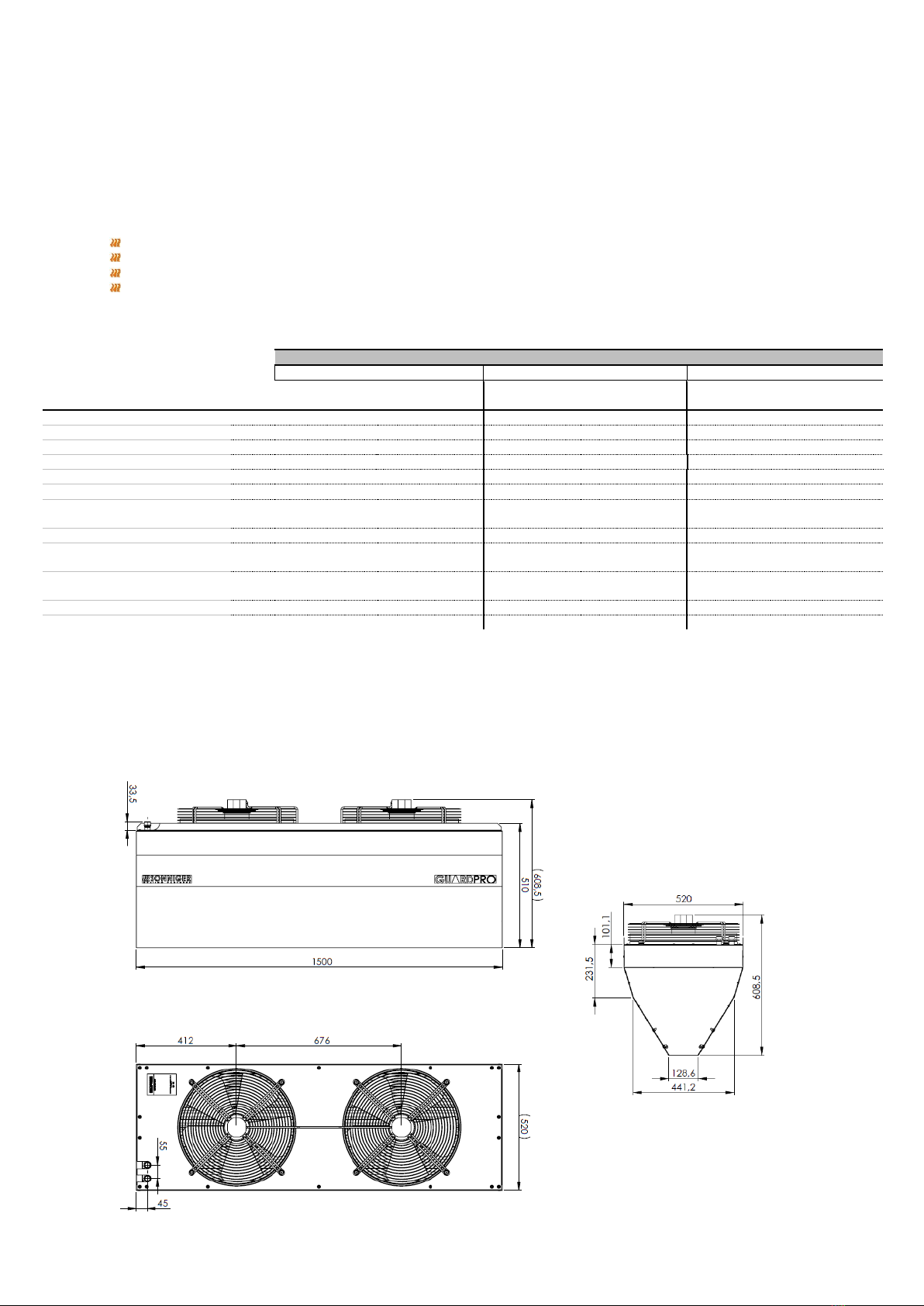
5. HEAT OUTPUT RANGES
6. CONTROLLER - INSTALLATION
Panel Comfort is a controller that allows to regulate air speed and desired temperature in the room. Panel Comfort should be
located beyond the air stream generated by the air curtain. The Panel Comfort allows to regulate 1 pc of GUARD PRO unit.
Description of the Panel Comfort settings
ON/OFF –turning ON/OFF a unit
I-II-III –switch for fan speed regulation
HEAT - thermostat sends a signal to the valve and actuator fan and fan turns off when temperature in
the room is reached, valve/actuator closes water supply.
FAN/COOL –functions not active
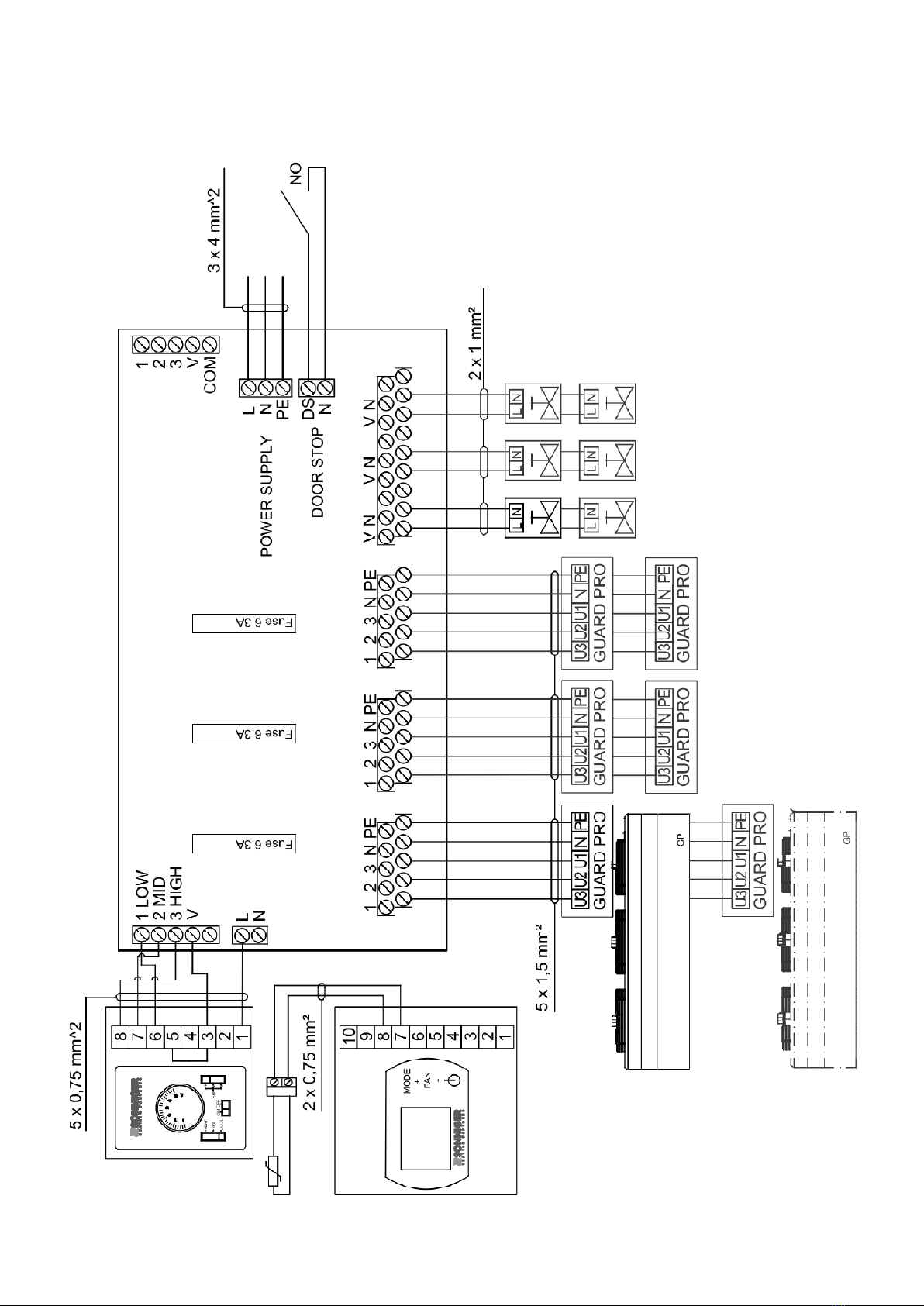
7. ELECTRICAL CONNECTION DIAGRAMS
To connect the curtain use a 3-core copper cable of minimal diameter 3x1,5mm² for two curtains (up to 6 fans) or 3x2,5mm²
for 3 curtains (up to 9 fans). The electrical installation and connection to power supply must be done in compliance with the
existing regulations and standards for building industry.
The electric network, to which the device is to be connected, should protect the device against overloading and short circuit. It
is necessary to use protective grounding. Any electrical installation works and the connection to supply power must be
conducted in accordance with the applicable building regulations and standards. The connection of the unit to the power supply
must be conducted by a qualified specialist who is familiar with the Manual. Fan’s motor is equipped with internal thermal
protection against overheating. Power cable and a main switch are not included in the set.
Also the DOORSTOP door contact switch can be installed; it turns off the GUARD PRO curtain when the door is being closed and
the moment the door is being opened the GUARD PRO curtain starts operating accordingly to the parameters set in the control
panel of the device.
Fan wiring description
U1 high speed –brown
U2 middle speed –grey
U3 low speed –red
N neutral –blue
PE protection - yellow/green
NOTICE!
After a year of operation check the electrical connections and if needed tighten the wire connections to eliminate
potential sparkling.
0 5 10 15 20 0 5 10 15 20 0 5 10 15 20 0 5 10 15 20
heatoutput kW 18,3 16,2 13,7 11,3 8,6 23,5 21,3 19,1 17,0 14,8 28,0 25,8 23,7 21,5 19,3 32,5 30,4 28,2 26,0 23,8
outlet air temperature ˚C 8,2 12,3 16,2 20,1 23,8 10,6 14,6 18,6 22,6 26,6 12,6 16,6 20,6 24,7 28,7 14,6 18,7 22,7 26,7 30,7
water flow
m3/h 0,8 0,7 0,6 0,5 0,4 1,0 0,9 0,8 0,8 0,6 1,2 1,2 1,0 0,9 0,9 1,4 1,3 1,3 1,2 1,0
pressure drop kPa 2,3 1,8 1,3 0,9 0,9 3,6 3,0 2,4 2,0 1,5 4,9 4,2 3,6 3,0 2,5 6,4 5,7 4,9 4,2 3,6
0 5 10 15 20 0 5 10 15 20 0 5 10 15 20 0 5 10 15 20
heatoutput kW 26,4 23,4 20,4 17,4 14,1 33,3 30,3 27,3 24,3 21,2 39,5 36,5 33,5 30,5 27,5 45,7 42,7 39,7 36,7 33,7
outlet air temperature ˚C 8,6 12,6 16,6 20,6 24,6 10,8 14,8 18,9 22,9 26,9 12,8 16,9 20,9 24,9 28,9 14,8 18,9 22,9 26,9 30,9
water flow
m3/h 1,2 1,0 0,9 0,8 0,6 1,4 1,3 1,2 1,0 0,9 1,7 1,6 1,5 1,3 1,2 2,0 1,9 1,8 1,6 1,5
pressure drop kPa 5,4 4,3 3,3 2,5 1,7 8,1 6,8 5,6 4,5 3,5 11,0 9,5 8,1 6,8 5,6 14,0 13,0 11,0 9,5 8,1
inlet/outlet water temperature
inlet/outlet water temperature