
SONNETEER Morpheus Manuel utilisateur

Quick Start Guide
wall
shelf
side board
Using the legs provided you can assemble your Morpheus as
shown. Just screw the legs into two of the mounting holes
provided, as shown below. Use the bottom two holes to mount
upright or the top two to mount on its back. All four mounting
holes may be used for wall mounting using the standard VESA
Assembling your Morpheus:
In your accessory compartment you will find a pair of stainless steel legs.
A typical connection diagram:
4mm Banana Plug to Speaker Sockets
(Please note polarity!)
Preout
Ethernet Expansion Slot
Aux2
Aux1CD
Speaker Left
Speaker Right
++
_ _
Right channel
Left channel
Power +20V d.c. max!
12V Switch
Speaker Right Speaker Left
CD Player
Power Adapter
Mains Plug
Modem Router
(If not using Wi-fi)
To Telephone Socket
Outputs
R L To Modem
Router
RCA (Phono) Plugs
If you have a CD playe
or any other audio sources
connect them here.
RJ-45 (Ethernet Cable)
RJ-45
Elthernet / LAN
Telephone Line
2.5mm DC power plug
If you are unsure about how to connect your Morpheus, please contact your supplier.
£$%^ END AB C
BCC Radio1
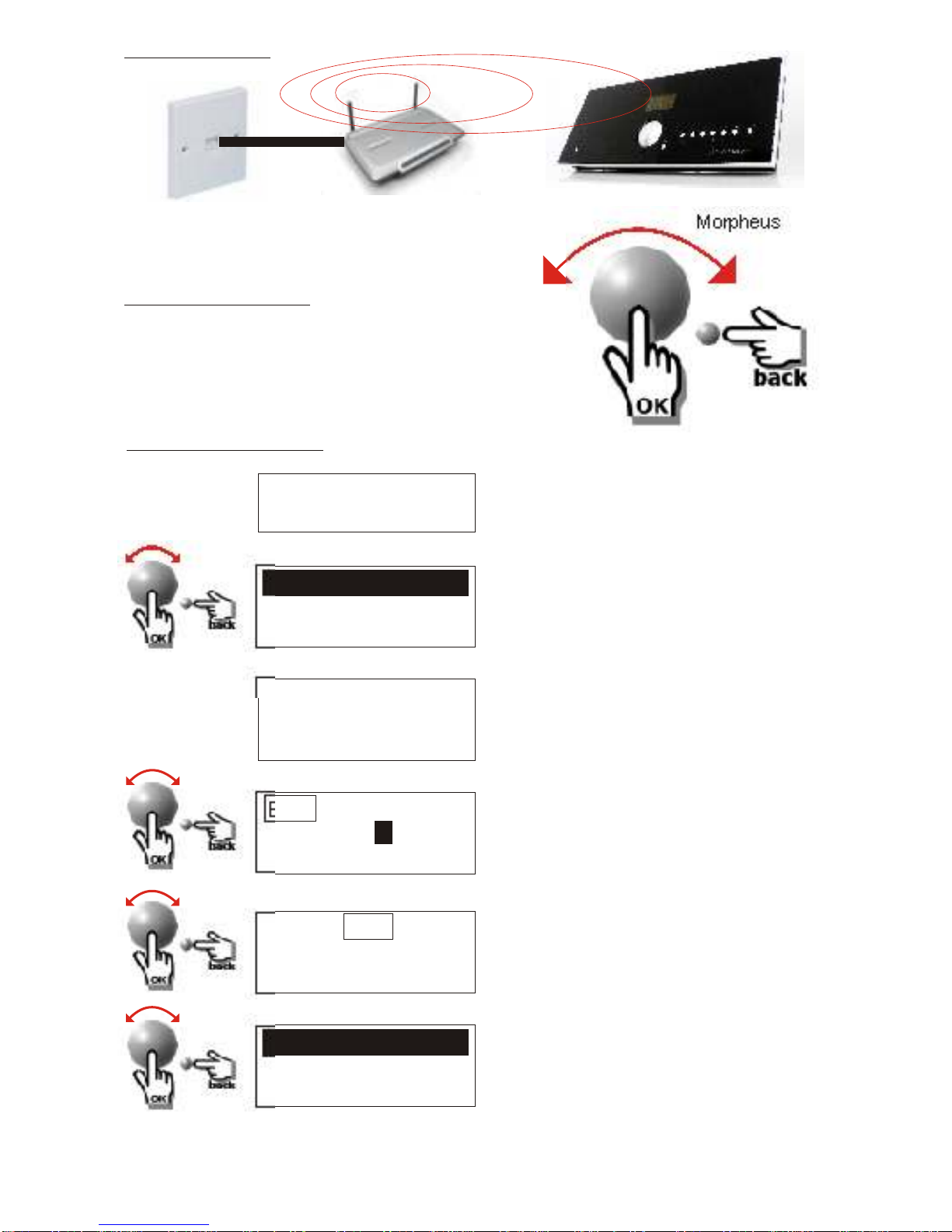
For Wi-Fi Setup:
Telephone socket Wireless Modem Router Morpheus
Navigation Controls:
The Morpheus utilises a very simple but effective
navigation control where all user functions can be
Accessed using the main dial and the back button,
as shown opposite.
First time installation:
SCANNING
Power ON:
MY NETWORK
OTHER NETWORK
Enter WEP/WPA
key
END AB C DEFGH
ACC
Stations
Media Player
For more information on WEP or WPA security, refer to main manual,
on CD ROM provided or online; www.sonneteer.co.uk/downloads
Using the power supply provided, plug
your Morpheus into the mains. After a
few seconds the Morpheus will switch
on automatically.
The unit will then begin to scan for Wi-Fi
networks, followed by displaying a list
of Wi-Fi networks found.
Rotate the dial to highlight your own
network and press down to select it. If
the screen displays either Enter WPA or
WEP key, it will then request you enter
your wireless network key after a few
seconds (Else the Morpheus will
connect automatically).
To enter the key, rotate the dial to select
each character of the key. Pressing the
dial will confirm each character. Once
you have entered the complete
password, Scroll to the word “END” and
press the main dial. Press the BACK
button to undo any error.
Please note the password is case
sensitive!
The radio should now automatically
connect to the your network and display
STATIONS on the screen (Main menu).
For information on how to tune in your
stations please see overleaf.
A = a !
X
3 seconds
END AB C DEFGH
ACC
Connecting to
Network
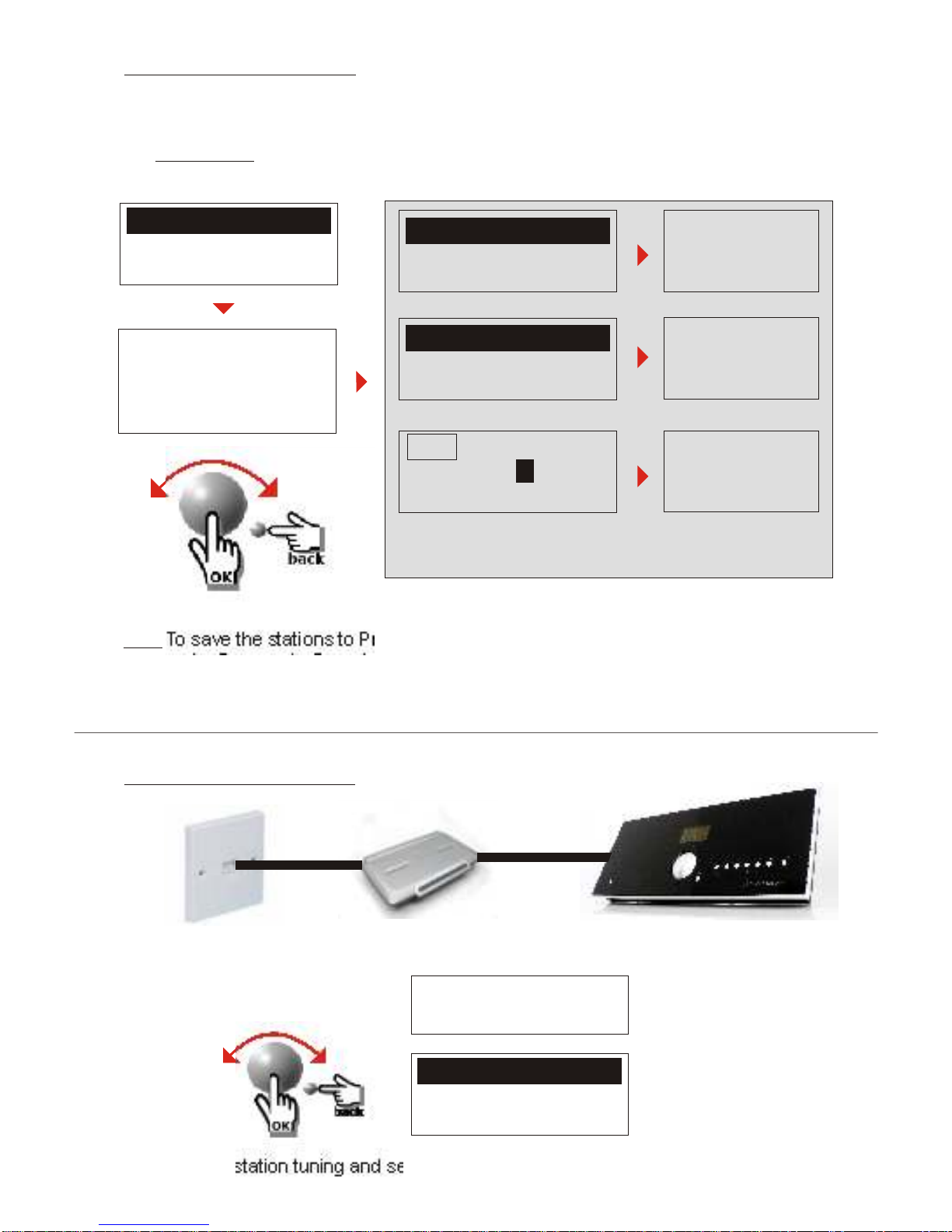
For Cable Network Setup:
Telephone socket Modem router Morpheus
Power ON:
Stations
Media Player
For station tuning and searching instructions please see top of page!
Tuning in, Station search:
Location
Genre
Search
Afghanistan
Albania
Algeria
Contemporary
Country
Dance
Stations
Media Player
With the Morpheus you have access to over 14,000 stations plus many more on-
demand stations world-wide. At anytime press the Dial or the Back button to access
the Main menu to select Stations. You can then search by Location, Genre, Local
Stations and even Name search.
Stations listed
under selected
COUNTRY
Stations listed
under searched
NAME
Hint: To save the stations to Presets 1 to 5, simply hold down one of the 5 preset
buttons for 5 seconds. Pressing the SHIFT button first and then a Preset button will
save the station to Presets 6-10. You can save over as many times as you like.
Stations listed
under selected
GENRE
Enter all or part of station name, select END
to start search (may take a few seconds).
Morpheus in your home
Hints and tips:
Always refer to the User Manual for further information on the Morpheus.
You can also find regular updates on our website: www.sonneteer.co.uk
Remember safety first: Always disconnect the Morpheus when connecting
or disconnecting anything from the Morpheus.
Warning:
The Morpheus is designed for indoor use only.
Do not expose the unit to moisture, extreme cold or heat source.
Use only the power adapter supplied with the Morpheus.
Disconnect the Morpheus from the mains supply whenever the Morpheus
is not being used for long periods of time.
No user serviceable parts inside, refer all servicing to your authorised dealer.
Cleaning:
The front panel of the Morpheus is made from high quality Perspex, so proper
care will prevent the front panel from premature wear or damage..
To clean the Morpheus, please only use a clean, soft, lint free cloth.
A slightly damp cloth is fine for general cleaning, for heavier stains use
a good quality wax based polish (Do not spray directly onto the unit).
Disconnect the Morpheus from mains power when cleaning the unit.
Do not apply excessive pressure when cleaning the Morpheus.
Do not use any abrasive material or solvents to clean the Morpheus.
Registration:
Please find the time to register your Morpheus on our website so you will be
kept up to date with any priority information regarding the Morpheus.
To Register please visit: www.sonneteer.co.uk/register and follow the simple
Instructions online. On there you will also find information on how to get your
Morpheus registered to The Morpheus Portal where you can access other
web based services available for your Morpheus.
Manual Updates:
For the latest user manual updates for the Sonneteer Morpheus, please visit
www.sonneteer.co.uk/downloads
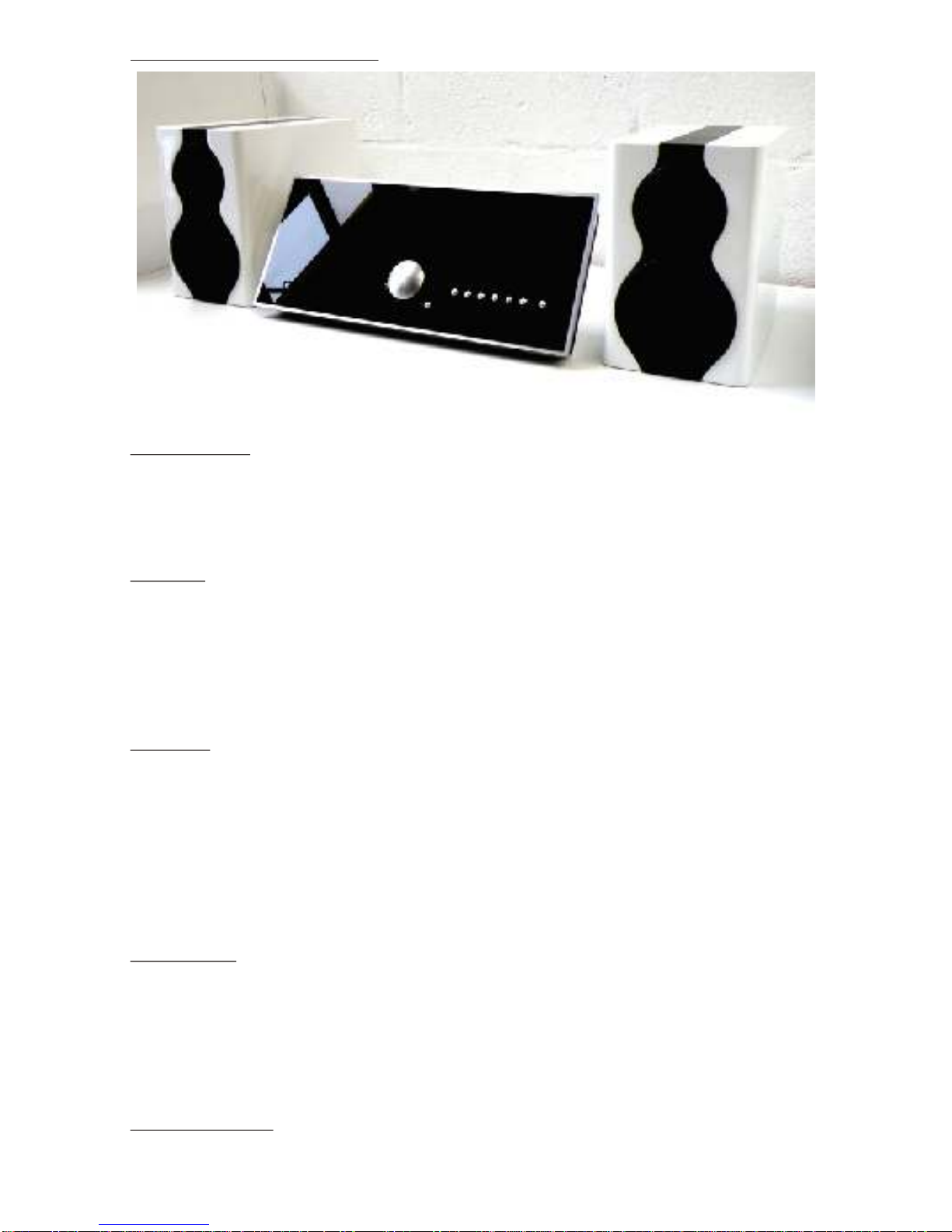
Morpheus shown with Penaudio Rogue 6 speakers (available separately).
Autres manuels pour Morpheus
1


