
Solid State Logic Duende Manuel utilisateur
DDuueennddee PPCCIIee
Installation Guide
Installationsanleitung
Manuel d’Installation
Manual de Instalaci n
Guida di Installazione
EN
DE
FR
ES
IT
JP
82S6MC090A

CCoonntteennttss
English 1
Deutsch 9
Francais 17
Espanol 25
Italiano 33
41
EN
DE
FR
ES
IT
JP


This section contains definitions, warnings, and practical information to ensure a safe working environment.
Please take time to read this section efore installing or using this unit. Please do not dispose of these instructions.
General Safety
• Read these instructions.
• Keep these instructions.
• Heed all warnings.
• Follow all instructions.
• Do not use this apparatus near water.
• Do not expose this apparatus to rain or moisture.
• Do not block any ventilation openings. Install in accordance with the
manufacturer’s instructions.
• Do not install near any heat sources such as radiators, heat registers, stoves
or other apparatus (including amplifiers) that produce heat.
• There are no user-adjustments, or user-servicable items, on this apparatus.
• Adjustments or alterations to this apparatus may affect the performance
such that safety and/or international compliance standards may no longer
be met.
Caution
• To reduce the risk of electric shock, do not perform any servicing other than
that contained in these Installation Instructions unless you are qualified to
do so. Refer all servicing to qualified service personnel.
Installation Notes
• When installing this apparatus, place the host system into which it is to be
installed on a secure level surface.
• To prevent damage from static electricity when installing this apparatus,
either to the host system or to this apparatus, always take proper anti-static
precautions. Always use an anti-static wristband. If in doubt, please refer to
qualified service personnel.
• Take care of rough or sharp edges when accessing the inside of the host
system.
• Never install or remove this apparatus whilst the host system is powered.
Always remove the power cord from the host system prior to accessing this
apparatus.
• If in doubt about installing this apparatus, please refer to qualified service
personnel.
1
EN
DE
FR
ES
IT
Safety and Installation Conside ations
2
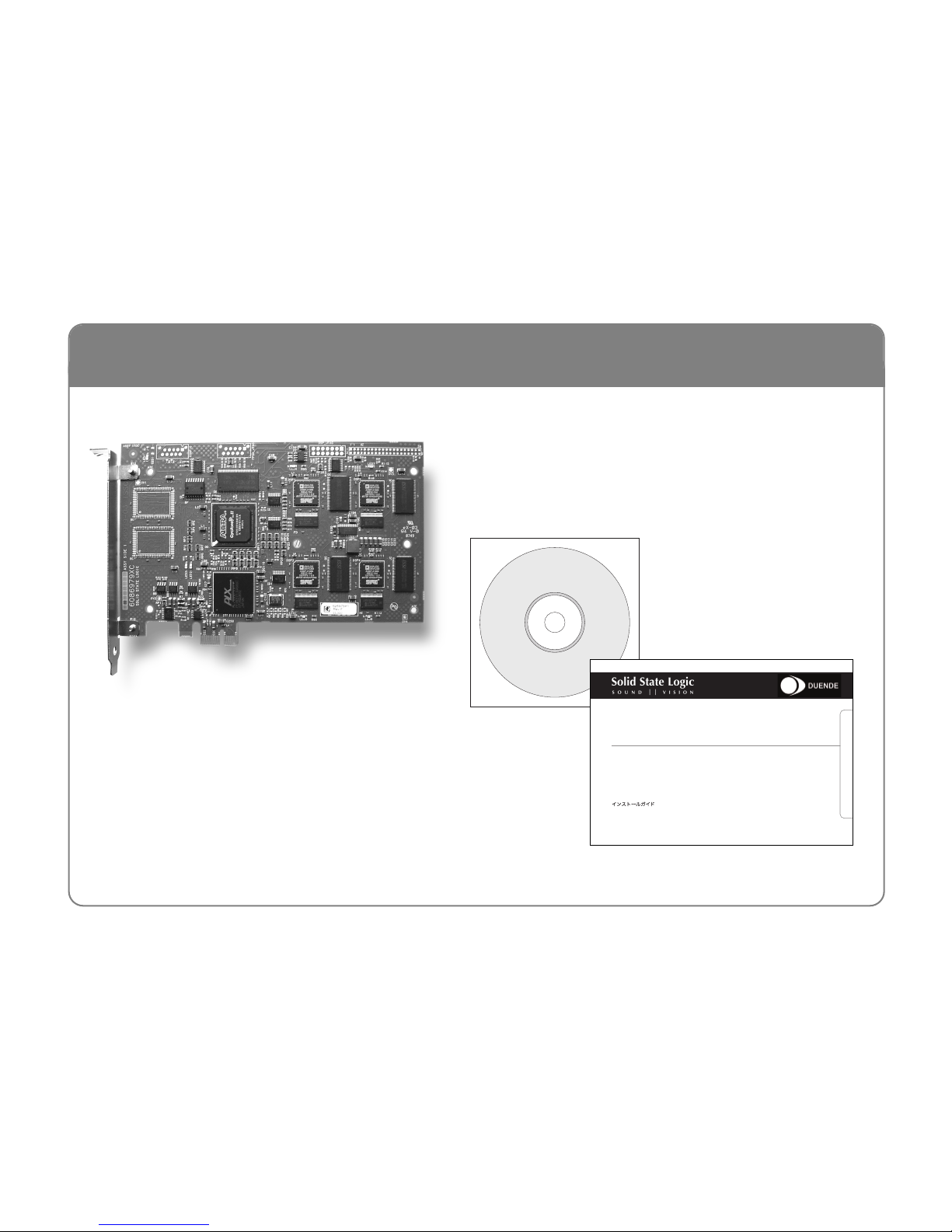
Your Duende box should contain the following:
Un-pack
DDuueennddee PPCCIIee
Installation Guide
Installationsanleitung
Manuel d’Installation
Manual de Instalación
Guida di Installazione
EN
DE
FR
ES
IT
JP
82S6MC090A
CD &
Installation Guide
(this document)
Duende PCIe Card

3
EN
DE
FR
ES
IT
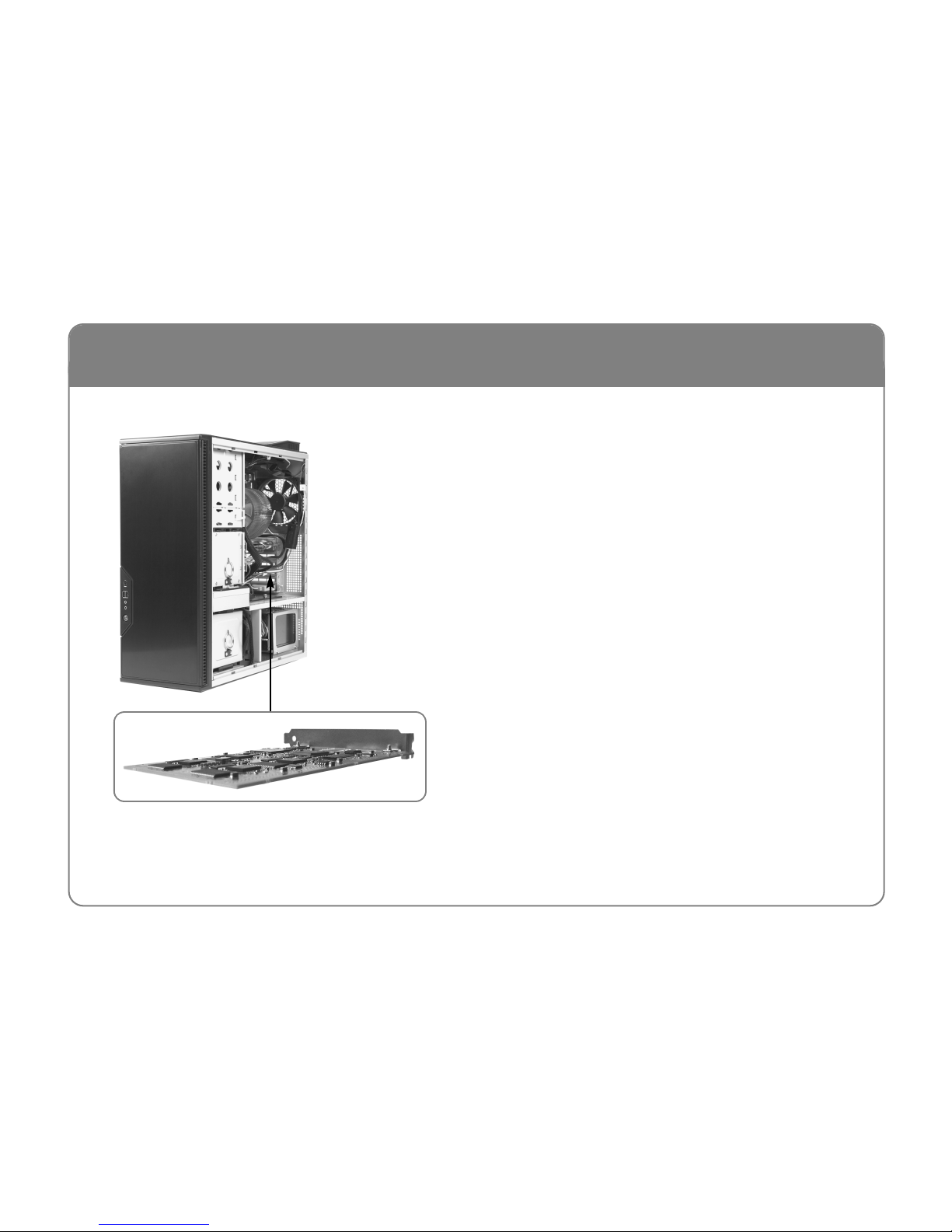
1. Power down the computer and remove the power cord
2. Remove the cover(s) to gain access to the PCIe sockets
3. Locate a free PCIe socket and ensure that the rear panel
blanking plate is removed
4. Plug your Duende PCIe card into the PCIe socket and
secure the mounting bracket to the computer case
5. Re-fit the cover(s) to the computer and re-connect the
power cord
6. Switch the computer on
Ha dwa e Installation (Mac)
4
1. Power down the computer and remove the power cord
2. Remove the cover(s) to gain access to the PCIe sockets
3. Locate a free PCIe socket and ensure that the rear panel
blanking plate is removed
4. Plug your Duende PCIe card into the PCIe socket and
secure the mounting bracket to the computer case
5. Re-fit the cover(s) to the computer and re-connect the
power cord
6. Switch the computer on
Ha dwa e Installation (PC)

5
EN
DE
FR
ES
IT
Mac:
1. Insert the Duende installation CD in your CD/DVD
drive
2. Double click the CD icon to view the CD content
3. Launch the Duende Installer by double clicking the
Duende Installer icon
4. Follow the on-screen instructions
PC:
1. When the computer is turned on after inserting the card,
the Found New Hardware Wizard should appear. Ignore
this; DO NOT press ‘Next >’ and DO NOT press ‘Cancel’
2. Insert the Duende Installation CD in your CD/DVD
drive
3. Double click the CD icon to view the CD content. If
Autorun is enabled this will happen automatically
4. Double click the SSL Duende Setup icon
5. Follow the on-screen instructions, making sure to attend
to the Add Hardware Wizard when prompted
Softwa e Installation
This equipment has been tested and found to comply with the limits for a Class B digital device, pursuant to part 15 of the FCC
Rules. These limits are designed to provide reasonable protection against harmful interference in a residential installation. This
equipment generates, uses and can radiate radio frequency energy and, if not installed and used in accordance with the
instructions, may cause harmful interference to radio communications. However, there is no guarantee that interference will not
occur in a particular installation. If this equipment does cause harmful interference to radio or television reception, which can be determined by turning the
equipment off and on, the user is encouraged to try to correct the interference by one or more of the following measures:
• Reorient or relocate the receiving antenna.
• Increase the separation between the equipment and receiver.
• Connect the equipment into an outlet on a circuit different from that to which the receiver is connected.
• Consult the dealer or an experienced radio/TV technician for help.
Instructions for Disposal of WEEE y Users in the European Union
The symbol shown here is on the product or on its packaging, which indicates that this product must not be disposed of with other waste. Instead, it
is the user’s responsibility to dispose of their waste equipment by handing it over to a designated collection point for recycling of waste electrical and
electronic equipment. The separate collection and recycling of your waste equipment at the time of disposal will help to conserve natural resources
and ensure that it is recycled in a manner that protects human health and the environment. For more information about where you can drop off your
waste equipment for recycling, please contact your local city office, your household waste disposal service or where you purchased the product.
Standards Conformance
This apparatus fully conforms with the current protection requirements of the uropean community council directives on MC and LVD.
Warranty
Pursuant to the Solid State Logic Terms and Conditions, under uropean consumer law the purchaser has full statutory warranty rights for two years from the
date of delivery of the product. The warranty is valid only in those Member States of the uropean Union ( U) who have adopted the applicable U law into their
national legislation, otherwise a warranty term of one year will apply. The applicable national legislation governing the sale of consumer goods is not affected by
this warranty. Warranty claims will only be accepted if the purchased product has been used for its intended purpose. Any purchased product used for an
unintended purpose will not be eligible for warranty protection. For all warranty inquiries or claims please address the claim to us if the purchase was directly
from us or otherwise to the dealer from which you purchased the product within a period of two months from the date on which you detected its lack of
conformity with the terms of the warranty. Please include your original proof of purchase when initiating the claim.
Out of Warranty Repairs
In the event of a fault arising after the warranty period has expired the unit should be returned to Solid State Logic either directly or via your local dealer. You
will be charged for the time spent on the repair (at Solid State Logic's current repair rate) plus the cost of parts and shipping. Note that no units can be accepted
for repair without prior arrangement (see below).
All Returns
• No unit will be accepted for repair by Solid State Logic unless accompanied by a valid RMA (Return Material Authorisation) number, obtainable from Solid
State Logic prior to shipping.
• All units should be shipped to Solid State Logic in suitable rigid packaging – Solid State Logic cannot be held responsible for any damage caused by shipping
units in other packaging. In such cases Solid State Logic will return the unit in a suitable box, which you will be charged for.
• Do not include the power cable, manual or any other items – Solid State Logic can not guarantee to return them to you.
AAA
AAA
AA
AA
Tested To Comply
with FCC Standards
FOR HOME OR OFFICE USE
6
Autres manuels pour Duende
1
Table des matières
Langues :
Autres manuels Solid State Logic Carte PCI
Manuels Carte PCI populaires d'autres marques


Belkin
Belkin F5D7000F Manuel utilisateur

Pericom
Pericom PI7C7100 Manuel utilisateur

ADLINK Technology
ADLINK Technology cPCI-3548 Manuel utilisateur

Digium
Digium TE200 Series Manuel utilisateur

Allo.com
Allo.com 2nd Gen E1/T1/J1 Manuel utilisateur

Western Digital
Western Digital FireWire PCI Adapter Manuel utilisateur