softDSP SDS 200A Manuel utilisateur

User’s Guide
- SDS 200A -
- SoftScope-
PC Based Digital Oscilloscope

1
Copyright softDSP CO., LTD.. All rights reserved.
This document is being furnished by softDSP CO., LTD.. for information purposes only to licensed users
of the SDS 200A and is furnished on as “AS IS” basis, that is, without any warranties, whatsoever,
expressed or implied.
SDS 200A and SoftScope are trademarks of softDSP CO., LTD..
Other brand and product names are trademarks or registered trademarks of the respective holders.
Microsoft is a registered trademark and Windows, the Windows logo are registered trademarks of the
Microsoft Corporation.
Information in this document is subject to change without notice and does not represent a commitment on
the part of softDSP CO., LTD..

2
FCC NOTICE
THIS DEVICE COMPLIES WITH PART 15 OF THE FCC RULES.
OPERATION IS SUBJECT TO THE FOLLOWING TWO CONDITION:
(1) THIS DEVICE MAY NOT CAUSE HARMFUL INTERFERENCE, AND
(2) THIS DEVICE MUSTACCEPTANY INTERFERENCE RECEIVED,
INCLUDING INTERFERENCE THAT MAY CAUSE UNDESIRED
OPERATION.
This equipment has been tested and found to comply with the limits for a Class
B digital device, pursuant to part 15 of the FCC Rules. These limits are
designed to provide reasonable protection against harmful interference in a
residential installation. This equipment generates, uses and can radiate radio
frequency energy and, if not installed and used in accordance with the
instructions, may cause harmful interference to radio communication. However,
there is no guarantee that interference will not occur in a particular installation. If
this equipment does cause harmful interference to radio or television reception,
which can be determined by turning the equipment off and on, the user is
encouraged to try to correct the interference by one or more of the following
measures :
- Reorient or relocate the receiving antenna.
- Increase the separation between the equipment and receiver.
- Connect the equipment into an outlet on a circuit difference from that to which
the receiver is connected.
- Consult the dealer of an experienced radio/TV technician for help.
NOTE : The manufacturer is not responsible for any radio or TV interference
caused by unauthorized modifications to this equipment. Such modifications
could void the user’s authority to operate the equipment.

3
Declaration of Conformity
Manufacturer softDSP Co., Ltd.
Address Jungil Bldg 203, 552-1 Sungnae-dong, Kangdong-ku, Seoul,
Korea
Declares that the following product
PC Based Digital Oscilloscope
Model No. : SDS 200A
Conforms to the technical regulations applicable to the product within the scope of the
EMC Directive 89/336/EEC :
EMCD EN 55022:1998+A1:2000 Class B
EN 61326:1997+A1:1998+A2:2001
(Minimum immunity test requirements)
(EN 61000-4-2:1995+A2:2001)
(EN 61000-4-3:1996+A1:1998+A2:2001)
(EN 61000-4-4:1995+A1:2001)
(EN 61000-4-5:1995+A1:2001)
(EN 61000-4-6:1996+A1:2001)
(EN 61000-4-11:1994+A1:2001)
The relevant technical file is available for inspection:
Technical file SKTCEE-040713-114
SK TECH Co., Ltd. (DAR Registration No. DAT-P-076/97-01)

4
Certificate of Product Warranty
This product’s warranty, provided by softDSP, Co., Ltd., covers a period of 1 year from the date of
purchase. All faulty parts and/or functions, resulting despite user’s normal use, will be repaired and/or
replaced at no charge during the warranty period.
However, if any of the malfunctions are caused by user carelessness, inadequate maintenance, or natural
disaster, softDSP will then provide repair and/or replacement services for a fee regardless of warranty
period.
In the event our product does not prove suitable for your application you can return the product for an
exchange or refund. To claim, the product must be returned in good condition within 14 days. Before
returning a product please contact and provide us a serial number. The customer is responsible for all
shipping costs.
Products covered by this warranty are limited to those that are registered at the softDSP headquarter or
branch offices and repairs, replacements, or refunds will be issued according to manufacturer’s discretion.
When in need of warranty services, the purchaser may visit our headquarter or one of our sales offices
with the product or send the product with a detailed description of services required via postal service to
any of our sales offices (the purchaser will be responsible for packaging, postage, and any postal
insurance). Once repair services are completed, the supplier will return the product to the purchaser
(return postage will be paid by the supplier).
However, if we determined required services to be outside the boundaries of the warranty coverage, we
will first contact the purchaser and provide an estimate of repair costs and obtain authorization to conduct
services before any work is done. In such a case, return postage along with the repair costs will be billed
to the purchaser when the repaired product is returned.
softDSP do not warrant that the software and the product with which it was supplied are completely error
free or that they will function correctly in all operating environments. It is essential that you, the user,
should verify that the software and product are functioning to your requirements before relying on them
or the data that they generate. softDSP does not accept responsibility for any loss or injury caused by the
use of softDSP's product or software. It is the user's responsibility to ensure that the product is suitable for
the user's application.
softDSP Co., Ltd. will not be held legally liable for any malfunction resulting from user carelessness,
abnormal use (e.g. ignorance of warning instructions, etc.), and/or natural disaster. Even if softDSP Co.,
Ltd. is in receipt of prior notification of such dangers, we will not be held legally liable.

5
Product Warranty Guide
Please read through the “Precautions for Safety” carefully to obtain a long and safe use of this product.
This product has been processed through careful quality control and testing procedures. Any malfunctions
occurring during normal use are covered under the guidelines of the “Certificate of Product Warranty”,
which is included in this Manual.
If you experience product malfunction, please contact our headquarters or any of our sales offices.

6
Precautions for Safety
The following instructions are provided for safe and correct use of the product and to prevent a potentially
dangerous situation or damage in advance. Be sure to read through them before you use the product.
Recommended Usage Environment
The ambient temperature and relative humidity should be 0-40°C and 10-80% respectively for the
normal operation of the product.
Power Source
The USB terminal and SDS 200A are connected via a USB cable for DC +5V power from the PC.
The product does not require an outside power source.
Warning: Be careful not to input excessive power voltage
The product’s input power capacity is fixed as shown below to prevent electric shock and/or fire.
Please DO NOT use voltage higher than that prescribed below.
Probe Attenuation Maximum Input Voltage Input Impedance
1:1 42Vpk, AC 30Vrms, DC 60V 1MΩ
10:1 420Vpk, AC 300Vrms, DC 600V 10MΩ
100:1 4.2KVpk, AC 3KVrms, DC 6KV 100MΩ
1000:1 42KVpk, AC 30KVrms, DC 60KV 1GΩ
(Warning) Be sure to check the probe attenuation before measuring the voltage. The voltage that is
higher than the maximum input voltage can cause damage to the device and you. In particular,
there is the risk of an electric shock when measuring high voltage. So you need to pay extra
attention not to have your hand touch the terminal.

7
Please eliminate all unused probes or tester leads so that they do not come in contact with
surrounding high voltage parts.
Make sure that the PC’s power source is grounded.
Handling Precautions
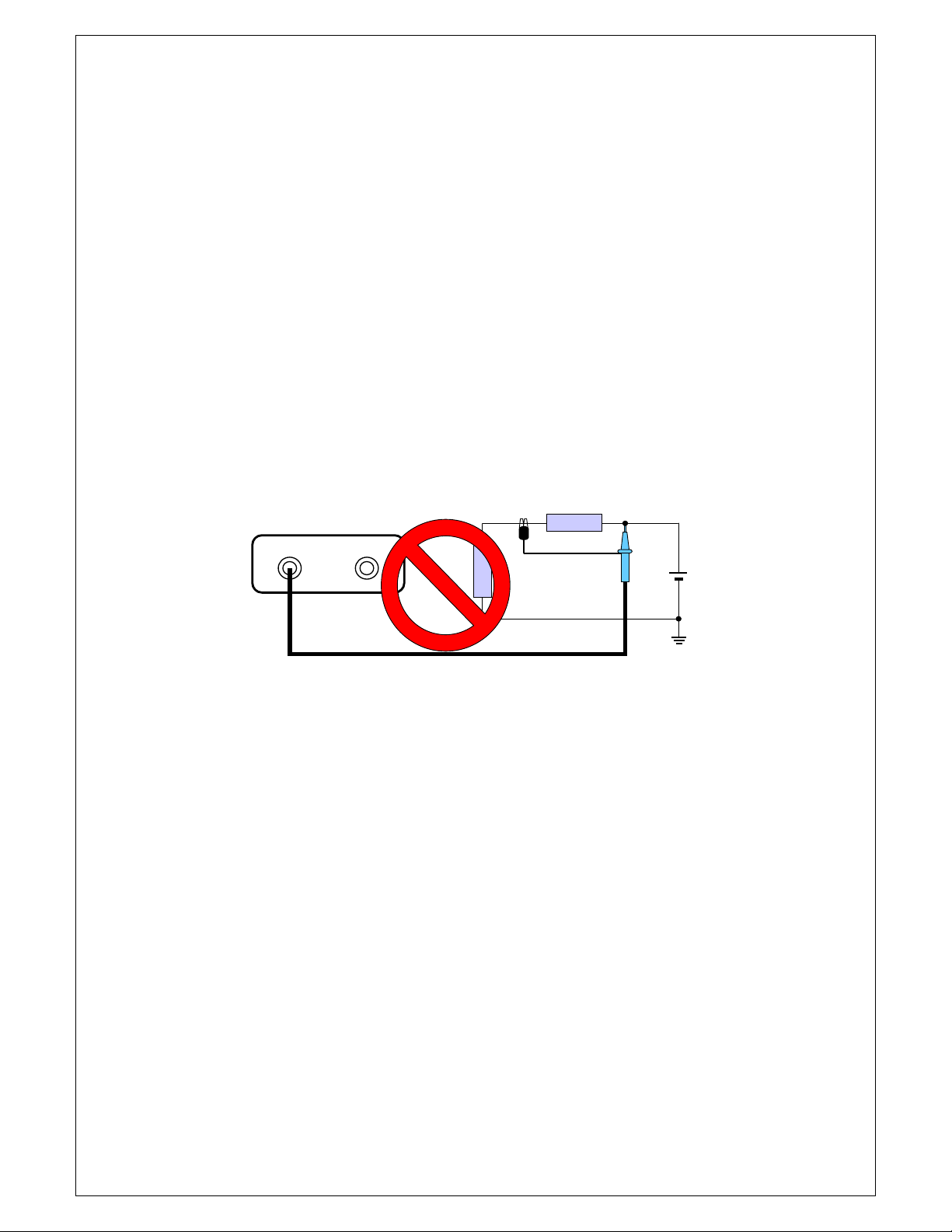
The probe ground lead is at ground potential. Do not connect the ground lead to an elevated
voltage. Connect the ground lead of the probe to earth ground only.
If measuring the floating potential, we will recommend the measurement by the differential motion
method using CH1 and CH2.
Do not connect or disconnect the product with the probe or test lead which is connected to a
voltage source.
Do not attempt to operate the product at the situation that a risk of dysfunction or shock expected
to happen.
Stop using the product immediately when you notice something unusual about the smell, smoke or
sound.
And then remove the USB connection from your computer.
Keep the product out of the reach of children or those who cannot be trusted with the use.
Do not use the product with your hands wet. It can cause an electric shock.
Do not try the product for the purposes other than those stated.
CH1 CH2

8
Usage Location
If the products crevice is exposed to electric conductors (solids or liquids), the product will short
circuit and possibly create dangers of electric shock or fire. Please keep this product away from
humidity, water, or dust.
DO NOT use this product near gas as well as other flammable and/or explosive materials.
Store the product where direct sunlight can’t reach.
Do not use the product where it’s dirty, other machines are operated, or there is a high level of
electromagnetic waves.
DO NOT place the product on an unstable cart, stand, or tripod. Such usage creates the dangers of
accident and/or damage to product.
Maintenance and Storage
If not using it for a long term, remove the USB cable from the product.
The recommended temperature and humidity for equipment storage is 25 °C at 50% humidity.
After Service
There are no parts that you can replace inside the product. Do not attempt replacing a part yourself.
It can give you an electric shock.
Do not attempt to open the case or repair yourself. It can cause an electric shock or other safety
accidents.
Once you open the case, you cannot have the privilege of an after-sales service.
Call the After-service department at our headquarter through 82-2-470-0491 for repair.
(info@softdsp.com)

9
Minimum System Requirements
To install and run SoftScope, you should have the following;
Operating System
Windows 98/ME/2000/XP
CPU/Mainboard
Pentium 200MHz , USB equipped mainboard
Memory
32MByte
HDD
20MByte
Graphic Card
Microsoft DirectX supported
Screen resolution: 800x600
Color depth: 16bit
Table des matières
Autres manuels softDSP Équipement de test
Manuels Équipement de test populaires d'autres marques

SMART
SMART KANAAD SBT XTREME 3G Series Manuel utilisateur

Agilent Technologies
Agilent Technologies BERT Serial Manuel utilisateur

Agilent Technologies
Agilent Technologies N3280A Manuel utilisateur

Vernier
Vernier Go Direct Voltage Manuel utilisateur

Lifeloc
Lifeloc R.A.D.A.R. Manuel utilisateur

Fluke
Fluke T5-600 Instructions d'utilisation et d'installation