Page | 9
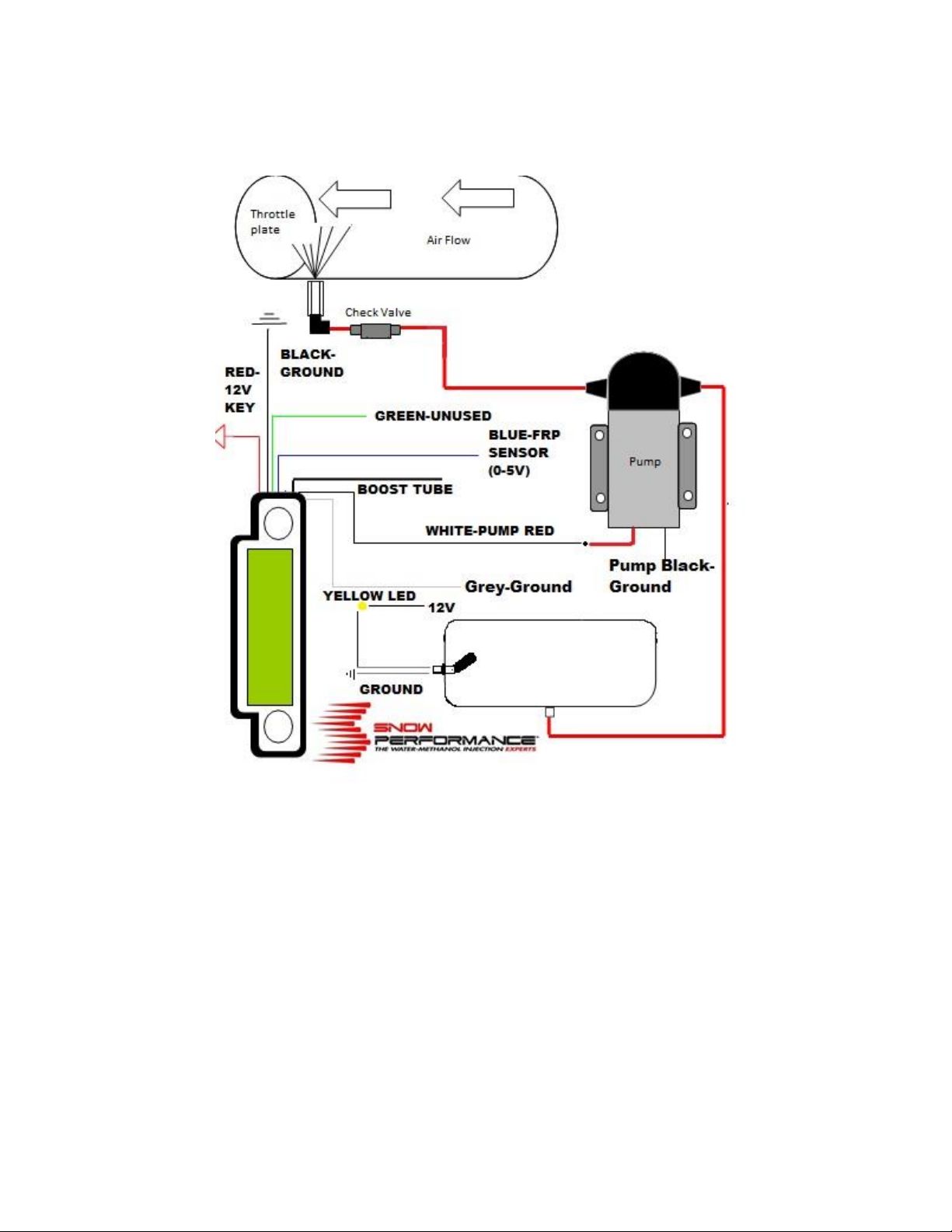
Step 7: Using preferred electrical fitting connector connect RED wire to 12 volt key on power source.
Step 8: GREEN wire is only used to control a second stage of water/methanol. If a solenoid/dual nozzle
upgrade is not being used GREEN wire can be tied out of the way. If a solenoid/dual nozzle upgrade is
being used follow upgrade installation guide for proper installation.
Step 2 Testing the System
You are now complete with your Stage 3 Boost Cooler install. Check the system for any leaks/correct
wiring. To test the system before use follow the below steps.
Step1: Make sure tank is filled with fluid.
Step 2 Arm systems by putting key in the ignition.
Step 3: Remove nozzle from intake location. Place in location that is easy visible.
Step 4: Set the “Start” setting to 1 PSI on the following the below setting instructions. Blow into the
boost hose connected to the controller. The system should engage, fluid should be atomized out of the
nozzle. If no injection occurs check wiring/grounds for the system.
Step 3 Tuning the Stage 3 Boost Cooler™ System (Part #320 Only)
The Stage 3 Boost Cooler™ system allows for a large range of tuning on any direct injected/forced
induction vehicle. It can reference fuel pressure sensor voltage, boost, or both simultaneously. It has
two fully progressive stages of injection to cover not only high load/high performance driving, but also
moderate driving such as going up a hill or accelerating away from a stoplight. The boost and FRP data
are displayed on the LCD screen, along with the system’s output as a percentage of pump capability.All
functions of the controller are accessed using the two push buttons to the left and right of the LCD
screen. Pressing button 1 will scroll between screens, while pressing button 2 will affect whatever
setting is on the screen.
Holding down button 2 while powering up the unit will engage metric units (BAR). Holding down
button 1 while powering up will set standard units (PSI). Once this has been done once, it is not
necessary to specify units again. The controller comes pre-set to standard units (PSI).
CAUTION: The controller has a “read only mode”. If you wish to observe boost and fuel pressure
data without injection, proceed to a display screen, then press and hold button 2. Then press and hold
button 1. Finally, release both buttons simultaneously. This will toggle between read only mode and
normal operation.