
snopfon ezTWO3G Manuel utilisateur
the cellphone for seniors
Model ezTWO3G
Owner’s Manual
Tech Data:
GSM 850/900/1800/1900 MHz
WCDMA (3G GSM) 850/1900/2100 MHz
Battery: Li-Ion 3.7V / 1000mAh
Dimensions: 118.5 x 57.5 x 15.3mm
Weight: 90g
3G
Compatible
Hearing Aid
M3 / T3
3G

Table of Contents
Table of Contents
Geng Started
The Snapfōn® Home Screen
External Features
Power the Phone On or Off
Seng Up Voicemail
Making a Call
Answering an Incoming Call
Ending a Call or Ignoring a Call
Call Waing
Adding Contacts
Field Definions
Icons
High-Intensity LED Flashlight
Keypad Lock
Camera Launch / Shuer Buon
Volume (+/-) Buon
Lanyard Connecon
Headphone Port
Power Port
2
8
8
8
9
9
9
9
9
10
10
11
12
12
12
12
12
13
13
13
2
Included in the Box 5
Safety Precauons 6

Keypad
Diagram of External Features
Keypad Diagram
Key Funcons
To Add a Contact
To Call a Saved Contact
To Edit a Saved Contact
Opons for Saved Contacts
To Delete All Phonebook Contacts
To Write a Message
Inbox
Dra
Outbox
Sent
Delete Messages
Missed Calls
Dialed Calls
Recieved Calls
Delete Call Logs
All Call Logs
Photo Album
Camera
13
14
15
16
The Menu
Phonebook
Messaging
Call History
Photos
17
22
22
22
23
23
23
24
25
25
26
17
17
17
18
18
19
20
20
21
21
21
22
3

Camera Key Funcons
Tone Sengs
Phone Sengs
Speed Dial
Bluetooth
SMS & VM Number
Low Baery Warning System
Restore Factory Sengs
Carrier Info
Secured Calling
Buon Status
Siren
SOS Contacts
SOS Message
26
27
27
27
Sengs
SOS Sengs
Alarm
Silent Mode
Installing the BATTERY, SIM Card, & Oponal Micro SD
Figure 1. SIM Card Installaon Diagram
Figure 2. Baery Installaon Diagram
Figure 3. Removing the Back Cover
Warranty to the Orginal Purchaser
Repair or Replacement Due To Defect
30
37
38
39
40
41
43
42
28
29
30
30
30
31
33
34
35
34
35
36
4
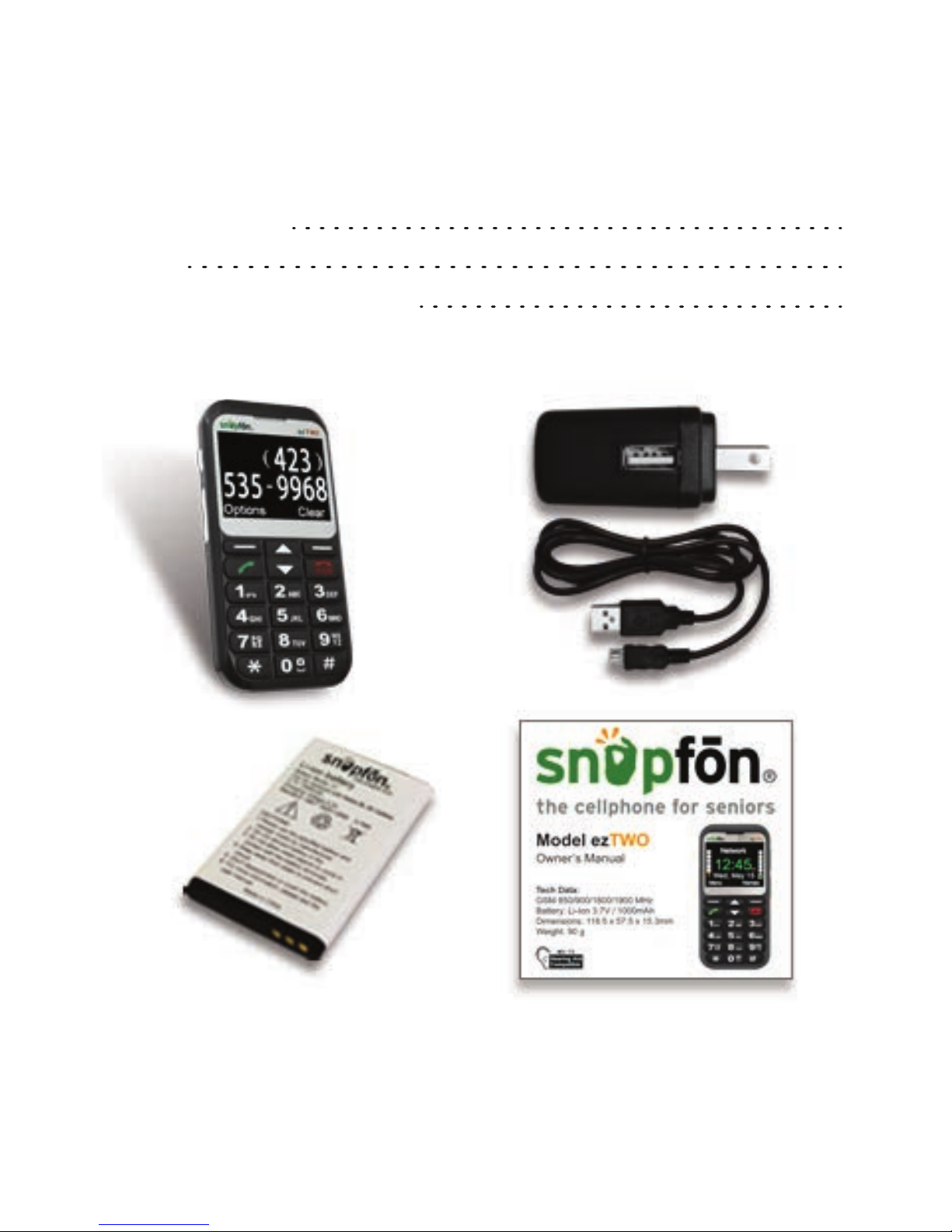
Included in the Box
Intended Usage 43
Disposal 43
Correspondence & RMAs 44
5

Safety Precauons
1.
2.
3.
4.
5.
6.
7.
8.
9.
When using this unit, basic safety precauons should always be
followed to reduce the risk of fire, electric shock, or
personal injury.
Read and understand all instrucons.
Do not use liquid or aerosol cleaners. Use a damp cloth for
cleaning.
Do not use this unit near water such as bathtub, shower or pool.
Immersion of this unit in water could cause an electrical
shock.
Place the unit securely on a stable surface. Serious damage and/or
injury may result if the unit falls.
Do not cover slots and openings on the unit. They are provided for
venlaon and protecon against overheang.
Install the unit in a place where it cannot be walked on.
Never push any objects through slots in this unit. This may
result in the risk of fire or electric shock. Never spill any liquid
on the unit.
To reduce the risk of electric shock, do not disassemble this unit.
Contact Snapfōn® if service or repair work is required. Opening
or removing covers may expose you to dangerous voltages or
other risks. Incorrect reassembly can cause electric shock
during subsequent use.
6

10.
11.
12.
13.
14.
15.
16.
17.
Do not expose the unit to extreme temperatures such as areas
near a hot radiator or stove or in a hot car.
Do not place lighted objects such as candles or cigarees on the
unit.
Do not use this unit to report a gas leak in the vicinity of the leak.
Power off mobile telephone in hospitals or near medical devices.
There should be a minimum distance between switched-on phone
and a pacemaker.
Do not operate a vehicle while holding or using your mobile
telephone. Follow the local laws and traffic rules of the area you
are in.
Always power your mobile telephone off while in an airplane.
Do not use near gas staons or other explosive materials.
Never shine the LED flashlight into a human’s or animal’s eyes
(protecon class 3).
WARNING: To prevent the risk of fire or electric shock, do not expose
this unit to rain or any type of moisture.
7

Geng Started
Powering the phone On or Off
Seng Up Voicemail
Thanks for buying the Snapfōn® ezTWO! Please read this manual
thoroughly before use. This secon is intended for Snapfōn®
customers who purchased their handset with a Snapfōn® service
plan. If you purchased a handset without service, addional steps
may be required.
Press and hold the red PWR buon for 3-5 seconds. Release the
buon when the phone plays its start-up or power-off chime, and
the screen animaon begins.
Aer the phone has powered on and has connected with the
carrier, press and hold the 1 buon on the phone’s keypad unl it
begins to call your voicemail box. When the call connects, simply
follow the spoken instrucons. You may choose to have (or not to
have) a password.
Please note: if you do not set up voicemail, you may not be able to
receive incoming calls. Do not skip this step!
8

Making a Call
Answering an Incoming Call
Call Waing
Adding Contacts
With the phone powered on, while on the Home screen, enter the
10-digit phone number of the person you wish to call and press
the green Send buon.
When the phone rings and/or vibrates, press either the green
Send/Answer buon, or the Opon Le buon to answer the call.
While a call is engaged, press the Answer or Ignore Opon Buons
when the second incoming call is displayed. To swap between
lines when call waing is in use, select “swap” from the Opons
menu, or press the green OK/Send buon one me.
From the Home screen, press the Opon Right buon for Names.
Highlight the “Add contact” line with the Navigaon buon and
press Opon Le to Select, then enter the contact’s name &
number. Or manage contacts online with our ezContacts Service.
Ending a Call or Ignoring a Call
Press the red PWR buon to end a call at any me. Note: do not
hold down the PWR buon or you will turn the phone completely off.
9
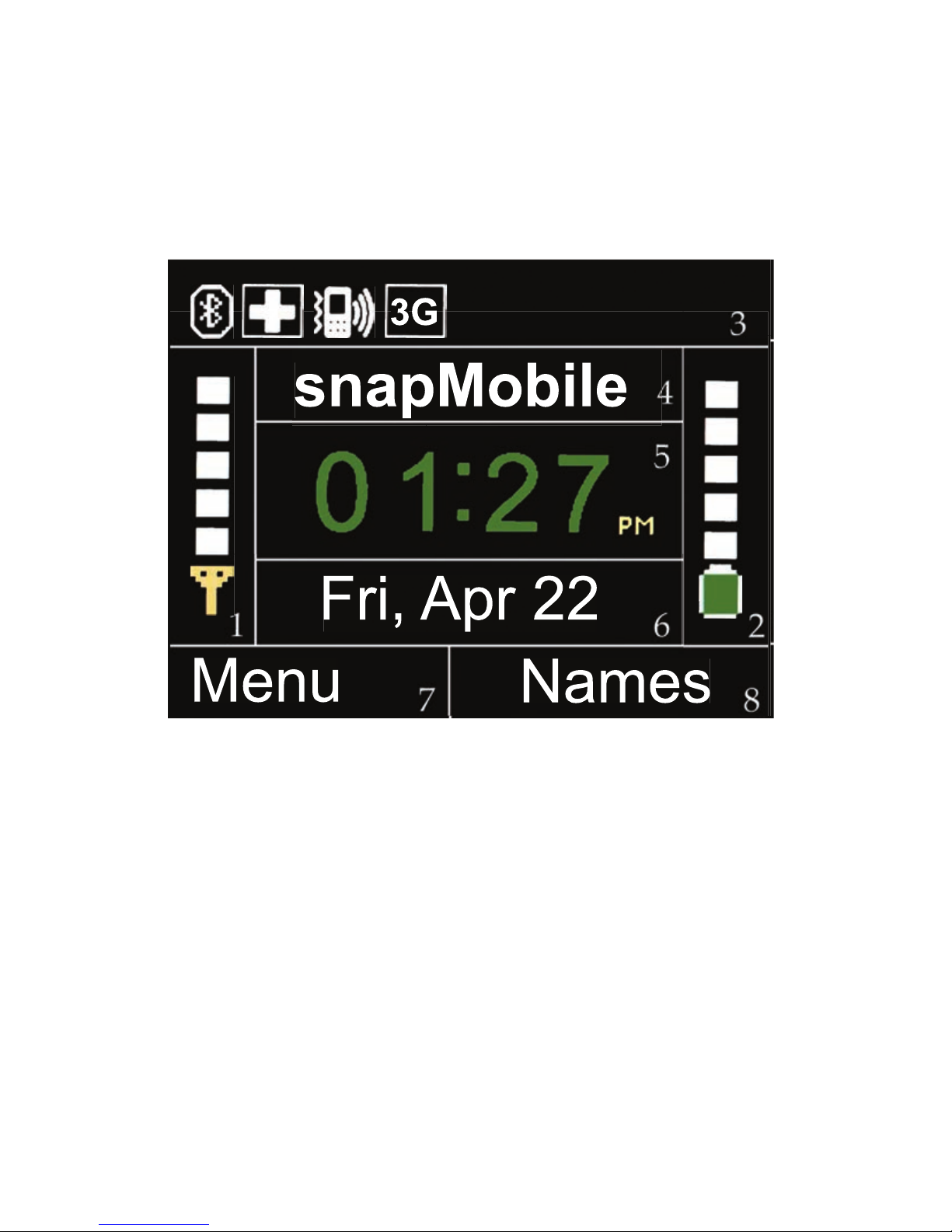
The Snapfōn® Home Screen
Field Definions
1. Signal Status Indicator 5. Time
2. Baery Charge Indicator 6. Date
3. Icons 7. Opon Le
4. Cellular Service Type 8. Opon Right
10
Names
Menu
Fri, Apr 22
snapMobile
3G
Names
Menu
Fri, Apr 22
snapMobile
3
G
3
G
Table des matières
Autres manuels snopfon Téléphone portable


