
Snipe SELFSAT BT Grey Line Manuel utilisateur
ENGLISH : User’s manual
GERMAN: Bedienungsanleitung
FRENCH : Manuel utilisateur
ver 1.0
www.selfsat-service.de
www.selfsat.com
Automatic Flat Satellite Camping Antenna
SNIPE
CONNECT


Contents
1. General Information
.............................................................................................
...............................................................................
.............................................................................................
1-1. Introduction
1-2. Proper use and operation
1-3. Safety notes
2
2
3
2. Contents
.......................................................................................
...........................................................................................
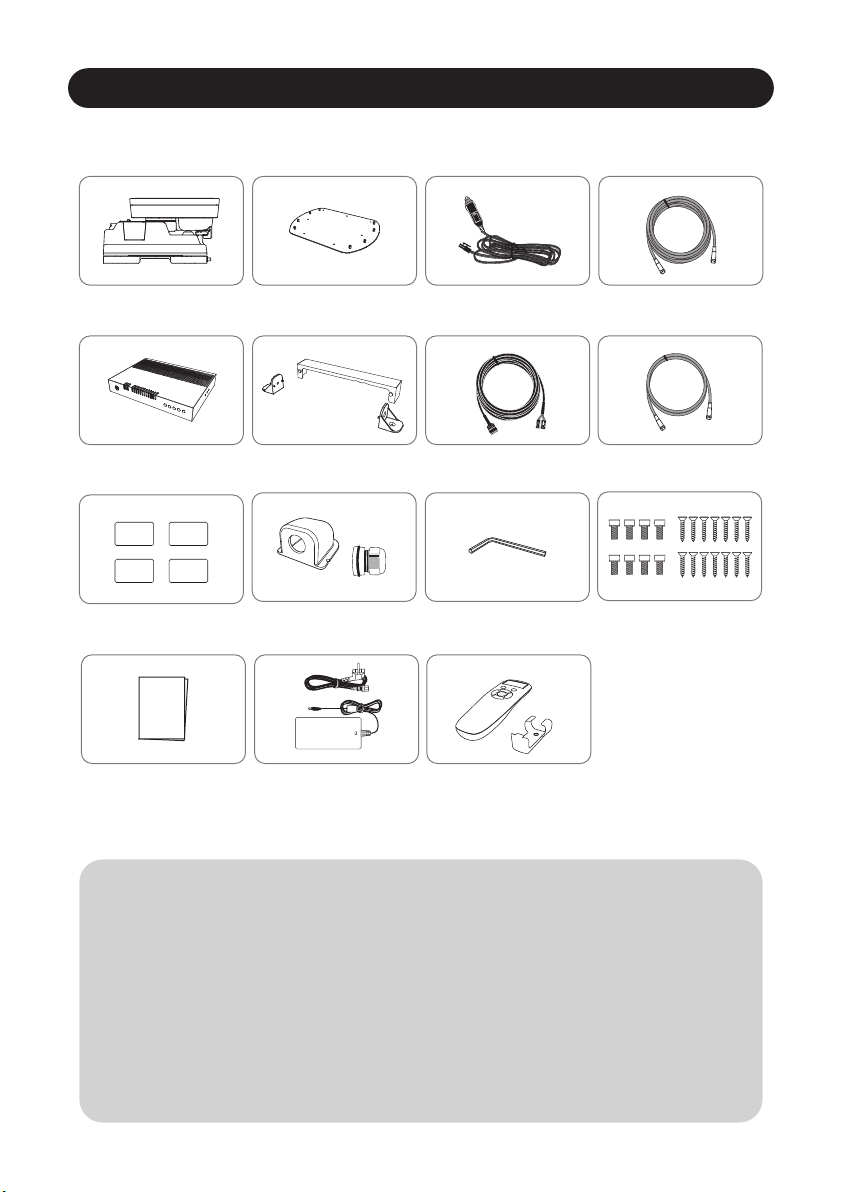
2-1. Accessory included
2-2. Name of parts
4
5
9. Caravan/Motorhome Installation
.................................................................
..............................................................................
..............................................................................
9-1. Required space for SNIPE BT Grey Line
9-2. Equipment for installation
9-3. Instruction for installation
16
17
17
3. Operating Instruction
....................................................................................3-1. Connection diagram 7
5. Functional description of mobile app ............................................... 11
...................................................................................
.................................................................
.........................................................................................
4-1. Searching the satellite
4-2. Back to HOME position & Turning off
4-3. Special function
8
8
9
...............................................................................................
............................................................................................
8-1. Dimension
8-2. Specifications
15
15
4. Functional description
6. Firmware Update
7. Troubleshooting
8. Specifications
13
14
...............................................................................
................................................................................

ENGLISH - 2
1. General Information
•
•
•
•
•
•
•
Please also note the following instructions from the manufacturer :
1-1. Introduction
These instructions describe the functions and operation of SNIPE BT Grey Line, auto skew
satellite system.
Correct and safe operation of the system can only be ensured by following instruction, both
for installation and operation.
SNIPE BT Grey Line is an intelligent satellite-TV reception system which can align itself towards
a preset satellite automatically as long as the system is located within the footprint of the
selected satellite.
SNIPE BT Grey Line only occupies requisite space while it performs the necessary adjustments
with slim and agile antenna body.
For general operation, please ensure that the system always has a clear view to the sky. In
Europe, all satellites are in an approximate position on the equator. If the satellite‘s signal
beam is interrupted by obstacles such as mountains, buildings or trees, the unit will not
function and no TV signal will be received.
For more information on general use of this unit consult local dealer for assistance.
1-2. Proper use and operation
This product has been designed for portable use and fixed installation on vehicles with
maximum speeds of 130 km/h. The unit is programmed to automatically aims at geostationary
television satellites.
The power is supplied by a standard vehicle electrical system with a rated voltage of 12 Volts
DC. For installations on the vehicle, use power input cable (cigarette lighter adaptor) to
supply power. For portable use, optional power adaptor produced by manufacturer must be
used.
Use of the equipment for any other purpose to the one specified is not permitted.
It is not possible to add or remove components on this product.
The use of other components other than those originally supplied is not permitted.
To complete installation, installer must strictly follow instruction in the supplied user manual.
Failure to follow the user manual may cause damage to the unit or user's vehicle.
The product does not require any regular maintenance; all service must be carried out at
approved service centers.
All relevant guidelines of the automotive industry must be observed and complied with.
The equipment must only be installed on solid vehicle roofs.
Avoid cleaning user's vehicle with the mounted satellite system in a drive-through car wash or
a car wash with a high-pressure cleaner.

ENGLISH - 3
1-3. Safety notes
CE Certicate Note
Please carefully read and follow the operating instructions in this manual and use the
SNIPE BT Grey Line for its intended purpose.
Upon installation of SNIPE BT Grey Line, please ensure the installation is done with
supplied cables and ensure the cables are not modified in any way.
As the user of this equipment, be responsible for ensuring compliance with the relevant
laws and regulations.
The manufacturer does not take liability for direct or indirect consequential damage of
the system, motor vehicles or other equipment by reason of unsuitable battery usage or
erroneous installation or wrong wire connection.
We hereby declare, that all major safety requirements, concerning to
CE Mark Directive (93/68/EEC) and Low Voltage Directive (73/23/EEC),
Electromagnetic Compatibility Directives (89/336/EEC, 92/31/EEC) and
Directive 2014/30/EU are fulfilled, as laid out in the guideline set down by
the member states of the EEC Commission.
The full CE Declaration of Conformity document you can download at
https://www.selfsat-service.de/ce-documents
ENGLISH - 4
2. Contents
2-1. Accessory included
The images used in this manual are for illustrative purposes and may differ from
the actual ones.
Specifications and appearance of this product are subject to change without prior
notice for quality improvement.
The unit enables to have power from car battery. To make power input cable for
direct connection, cut off cigarette lighter adaptor and peel off to take copper
cables out.
Only power adaptor produced by SNIPE series manufacturer is guaranteed and
has to be used.
Optional parts are purchased separately. Please ask to local dealer/shop for more
information.
※
※
※
※
※
Main unit Mounting plate
Allen wrenchCable holder, Cable gland
Power input cable
(Cigarette lighter adaptor)
Signal cable
(x2 for optional twin outputs)
Screw set
M6 × 15 (8), M4 × 20(14)
User manual Power adaptor
(Optional)
BT Remote control
(Optional)
Manual
Controller Controller bracket,
Rear cable cover
Controller cable
Base pads
STB cable - 1.5m
ENGLISH - 5
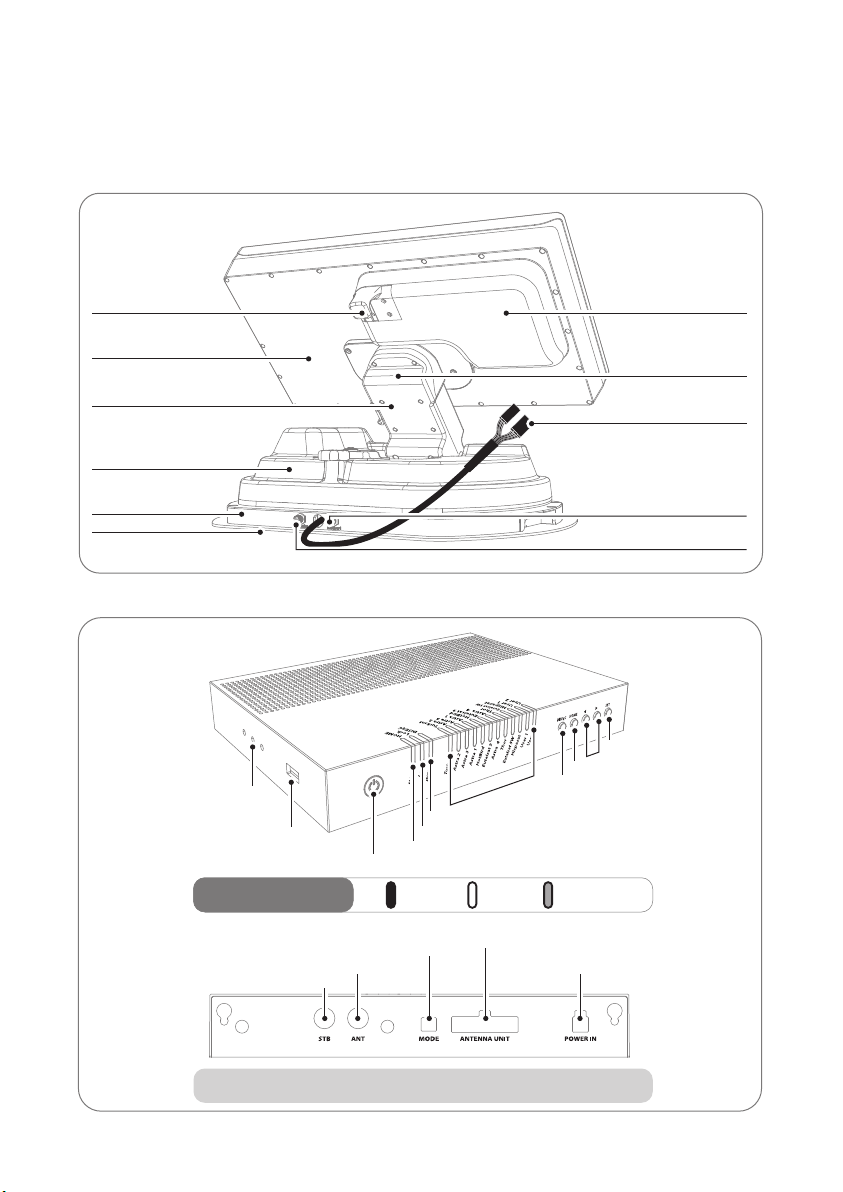
2-2. Name of parts
Main unit
Latch
Antenna
Elevation
Main body
Base
Mounting plate
LNB
Skew pivot
to Controller cable connection
(pre-connected)
to STB (optional)
to Controller ("ANT" port)
Controller
• Front
• Back
OnLED Indicator
Power S/W
USB port
Controller bracket hole
HOME LED
Lock LED
DiSEqC LED
Satellite LEDs
DiSEqC button
HOME button
Arrow buttons
SET button
BlinkingOff
STB cable to STB
Signal cable from Main unit
Dip switch (Mode selector) Controller cable from Main unit
Power port
Note : For normal operation, Dip switches in MODE should be up
ENGLISH - 6
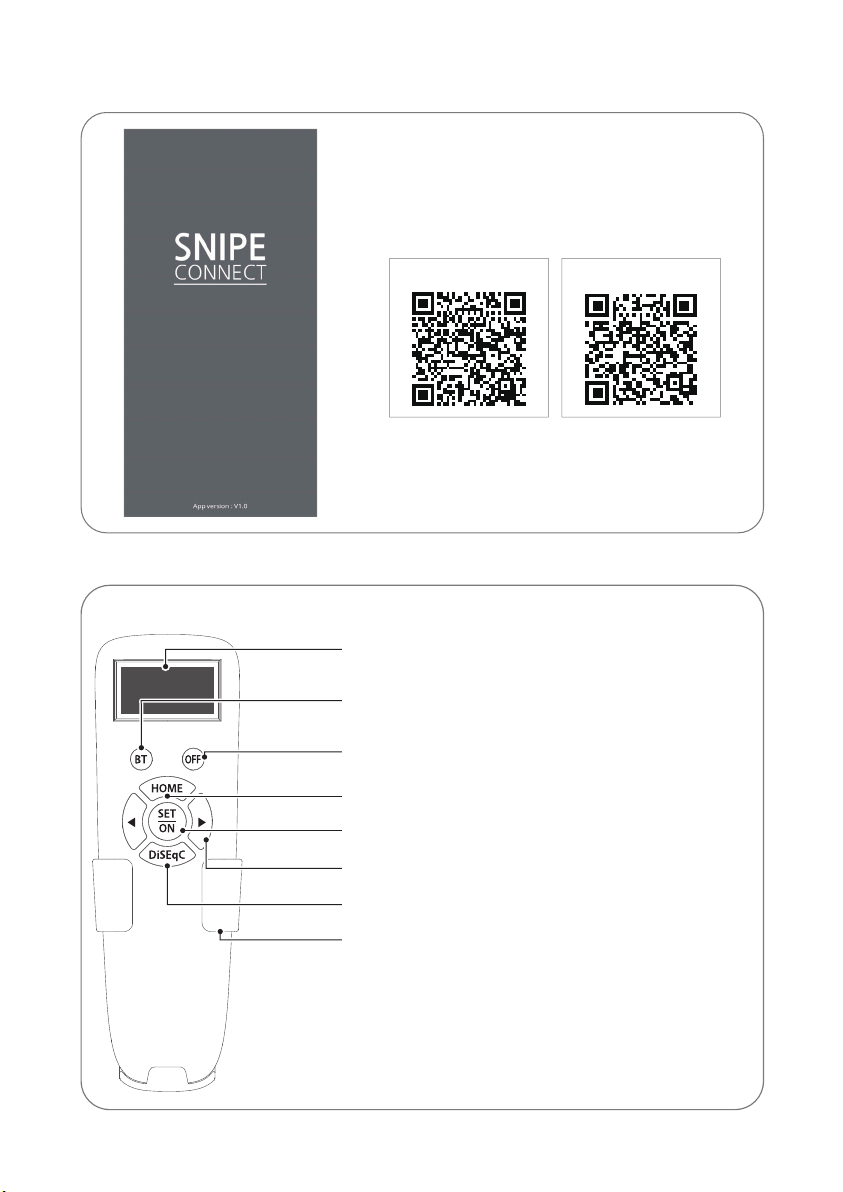
Display screen
BT button
(RCU) OFF
HOME button
SET/ON button
Arrow button
DiSEqC button
Bracket
Pairing antennas
with remote controls
Turn off
the remote control
Remote control : BT Remote control (separate purchase)
Remote control : Mobile application
SET/ON button
When using the remote control, press this button to
activate the remote control.
It is used to confirm the selected menu with the same
button as the SET button on the controller.
(RCU) OFF
Used to turn off the remote control immediately.
Even if do not press this button, the screen turns off
if do not use the remote control for more than 10 seconds.
To use it again, press the SET/ON button.
BT button
Button for pairing the antenna and BT Remote control.
HOME button
Move the antenna to the HOME position.
◀, ▶ (Arrow) button
Select the desired menu with the arrow buttons. Same as
the arrow buttons on the controller.
DiSEqC button
Turn on/off the DiSEqC function.
[D] is displayed at the screen when the DiSEqC function is
activated.
Using the remote control app, operate the antenna,
change the satellites to receive, and even update the
firmware if necessary.
Download the "SNIPE CONNECT" app from the App Store
(Android/iOS).
In order to operate SNIPE BT Grey line using the app, the
antenna must be paired with the "SNIPE CONNECT" app.
Android QR CODE iOS QR CODE
RCU
ENGLISH - 7
3. Operating Instruction
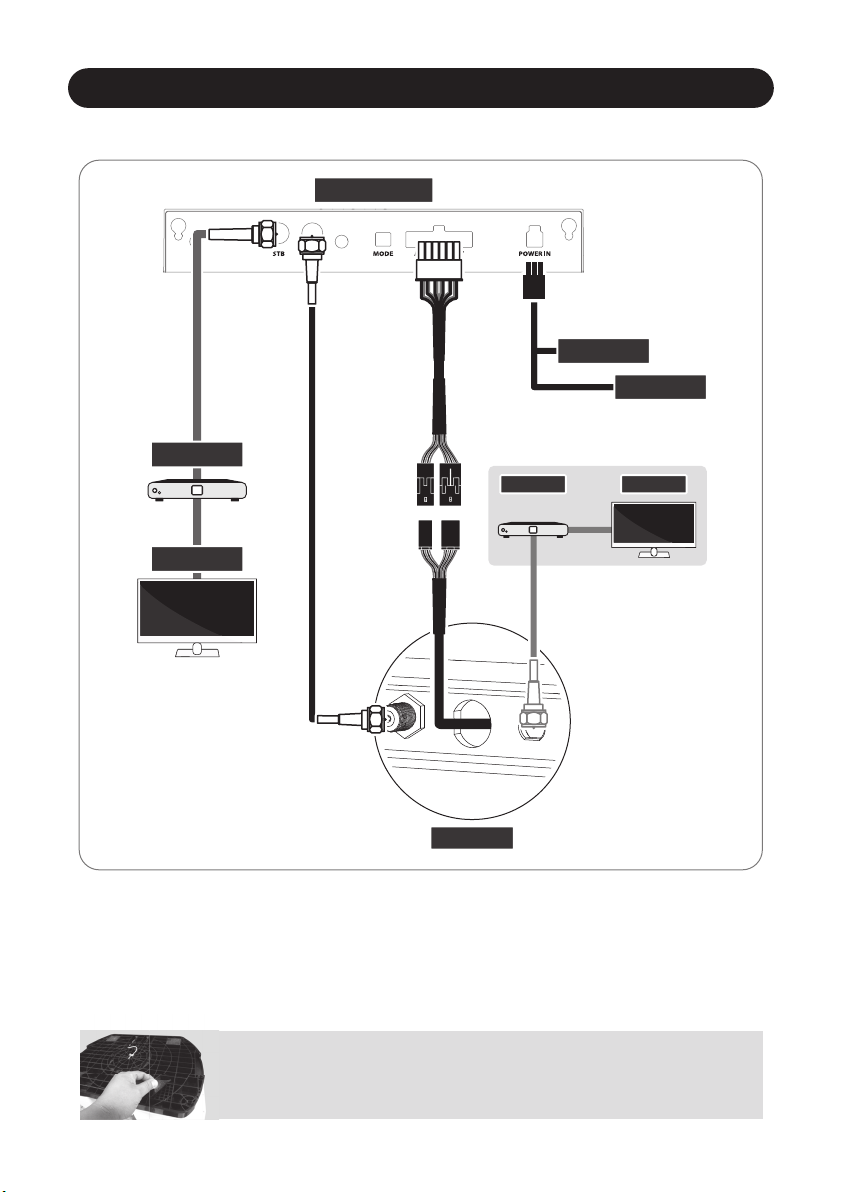
3-1. Connection diagram
Portable use
Attach four(4) base pads to the bottom of antenna base.
CONTROLLER
MAIN UNIT
Controller cable (20pin cable)
※Extra connection
for twin outputs
(optional)
Signal cable
There are two cable connections from the main unit to the controller
Use controller cable (20pin) to connect the controller and the cable running out from the main unit
Use STB cable (the shortest cable) to connect the controller and STB
Please check the labels to use the correct cable for the job
Please ensure the provided cables are used and not modified in anyway
•
•
•
•
•
Power input cable
Signal cable (7m)
Receiver/STB TV
Ignition
Cigar jack
STB cable (1.5m)
Receiver/STB
TV
ENGLISH - 8
4. Functional description
4-1. Searching the satellite
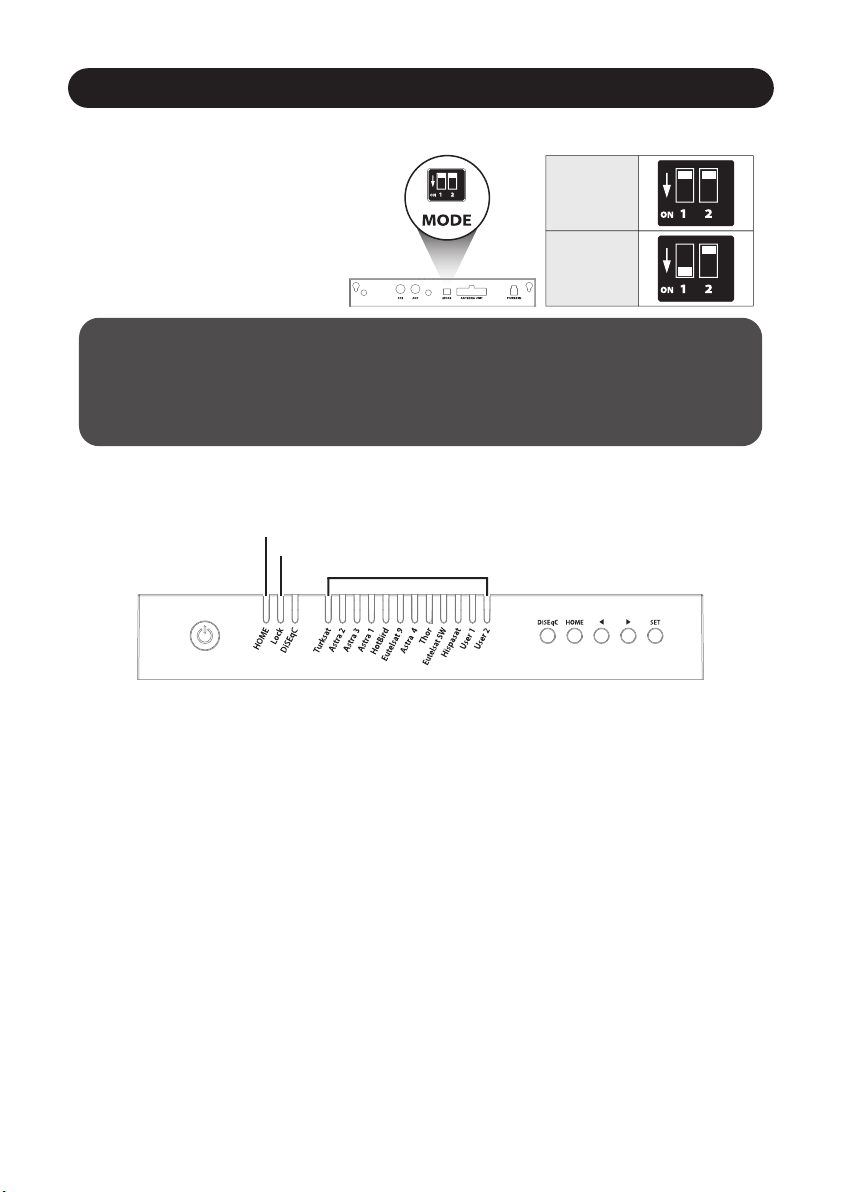
Mode selector is for A/S, so it is not recommended by consumers to modify it arbitrarily.
Consumers should never do this, and if trouble is occurred in Manual mode, guarantee
will not be provided.
Warning
※Get ready to use
a.
b.
c.
d.
e.
f.
When the controller is turned on, some LEDs light indicate firmware version
(It is made by binary code and for future service purpose)
Once the unit is ready to use, one of satellite LED is lit ON at default satellite
Go to the target satellite using arrows buttons and press SET button to confirm
Before satellite search, HOME LED blinks for antenna status(position) check
(If antenna was not at HOME, antenna has to return to HOME first, LED may blink for a while)
Lock LED blinks during satellite search and becomes solid when the target satellite is found
After use and before travelling, press HOME button for HOME positioning
Default is set Automatic mode;
both dip switches are up.
Customers should use only in
Automatic mode.
If the switch is handled in other
than the Automatic mode, the
unit does not operate normally.
4-2. Back to HOME position & Turning o
In some cases, the antenna is automatically stopped and sent to HOME position
A. Automatic
a. If ignition cable is connected and ignition signal is detected
antenna position check (●
●
)
searching satellite (
●
)/ found (●)
firmware ver. (Binary code)
Automatic mode
Manual mode
Table des matières
Langues :
Autres manuels Snipe Antenne
Manuels Antenne populaires d'autres marques

Alfa Network
Alfa Network APA-L01 Manuel utilisateur

Naval
Naval PR-422CA Manuel utilisateur

Feig Electronic
Feig Electronic ID ISC.ANTH200/200 Series Manuel utilisateur

TERK Technologies
TERK Technologies TV44 Manuel utilisateur

Directive Systems & Engineering
Directive Systems & Engineering DSE2324LYRMK Manuel utilisateur

HP
HP J8999A Manuel utilisateur


CommScope
CommScope CMAX-OMFX-43M-I53 Manuel utilisateur

Ramsey Electronics
Ramsey Electronics DAP25 Manuel utilisateur

COBHAM
COBHAM SAILOR 800 VSAT Manuel d'utilisation et d'entretien

Trango Systems
Trango Systems AD900-9 Manuel utilisateur

Steren
Steren ANT-100 Manuel utilisateur

Proxim
Proxim 5054-PA-23 Manuel utilisateur