ee
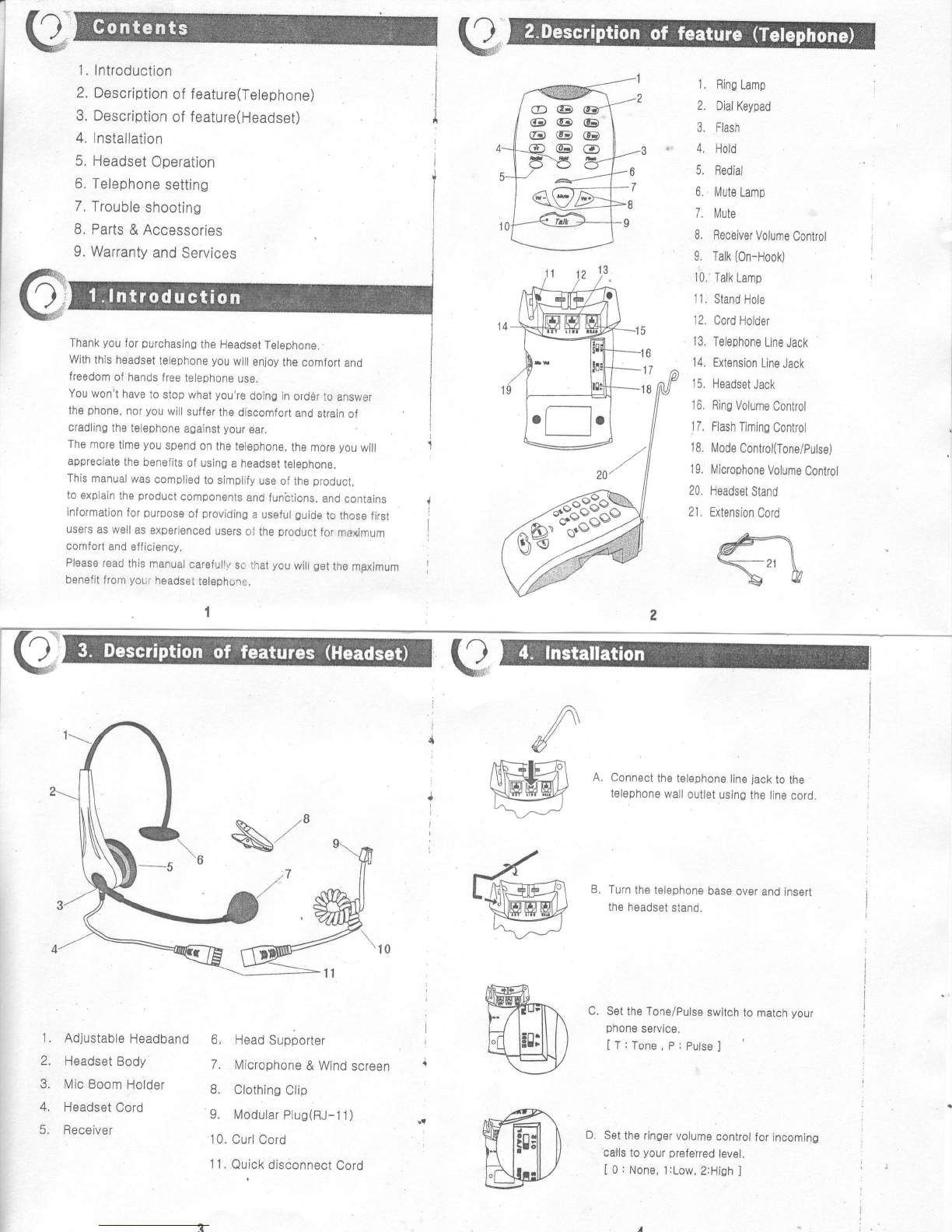
E. Set
theflash
timing
switch
tomatch
your
phone
service.
[ 1
:100ms,
2:300ms,
3:600ms
]
F. Plug
the
headset
cordinto
the
headset
jack
of thetelephone
set
lf
you
wanttouse
extraoommunication
device
(
another
t6lephone'
computsr
modem,
lax,
answering
machine,
etc)
then,connect
ths
extension
cord
totheextonsion
jack
of
thetelephone'
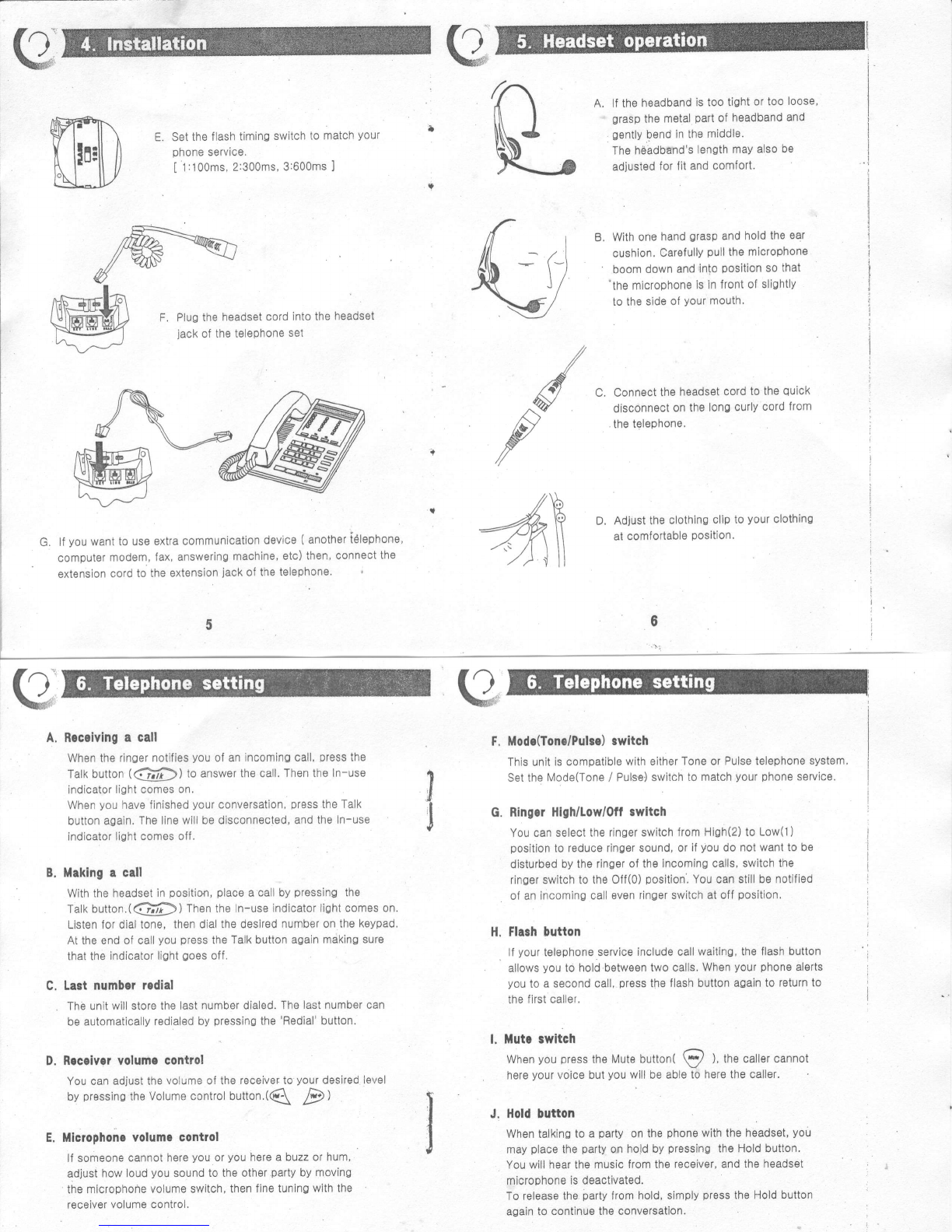
A. lfthe
headband
istootight
ortoo looso'
grasp
the metal
part
of headband
and
gently
bend
inthe
middle.
The
hebdbsnd's
length
may
also
be
adjusted
forJit
and
comfort.
B, Withone
hand
orasp
andhold
the
ear
cushion.
Carefully
pull
themicrophone
' boom
down
and
into
position
so
that
'the
microphone
isin
trontof
sli0htly
tothesids
of
vour
mouth'
C. Connect
the
headset
cord
to
the
quick
disconnect
onthe
lono
curly
cord
from
.
the
telephone.
D. Adjustthe
clothins
cllp
to
vour
clothing
at
comfortabls
position.
Modc(Tonc/Pulso)
switch
Thisunit
iscompatiblewith
eitherToneor
Pulsetelephone
system,
Setthe
tvlode(Tone
/ Pulse)switch
tomatch
your
phone
service.
FingerHlgh/Low/Off
switch
You
canselect
theringerswitchfrom
High(2)toLow(1)
position
toreducerinoersound,or
if
you
donot
wanttobe
disturbod
bytheringer
oftheIncoming
calls,switchthe
ringsrswitch
totheOff(o)
position,
You
canstill
benotified
ofanincomino
call
evenringerswitchatoff
position.
FlaghDutton
lf
your
telephone
serviceincludecallwaiting,
theflash
button
allows
you
t0holdbstween
twocalls.
When
your
phone
alerts
you
to
asecondoall,
press
the
flashbuttonaOain
toreturnto
thefirstcaller.
L Mutc swltch
When
you
press
the
Mutebutton(
S/ ),
tnecallercannot
here
your
voice
but
you
willbeable
toherethecaller.
J. HoldDutton
Whentalking
toaparty
onthe
phone
withtheheadset,
you
may
place
the
party
onhold
by
pressing
theHoldbutton.
You
willhearthemusic
fromthe
receiver,andtheheadsst
microphone
isdeactivated.
Torelease
the
barty
from
hold,simply
press
theHold
button
againtocontinuetheconversation
F.
A.
G,
I
J
B.
c,
D.
E.
H.
/
^w
f
Brceivinga call
Whenthe
ringernotifies
you
ofan
incominocall,
press
the
Talkbutton
(@) toanswerthecall.
ThentheIn-use
indicator
lightcomes
on.
When
you
havefinished
your
conversalion,
press
the
Talk
button
again.
Thelinewillbe
disconnected,and
theIn-use
indicatorlight
comesoff,
Makinga call
With
theheadset
in
position,place
a
calby
pressing
the
Talk
button.(@) Thentheln-use
indicatorlightcomeson.
Listenfordialtone,
thendial
ths
desired
numberon
thekeypad.
Attheend
ofcall
youpress
the
Talk
button
againmakingsure
thatthe
indicator
light
Qoes
off.
Last numberrcdial
Thbunit
willstorethelast
numberdialed.The
lastnumbercan
be
automatically
redialed
by
pressing
the
'Redial'
button.
Receiver
Yolumecontrol
Youcan
adjustthe
volume
olthe
receiverto
your
desiredlevel
by
pressins
theVolume
controlbutton.(Q 7p)
Microphonevolumc control
lfsomeone
cannothere
you
or
you
here
abuzzorhum,
adjust
howloud
you
soundtotheothsr
party
bymoving
the
microphonevolume
switch,thenfine
tuningwith
the
receiver
volumecontrol.