SmartLabs SML-272 SD Manuel utilisateur

SML-272 SD
SML-282 HD Base
SML-292 HD Premium
User Guide
IPTV Set-Top Box

Contents
CONTENTS.........................................................................................2
INTRODUCTION.................................................................................3
USING IPTV STB................................................................................7
TECHNICAL CHARACTERISTICS..................................................20
LICENSESANDCERTIFICATES.......................................................23
WARRANTY.......................................................................................25
2
Thank You for Choosing SmartLabs IPTV STB..............................3
Serial Number and MAC Address of STB.......................................3
Using This Guide............................................................................3
Usage Conditions...........................................................................3
Чистка............................................................................................5
Cleaning.........................................................................................5
Servicing.........................................................................................5
Packaging.......................................................................................7
Connecting to Devices....................................................................8
Indicators and Slots......................................................................10
Starting the IPTV STB..................................................................13
Using the Remote Control...........................................................13
Remote Control Buttons Specication..........................................16
Installation of the Hard Disk (HDD)..............................................18
Installation of the Flash Drive (USB Flash)..................................20
Licensing Agreement...................................................................23
Copyright Notice..........................................................................23
Standards and Certicates..........................................................24

Introduction
Thank You for Choosing SmartLabs IPTV STB
Please read this user guide carefully before using the digital interactive televi-
sion (IPTV) set-top box (STB).
This guide contains the information about the following models of IPTV STB:
SML-272 SD, SML-282 HD Base, SML-292 HD Premium.
Note that particular features of your device are optional. Your device may differ
from the device shown in pictures in this guide.
The guide provides the description of all possible functions and options of
SmartLabs IPTV STB.
The functions and slots available in your device and supplied accessories are
fully determined by the service provider.
Your service provider will also give you another user guide or manual with the
information on how to use the device to get access to IPTV services.
Serial Number and MAC Address of STB
Serial Number and MAC Address of STB are written at the bottom panel of
IPTV STB.
Using This Guide
Further in this guide the information, which is strongly recommended to be read, is
marked with the following icons:
Usage Conditions
1. Use your IPTV STB indoors only. The air temperature should be no higher
than 40° С and the relative humidity should be between 20-90% without
condensation.
3
Attention! Possible situations of incorrect usage of the device, which can
provoke damage of IPTB STB or other devices and accessories.
Note. Additional information on the device usage peculiarities.

2. Use the IPTV STB only with the power adapter supplied with your device.
Make sure that the power supply standard approved in your country is
compatible with the power supply standard used in the power adapter (See
the Technical Specication section, Power Adapter). If the power adapter
is not compatible with the power supply standard used in your country,
contact the service provider.
3. Do not allow water or other liquids, rain or high humidity to affect the de-
vice to decrease the risk of re or current rush.
4. Do not put the device into water. Do not use the device in those places,
where the IPTV STB can contact with liquid or steam. If this occurs, im-
mediately turn off the device and disconnect from the electricity network.
Contact the service provider on this accident.
5. Do not put the device into direct sun rays.
6. Do not place the device near the open re or heating radiators.
7. Do not allow vibration or shake the device.
8. Do not use the device in dusty rooms.
9. If lightning is expected, or you are not going to use IPTV STB for a long
time, disconnect the device from the wall outlet, unplug the Ethernet,
video, audio cables from it. This measure will help to protect IPTV STB
from damage due to lightning and power surges.
10. If you use IPTB STB with a plasma TV set, do not leave the picture on for
more than 5 minutes. Due to plasma’s constructive peculiarities a static
picture left for a long time can damage the display of the screen. The IPTV
STB manufacturer is not responsible for any harm caused by this reason.
11. IPTB STB can automatically update its software. Do not switch off the
device and disconnect it from Ethernet until the software update is com-
plete. The IPTV STB manufacturer is not responsible for consequences of
incorrect software update in your device.
4

Cleaning
• Turn off the device before cleaning.
• Wipe the device with a clean, dry rag only.
• Clean the ventilation holes in the device’s enclosure regularly.
• To remove stains from the device’s surface, it is possible to use a slightly
damp rag.
• Do not use chemical cleaner, car polish, dissolvent, aerosol, cleaning
agents, abrasive powders and materials for cleaning the device and acces-
sories.
Servicing
1. Do not open the device. Unauthorized opening of the device deprives war-
ranty. The manufacturer’s label is located at the bottom side of the device.
Breach of the label removes warranty from the device.
2. To repair the device, contact your service provider.
Device Installation
1. Remove IPTV STB from packaging.
2. Remove the protective lm from the glance top panel of the device.
3. Choose one of the following positions:
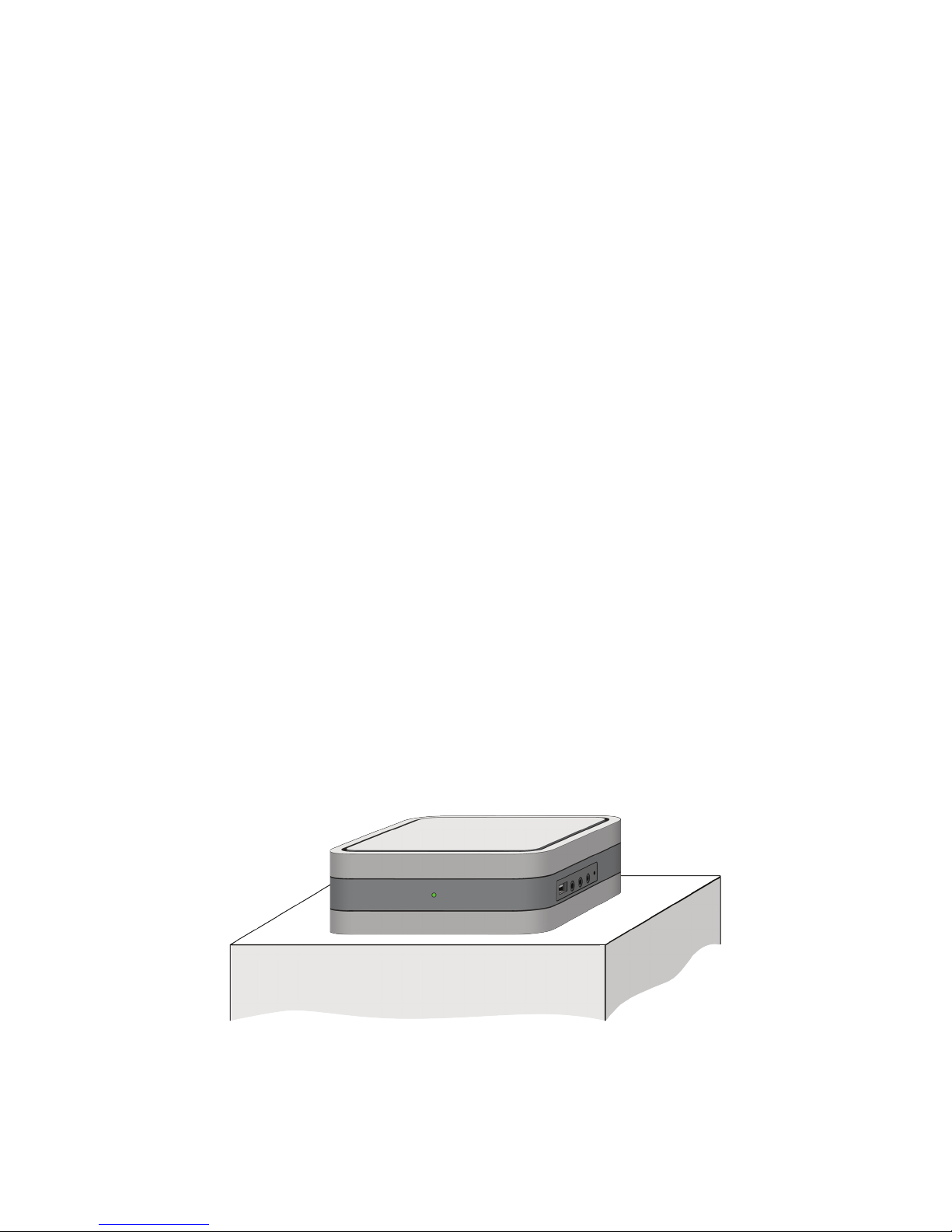
Horizontal position (on table, holder, shelf)
5

If your device is supplied with the RF remote control, you do not need to place
IPTV STB in the direct visibility range to control the device.
Keep the following conditions when installing the device:
1. Place IPTV STB on a at surface.
2. Do not place the device on slick surfaces, where there is a risk of vibra-
tion, fall or other damages of IPTV STB.
3. Do not mount the device on soft surfaces, like bed, carpet, etc. Because
it impedes access for air and normal ventilation of the device. This can
cause overheating or damage of the device.
4. Do not cover the device.
4. If your IPTV STB is equipped with an IR receiver, you should place the
device’s front side towards the user.
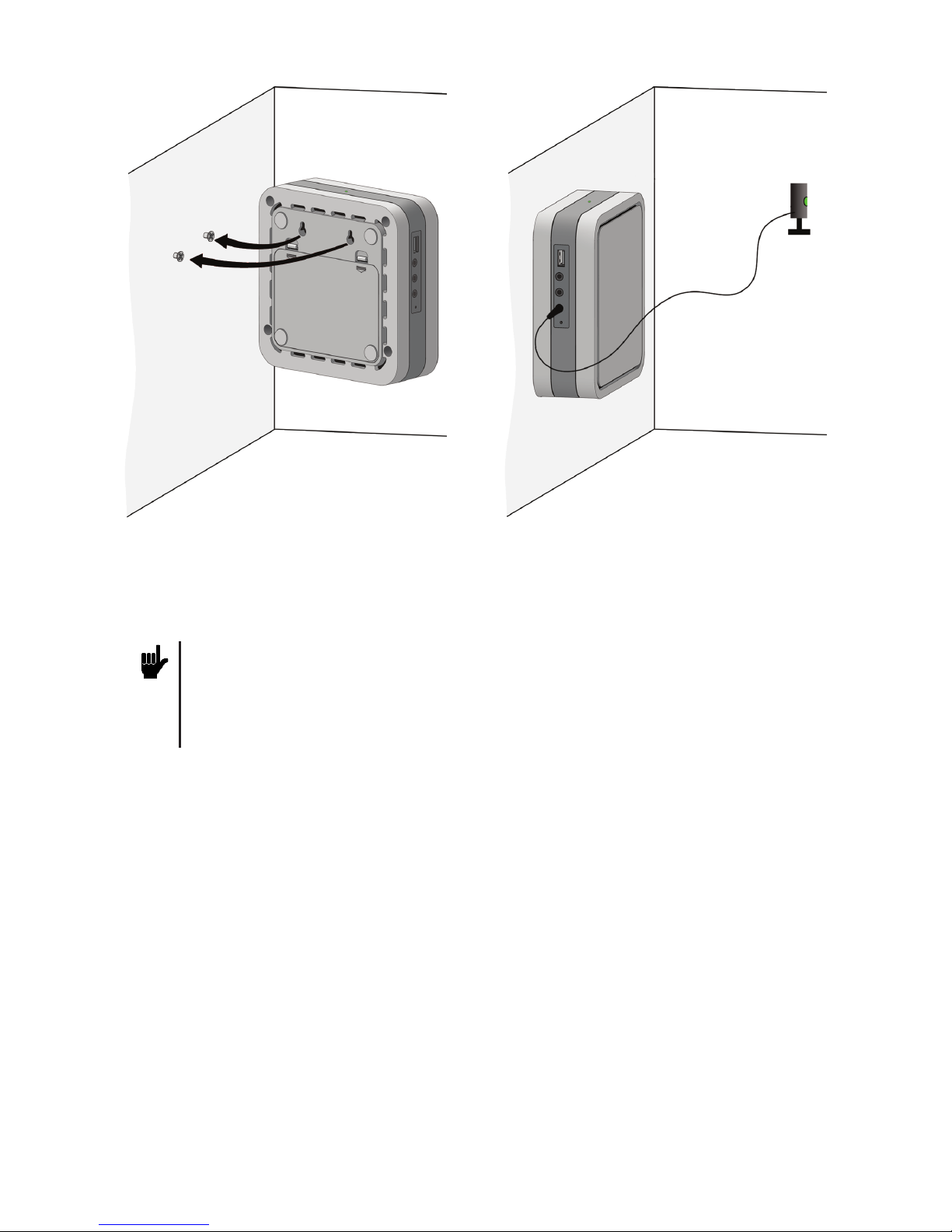
Note. To control the device placed out of the direct visibility range with the
IR remote control, use the external IR receiver (if the device has the appro-
priate slot). Connect the external IR remote control to IPTV STB and x the
external IR receiver in the direct visibility range of the device.
Remote
IR receiver
Vertical position (on the wall)
6

5. Do not shield the ventilation holes in the device’s enclosure located at the
top panel of the device.
6. When mounting the device leave at least 10 cm of free space from each
panel of the device. Do not place IPTV STB in closed cupboards and
caves.
7. Do not place IPTB STB on surfaces, which can heat, for instance, on
boosters.
8. Do not place various things on the device.
9. To avoid damage of the power adapter’s cable, place the cable so that it is
not pressed, pinched or mechanically affected in another way.
Using IPTV STB
Packaging
Name SML-272 SD SML-282 HD Base SML-292 HD Premium
IPTV STB + + +
Power supply 12V 1.2A 12V 2.0A
Ethernet cable Optional Optional Optional
AV video cable
(3xRCA) + + +
YPbPr video cable
(3xRCA) Optional Optional Optional
YPbPr + Audio cable
(5xRCA) Optional Optional Optional
HDMI cable, 1.8 m - Optional +
Remote control IR or RF IR or RF IR or RF
ААА batteries, 2 pcs + + +
HDD connection kit - - +
User guide + + +
Warranty card + + +
Package + + +
7

Connecting to Devices
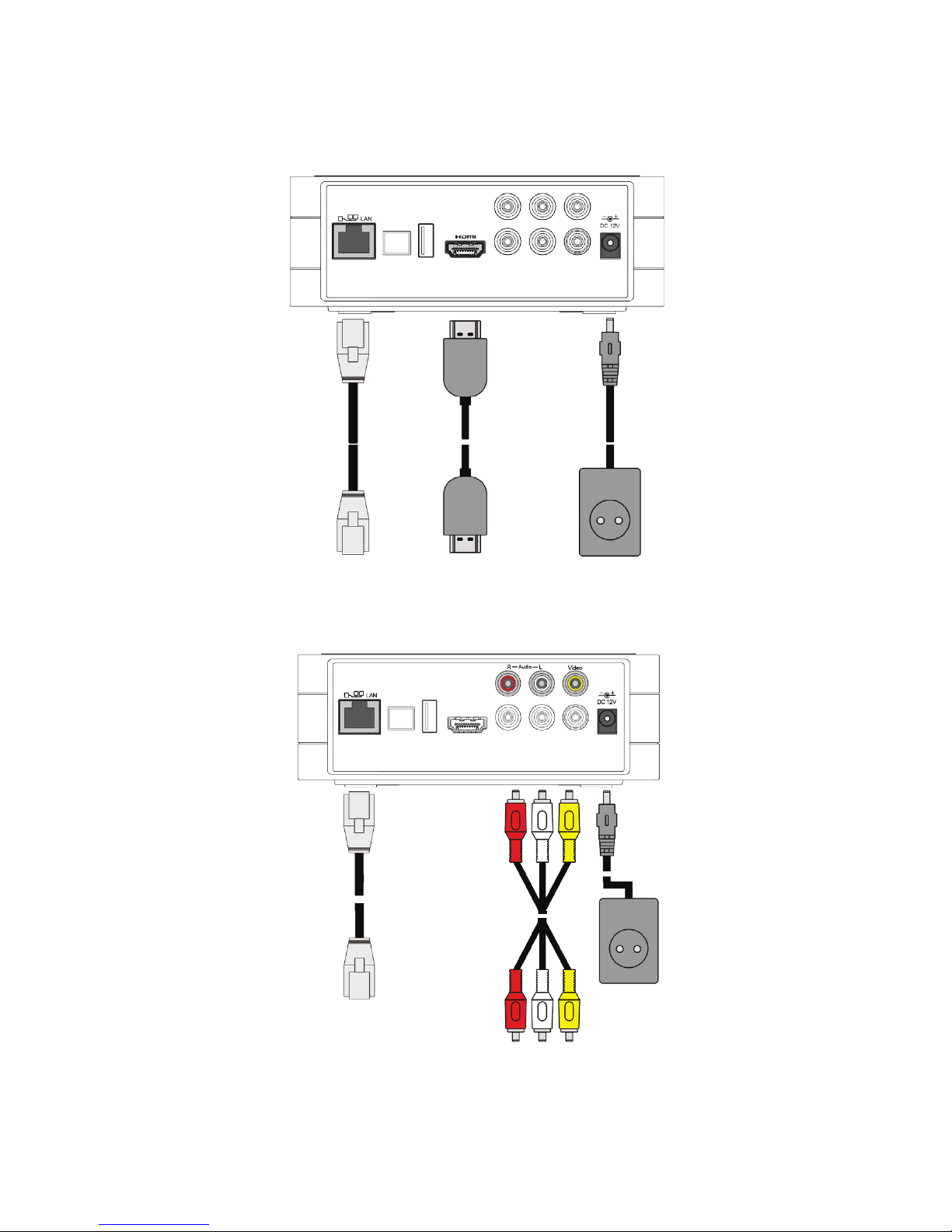
Connect your IPTV STB to a TV set, speakers (if any) and the Internet accord-
ing to one of the following schemes:
The connection scheme via HDMI
The connection scheme via the composite video slot RCA
and stereo audio slot RCA
To an Internet
router
To an Internet router
Power supply
(220 V)
Power supply
(220 V)
To a TV set or audio
system
To a TV set or AV
receiver
To a TV set
8

You can also connect additional devices to your IPTV STB:
• Microphone
• 2.5’’ SATA internal HDD – SML-292 HD premium only
• USB ash drive (USB Flash) or other USB device (web camera, external
HDD)
• External IR receiver
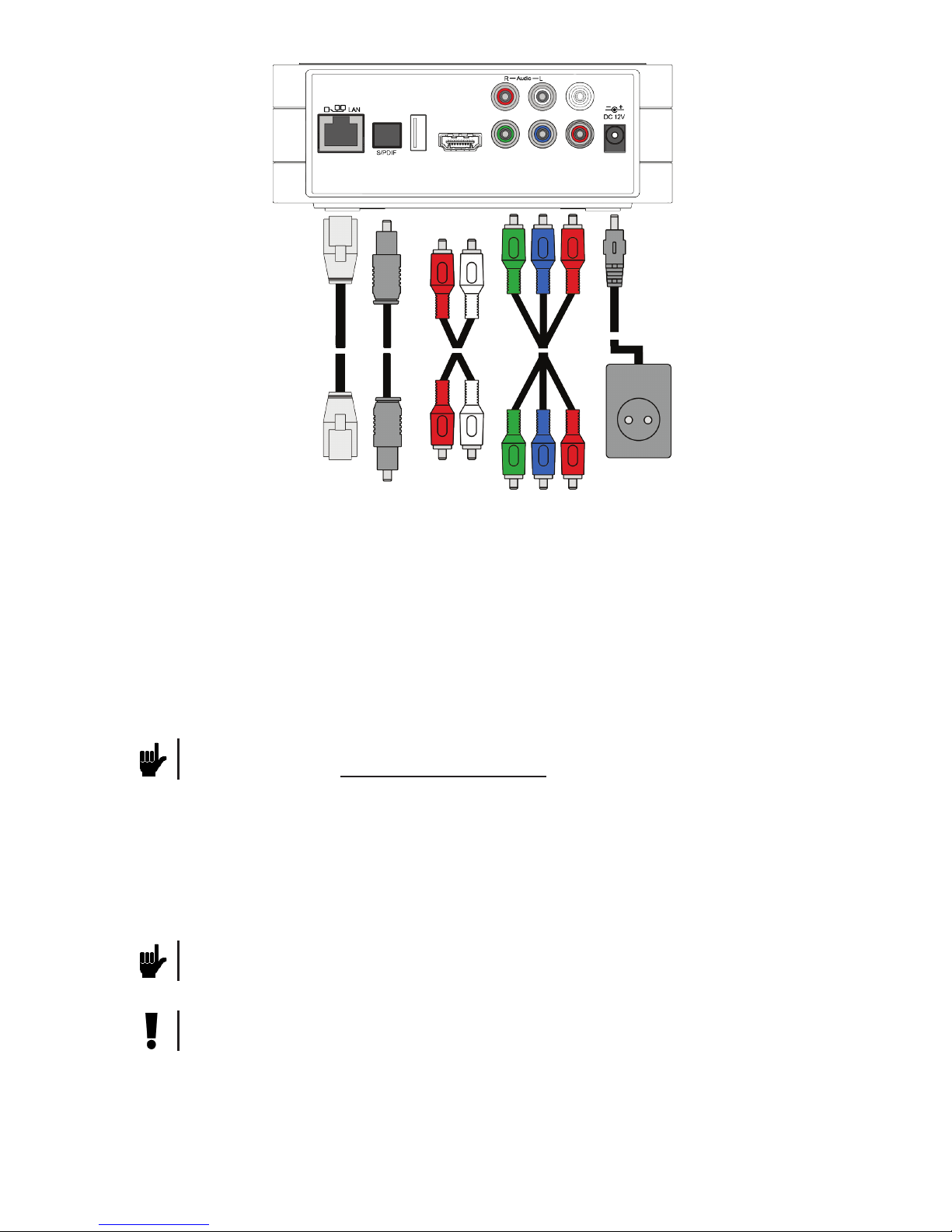
The connection scheme via the component video slot YPbPr
and audio slot RCA or S/PDIF
To an Internet router Power supply
(220 V)
To an audio receiver or
audio system (if any)
To a TV set
To a TV set or
audio system
9
Note. If your device is provided with the RF remote control, it has no slot to
plug in an external IR remote control.
Note. The list of compatible microphones is available on the IPTV STB manu-
facturer’s web site: www.smartlabs.tv/iptvstb
Attention! Before using the RF remote control, you should connect it to the
IPTV STB, as it is described in the Connecting the RF Remote Control sec-
tion.

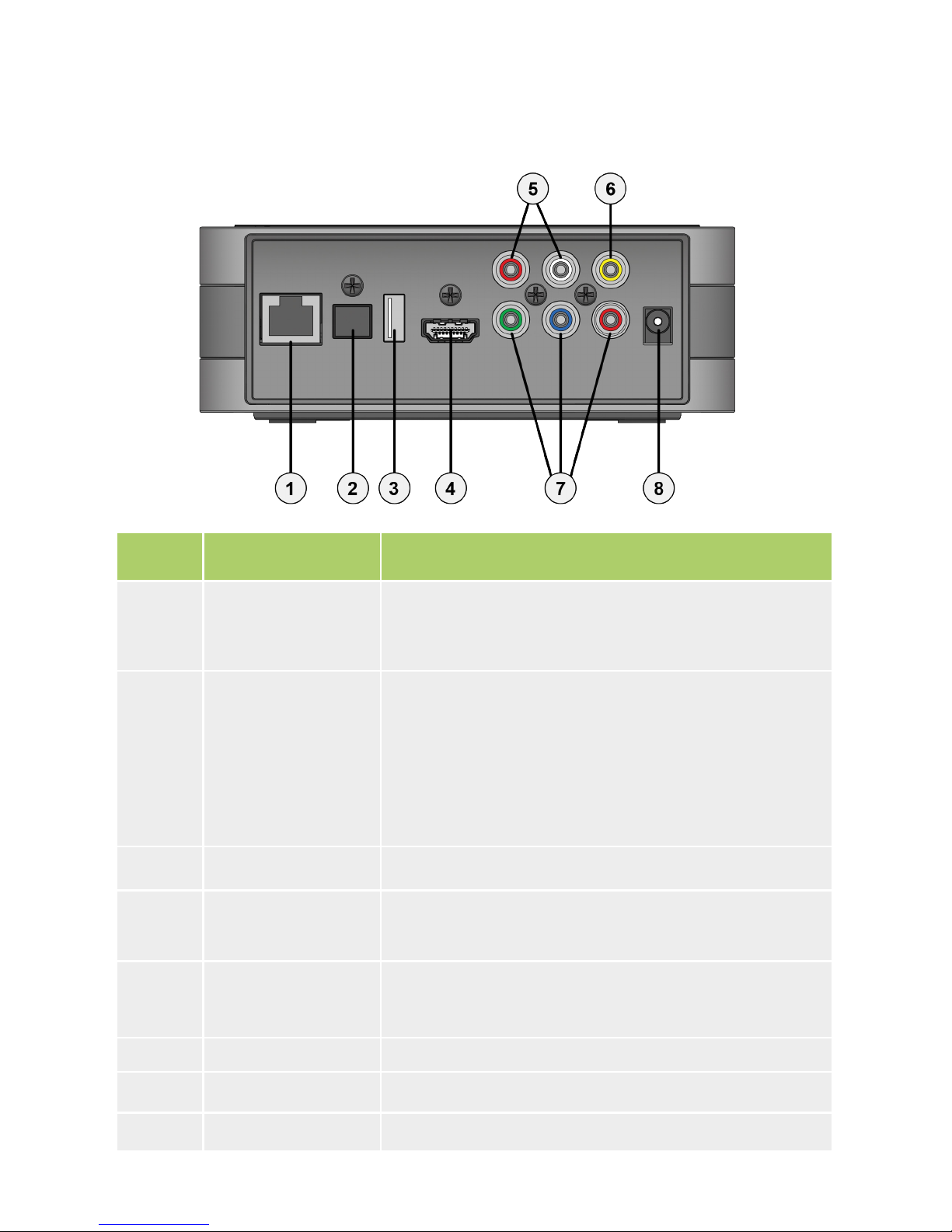
Back Panel
Number Slot Purpose
1 LAN
Ethernet port 10/100 Mbit/s for the connection to a
network device (the service provider’s equipment or
Internet router).
2 S/PDIF
Optical audio output to audio receiver or speakers of
the PCM or Dolby Digital 5.1 digital audio format.
It is possible to switch the output mode from the
application’s menu, if your service provider provides
this feature.
3 USB USB 2.0 port for the connection to external devices.
4HDMI (Нет в SML-
272 SD)
Audio+video output of high denition for the connec-
tion to a TV set or AV receiver.
5 R-Audio-L
Stereo audio output.
R - Right channel.
L - Left channel.
6Video Composite video output.
7 Y, Pb, Pr Component video output.
8 DC 12V Power adapter slot.
Indicators and Slots
10
Ce manuel convient aux modèles suivants
2
Table des matières
Autres manuels SmartLabs Décodeur