
smartheart 19-109 Manuel utilisateur

Digital Measuring Cup Scale
Model # 19-109
INSTRUCTION MANUAL
ENGLISH AND SPANISH
Please read this instruction manual
completely before operating this device.
2 • ENGLISH
Introduction .....................................................................................3
Care & Safety Information.................................................................3
Product Overview ............................................................................4
Battery Installation............................................................................5
Instructions for Use ....................................................................... 6-7
Care and Maintenance.....................................................................8
Device & Label Symbols....................................................................8
Troubleshooting & Error Codes ..........................................................9
FCC Information ............................................................................10
Specications ................................................................................11
Warranty ......................................................................................12
Instrucciones en Español ............................................................ 13-24
INDEX
SmartHeart™
Manufactured for
Veridian Healthcare
1175 Lakeside Drive
Gurnee, IL 60031
Made in China
#93-1525 06/21
©2021 Veridian Healthcare, LLC
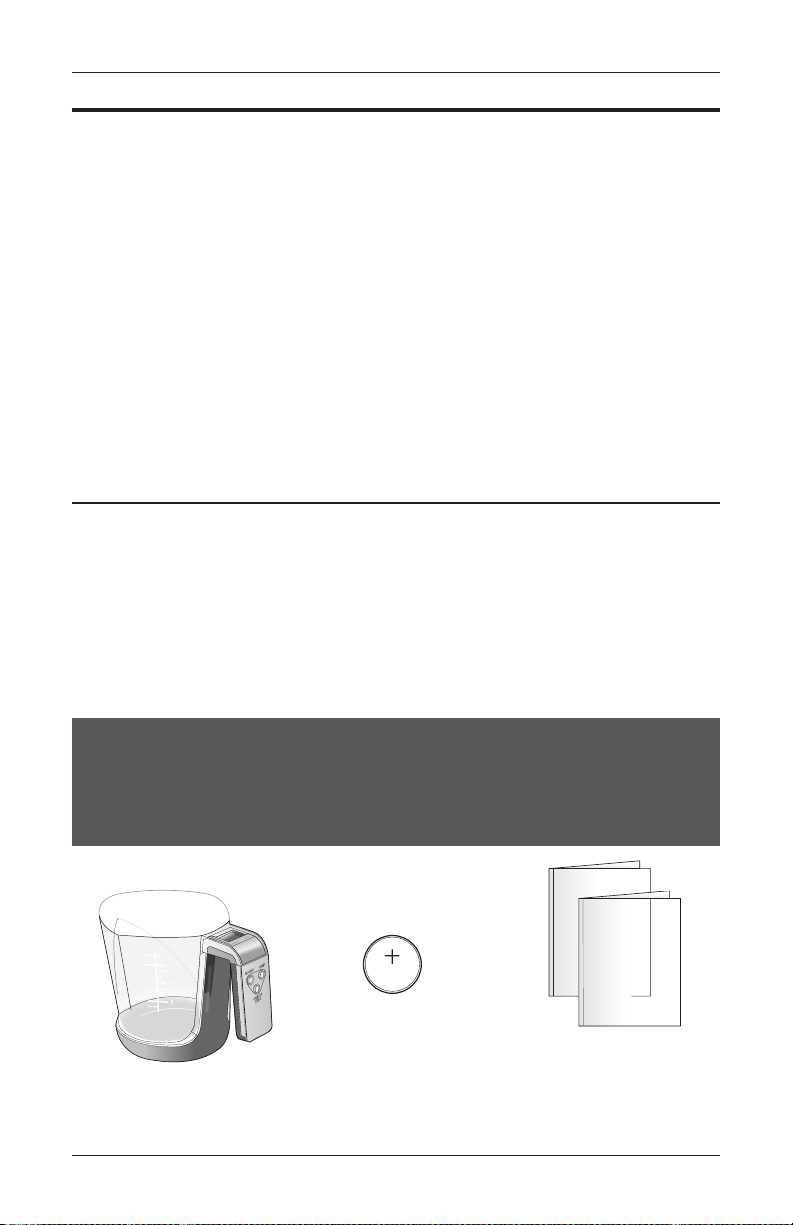
One (1) CR2032
Battery,
Preinstalled Instruction Manual
STOP!
PLEASE ENSURE YOU HAVE ALL OF THE
FOLLOWING COMPONENTS BEFORE USING
YOUR DIGITAL FOOD SCALE
Digital Scale
Toll-Free
Customer Care Help Line:
1-866-326-1313
Monday – Friday
8:30 a.m. – 4:30 p.m. CST
www.veridianhealthcare.com

ENGLISH • 3
CARE & SAFETY INFORMATION
NOTE: Read all instructions carefully before use. The following basic precautions are needed
when using an electrical product.
CAUTION: Failure to read and observe all precautions could result in equipment damage.
GENERAL CAUTIONS AND WARNINGS
• Do not drop the scale; take care not to drop items onto the scale.
• If any abnormality occurs, discontinue use until the unit has been examined and
repaired.
• Do not disassemble the unit or attempt to repair it; doing so may result in results error
and will void manufacturer warranty.
• Always follow local regulations for proper disposal of the digital scale and batteries.
OPERATING CAUTIONS AND WARNINGS
• Operation outside of stated operating temperature may result in measurement error or
device malfunction; operation environment temperature is: 41°F – 95°F (5°C – 35°C);
Humidity: ≤75%RH max.
• Read and follow the Instructions For Use section of this manual for safe use of this
device.
STORAGE CAUTIONS AND WARNINGS
• Avoid storage near water, moisture or excessive humidity.
• Avoid storage in extreme temperatures, direct sunlight, dust or salt air.
• Keep out of the reach of infants, children or incapacitated persons.
CLEANING CAUTIONS AND WARNINGS
• Never immerse the unit in water to clean as it may damage the unit.
• Follow the ‘Cleaning and Maintenance’ portion of this manual for instruction on how to
clean and care for your scale.
INTRODUCTION
Thank you for purchasing a SmartHeart Digital Measuring Cup Scale.
Please read this instruction manual completely before using your unit to
ensure safe and effective use, as well as long life of the product.

4 • ENGLISH
PRODUCT OVERVIEW
DETAILS OF THE DIGITAL
DISPLAY SCREEN AND
INTERPRETATION OF THE
SYMBOLS ARE INCLUDED
THROUGHOUT THIS MANUAL.
ON/OFF/
ZERO*
*for use with
measuring multiple
foods
UNIT
Measuring Unit
selection — g,
Lbs, ml, cup
FIVE MODES:
• Weight (default at POWER
ON)
• Volume — Water
• Volume — Milk
• Volume — Oil
• Volume — Flour
IMPERIAL & METRIC
UNIT CONVERSIONS:
• Weight — grams; lbs oz.
• Volume — . oz; cup
PITCHER
Clear, removable
with graduated
measurement marks
BASE
Measuring base; battery
compartment in handle
MODE
Measurement
Type selection
—weight, volume
water, volume
milk, volume oil,
volume our
ENGLISH • 5
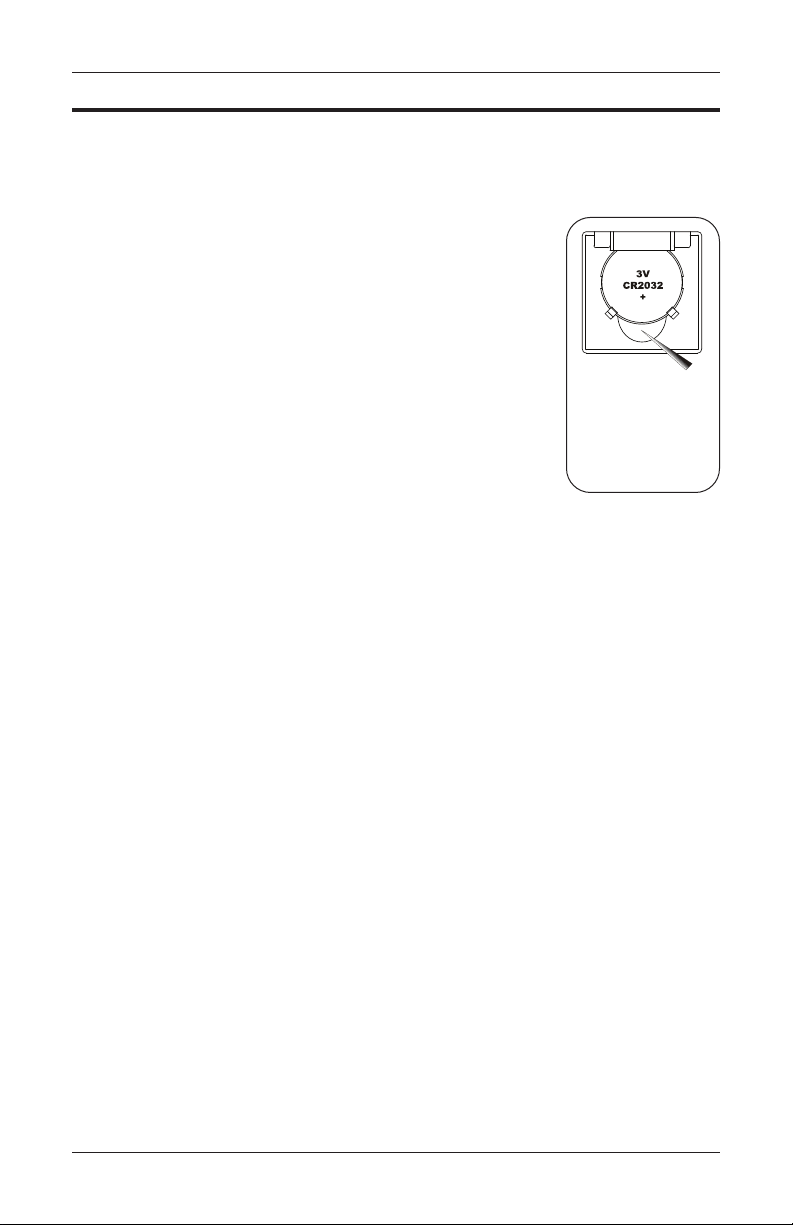
This unit includes 1 CR2032 battery, preinstalled.
The battery compartment is located under the handle of the base
unit..
Before rst use, open the battery compartment and remove the plastic
insulating strips.
It is necessary to replace the battery when the display does not turn
on or the digital image fades.
1. Carefully remove the battery compartment cover.
2. Insert or replace 1 CR2032 battery into the compartment, the
positive (+) is up. Always use new batteries.
3. Replace the battery cover.
4. Dispose of batteries according to local disposal and recycling
regulations.
It is recommended to remove the batteries if the unit will not be used
for an extended period of time.
BATTERY INSTALLATION
A sharp object such
as a paperclip is
necessary to pop
out the battery from
under the battery
bafe

6 • ENGLISH
INSTRUCTIONS FOR USE
NOTE:
ALWAYS POWER ON UNIT PRIOR TO ADDING FOOD OR LIQUID
FOR MEASUREMENT; FAILURE TO DO SO MEANS THE SCALE
WILL ALSO CALCULATE THE PLASTIC PITCHER WEIGHT INTO THE
RESULTS.
TIPS:
• Always use on a solid, at surface.
• Direct weight (non liquid) can be used with the measuring pitcher
or directly on the platform. Follow instructions in the following
sections to ensure accuracy.
• When pouring from measuring cup, remove the clear cup from the
scale body; or hold both pieces rmly with your thumb to avoid
spilling.
DIRECT ITEM WEIGHT:
1. Press ON/OFF/ZERO to turn the scale ON.
2. The display will show ‘0’ (weight of zero); press ‘UNIT’
to select the desired measurement mode: lbs:oz
(pounds:ounces) or g(grams).
3. Add your item to be weighed onto the scale.
4. In moments, the scale will show the weight of the object;
take care not to touch the food being weighed or other-
wise touch the scale during measurement.
5. To turn off, press and hold ON/OFF/ZERO for 3
seconds; the scale will turn off after approximately 30
seconds of non use.

ENGLISH • 7
TARE WEIGHT / WEIGHT OF MULTIPLE FOODS:
Tare feature allows you add combine different food types for measuring on the scale.
1. Follow the proceeding steps for weight or volume modes.
2. After adding rst food and getting the reading, press ‘ON/OFF/ZERO’ to reset the
display to ‘0’.
3. The display will briey show ‘----’ and then ‘0’ with the Ticon.
4. Add the additional food to be measured and note the results, not including the weight
of the previous measurment load.
5. Repeat for additional ingredients as needed; do not excee total scale capacity (xx).
6. The scale will turn off after approximately 30 seconds of non use.
INSTRUCTIONS FOR USE
NOTE:
ALWAYS POWER ON UNIT PRIOR TO ADD
ING FOOD OR LIQUID FOR MEASUREMENT;
FAILURE TO DO SO MEANS THE SCALE WILL
ALSO CALCULATE THE PLASTIC PITCHER
WEIGHT INTO THE RESULTS.
VOLUME MODE:
Used for measuring liquid volume
1. Press ON/OFF/ZERO to turn the scale ON.
2. The display will show ‘0’ (weight of zero); press
‘MODE’ to select the chosen ingredient - Milk, Water,
Oil, Flour.
3. Press UNIT to select the desired measurement unit
- . oz (uid ounces) or CUP.
Flour selection will default to CUP only.
4. Add your item to be measured into the pitcher.
5. In moments, the scale will show the weight of the object;
take care not to touch the food being weighed or other-
wise touch the scale during measurement.
6. To turn off, press and hold ON/OFF/ZERO for 3
seconds; the scale will turn off after approximately 30
seconds of non use.

8 • ENGLISH
CARE & MAINTENANCE
Use common sense caution when cleaning an electronic device.
• The scale pitcher may be handwashed.
• The scale base may be dusted with a soft cloth, or wiped down with a damp cloth.
• Never get excessively wet or submerge the scale base in water.
• Never use propellant, abrasive or other chemicals on the scale.
• Do not disassemble this device; doing so may void the manufacturer’s warranty.
• Follow the Operating and Storage Temperature ranges as indicated in the Specications
section of this manual.
• Follow the indicated weight range capacity; weight in excess of the stated range may
damage the unit.
• It is recommended that the battery be removed if the scale will not be used for an
extended period of time.
These symbols may appear on your device, instructions or packaging and may
vary by make and model.
Read This Manual—All included manuals should be read prior to rst
use
Warning—Symbol indicates a warning, prohibition or mandatory
action that mitigates a risk that is not necessarily obvious to the device
operator
Environment Protection—dispose of this product properly; consult with
your local recycling ordinances for proper recycling and disposal
Keep Dry—This device should be kept dry; never submerge the unit or
cuff. Consult with the Care and Maintenance section of this manual for
information on cleaning your monitor
Symbol Meaning
2012
2012
DEVICE & LABEL SYMBOLS

ENGLISH • 9
TROUBLESHOOTING & ERROR CODES
ERROR
Overload / too much
weight is on the scale. The
unit will shut off.
Low battery
This scale is not suitable for weight in
excess of 3kg / 6.6 lbs; cease using
this scale
Replace the battery with new, unused
batteries
DESCRIPTION SOLUTION
PROBLEM
Battery is not installed or
installed incorrectly; battery
is depleted.
Batteries are low
Blank LCD display
with the device is
powered on
The scale activates
but shuts off imme-
diately
Install 1 CR2032 battery if not already
installed; check the polarity of the bat-
tery; install new battery
Replace the batteries with new, unused
batteries
DESCRIPTION SOLUTION

10 • ENGLISH
FCC INFORMATION FCC
IMPORTANT INFORMATION REQUIRED BY THE FCC
This device complies with Part 15 of the FCC Rules. Operation is
subject to the following two conditions: (1) this device may not cause
harmful interference; and (2) this device must accept any interference
received, including interference that may cause undesirable opera-
tion.
NOTE: This equipment has been tested and found to comply with the
limits for a Class B digital device, pursuant to Part 15 of the FCC
Rules. These limits are designed to provide reasonable protection
against harmful interference in a residential installation. This equip-
ment generates, uses, and can radiate radio frequency energy, and
if not installed and used in accordance with the instructions, may
cause harmful interference to radio communications. However,
there is no guarantee that interference will not occur in a particular
installation. If this equipment does cause harmful interference to
radio or television reception, which can be determined by turning
the equipment off and on, the user is encouraged to try to correct the
interference by one or more of the following measures:
• Reorient or relocate the receiving antenna.
• Increase the separation between the equipment and receiver.
• Connect the equipment into an outlet on a circuit different from
that to which the receiver is connected.
• Consult the dealer or an experienced radio/TV technician for
help.
CAUTION: Changes or modications not expressly approved by the
party responsible for compliance could void the user’s authority to
operate the equipment.
Table des matières
Langues :
Autres manuels smartheart Échelle


