
SMART Studio HD Manuel utilisateur

USER MANUAL
1. Introduction
Congratulations on choosing the Smart Studio Bluetooth Speaker. Please read manual very carefully so that you can
operate all features and functions to get the best performance. The unit is designed for portable convenience, super
bass sound quality and also combines multi functions into one.
2. Caution
a. Please do use or store the unit in high temperature or hazardous location:
b. Please do not expose the unit to rain.
c. Please do not disassemble, repair or modify the unit
d. The unit comes with a rechargeable battery so please do not throw or put in fire to avoid explosion
e. Please take out battery if the device is not going to be used for a long time.
f. Please do not listen to music in high volume for long time as it may cause damage to your ears.
g. Low battery power may result in reduction in bluetooth transmission distance or disconnection.
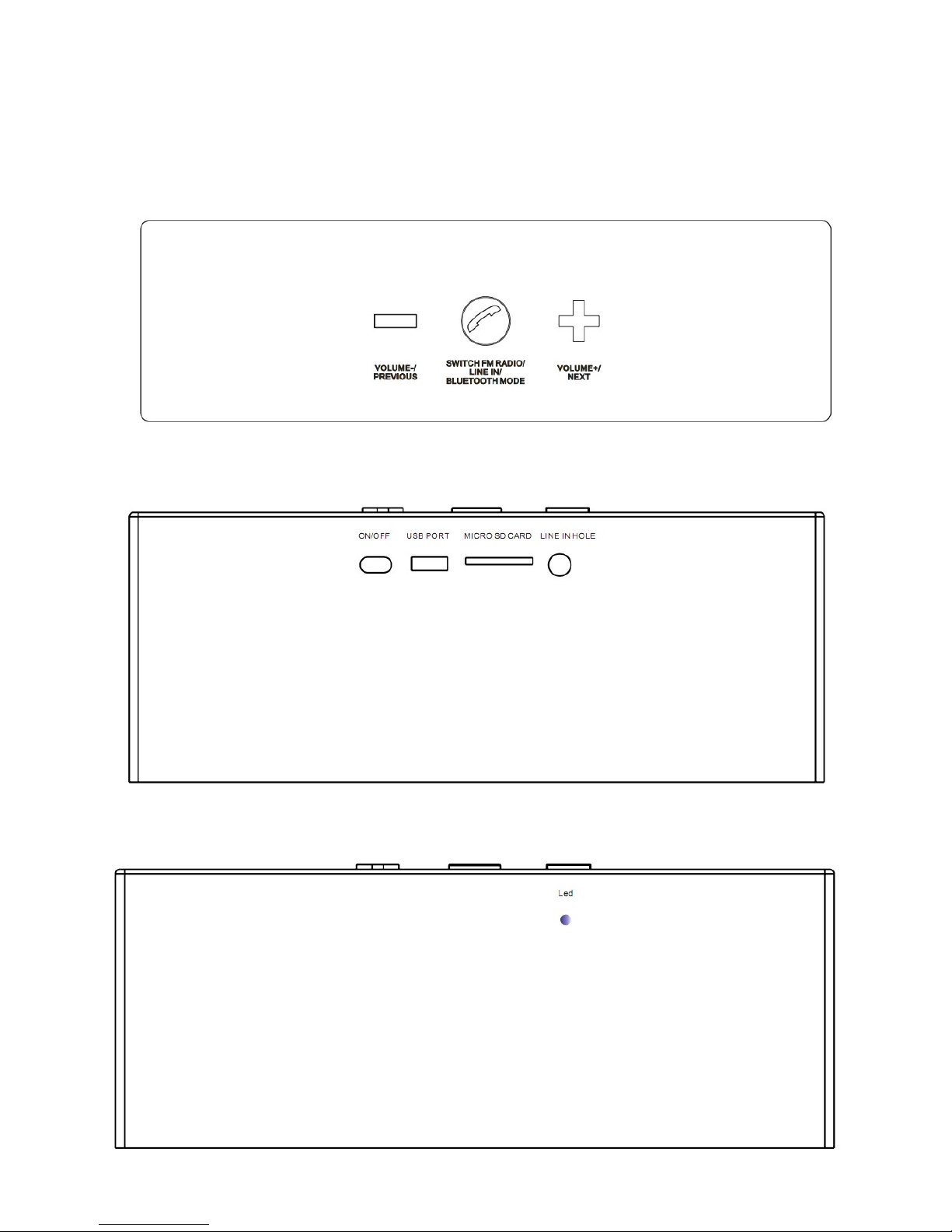
3. Product Diagram

4. General Functions
: Volume Increase, Next Song/Channel
``: Long press to Switch to Bluetooth, FM radio and Aux- mode
Short press to Play/ Pause or Answer/ End the call. In Music Play Mode ,short press for Pause. Short press
to Pick up or End call when the mobile is connected through Bluetooth.
` `: Volume Decrease, Previous Song /Channel
ON/OFF switch: Push Button to right for Power On and Left for Power Off
USB PORT: Use the provided USB cable for charging the unit with DC 5V charger or Connect to Computer
Micro SD card slot: Insert MicroSD card with songs into the Slot and it automatically starts playing.(Low quality
recording or MicroSD cards may not function).
Line In /Aux Input Slot: Use the provided Aux -In cable to connect your Mobile ,Tablet, ipad, Mp3 player etc to play
music.
LED light: Blinking Blue light indicates Switch On, Blue light Indicates Pause, Red Light indicates Charging.
5. Product features:
Model no:SS -01
Bluetooth version:Bluetooth V2.1+EDR
Transmission distance:≤10M (This may vary according to environment and connected Bluetooth device )
USB charge voltage:DC 5V
Lithium battery:BL 5C Lithium changeable battery, 1000mAh
Output power:3W×2
Frequency:60Hz-20KHz
sensitivity:80db±2db
Signal to noise ratio:≥95dB
Unit size:156×60×46MM
Unit weight: 230g
6. Components
1. Unit: 1pc
2. 3.5 Aux cable: 1pc
3.USB power cable: 1pc
4.Manual : 1pc
5.Warranty card: 1pc
7. Operating the Speaker.
A. Power On Status:
Slide the Power On switch behind the unit to hear voice prompt “Bluetooth Pairing Mode” and blue light starts
blinking.
B. Power Off :
Slide the Power On Switch to the opposite direction and the speaker shuts down.

C. Bluetooth Pairing:
If the speaker has never been paired with a Bluetooth device before, you need to follow the instructions below to
pair speaker with your bluetooth device.
1.After hearing the voice prompt” Bluetooth Pairing Mode”, the speaker is ready to pair with your bluetooth device
and Blue LED light will be blinking fast.
2. Activate bluetooth on your compatible device and set it to search for compatible devices.
3. Select the speaker “Smart Studio” from the list of found devices.
Note: If the speaker is already connected to another Bluetooth device then the speaker will not appear in search
list and you need to disconnect the already paired bluetooth device from the speaker and search again.
4. If your device asks for a passkey, enter digits “0000” and press “OK”.(Varies depending on the bluetooth
device manufacturers, model and software version)
5. If the pairing is successful, the speaker will have Voice Prompt “Bluetooth Device is Connected” and the
Blue LED light indicator will flash once every 2 seconds and your speaker is ready to play music and receive calls
from mobile.
Note: If the speaker has been paired to the bluetooth device before you need to follow the pairing instructions
below to connect the speaker to the bluetooth device.
1. Activate bluetooth on your compatible device and put the speaker on “Bluetooth Mode” and the speaker will
connect automatically to the compatible device and you will hear a Voice Prompt “Bluetooth Device is
Connected”.
D. Playing Music in Bluetooth Mode:
After bluetooth is connected successfully , the speaker will play music when music is played from the device.
Short press` ` to pause music, and short press ` ` again to resume music.
Short press ` + ` for next song and short press `--` for next song
Long press `+` to increase volume and short press` --` to decrease volume
E. Using the Speaker as Hands-free Bluetooth Speaker Phone
When your device is paired to the speaker and if there is an incoming call or outgoing call the speaker will shift
from music mode to call mode automatically. Press to pick up the call. After completing the call Press “ ”
to hang up. The music will automatically resume after the call is disconnected.
F. Using the Speaker in AUX-In Mode :
Plug one end of the 3.5 mm Audio Cable into the headphone or line out of your player and plug the other end of
the cable to the Aux-In jack of the Speaker.
Long press “ ” to hear Voice Prompt “Aux Input Mode”, and then play Music from your device .
Short press “ ” to Pause Music and Short press “ ” to Play Music again.
Short press ` + ` for Next Track & Short press `--` for Previous Track.
Long press `+` to Increase Volume and Short press` --` to Decrease Volume
G. Playing speaker in FM Mode:
Long press to turn on “FM Radio Mode” & Voice Prompt “Radio mode” will be heard.
Short press to start receiving Radio Station and Radio will search Channel automatically.
Short press`+` or `-` button to choose Channel to play and select the Channel.
Short press ` ` for searching Channel again ( Please insert the provided USB cable as antenna when using
Radio Function).

H. NFC (Near Field Communication) Mode(Only Applicable to Speakers with NFC feature)
Switch On the speaker and turn to bluetooth Mode and activate “NFC” in your mobile. Touch the mobile on the
“NFC” sensitive area of the speaker( Left top corner of the speaker) and the mobile will get connected to the
bluetooth speaker and the speaker is ready to use with the mobile.
8. Speaker Charging
The speaker has got a Built in rechargeable battery. Connect the provided USB cable to computer or into DC 5V
power adaptor. The LED light will turn to Red color when the speaker is being charged and when speaker is fully
charged, the Red LED will turn off. (The charge time is approximately 5 hours). Unplug the Speaker from the Power
device once the speaker is fully charged.
9. Compatibility
Wireless:With BLUETOOTH V2.1+EDR Including A2DP, AVRCP, HFP/HSP,OPP, PBAP
10. Trouble Shooting Guide
Should you experience any difficulty while using the speaker , Please refer to the following Chart.
Fault Reason Solution
Not Charging
The USB power adaptor (not included) is not plugged
into a wall outlet or the USB cable (included) is not
plugged into the mini USB jack behind the speaker.
Plug the USB power adaptor (not included) into a wall outlet and plug
the USB cable (included) into the mini USB jack of the speaker.
Wall outlet is not functioning.
Plug another device into the same outlet to confirm the outlet is
working.
Computer USB port is not function. Make sure your computer power is turned on and try another USB
port.
No Sound
The speaker battery is dead. Recharge the speaker
The speaker is not linked to the cell phone. Go through “Speaker Operations” process to connect the speaker.
Volume set is too low. Increase the volume of your device.
No Audio Signal via
Bluetooth Connection
Speaker is not paired to the audio source. Check whether a connection exists. If necessary pair the speaker
again to the audio source
Volume too low Increase the volume on the speaker
Increase the volume on the audio source.
Speaker cannot be Connected
Pairing does not work Check whether the audio source supports the A2DP protocol
Audio source is switched off Switch on the audio source
Bluetooth is switched off at the audio source. Switch on the Bluetooth function in the audio source.
Bluetooth version is not supported. Use a different playback unit.
Poor Sound quality from a
Bluetooth device
Bluetooth device is almost out of range of the speaker Move your Bluetooth device closer to the speaker
The right to make technical and design modifications in the course of Continuous product development remains reserved. This device has been tested according to all
relevant current CE guidelines, such as electromagnetic compatibility and low voltage directives, and has been constructed in accordance with the latest safety
regulations.
Table des matières
Autres manuels SMART Intervenants


Manuels Intervenants populaires d'autres marques


Bowers & Wilkins
Bowers & Wilkins 4 Manuel utilisateur

Sonance
Sonance SONOS OUTDOOR Series Manuel utilisateur

Electro-Voice
Electro-Voice EVID FM4.2 Manuel utilisateur

Pioneer
Pioneer XW-HTD630 Manuel utilisateur

Onn
Onn BWA16AA002 Manuel utilisateur

HP
HP GL313AA - USB Speakers PC Multimedia Manuel utilisateur