USER GUIDE - SHORT
SMART METER CORPORATION
368 New Hempstead Road, Suite 309, New City, NY 10956 1-844-IGLUCOS (1-844-445-8267)
www.iGlucose.com
Performing Blood Tests
To perform the blood test:
1. Wash your hands in warm water, using soap. Rinse and dry completely.
2. Select the appropriate test mode: “Before Meal” or “After Meal” in one of the following ways:
Using the menu:
a. Press the “up” (Menu) button on the device. The Menu appears.
b. Select the “Test Mode” option.
c. Scroll to the “Before Meal” or “After Meal” option as required.
d. Press the middle button. A confirmation message appears.
Using the middle button from the home screen (when no menu is selected):
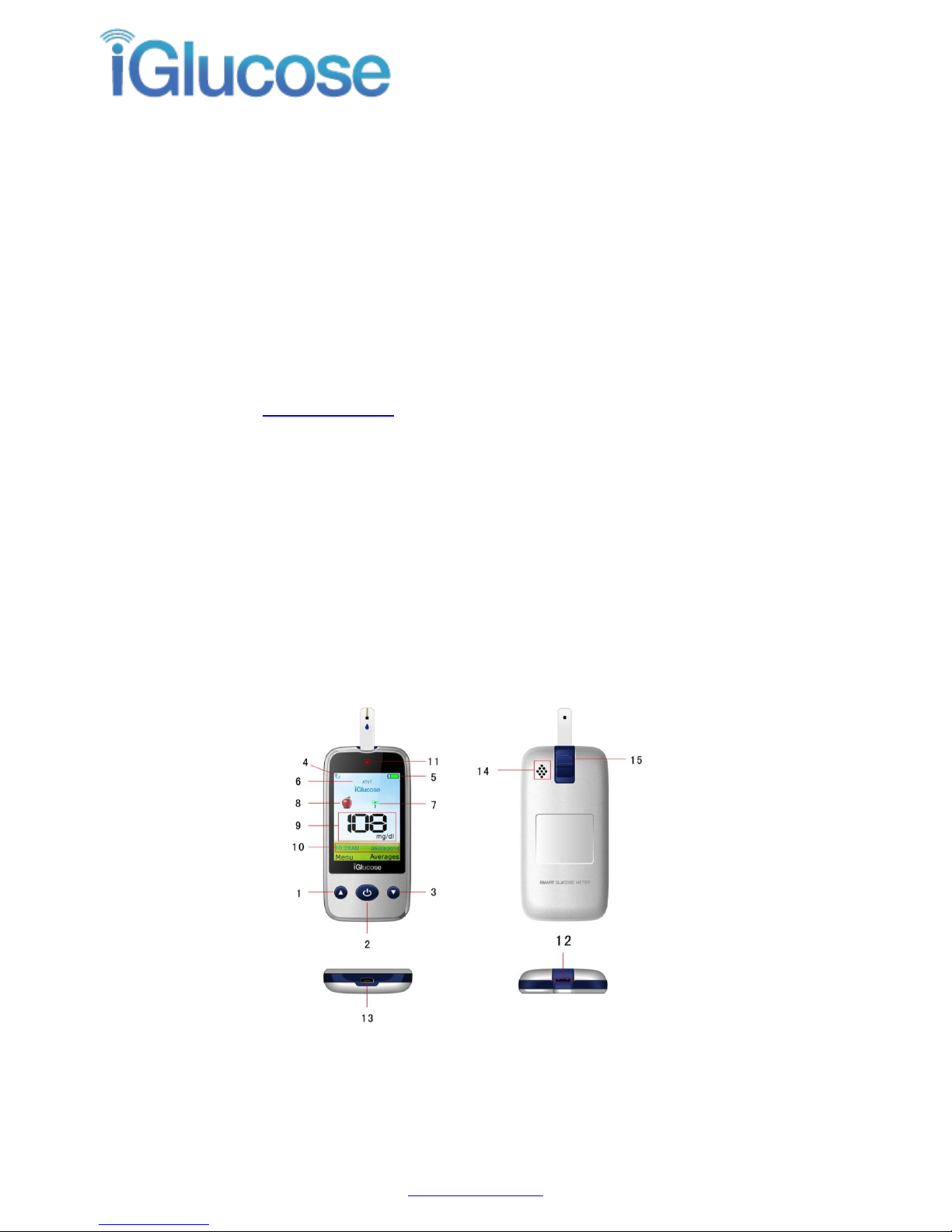
a. Press the middle button on the device to toggle the Test Mode icon (#8 in Figure 1
above) on the display.
b. For “Before Meal” toggle to the whole apple icon; for “After Meal” toggle to the
partially eaten apple icon. Do not use the “Control Solution” setting (represented by the
solution bottle icon) for a blood test, as the result will not be calculated into averages.
Important: If the test is performed within two hours after a meal, use the “After Meal” setting;
otherwise, use the “Before Meal” setting.
3. Remove a new test strip from the vial. Be sure to replace the vial cap tightly after removing the test
strip.
4. Use a safety lancet or lancing device to prick your finger and draw a drop of blood. To avoid the
transmission of blood borne pathogens, use the lancing device once for a single patient only. Do not
share it with anyone else, including other family members.
5. Insert a test strip, arrow side facing up, into the strip slot of the device. A message “Strip inserted”
and then “Apply a drop of blood” appears. Check if the code number on the meter matches the code on
the vial. If the two numbers match, you may begin blood testing. Otherwise insert a new one. If the code
number still doesn’t match, please contact customer support.
6. Hold the device upright and apply a drop of blood to the top front of the test strip, where several
black stripes are visible.
7. The test result will show in about five seconds and a “Glucose Value”number appears on the screen.
8. After a few seconds, the sending signal icon blinks as the test result is transmitted to the online
database. A message “Successfully Recorded” appears.