
Slican VPS-840P Manuel utilisateur
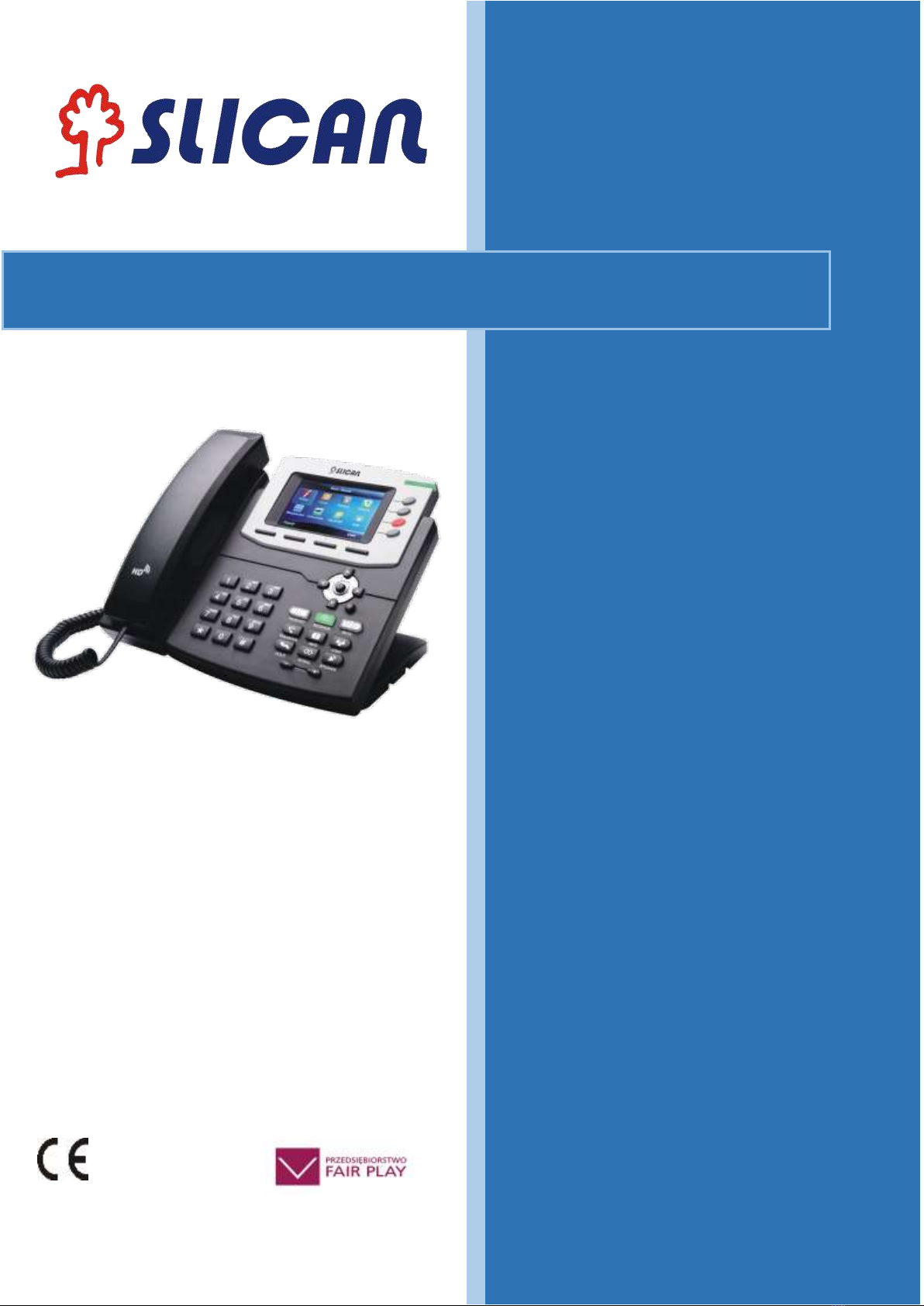
Instruction manual
Release 1.1
2016-06-24
IP Phone VPS-840P

2
INSTRUCTION MANUAL VPS-840P
Table of Contents
1. IP Phone VPS-840P............................................................................................... 5
1.1. Notice Information............................................................................................ 5
1.2 Packing List....................................................................................................... 6
2. Phone Installation................................................................................................ 8
2.1. Attach the Foot stand ....................................................................................... 8
2.2. Connect the Handset and optional Headset..................................................... 8
2.3. Connect the Network and Power...................................................................... 9
2.4.Initialization........................................................................................................ 9
3. Getting Familiar with Your Phone......................................................................... 11
3.1. Hardware Components Preview..................................................................... 11
3.2. Icon preview................................................................................................... 13
4. Phone Configuration............................................................................................. 15
4.1. Basic Features Configuration......................................................................... 15
4.2. Administrator Password ................................................................................. 17
4.3. Language ....................................................................................................... 18
4.4. Time and Date................................................................................................ 19
4.5. Screen Saver.................................................................................................. 21
4.6. Ring Tone....................................................................................................... 22
4.7. Ring volume ................................................................................................... 23
4.8. Directory –edit contact list ............................................................................. 24
4.9. Call log ........................................................................................................... 27
4.10. Network Configuration.................................................................................. 28
4.10.1. Configuration Internet port...................................................................... 28
4.10.2. Configuration PC port............................................................................. 29
5. Configuration VoIP Account.................................................................................. 29
5.1. Basic configuration VoIP Account ................................................................. 30
5.2. Advanced Configuration VoIP Account ......................................................... 30
5.3. Codecs........................................................................................................... 32

3
INSTRUCTION MANUAL VPS-840P
6. Basic Call Features............................................................................................... 33
6.1. Place a Call.................................................................................................... 33
6.2. End a Call....................................................................................................... 33
6.3. Receive a Call............................................................................................... 34
6.4. Redial a Call.................................................................................................. 35
6.5. Auto answer .................................................................................................. 35
6.6. Call Hold........................................................................................................ 35
6.7. Call Transfer................................................................................................... 36
6.8. Call Conference............................................................................................. 37
6.9. Call Forward................................................................................................... 39
6.10. Call Return - REDIAL ................................................................................... 41
6.11. Anonymous Call........................................................................................... 41
6.12. Call Mute...................................................................................................... 42
6.13. Do Not Disturb DND..................................................................................... 43
6.14. Key as Send................................................................................................. 43
6.15. No Key Entry Timeout .................................................................................. 43
6.16. Hot Line..................................................................................................... 44
7. Advanced Features............................................................................................... 46
7.1. Line ................................................................................................................ 46
7.2. Voice Message............................................................................................... 46
7.3. Intercom ......................................................................................................... 47
7.4. Speed Dial...................................................................................................... 48
7.5. Direct Pickup.................................................................................................. 49
7.6. Group Pickup.................................................................................................. 49
7.7. BLF(Busy Lamp Field).................................................................................... 50
7.8. Shared Line.................................................................................................... 51
7.9. Call Park......................................................................................................... 52
7.10. Paging.......................................................................................................... 52
7.11. DTMF ........................................................................................................... 53

4
INSTRUCTION MANUAL VPS-840P
7.12. Prefix............................................................................................................ 54
7.13. Action URL................................................................................................... 54
7.14. SMS ............................................................................................................. 55
7.15. Keypad Lock................................................................................................. 55
7.16. Setting LED status........................................................................................ 56
7.17. Dial plan ....................................................................................................... 56
7.18. Encrypted call handling - TLS/SRTP............................................................ 57
7.19. VLAN and QoS service ................................................................................ 58
7.20. Additional tools............................................................................................. 59
8. Management –Upgrade....................................................................................... 60
8.1. Start................................................................................................................ 60
8.2. Factory Reset................................................................................................. 60
8.3. Software update............................................................................................. 60
8.4. Download/restore configuration...................................................................... 61
8.5. Autoprovisioning HTTP/HTTPS...................................................................... 62
9. Troubleshooting.................................................................................................... 63
9.1. Why is the phone LCD screen blank? ............................................................ 63
9.2. Why does the phone display "Network Unavailable"?.................................... 63
9.3. Why can’t I get a dial tone? ............................................................................ 63
10. Annex ................................................................................................................. 64
10.1. Hardware Specifications............................................................................... 64
10.2. Technical Specifications............................................................................... 64

5
INSTRUCTION MANUAL VPS-840P
1. IP Phone VPS-840P
Thank you for purchasing the VPS-840P. It is an innovative enterprise-level Color IP
Phone. This device works like a traditional phone: You can make and receive calls
and use other functions specific to a regular phone.
This phone has other features data services that are unavailable in traditional
phones.
This manual contains information on the features and services available on the
device.
1.1. Notice Information
Before you connect and start using your phone, please read the following
information. They are important, the unit will operate in a safe and reliable.
Safety cautions
1. To use the power adapter that delivered with the phone. Other power adapters
may damage the phone.
2. The phone is only for indoor use. And also avoid in high humidity, water and some
other liquids.
3. Do not use the phone during thunderstorms.
Disposal of the phone
This symbol indicates that the product is classified as electrical or
electronic equipment and should not be disposed of with other
commercial or household waste at the end of its working life.
Cleaning
To clean the device, use an anti-static cloth. Please avoid cleaning liquids as they
might damage the surface or internal electronics of the phone.
„The manufacturer reserves the right to make changes to the
product
without prior notice.”
www.slican.pl
e-mail: [email protected]
6
INSTRUCTION MANUAL VPS-840P
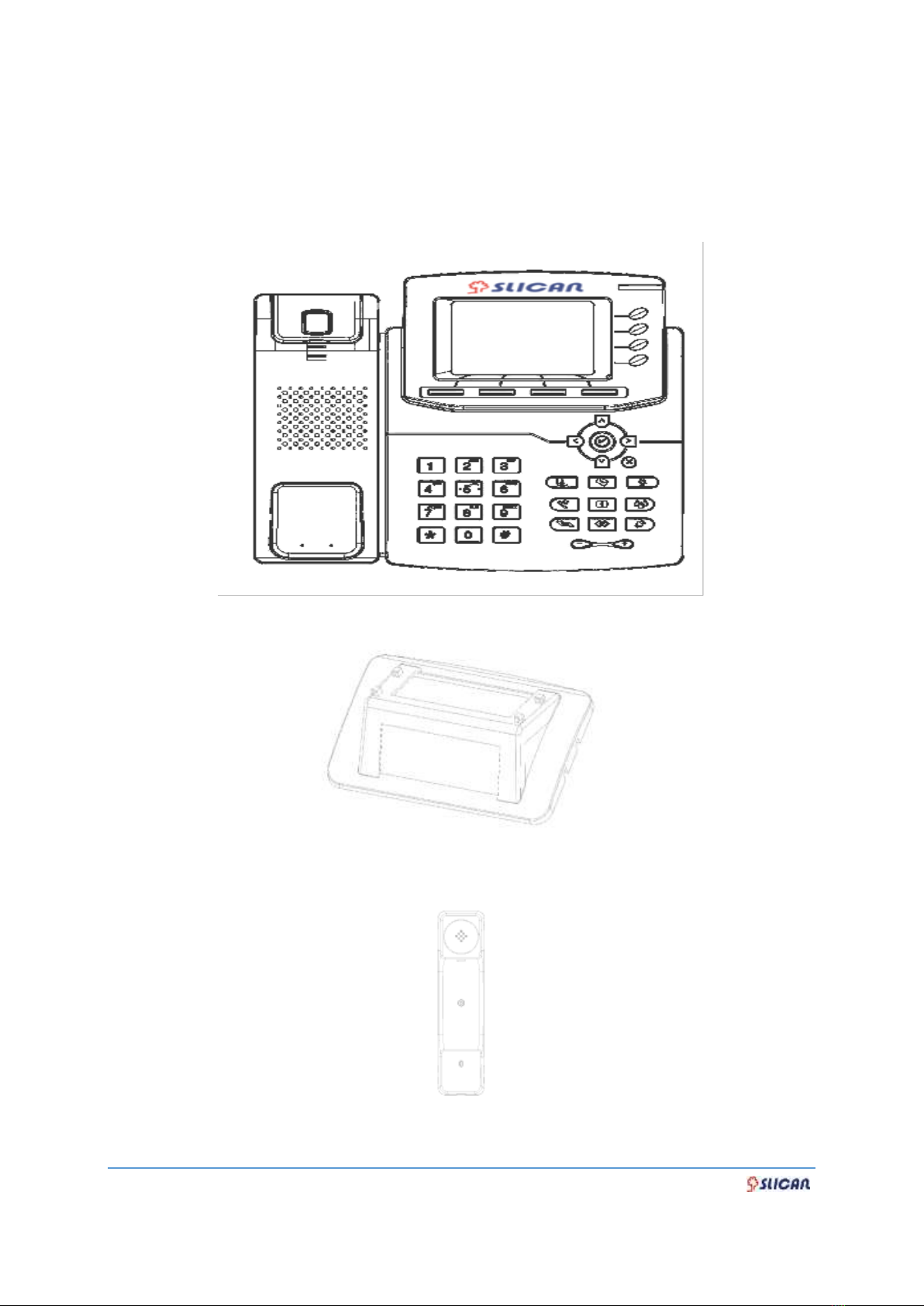
1.2 Packing List
The package contains the following parts, please check if all the items are not
missed:
PHONE
THE FOOTSTAND
HANDSET

7
INSTRUCTION MANUAL VPS-840P
HANDSET CORD
POWER ADAPTER
ETHERNET CABLE
QUICK INSTALLATION REFERENCE
8
INSTRUCTION MANUAL VPS-840P
2. Phone Installation
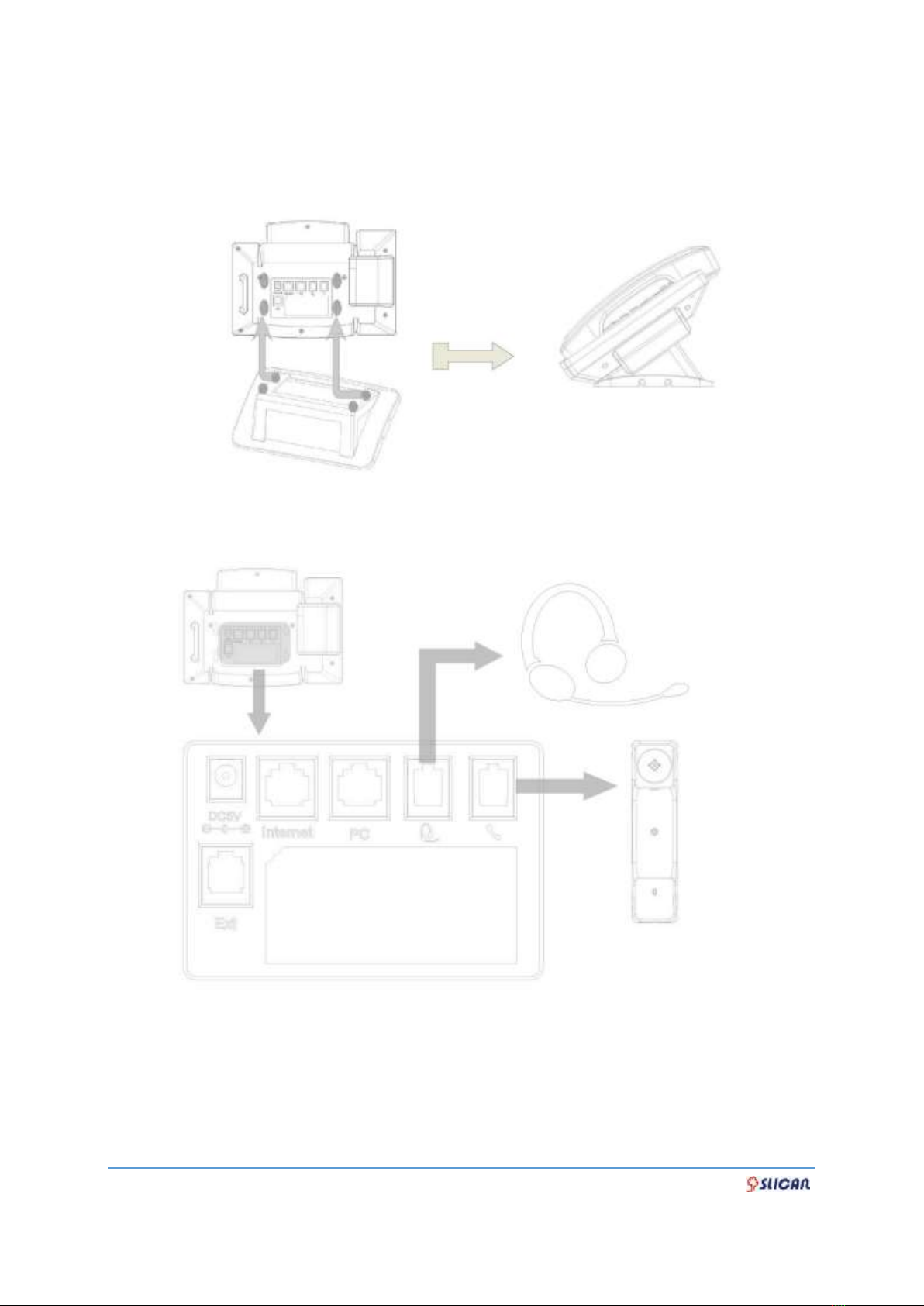
2.1. Attach the Foot stand
2.2. Connect the Handset and optional Headset.
9
INSTRUCTION MANUAL VPS-840P
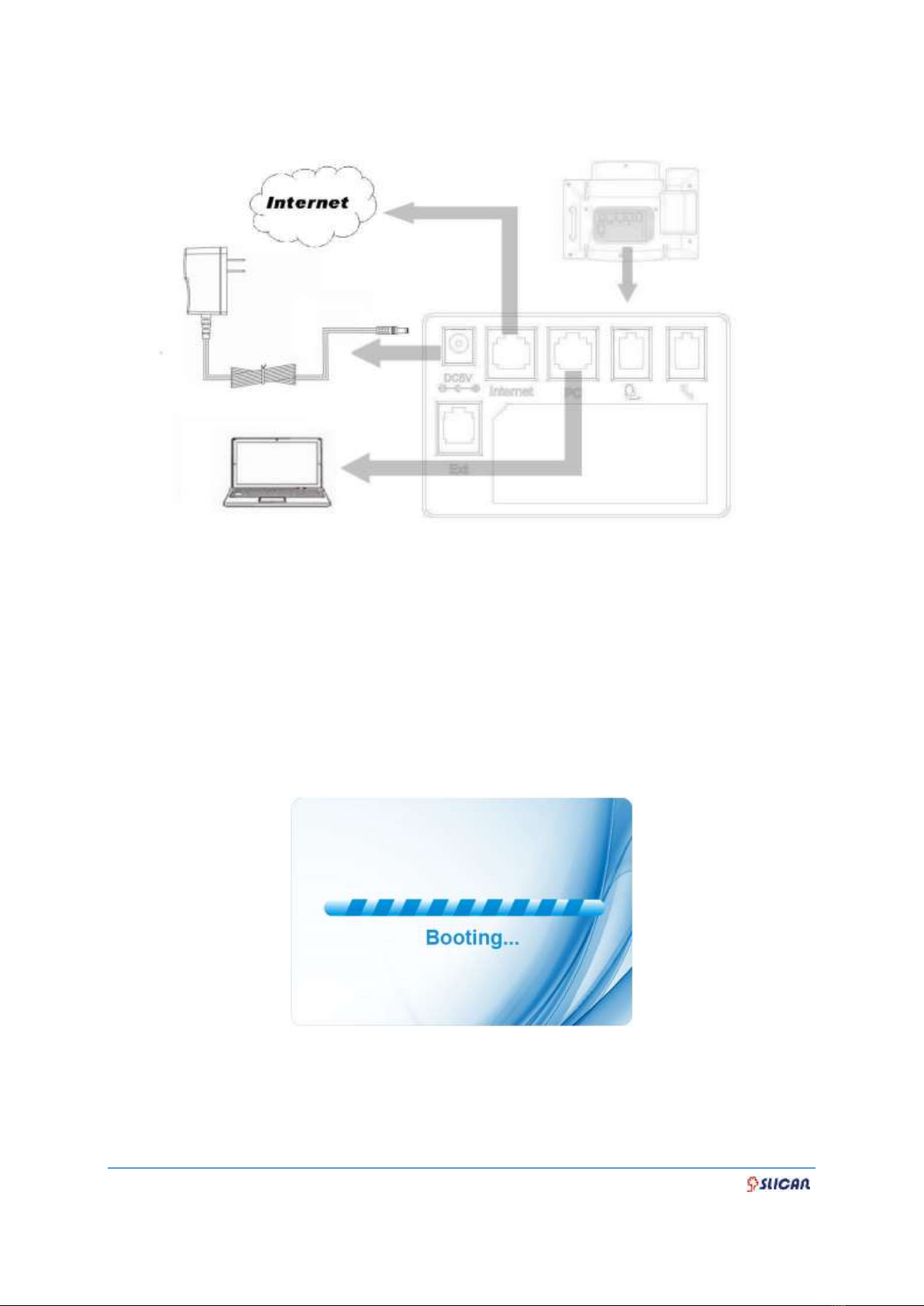
2.3. Connect the Network and Power
2.4.Initialization
After your phone has been powered up, the system boots up and performs the
following steps:
- automatic phone initialization
The phone finishes the initialization process by loading the saved configuration. The
phone LCD screen will display "Booting":
- and then show “Initializing “during the initialization process.

10
INSTRUCTION MANUAL VPS-840P
By default the phone attempts to contact a DHCP server in your network in order to
obtain its valid network settings, e.g. IP address, subnet mask, default gateway, DNS
server.
Table des matières
Autres manuels Slican Téléphone IP

Slican
Slican VPS-802P Manuel utilisateur

Slican
Slican VPS-802 Manuel utilisateur

Slican
Slican VPS-902P Manuel utilisateur

Slican
Slican VPS-912G Manuel utilisateur

Slican
Slican VPS-2000P Manuel utilisateur

Slican
Slican XL-2023ID Manuel utilisateur

Slican
Slican VPS-902P Manuel utilisateur

Slican
Slican VPS-804P Manuel utilisateur

Slican
Slican VPS-912G Manuel utilisateur


