Quick Set up Guide
1. Take out the Zone Shield unit and plug it in to any available wall outlet for power.
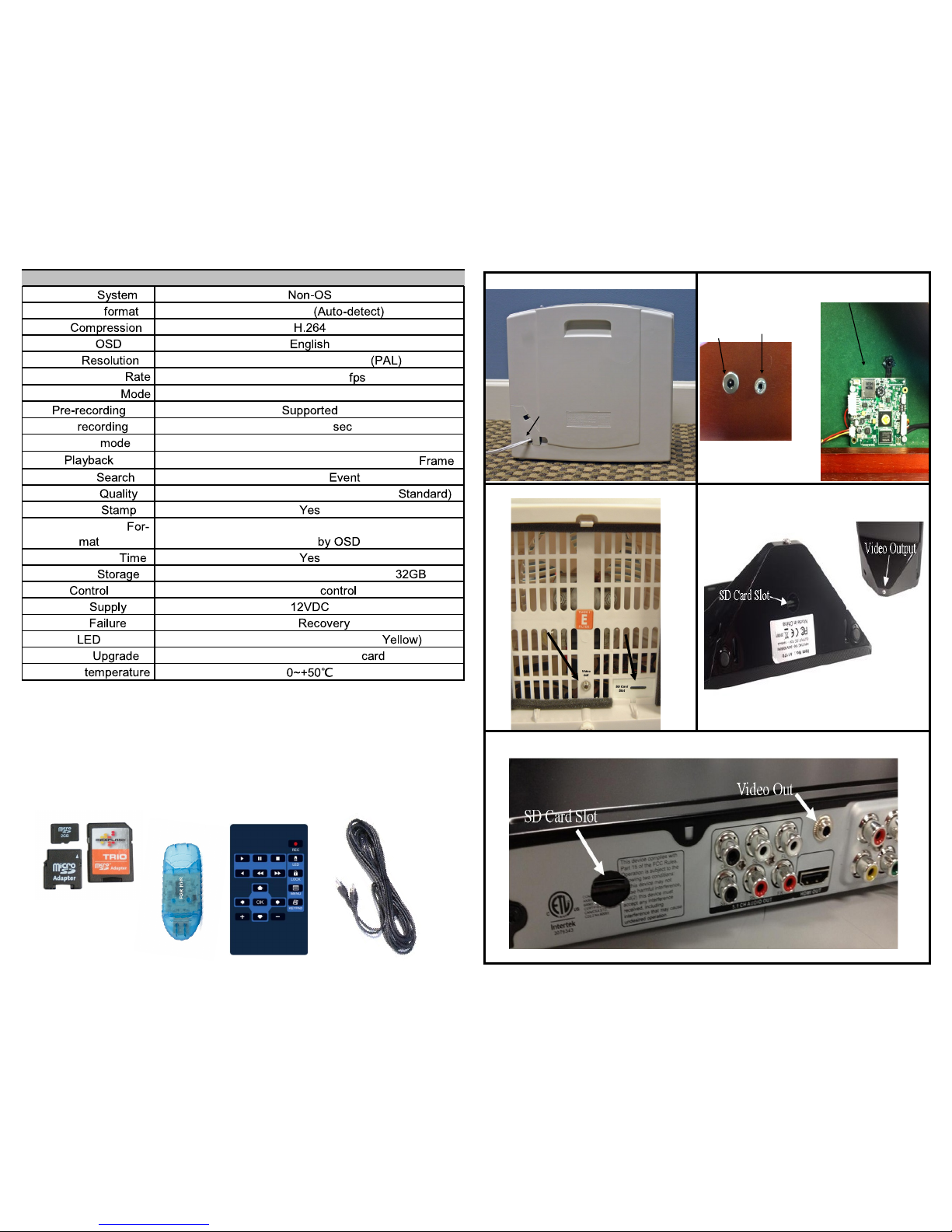
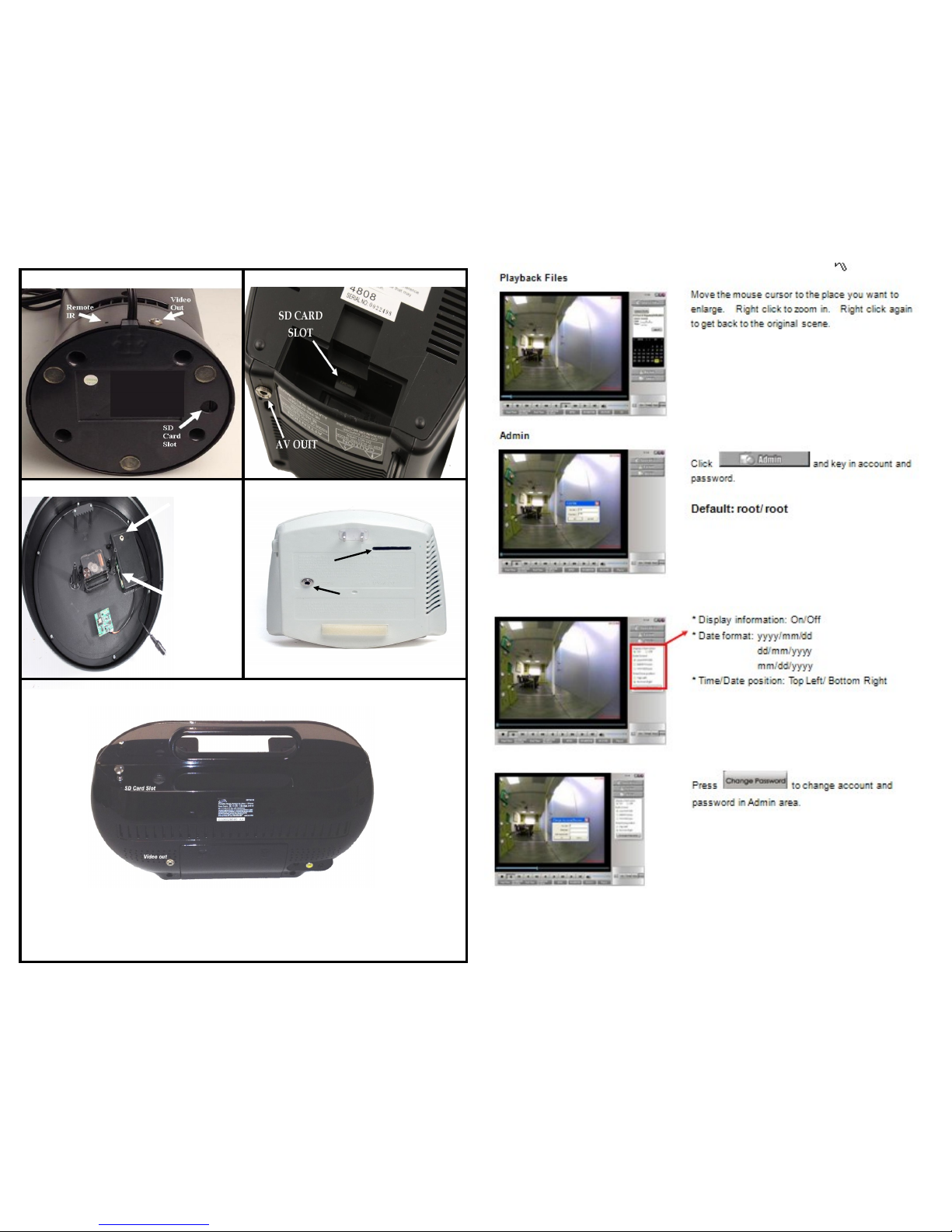
2. Facing the back of the unit locate the V ideo-Out Jack (see insert). Using the
included V ideo Cable plug the cable into the V ideo-Out Jack. Connect the other end
of the V ideo Cable to a Television video input jack.
3. Change the video input or auxiliary on your TV. The input select button is usually
located on the TV’s remote control or on the front panel of the TV itself. However,
some TV’s may require you to select the video input from the on-screen menu. Con-
sult the owner’s manual for the for specific instructions.
4. When you have a picture on your Television use the included remote and press the
Menu button to enter menu screen. (see diagram for remote functions on page 4)
5. Set up Time and Date using the enclosed remote. Go to Main Menu> Date/Time
Setup see page 4, then return to the main menu.
6. Find the SD card slot (see insert) and insert the SD card.
7. Set the unit in a desired location for video surveillance. Factory default settings
will record 24x7 based on motion detection.
Features and Functions of the Zone Shield DVR by SleuthGear™
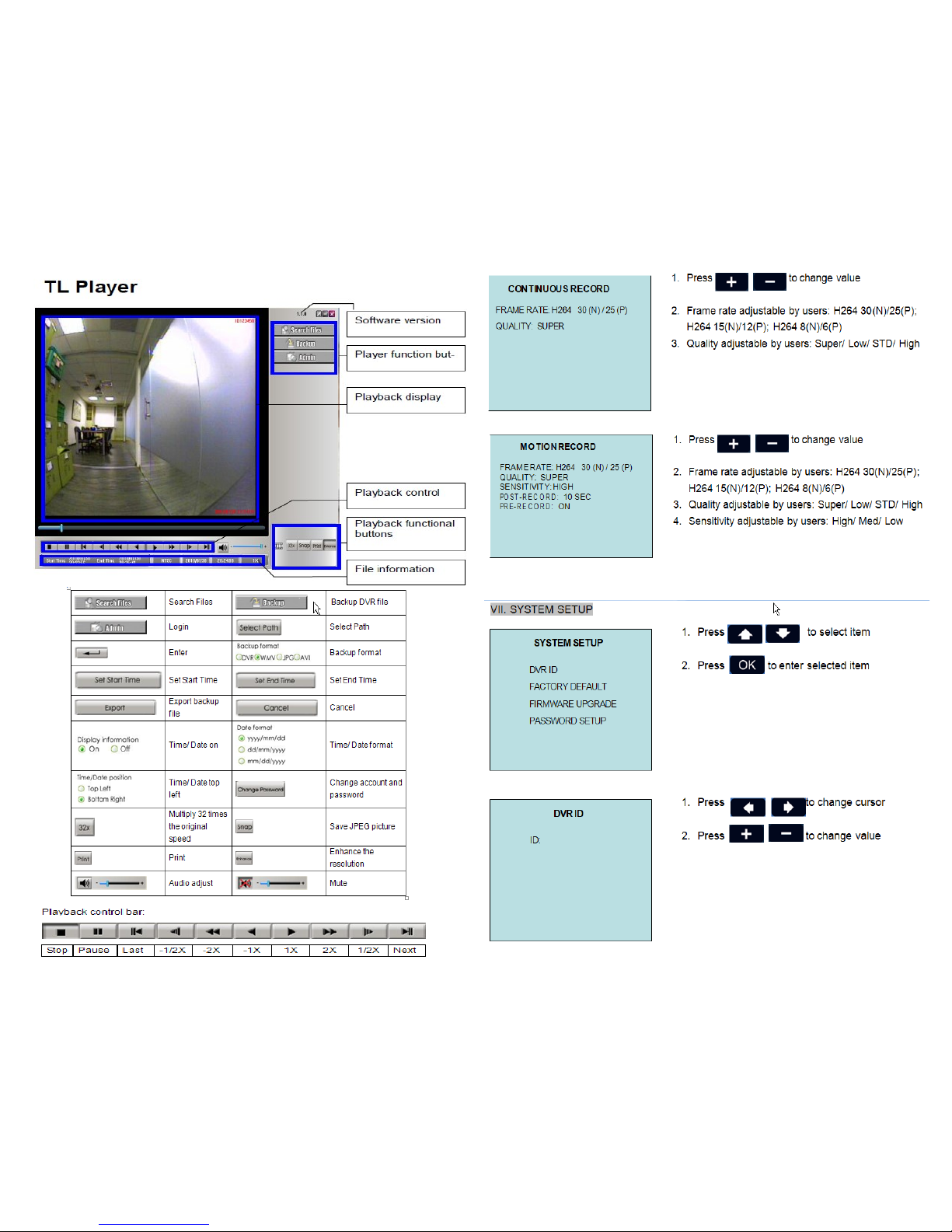
Frame Rate Settings for recording You may r ecord 30, 15 & 8 FPS Quality is
adjustable, Super, Low, Standard & High.. Use this setting to gain more memory. See
page 7 for details.
Motion Setting This allows thr ee motion sensitivity settings, High, Medium and
Low, see page 7 for details.
Continuous Recording You may r ecord continuously without using motion
please refer to Capacity chart on page 7.
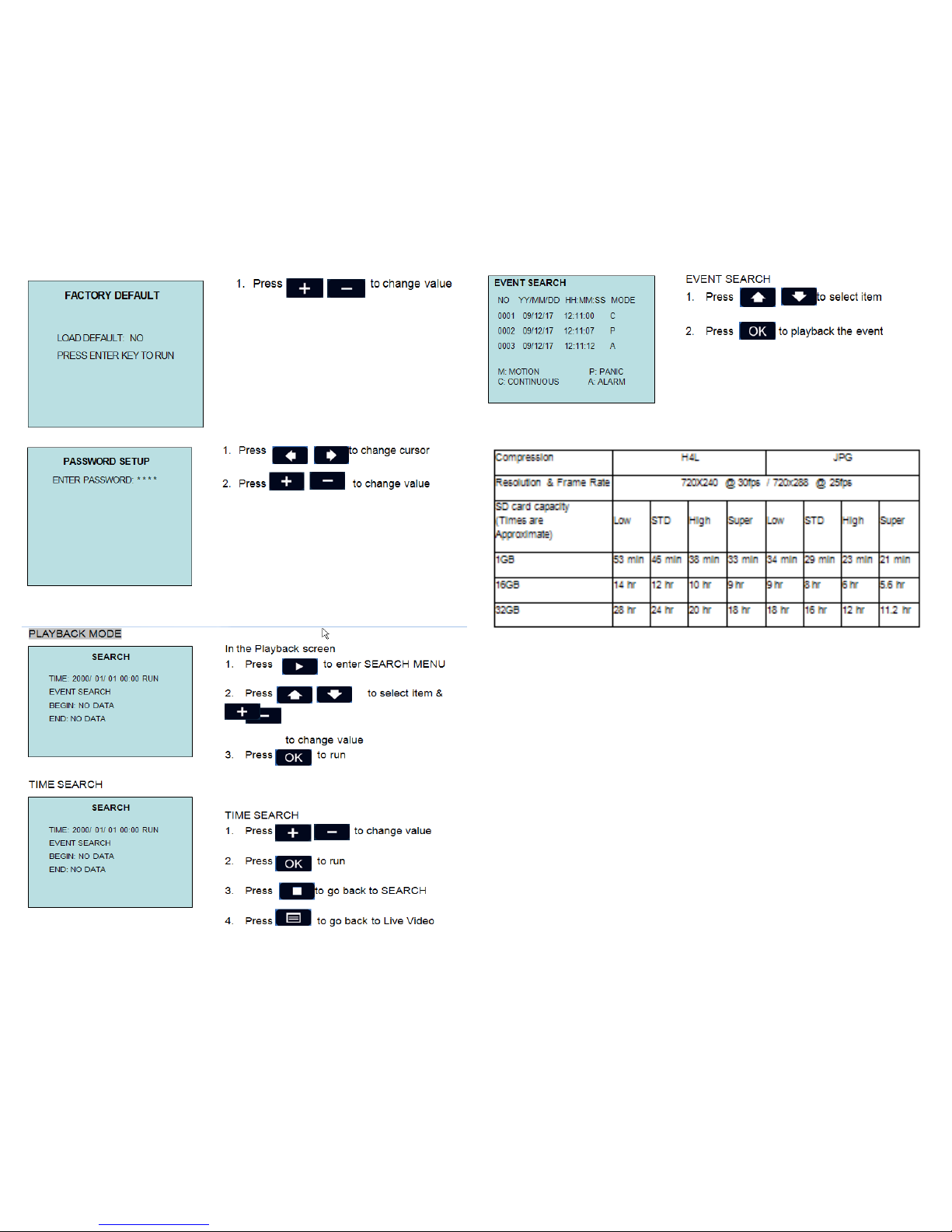
Playback On your TV by using the RCA output or the player supplied on the
enclosed CD, see page 8 for details.
File Search Fr om unit push play back see quick sear ch or list all to find files, see
page 8 for details.
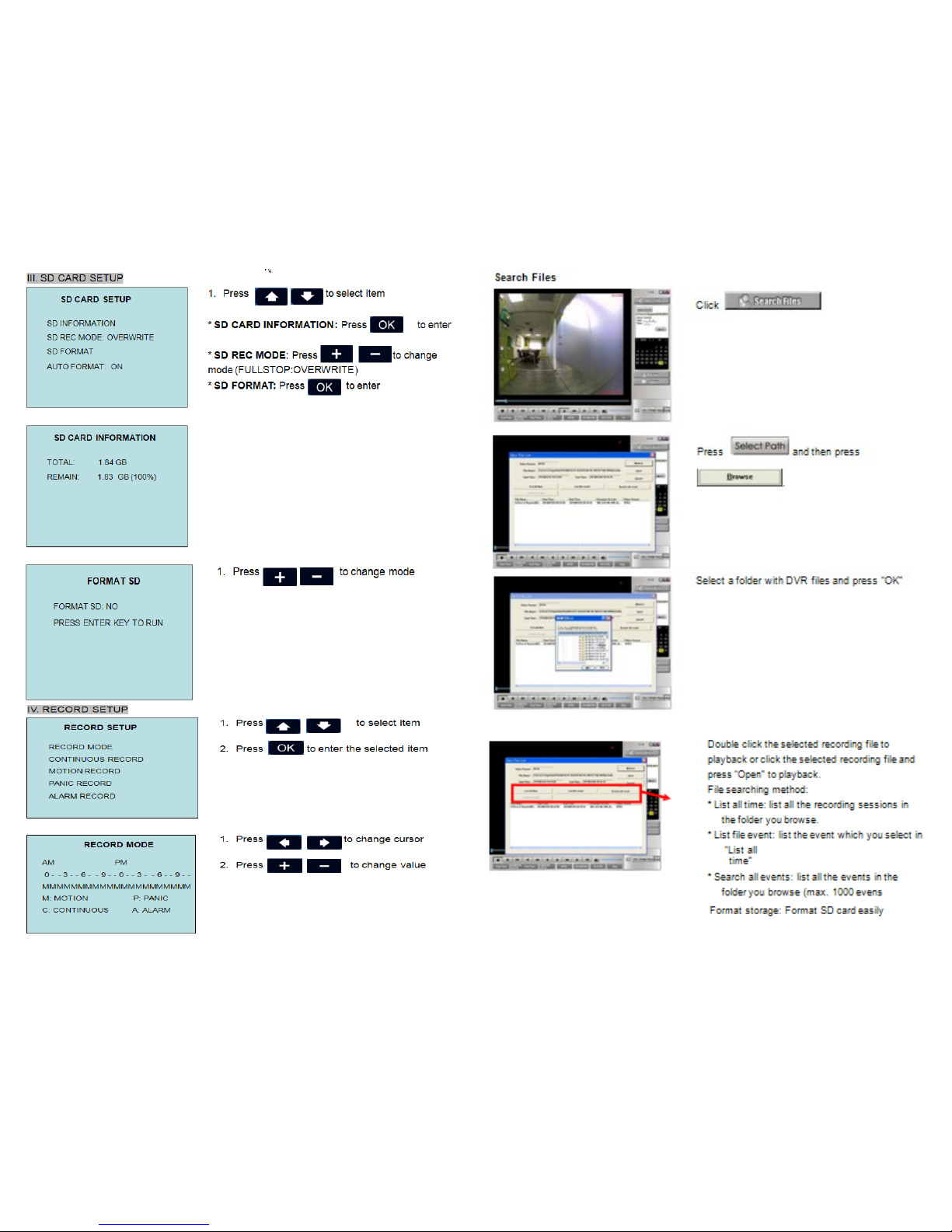
Storage: the unit is set to default to over wr ite video when car d is full using the
first in first out rule: you may change the overwrite function by choosing Full Stop
from the storage menu. You may also delete all files from the delete all functions.
This action will reformat your SD Card, see page 6 for details.
Password, you may set up a passwor d for the unit, please wr ite the number
down in a safe place, if the password is lost there is no way to recover it. So please
choose this option carefully. See page 8. Write down your password on page 15.
System Setting Menu
Time and Date Stamp You may display time and date to show on your video clip.
It will be embedded in the actual video by the default setting. You can also adjust date
format before you start your recording.
Factory Default menu This setting list’s the factor y default. Her e you may r eset
at anytime back to factory default. See page 8.
2
Frequently asked Questions & Trouble Shooting
Q. What player software should I use to playback the recording files?
A. Please use only the software on the enclosed CD, TL Player.
No video? Have you inserted the micro SD card into the Large SD card adapter? Have you
tried another SD card? Is the lock on the SD card in the “lock” position? Did you put the
SD card in the unit before powering on your Sleuth Gear unit?
Did you know the unit is set to record motion as one of its default settings?
Do you know how to access the video files on your SD card?
Did you know you can press the play button on the remote control to play the recorded
files back on your Television?
Do you have the proper input selected on your TV to display the Video from the HVR
system?
Having trouble with the unit? Have you tried restoring the unit to its factory default set-
tings? This can be done in the menu > System Setup> Factory Default.
Safety Precautions and Notes
Use only the included power supply to operate your
Zone Shield DVR by SleuthGear™ system
(AC: 120 Volt, 60 Hz ONLY, if outside the US and Canada
a special adaptor may be required).
To avoid electrical shock, do not attempt to open the unit. Opening the unit Voids the
warranty. To prevent fire or shock hazard, do not expose this product to rain or
moisture. Do not operate near bath tub, sink, or swimming pool.
Avoid operation in moist environments.
Do not overload electrical outlets or extension cords as this may result in fire
or electric shock, this unit works only on 120 Volt .
Power surges or over voltage (i.e. 220 Volt) will damage the unit
and void the warranty. A surge suppressor and or other
adaptors may be required and are the responsibility of the user.
Please refer to the enclosed instructions for basic functions of the unit if applicable.
Notes:
Password_______________
Default Password 1234
15