
skyvoe NXG-4K Manuel utilisateur
Owner’s Manual
Weatherproof Televisions
IMPORTANT:
Please read this owners manual before
starting or operating the equipment.
NXG-4K
MODEL:
2160P
2160P
4K


Dear SkyVue Customer,
Congratulations on purchasing your new outdoor weather-proof television. We welcome you to our
SkyVue family. To gain the full potential of your new SkyVue Outdoor Television, please read carefully the
instructions within this document. There is a wealth of relevant information to get started and fully utilize all
of the unique capabilities of your new SkyVue Outdoor Television. We sincerely thank you for your purchase
and hope you have several years of enjoyment from your new SkyVue Outdoor Television.
We at SkyVue have taken a studied approach to delivering the highest quality and reliable outdoor
television on the market. SkyVue started with the goals of operating with unparalleled customer service
and extensive research and development. Upon extensive research of national competition, we realized that
yet, all outdoor television manufacturers purchase the circuitry and panels in their products overseas; that
SkyVue is the only manufacturer that completes its designs with all American Made products. Our family
of televisions are re-innovating the ideas, functions, and technologies, in which other outdoor television
manufacturers seemed to have missed. We take pride in every product and are glad to have you as part of
our family.
Customer Service can be directly reached at:
1-(877) 4-SkyVue
1-(877) 475-9883
info@SkyVue.com
To inquire about extended warranty information, accessories, or installation FAQs please visit our website
www.skyvue.com.
We Thank You for Your Support,
The SkyVue Management Team


3Table of ConTenTs |Operator’s Manual - Model NXG-4k
Table of Contents
Welcome .......................................................................................................................... 1
TV Models - PS .........................................................................................4
TV Location and Placement - PS..............................................................5
TV Models - FS .........................................................................................6
TV Location and Placement - FS..............................................................7
Important and Safety Information ............................................................8
Unpacking ..................................................................................................................... 14
Rear Panel Component Source...................................................................................... 14
Rear Panel Component Quality...................................................................................... 15
Rear Panel Connections................................................................................................. 16
Manual Controls On TV ................................................................................................. 18
Front Panel Lights and Sensors ..................................................................................... 18
Remote Control Guide ................................................................................................... 19
On-Screen Display (OSD) Functions .............................................................................. 20
On-Screen Display Menu ............................................................................................... 21
Channel Menu ................................................................................................................ 21
Picture Menu.................................................................................................................. 21
Audio Menu.................................................................................................................... 21
Time Menu ..................................................................................................................... 22
Setup Menu.................................................................................................................... 22
Lock Menu ..................................................................................................................... 22
Adjusting On-Screen Displays - Channel Menu ............................................................. 23
Adjusting On-Screen Displays – Picture Menu............................................................... 25
Adjusting On-Screen Displays – Audio Menu................................................................. 26
Adjusting On-Screen Displays – Time Menu .................................................................. 28
Adjusting On-Screen Displays – Setup Menu ................................................................ 30
Adjusting On-Screen Displays – Lock Menu .................................................................. 32
Using the USB Input ...................................................................................................... 35
Troubleshooting.............................................................................................................. 37
Care of SkyVue Outdoor TV ........................................................................................... 39
TV Care & Policy Information .................................................................40
RS232 Control Codes ............................................................................41
4All Rights Reserved. SkyVue®
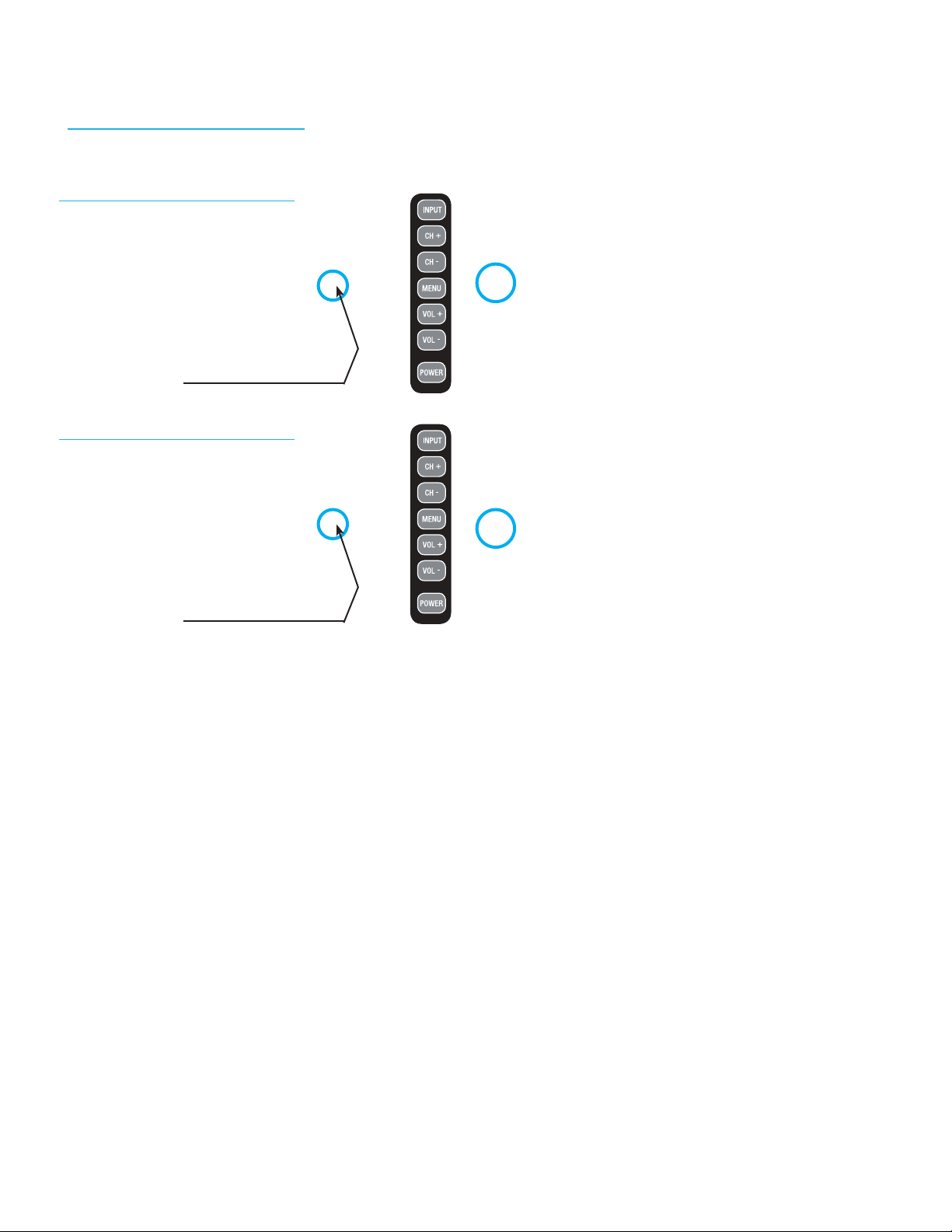
TV Models - Partial Sun
NXG 4k - Partial Shade
Built for shaded areas that are exposed very limited sunlight.
Location of
Manual Controls Panel
Location of
Manual Controls Panel
43” NXG 4k 500 &700 Nit
55” NXG 4k 500 & 700 Nit
5Owner’s Manual - Model NXG-4k Important InformatIon |
Locations for the TV - Partial Shade
Important: The TV must be installed at least 5 feet from pool, spa, or other body of water.
The Partial Shade TV models should be installed so the screen is not in direct sunlight, if installing in sunlight TV
should be turned away from direct sunlight. Placement should be in an area where the TV viewing is shaded
by trees, landscape and/or structures, or under a patio cover or gazebo. Remember that the position of the
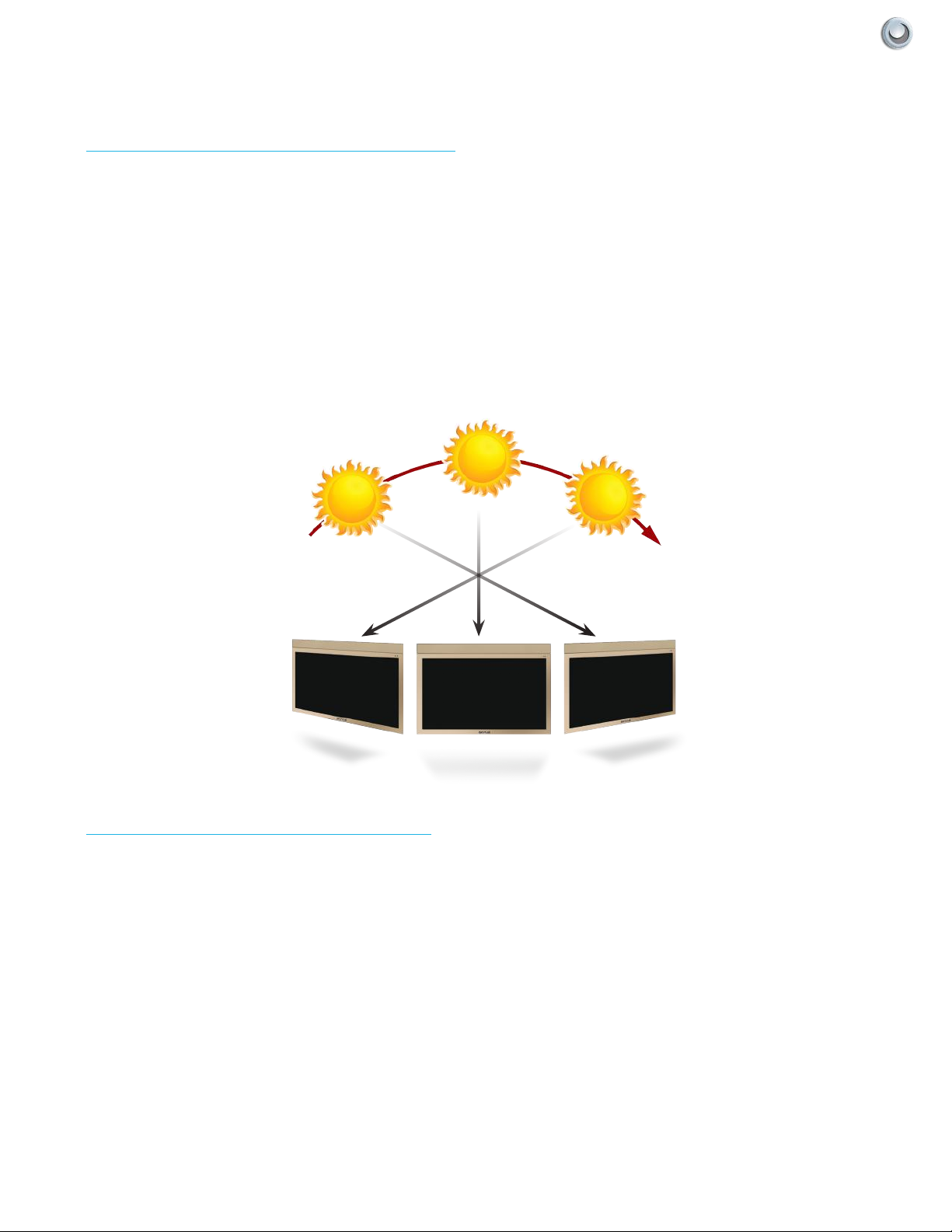
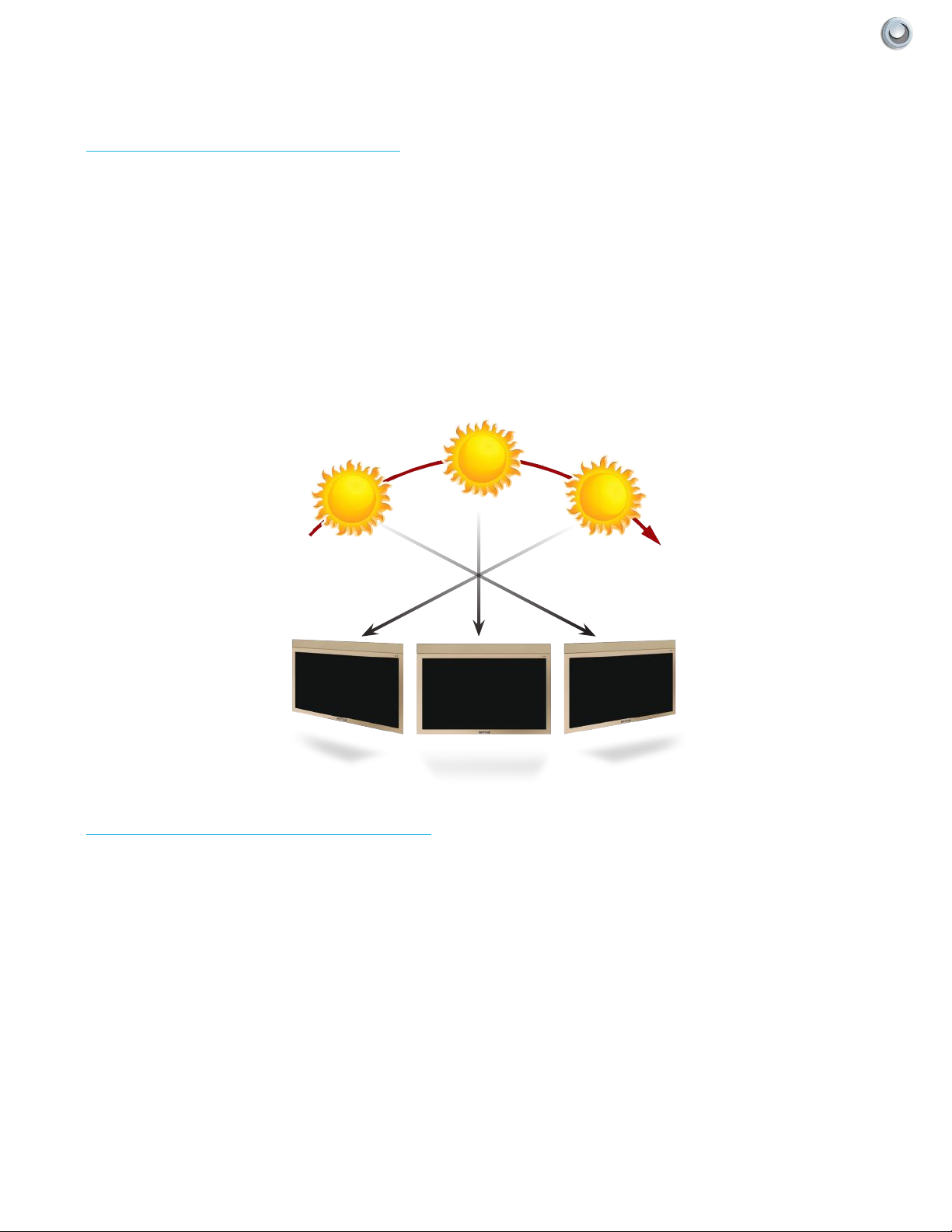
sun changes during the day, as seen in the below. This means that the quality of the picture will change during the
day. If you intend to install the TV in areas where some sunlight will reach it, it’s best to position the TV for optimum
performance during the time of day when you do most of your TV viewing. If the sun shines directly on the TV for
extended periods of time, dark areas may develop on the screen. This may cause permanent damage to the screen
over time.
Sunrise Sunset
Afternoon
TV Placment & Location - Partial Shade
Mounting Placment / Orientation
All Skyvue Landscape TV models should be installed so that the television is in a landscape orientation. Mounting
the television incorrectly may cause damage to the television over time and will void the manufacturers warranty.
The gure below displays the correct orientation.
6All Rights Reserved. SkyVue®
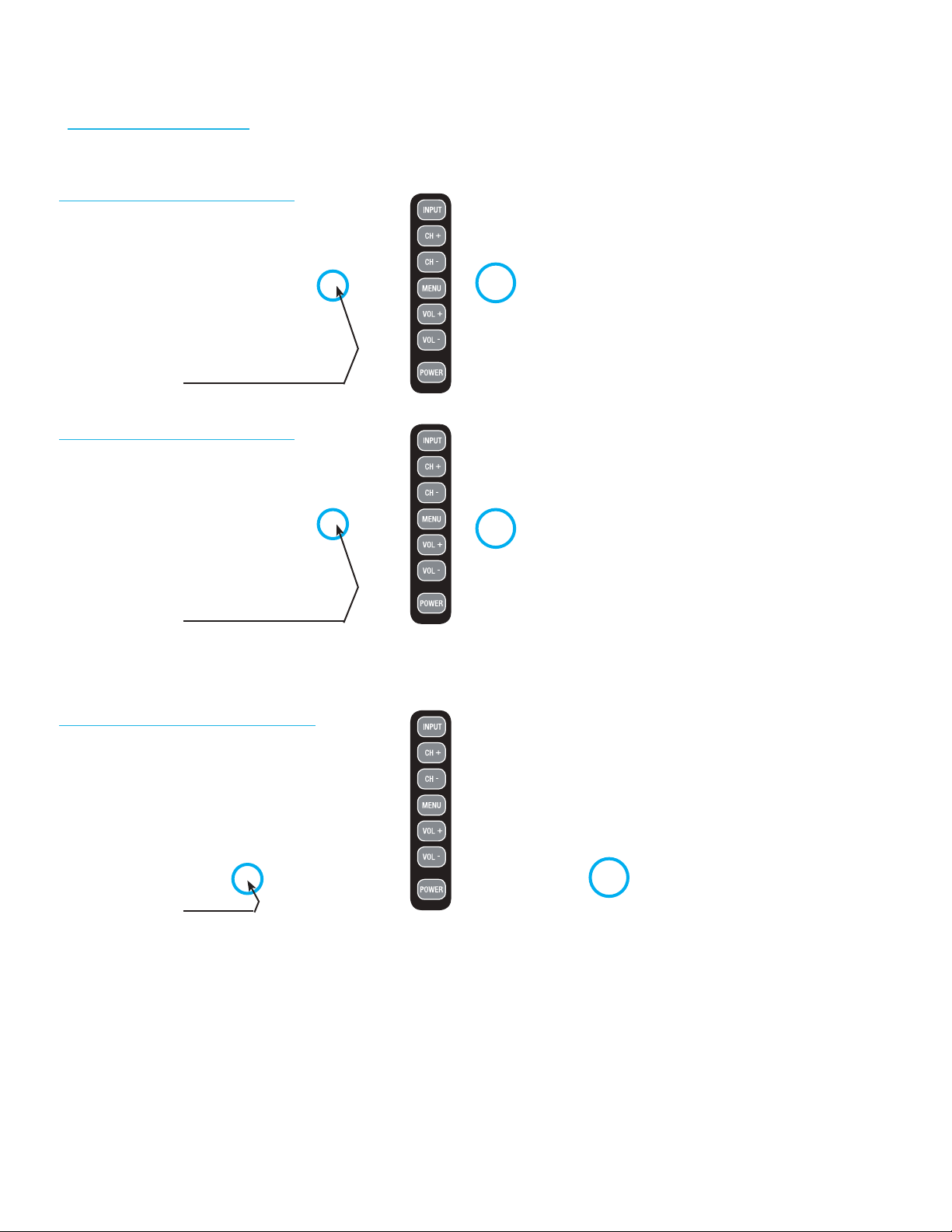
TV Models - Full Sun
NXG 4k - Full Sun
Built for Sun exposed areas that will experience direct sunlight.
Location of
Manual Controls Panel
Location of
Manual Controls Panel
43” NXG 4k 500 & 700 Nit
55” NXG 4k 500 & 700 Nit
75” NXG 4k 1500 & 3000 Nit
Location of
Manual Controls Panel
7Owner’s Manual - Model NXG-4k Important InformatIon |
Locations for the TV - Full Sun
Important: The TV must be installed at least 5 feet from pool, spa, or other body of water.
The Full Sun TV model should be installed so the screen is not facing direct sunlight, or can be easily turned away
from direct sunlight. Ideal placement is still in an area where the TV is shaded by trees, landscape and/or structures, or
under a patio cover or gazebo. Remember that the position of the sun changes during the day, as seen in the drawing
on the right. This means that the quality of the picture will change during the day. If you intend to install the TV in areas
where direct sunlight will reach it, it’s best to position the TV for optimum performance during the time of day when
you do most of your TV viewing. If the sun shines directly on the screen for extended periods of time, dark areas may
develop on the screen. This is a normal reaction for the LED panel, and will not cause damage to the screen. Either
turn the screen away from the sun, or apply shade to the TV, and the dark areas will quickly disappear.
Sunrise Sunset
Afternoon
TV Placment & Location - Full Sun
Mounting Placment / Orientation
All Skyvue Landscape TV models should be installed so that the television is in a landscape orientation. Mounting
the television incorrectly may cause damage to the television over time and will void the manufacturers warranty.
The gure below displays the correct orientation.
8All Rights Reserved. SkyVue®
The lightning flash with arrow-head
symbol, within an equilateral triangle,
is intended to alert the user to the
presence of uninsulated “dangerous
voltage” within the product's
enclosure that may be of sufficient
magnitude to constitute a risk of
electric shock to persons.
The exclamation point within a
triangle is intended to alert the user
to the presence of important
operating and maintenance
(servicing) instructions in the
literature accompanying the product.
CAUTION
RISK OF ELECTRIC SHOCK
DO NOT OPEN
CAUTION: TO REDUCE THE RISK OF ELECTRIC SHOCK,
DO NOT REMOVE COVER (OR BACK).
NO USER-SERVICEABLE PARTS INSIDE.
REFER SERVICING TO QUALIFIED SERVICE
PERSONNEL.
TO PREVENT ELECTRIC SHOCK, MATCH WIDE BLADE OF PLUG TO WIDE
SLOT, FULLY INSERT.
CAUTION:
WARNING: FCC Regulations state that any unauthorized changes or modifications to this equipment not expressly
approved by the manufacturer could void the user's authority to operate this equipment.
OPERATION MANUAL
IMPORTANT:
To aid reporting in case of loss or theft, please record the
TV's model and serial numbers in the space provided. The
numbers are located at the rear of the TV.
LED TELEVISION
ENGLISH
IMPORTANT INFORMATION
LC-60LE632U70LE732UE.indb1 2011/02/0416:19:25
2012 SKYVUE 3
SKY4230 & SKY4630
2012 SKYVUE 3
Table des matières
Autres manuels skyvoe TV

skyvoe
skyvoe Fusion Series Manuel utilisateur

skyvoe
skyvoe NXG-3250-DS Manuel utilisateur

skyvoe
skyvoe NXG-4250-DS Manuel utilisateur

skyvoe
skyvoe NXG-8070-DS Manuel utilisateur

skyvoe
skyvoe NXG-4650-DS Manuel utilisateur

skyvoe
skyvoe NXG-7070-DS Manuel utilisateur
skyvoe
skyvoe SKY8020 Manuel utilisateur

skyvoe
skyvoe NXG-6550-DS Manuel utilisateur

skyvoe
skyvoe OBX-4270-L Manuel utilisateur
Manuels TV populaires d'autres marques

Philips
Philips Colour Television Manuel utilisateur

Toshiba
Toshiba 27A10 Manuel utilisateur

Philips
Philips 42PF9630A/37 Manuel utilisateur

Hitachi
Hitachi 32FX48B Manuel utilisateur

DAEWOO ELECTRONICS
DAEWOO ELECTRONICS DTQ-14V1FC Manuel utilisateur

Changhong Electric
Changhong Electric uhd55b6000is Manuel utilisateur


