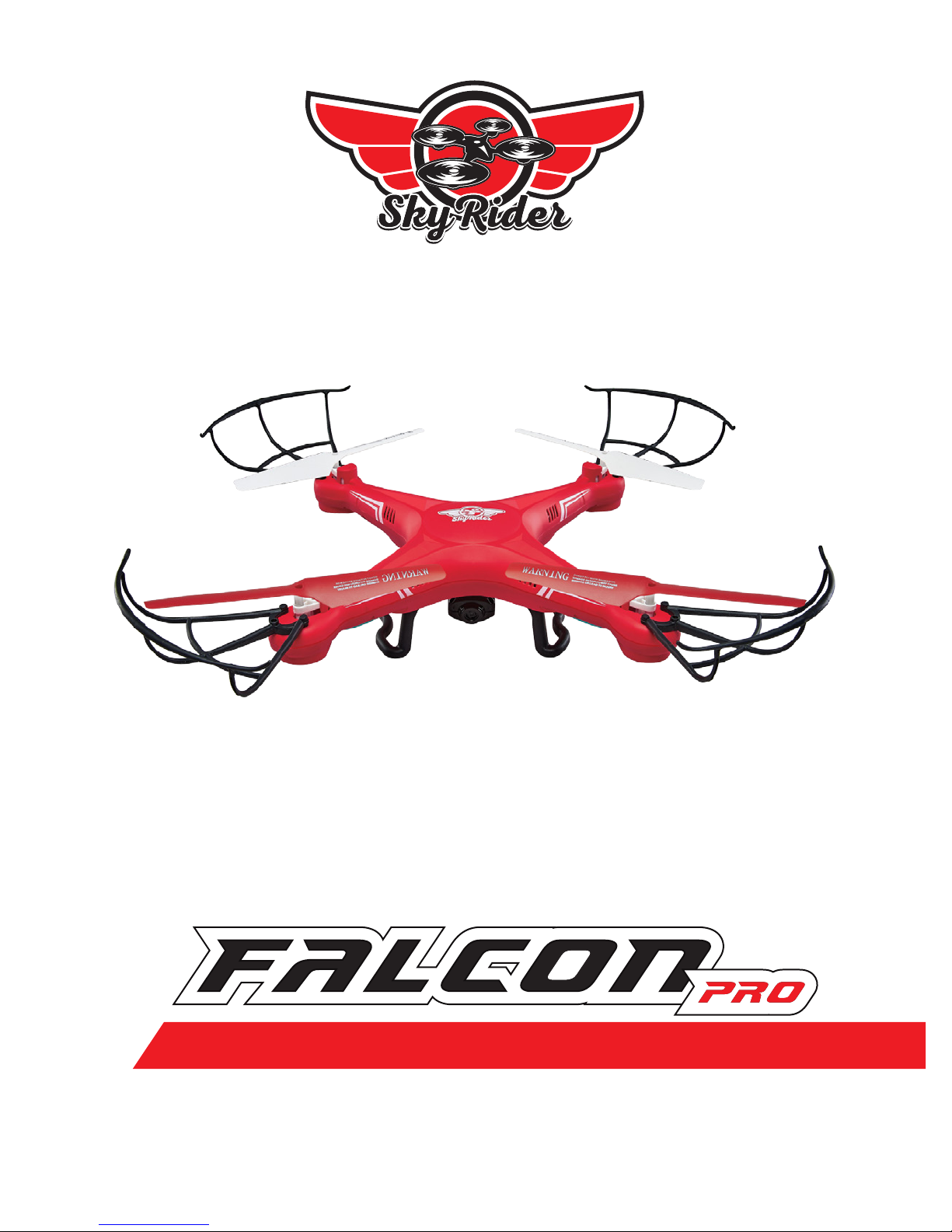
sky rider DRC376 Manuel utilisateur

User’s Guide for Model DRC376 v1648-01
QUADCOPTER DRONE WITH VIDEO CAMERA

Warnings & Precautions
Important Safety Instructions
• Readandfollowallinstructions.
• Keeptheseinstructionsforfuturereference.
• HeedallWarnings.
• Intendedforchildrenages14andhigher.Adult
supervisionisrequired.
• Onlyuseattachments/accessoriesspeciedbythe
manufacturer.
• Beforeying,alwayscheckthebody,rotors,and
batteryforanydamageorobstructions.
• Batteryshouldbefreefromcracksorswelling.
• Keeptherotorsclearofanyobstructionsandbody
partstoavoidpotentialdamageandinjury.
• Manufactureranddealerassumenoliabilityfor
accidentaldamagesfromimproperuseorinstallation
ofparts,orfromdamageincurredfromwornor
brokenparts.
• Pilotsareresponsiblefortheiractionsandany
damagecausedfromimproperuse.
• Pilotsshouldkeepthecraftinsightatalltimes
duringight.Ifyoulosesightofthecraftatanytime,
powerdownandceaseightimmediately.
• Onlyyinlarge,openareasthatarefreefrom
obstaclesorpotentialhazards,suchastrees,power
lines,ceilingfans,andthelike.
• Flyingoverbodiesofwaterisnotrecommended.
• Flyingatnightisnotrecommended.
• Nevertrytoretrievethecraftfromareasyoucannot
safelyreach,suchasrooftopsortrees.
• Neverlaunchthecraftfromyourhand.
• Neverleavethecraftunattendedwhileitispowered
onorwhilethebatteryischarging.
FCC Warnings
Warning:Changesormodicationstothisunitnot
expresslyapprovedbythepartyresponsiblefor
compliancecouldvoidtheuser’sauthoritytooperate
theequipment.
NOTE:Thisequipmenthasbeentestedandfoundto
complywiththelimitsforaClassBdigitaldevice,
pursuanttoPart15oftheFCCRules.Theselimitsare
designedtoprovidereasonableprotectionagainstharmful
interferenceinaresidentialinstallation.Thisequipment
generates,uses,andcanradiateradiofrequencyenergy
and,ifnotinstalledandusedinaccordancewiththe
instructions,maycauseharmfulinterferencetoradio
communications.However,thereisnoguaranteethat
interferencewillnotoccurinaparticularinstallation.If
thisequipmentdoescauseharmfulinterferencetoradio
ortelevisionreception,whichcanbedeterminedby
turningtheequipmentoffandon,theuserisencouraged
totrytocorrecttheinterferencebyoneormoreofthe
followingmeasures:
• Reorientorrelocatethereceivingantenna.
• Increasetheseparationbetweentheequipmentand
receiver.
• Connecttheequipmentintoanoutletonacircuit
differentfromthattowhichthereceiverisconnected.
• Consultthedealeroranexperiencedradio/TV
technicianforhelp.
Additional Warnings & Precautions
• WARNING:Toreducetheriskofreorelectric
shock,donotexposethisapparatustorain,moisture,
dripping,orsplashing.
• CAUTION:Useofcontrolsoradjustmentsor
performanceofproceduresotherthanthosespecied
mayresultinpersonalinjury.
• WARNING:Changesormodicationstothisunit
notexpresslyapprovedbythepartyresponsiblefor
compliancecouldvoidtheuser’sauthoritytooperate
theequipment.
• CAUTION:Dangerofexplosionifbatteryis
incorrectlyreplaced.Replaceonlywiththesameor
equivalenttype.
• Lithiumbatteries,likeallrechargeablebatteries,are
recyclableandshouldberecycledordisposedof
accordingtostateandlocalguidelines.Theyshould
neverbedisposedofinnormalhouseholdwaste,
andtheyshouldneverbeincinerated,astheymight
explode.Contactyourlocalgovernmentfordisposal
orrecyclingpracticesinyourarea.
• WARNING:Shockhazard-DoNotOpen.
• Batteryshallnotbeexposedtoexcessiveheatsuchas
sunshine,re,orthelike.
Keepnewandusedbatteriesawayfromchildren.If
thebatterycompartmentdoesnotclosesecurely,stop
usingtheproductandkeepitawayfromchildren.
• Ifyouthinkbatteriesmighthavebeenswallowedor
placedinsideanypartofthebody,seekimmediate
medicalattention.
• Donotmixoldandnewbatteries.
• Completelyreplacealloldbatterieswithnewones.
• Donotmixalkaline,standard(carbon-zinc),or
rechargeable(ni-cad,ni-mh,etc)batteries.
• Batteriesshouldberecycledordisposedofasper
stateandlocalguidelines.
• WARNING:Thisproductmaycontainchemicals
knowntotheStateofCaliforniatocausebirth
defects,orotherreproductiveharm(CaliforniaProp
65).Washhandsafterhandling.
• ThisproductmeetsandcomplieswithallFederal
regulations.

3
Table of Contents
FAA Registration – 4
Which UAS Must Be Registered?
Who Can Register?
What Do You Need to Register?
Additional Info
Sky Rider Falcon Pro – 5
Features
Includes
Orientation – 6
Overview
Remote Control
Camera – 8
Attach Camera
Functions
Batteries & Charging – 10
Battery Charging Procedure
Remote Control Battery Installation
Pre-Flight Calibration – 13
Craft/Remote Link
When You’re Done Flying...
Trim Adjustment – 15
Setting Trim & Countering Drift
Flying Tips & Features – 17
Tips for Safe Operation
Speed Setting
Flips & Tricks
Headless Mode
Auto-Reverse
Factory Default Settings
Troubleshooting – 20
Repair – 21
Rotor Replacement
Parts – 22
Parts Replacement
Parts List
Company Information – 24
Contact Information
International Support
Warranty

4
FAA Registration
As of December 21, 2015, the U.S. Federal Aviation Administration (FAA) has
mandated that all Unmanned Aircraft Systems (UAS) of a certain weight must be
registered with the FAA before ying outdoors. This includes aircraft commonly
referred to as drones, quadcopters, Unmanned Aerial Vehicles (UAV), and the like.
The Online Registration fee is $5, but will be credited back to your account if the
registration is completed within the rst 30 days of ownership. Once completed, the
registration is valid for 3 years.
Which UAS Must Be Registered?
The Online Registration requirement applies to all UAS that weigh between 0.55 lbs
(250g) and 55 lbs (25kg).
The Sky Rider Falcon Pro meets this requirement, and must be registered, with the
Registration Number permanently afxed to the craft.
Who Can Register?
• Anyone 13 years of age or older. A person who does not meet this age
requirement must have their UAS registered by someone 13 years of age
or older.
• A US citizen or legal permanent resident.
What Do You Need to Register?
When registering online, you will need:
• A valid email address
• A Credit or Debit Card
• A physical and mailing address (if different from physical address).
Additional Info
For the latest information on the FAA and the registration process, visit the web links
listed below.
• FAA Home Page - http://www.faa.gov/
• UAS Registration Page - http://www.faa.gov/uas/registration/
• UAS Registration FAQs - http://www.faa.gov/uas/registration/faqs/

5
Features
• 360° ips & tricks
• 2 speed settings
• 6-axis gyroscope
• .3 MP Camera (photo & video) with SD card slot
• Control distance: up to 150 feet
• Headless Mode
• Auto-Reverse
• LED navigation lights
• Operating time: 6-8 minutes
• Charge time: 60-80 minutes
Includes
• 2.4 GHz remote control: requires 6 AA batteries (not included)
• Built-in rechargeable lithium polymer battery
• USB cable for battery recharge
• 4GB SD card
• Screwdriver
• 4 replacement rotors
• User’s guide & warranty
Sky Rider Falcon Pro

6
Orientation
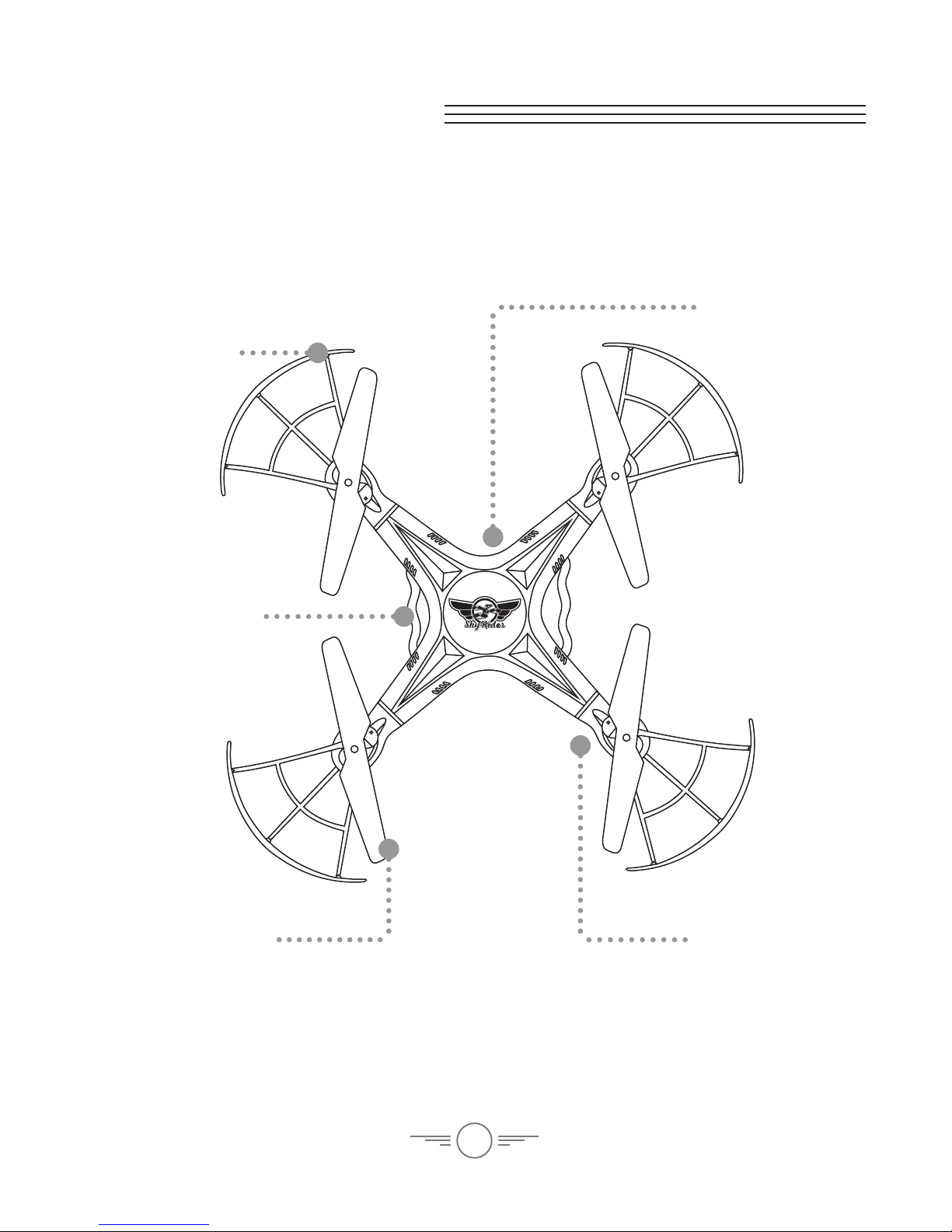
Rotor Guard
Landing Skids
Formation Lights
(underside)
Red LEDs indicate
front of craft
Battery Bay/
Camera Mount
(underside)
Overview
Rotors
Red rotors indicate
front of craft.

7
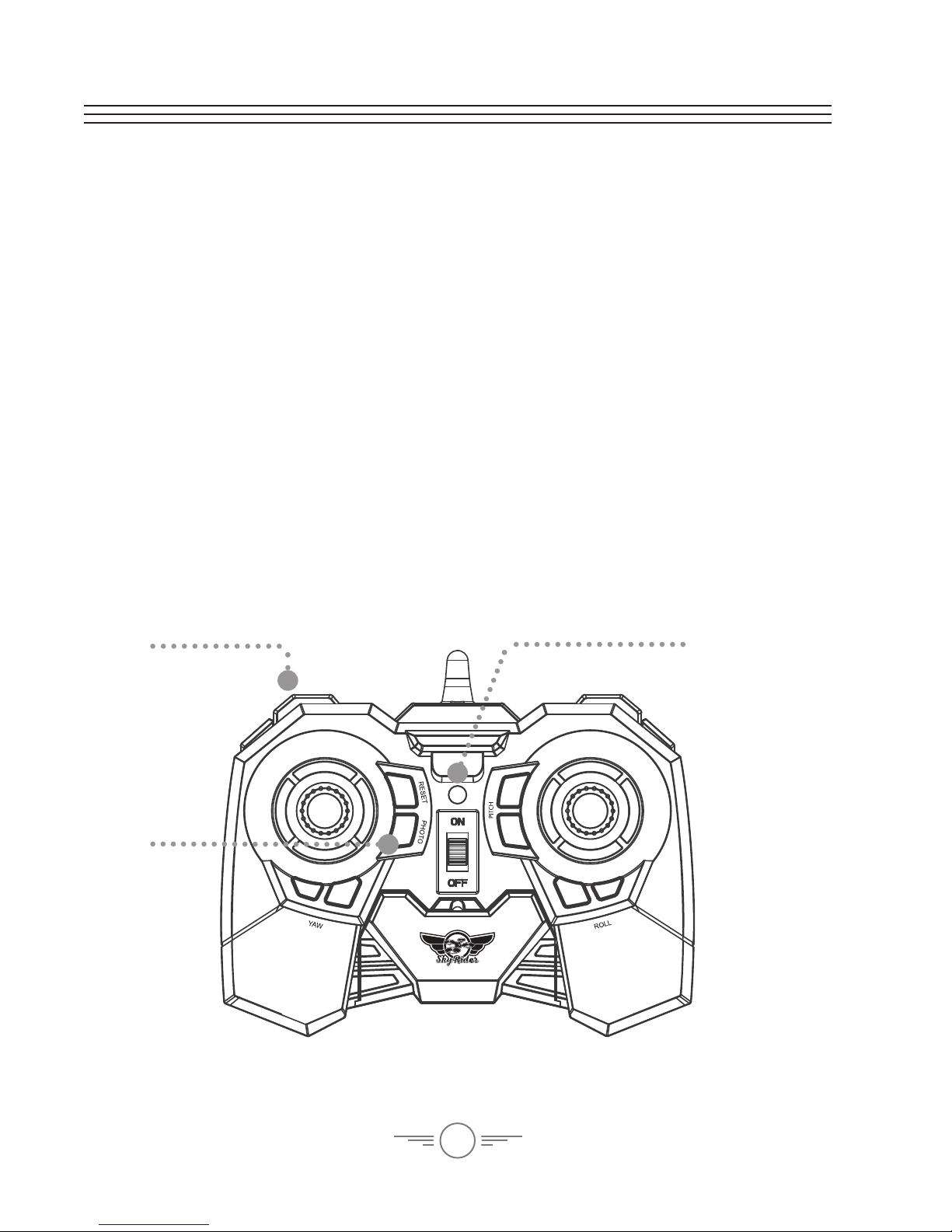
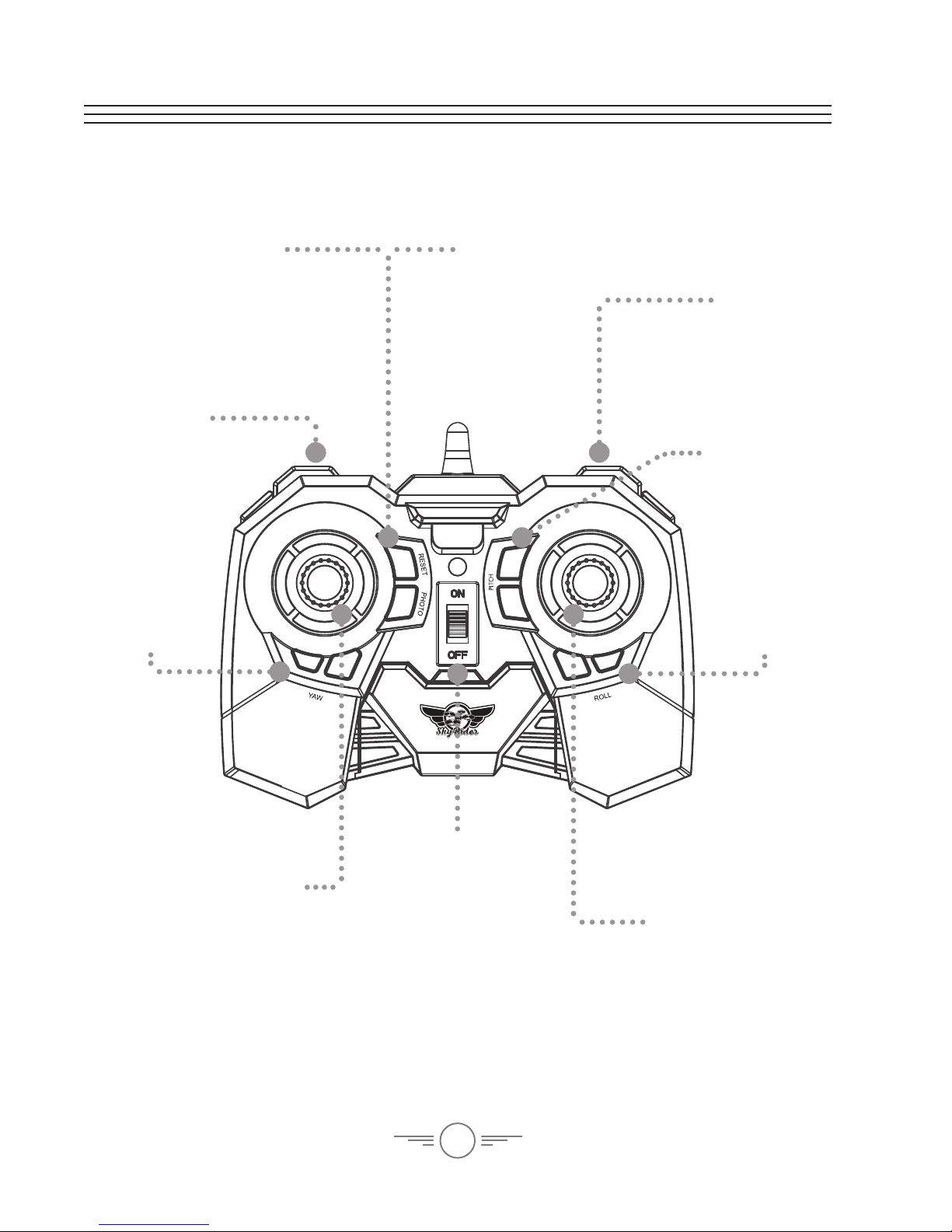
Remote Control
Left Control Stick
Increase Throttle:
push forward
Decrease Throttle:
pull backward
Yaw/Spin:
push left or right
Auto-Reverse:
press down
Right Control Stick
Pitch:
push forward/
backward
Roll/Bank:
push left/right
Headless Mode:
press down
Reset/Speed
Press to change craft
speed setting.
Press and hold to reset
craft to factory settings.
Photo
Press to take a
photo.
Video
Press to take video.
Flip
Press and
move the Right
Thumbstick to
perform a ip.
Roll Trim
Correct left/
right drift.
Yaw Trim
Correct
left/right
rotational
drift.
Pitch Trim
Correct
forward/
backward
drift.
Power Switch
& Indicator

8
Camera
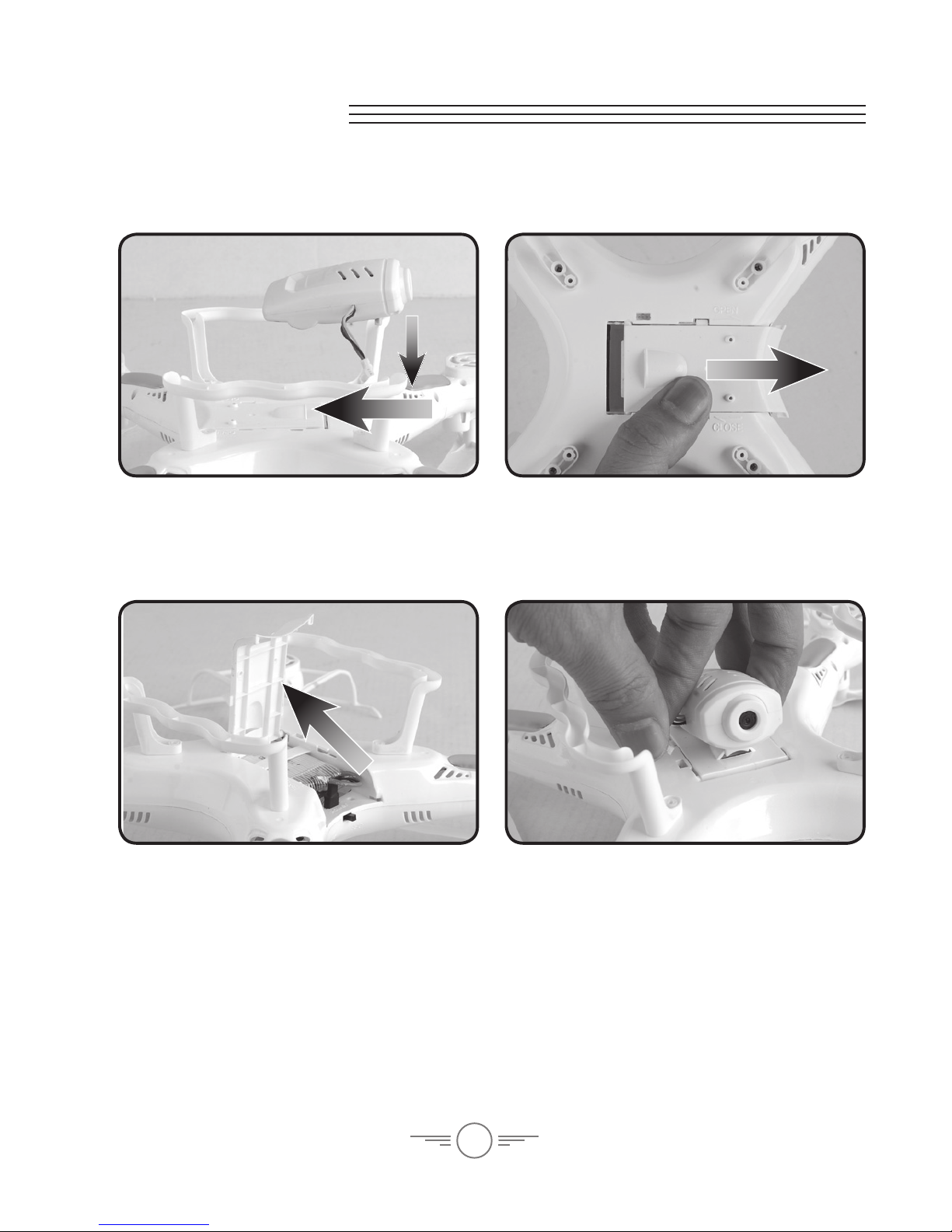
Attach Camera
Mount the camera to the battery door by
aligning the tab on the camera to the slot
on the battery door.
Tighten the camera to the door using the
included screws and screwdriver. Close
the door when complete.
Open the battery door with the camera
attached to access the inside of the door.
Attach the camera’s power cable to the
plug on the body.
Be sure to match the plugs correctly or
damage may occur.

9
Functions
Make sure the remote and the craft have been successfully paired (indicated by a red
light on the remote) before attempting to use the camera.
Video
To record video, press the Video button on the remote. The indicator light will turn
green for as long as the camera is recording. Press the video button again to stop
recording video, the light will turn back to red.
Photos
To take a single image, press the Photo button once. The indicator light will turn from
red to green, then back to red.
Press and hold the Photo button to take a 3 photo burst. The indicator light will
icker green 3 times, then switch back to red.
Photo
Video Indicator Light

10
Batteries & Charging
Battery Charging Procedure
The craft’s lithium-polymer (Li-Po) battery must be charged before the unit can be
own. Before charging, be sure the craft and remote control are powered off. Failure
to do so may result in injury.
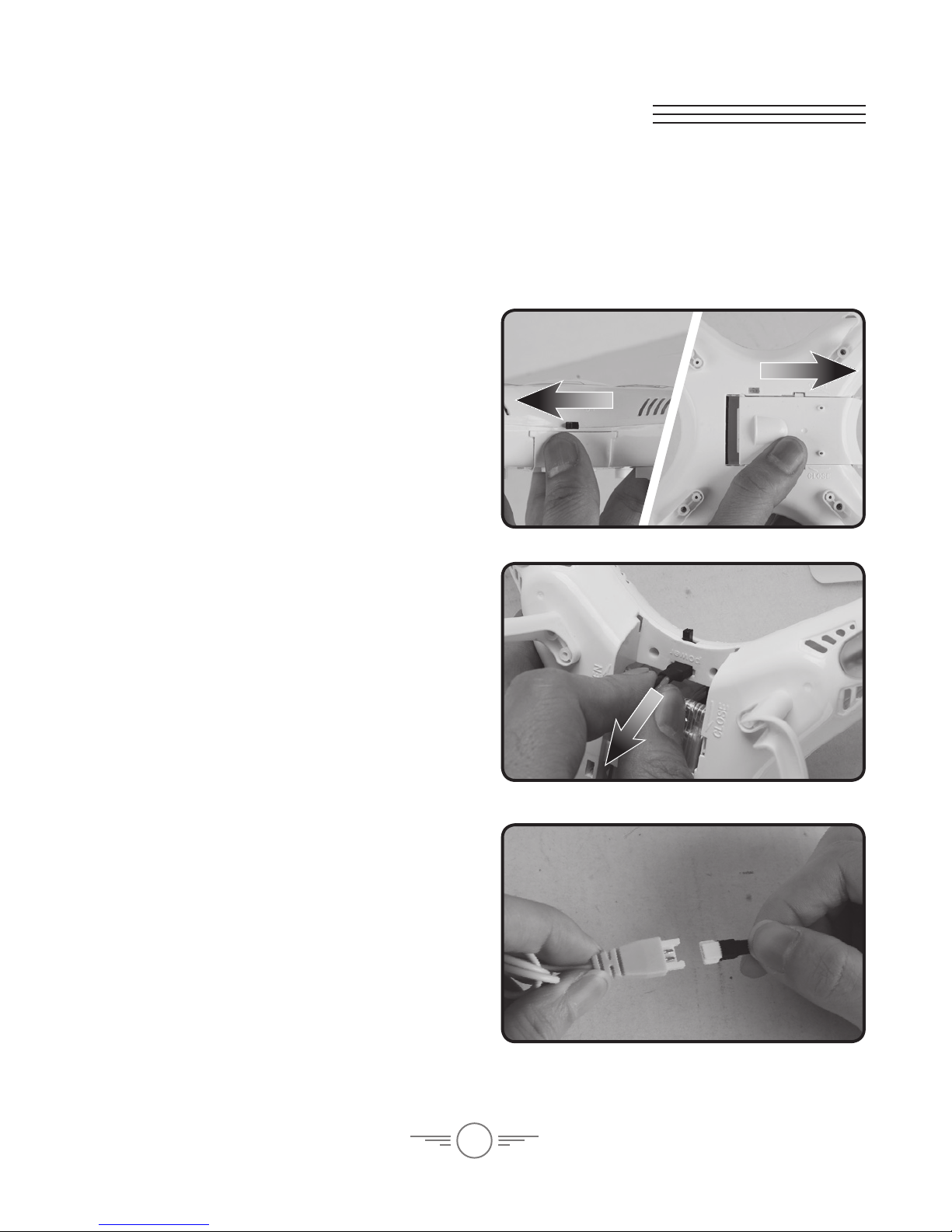
Step 1
Make sure the craft is powered OFF, then
remove the battery cover.
Step 3
Attach the plug on the battery to the
plug on the charging cable.
Be sure to match the plugs correctly or
damage may occur.
Step 2
Disconnect the power plugs connecting
the battery to the craft. It is strongly
recommended to remove the battery
when charging. This will reduce the
chance of damage or injury.
Table des matières
Autres manuels sky rider Quadricoptère

sky rider
sky rider Micro Manuel utilisateur

sky rider
sky rider HAWK DR176 Manuel utilisateur

sky rider
sky rider Metal Alloy Drone Manuel utilisateur

sky rider
sky rider Drone-asaur DR397 v1903-01 Manuel utilisateur

sky rider
sky rider X-11 Stratosphere Manuel utilisateur

sky rider
sky rider FALCON 2 PRO Manuel utilisateur

sky rider
sky rider Griffon Pro DRW618 Manuel utilisateur

sky rider
sky rider Eagle 3 Pro Manuel utilisateur

sky rider
sky rider Pegasus Manuel utilisateur

sky rider
sky rider eagle pro series Manuel utilisateur