
SK Telesys SWT225 Manuel utilisateur

CPE (SWT225)
User Manual
June, 2011
THIS DOCUMENT CONTAINS INFORMATION CONFIDENTIAL AND PROPRIETARY TO SK TELESYS CO., LTD. THE INFORMATION MAY NOT
BE USED, DISCLOSED OR REPRODUCED WITHOUT THE PRIOR WRITTEN AUTHORIZATION OF SK TELESYS AND THOSE SO AUTHORIZED
MAY ONLY USE THE INFORMATION FOR THE PURPOSE OF EVALUATION CONSISTENT WITH AUTHORIZATION. REPRODUCTION OF ANY
SECTION OF THIS DOCUMENT MUST INCLUDE THIS LEGENT.

SKTelesysCo.,Ltd. | 2
Confidential & Proprietary
CPE(SWT225)
Patent‐pendingtechnologiestoimprovedataperformance
[ Table of Contents ]
SECTION 1. SWT225 COMPONENTS...............................................................4
1.1 Components.....................................................................................................................4
1.2 Front View.......................................................................................................................5
1.3 Rear View........................................................................................................................6
SECTION 2. INSTALLATION...........................................................................7
2.1 Antenna connection ........................................................................................................7
2.2 Adapter connection.........................................................................................................7
2.3 Station connection ..........................................................................................................8
SECTION 3. INTERNET ACCESS ...................................................................10
3.1 Access via WiFi (wireless) .............................................................................................10
3.1.1 Detection of wireless network and access...........................................................................................10
3.1.2 View access to wireless network ..........................................................................................................11
3.2 Access via LAN (wired).................................................................................................. 13
3.2.1 Connection between SWT225 and PC.................................................................................................13
3.2.2 View access to wired network..............................................................................................................14
SECTION 4. TROUBLE SHOOTING............................................................... 15
4.1 Checking via LEDs......................................................................................................... 15
4.2 Checking through WEB CM........................................................................................... 16

SKTelesysCo.,Ltd. | 3
Confidential & Proprietary
CPE(SWT225)
Patent‐pendingtechnologiestoimprovedataperformance
[ List of Figures ]
FIGURE 1. COMPONENTS OF SWT225....................................................................................4
FIGURE 2. FRONT LEDS.........................................................................................................5
FIGURE 3. REAR PORTS.........................................................................................................6
FIGURE 4. ANTENNA CONNECTION......................................................................................7
FIGURE 5. ADAPTER CONNECTION.......................................................................................8
FIGURE 6. FASTENING OF SCREWS ......................................................................................8
FIGURE 7. A VIEW OF THE BOTTOM AFTER THE SCREWS ARE FASTENED.........................9
FIGURE 8. MOUNTING OF THE STAND .................................................................................9
FIGURE 9. WIRELESS NETWORK DETECTION....................................................................10
FIGURE 10. VIEW ACCESS TO WIRELESS NETWORK ..........................................................11
FIGURE 11. VIEW ACCESS TO WIRELESS NETWORK (IP ADDRESS) .................................. 12
FIGURE 12. CONNECTION TO THE LAN PORT ..................................................................... 13
FIGURE 13. VIEW ACCESS TO WIRED NETWORK ............................................................... 14
FIGURE 14. VIEW ACCESS TO WIRED NETWORK (IP ADDRESS)........................................ 14
FIGURE 15. CHECKING OF WIMAX CONNECTION AT WEB CM........................................... 17
SKTelesysCo.,Ltd. | 4
Confidential & Proprietary
CPE(SWT225)
Patent‐pendingtechnologiestoimprovedataperformance
Section 1. SWT225 Components
SWT225 CPE provides the WiFi service to users using the WiMAX service in the region
where the WiMAX service is available. In this manual, [terminal] stands for all devices
which can use wireless LAN (WiFi), such as laptops, smart phones, and other devices.
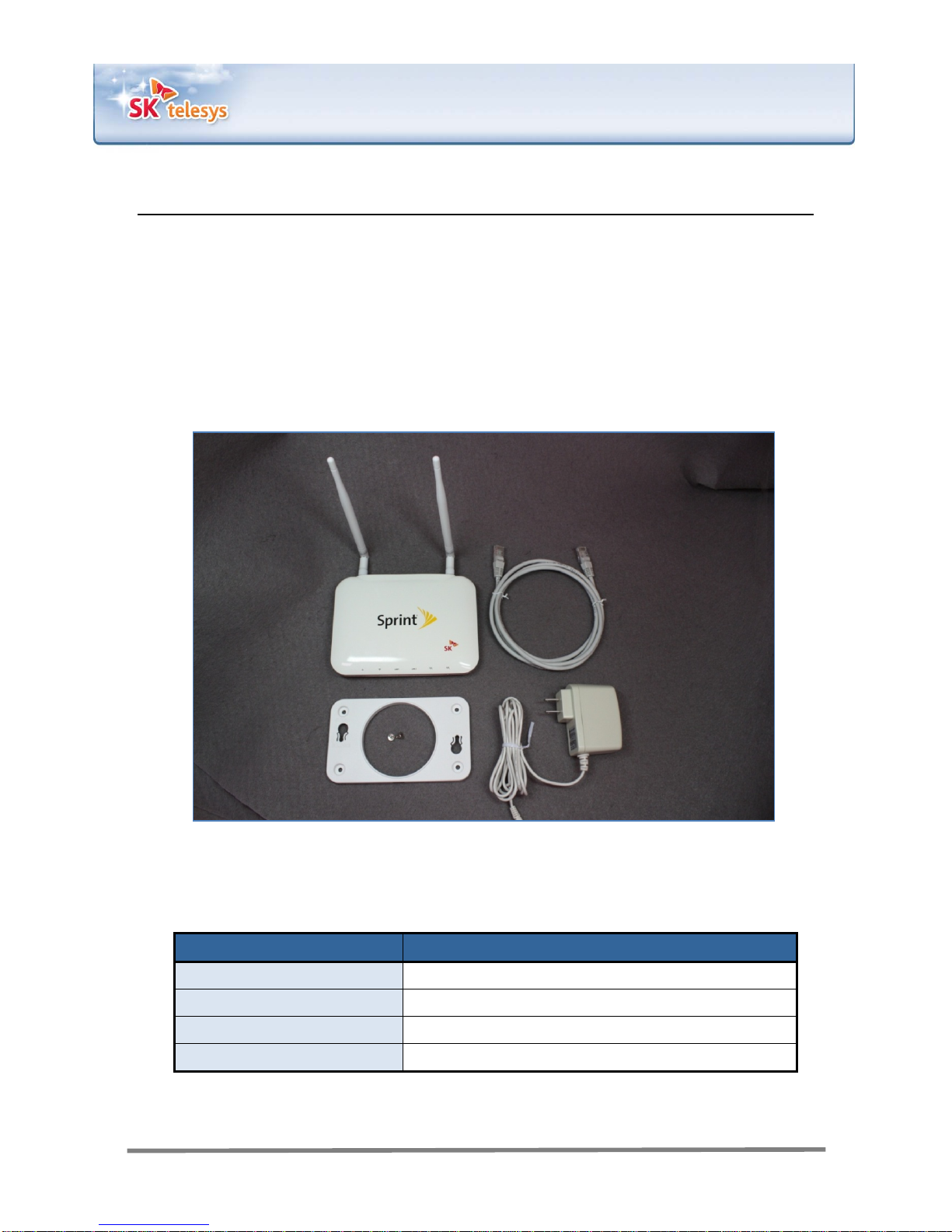
1.1 Components
Figure 1. Components of SWT225
Component Quantity
Main body 1EA
Bracket (screws included) 1EA
LAN cable 1EA
Adapter 1EA
SKTelesysCo.,Ltd. | 5
Confidential & Proprietary
CPE(SWT225)
Patent‐pendingtechnologiestoimprovedataperformance
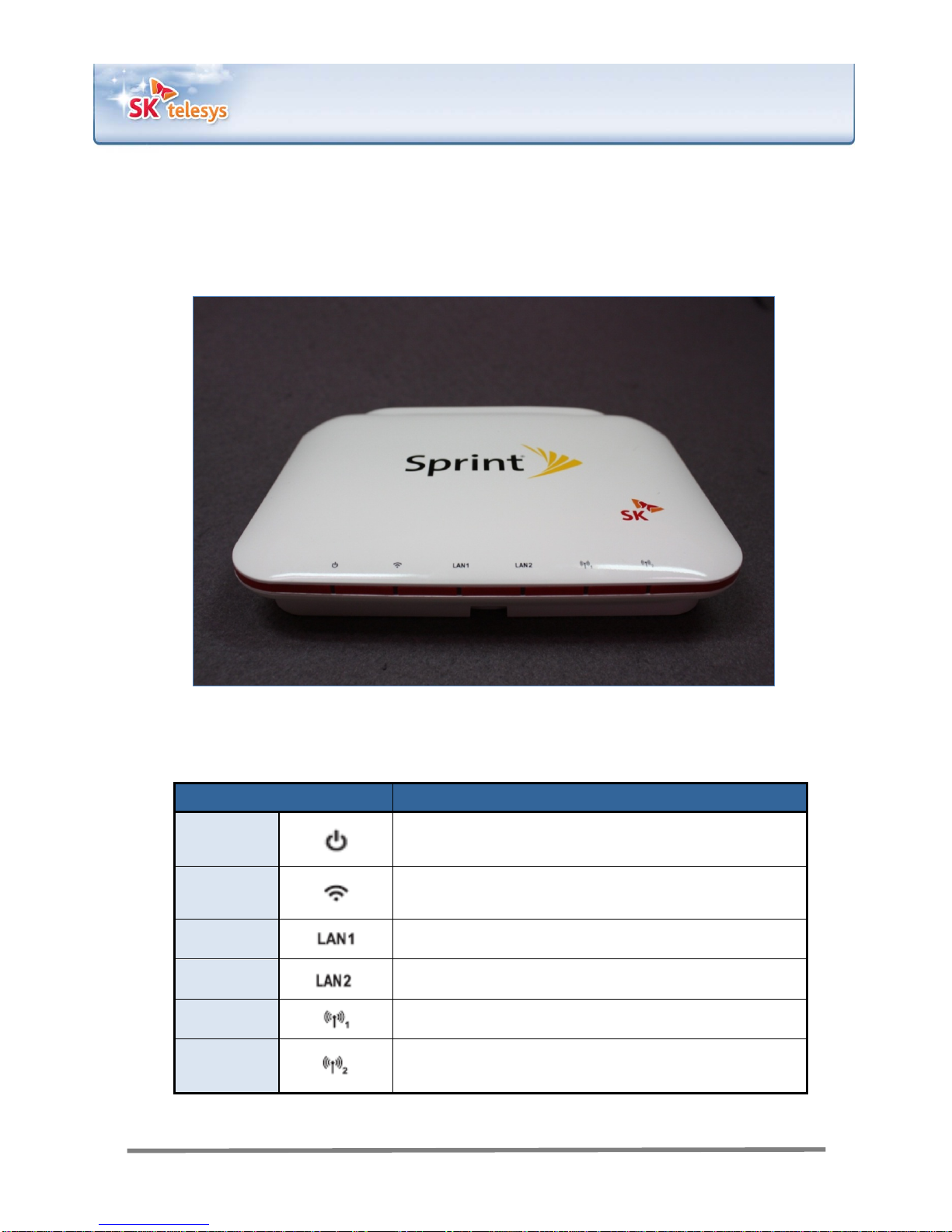
1.2 Front View
Figure 2. Front LEDs
Items Descriptions
Power Indicates power supply to the device. Flashes green
when normal.
WiFi Indicates the state of wireless LAN (WiFi). Flashes
green when normal. Blinks while data is transferred.
LAN1 Indicates the state of LAN Port 1.
LAN2 Indicates the state of LAN Port 2.
WiMAX1 Indicates the state of WiMAX Module 1.
WiMAX2 Indicates the state of WiMAX Module 2.
SKTelesysCo.,Ltd. | 6
Confidential & Proprietary
CPE(SWT225)
Patent‐pendingtechnologiestoimprovedataperformance
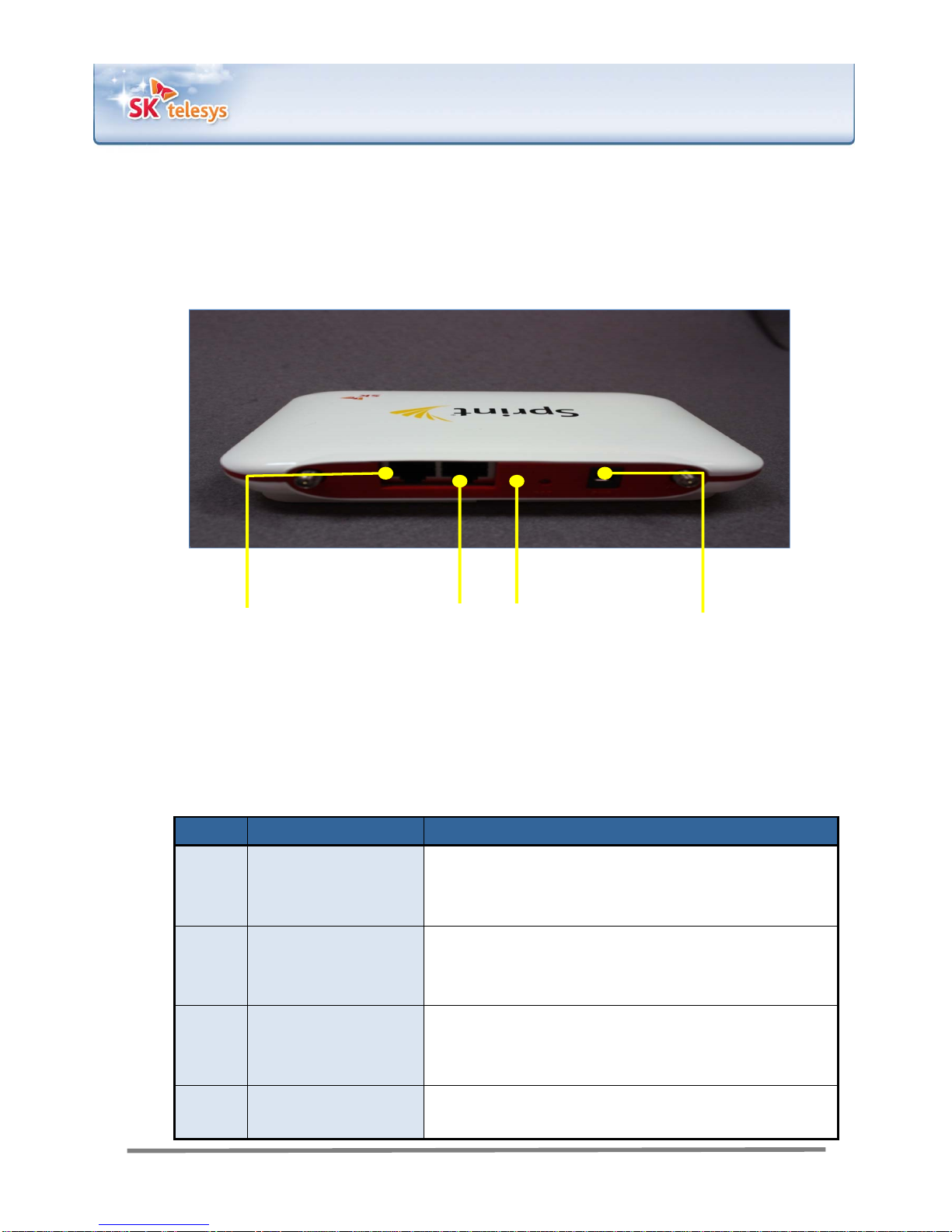
1.3 Rear View
2. LAN Port #2
1. LAN Port #1 4. Power Port
3. Reset button
Figure 3. Rear Ports
No. Items Descriptions
1 LAN1
Provides wired connection to a terminal. A terminal
connected into this port will be allocated an IP address
automatically (via DHCP).
2 LAN2
Provides wired connection to a terminal. A terminal
connected into this port will be allocated an IP address
automatically (via DHCP).
3 RST (Reset)
Used to reset the device. Press and hold for less than 2
seconds for rebooting and for 10 seconds or longer for
factory initialization.
4 PWR (power) The power adapter, one of the device components, is
connected into this slot.
SKTelesysCo.,Ltd. | 7
Confidential & Proprietary
CPE(SWT225)
Patent‐pendingtechnologiestoimprovedataperformance
Section 2. Installation
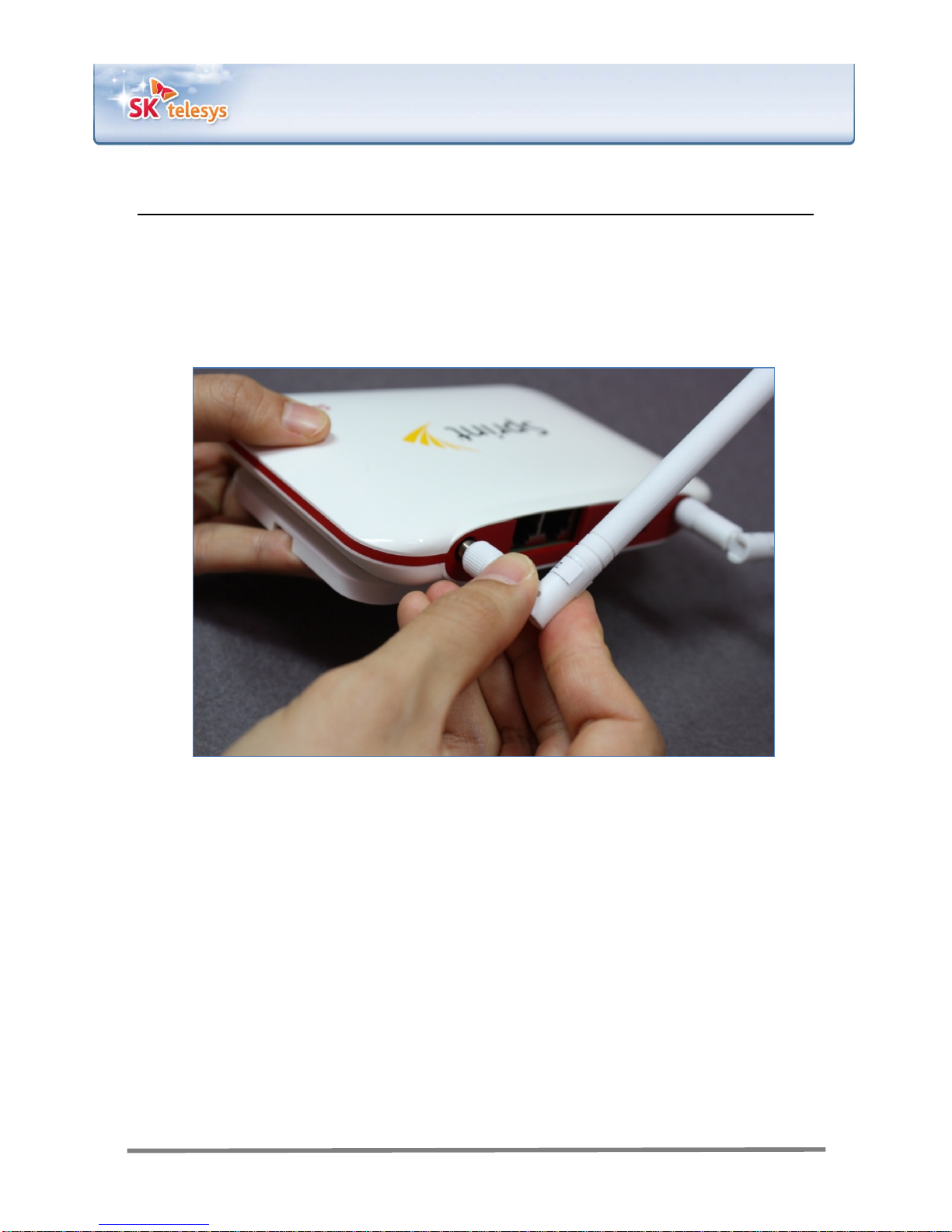
2.1 Antenna connection
Connect a pair of antennas to the main body respectively as shown in Figure 4.
Figure 4. Antenna connection
2.2 Adapter connection
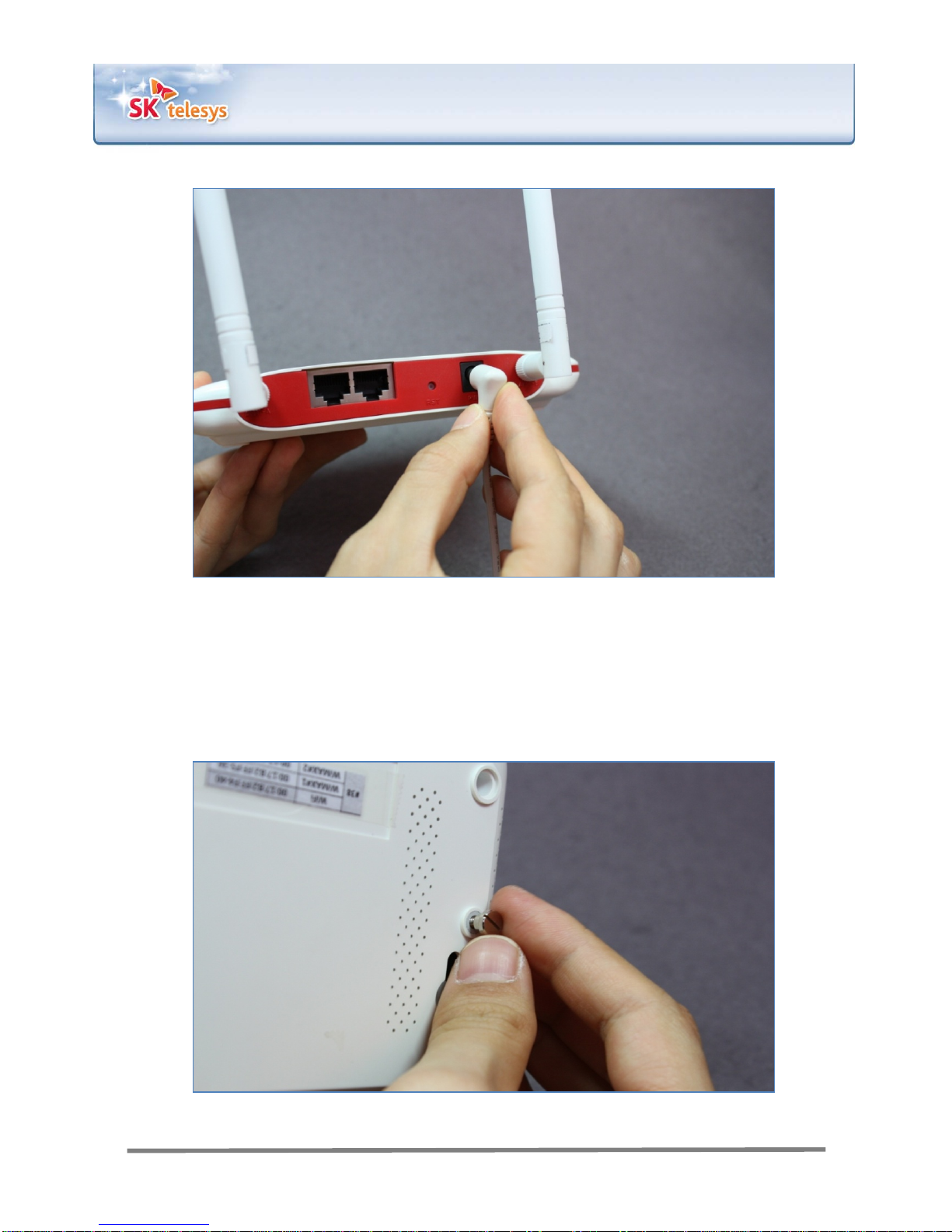
Connect the adapter to the main body as show in Figure 5. SWT225 has no power
switch. Therefore power is supplied to the device upon connection of the adapter.
SKTelesysCo.,Ltd. | 8
Confidential & Proprietary
CPE(SWT225)
Patent‐pendingtechnologiestoimprovedataperformance
Figure 5. Adapter connection
2.3 Station connection
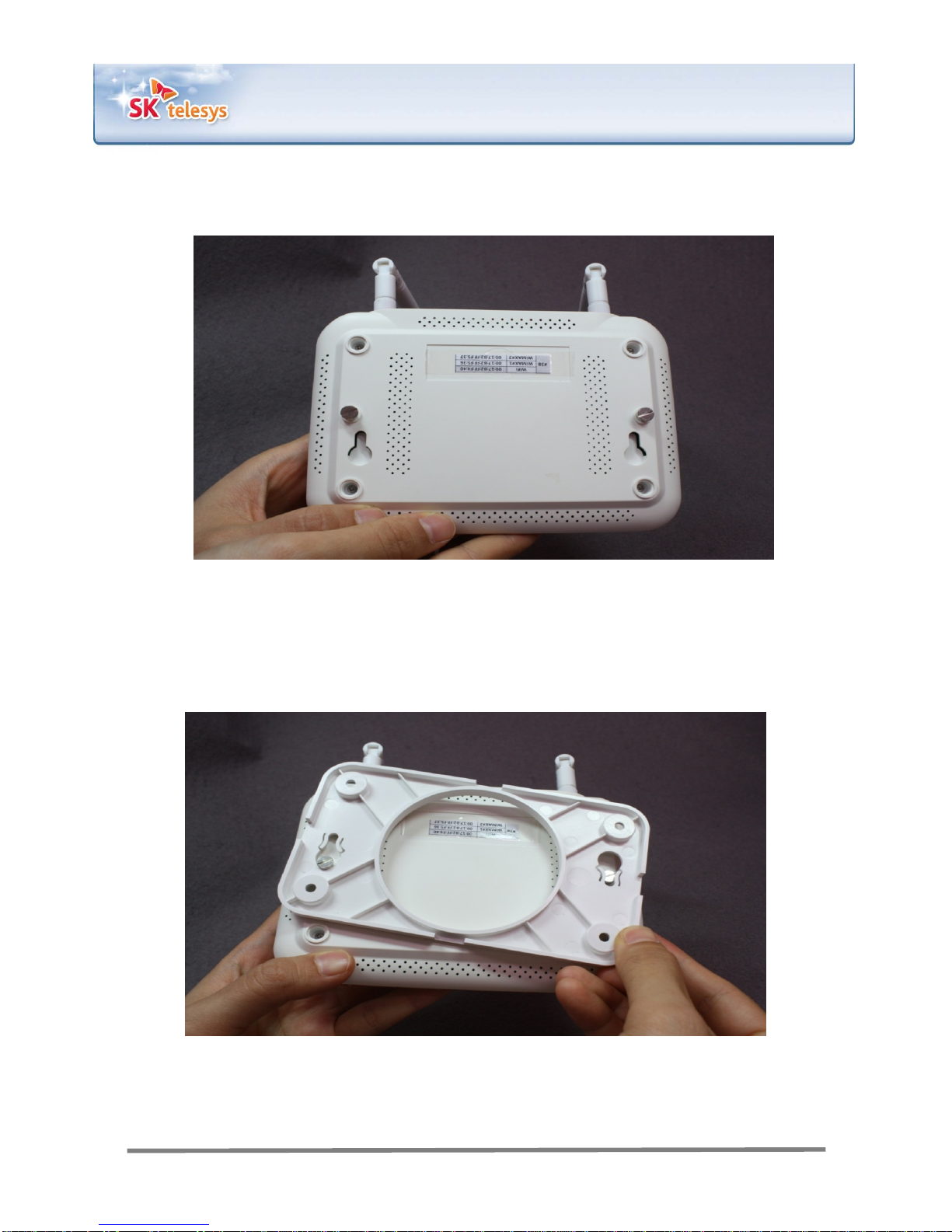
Fasten the two screws to the bottom of the main body of SWT225 as shown in Figure
6 to mount the stand.
Figure 6. Fastening of screws
SKTelesysCo.,Ltd. | 9
Confidential & Proprietary
CPE(SWT225)
Patent‐pendingtechnologiestoimprovedataperformance
Figure 7. A view of the bottom after the screws are fastened
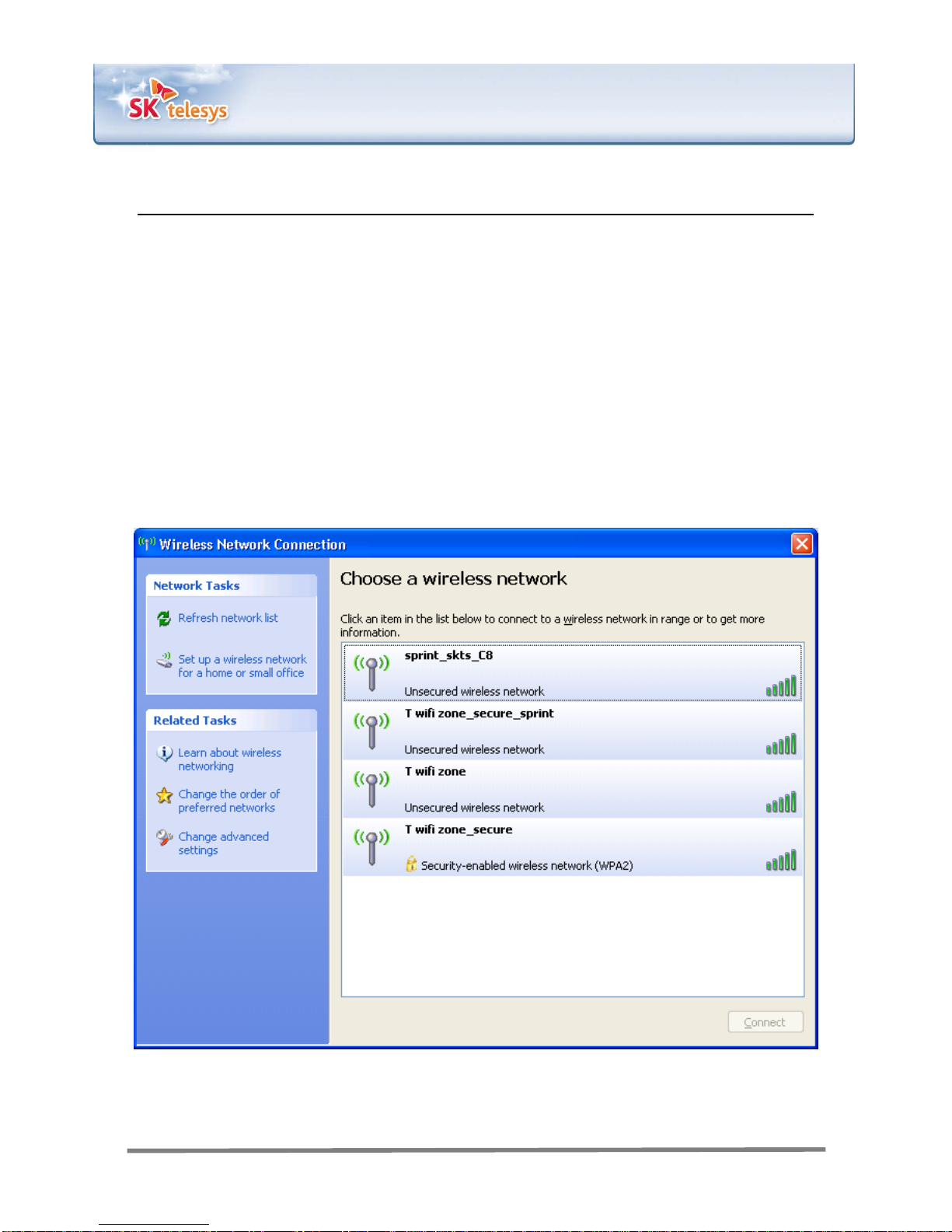
Mount the stand onto the device using the screws as shown in Figure 8.
Figure 8. Mounting of the stand
SKTelesysCo.,Ltd. | 10
Confidential & Proprietary
CPE(SWT225)
Patent‐pendingtechnologiestoimprovedataperformance
Section 3. Internet access
You can access the Internet via either WiFi or LAN.
3.1 Access via WiFi (wireless)
3.1.1 Detection of wireless network and access
Run wireless network detection on your computer and see what networks exist
around it.
If SWT225 is included in the list of networks, double click on the SSID to access
WiFi.
Figure 9. Wireless network detection
Table des matières
Manuels Point d'accès sans fil populaires d'autres marques

D-Link
D-Link DWL-2100AP - AirPlus Xtreme G Manuel utilisateur

Ubiquiti
Ubiquiti NanoStation NSM2 Manuel utilisateur

Cisco
Cisco Aironet 1550 Series Manuel utilisateur

Aruba
Aruba IAP-335 Manuel utilisateur

Advantek Networks
Advantek Networks AWN-AP-54MR Manuel utilisateur

IP-COM
IP-COM AP355 Manuel utilisateur


