
SitOnit Seating eBEAM Manuel utilisateur

C6547 Rev. A
eBEAM
ASSEMBLY INSTRUCTIONS
eBEAM is a straightforward, streamlined solution for adding power to your workstations.
With adaptable legs, multiple beam lengths and cable management options that make it
practically mess-free, eBEAM is simply powerful (and powerfully simple).
To report any issues with this product, please contact our customer service department at (888) 274-8664.
For more information, visit www.sitonit.net
EBEAM ASSEMBLY INSTRUCTIONS
REQUIRED TOOLS
COMPONENT LIST
1:1 SCALE
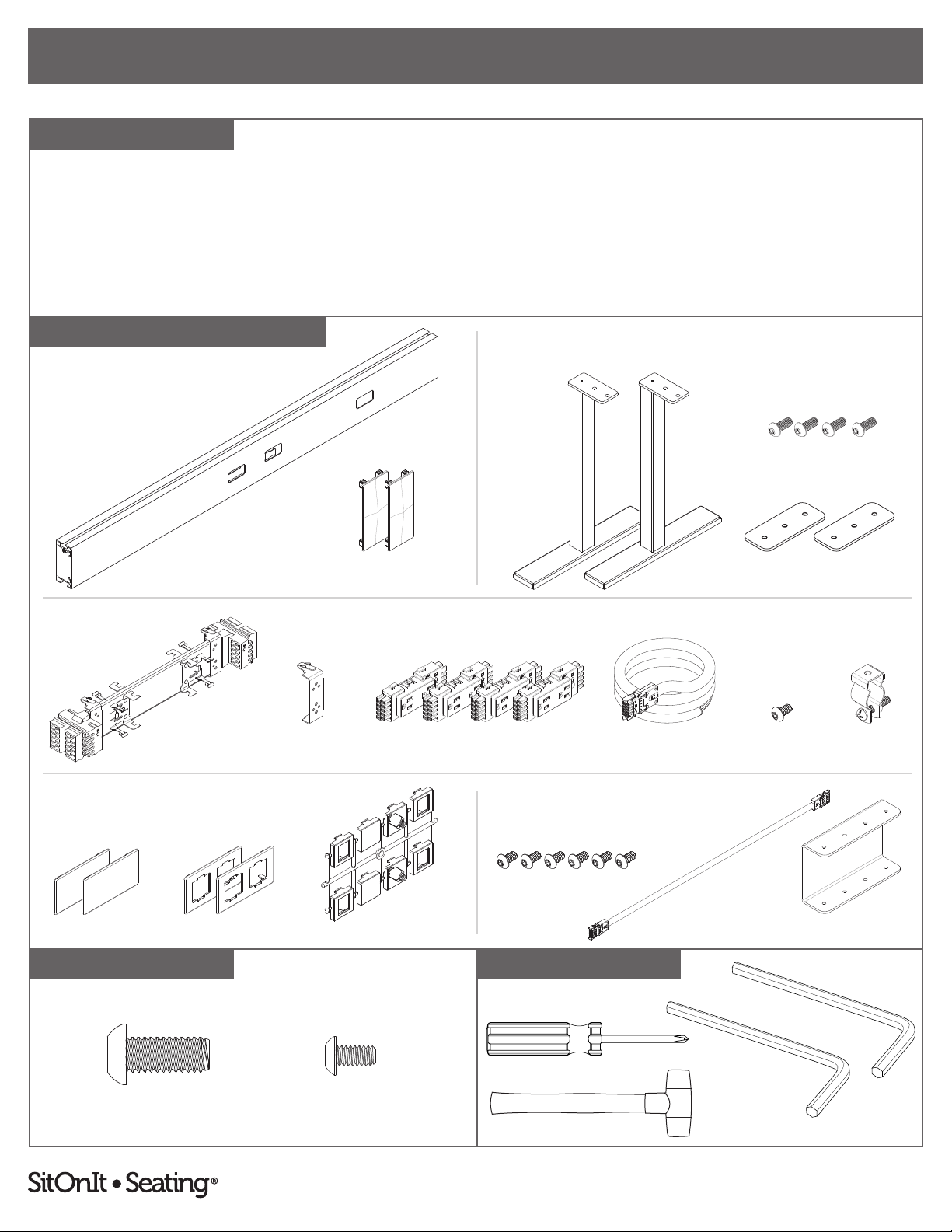
Beam
• Beam (1)
• End Cap (2)
Legs
• Leg (2)
• Mounting Plate (2)
• 5⁄16"–18 × ¾" Screw (4)
#2 Phillips Screwdriver
Non-Marring Mallet/Hammer
3⁄16" Hex L-Key
(Included)
Beam Legs
BEAM
POWER
DATA PACK GANGING
LEGS
Mounting Plates
Power
Distribution Harness
End Caps
POWER BEAM COMPONENTS
Middle Clip
Blank Faceplates Data Faceplates
Data
Adapter Tree
Power
• Power Distribution Harness (1)
• Middle Clip (1)
• Duplex Receptacles (4)
• Power Infeed (1)
• Hose Clamp (1)
• #10–24 × ⅜" Screw (1)
5⁄16"–18 × ¾" Screws
5⁄16"–18 × ¾"
#10–24 × ⅜" Screws
Ganging Bracket
Jumper
Component quantities shown are
for a standard 2-seat back-to-back
conguration.
Quantities will vary with user
specications. For more information,
see the table on page 22.
For accessory components,
see page 12.
Data adapters are not included.
See page 23 for a list of compatible jacks.
Included if two or more beams will be connected.
Power InfeedDuplex Receptacles
Data Pack
• Data Adapter Tree (1)
• Blank Faceplate (2)
• Data Faceplate (2)
Ganging (If Applicable)
• Ganging Bracket (1)
• #10–24 × ⅜" Screw (6)
• Jumper (1)
#10–24 × ⅜"
Hose Clamp
#10–24 × ⅜" Screw
⅛" Hex L-Key
(Included)
Installation may not use all of the provided screws or mounting plates.
2
To report any issues with this product, please contact our customer service department at (888) 274-8664.
For more information, visit www.sitonit.net
EBEAM ASSEMBLY INSTRUCTIONS
STEPS
1
Note: We recommend reading these instructions in their entirety and laying all components out in advance.
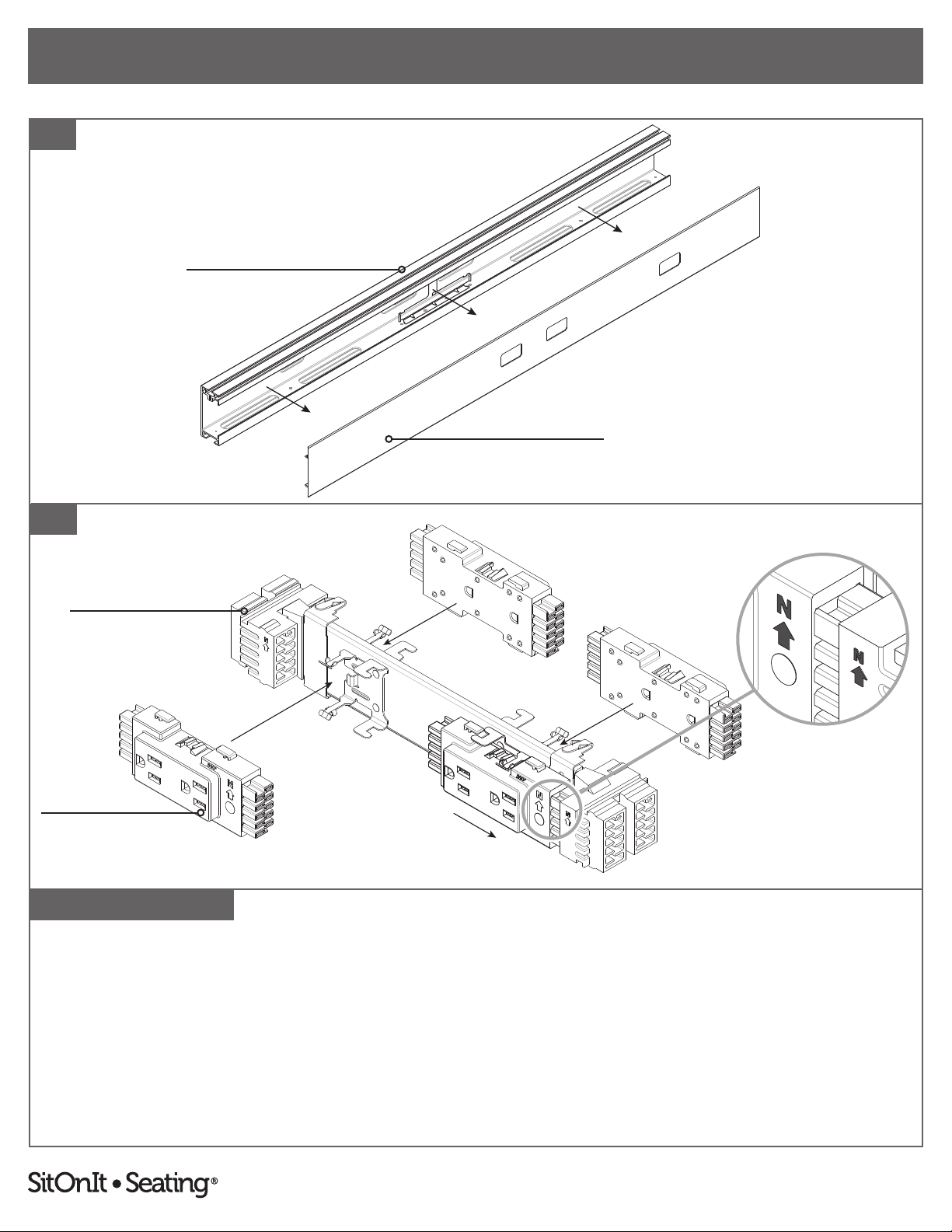
1. Remove cover from beam and set aside.
2. If duplex receptacles were purchased, set them into the power distribution harness with the arrows pointing up, then slide
outwards to snap them into place.
Beam
Cover
Duplex Receptacle
Power Distribution Harness
SNAP
2
3

To report any issues with this product, please contact our customer service department at (888) 274-8664.
For more information, visit www.sitonit.net
EBEAM ASSEMBLY INSTRUCTIONS
STEPS
3
Bottom Harness Clip
Mounting Bracket
Top Harness Clip
To attach a distribution harness:
3. Align distribution harness with the pre-installed mounting bracket, ensuring that the arrows on both the distribution harness
and the duplexes point up. Hook the bottom harness clips rst, then rotate slightly and apply pressure to snap the top
harness clips into the mounting bracket. The mounting bracket is pre-installed on the inside center of the beam.
Place the middle clip over the distribution harness and attach it to the mounting bracket, hooking the bottom rst, before
snapping the top of the clip into mounting bracket.
4
To report any issues with this product, please contact our customer service department at (888) 274-8664.
For more information, visit www.sitonit.net
EBEAM ASSEMBLY INSTRUCTIONS
STEPS
Bottom Slot
Infeed would run up this side
Beam is shown upside-down. Beam is shown upside-down. Beam is shown upside-down.
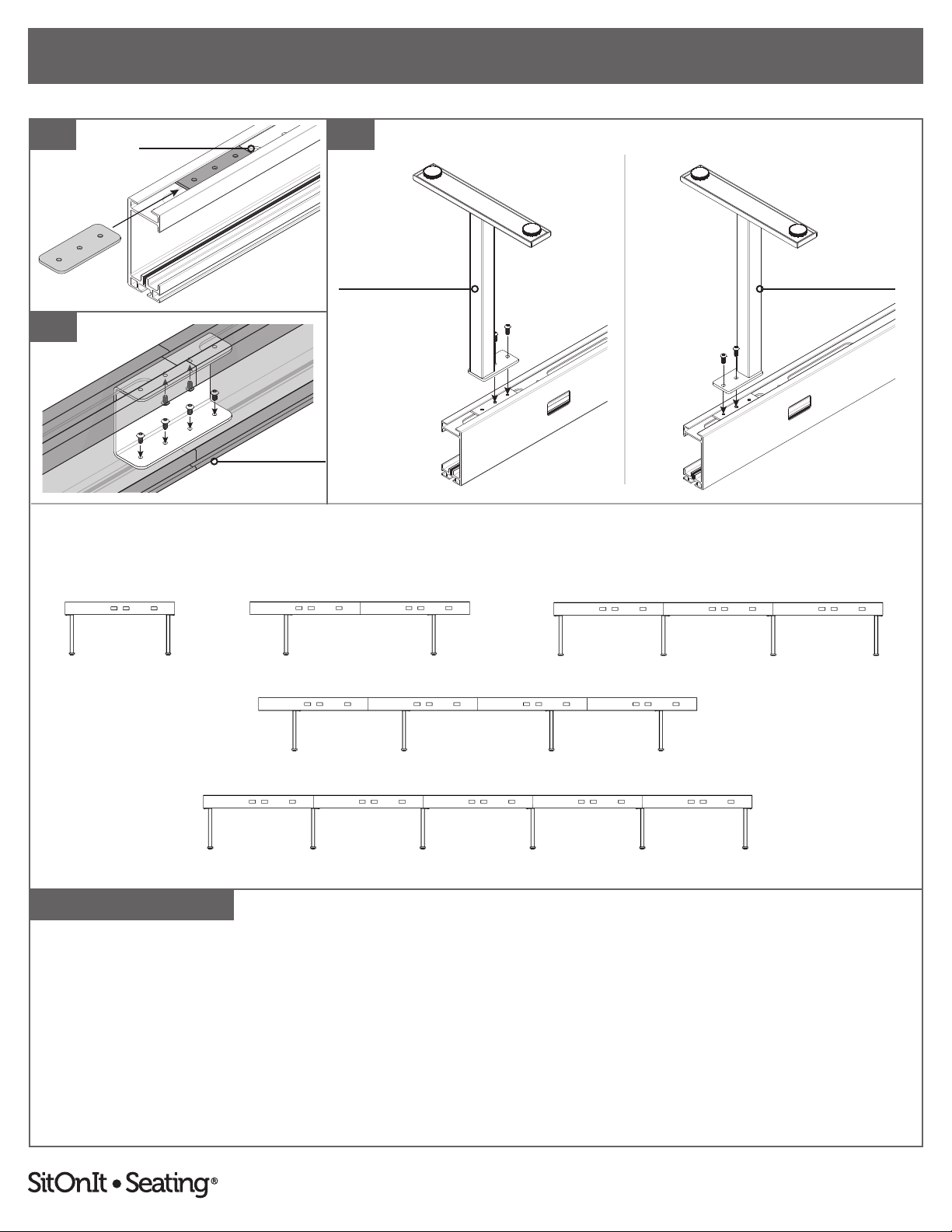
For leg installation without wire trays, complete steps 4–6 below.
For leg installation with wire trays, see steps 7–11 (pages 6–7).
4. Flip the beam upside-down and slide in one mounting plate per leg, aligning them to the desired locations, leaving at least a
3" gap in one of the bottom slots for the power infeed and ¾" spacing from the open ends of the beam for the end caps.
5. If attaching multiple beams: From within the ganging bracket, inside of the beam (shown inverted above), fasten the
ganging bracket using the ⅛" hex L-key to install two #10–24 × ⅜" screws up into the inside bottom of the beam and four
#10–24 × ⅜" screws down into the inside top of the beam.
6. Place the legs in position and use the 3⁄16" hex L-key to secure them in place with two 5⁄16"–18 × ¾" screws per mounting
bracket. Turn beam upright. Note: Legs can be mounted in two dierent directions.
4
RECOMMENDED LEG PLACEMENT
5
6
Top of Beam
Infeed would run up this side
LEG FACES IN LEG FACES OUT
Beam is shown upside-down.
5

To report any issues with this product, please contact our customer service department at (888) 274-8664.
For more information, visit www.sitonit.net
EBEAM ASSEMBLY INSTRUCTIONS
STEPS
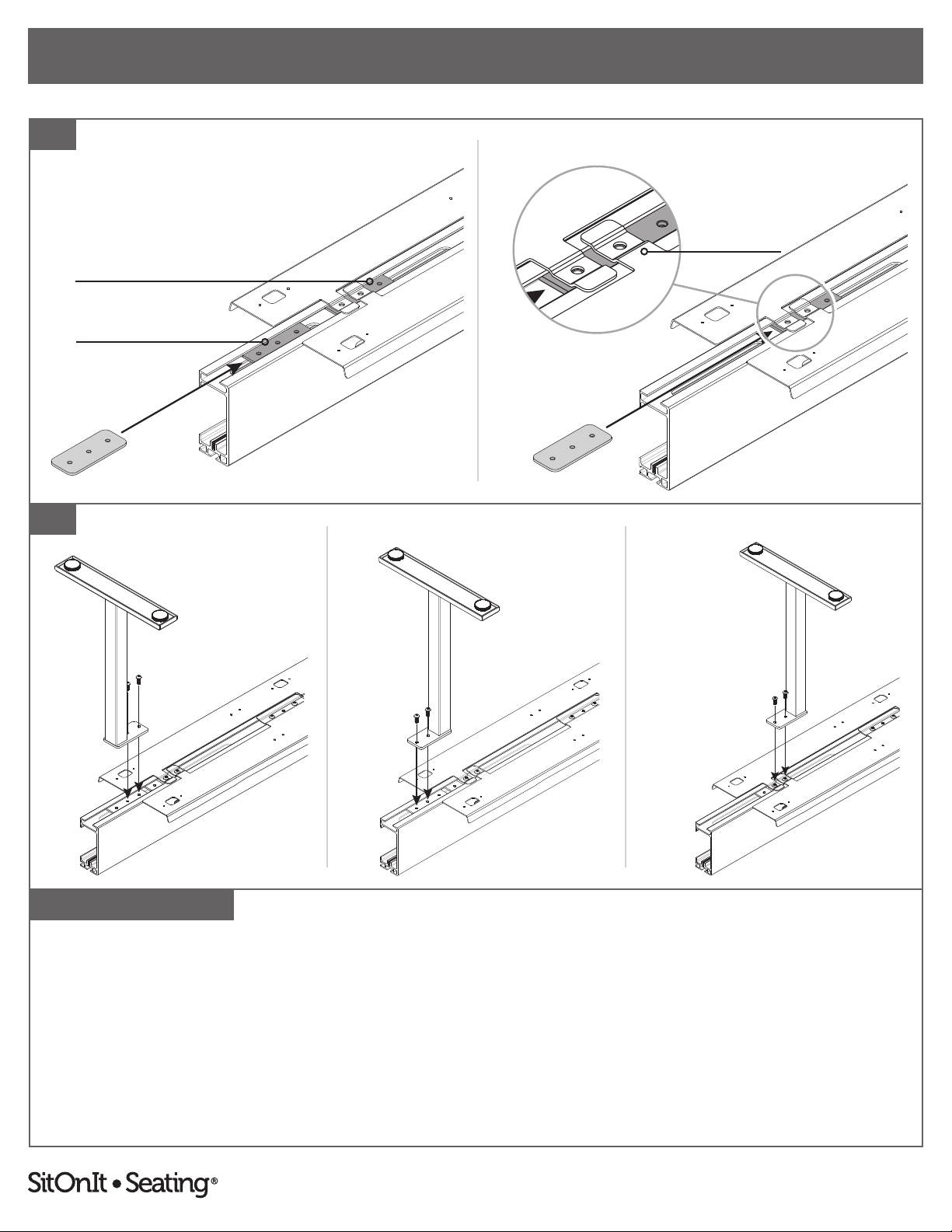
For leg installation with wire trays complete steps 7–11:
7. Flip the beam upside-down and slide in one mounting plate per wire tray, aligning them with the central holes of the beam.
8. Place the wire tray(s) in position and then secure the trays to the mounting plates by using the 3⁄16" hex L-key to fasten two
5⁄16"–18 × ¾" per mounting plate.
9. If attaching multiple beams: From within the ganging bracket, inside of the beam (shown inverted above), fasten the
ganging bracket using the ⅛" hex L-key to install two #10–24 × ⅜" screws up into the inside bottom of the beam and four
#10–24 × ⅜" screws down into the inside top of the beam.
9
7
8
Top of Beam
Beam is shown upside-down.
Beam is shown upside-down.
Beam is shown upside-down.
SINGLE-SIDED BACK-TO-BACK
6
To report any issues with this product, please contact our customer service department at (888) 274-8664.
For more information, visit www.sitonit.net
EBEAM ASSEMBLY INSTRUCTIONS
STEPS
Beam is shown upside-down.
Beam is shown upside-down.
Beam is shown upside-down.Beam is shown upside-down.
Beam is shown upside-down.
Beam is shown upside-down.
Beam is shown upside-down.
10
11
10. If legs share mounting plates with the wire tray(s): Slide in one mounting plate per leg and align them to the outer wire
tray tabs. (Use this installation option with the mounting plate closest to the infeed when using a 48" beam.)
If legs do not share mounting plates with the wire tray: Slide in one mounting plate for each leg and set of wire tray tabs.
The mounting plates for the legs can be placed inside or outside the wire trays' outer mounting plates.
Note: Leave at least a 3" gap in the bottom slot for the infeed and ¾" spacing from the open ends of the beam for the end
caps. Some mounting plates or screws may be left over after installation.
11. Place the legs in position and use the 3⁄16" L-hex key to secure the legs and outer wire tray mounting plates in place with two
5⁄16"–18 × ¾" per mounting bracket. Turn beam upright. Note: Legs can be mounted in two dierent directions.
SEPARATE MOUNTING PLATE SHARED MOUNTING PLATES
Mounting Plate for Leg
Mounting Plate for Wire Tray(s)
MOUNTING PLATE FACES IN MOUNTING PLATE FACES OUT SHARED MOUNTING PLATE
Wire Tray Tabs
7

To report any issues with this product, please contact our customer service department at (888) 274-8664.
For more information, visit www.sitonit.net
EBEAM ASSEMBLY INSTRUCTIONS
STEPS
12
12. Route power infeed through one of the bottom slots of the beams and plug the end of the power infeed into the nearest
distribution harness, ensuring that the arrows on both the distribution harness and the power infeed point upwards.
13. If attaching multiple beams together: Plug one end of the jumper into each beam's distribution harness, ensuring that
the arrows on both the distribution harnesses and the jumper point up.
Note: The jumper and infeed can be plugged in next to each other if the infeed is not on the outer distribution harness.
Bottom Slot
Power Infeed
13
8

To report any issues with this product, please contact our customer service department at (888) 274-8664.
For more information, visit www.sitonit.net
EBEAM ASSEMBLY INSTRUCTIONS
STEPS
Dept. Technical reference
14
16
15
14. Remove the ¼"–20 × 1¼" screw and ¼"–20 × ¼" hex nut from the pre-attached hose clamp assembly.
15. Position the hose clamp above one of the bottom slots and fasten it to the thread feature on the upper inside of beam
with a #10–24 × ⅜” screw using the ⅛" hex L-key.
16. Hold the power infeed within the hose clamp opening and slide the ¼"–20 × 1¼" screw through the hose clamp holes.
Then tighten the ¼"–20 × ¼" hex nut onto the screw using a #2 Phillips screwdriver.
Connection to building wiring must be done by a qualied electrician.
See page 23 for 4-2-2 wiring schematic.
Power Infeed
Bottom Slot
9

To report any issues with this product, please contact our customer service department at (888) 274-8664.
For more information, visit www.sitonit.net
EBEAM ASSEMBLY INSTRUCTIONS
STEPS
17. Break o applicable data adapters from tree and snap into data faceplates, then snap in respective data modules, etc. (not
supplied).
18. Snap blank faceplates and/or data faceplates into window cutouts on the beam and beam cover.
19. Route data cables through bottom slot of the beam and connect into data modules. Then align and snap the beam cover
back onto the beam.
19
17 18
Data Modules Are Not Included
DATA FACEPLATE BLANK FACEPLATE
10
Table des matières


