4.5 Touch button function
SET/AUTO
Short press -- manually select the display temperature, humidity, CO2, and automatically scroll display;
Long press -- Convert the temperature unit to / , press for 3 seconds in the temperature display
state;
TEST/HUSH: Short press
Long press - CO2 test alarm.
4.6 Environmental light detection function
When AC power supply is normal, CO2, temperature and humidity are in the normal range, if the
ambient brightness is very low (at night, indoor lights are all off), the brightness of the product's display
screen and indicator light will automatically decrease to reduce the impact on users' sleep. Normal
brightness is displayed when CO2 or temperature and humidity are detected abnormal.
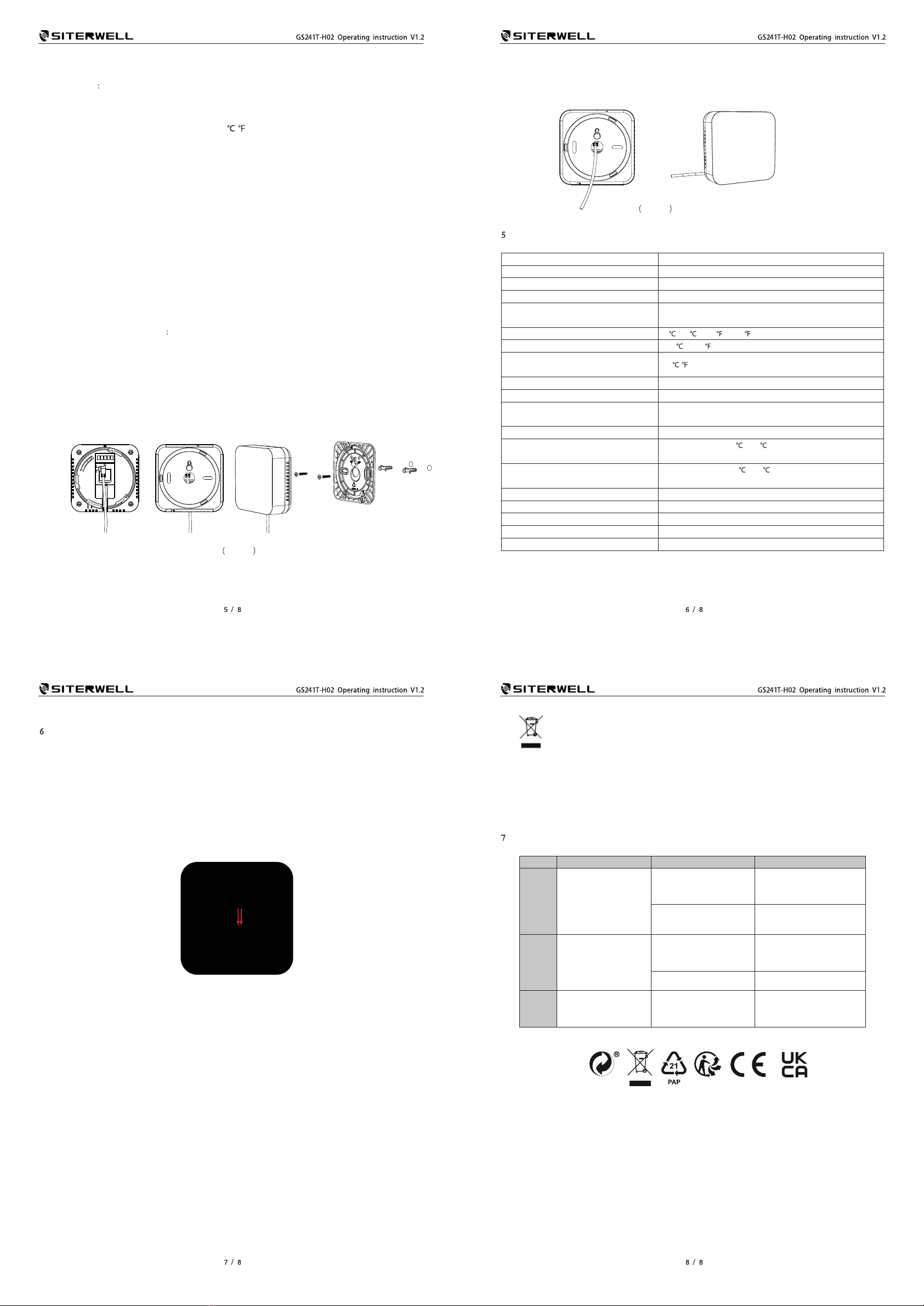
4.7 Installation
This product recommends wall installation.
Method of wall installation
Select the appropriate installation location of the alarm to ensure that there are no wires or pipes
in the vicinity or within the walls.
Determine the position of the two fixing screws on the alarm panel, the center distance of the two
holes is 58mm, and drill the two diameters 5 mm depth of about 30~40mm hole;
Insert two expansion rubber plugs into the holes respectively in the installation package;
Screw the screws in the mounting package into the rubber plug and set aside about 3~5 mm;
Install the alarm as shown in figure 8.
figure 8
figure 9
5Product Technical Parameters
Working voltage DC5V (Power adapter 5V/1A)
CO2 measurement range 400 ~ 5000 PPM
CO2 measurement error range ±(50ppm+5% reading value) (Note 1 and Note 2)
Pressure dependence + 1.6 % reading per kPa deviation from normal pressure
CO2 measurement resolution and response
time 1 PPM ; T90 < 120s
Temperature range -5 ~ 50 or 23 ~ 122
Temperature measurement error range ±0.5 or 0.9
Temperature measurement resolution and
response time 0.1 / ; T90 < 120s
Humidity measurement range 0.0% ~ 99.9%RH
Humidity measurement error range ±5% RH
Humidity measurement resolution and response
time 0.1% ; T90 < 600s
Backup battery running time 12 Hours
Extreme Work environment Working temperature -5 ~ 50 , working humidity 0 ~ 90%RH(no
condensation)
Storage environment Storage temperature -10 ~ 60 , storage humidity 0 ~ 95%RH(no
condensation)
Product service life 10 years (End of product service life display "End")
Level of prevention and care IP40
Environmental protection standard RoHS
Overall dimensions 99mm*99mm*37mm
Product weight Net weight 268g
Note 1: In indoor air CO2 detection applications, the accuracy is measured after 24 hours of continuous
operation of the equipment.
Note 2: The nominal accuracy of the data at room temperature +25°C and atmospheric pressure 101.3kPa,
the device used for calibration and the gas have an uncertainty of ±1%.
6Matters Needing Attention
6.1 In the process of product use, due to transportation, installation and other factors, may cause NDIR
carbon dioxide sensor zero drift and detection accuracy reduction, the first use or change the use of
the environment, should let the product continue to work for more than 24 hours, automatically correct
the drift.
If CO2 concentration is obviously abnormal or above 1500PPM when it is used for the first time,
manual calibration can be adopted to quickly correct the drift. The method of manual calibration is as
follows: after the product is started, it is placed in a fresh outdoor environment for more than 5 minutes,
and the wire or metal wire is short-connected to the manual calibration port as shown below for 2
seconds and then released. The equipment will be manually calibrated to 400PPM in 6 seconds.
6.2 This product cannot be used in factories, warehouses and other industrial environments that may be
in high CO2 concentration for a long time. The CO2 detector used in industrial environments needs
regular manual calibration.
6.3 If the product is to be placed in a narrow space, the space should be well ventilated, especially the
two diffusion Windows should be in a well-ventilated position.
6.4 The product should be away from heat source, and avoid direct sunlight or other thermal radiation.
6.5 This product should not be used in the environment with high dust density for a long time.
6.6 Do not use the device in potentially explosive rooms.
6.7 Do not remove any safety signs, stickers or labels from the device. Keep all safety signs, stickers and
labels legible condition.
6.8 Do not open the device in case it is damaged.
6.9 Clean the device with a soft, damp and lint-free cloth. Make sure that no moisture enters the housing.
Do not use any sprays, solvents, alcohol-based cleaning agents or abrasive cleaners, but only clean
water to moisten the cloth.
6.10 The icon with the crossed-out waste bin on waste electrical or electronic equipment stipulates
that this equipment must not be disposed of with the household waste at the end of its life. You will find
collection points for free return of waste electrical and electronic equipment in your vicinity. The
addresses can be obtained from your municipality or local administration. The separate collection of
waste electrical and electronic equipment aims to enable the re-use, recycling and other forms of
recovery of waste equipment as well as to prevent negative effects for the environment and human
health caused by the disposal of hazardous substances potentially contained in the equipment.
7Troubleshooting
Number Fault phenomenon Cause analysis, Solution
1
The device is not
displayed, the indicator
light is not on, and
there is no response to
the button operation
Controller is not powered
on Check the power supply
Equipment failure Contact the after-sales
2 The measurement of
CO2 concentration
value is not accurate
The 24-hour self-
calibration process is not
complete Power on for 24 hours
CO2 sensor failure Contact the after-sales
3 Intermittent device
voice low voltage
The backup battery
voltage of the device is
too low
ConnectAC power and turn
on the backup power switch
for charging
Free standing on table is also workable.
Method of free standing: (See figure 9)
Twist off the back cover, get adapter wire through the center hole of back cover,
plug in, twist back the cover. Put the detector on a horizontal desktop.