
SinoCastel IDD-213T Manuel utilisateur

IDD-213T User Manual
(Rev. 1.5)
Sinocastel Co., Ltd.
September, 2014

IDD-213T User Manual
1
Contents
1. Introduction......................................................................................................................................................................2
2. Specifications...................................................................................................................................................................3
2.1 External Interface....................................................................................................................................................3
2.2 Status Indicator .......................................................................................................................................................4
2.3 Technical Parameters............................................................................................................................................5
3. Device Configuration....................................................................................................................................................7
3.1 PC Tool .......................................................................................................................................................................7
3.2 SMS Instructions.....................................................................................................................................................7
4. Installation Instruction..................................................................................................................................................9
4.1 SIM Card Installation.............................................................................................................................................9
4.2 OBD Port................................................................................................................................................................. 10
4.3 Device Installation............................................................................................................................................... 11
5. Functions ........................................................................................................................................................................ 14
5.1 Location Inquiry ................................................................................................................................................... 14
5.2 Regular GPS data reporting............................................................................................................................. 14
5.3 Regular G-Sensor Data Reporting ................................................................................................................ 14
5.4 Cell ID Reporting ................................................................................................................................................. 15
5.5 GPS Data Reporting in Sleep Mode............................................................................................................. 15
5.6 Data storage/Supplementary Report in Dead zones............................................................................. 15
5.7 Trip Mileage........................................................................................................................................................... 15
5.8 Alarms and Events Reporting ......................................................................................................................... 15
5.9 Intelligent Power Saving................................................................................................................................... 16
5.10 GPS/Cellular Timer............................................................................................................................................ 16
5.11 SMS Alert.............................................................................................................................................................. 16
5.12 Google Map Link............................................................................................................................................... 16
5.13 Remote Configuration .................................................................................................................................... 16
5.14 SMS Configuration ........................................................................................................................................... 16
5.15 PC Tool Configuration..................................................................................................................................... 16
6. Disclaimer....................................................................................................................................................................... 17
7. Warranty......................................................................................................................................................................... 18
8. Statement....................................................................................................................................................................... 19
IDD-213T User Manual
2
1. Introduction
IDD-213T is a plug-and-play GPS tracker with standard OBD II interface, it monitors
and records trip info including engine start/off time, real-time location, vehicle speed,
various alarms and events, it supports GPRS and SMS channel.
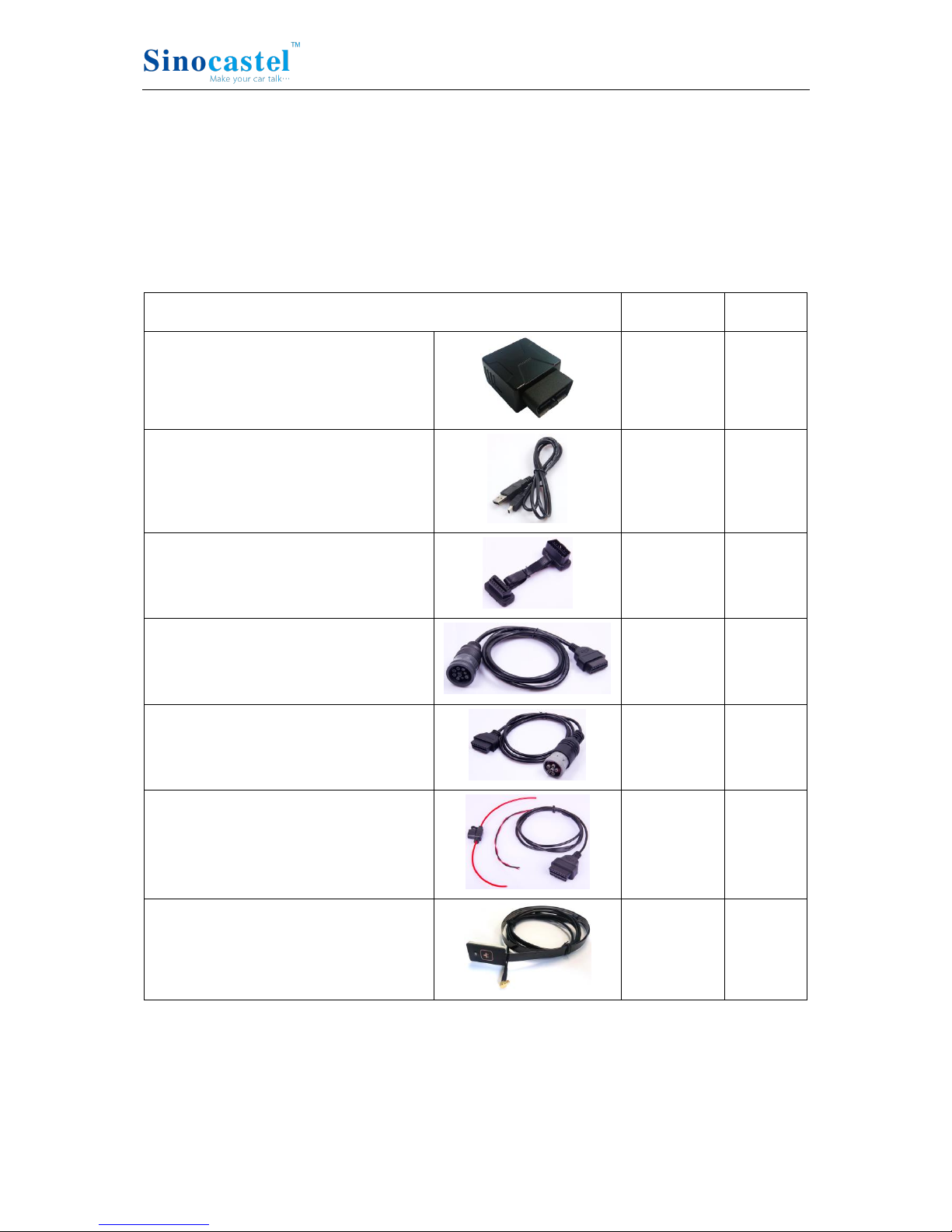
Packing List
Parts name
Quantity
Note
IDD-213T OBD Dongle
1
●
USB Configuration
Cable
1
○
OBD II extension cable
1
○
9-Pin deutsch wiring harness
1
○
6-Pin deutsch Wiring harness
1
○
Power cable (including 3A Fuse)
1
○
SOS button
1
○
Note: ● Standard configuration ○ Optional configuration
(Optional accessories will not be included if there is no indication in the order)
IDD-213T User Manual
3
2. Specifications
2.1 External Interface
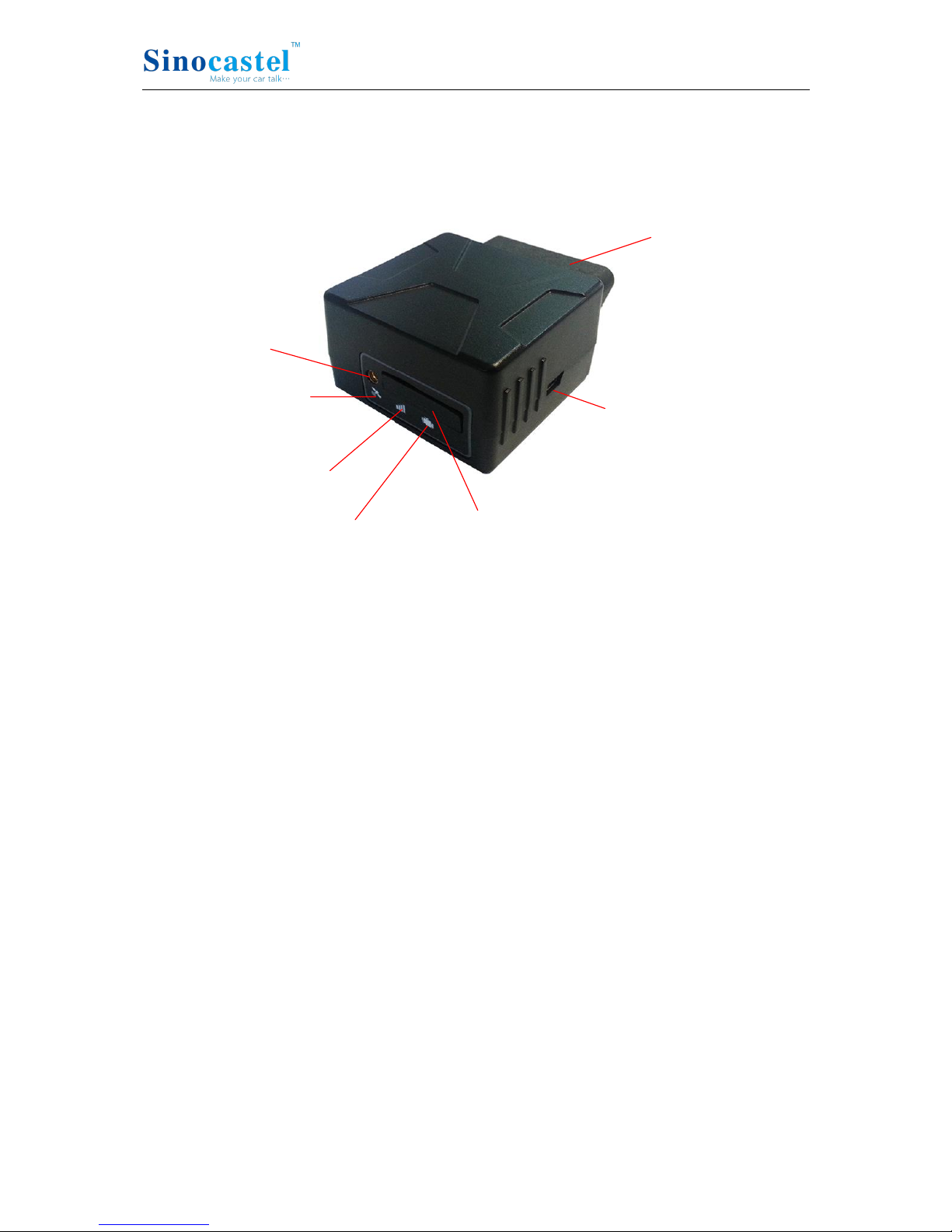
Product appearance as follows:
SOS Button
Interface
GPS LED
Cellular LED
Power/OBD LED SIM Card Slot
OBD Connector
USB Interface
1. Standard OBD Connector
Connect to the 16 pin on-board Diagnostic Link Connector (DLC).
2. Mini USB interface
Connect to PC through USB configuration cable.
3. SOS button Interface
This is a SOS button interface, to connect the SOS button for emergency, interface
type is MMCX.
4. SIM Card slot

IDD-213T User Manual
4
2.2 Status Indicator
Indicator
Color
Status
OBD LED
Red
Solid off
Cellular LED
Orange-red
Fast blinking (on 0.5s, off 0.5s) - No SIM card or
network searching
Slow blinking (on 0.5s, off 2.5s) - Registered network
Solid on - Logged into the server
Solid off - Cellular off
GPS LED
Green
Blinking (on 1s, off 1s) - GPS signal is good
Solid on - Searching for GPS signal
Solid off - GPS off
Buzzer
Beep
One beep - Power on
Three beeps - Successful log in
Four beeps - Trip end
Five beeps - Power off
Six beeps –Trip Start
Five beeps (short beep) - Alarm indication
IDD-213T User Manual
5
2.3 Technical Parameters
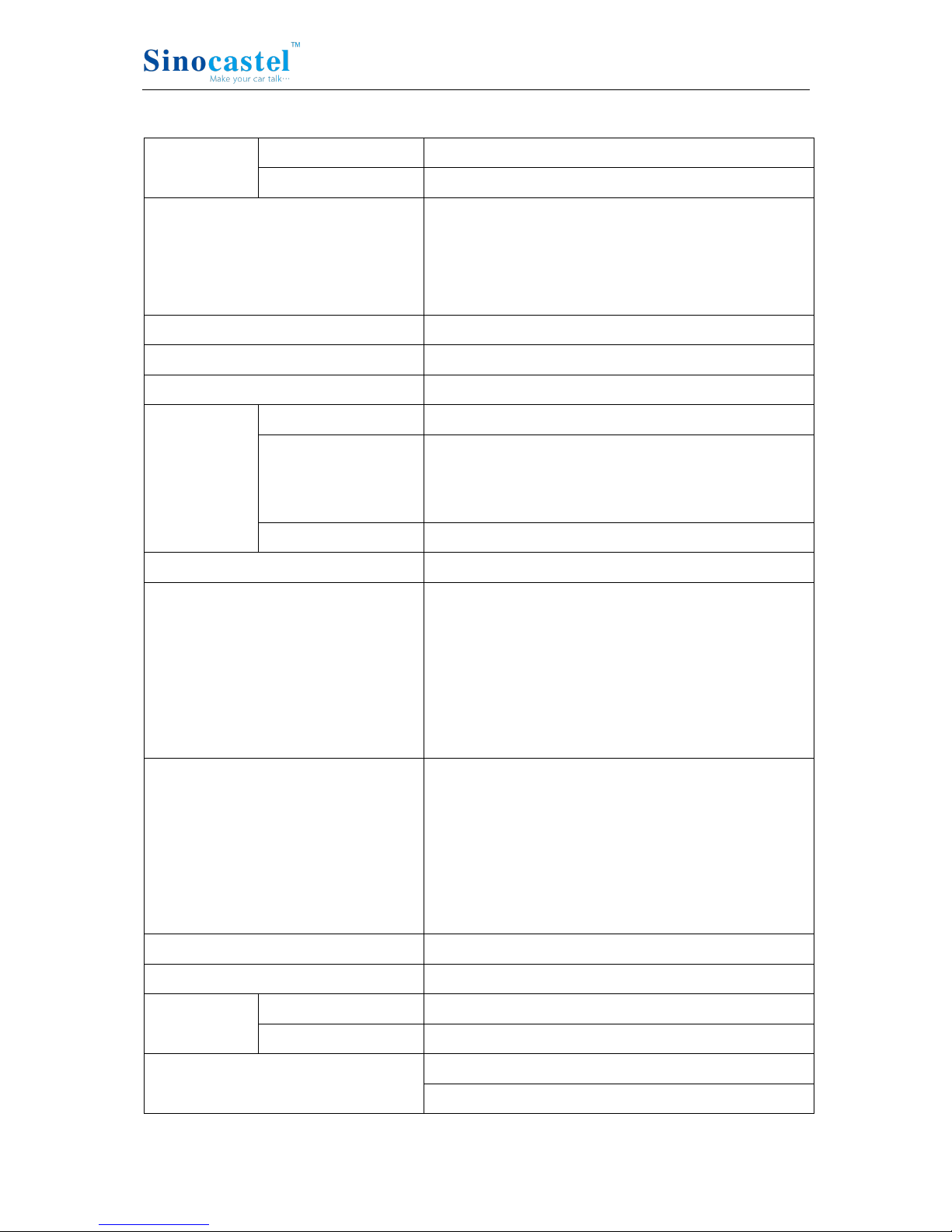
Mechanical
Dimension
63mm (L) x 48mm (W) x 28mm (H)
Weight
50g
Interface
OBD interface: 16 pin standard OBD II
Configuration interface: Mini USB
SOS button interface: MMCX
SIM card interface: Push-Push Type
Storage
2MB FLASH, can store up to 24000 GPS data
Data Transmission
GPRS/SMS
Positioning Mode
GPS/A-GPS
Power
Working Voltage
9-36VDC
Working Currency
Average Currency: <150mA@13.8/27.6VDC
Max. Currency: <2[email protected]/27.6VDC
Sleep Currency: <10mA@12/24VDC
Internal Battery
3.7V/160mA Lithium battery
3-axis Accelerometer
+/-2g, +/-4g, +/-8g, +/-16g
GPS
Channels: 50
Sensitivity: -160dBm
Accuracy: 5m CEP
Cold start: <32s
Warm start: <32s
Hot start: <1s
Cellular
Frequency: Quad-band 850/900/1800/1900MHz
Protocol: TCP/IP
Sensitivity: -107dBm@850/900MHz
-106dBm@1800/1900MHz
Output Power: Class 4 (2W)@850/900MHz
Class 1 (1W)@1800/1900MHz
LED Indicator
Power/Cellular/GPS
Buzzer
System status/Alarm indication
Antenna
Cellular Antenna
Built-in
GPS Antenna
Built-in
Certification
CE
E-Mark (Pending)

IDD-213T User Manual
6
Environment
Working
Temperature
-30℃ ~ +70℃
Storage
Temperature
-40℃ ~ +85℃
Humidity
5%~95%(no frog)

IDD-213T User Manual
7
3. Device Configuration
3.1 PC Tool
Download USB driver and PC Tool at http://www.sinocastel.com/en/Downloads/.
Install the USB driver and PC Tool on your PC.
Connect device to PC through USB configuration cable, open the OBD PC Tool, click
on “Help->User manual” for configuration reference.
3.2 SMS Instructions
SMS command is mainly for remote maintenance. The message content is text format.
Default secret key is the last 6 digits of the device ID. The key can only be changed
through PC Tool. SMS format is defined as follows:
3.2.1 Set IP parameters
Send SMS *SecretKey#set gprs#APN,User,Password,IP,Port*, device will reply *set
gprs#ok* or *set gprs#fail*.
e.g.: *123456#set gprs#cmnet,,,113.98.241.66,11088*
3.2.2 Read IP parameters
Send SMS *SecretKey#get gprs#*, device will reply *get gprs#APN,User,Password,
IP,Port*.
e.g.: *123456#get gprs#*
3.2.3 Set domain parameters
Send SMS *SecretKey#set domain #APN,User,Password,IP,Port*, device will reply *set
domain#ok* or *set domain#fail*.
e.g.: *123456#set domain# cmnet,,,obd.livetelematics.com,11088*
3.2.4 Read domain parameters
Send SMS *SecretKey#get domain#*, device will reply *get domain#APN,User,
Password,domain,Port*.
e.g.: *123456#get domain#*
3.2.5 Get current location

IDD-213T User Manual
8
Send SMS *SecretKey#position#*, device will reply
*position#http://maps.google.com /?q=latitude,longitude*.
e.g.: *123456#position#*http://maps.google.com/?q=22.536934,114.021425*
IDD-213T User Manual
9
4. Installation Instruction
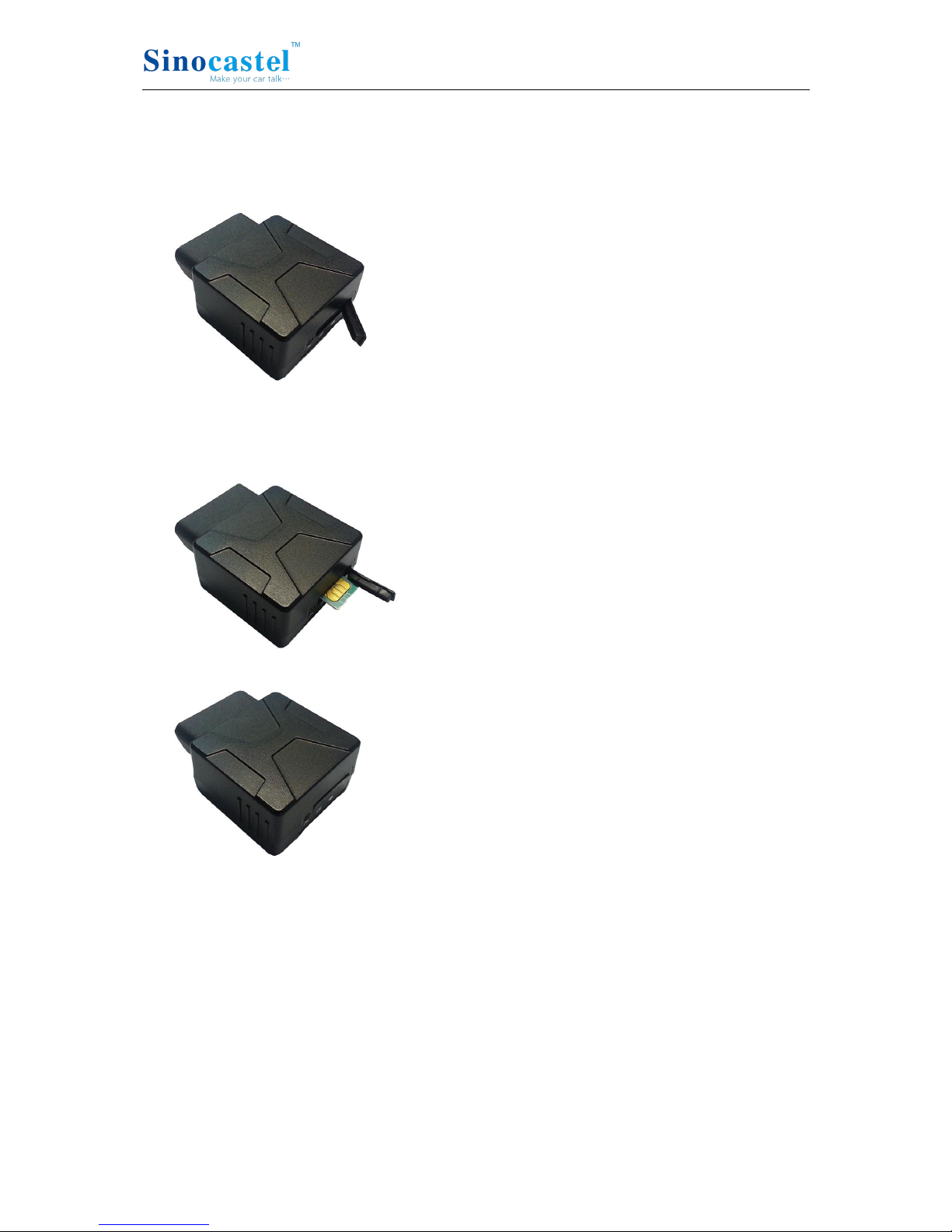
4.1 SIM Card Installation
1. Remove the SIM card cover.
2. Insert the SIM card and press gently, a click will be heard upon successfully placing
the SIM card in its place, please follow the insertion direction marked on the SIM
card cover.
3. Put the SIM card cover back.
Note:
There is a backup battery in the device, please make sure all lights are off before inserting or
removing SIM card.
Table des matières
Autres manuels SinoCastel GPS


