- -
s u p p o r t @ u s b i d . c o . i l
11. Extra tips for controlling
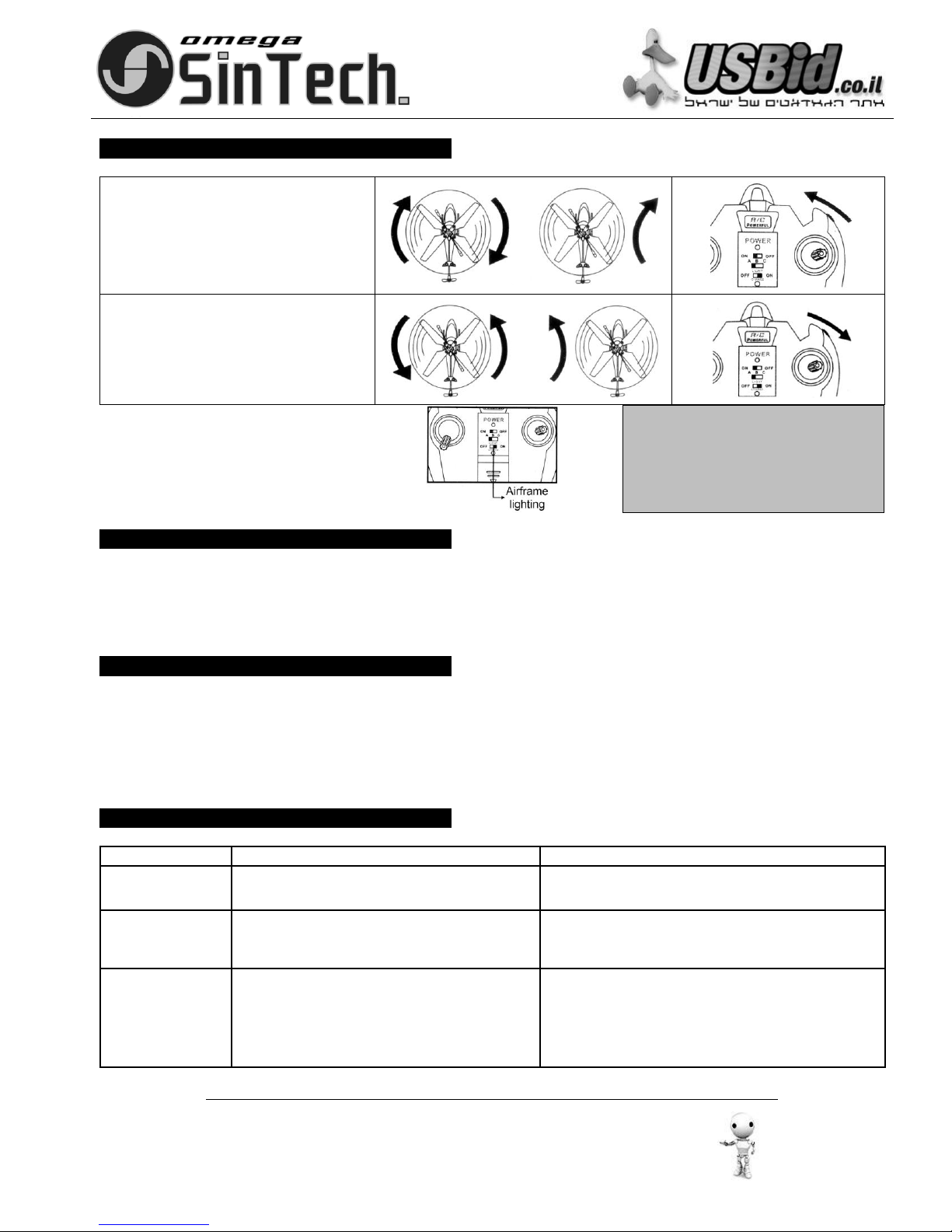
1.lf the direction stick was not touched but the helicopter keep spinning, try to adjust as the picture shows:
1)If the helicopter keep spinning
clockwise or keep turning towards
the tight, roll the “micro-adjust”
towards the left, till it could fly
straight forward.
2)If the helicopter keep spinning
anticlockwise or keep turning
towards the left, roll the “micro-
adjust” towards the right, till it could
fly straight forward.
2.The product configure fuselage
lighting switch control function for
the users to choose.
Warm reminder:
Open the lights: make the helicopter is in full
mode, attractive lights at night;
Close the lights: Make the helicopter is in
power saving mode to extend the flight time.
1.If the battery power of the remote goes low, the
control distance would be much shorter.
2.If the battery power of the helicopter goes low, the
helicopter could not fly to a high position or even fly.
3.The remote-control range is about 10 meters, if the
helicopter flies out of this range, it may lost control.
4.Repair immediately when the helicopter is damaged
or out of shape. (e.g. If the rotor is seriously broken,
do not fly the product, or else it may cause some
accident.)
1). Wipe the toy gently with clean damp cloth.
2). Do not insolation on sun and calefaction.
3). Do not submerge the toy into the water.
4). Turn of the power of the remote and the helicopter when not in use.
5). Remove battery from the remote when not used for a long time.
6). New and alkaline batteries are recommended for the remote to obtain best and maximum performance.
7). Check the toy regularly; makes sure the toy is in good shape.
1. ON/OFF switch is OFF
2. Run out of power
1. Turn the power on.
2. Recharge the helicopter or change the remote’s
batteries.
Suddenly stop and
drop down when
flying
Helicopter does not
react
1. Wrong frequency selection
2. Another infrared control device is working with the
same frequency
3. Affected by strong lighting.
4. Aircraft unopened gyroscope system
(3.5 channel use only).
1. Set to the correct frequency
2. Avoid this kind of situation if possible, or choose another
place to play.
3. Change to another place to avoid direct lighting.
4. Shut down after the restart switch and the aircraft placed
in a steady state (3.5 channel use only).