Simonsen S-310 Manuel utilisateur

English
SIMONSEN S-310
GSM Fixed Wireless Telephone
User Manual
(
V 2
.0)

GSM Fixed Wireless Telephone
User
Manual
ii
CONTENTS
I.
INTRODUCTION
.........................................................................
1
II.
THE MANUAL USAGE
..............................................................
2
III.
TELEPHONE INTRODUCTI
ON
..............................................
3
I. T
ELEPHONE
C
OMPOSE
........................................................................
3
II
. F
IX THE
T
ELEPHONE
...........................................................................
4
III
. T
HE NAME OF EACH PART
...................................................................
5
IV
. T
HE KEY DESCRIPTION
........................................................................
7
IV.
SIMPLE OPERATION
................................................................
3
I. M
AKE CALL
........................................................................................
3
II
. D
IAL NUMBER IN TELEPH
ONE BOOK
...................................................
3
III
. A
NSWER CALL
....................................................................................
3
IV
. E
ND CALL
...........................................................................................
3
V. R
EFUSE CALL
.....................................................................................
4
VI
. R
EDIAL
...............................................................................................
4
VII
.H
ANDFREE
.........................................................................................
4
V.
INTRODUCTION OF MENU
FUNCTION
..............................
4
I. P
HONEBOOK
.......................................................................................
4
i.i View detail
.........................................................................................................................
4
i.ii Create
...............................................................................................................................
4
i.iii Copy
................................................................................................................................
4
i.iv Move
................................................................................................................................
4
i.v Delete
................................................................................................................................
4
i.vi Find
..................................................................................................................................
4
i.vii Display type
....................................................................................................................
4
i.viii My number
....................................................................................................................
4
i.ix
Storage Status
................................................................................................................
5
II
. M
ESSAGES
.........................................................................................
5
ii.i Create
...............................................................................................................................
5
ii.ii Inbox
...............................................................................................................................
5
ii.iii Outbox
............................................................................................................................
5
ii.iv Sent
................................................................................................................................
.6
ii.v Drafts
...............................................................................................................................
6
ii.vi My folder
........................................................................................................................
6
ii.vii Settings
..........................................................................................................................
6
ii.viii Voice mail
....................................................................................................................
6
ii.ix Storage status
..................................................................................................................
6
III
. C
ALL
H
ISTORY
...................................................................................
6

GSM Fixed Wireless Telephone
User
Manual
iii
IV
. S
ETTINGS
...........................................................................................
7
iv.i
Alarm
...............................................................................................................................
7
iv.ii Time and Date
................................................................................................................
7
iv.iii
Phone
.............................................................................................................................
7
iv.iv
Security
..........................................................................................................................
7
iv.v
Auto call
..........................................................................................................................
7
V. C
ALL SERVICES
...................................................................................
7
v.i Network
............................................................................................................................
8
v.ii
Call diversion
...................................................................................................................
8
v.iii SS
....................................................................................................................................
8
VI.
THE BASIC FUNCTION
............................................................
8
I. T
HE FUNCTION OF MENU
IN TALKING
..................................................
8
II
. I
NPUT METHOD
...................................................................................
8
ii.i Switch input methods
.......................................................................................................
9
ii.ii Input special signs
...........................................................................................................
9
ii.iii English input
method introduction
.................................................................................
9
VII.
TROUBLE SHOOTING
............................................................
10

GSM Fixed Wireless Telephone
User
Manual
1
I.
Introduction
Thank
you
for choosing our
GSM
desktop cellular tele
phones
. The manual describes
excellent performances of the GSM
fixed
wireless phone in detail
.
Besides basic call functions,
the phone provides many practical functions and services so as to ease your work and leisure
activities.
The
GSM desktop cellular telephone is of automatic double frequency, which is
designed specially for GSM900/1800 network environment. With GSM becoming the standard
of world telecommunication system, you will own a free space for communication with double
frequency.
The
tele
phone
h
as
passed
the test of China Compulsory Certification
and
Radio
Transmission Equipment Type Approval Certificate
.
Note:
Pay attention to the following when using this telephone.
Basic Requirements and Environmental Requirements
Read
this manual
carefully
before using this telephone.
Please do not use the telephone on aboard.
Please do not use the telephone in the gas station, oil
-
storage factory, chemi
cal
factory
with explosive gas or explosive producing process or
any place where
the
wireless products are prohibited.
Please do not use the telephone while driving.
While using the telephone, please keep it away from any equipment
that
its
performance
could be easily affected by the telephone.
Using the telephone, may interfere wi
th some medical equipment with poor quality of
shield, such as audio
-
phone and heart pacemaker.
To clean the telephone, you should use just a piece of soft cloth.
P
lease d
o not use
chemical products to clean
it.
Please make sure that the telephone is switc
hed off while cleaning it.
P
lease do not put it under strong daylight, avoid high temperature and contact with
liquid such as water.
Please do not connect to the equipment that doesn't match the telephone.
Prior to sending, receiving calls, you should pay
close attention to the local law
system on wireless telephone.
The telephone use the special encrypted SIM card, do not use this kind of SIM card
for others, and also do not use other SIM card in
the
telephone otherwise that SIM
card will be locked or da
maged
.
Battery
usage
In order to use the battery safely and make it reach its best performance ,please
read the following instructions carefully
You must use the battery provided by the supplier only. Unless, other battery
without

GSM Fixed Wireless Telephone
User
Manual
2
permission will cause danger and violate warranty terms
.
T
he battery must be installed according to the instruction of the manual, otherwise
the battery will be gr
eatly damaged.
The phone must be turned off before you install/unload the battery, otherwise the
storage of the telephone may be failure.
Do not take out the battery when the phone is turned on.
The performance of battery is affected greatly by t
he network
s coverage.
To charge the battery: make the battery discharged until the telephone stops working
and
the display on the screen disappears, plug in the connector of the charger to an
electrical outlet, insert
the adapter into the phone and m
ake the battery charged full.
After charging, pull out the charger from the electrical outlet at first, and then pull out
the charger from the phone.
If the phone stays unused for a long time, please turn off the phone to avoid over
discharging, otherwi
se, the battery may be damaged.
Normally the lifetime of the battery is 500 times of charge/discharge, the performance
is getting down gradually as time goes by. You have to contact the supplier for
replacing the batteries.
Please avoid battery short c
ircuit,
otherwise, it may cause fire.
It is highly recommended that the battery should be fully charged before being left
unused for a long time.
Specifications
Item
Description
Dimensions
230mm*205mm*75mm (W*D*H)
Weight(including
spare battery)
Less than
1000
g
Mounting method
Horizontal or wall mounting
Input voltage
AC: 90V to 264V (50
Hz to 6
0
Hz)
DC:
5.2
V±
5%, 1.0A
Operating temperature
0
to
40
Storage temperature
-1
0
to
50
Operating humidity
5% to 9
0%
II.
The
Ma
nual Usage
The contents in
represents the key on telephone. For example:
OK
represents
OK
key.
The contents in represents the left or right soft key on the screen. For example:

GSM Fixed Wireless Telephone
User
Manual
3
Back
represents soft key.
Acronym
s and Abbreviations
SIM
Subscriber
Identity Module
eng
English text input
abc
Alphabetic characters input
sel
S
elect
GSM
Global System for Mobile Communications
SS
Supplementary Service
III.
Telephone
introduction
i.
Telephone
Compose
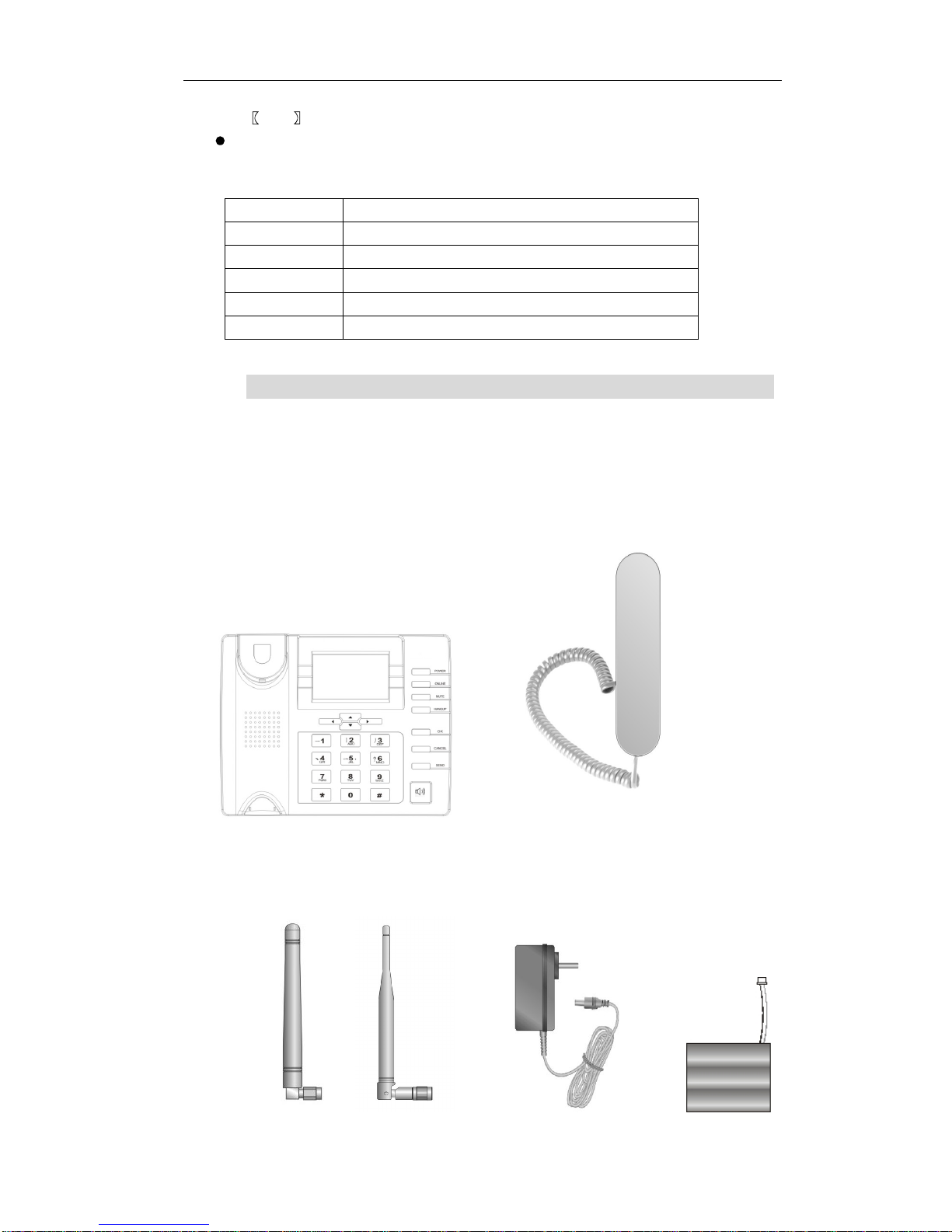
The telephone is composedby
following
parts
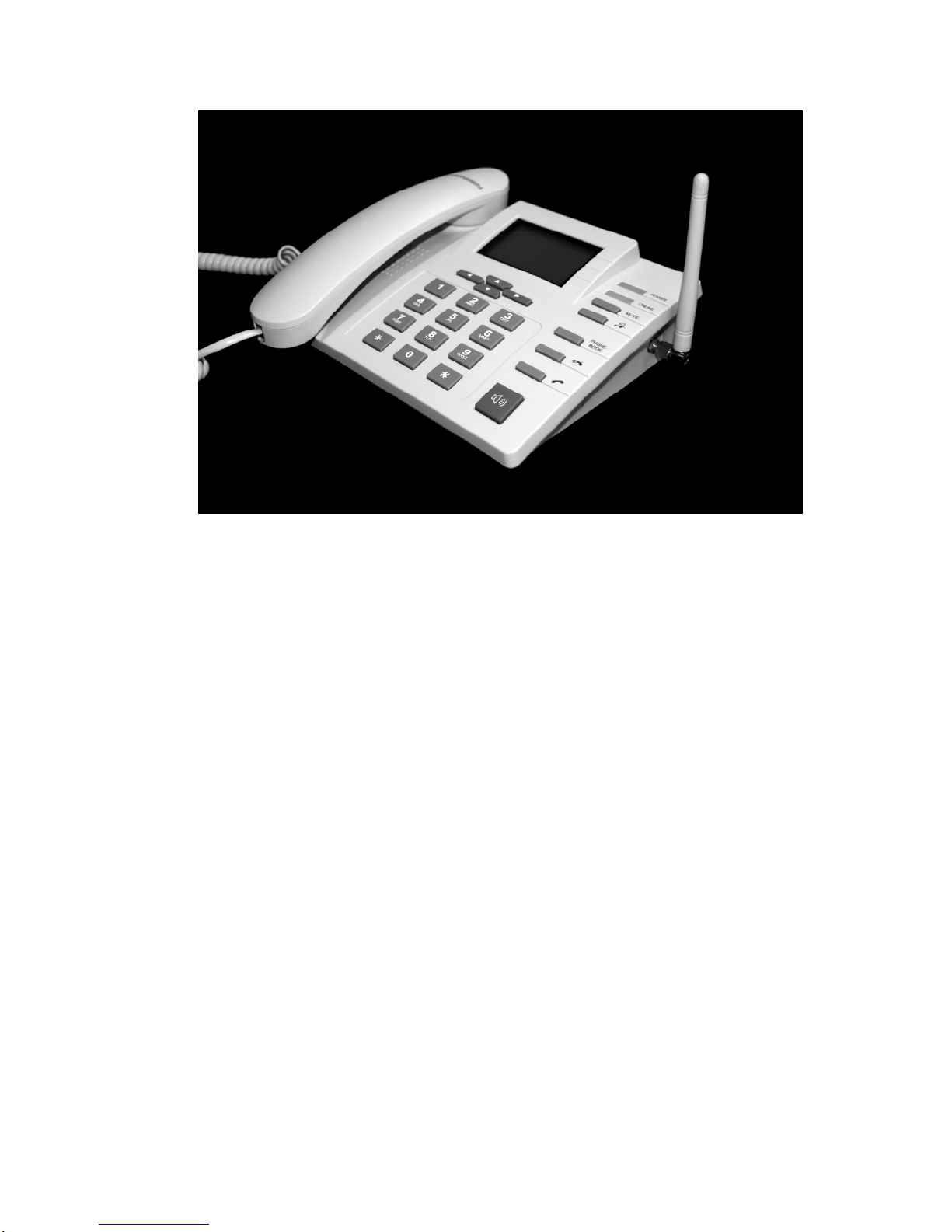
(1) Telephone body
(2) Headset and the spiral lead
(3
) Antenna(SMA or TNC)
(4) Power supply adapter
(5
)
L
ink
batter
ies
(1)
(2)

GSM Fixed Wireless Telephone
User
Manual
4
(3) (4) (5)
ii.
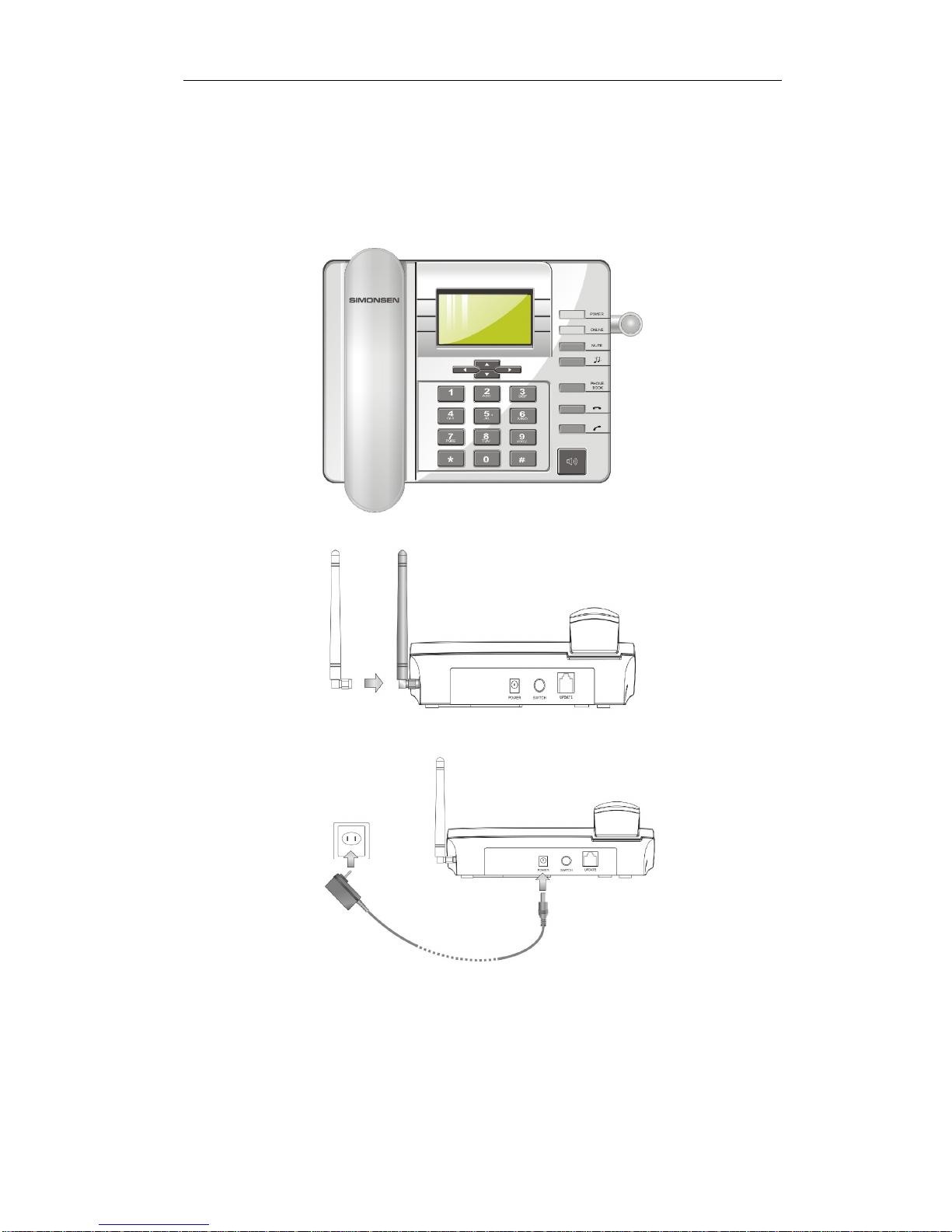
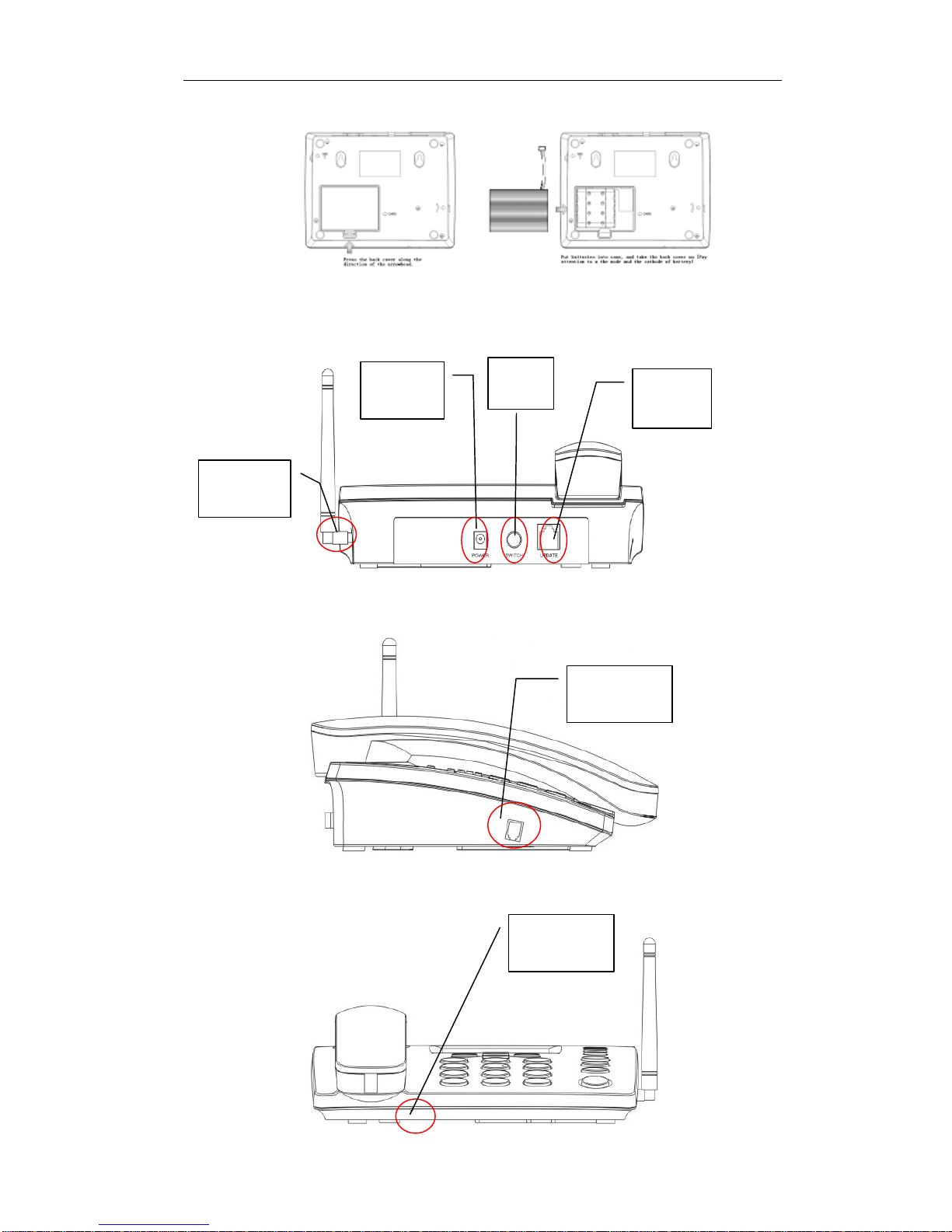
Fix the Telephone
(1) Fix the headset
(2) Fix the antenna
(
3) Fix the power supply adapter

GSM Fixed Wireless Telephone
User
Manual
5
(4)
Fix
the batteries
iii.
The
n
ame
of each part
Power
port
Antenna
port
Power
switch
Headset
port
Handfree
microphone
Update
port

GSM Fixed Wireless Telephone
User
Manual
6
P
ilot lamp
Describe
Power
lamp
The designation
of
power supply in e
ffect
, and
after
boot
-
strap, the power lamp keeps bright.
On
-
line lamp
When register to the network the lamp flash
es
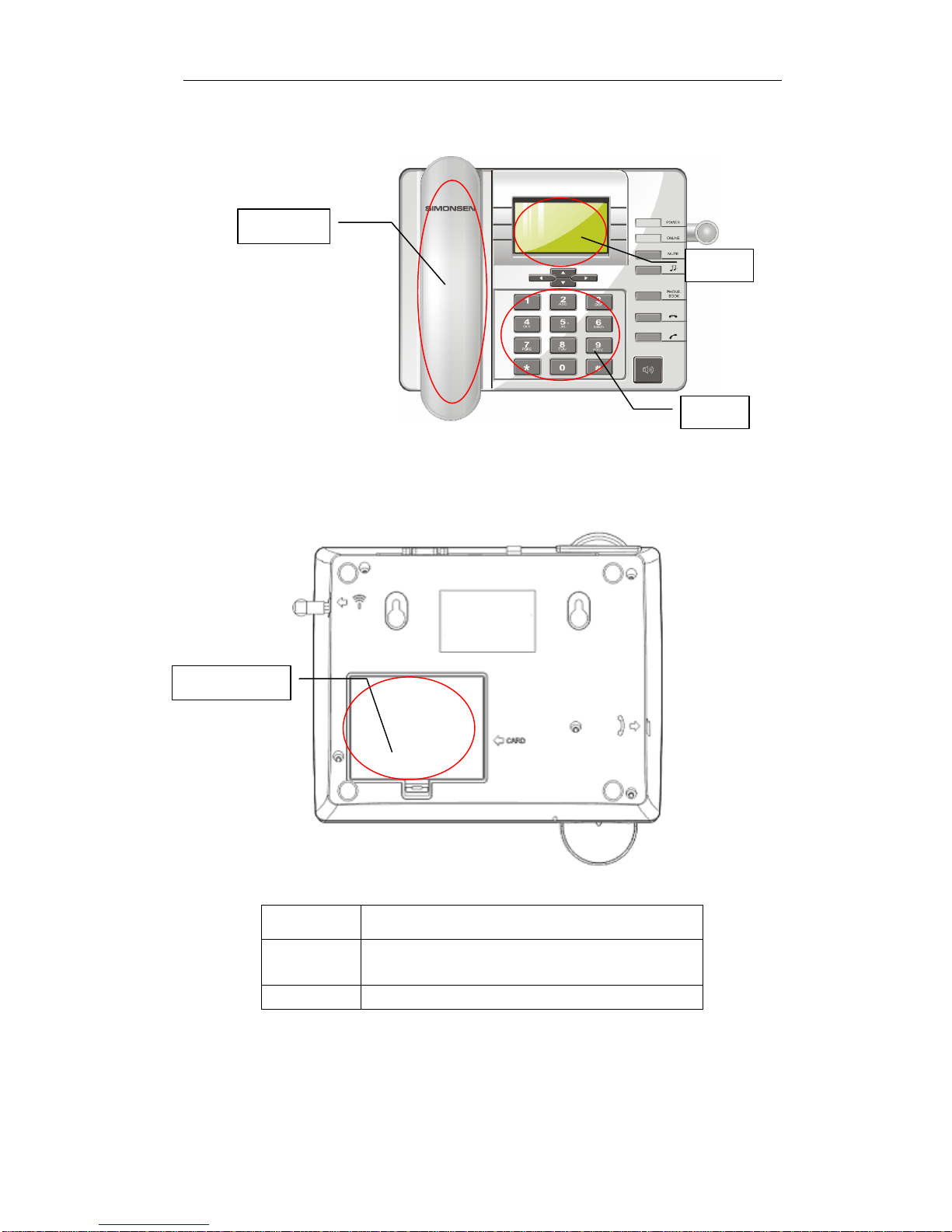
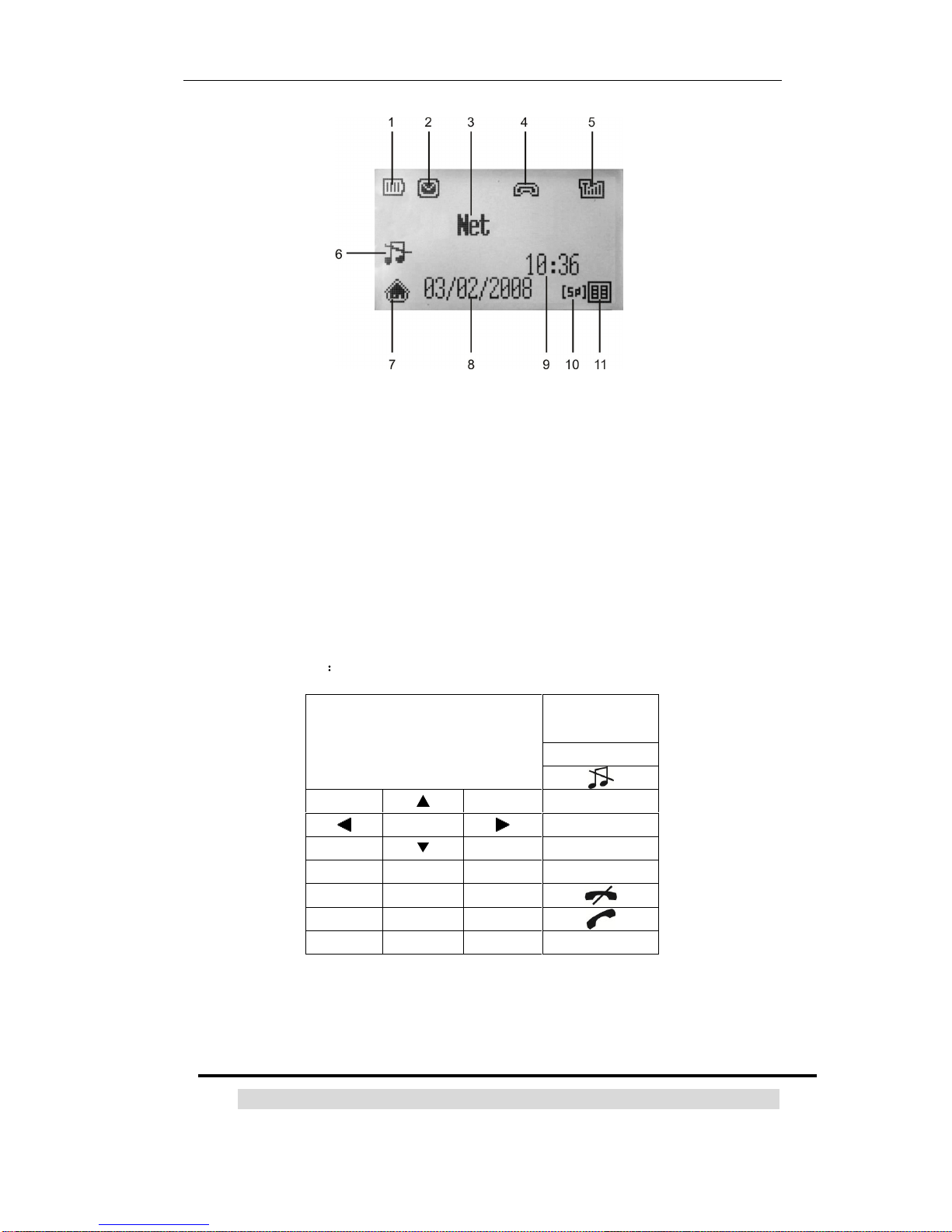
Screen symbols
Battery cover
Headset
Screen
keypad

GSM Fixed Wireless Telephone
User
Manual
7
1.
Battery indicator
2.
Message indicator
3.
Network service provider
4.
Unanswered call
5.
Signal indicator
6.
Quiet mode
7.
Main menu
8.
Date
9.
Time
10.
Day
11.
Phonebook
iv.
T
he key descri
ption
keyboard position
The key definition
:
Key
Description
SCRE
EN
MUTE
1 2 3
PHONEBOOK
4 5 6
7 8 9
* 0 #
HAND
S
FREE
Table des matières