Simmons DA12S Manuel utilisateur

SimmonsDrums.net
OWNER’S MANUAL
ADVANCED ELECTRONIC DRUM AMPLIFIERS
DA2100 SERIES
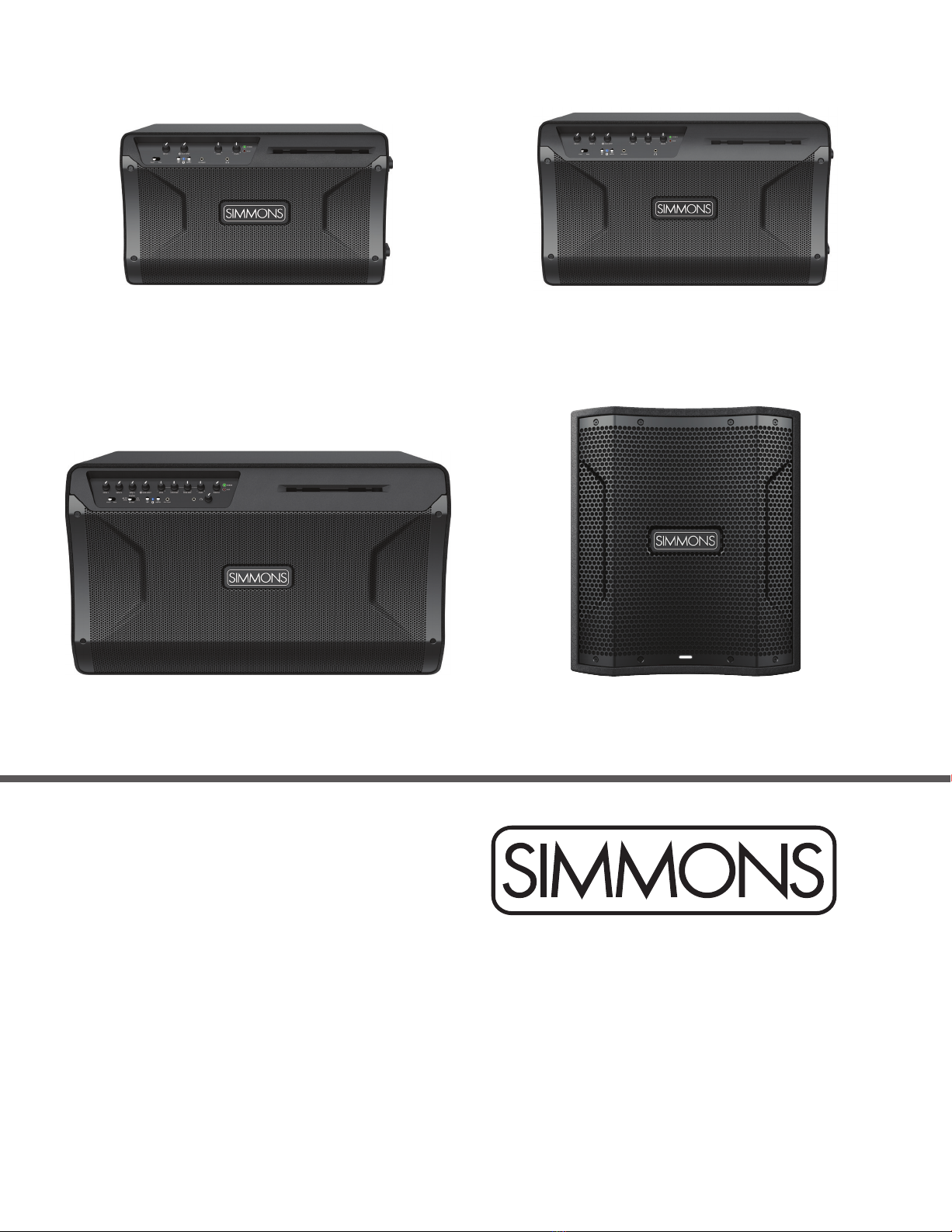
D A 2112
D A 2110
DA12S
DA2108
21506756 Simmons DA2100 Series manual_REV.indd 121506756 Simmons DA2100 Series manual_REV.indd 1 6/14/21 10:55 PM6/14/21 10:55 PM

2
For electronic drummers and pad players who want the best sound for their drums and tracks, the Simmons DA2100 Series combines high-fidelity
sound with Bluetooth and stereo line inputs, in a selection of different power and speaker configurations to serve both beginners and pros. The
available DA12S Subwoofer adds high impact low frequencies for use with any single amp, or Smart Stereo setup.
HIGH-FIDELITY SOUND FOR DRUMS AND TRACKS
Every unit features a modern 2-way speaker design, acoustically designed cabinet, high-frequency compression driver, and high peak output power, to
accurately render the wide dynamic range and transient punch of percussion instruments.
SMART STEREO
Using a pair of DA2100 Series amplifiers, you can fully immerse yourself in surrounding stereo, hearing each element of your drum kit at its proper
place in the stereo field. The first amplifier will control the volume and tone for the full rig, making it easy to step up to this level of sonic inspiration.
FLOOR/POLE
Place your DA2100 Series amplifier on the floor like a traditional amp, or take advantage of the pole mount to bring the sound to ear level. A floor/
pole switch ensures consistent frequency response in either placement.
D A 2112
Designed for electronic drummers who need a high-powered and versatile amplifier, the Simmons DA2112 combines high-fidelity sound and stage-
ready power with 3 stereo line inputs, Bluetooth audio input, and flexible monitoring of metronome, click and guide tracks. Experience high-impact
bass and studio monitor-style sound quality for your drums and tracks, and take full control of your tone with 4 knob EQ. The versatile cabinet can
be placed on the floor or on a speaker pole, and Smart Stereo capability lets you use link two DA2112s to immerse yourself in full stereo sound, with
unified control from the master unit. Headphone output with separate volume completes the package.
KEY FEATURES
• Premium 12” speaker + 1.35“ compression driver
• 350 Watts RMS, 2000W Peak, 126dB Max SPL
• 3 Stereo Line Inputs, Aux Input & Bluetooth
• 4 Knob EQ to take full control of your sound
• Headphone out with separate volume knob
• Versatile monitoring options for metronome, click and guide tracks
• Place DA2112 on the floor like a traditional amp, or on a speaker pole for ear-level sound
• Detachable mobile device holder included
D A 2110
Designed for electronic drummers who need a powerful practice amplifier, the Simmons DA2110 combines high-fidelity sound and ample power with
2 stereo line inputs, Bluetooth audio input, and aux input. Experience rich bass response and studio monitor-style sound quality for your drums and
tracks, while taking control of your tone with 3 knob EQ. The versatile cabinet can be placed on the floor or on a speaker pole, and Smart Stereo
capability lets you link two DA2110s to immerse yourself in full stereo sound, with unified control from the master unit. Headphone output for silent
practice completes the package.
KEY FEATURES
• Premium 10” speaker + 1“ compression driver
• 100 Watts RMS, 400W Peak, 120dB Max SPL
• 2 Stereo Line Inputs, Aux Input & Bluetooth
• 3 Knob EQ to take control of your sound
• Headphone out for silent practice
• Place DA2110 on the floor like a traditional amp, or on a speaker pole for ear-level sound
• Detachable mobile device holder included
DA2108
Designed for electronic drummers who need a high quality practice amplifier, the Simmons DA2108 combines high-fidelity sound with stereo line input,
Bluetooth audio input, and aux input. Experience studio monitor-style sound quality for your drums and tracks, while tailoring your tone with 2 knob
EQ. The versatile cabinet can be placed on the floor or on a speaker pole, and Smart Stereo capability lets you link two DA2108s to immerse yourself
in full stereo sound, with unified control from the master unit. Headphone output for silent practice completes the package.
KEY FEATURES
• Premium 8” speaker + 1“ compression driver
• 100 Watts RMS, 400W Peak, 118dB Max SPL
• Stereo Line Input, Aux Input & Bluetooth
• 2 Knob EQ to adjust your sound
• Headphone out for silent practice
• Place DA2108 on the floor like a traditional amp, or on a speaker pole for ear-level sound
• Detachable mobile device holder included
WELCOME
21506756 Simmons DA2100 Series manual_REV.indd 221506756 Simmons DA2100 Series manual_REV.indd 2 6/14/21 10:55 PM6/14/21 10:55 PM

DA2100 SERIES ADVANCED ELECTRONIC DRUM AMPLIFIERS
3
DA12S
Add the Simmons DA12S Drum Amplifier Subwoofer to make high impact low frequencies part of your amplification setup for your electronic drums.
High headroom, low distortion, and a transparent, dynamic DSP limiter provide outstanding clarity and impact even when pushed to the max. Set the
crossover either by the speaker size of the amps you’re pairing up with, or by frequency. The time-align delay then ensures maximum low frequency
response by avoiding phase alignment issues for any physical setup. And with 130dB Max SPL output, you can be confident this sub will deliver the
clean, deep bass you need to let you feel your kick, toms, and every other element of your electronic drum kit.
KEY FEATURES
• Premium 12” high-temperature sub driver
• 400 Watts RMS, 1000W Peak, 130db Max SPL
• Dual Combo-Jack Line Inputs and XLR Output
• Time Aligning Delay guarantees max bass response when used in any rig
• Crossover Frequency adjustable to match a specific full-range speaker size or frequency (Hz)
• Road-worthy plywood cabinet with rugged polyurea coating for durability
• Side handles for easy handling in transport
21506756 Simmons DA2100 Series manual_REV.indd 321506756 Simmons DA2100 Series manual_REV.indd 3 6/14/21 10:55 PM6/14/21 10:55 PM
4
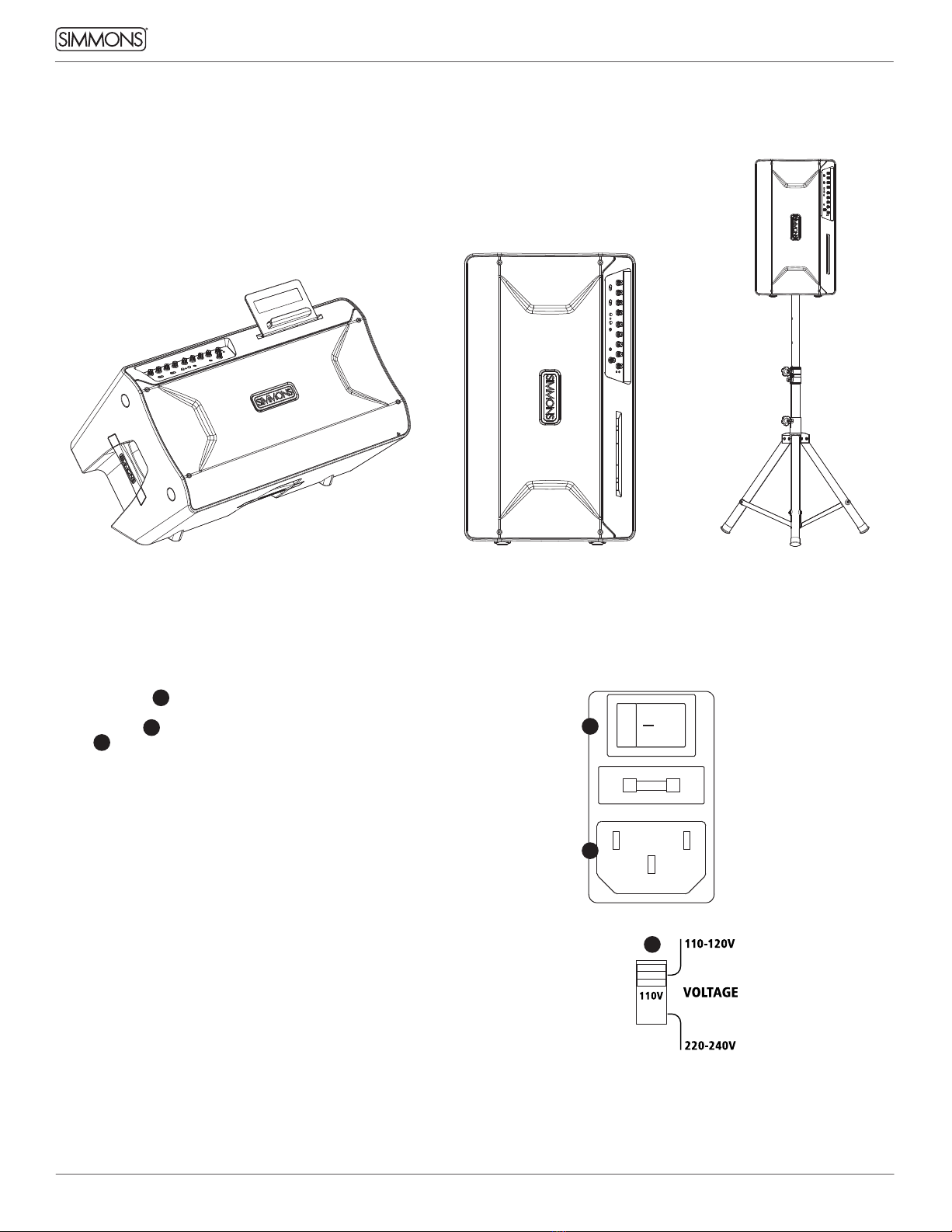
Position your DA2100 Series amplifier in the desired location, and ensure the amp is stable.
INITIAL SETUP
Floor Pole
(speaker stand not included)
Free-standing
POWER
• Make sure the 1power switch is set to the off position.
• Connect the included detachable IEC power cable from a power
outlet to the 2power cable input.
• The 3red voltage switch comes factory-set to the position
appropriate for the market where the amplifier is sold. For the USA,
this is 110-120V.
1
3
2
21506756 Simmons DA2100 Series manual_REV.indd 421506756 Simmons DA2100 Series manual_REV.indd 4 6/14/21 10:55 PM6/14/21 10:55 PM

DA2100 SERIES ADVANCED ELECTRONIC DRUM AMPLIFIERS
5
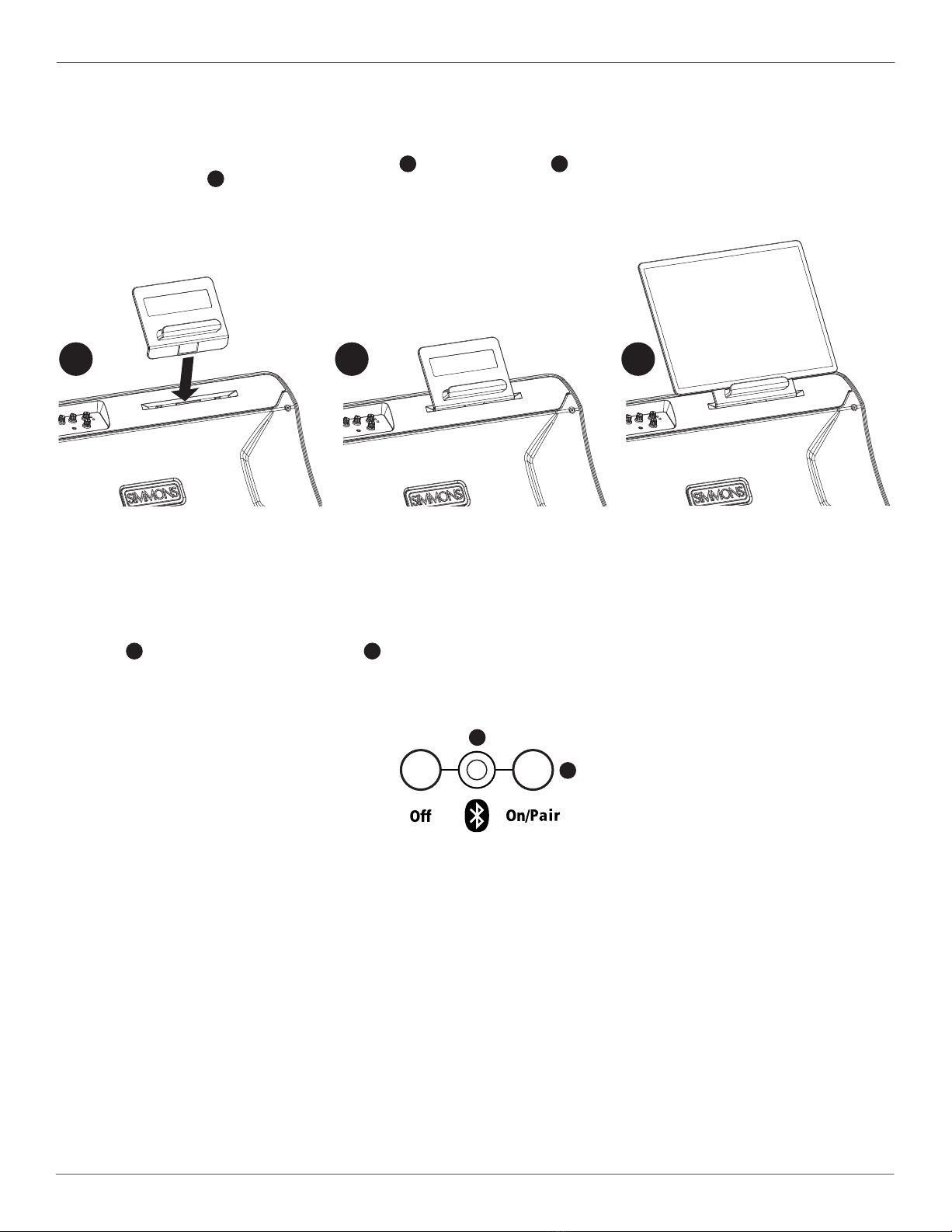
• Each model in the DA2100 series ships with a removable mobile device holder as an accessory inside the retail packaging.
• When using your amp in floor wedge position, you can attach the holder to the front-panel as shown below.
• Slide the angled bottom end of the device holder into the 1front panel slot, until it 2clicks into place.
• Now you can keep your 3tablet or smart-phone held in a convenient position during performance or rehearsal.
• Please remove the cradle before transporting the amplifier, or when using the amplifier on a speaker pole or standing upright.
DEVICE HOLDER
BLUETOOTH®CONNECTING
BLUETOOTH®TROUBLESHOOTING
• Press the 1front panel On/Pair button so that the 2Bluetooth LED flashes, indicating that Bluetooth audio is enabled and ready for pairing
• From your Bluetooth source device, select your drum amplifier’s model number (DA2108, DA2110 or DA2112) to pair
• Play audio from your source device, making sure your device’s volume is turned up, as well as the amplifier’s volume
These steps should resolve any Bluetooth trouble you may encounter:
Power off the DA2100 Series amplifier and leave it off, then follow directions for Apple and Android devices below:
Then power on your DA2100 Series amplifier, press the Bluetooth On/Pair button, and follow the Bluetooth Connecting steps above
• On your Apple iOS device
1. Open Settings app, select Bluetooth
2. If your amplifier is listed under MY DEVICES, touch info button,
tap to Forget This Device
3. Turn off Bluetooth, wait 10 seconds, turn on Bluetooth
• On your Android device
1. Open Settings, select Bluetooth
2. If your amplifier is listed under Paired Devices, touch gear icon,
and tap to unpair
3. Turn off Bluetooth, wait 10 seconds, turn on Bluetooth
1
2
1 2 3
21506756 Simmons DA2100 Series manual_REV.indd 521506756 Simmons DA2100 Series manual_REV.indd 5 6/14/21 10:55 PM6/14/21 10:55 PM
6
INPUTS
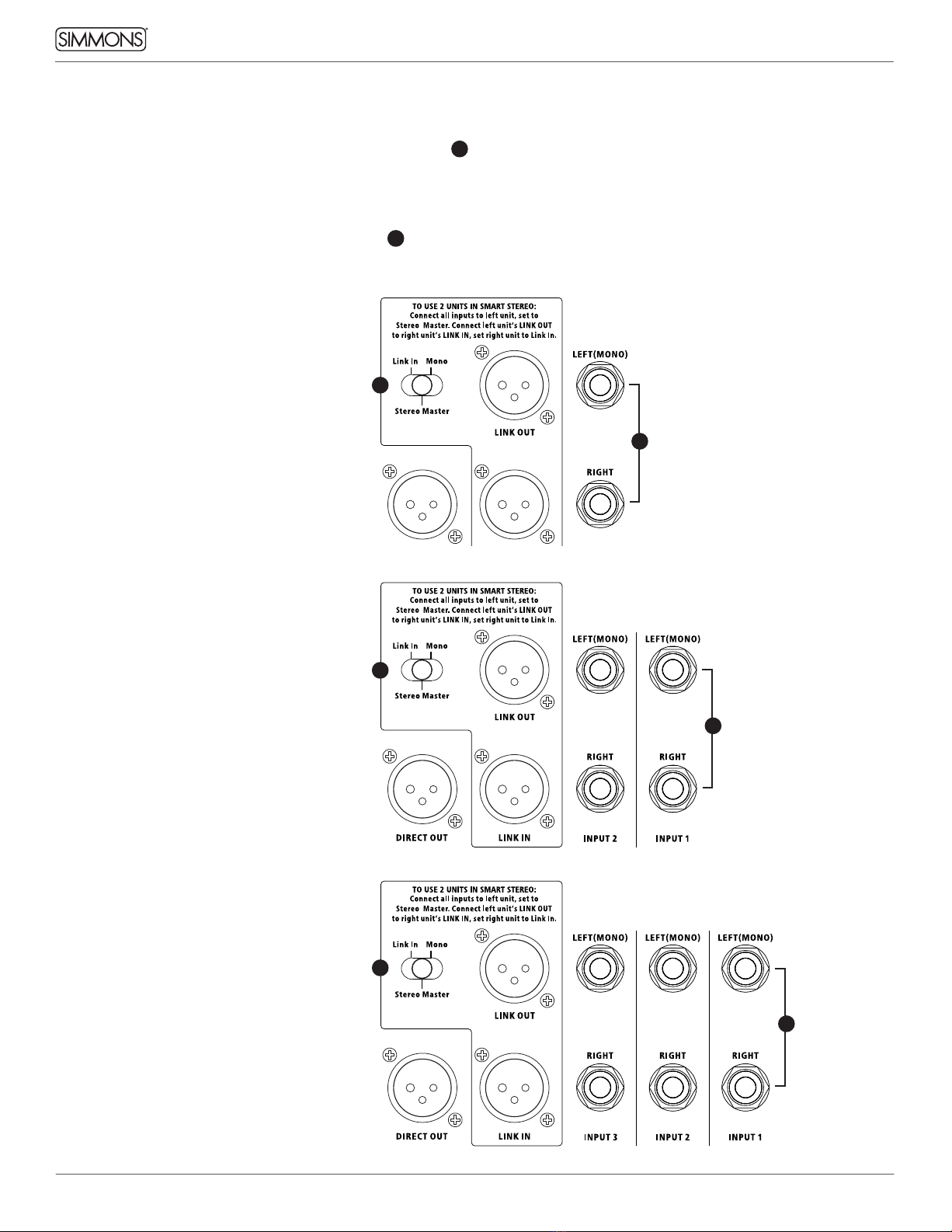
• Connect your electronic drum sound module’s audio outputs to the 1INPUT 1 jacks on the amplifier rear panel
• Stereo Input: use 2 cables to connect to both the INPUT 1 LEFT(MONO) and RIGHT jacks
• Mono Input: use 1 cable to connect to the INPUT 1 LEFT(MONO) input jack only
• If you’d like to amplify additional sources, connect them to the remaining rear panel inputs, or the front panel aux input
ROUTING SWITCH
• If you are using a single DA2100 series amplifier, set the 2rear panel switch to Mono
• For dual-amp stereo configuration, see Smart Stereo on the next page
DA2108 REAR PANEL
DA2110 REAR PANEL
DA2112 REAR PANEL
QUICK START: INPUT
1
2
2
2
1
1
21506756 Simmons DA2100 Series manual_REV.indd 621506756 Simmons DA2100 Series manual_REV.indd 6 6/14/21 10:55 PM6/14/21 10:55 PM
DA2100 SERIES ADVANCED ELECTRONIC DRUM AMPLIFIERS
7
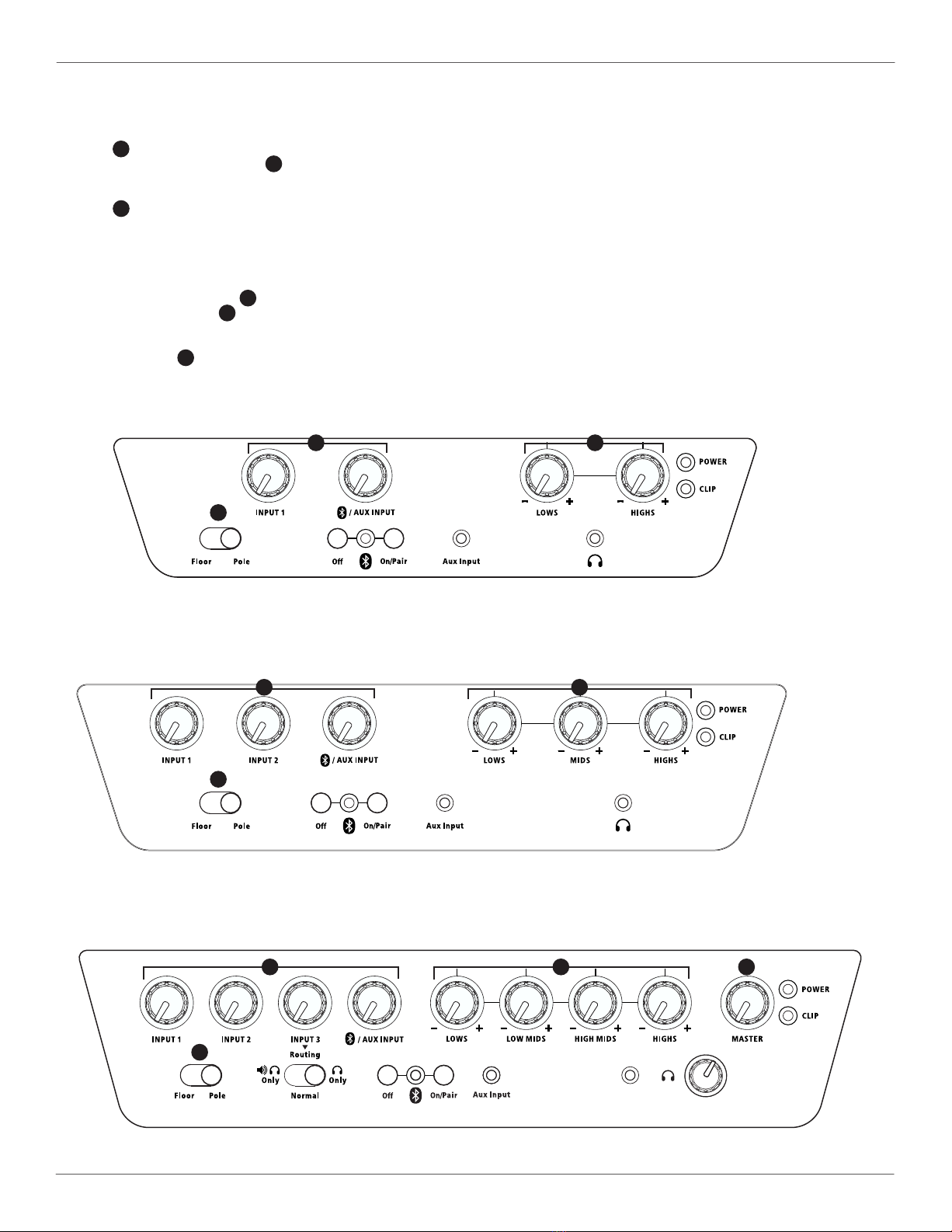
VOLUME CONTROLS
• Turn all 3input level control knobs to the minimum position
• DA2112 only: also turn the Master 4knob to minimum
VOICING SWITCH
• Set the 5Voicing switch to Floor when using the amplifier lying horizontally on the floor, or free-standing vertically
• Set the switch to Pole when using the amplifier on a speaker pole
POWER ON
• Power on the drum sound module and set its output volume to max
• Then power on the amplifier, via the rear panel switch
• DA2112 only: turn the Master 4knob to noon position
• Turn up the INPUT 1 knob 3while playing your drum sound module, until you reach a comfortable listening level
EQ
• Turn the EQ knobs 6to adjust your tone as desired
QUICK START: CONTROLS
DA2108 FRONT PANEL
DA2110 FRONT PANEL
DA2112 FRONT PANEL
3
46
6
6
3
3
5
5
5
21506756 Simmons DA2100 Series manual_REV.indd 721506756 Simmons DA2100 Series manual_REV.indd 7 6/14/21 10:55 PM6/14/21 10:55 PM
8
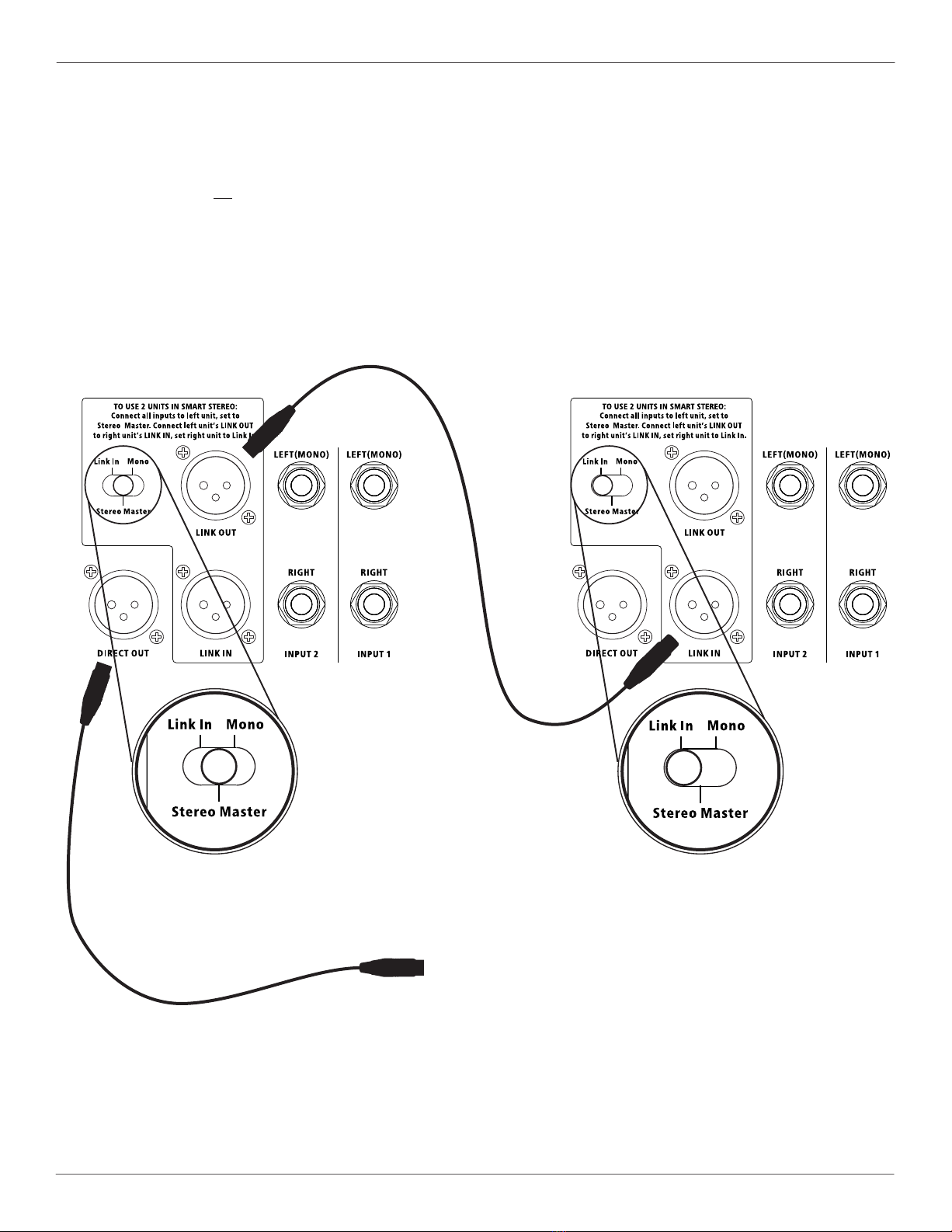
A pair of DA2100 Series amplifiers can operate together as a Smart Stereo system, giving you control of the sound and volume of both amplifiers
from the first master amplifier, and optimally distributing all audio inputs to both for rich stereo sound.
• Use two like amplifiers: two DA2108s, two DA2110s, or two DA2112 amplifiers
• Set the switch on the first amplifier to Stereo Master
• Set the switch on the second amplifier to Link In
• Connect a standard microphone cable (female XLR to male XLR cable) from the first unit’s LINK OUT jack to the second unit’s LINK IN jack
CONNECT ALL INPUTS TO FIRST AMPLIFIER ONLY
• Connect all inputs and make all sound settings on the first (left) unit only, this will be the master amplifier
• All inputs and controls on the second amplifier will be disabled, except that on DA2112 you must set the second amp’s Master Volume to max
• For headphones, use the headphone jack on the first amplifier
SMART STEREO WITH PAIR OF AMPLIFIERS
FIRST/MASTER/LEFT UNIT SECOND/LINKED/RIGHT UNIT
21506756 Simmons DA2100 Series manual_REV.indd 821506756 Simmons DA2100 Series manual_REV.indd 8 6/14/21 10:55 PM6/14/21 10:55 PM

DA2100 SERIES ADVANCED ELECTRONIC DRUM AMPLIFIERS
9
SMART STEREO WITH SUBWOOFER OR DIRECT OUT
To connect a subwoofer, or a direct out, the setup is the same as on the opposite page, but you can add a connection from the first unit’s DIRECT
OUT jack to a subwoofer or other audio receiving device, as shown below.
• The DIRECT OUT provides a full-range, mono signal
• The DIRECT OUT level is not effected by the MASTER knob of the DA2112.
TO DA12S SUBWOOFER OR OTHER UNIT
FIRST/MASTER/LEFT UNIT SECOND/LINKED/RIGHT UNIT
21506756 Simmons DA2100 Series manual_REV.indd 921506756 Simmons DA2100 Series manual_REV.indd 9 6/14/21 10:55 PM6/14/21 10:55 PM

10
1
1
1
2
2
2
3
3
3
4
4
4
5
5
5
6
6
7
7
7 8
12
12
12
13 14
11
11
11
9
9
9
18
15 16
16
16
17
17
17
10
10
10
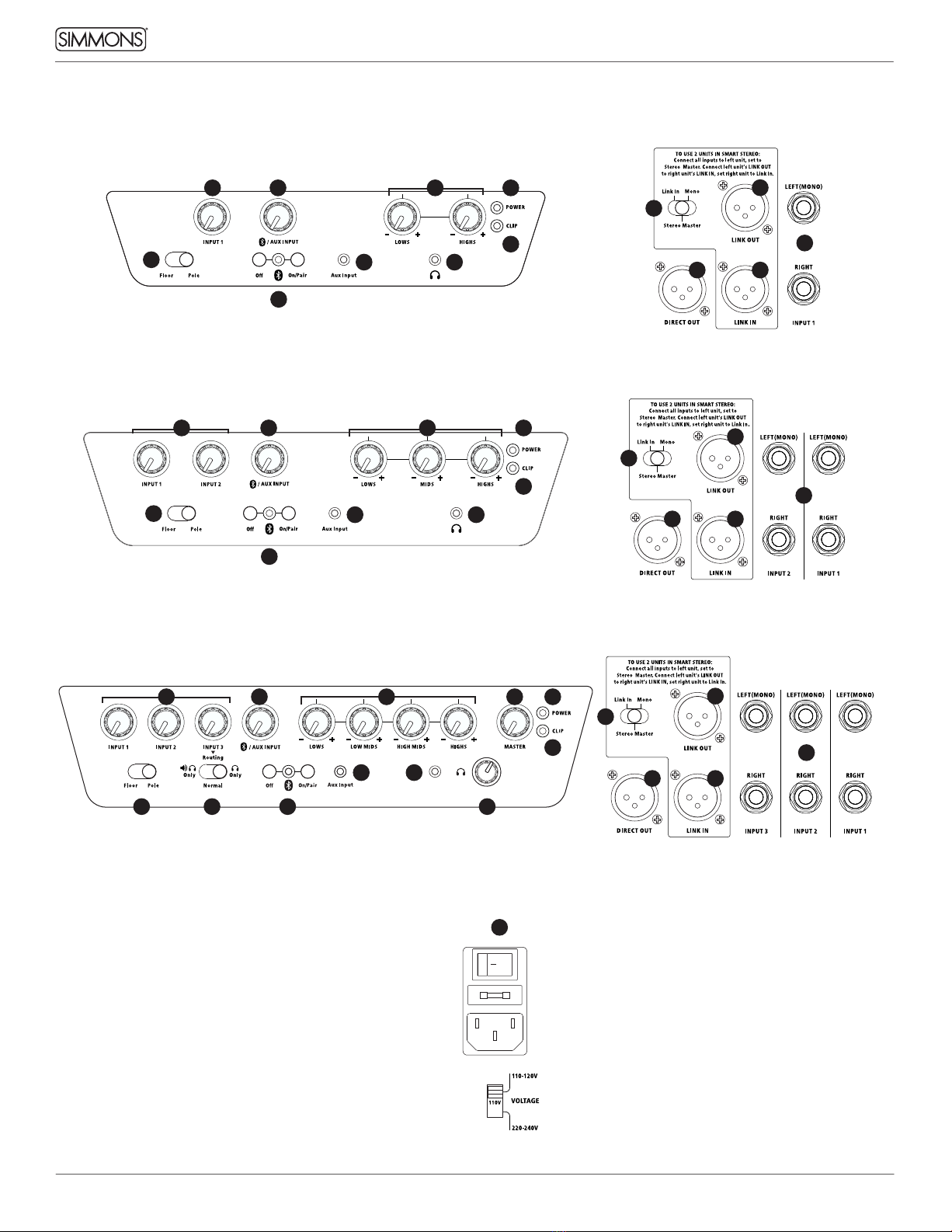
CONNECTIONS AND CONTROLS
DA2108 REAR PANELDA2108 FRONT PANEL
DA2110 REAR PANELDA2110 FRONT PANEL
DA2112 REAR PANELDA2112 FRONT PANEL
REAR PANEL POWER
6 8
8
21506756 Simmons DA2100 Series manual_REV.indd 1021506756 Simmons DA2100 Series manual_REV.indd 10 6/14/21 10:55 PM6/14/21 10:55 PM
Ce manuel convient aux modèles suivants
4
Table des matières
Autres manuels Simmons Amplificateur