
Simgrade THERA PEDALS Manuel utilisateur

Manual v.1.4

2
Table of contents
Table of contents 2
1. General 3
1.1 Varoitukset ja ohjeet turvalliselle käytölle 4
1.1.1. Käyttöympäristö ja turvalliset säilytysolosuhteet 4
1.1.2. Takuu 4
1.1.3. CE-Merkintä 4
1.1. Warnings & instructions for safe usage 5
1.1.1. Operating environment and safe storage conditions 5
1.1.2. Warranty 5
1.1.3. CE-Marking 5
1.4. Mounting the pedals 6
1.5. Connecting the pedals to the controller box and to the PC 6
1.6. Grounding 7
1.7. Maintenance 7
2. Mechanical Adjustments 8
2.1. General - read carefully! 8
2.2. Brake & Clutch 12
2.3. Throttle 13
3. Software 14
3.1. General 14
3.2. Layout 15
Version changes: 17

3
1. General
Please read the manual carefully as it contains important information regarding the pedals and safe usage of them.
The latest version o f the manual and software can always be found at: https://simgrade.fi/support/
Contact the manufacturer: [email protected]
Pictures on the manual might not represent your actual pedal configuration exactly.
Thank you for choosing the Thera’s, we hope you will enjoy your new pedals.
Best regards,
Team SIMGRADE°
4
1.1 Varoitukset ja ohjeet turvalliselle käytölle
● VAROITUS: TUKEHTUMISVAARA - sisältää pieniä osia, käyttö vain aikuisen valvonnassa! Älä anna lasten käyttää polkimia, tai mitään toimitettua osaa tai työkalua
ilman aikuisen valvontaa.
● Älä koskaan käytä vahingoittunutta tai millään tavalla viallista tuotetta, lopeta käyttö ja ota yhteys jälleenmyyjään tai valmistajaan.
● Sisältää teräviä reunoja ja kulmia sekä sulkeutuvia välejä, älä koske polkimiin käytön aikana.
● Käytä suojahanskoja kun vaihdat tai lisäät osia polkimiin, tai poistat osia polkimista.
● Älä käytä maaöljypohjaisia voiteluaineita polkimien kanssa, ne vahingoittavat osia polkimista. Mikäli voitelua tarvitaan, suosittelemme PTFE-kuivavoitelusuihketta.
● Varmista, että kaikki jotka polkimia käyttävät, ovat lukeneet ja ymmärtäneet käyttöohjeen sisällön (ajantasaisen käyttöohjeen löydät: https://simgrade.fi ).
● Varmista aina, että kaikki liitokset ovat kireällä ennen kuin käytät polkimia. Kiristä liitos aina mutterin puolelta kun sellainen on käytössä.
● ÄLÄ avaa ohjausboxia.
● Polkimia tai niiden osia ei saa käyttää kuin siihen tarkoitukseen, johon ne on suunniteltu. SIMGRADE° THERA PEDALS on tarkoitettu käytettäväksi USB-peliohjaimena tietokoneella.
Valmistaja ei vastaa vahingoista, jotka voivat syntyä tuotteen ohjeiden vastaisesta käytöstä.
● Kiinnitä aina polkimet M6-pulteilla (4kpl / poljin) tukevaan alustaan. Käyttäjä vastaa siitä, että alusta kestää polkimien käytön.
1.1.1. Käyttöympäristö ja turvalliset säilytysolosuhteet
● 15°C – 35°C lämpötila, tiivistymätön kosteus.
● Älä altista polkimia tai muita sen osia suoralle auringonvalolle tai kosteudelle.
● Vain sisäkäyttöön ja varastointiin.
1.1.2. Takuu
Tuotteella on 5 vuoden takuu, poislukien tilanteet ja tapahtumat joissa:
- Käyttö- tai hoito-ohjeita on laiminlyöty.
- Tuotetta on käytetty väärin tai huolimattomasti.
- Tuotteen luovutuksen jälkeen on sattunut onnettomuus tai muu tapahtuma, jossa tuote on vahingoittunut ulkoisten tekijöiden toimesta.
- Normaali kuluminen käytössä.
1.1.3. CE-Merkintä
Tuote täyttää EU:n terveys-, turvallisuus- ja ympäristönsuojelustandardit.
- Valmistaja: SimGrade Oy
- Valmistajan osoite: Piispanpelto 8, 02200 Espoo
- Tuotteen nimi / tunnus: SIMGRADE° Thera

5
1.1. Warnings & instructions for safe usage
● WARNING: CHOKING HAZARD - Small parts, adult supervision required! Never let children use the pedals, or any of the provided parts or tools without supervision by
an adult.
● Never use damaged or in any way defective product, stop using it and contact the reseller or the manufacturer.
● There are sharp edges and corners and closing gaps, keep away from the pedals while they are being used.
● Use protective gloves when changing or adding parts to the pedals, or when removing parts from them.
● Do not use petroleum based lubricants with the pedals, these will damage some of the parts in the pedals when in contact. If you need to use some lubricant, we recommend dry
PTFE-spray.
● Always make sure everyone using the pedals have read and understood the content of the manual (up-to-date manual can be found: simgrade.fi).
● Always check that all connections are tightened before using the pedals. Always tighten from the nut side when one is used.
● DO NOT open the controller box.
● Pedals or any of their parts may not be used on any other purpose than what they were designed for. SIMGRADE° THERA PEDALS is meant to be used as an USB-input device on a
computer. The manufacturer is not liable for any damage that may result from using the product in violation of the instructions.
● Always fasten the pedals to the support base with M6 bolts (4 pcs / pedal). It is the user's responsibility to ensure that the platform can withstand the use of the pedals.
1.1.1. Operating environment and safe storage conditions
● 15°C – 35°C temperature, non-condensing humidity.
● Do not expose the pedals or any provided part to direct sunlight or moisture.
● Indoor use and storing only.
1.1.2. Warranty
The product has a 5-year warranty, excluding situations and events where:
- Instructions for use or care have been disregarded.
- The product has been used incorrectly or carelessly.
- An accident or other event has occurred after the product has been handed over, in which the product has been damaged by external factors.
- Normal wear and tear in use.
1.1.3. CE-Marking
Product meets EU standards for health, safety, and environmental protection.
- Manufacturer: SimGrade Oy
- Manufacturer address: Piispanpelto 8, 02200 Espoo
- Product Model name / identification: SIMGRADE° Thera

6
1.4. Mounting the pedals
● A proper racing rig with a sturdy mounting platform is required . Aluminium extrusion profile bas e for the pedals is
recommended.
● Always use all 4 mounting bolts (M6) with washers on each pedal. Mounting pattern for one pedal is 80 mm (longitudinal) x 24
mm (lateral).
1.5. Connecting the pedals to the controller box and to the PC
Connect the brake pedal to the middle port (red), and throttle on the side of the USB-out port (green). The 3rd port is for the clutch.
It is recommended to connect the pedals directly to the motherboard of the PC (back of the computer), into a USB 2.0 slot. We do not
recommend using USB-hubs with the pedals. The controller board is 12bit.

7
1.6. Grounding
In case you have some installed hardware (or some other environmental issue) that is creating EMI problems or other electrical
interference (i.e. signal from the pedals is not stable), you might need to ground the pedals by connecting a cable from the controller box
to the brake pedal. Pedal end of the cable is connected to the underside of the load cell, on the M10 thread. The controller box end is M3
(ring), and the pedal end is M10 (ring). The cable controller box end is connected to the threaded hole under the corner cap (remove),
nearest corner to the USB port. Do not use excess force while tightening the connections.
The signal value will always move around / vary slightly, but if the range of variation is more than 10 units (out of 4096) while having the
pedals stationary, we recommend adding the cable just to be on the safe side.
1.7. Maintenance
Pedals do not need any added lubrication in normal conditions. If you add some regardless, only use dry PTFE-spray. Clean the pedals
only with a dry cloth.

8
2. Mechanical Adjustments
2.1. General - read carefully!
● Do not open the connection between the pedal arm and the push rod top end. You’re not allowed to change the
mounting slot on the pedal arm. Changing the slot might lead to permanent damage to the load cell. Changing the
slot voids warranty (all pedals).
● Use protective gloves when changing or adding parts to the pedals, or when removing parts from them. Particularly
when changing the spring or elastomer on the brake or clutch, or when adding washers on the stack to adjust
preload (all pedals).
● Proceed with caution when pressing the rear of the spring / elastomer down to its place. The assembly will snap
suddenly to its place (the higher the level of preload, the faster the snap), and you need to be extra careful not to
get your fingers in between. Locate the parts carefully between the bearings and make sure you push it down
evenly. It is recommended to do this operation only while the pedals are securely mounted on a stable base (for
example a rig). DO NOT keep your fingers under the assembly while pressing down. Only press from the top side
paying close attention to keep everything lined up correctly.
● To prevent accidents - only adjust the pedals while they are securely mounted on a firm base (for example on a rig).
● All pedals are load based, which means every time you change any mechanical setting on a pedal, you need to recalibrate that
particular pedal. This is done in the app by adjusting the signal cut off lines up or down (bottom line & top line). See the
“Software” section for more details. The only exception to this is that the top line for the brake needs to be changed only when
you want to change the maximum braking force - adding or removing preload has no effect on this.
● The angle of the pedal can be changed (+/-8,5 degrees) by opening the rear bolts on the side, and rotating the pedal.
● The maximum allowed pedal force (110kg) is only achieved with the red spring and with the pedal face adjusted to low position.

9
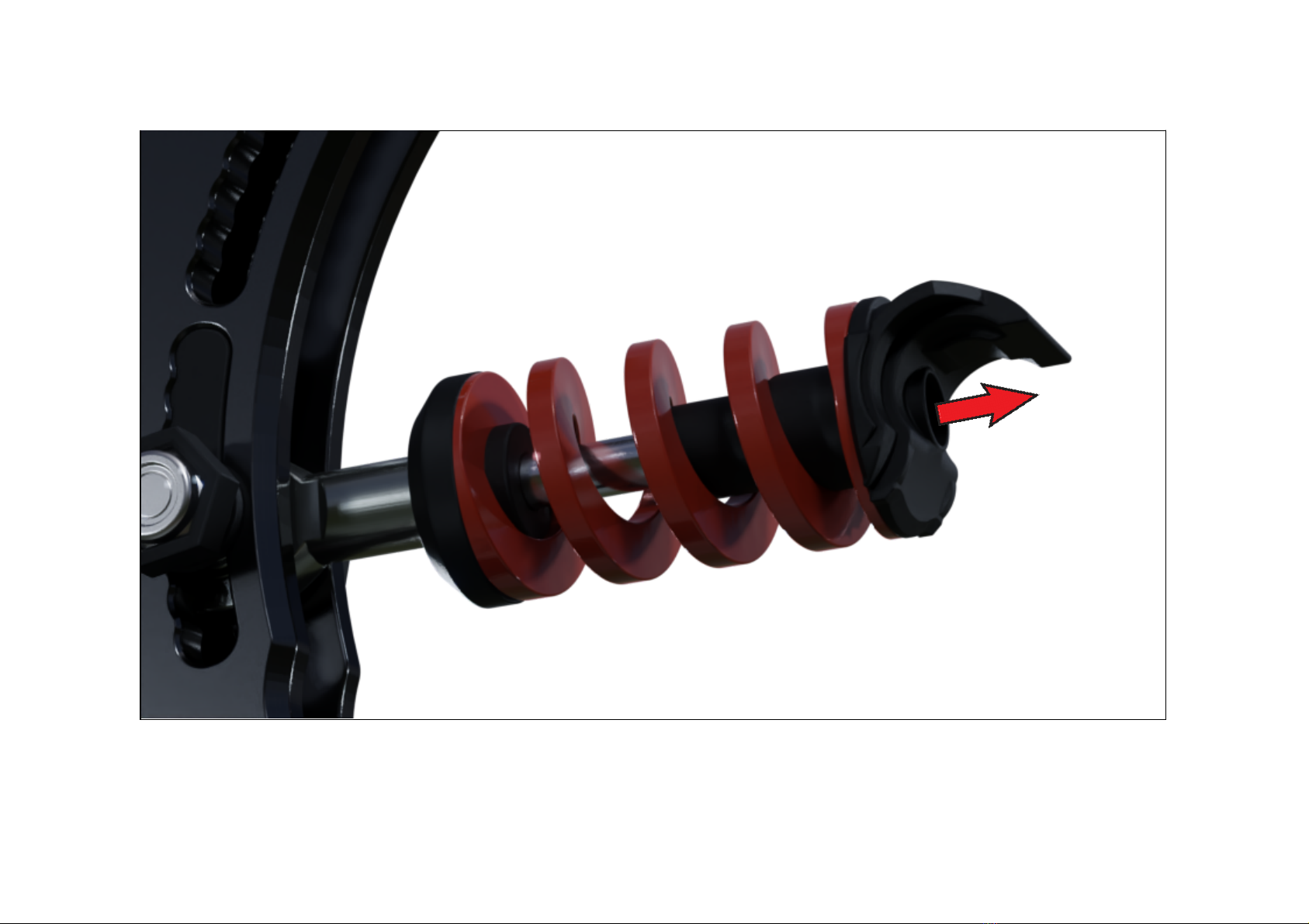
Lifting up and pressing down the rear of the pushrod assembly. It is recommended to only lift the rear up, while the pedal is mounted.
● Lifting up - upward arrow. You can also support the lift from the spring / elastomer underside with your other hand.
● Pressing down - downward arrow. ONLY press down from the top side. DO NOT keep your fingers on the underside.
10
^After you’ve lifted the rear up, you can change the spring / elastomer or add / remove preload for the pedal.
Table des matières


