Simeon VoiceOver Manuel utilisateur

Simeon VoiceOver
Personal Voice Amplifier
™
User Manual — Page 1
Manuel de l’ulisateur — Page 9
Manual de Usuario — Pagina 17


1
Simeon™ VoiceOver
Personal Voice Amplier
Your new Simeon VoiceOver system provides a convenient, portable and us-
er-friendly personal amplicaon soluon. Its small size and ergonomic shape
allow it to be comfortably worn around the waist and used almost anywhere.
VoiceOver comes with the following components:
• Simeon VoiceOver wearable amplier / speaker
• Simeon 623 direconal boom microphone (or oponal alternate mi-
crophone model)
• Six high capacity NiMH rechargeable baeries
• Charging adapter
• Auxiliary audio input cable

2
Simeon VoiceOver Personal Voice Amplier
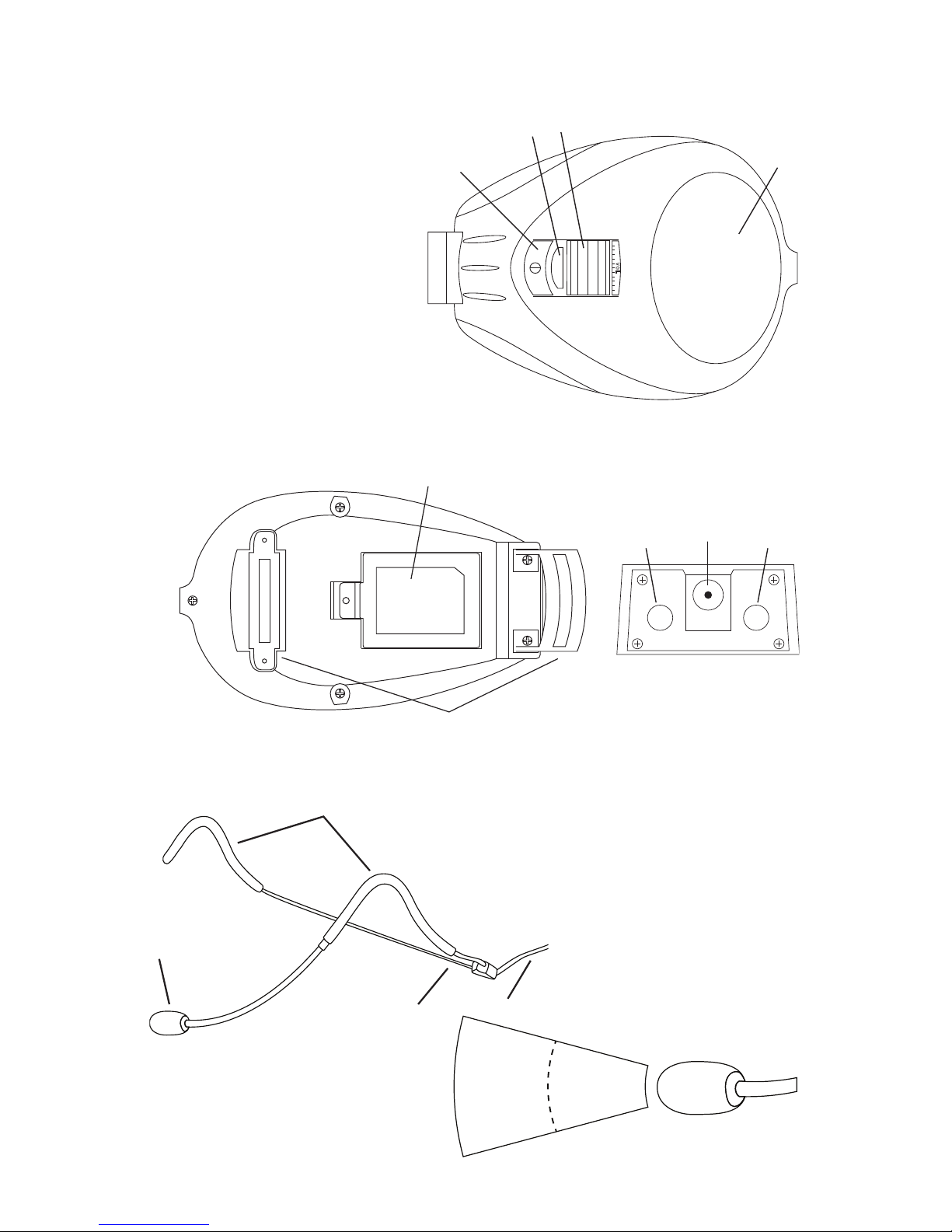
Figures 1, 2 & 3
Simeon 623 Direconal Boom Microphone
Figures 4 & 5
11
10
12 13
3
0
˚
6
5
7
8
9
VOL
1
23
4
1. Power ON/OFF Buon
2. Baery Status Indicator Light
3. Volume Dial
4. Speaker
5. Baery Cover
6. Belt Hooks
7. Microphone Input Jack ‘MIC IN’
8. Charging Jack
9. Auxiliary Input Jack ‘AUX IN”
10. Microphone Direconal Capsule
11. Earhooks
12. Spring Metal Frame
13. Connector Cable

3
Setup
Carefully unpack the system and idenfy the main components.
Simeon VoiceOver Personal Voice Amplier
The Simeon VoiceOver is a simple body-worn amplicaon soluon that can
be used in just about any environment!
It is recommended that you charge the amplier fully before its inial use.
Open the baery compartment [5] and insert six NiMH size AAA baeries (sup-
plied), taking care to observe the correct baery polarity. Never use disposable
(alkaline) baeries in combinaon with the charging system. Clip the Voiceover
around your waist and ghten the adjustable strap so it sits snuggly and comfort-
ably at the hip.
Simeon 623 Direconal Boom Microphone
The standard Simeon 623 direconal boom (headset) microphone and its al-
ternaves oer a great hands-free way to use the VoiceOver in many dierent
speaking environments.
Plug the boom microphone into the 3.5mm input jack marked MIC IN on the
side of the VoiceOver [5]. PLEASE NOTE: If the microphone is inserted into the
AUX IN jack speech will not be amplied. Place the microphone frame [12] over
your ears and adjust the boom arm [10] so the microphone capsule sits approxi-
mately 1 cm from the corner of your mouth. It is not necessary to place the
microphone in front of your lips and doing so may diminish sound quality. The
boom microphone frame must be adjusted to rest comfortably over both ears,
with no other contact or pressure points against the head or face. Ensure that
the VoiceOver is turned ON and the volume control [3] set to an audible level.
Operaon
Simeon VoiceOver Personal Voice Amplier
To turn the amplier on, press the power ON / OFF buon [1] unl the green
LED indicator illuminates [2]. The device requires either a microphone or other
sound input source, connected via the MIC IN [7] and AUX IN [9] jacks respec-
vely. The large scroll wheel controls the volume of the amplier [3].
To turn the amplier o, simply press the power buon [1] unl the green
indicator LED turns o [2].

4
Seng Gain Level
Check the volume posion before turning the system on! Turn the VoiceOver
ON using power buon on the exterior of the amplier [2]. With the amplier
turned ON and microphone posioned correctly, slowly increase the volume
control [3] to a comfortable listening level. Avoid excessive amplicaon; speech
should be comfortably audible throughout the listening area.
External Connecons
The side panel of the VoiceOver has two external connectors. These can be
used to connect a variety of input devices to the amplier.
The 3.5mm input jack marked MIC IN [7] allows for connecon and ampli-
caon of wearable microphones, such as standard boom (headset) mic model
623. An extensive range of alternave microphone styles are available, includ-
ing Simeon transdermal microphone model TR15 for special applicaons. Please
review our website: www.simeoncanada.com for photos of alternave micro-
phone models.
External audio feeds, such as from iPods or laptop computers, may be con-
nected to the 3.5mm stereo input jack marked AUX IN [9]. Volume for external
audio feeds can be adjusted from the source device or by the VoiceOver main
volume control. Note that VoiceOver accepts simultaneous microphone and au-
dio inputs, which allows you to mix voice and music karaoke-style!
Useful Tips
• Adjust the microphone for comfort and ensure especially that the mic cap-
sule is posioned correctly.
• Avoid excessive amplicaon - the VoiceOver Personal Voice Amplier will
make speech clearly audible at a comfortable listening level.
• Use only the recommended baeries and the correct charging adapter (9v
DC; 300mA).
• To prevent feedback, avoid poinng the microphone directly at the speaker.

5
System Care and Baery Charging
For best performance, use only the included Nickel Metal-Hydride (NiMH) size
AAA rechargeable transmier baeries. Never use disposable (alkaline) baeries
in combinaon with the charging system.
Charge the amplier aer each day of use using only the recommended
charging adapter. Make sure the device is turned OFF when charging. Connect
the adapter to the charging jack [8] marked DC-9V on the side of the VoiceOver
amplier. The charging indicator light [2] illuminates red during charging. Allow 4
to 5 hours for a complete charge.
To clean the device, simply wipe with a damp cloth. Do not immerse the de-
vice in water. The microphone frame may be cleaned with a dry cloth or with
an alcohol-based solvent. Protect the microphone capsule from moisture. Clean
the pin of the microphone plug regularly and replace damaged or missing wind-
screens.
The Simeon 623 boom (headset) microphone is the most delicate component
of your VoiceOver amplicaon system and must be protected against strain and
excessive force. The microphone has a unidireconal pick-up paern. The p of
the mic capsule must be pointed towards the corner of the mouth for proper
performance.
One Year Limited Warranty
The Simeon VoiceOver is covered by a ONE year parts and labour warranty, ef-
fecve from the date of purchase. Coverage applies to amplier, charging system
(excluding baeries) and power adapters. Genuine Simeon microphones bearing
the Simeon brand name are warranted for ONE year. Baeries are warranted for
90 days unless stated otherwise by the baery manufacturer.
The manufacturer’s warranty provides for repair or replacement of defecve
components or workmanship. Expressly not covered are damages resulng from
abuse, neglect, and unapproved substuon of components, baeries or acces-
sories. Extended warranty coverage may be purchased under the Simeon Service
Plus extended full service program.

6
Troubleshoong
No Sound
Check that the amplier is turned ON and volume adjusted to an audible level. Check
that the amplier baeries are correctly inserted, observing correct polarity, and that
the baery terminals are making rm contact inside the baery housing. Check that
the microphone is inserted into the MIC IN jack; speech amplicaon will be absent
if the mic is inserted into the AUX IN jack. Check or replace microphone.
Dead Baeries
Check that the amplier baeries are properly inserted observing correct polarity,
and that the baery terminals are making rm contact inside the baery housing.
Check that the correct charging adapter (9v DC, 300mA) is connected to the amplier.
Turn the VoiceOver device OFF during charging.
Weak Sound
Check and adjust volume seng. Adjust microphone posion so that the p of the
mic capsule is poinng directly towards the corner of your mouth. Check or replace
the microphone.
Noise or Distorted Speech
Adjust the microphone so it is not directly in the path of your breath (in front of your
mouth or nose); the mic p should point directly at the corner of your lips. Check the
microphone for damage, in parcular the integrity of the microphone cord and plug.
Clean microphone plug pin with an alcohol-based solvent to maintain noise-free con-
necon.
Distorted Audio Input
If music or other auxiliary input sounds distorted, check that the external source
is connected to the AUX IN jack and adjust volume; distoron will occur if music
sources such as iPods are connected to the MIC IN jack.
Feedback
Check and adjust the volume seng. Ensure that the microphone is posioned cor-
rectly and is close to the corner of your mouth. Avoid poinng the microphone di-
rectly at the speaker.
Intermiency
Check the microphone, mic cable and the plug connecon into the MIC IN jack of
the device. Try a substute microphone and replace the microphone if it is damaged.

7
Technical Specicaons
© 2011 Supporve Hearing Systems Inc.
Speaker Type Convenonal full range 3.25” cone driver, 4 Ω
Dynamic Range 100 dB
Audio Frequency Range 50 Hz - 15 KHz
Total Harmonic Distoron < 10%
Amplier Connuous Power 8 Was RMS @ 4 Ω
Power Requirements NiMH Rechargeable AAA baeries x 6 (included)
Charging Method External 9V wall adapter
Recharging Time 4 - 5 Hours
Autonomy 4 - 8 Hours
Inputs Microphone 3.5mm; Auxiliary 3.5mm
Standard Microphone Type Direconal over-the-ear boom mic
Dimensions 21 x 130 x 60mm
Weight < 500g including baeries
Warranty One year including genuine Simeon™ microphone

Table des matières
Langues :