Silvercrest JS-101 Manuel utilisateur

1
English
1 Preliminary remarks
Thank you for deciding to purchase our USB joystick JS-101 USB.
This is a device for IT equipment. It may only be used for private and not
industrial or commercial purposes. This product is not intended for use in
medical, life-saving or life-sustaining applications. Only connection cables which
correspond to this device in terms of safety, electromagnetic compatibility and
shielding quality and such external devices may be used in conjunction with the
unit. This device fulfils all relevant standards and guidelines with respect to CE
conformity. If the device is altered without the agreement of the manufacturer,
compliance with these standards and guidelines is no longer guaranteed. Use
only the accessories specified by the manufacturer. If you do not use the device
within the Federal Republic of Germany, you must observe the regional
regulations or laws of the country of use.
In order for you to utilise this device and all its options, we recommend that you
read the corresponding instructions in this manual thoroughly before using the
device for the first time, even if you are familiar with handling electronic devices.
Please pay particular attention to the chapter “Important safety information“ on
page 4. Store this manual in a safe location for future reference. If you sell or
transfer this device, please be sure to pass along these instructions as well.
2 Copyright
The contents of this manual may not be reproduced, copied or otherwise
duplicated in electronic, mechanical, magnetic, optical, chemical, manual, or any
other form without the permission of our company, nor may it be stored in a
search engine or translated into another language.

2
3 Declaration
The descriptions and features in this manual only serve as general guidelines
and do not represent a guarantee. In order to offer you a product of the highest
quality, we reserve the right to make possible improvements or changes without
prior notification.
For all product descriptions and user instructions, the German version is the
ultimately valid reference in the event of possible deviations in other languages.
The USB joystick JS-101 USB corresponds to the basic requirements and
relevant regulations of the EMC Directive 2004/108/EC and the Low Voltage
Directive 2006/95/EC.
4 Manufacturer information
JNC Datum Tech GmbH
Benzstraße 33
71083 Herrenberg
Germany
More information can also be found at:
www.mysilvercrest.de

3
English
5 Table of contents
1Preliminary remarks 1
2Copyright 1
3Declaration 2
4Manufacturer information 2
5Table of contents 3
6Important safety information 4
7Scope of delivery 5
8Control elements 6
9System requirements 7
10 Installation 8
11 Technical data 10
12 Troubleshooting 11
13 Warranty information 12

4
6 Important safety information
Please read and strictly observe the following
instructions!
You are not permitted to disassemble, modify or repair the USB joystick.
If the USB joystick has been dropped or if the casing has been
damaged, do not continue to use it.
Do not give your USB joystick to children. Never let your children use
electrical devices without supervision. Children are not always able to
recognize potential hazards. Also keep the plastic packaging material out
of reach of children. There is a danger of suffocation.
The USB joystick and accompanying components may not be exposed
to dripping or sprayed water. Additionally, no objects or containers
containing liquids, such as vases or glasses, may be placed next to the
device.
Do not use the USB joystick in environments with high humidity, large
amounts of steam, smoke, or dust.
Do not leave the USB joystick in locations where the temperature can
rise dramatically (e.g. in direct sunshine). This could damage the
casing and interior parts.
Only place the USB joystick on stable surfaces. The USB joystick might
otherwise fall or topple, cause injuries or sustain damage. Do not drop the
USB joystick or bump it against anything and take great care when using
it.
Dispose of your device in compliance with the Directive 2002/96/EC. This
device should not be disposed of with household waste.

5
English
7 Scope of delivery
1. USB joystick JS-101 USB 2. Driver CD
Not illustrated
3. User manual
Note:
Desi
g
n and technical data are sub
j
ect to chan
g
e without
notice.

6
8 Control elements
1-8 : Function buttons
9 : Throttle control
10 : 4-way trigger

7
English
9 System requirements
- Pentium PC or higher
- USB port V1.1 or V2.0
- Microsoft Windows 98/ME/2000/XP/Vista
- Minimum 32MB and 64MB RAM recommended for Microsoft Windows
98 or ME
- Minimum 64MB and 128MB RAM recommended for Microsoft Windows
2000 or XP/Vista
- Minimum 32MB hard drive capacity
- CD-ROM drive
- Minimum Super VGA 256 colour monitor
Note:
If
y
ou are unable to pla
y
an
y
g
ames, check the minimum
requirements for the game.

8
10 Installation
Note:
We recommend plu
gg
in
g
in the USB cable onl
y
when the device is
turned off.
1) Plug the USB cable into a free USB port on your computer. A message will
appear stating that new hardware has been found.
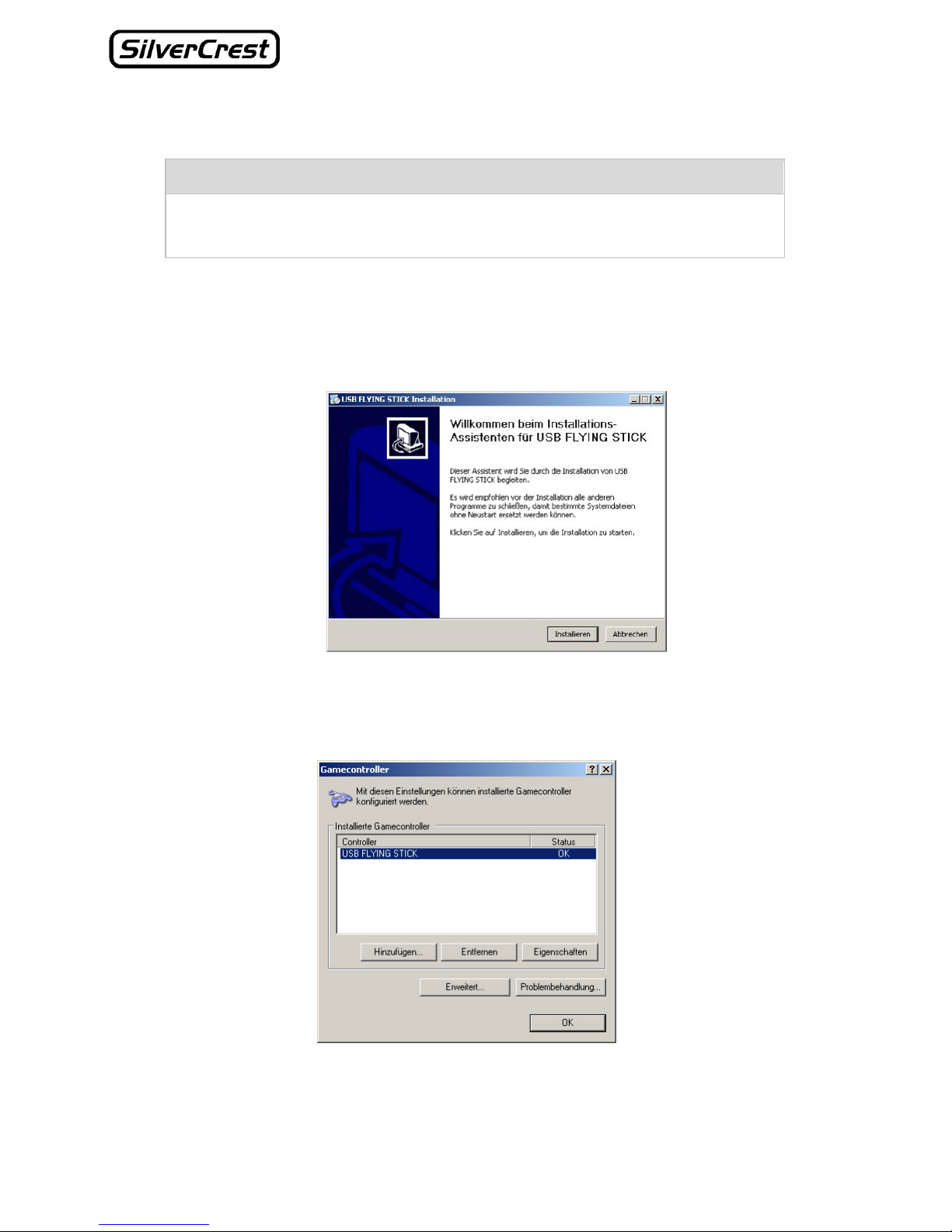
2) Insert the CD-ROM provided. Start the SETUP file and follow the
installation instructions on your screen.
3) After installation click on Start – Settings – Control Panel and select the
item “Game Controllers” here. A window will open in which you can select
the USB joystick and test whether it functions correctly.

9
English
4) Click on Properties to test whether the USB is working correctly. Another
window will open.
5) After the test, close the window by clicking OK.
Installation of your USB joystick is now complete and you can start using
the device.
Note:
Please note that the installation
g
uidelines refer to the Windows XP
operatin
g
s
y
stem. The instructions for Windows Vista
(
or other
versions) may differ somewhat.

10
11 Technical data
General
Dimensions 16 x 13.5 x 21 cm (L x W x H)
Weight 500 g
Operating temperature 5° - 35° C
Permissible humidity for
operation
20 % - 80 %
Storage temperature -10° - 60° C
Operating voltage 5 V
Operating current 150 mA
Connections/control elements
USB connection V1.1/V2.0 compatible
4-way trigger
Throttle control
8 function buttons
Ce manuel convient aux modèles suivants
1
Table des matières
Langues :
Autres manuels Silvercrest Manettes de jeux vidéo