
Silicon RE31 Manuel utilisateur
USER MANUAL
RE31 Mini Reader
Rev 1.0 (11, 2020)
This document describes how to use RE31 Mini Reader to show performance of RE31 IC.

Revision History
RE31 USER MANUAL
RE31 Mini Reader
PROPRIETARY AND CONFIDENTIAL
2
USER MANUAL RE31
11, 2020
V1.0
Copyright © 2020 Silicon Craft Technology PLC
Revision History
Revision
Date
Description
1.0
November 2020
1st Release
The information herein is for product information purposes. While the contents in this publication
have been carefully checked; no responsibility, however, is assumed for inaccuracies. Silicon Craft
Technology PLC. reserves the right to make changes to the products contained in this publication
to improve design, performance, or reliability.

Contents
RE31 USER MANUAL
RE31 Mini Reader
PROPRIETARY AND CONFIDENTIAL
3
USER MANUAL RE31
11, 2020
V1.0
Copyright © 2020 Silicon Craft Technology PLC
Contents
RE31 Mini Reader ............................................................................................................................................1
Revision History.............................................................................................................................................. 2
Contents......................................................................................................................................................... 3
List of Figures ................................................................................................................................................. 4
List of Tables .................................................................................................................................................. 5
1. Introduction............................................................................................................................................ 6
2. Getting Start........................................................................................................................................... 7
2.1. System and Hardware Requirements..................................................................................................7
2.2. Software Setup.....................................................................................................................................7
2.2.1. Serial Communication Configuration..........................................................................................7
2.2.2. Terminal Software (MobaXterm) ................................................................................................7
2.2.3. Downloading and Installing MobaXterm.....................................................................................8
2.2.4. Connecting with PC...................................................................................................................10
2.3. Hardware Setup.................................................................................................................................. 11
3. Example Use Case ................................................................................................................................13
4. Schematic .............................................................................................................................................14
4.1. MCU Module ......................................................................................................................................14
5. Upgrade Firmware.................................................................................................................................15
6. Product and Documentation Support....................................................................................................16
6.1. Notation ..............................................................................................................................................16
6.2. Tools and Software ............................................................................................................................17
6.3. Documentation Support.....................................................................................................................17
6.4. Contact Information ...........................................................................................................................17
7. Legal Information.......................................................................................................................................18
7.1 Disclaimer ..................................................................................................................................................18

List of Figures
RE31 USER MANUAL
RE31 Mini Reader
PROPRIETARY AND CONFIDENTIAL
4
USER MANUAL RE31
11, 2020
V1.0
Copyright © 2020 Silicon Craft Technology PLC
List of Figures
Figure 2-1 MobaXterm...........................................................................................................................7
Figure 2-2 MobaXterm Website............................................................................................................8
Figure 2-3 MobaXterm Download Page...............................................................................................8
Figure 2-4 MobaXterm Home Edition Download Page........................................................................9
Figure 2-5 MobaXterm Installation Window.........................................................................................9
Figure 2-6 MobaXterm Create new session.......................................................................................10
Figure 2-7 Sesstion setting..................................................................................................................10
Figure 2-8 Basic Serial Setting............................................................................................................ 11
Figure 2-9 Successfully RE31 Mini Reader connection ..................................................................... 11
Figure 2-10 Hardware Connection......................................................................................................12
Figure 3-1 Example reading tag's UID.................................................................................................13
Figure 4-1 STM8L Module Schematic................................................................................................14
Figure 5-1 STM8L MCU Connection via SWIM..................................................................................15
Figure 6-1 Register Definition..............................................................................................................16

List of Tables
RE31 USER MANUAL
RE31 Mini Reader
PROPRIETARY AND CONFIDENTIAL
5
USER MANUAL RE31
11, 2020
V1.0
Copyright © 2020 Silicon Craft Technology PLC
List of Tables
Table 6-1 Styles and Fonts for keywords............................................................................................16

Introduction
RE31 USER MANUAL
RE31 Mini Reader
PROPRIETARY AND CONFIDENTIAL
6
USER MANUAL RE31
11, 202
V1.0
Copyright © 2020 Silicon Craft Technology PLC
1. Introduction
RE31 is a single chip reader IC for 13.56MHz RFID/contactless standard protocols including
ISO14443A/B, ISO15693. The HiRead-R provides a hi-speed SPI controller/host interface with a
built-in 64-byte FIFO for smooth data transfer.
Silicon Craft Technology PLC. (SIC) creates this document to describe how to enable RE31
Mini Reader with PC. This mini reader connects to PC via UART connection.
Getting Start
RE31 USER MANUAL
RE31 Mini Reader
PROPRIETARY AND CONFIDENTIAL
7
USER MANUAL RE31
11, 202
V1.0
Copyright © 2020 Silicon Craft Technology PLC
2. Getting Start
Before user can operate RA12 Mini Reader, proper operational environment and the
following requirements must be prepared.
2.1. System and Hardware Requirements
•Computer : PC with USB Port
•Operating System : Window XP, Window 7, 8, 10
•Software Requirement : Hyper Terminal, Tera Term, Putty, MobaXterm, etc.
•Others : ISO14443A/B or ISO15693 Card or Tag.
2.2. Software Setup
2.2.1. Serial Communication Configuration
To communicate with the reader, user must establish a serial connection. The setting
below is to config the serial session to match the reader communication configuration.
•Serial Port : Select COM Port which match to USB to UART converter
•Baud Rate : 115200 bps
•Data : 8 bits
•Parity bit : None
•Stop bit : 1 bit
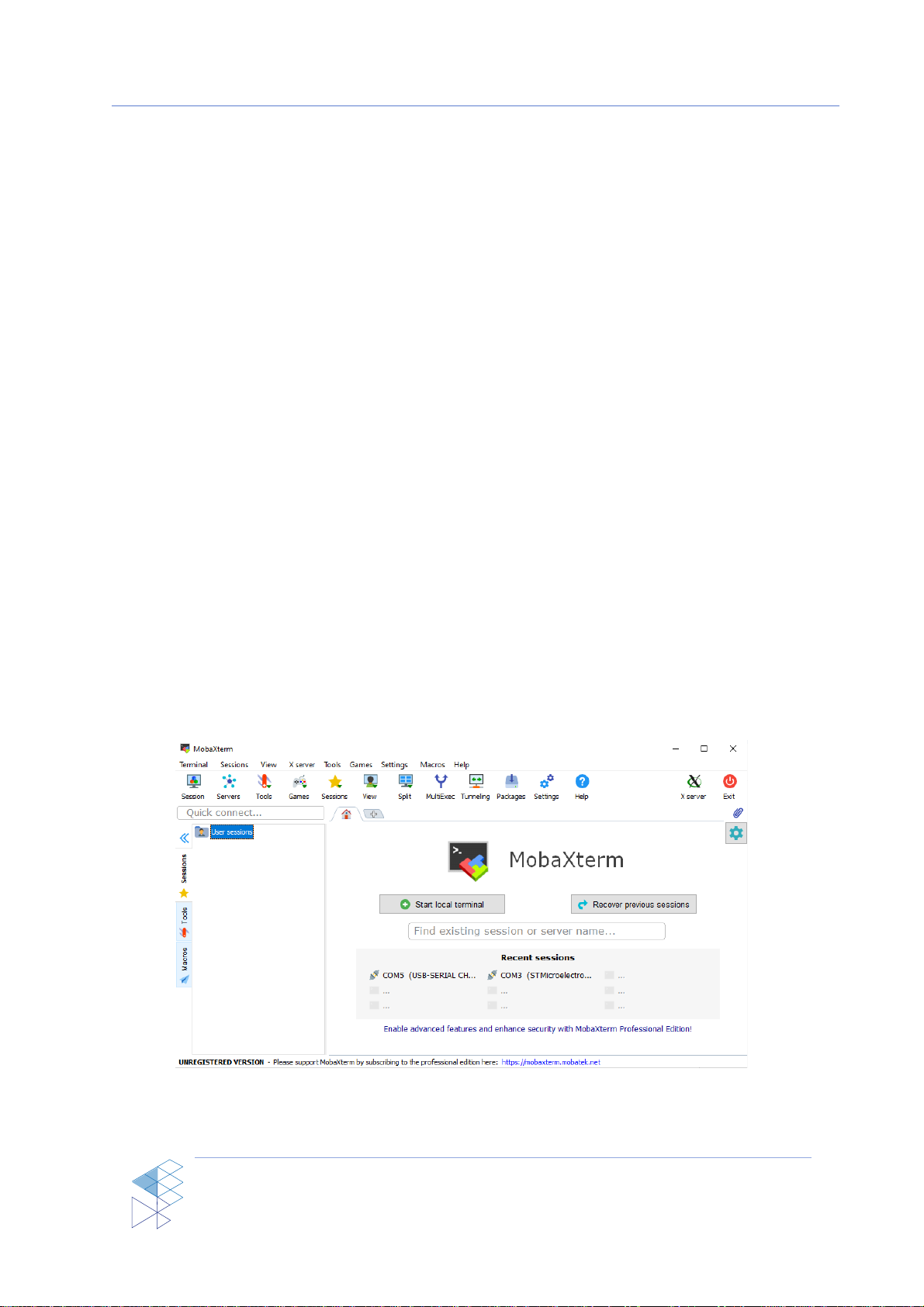
2.2.2. Terminal Software (MobaXterm)
To interact with the reader, a terminal software is needed. Generally, any terminal software
is compatible. However, we will use MobaXterm as an example terminal software to communicate
with the reader in this case.
Figure 2-1 MobaXterm
Getting Start
RE31 USER MANUAL
RE31 Mini Reader
PROPRIETARY AND CONFIDENTIAL
8
USER MANUAL RE31
11, 202
V1.0
Copyright © 2020 Silicon Craft Technology PLC
2.2.3. Downloading and Installing MobaXterm
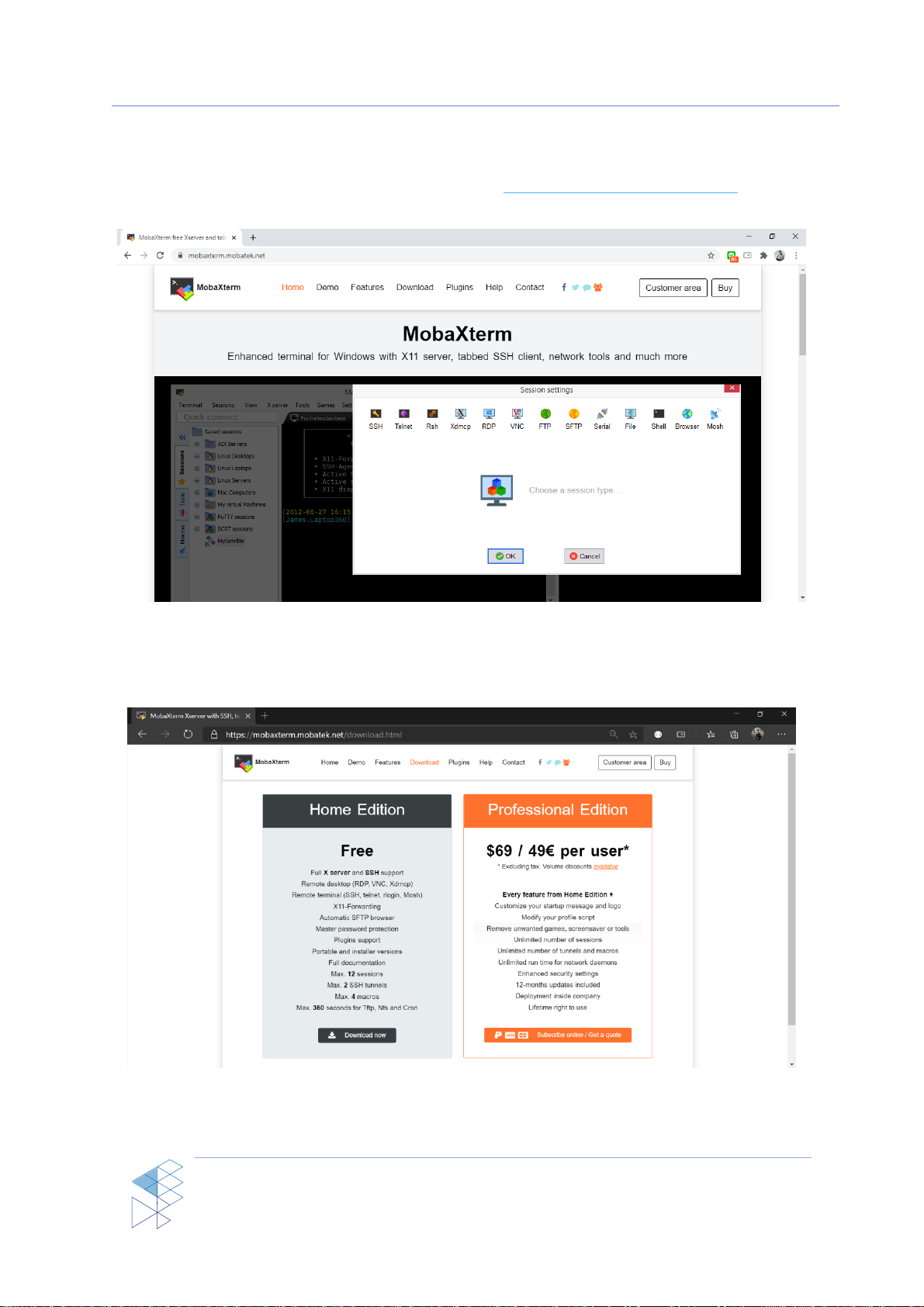
1. To download MobaXterm, pleasego to this url: https://mobaxterm.mobatek.net/ then, click
the tab “Download” as shown in Figure 2-2.
Figure 2-2 MobaXterm Website
2. At download page, click at “Download now” to go to home edition download page as
shown in Figure 2-3.
Figure 2-3 MobaXterm Download Page
Getting Start
RE31 USER MANUAL
RE31 Mini Reader
PROPRIETARY AND CONFIDENTIAL
9
USER MANUAL RE31
11, 202
V1.0
Copyright © 2020 Silicon Craft Technology PLC
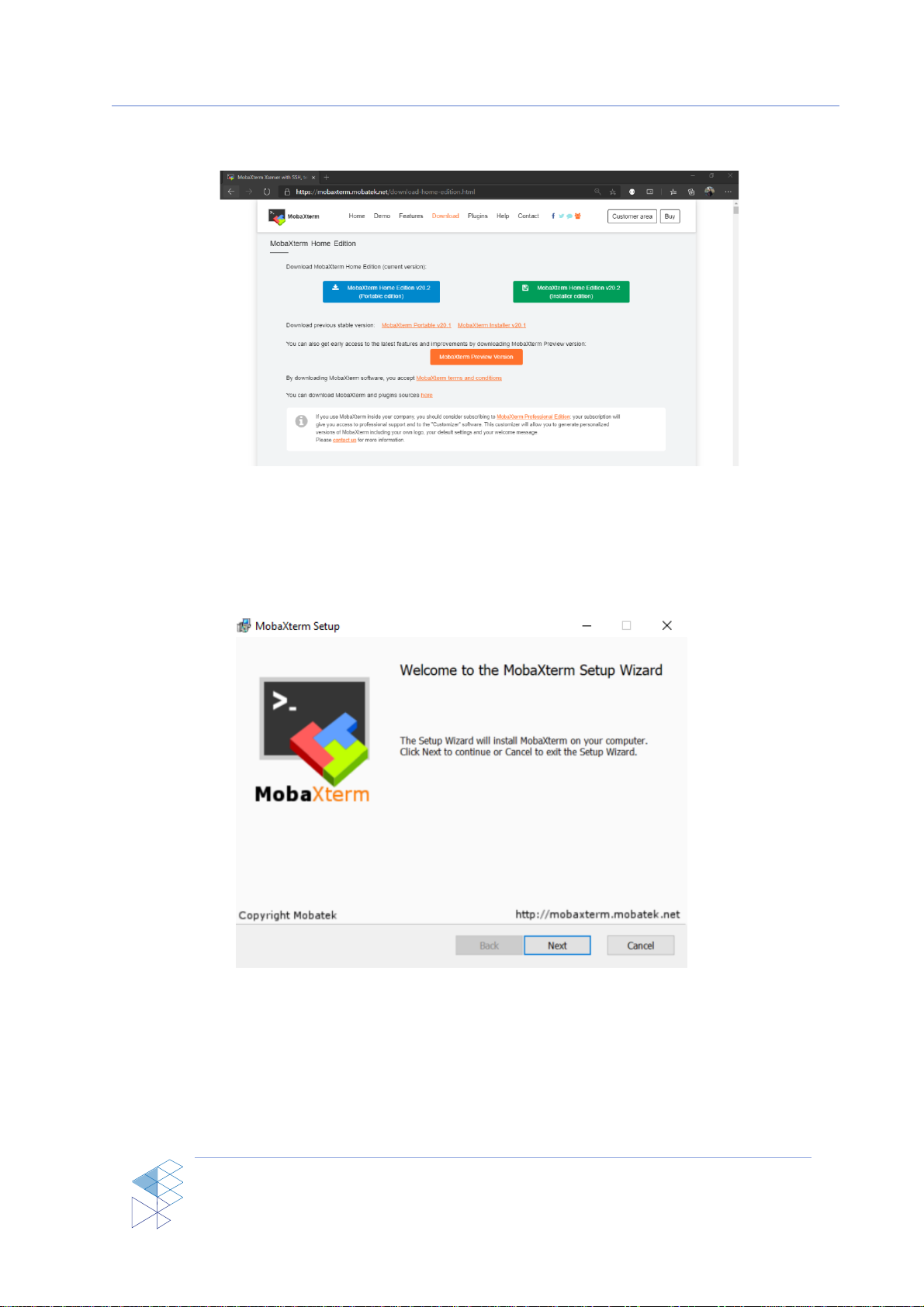
3. At Home Edition download page, click at “MobaXterm Home Edition v20.2 (Installer
Edition)” to download the installer as shown in Figure 2-4.
Figure 2-4 MobaXterm Home Edition Download Page
4. When the download is completed, extract the installer.
5. Inside the extracted folder, double click at “MobaXterm_installer_20.2.msi” to begin
installation.
6. The installation window will pop up, click “Next” as shown in Figure 2-5.
Figure 2-5 MobaXterm Installation Window
7. At End-User License Agreement page, “check” the accept box and then click “Next”.
8. The window will prompt the user to choose the installation folder. Choose your path where
you want to install the program then click “Next”.
9. Click “Install” to begin installation.
10. Click “Finish” when the installation is completed.
Getting Start
RE31 USER MANUAL
RE31 Mini Reader
PROPRIETARY AND CONFIDENTIAL
10
USER MANUAL RE31
11, 202
V1.0
Copyright © 2020 Silicon Craft Technology PLC
2.2.4. Connecting with PC
In order to communicate with the reader, a serial connection must be initialized. The steps
below describe how to properly connect the reader with a PC.
1. Connect the reader to PC using a micro USB cable.
2. Open MobaXterm.
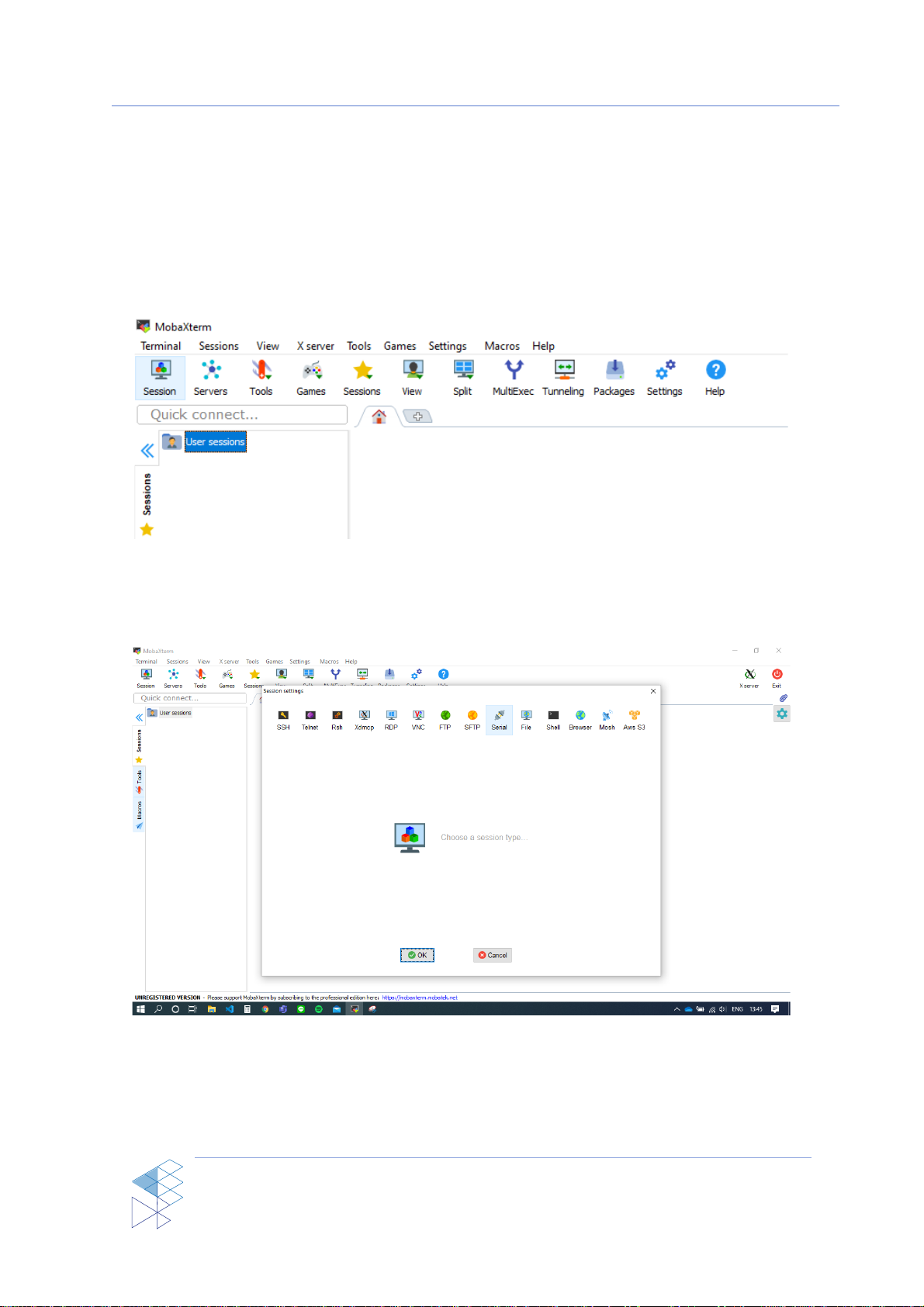
3. On the menu bar at the top left of the program, click at “Session” to create a new session.
Figure 2-6 MobaXterm Create new session
4. The program will pop up a new window called “Session settings”, click on “Serial” to set up
a new serial monitor.
Figure 2-7 Sesstion setting
5. Under the tab “Basic Serial settings”, click at the drop-down menu “Serial port” to select a
port to connect. If the reader is already connected with the PC then the correspondent port
number should be automatically shown up here. Otherwise, try restarting MobaXterm.
Table des matières


