Silex technology X-5 Manuel utilisateur

Multicast Distribution System
X-5
User's Guide
- Multicast Distribution Feature -
WA101050XA

Copyright© 2016 silex technology, Inc. All rights reserved.

Index
1. Introduction.....................................................................1
1-1. This Manual ............................................................................................................................ 1
Disclaimers.................................................................................................................................. 1
Trademarks ................................................................................................................................. 1
1-2. User Registration and Services for X-5 ......................................................................... 2
User Registration ...................................................................................................................... 2
Services ........................................................................................................................................ 2
Customer Support Center ..................................................................................................... 2
2. X-5................................................................................ 3
2-1. Features and System Conguration.............................................................................. 4
Features........................................................................................................................................ 4
System Conguration ............................................................................................................. 5
2-2. Parts and Functions............................................................................................................. 6
2-3. Product Specications .....................................................................................................11
Basic Specications................................................................................................................11
Communication Protocol Specications........................................................................14
Interface Specications........................................................................................................14
2-4. Usage Notes.........................................................................................................................15
Wireless Signals.......................................................................................................................15
Copyrights for Video and Audio Content.......................................................................17
3. X-5 Settings and Installation ...................................19
3-1. Required Items....................................................................................................................19
3-2. Building the Setting Environment...............................................................................21


3-3. X-5 Settings ..........................................................................................................................23
Assigning IP Addresses.........................................................................................................23
Parameter Settings.................................................................................................................25
Screen Adjustment ................................................................................................................31
3-4. X-5 Installation ....................................................................................................................33
Characteristics of Supplied Antenna...............................................................................34
Obtaining Line of Sight ........................................................................................................35
4. Video and Audio Distribution and Maintenance ...37
4-1. Video and Audio Distribution........................................................................................37
4-2. Maintenance Using the Web Interface.......................................................................38
Accessing the Web Page of X-5..........................................................................................38
Status Page ...............................................................................................................................40
Conguration Page................................................................................................................44
Management Page.................................................................................................................51
4-3. Initialization of Settings...................................................................................................56
A. Appendix ..................................................................57
A-1. List of Setting Items..........................................................................................................57

1. Introduction
1
Thank you for purchasing the Multicast Distribution System X-5 (called "X-5" below).
Disclaimers
1. Introduction
- The unauthorized transfer or copying of the content of this manual, in whole or in part,
without prior written consent is expressly prohibited by law.
- The content of this manual is subject to change without notice.
- This manual was prepared to accurately match the content of each OS, but the actual
information shown on the computer monitor may differ from the content of this manual
due to future OS version upgrades, modifications, and other changes.
- Although every effort was made to prepare this manual with the utmost accuracy, Silex
Technology will not be held liable for any damages as a result of errors, setting examples,
or other content.
Trademarks
- Microsoft and Windows are registered trademarks of Microsoft Corporation in the United
States and/or other countries.
- Ethernet is a trademark of Xerox Corporation.
- Other company names and product names contained in this manual are trademarks or
registered trademarks of their respective companies.
1-1. This Manual
X-5 includes a Multicast Distribution feature for IP multicast transfer of video/audio from
players (computers and DVD players) to displays (TVs and monitors) and a Store & Play
feature for playing back video in storage devices using the receiver only.
This manual describes the setting and operating procedures when using the Multicast
Distribution feature of X-5. For details on using the Store & Play feature, refer to the
separate manual "User's Guide: Store & Play Feature".

2
X-5 User's Guide
1-2. User Registration and Services for X-5
To enable us to provide better services (support and repair), please perform the user
registration process from our website.
User registration is performed from the URL below.
USA: http://www.silexamerica.com/support/product-registration/
Japan: http://www.silex.jp/register/
- The product serial number is required for user registration.
The serial number is provided on the rear panel of the product.
Note
User Registration
- Latest firmware available for download
- Latest software available for download
- Latest manuals available for download
- Support Information (FAQ)
Services
The services below are available from the Silex Technology website. For details, please visit
the Silex Technology website.
USA: http://www.silexamerica.com/
Japan: http://www.silex.jp/
Customer Support Center
Customer Support is available by e-mail or telephone for any problems that you may
encounter.
If you cannot find the relevant problem in this manual or on our website, or if the corrective
procedure does not resolve the problem, please contact Silex Technology Customer
Support.
Contact Information
Phone E-mail
- Refer to the Silex Technology website (http://www.silexamerica.com/) for the latest FAQ and available
product information.
Note

2. X-5
3
2. X-5
MDS is an abbreviation for Multicast Distribution System and is a system for IP multicast
transfer of the video/audio from players (computers and DVD players) to displays (TVs and
monitors).
The devices connected to computers, DVD players, and other players are referred to
as "transmitters", and the devices connected to projectors and displays are referred to
as "receivers". The transmitter encodes the signals that are output from the player and
distributes the encoded data in realtime to the receiver, where the data is then decoded
and output.

4
X-5 User's Guide
Features
2-1.
Features and System Configuration
The features and system configuration of X-5 are shown below.
[Video and Audio Control]
- Uses Silex Technology's proprietary "JPEG-XR" as video codec
-
Uses 16-bit stereo+monaural PCM (sampling rate: 32KHz / 44.1KHz / 48KHz) as audio codec
- Multi-resolution support (640 x 480 to 1920 x 1080)
- Maximum frame rate of 30 fps
- Includes video and audio synchronizing function ("Lip-sync")
- Includes Store & Play feature for playing back video on a storage device using the
receiver only.
(*For details on using X-5 with the Store & Play feature, refer to the separate manual
"User's Guide: Store & Play Feature".)
[Network Control]
- Multicast for enabling simultaneous batch sending to multiple receivers
(During wired connection: Up to 1000 receivers, During wireless connection: Up to 32
receivers)
- Time correction with transmitter of receiver enables playback synchronization
between receivers
- Support for both wired LANs (10Base-T/100Base-TX/1000Base-T) and
wireless LANs
(IEEE802.11a/g/n: Infrastructure mode)
- Network interface select function of transmitter enables distribution of data only
to the network interfaces connected by a receiver (wired LAN or wireless LAN) for
reducing traffic of networks where the receiver is not connected
- Support for remote management function based on SX Smart Manager (sold
separately)
[Other Features]
- Internal web page for making various settings

2. X-5
5
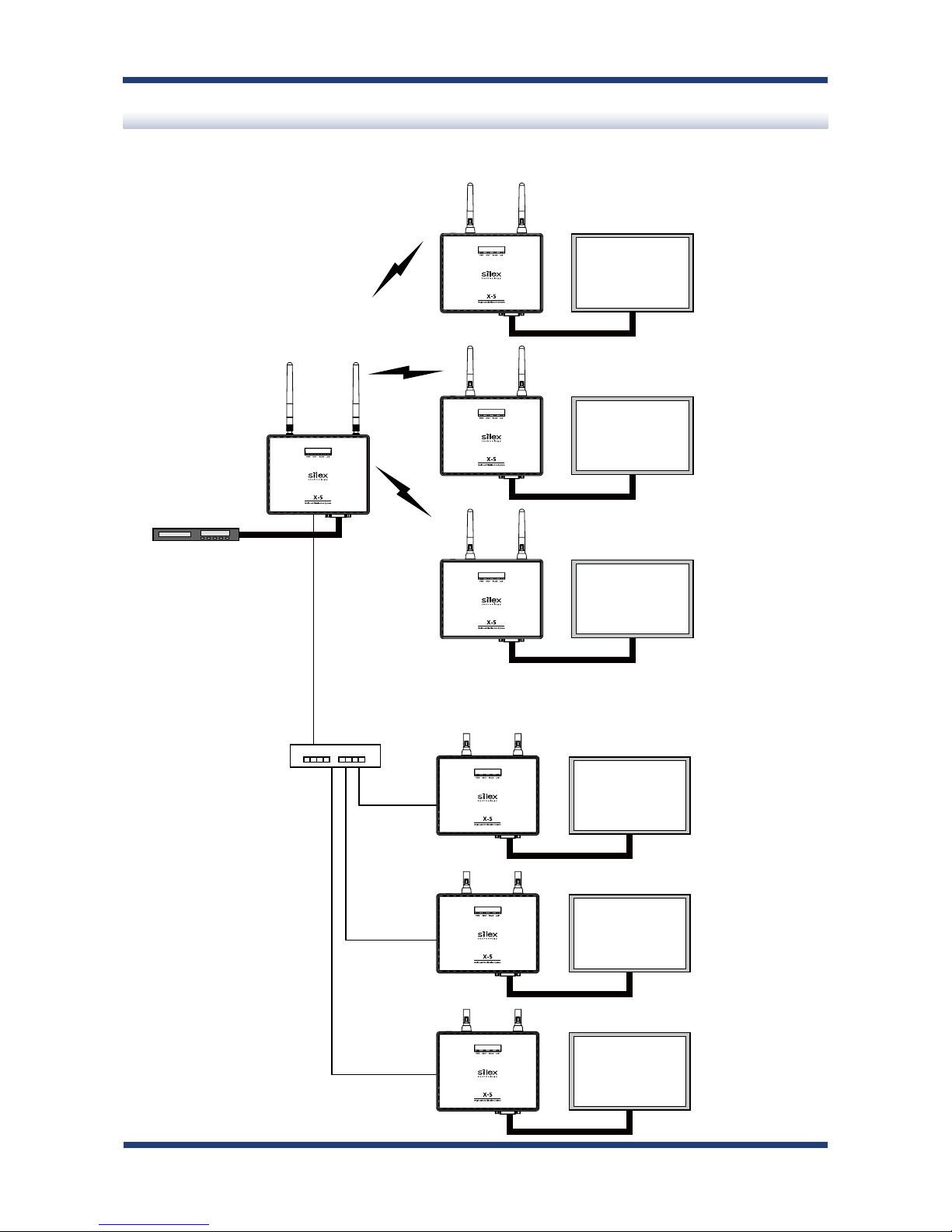
System Configuration
An example of a network system configuration using X-5 is shown below.
Wireless
(IEEE 802.11a/n)
Hub/Switch
Wireless
Wired
Transmitter
Player
Receiver Display
Receiver Display
Receiver Display
Receiver Display
Receiver Display
Receiver Display

6
X-5 User's Guide
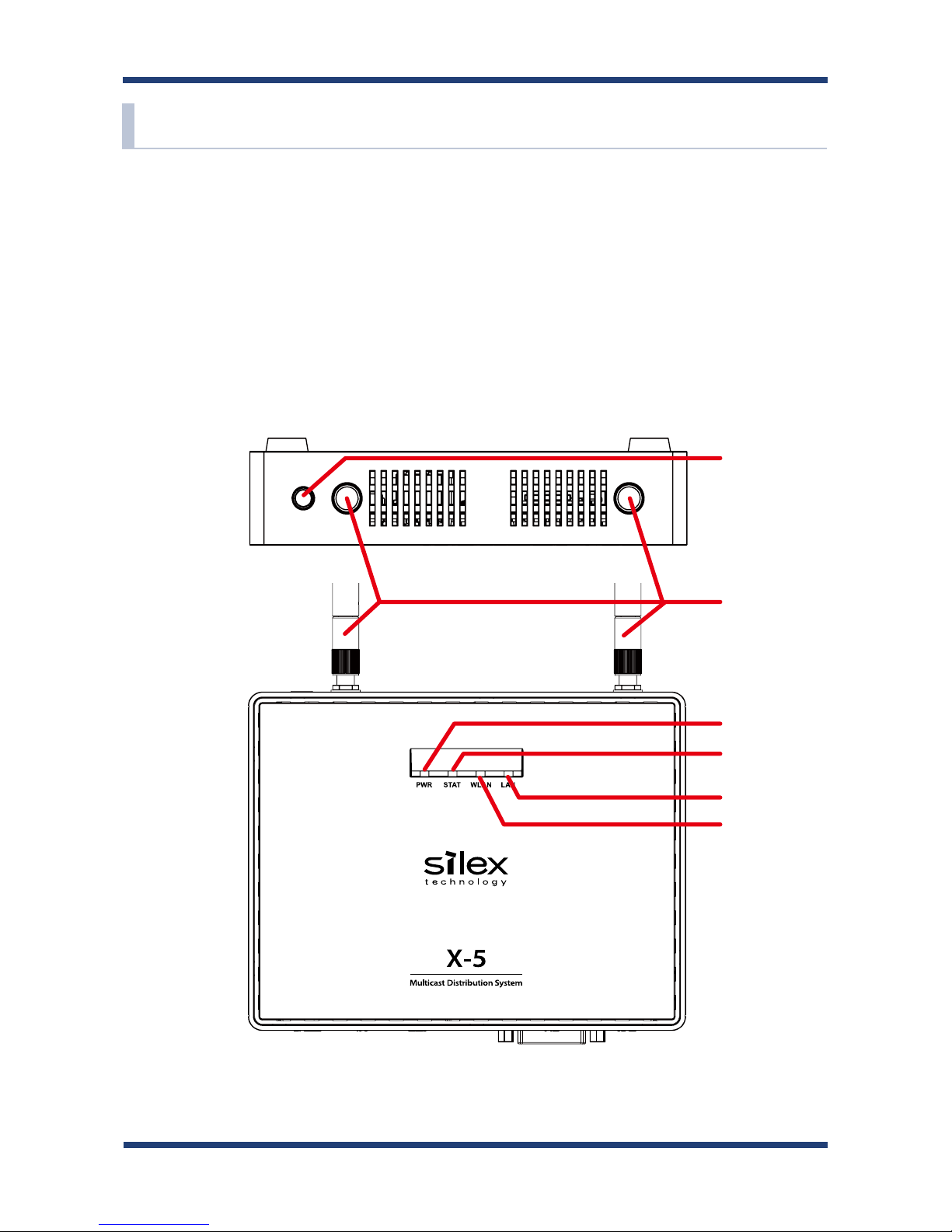
2-2. Parts and Functions
The names and functions of X-5T / X-5R are shown below.
(The transmitter (X-5T) and receiver (X-5R) have an identical appearance. They can be
distinguished by the model name written on the label on the rear panel.
When they are
turned on, it is possible to distinguish the model by a color of PWR LED.)
(Front Panel)
(Top Panel) (1)
(3)
(4)
(5)
(6)
(2)
[ X-5T / X-5R ]
Autres manuels pour X-5
1
Table des matières
Autres manuels Silex technology Récepteur