
SIGNIFY EA0403 Manuel utilisateur

AFTER SALES SUPPORT
1300 777 137
Jukebox with Bluetooth®
Model Number: EA0403
INSTRUCTION MANUAL

AFTER SALES SUPPORT
1300 777 137
MODEL: EA0403 PRODUCT CODE: 46486 08/2017
02
Welcome
Congratulations on choosing to buy a Signify product.
All products brought to you by Signify are manufactured to the highest standards
of performance and safety, and, as part of our philosophy of customer service and
satisfaction, are backed by our comprehensive 1 Year Warranty and customer technical
support line.
This comprehensive instruction manual will provide you with a detailed guide on how to
operate your product and will also assist you in troubleshooting any problems that you
may encounter.
If you have any queries regarding the use of this product, please feel free to phone our
technical support line for some friendly advice. If you are experiencing diculties or
believe that the product may have a technical fault, we will assist you in rectifying the
issue. We can generally solve most problems simply and quickly over the phone, so
please always phone us rst!
We are sure that you will enjoy using this product and you can expect to gain years of
service from this product when it is used and maintained in the correct manner.

AFTER SALES SUPPORT
1300 777 137
service@unclebills.com.au
MODEL: EA0403 PRODUCT CODE: 46486 08/2017
03
Welcome 02
Warranty Details 04
General Information and Safety Instructions 05
Product Overview 08
Getting Started 13
Instructions 13
Setting the Correct Time 13
Turning on the Lighting Eects 13
Using the Audio Functions 14
Using the FM Radio 15
Using the CD Player Function 17
Using the USB Input Function 21
Using the SD Card Input Function 26
Using the Bluetooth Function 30
Frequently Asked Questions 34
Cleaning and Maintenance 36
Storage 36
Repair and Refurbished Goods or Parts Notice 39
Responsible Disposal 40
Contents
AFTER SALES SUPPORT
1300 777 137
04
MODEL: EA0403 PRODUCT CODE: 46486 08/2017
The product is guaranteed to be free from defects in workmanship and parts for a period
of 12 months from the date of purchase. Defects that occur within this warranty period,
under normal use and care, will be repaired, replaced or refunded at our discretion. The
benets conferred by this warranty are in addition to all rights and remedies in respect of
the product that the consumer has under the Competition and Consumer Act 2010 and
similar state and territory laws.
Our goods come with guarantees that cannot be excluded under the Australian Consumer
Law. You are entitled to a replacement or refund for a major failure and for compensation
for any other reasonably foreseeable loss or damage. You are also entitled to have the
goods repaired or replaced if the goods fail to be of acceptable quality and the failure
does not amount to a major failure.
AFTER SALES SUPPORT
1300 777 137
service@unclebills.com.au
MODEL: EA0403 PRODUCT CODE: 46486 08/2017
05
RETAIN FOR FUTURE USE
Read this manual thoroughly before rst use, even if you are familiar with this type of
product. The safety precautions enclosed herein reduce the risk of re; electric shock and
injury when correctly adhere to. Please keep this user manual in a safe place along with
your purchase receipt, warranty card and carton for future reference. If applicable, pass
these instructions and packaging on to the next owner of the product. Always follow basic
safety precautions and accident prevention measure when using an electrical product.
1. Read all instructions before using the Jukebox.
2. Never allow children to play with Electrical Equipment.
3. Do not use the Jukebox for other than its intended use.
4. Before turning on, ensure the electrical voltage and frequency of the circuit
corresponds to those indicated on the rating label of the power adaptor.
5. Do not allow the Jukebox, its power adaptor, cord or plug to come into contact with
water or any other liquid.
6. The Jukebox is not intended to be operated by means of an external timer or any type
of separate remote control system.
7. The use of attachments not recommended or sold by the manufacturer is dangerous
and may cause re, electric shock or injury.
8. The remote control is powered by a button cell battery.
WARNING: Keep batteries out of reach of children. Swallowing may lead to
serious injury or death in as little as 2 hours due to internal burns. If swallowed, go
straight to a hospital emergency room. Dispose of used batteries immediately.
9. This Jukebox is intended to be used indoors, for household use only. Do not use the
Jukebox outdoors.
10. Keep the Jukebox, its power adaptor, cord and plug out of direct sunlight.
11. Do not use an extension cord with this Jukebox unless completely necessary. If an
extension cord is used please ensure that it has a rating equal or exceeding the rating
of the power adaptor.
12. Do not pull or carry by the power cord, use cord as a handle, close a door on the cord,
or pull cord around sharp edges or corners. Keep cord away from heated surfaces.
13. Do not bend or damage the power cord.
14. Always unplug the Jukebox when not in use. To disconnect from the power supply,
rst ensure the power switch is turned o, then grip the plug and pull from the power
General Information and
Safety Instructions

AFTER SALES SUPPORT
1300 777 137
MODEL: EA0403 PRODUCT CODE: 46486 08/2017
06
socket. Never pull by the cord. The power plug must be removed from the power
socket before cleaning, servicing, or maintenance.
15. Unplug the Jukebox in cases of electrical storms to protect against the possibility of
power surges damaging the Jukebox.
16. Never force the plug into an outlet.
17. Ensure that power sockets are not overloaded by operating several electrical products
that exceed the power supply of the socket. Review the rating label of each electrical
product being operated to ensure that they do not exceed the capacity of the power
socket. Always turn o and unplug any electrical product that is not being used.
18. Never operate the Jukebox with wet hands, submerge under water or spill liquids into
the Jukebox.
19. Always turn the Jukebox o and disconnect from the power source before cleaning.
Never use liquid cleaners, use a soft dry (or slightly damp) cloth to wipe over.
20. Do not place the Jukebox near a hot burner (gas or electric), heat sources or open
ames.
21. Improper installation may result in the risk of re, electric shock and/or injury to
persons.
22. If the power adaptor or its cord or plug is damaged, do not use the Jukebox. Please
contact the After Sales Support line for assistance.
23. Always ensure that the power adaptor and cord are placed in a safe location to ensure
that they cannot be stepped on or cannot pose as a tripping hazard. Do not place any
items on or against the power adaptor and cord.
24. The manufacturer and retailer are not responsible for any eventual damages caused by
improper or faulty use.
25. The Jukebox and its power adaptor have no user serviceable parts contained within.
Do not attempt to repair, disassemble or modify the Jukebox or its power adaptor.
26. This Jukebox is not intended for use by persons (including children) with reduced
physical, sensory or mental capabilities or lack of experience and knowledge, unless
they have been given supervision or instruction concerning use of the Jukebox by a
person responsible for their safety. Children should be supervised to ensure they do
not play with the Jukebox.
27. Ensure that all packaging and plastic bags that were included in the Jukebox gift box
are kept out of reach from children to avoid potential danger of suocation.
28. Do not use the Jukebox on an unstable surface.
General Information and
Safety Instructions (cont)

AFTER SALES SUPPORT
1300 777 137
service@unclebills.com.au
MODEL: EA0403 PRODUCT CODE: 46486 08/2017
07
29. Never block the ventilation holes and openings that can be found on the front and
back of the Jukebox. These ventilation holes have been specically included in the
design of the Jukebox to assist the product to cool down and to prevent overheating.
Do not place this product against soft surfaces, drapery or fabric that may block the
ventilation holes. The product should not be placed in an “in-built” installation unless
all ventilation holes are provided with adequate ventilation.
30. The Jukebox must ONLY be powered by the power adaptor that is supplied with the
product. Do not use any other power adaptor. If you experience diculties with the
power adaptor supplied, please contact the customer support line for assistance.
31. Be extremely careful when unpacking or relocating the Jukebox and its power
adaptor. Ensure that the Jukebox and power adaptor are not dropped, bumped or
have excessive force applied. Impacts such as these can damage the product and its
internal components.
General Information and
Safety Instructions (cont)

AFTER SALES SUPPORT
1300 777 137
MODEL: EA0403 PRODUCT CODE: 46486 08/2017
08
Jukebox Parts List
1. CD Player ON / OFF Lever
2. CD Player
3. LED Light Mode Switch (located on rear panel of
Jukebox)
4. LCD Display Panel
5. POWER Button – Power ON / OFF
6. Control Panel (see following diagram for more
details)
7. Speakers
8. DC Power Input (located on rear panel of Jukebox)
9. FM Radio Antenna (located on rear
panel of Jukebox)
10. Transparent Window Hinge
11. Magnetic Window Catch (open
window to access CD player)
12. USB and SD Card Inputs
13. LIGHT Button – LED Light Power
ON / OFF
14. Colour Changing LED Light Tube
15. Colour Changing LED Light Tube
(inner panel)
Product Overview
1
2
3
4
5
6
7
8
9
10
13
14
15
11
12
Jukebox Parts Diagram

AFTER SALES SUPPORT
1300 777 137
service@unclebills.com.au
MODEL: EA0403 PRODUCT CODE: 46486 08/2017
09
Control Panel Diagram
Control Panel Function List
1. LCD Display Panel
2. POWER Button – Power ON / OFF
3. ON/OFF Button – On / Standby
Button
4. VOL + Button – Increase Volume
5. VOL – Button – Decrease Volume
6. MODE/DEV Button – Mode Selection
7. PLAY / PAUSE Button
8. STOP Button
9. RPT Button – Repeat
10. PROG Button – Program
11. F+10 Button – Skipping Next Tracks
(for digital media)
12. AUTO Button
13. STEREO / MONO Selection Button
14. PRE- Button – Previous Preset Station
15. PRE+ Button – Next Preset Station
16. MEM Button – Memory
17. F-10 Button – Skipping Previous Tracks (for
digital media)
18. LIGHT Button – LED Light Power ON / OFF
19. EQ Button – Equalizer
20. UP Button – Tune+ / Next Station or Track / Fast
Forward
21. DOWN Button – Tune- / Previous Station or
Track / Fast Backward (rewind)
1
2
3
18
19
20
21
4
5
12 13 14 15 16 17
11109876
Product Overview (cont)
AFTER SALES SUPPORT
1300 777 137
MODEL: EA0403 PRODUCT CODE: 46486 08/2017
10
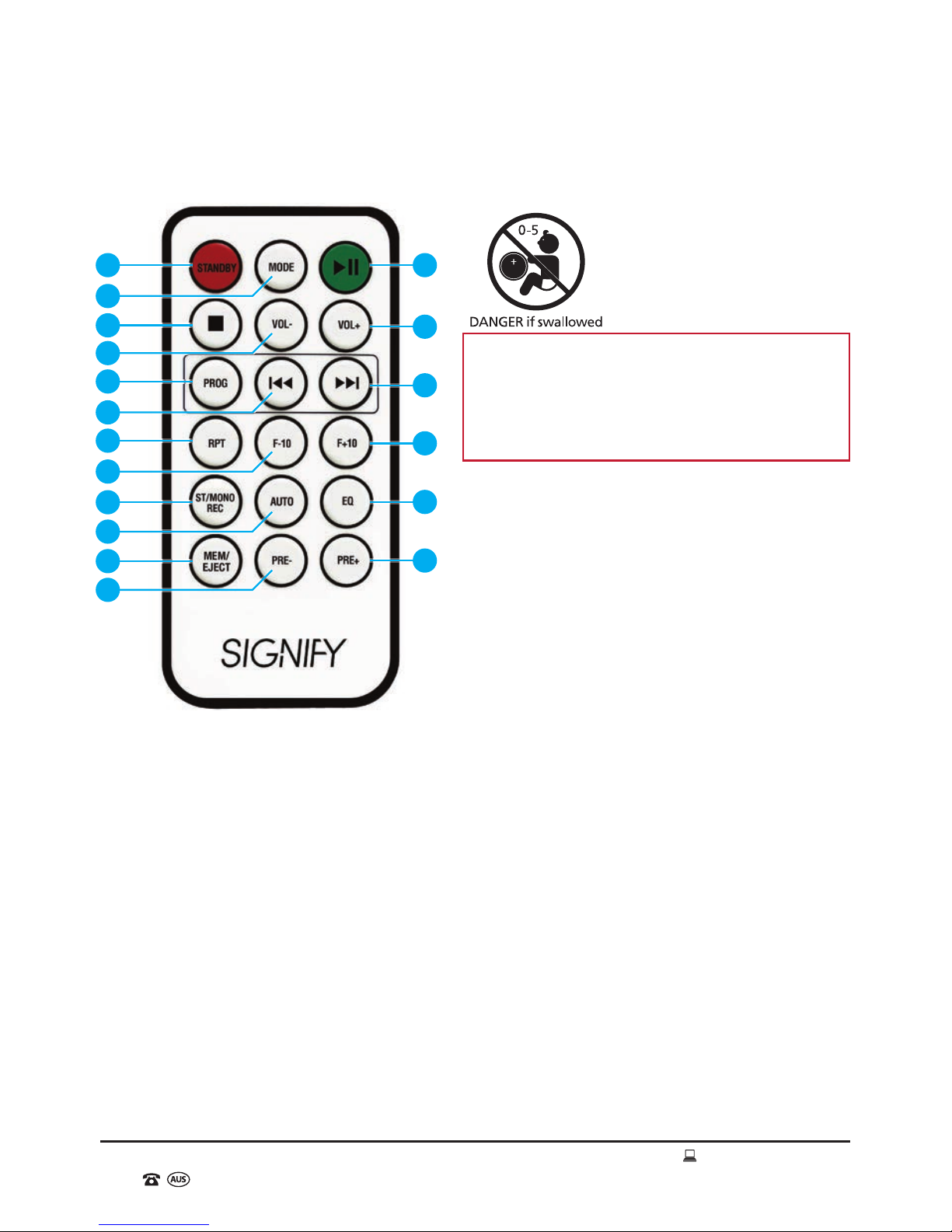
Remote Control Diagram
Remote Control Function List
1. POWER Button - On / Standby
2. FUNCTION Button – Mode Selection
3. STOP Button
4. VOL- Button – Decrease Volume
5. PROG Button – Program
6. PREV/F.B Button – Tune- / Previous
Station or Track / Fast Backward
(rewind)
7. REPEAT Button
8. FOLDER- Button – Skipping Previous
Tracks (for digital media)
9. ST/MONO Button – Stereo / Mono
Use in Radio Mode (where available)
10. AUTO Button – FM Radio Auto-search
and Save Stations
11. MEM Button - Memory
12. PRE- Button – Previous Preset Station
13. PLAY/PAUSE Button
14. VOL+ Button – Increase Volume
15. NEXT/F.F Button - Tune+ / Next Station
or Track / Fast Forward
16. FOLDER+ Button – Skipping Next Tracks
(for digital media)
17. EQ Button – Equalizer
18. PRE+ Button – Next Preset Station
Product Overview (cont)
113
14
15
16
17
18
5
7
9
11
2
6
8
10
12
4
3
WARNING: Keep batteries out of reach of
children. Swallowing may lead to serious
injury or death in as little as 2 hours due to
internal burns. If swallowed, go straight
to a hospital emergency room. Dispose of
used batteries immediately.
Table des matières
Autres manuels SIGNIFY Juke-box


