
Signal 433 Manuel utilisateur
Signal-433 Network Encoder
User Manual
SW Version: 1.0
HW version: 1.0
Web NMS version: 1.0

About This Manual
Intended Audience
This user manual has been written to help people who have to use, to integrate and to
install the produ t. Some hapters require some prerequisite knowledge in ele troni s
and espe ially in broad ast te hnologies and standards.
Disclaimer
No part of this do ument may be reprodu ed in any form without the written permission
of the opyright owner.
The ontents of this do ument are subje t to revision without noti e due to ontinued
progress in methodology, design and manufa turing. Company shall have no liability
for any error or damage of any kind resulting from the use of this do ument.
opy Warning
This do ument in ludes some onfidential information. Its usage is limited to the
owners of the produ t that it is relevant to. It annot be opied, modified, or translated
in another language without prior written authorization from Company.

Signal-433 Network Encoder User Manual
Directory
CHAPTER 1 NTRODUCT ON............................................................................................................... 1
1.1 PRODUCT OVERVIEW...................................................................................................................................1
1.2 KEY FEATURES............................................................................................................................................1
MULT PLE STREAMS OUT W TH D FFERENT PROTOCOL/RESOLUT ON/B TRATE….................................1
RESOLUT ON DOWNSCALE CONVERS ON...........................................................................................1
1.3 PRINCIPLE CHART........................................................................................................................................1
1.4 SPEC F CAT ONS........................................................................................................................... 2
1.5 SYSTEM CONNECTION SAMPLES.....................................................................................................................3
1.6 APPEARANCE AND DESCRIPTION....................................................................................................................3
CHAPTER 2 NSTALLAT ON GU DE....................................................................................................... 4
SAFETY NSTRUCT ONS...................................................................................................................... 4
NSTALLAT ONS.................................................................................................................................. 4
CHAPTER 3 WEB NMS OPERAT ON.....................................................................................................6
LOG N................................................................................................................................................ 6
OPERAT ON....................................................................................................................................... 6
CHAPTER 4 NETWORK CONNECT ON AND SETUP..............................................................................12
S TUAT ON 1: LAN NETWORK........................................................................................................... 12
S TUAT ON 2: WAN NETWORK.......................................................................................................... 13

Signal-433 Network Encoder User Manual
Chapter 1 ntroduction
1.1 Product Overview
Signal-433 network en oder is an en oding devi e for IP broad asting. The signals sour e
ould be from STB, PC, TV and et . It an transfer the live program through the internet/LAN,
and the output signals are to be re eived by PC, phone and other mobile terminals. Company
Signal-433 lets you a ess your IP STB, PC or TV anywhere to wat h your programs. Whether
you are in your house or a ross the globe, you'll never miss a game or your favorite show.
The devi e supports HDMI input and en odes in MPEG 4 AVC/H.264 format, after that, it
gives the IP signal output over UDP (uni ast/multi ast), RTMP and HLS. The USB port is
designed to re ord and save the en oded video (TS) in ts files in the USB Keys or Hard Disks
and play it ba k through IP out to in rease your ontent options.
1.2 Key Features
Easy setup
Wat h and ontrol your live and re orded TV shows anywhere, anytime
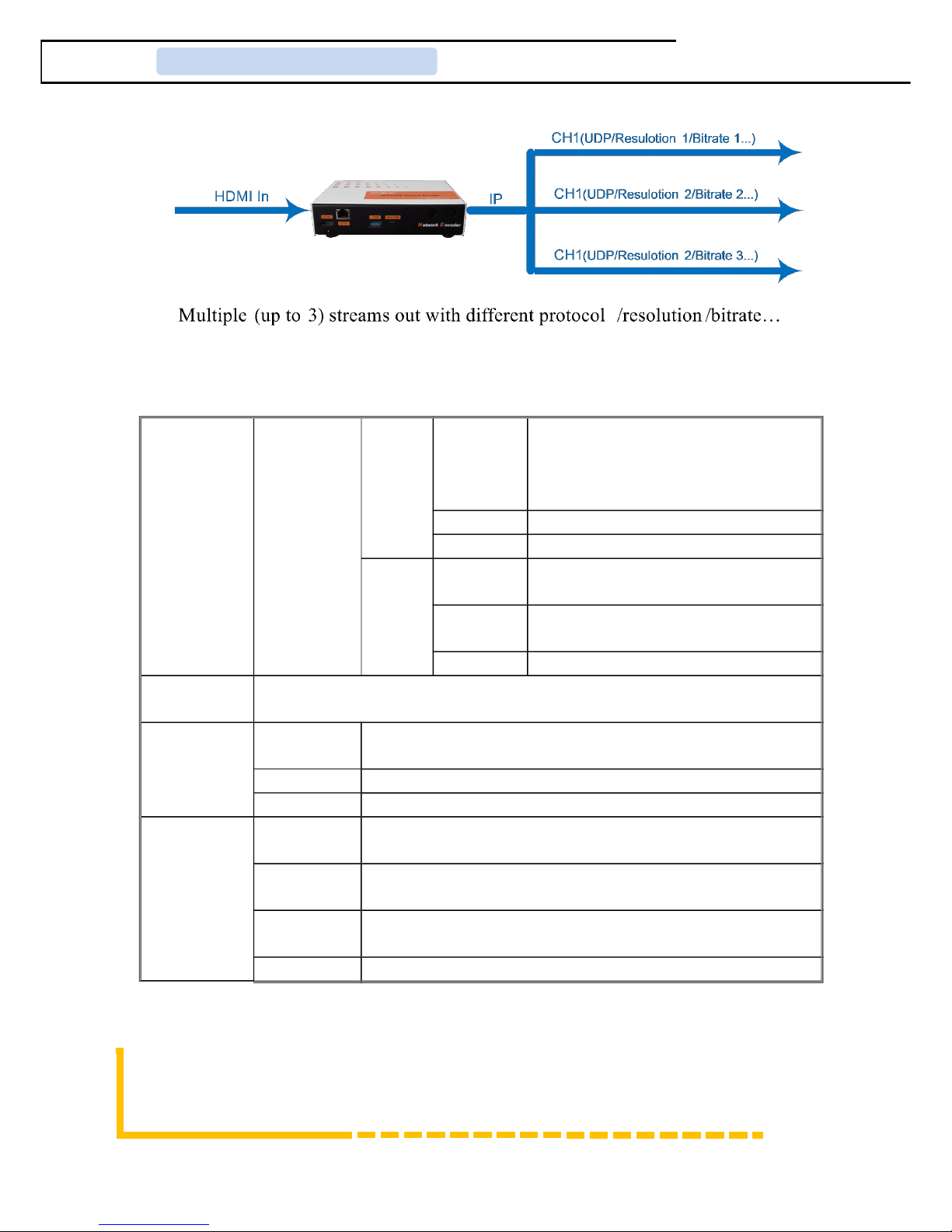
Multiple streams out with different proto ol/resolution/bitrate…
Resolution downs ale onversion
HLS Proto ol supports Apple terminals simultaneously running as per different resolution
and bit rate setting
USB port for TS re ording and playing ba k, in rease signal sour e option
HDMI input
IP Output over UDP (Uni ast/multi ast), RTMP, HLS
Absolutely no monthly fees
1.3 Principle hart
Page 1 / 23
Signal-433 Network Encoder User Manual
1.4 Specifications
Encoder HDMI input
Video
Resolution
1920x1080_60p, 1920x1080_60i
1920x1080_50p,1920x1080_50i
1280x720_60p ,1280x720_50p
720x576_60i ,720x576_50i
En oding MPEG-4 AVC/H.264
Bit rate 1Mbps~15Mbps
Audio
En oding MPEG1 Layer II, MPEG2-AAC,
MPEG4-AAC
Sample
rate 48KHz, 44.1KHz(RTMP)
Bitrate 48,64, 96, 128kbps
Stream out IP out over UDP (Uni ast/multi ast), RTMP, HLS (RJ45, 100/1000M self-
adaption)
System
Remote
ontrol Web-server NMS
Language English ontrol interfa e
Upgrade USB/NFS
General
Approx
weight ≤1Kg
Operation
temperature 0~45℃
Power
supply DC12V
Dimensions 183*110*45mm
Page 2 / 23
Signal-433 Network Encoder User Manual
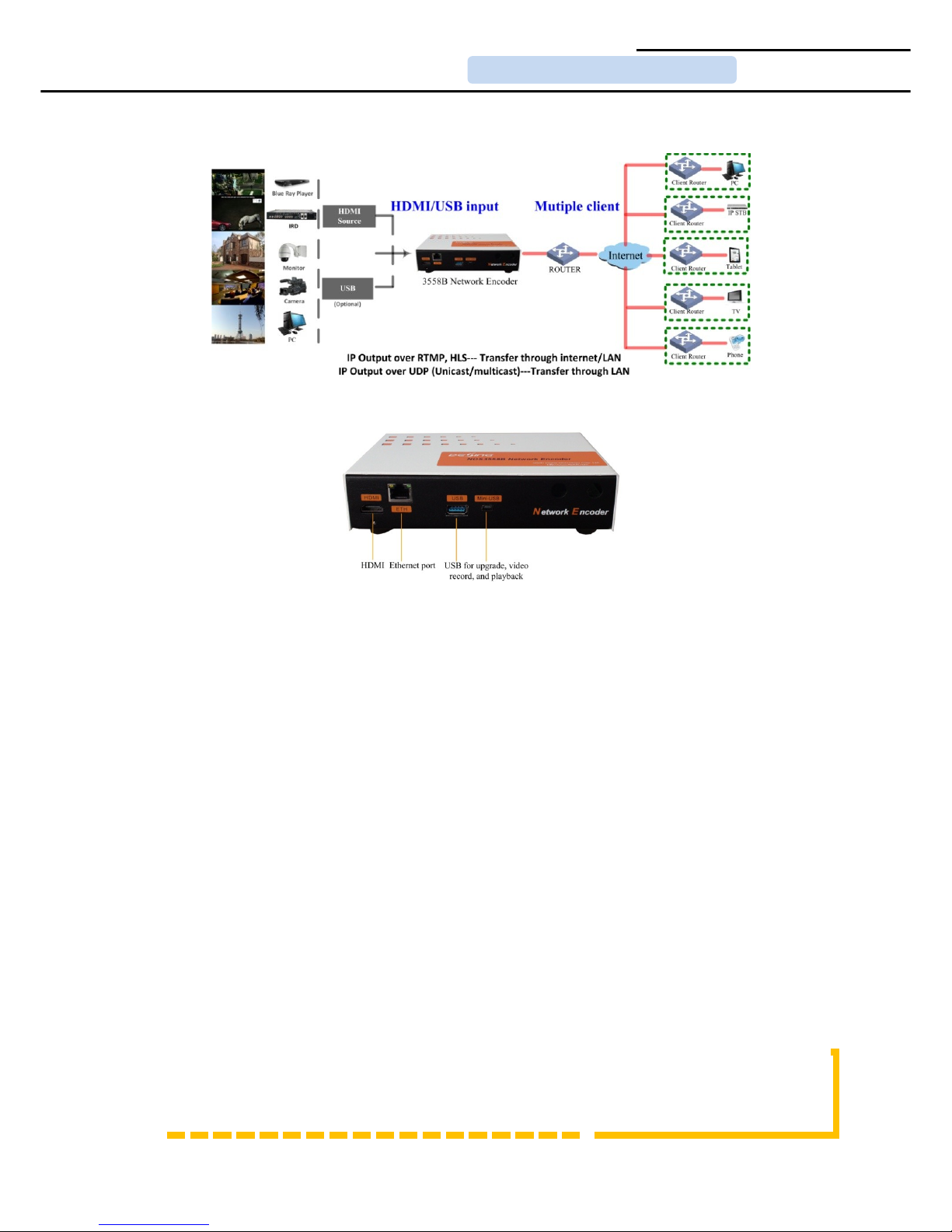
1.5 System onnection Samples
1.6 Appearance and Description
Page 3 / 23

Signal-433 Network Encoder User Manual
Chapter 2 nstallation Guide
Safety Instructions
WARNING: Hot plug is not allowed sin e it may ause system halted.
To prevent fire or ele tri al sho k, do not expose the devi e to rain or moisture.
The network en oder is powered with a voltage of 12V DC. The power supply voltage must
not ex eed the re ommended voltage, whi h otherwise may ause irreparable damage to the
devi e and the invalidation of the warranty. Therefore:
Do not repla e power supply with a voltage greater than 12V DC.
Do not onne t the devi e to the power if the power ord is damaged.
Do not plug the devi e into mains supply until all ables have been onne ted orre tly.
Do not ut the ord.
Avoid pla ing the devi e next to entral heating omponents and in areas of high humidity.
Do not over the devi e with elements that obstru t the ventilation slots.
If the network en oder has been kept in old onditions for a long time, keep it in a warm room
minimum 2 hours before plugging into the mains.
Mount the devi e in verti al position with the onne tors lo ated on the top side.
When repla ement parts are required, be sure the servi e te hni ian has used repla ement parts
spe ified by the manufa turer or have the same hara teristi s as the original part.
Unauthorized substitutes may result in fire, ele tri sho k or other hazards.
Safety he k- Upon ompletion of any servi e or repairs to this devi e, ask the servi e
te hni ian to perform safety he ks to determine that the devi e is in proper ondition.
Installations
RISK OF damage to the unit
Me hani ally handling the unit may result in damage. Do not onne t the unit to the power
Page 4 / 23

Signal-433 Network Encoder User Manual
supply before or during assembly. Conne t the unit as below instru ted.
NO HOT PLUG!
Conne t the signal input in the respe tive onne tors. The signal sour e an be from a
surveillan e monitor, DVD, set-top box, CCTV and et .
In ase of onne ting to a wired network, onne t the en oder Ethernet port and
terminal's Ethernet port wiht ethernet able.
In ase of onne ting wireless network, following Step 2, onne t the en oder Ethernet
port and router port with Ethernet able.
Power supply onne tion: a) Conne t the earth able; b) Conne t the power plug to the
unit mains onne tor; ) Conne t the power plug to the mains so ket.
Page 5 / 23
Signal-433 Network Encoder User Manual
Chapter 3 WEB NMS Operation
Without front buttons to ontrol the network en oder and USB devi e, users an just perform
the operation with the web Brower in the PC (Personal Computer).
Login
The default IP address of this devi e is 192.168.200.64. (We an modify the IP through the
front panel.)
Conne t the PC and the network en oder with a net able, and use ping ommand to onfirm
they are on the same network segment.
I.G. the devi e IP address is 192.168.200.64 we then hange the PC IP to 192.168.200.xxx (xxx
an be 1 to 254 ex ept 64 to avoid IP onfli t).
Use web browser to onne t the devi e with PC by inputting the devi e’s IP address in the
browser’s address bar and press Enter.
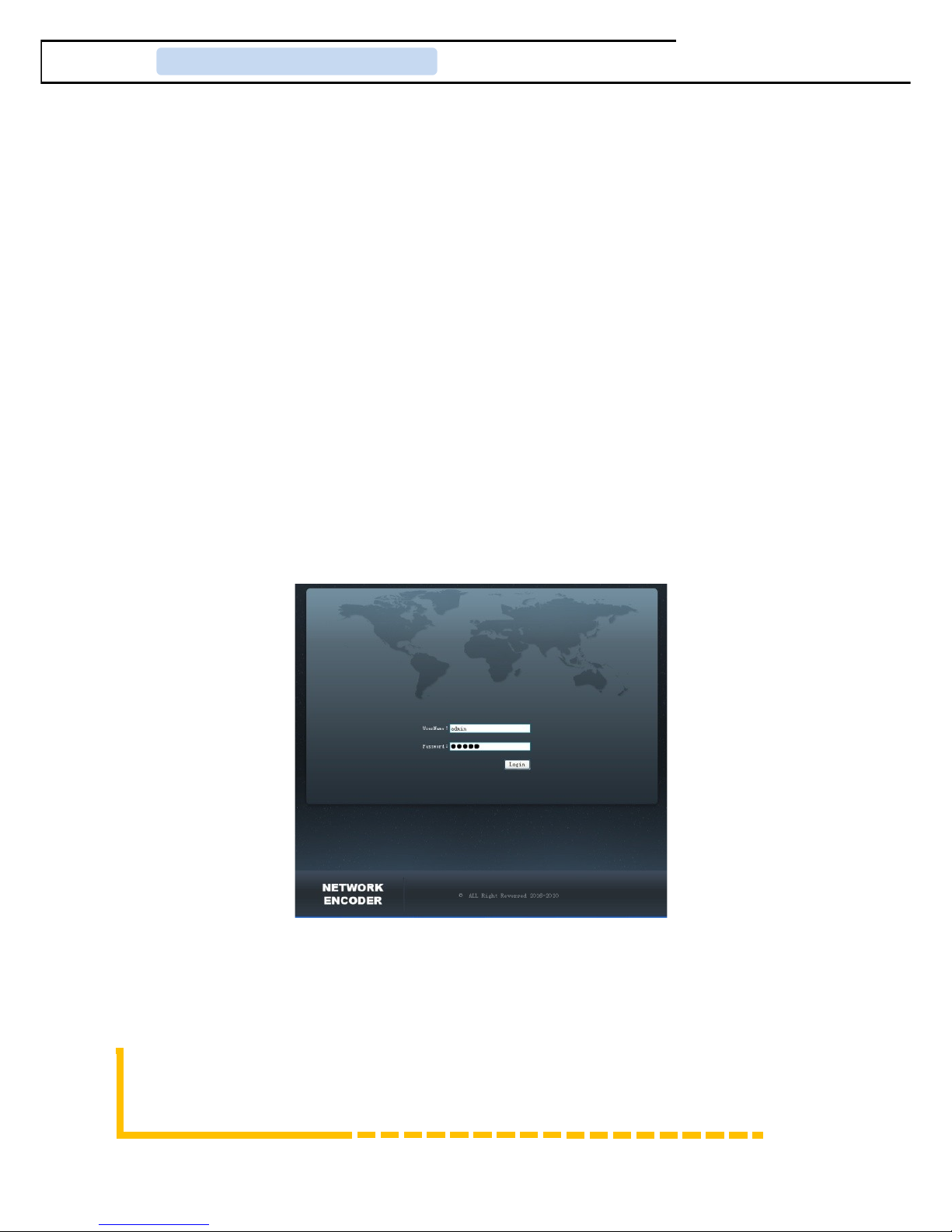
It will display the Login interfa e as Figure-1. Input the Username and Password (Both the
default Username and Password are “admin”.) and then li k “Login” to start the devi e
setting.
Figure-1
Operation
Summary:
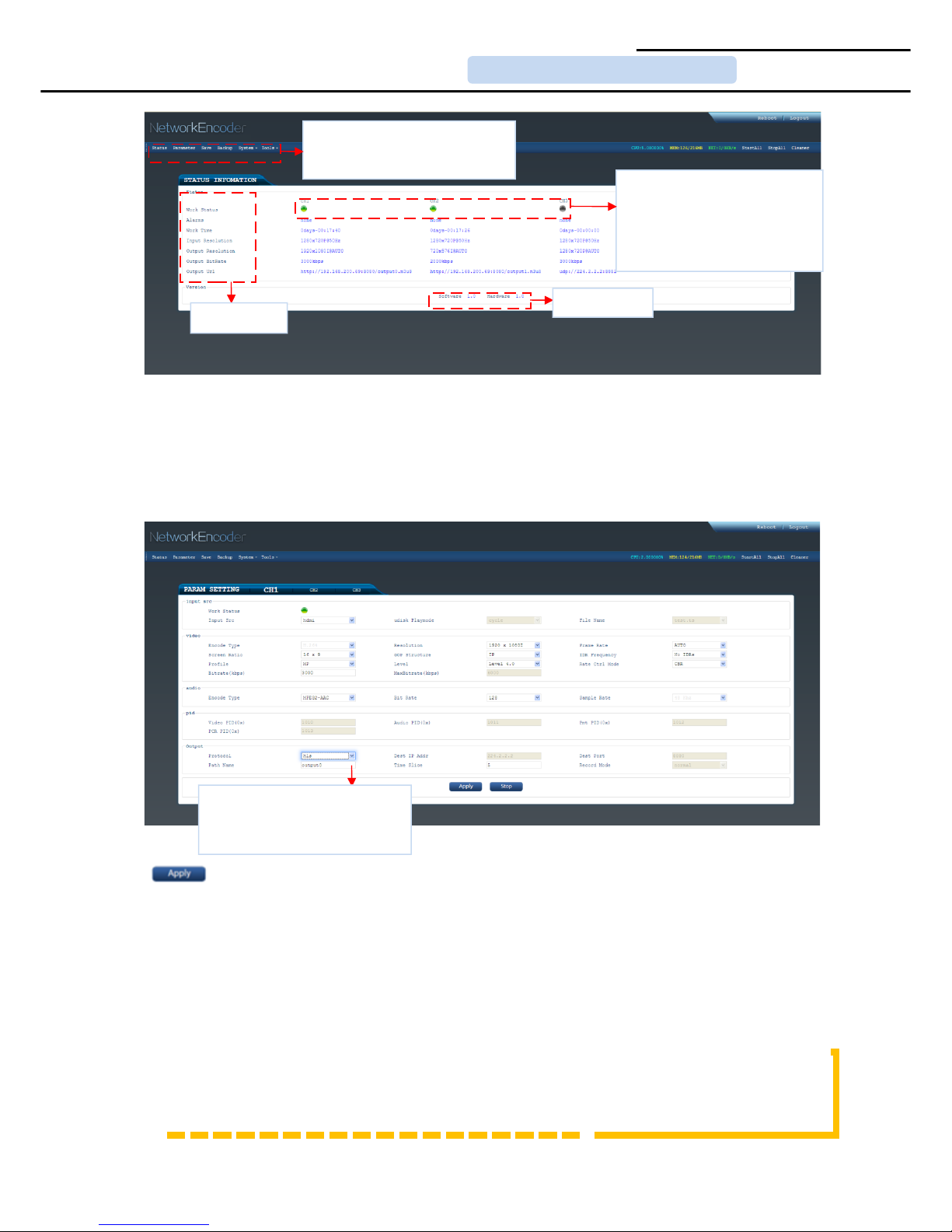
When we onfirm the login, it displays the WELCOME interfa e as Figure-2 where users an
have an overview of the devi e’s system information and working status.
Page 6 / 23
Signal-433 Network Encoder User Manual
Figure-2
Parameters → hannel 1/2/3:
From the menu on up side of the webpage, li king “CH1”or “CH2” or”CH3”, it displays the
interfa e where users an onfigure the en oding parameters for the output hannel. Signal-433
supports up to 3 streams out with different proto ol, resolution, bitrate, et . (Figure-3)
Figure-3
Cli k this button to apply the modified parameters.
Save/Restore:
From the menu on up side of the webpage, li king “Save/Restore”, it will display the s reen as
Figure-4 where to save or restore your onfigurations.
Page 7 / 23
User c n click ny item here to enter the
corresponding interf ce to check
inform tion or set the p r meters.
St tus
inform tion
Version
inform tion
Al rm Are : Green light indic tes the
corresponding item is in norm l st tus.
Otherwise the light is gr y.
Sign l-433 supports up to 3 stre ms out
with different protocol, resolution, bitr te,
etc.
Sign l-433 supports IP output over UDP
(Unic st/multic st), RTMP nd HLS.
User c n choose the output protocol nd
record file to USB or h rd disks.
Table des matières
Autres manuels Signal Convertisseur de média


