Sigma-Tech SMP-40300P Manuel utilisateur

Sigma-tech
Reguleated DC Power Supply Unit
Model : SMP-40300P
Serial No : JU14-1 4 6 2
User Manual
Sigma-Tech
경기도 부천시 오정구 내동 243-2 Tel:032)675-3903 Fax:032)675-3905 http://www.tech-sigma.com

10. Certificate of Calibration
Contents
4. Facial Functions
4-1) Facial Configuration
4-2) Configuration
3. How to use
6. Function explanation in the back
1. Overview
2. Important Instructions
Sigma-tech
6-1) Terminal Block Diagram
6-2) Input or Output Terminal Block
4-4) Name and functions of each part
4-3) Name and functions of each part
5. How to use
7. Insturctions for using output line
9. Outside view
경기도 부천시 오정구 내동 243-2 Tel:032)675-3903 Fax:032)675-3905 http://www.tech-sigma.com
8. Specification
5-1) Operation in Power On

bolt break this equipment.
If the stability of ouput voltage is important, please do Remote sensing.
align the polarities of ground on both sides. If not, the output will be short.
Sigma-tech
1. Overview
has independent OP AMP. With high accuracy and smooth switching,
2, Important Instructions before using
The SMP-Series is semi-permanent power supply with high accuracy and high
reliability. The SMP-Series include many kinds of standard products which provide different
Do not use when the temperature is over 40 degrees Celsius.
it can be DC power for both constant voltage and constant current. It is also
protected against any access.
Please check the standard before applying the input.
D. It displays the access of Juper Code. The output of short or overload with unfastened
경기도 부천시 오정구 내동 243-2 Tel:032)675-3903 Fax:032)675-3905 http://www.tech-sigma.com
capacity to be used as a power supply of diverse euipments.
E. Evade the use in the environment with many dust, corrosive gas and etc.
If not, please put this in any case or room.
C. Do not put any item on this equipment or around this equipment.
A. It can be broken if the input is over the specified input voltage.
B. When you ground output terminals on both the face and the back, please
Automatic VC limiter equipped in SMP power supply

1) Please connect after checking the AC input voltage in specification-standard.
2) Please turn the handle for constant current clockwise and the handle for contant voltage
counterclockwise.
3) If turn on the switch and turn the handle for constant voltage clockwise, the output
voltage increases. Please set at the voltage you need.
4) Once turn off the switch and connect load to the output terminal,
(+) and (-) terminals can be grounded because both terminals are sperated with the frame.
Please earth after joining one output terminal to Frame Ground.
5) if you turn on the switch, CV lamp will be turned on and the required voltage will be
provided.
6) If the load is short or an excess current, it is controlled as a constant curent at the
maximum current to decrease output voltage proportional to the impedence in the load. It
ends up preventing the overcurrent. The voltage become constant voltage if the load get
back on track. For the persnickety load, please make output shourt and set the preferred
current with the handle ahead of connecting. Constant current displays on an ammeter and
the value will be the set-point for prevention of overcurrent.
7) The minimum output will be provided if the handle for constant voltage is fully
경기도 부천시 오정구 내동 243-2 Tel:032)675-3903 Fax:032)675-3905 http://www.tech-sigma.com
A. In case of regulated power supply
voltage operation.
This power supply can support constant current If resistive load occurs in ordinary constant
3. How to use
It is DC power supply for both constant voltage and constant current.
Sigma-tech

turned counterclockwise or it is short between the terminals on the back and
the output voltage and current enter the set-value. And the minimum output
will be generated with the voltage over 10mV at the output port and counter
polarity. If counter polar voltage is applied, it can be broken.
B. In case of constant current regulated power supply
1) Please check the input caacity.
If your product has output range transition, tune it to the required range
2) Turn the handle for constant voltage fully clockwise and the handle for constant
current fully counterclockwise.
3) Make sure you connect the load with the output terminal. Please connect
one end of ordinary outut terminal (+) and (-) to Frame Ground and earth on it.
4) Set the current you need with the handle for constant current because CC lamp
will turn on if you turn on the switch.
5) When the resistive load increase during the constant current operation, the
output voltage increase proportional to the resistance. Thus, please set the output
voltage with the handle for CV before connecting the load.
This prevent the overcurrent to the load because constant voltage operation
automatically changes when the load resistance and constantcurrent is set.
경기도 부천시 오정구 내동 243-2 Tel:032)675-3903 Fax:032)675-3905 http://www.tech-sigma.com
Sigma-tech

C. Remote Control Function
1, Remote Function
1-A) Lamp(Blue) turn on if remote S/W is turned on
1-B) The voltage is set from 0 to 10 volt according to input at the EXT
1-C) Output voltage displays according to the set value and the output is permitted
by external equipment(PC, PLC and etc).
1-D) Do not common the (-) on EXT input with (-) on DC output.
EXT input (+,-) 0-10V permit the independent control voltage.
1-E) If EXT, A point of output On/Off in Input or control terminal block should be
on to activate DC output
(Remote function is optional)
2. Local function
2-A) Lamp(Blue) will be turn off if remote s/w is at local.
2-B) Facial voltage volume control the voltage
3. Protection function
3-A) OVP function
If the set voltage is over, OVP Lamp(Yellow) will be on and the output voltage will
be automatically down.
Then, you need to turn off Power S/W and turn on after 2 or 3 seconds.
3-B) OCP function
If the set current is over, C/C Lamp(Red) will be turned on.
3-C) Fan Motor
Auto: If Heat Sint temperature is below 50 degrees Celsius, it's off. If not, it's on.
Manual: Fan Motor On(always)
Sigma-tech
경기도 부천시 오정구 내동 243-2 Tel:032)675-3903 Fax:032)675-3905 http://www.tech-sigma.com

D. Repair and inspection
To keep the initial performance or prevent unexpected accidents, you need a
a periodic check.
A) Cover Panel
Please clean the cover panel with alcohol or a weak neutral detergent and cotton
flannel.
B) The Internal
Remove the dust with vacuum cleaner after the power code is plugged out.
C) Please check the insulation resistance frequently.
D) No strange sound is accepted.
the life of a fan motor is about 40,000 hours in the temperature of 40 degrees
E) When fuse is replaced, AC input power switch should be off.
경기도 부천시 오정구 내동 243-2 Tel:032)675-3903 Fax:032)675-3905 http://www.tech-sigma.com
Sigma-tech

It is a mode to set initial parameter and functions.
With power on, setthe voltage or current with voltage and current VR.
Connect output line to the load and turn on the output on/off SW.
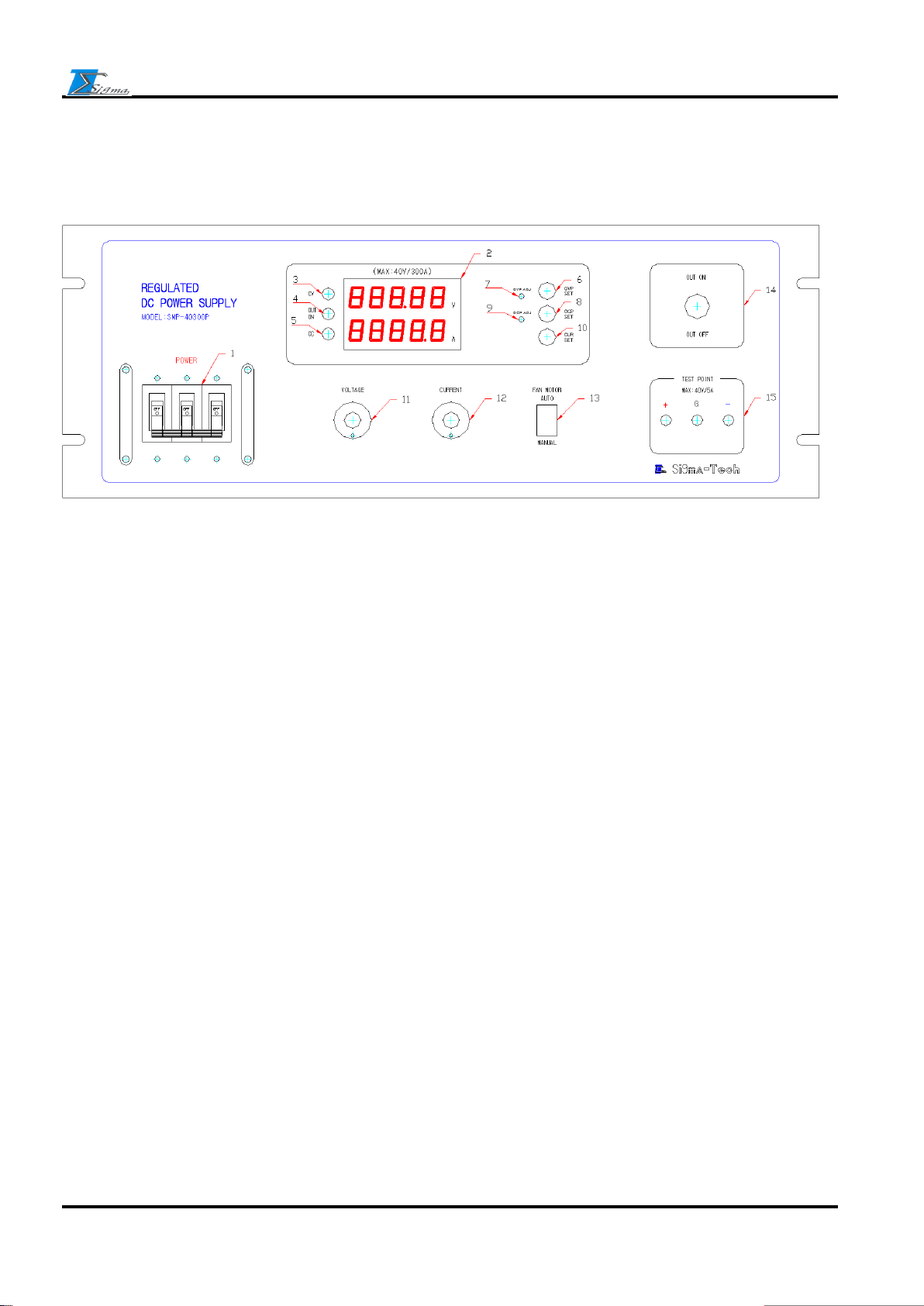
3, CV Lamp 4, Output On Lamp 5, CC Lamp
14, Output On/Off S/W
15, Output Test Point
13, Fan Motor S/W
1, Power S/W 2, Current,Viktage Display
경기도 부천시 오정구 내동 243-2 Tel:032)675-3903 Fax:032)675-3905 http://www.tech-sigma.com
12, Output Current VR (Output current adjustment)
6, OVP Set S/W 7, OVP ADJ VR
8, OCP Set S/W 9, OCP ADJ VR
10, Current Set S/W (Don't use)
11, Output Voltage VR (Output voltage adjustment)
4-1) Facial configuration
Sigma-tech
4. Facial function manual
4-2) Configuration

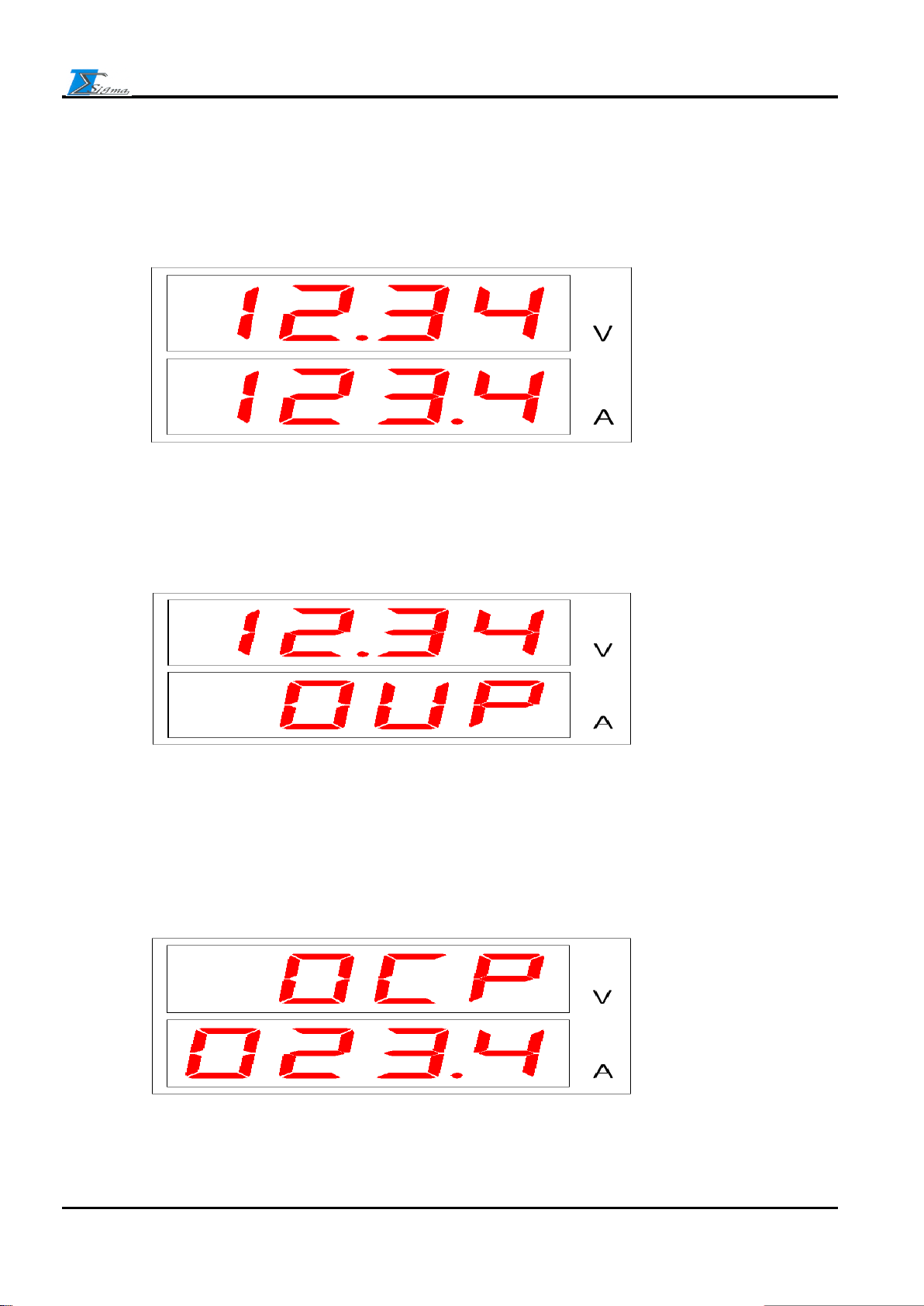
After pushing OVP button at the right side, turn OVP ADJ until the value is over predefined
power value.
After pushing OCP button at the right side, turn OCP ADJ until the value is over predefined
power value.
Sigma-tech
경기도 부천시 오정구 내동 243-2 Tel:032)675-3903 Fax:032)675-3905 http://www.tech-sigma.com
1.Voltage and Current setting
3.Over Current Protect (OCP) setting
A. Facial setting FND configuration
2.Over Voltage Protect (OVP) setting
Turnning Voltage and Current VR
4-3) Name and function of each part

After pushing CUR button at the right side, turn Current VR to set the value.
The voltage output of power is over the set-value.
The current output of power is over the set-value.
경기도 부천시 오정구 내동 243-2 Tel:032)675-3903 Fax:032)675-3905 http://www.tech-sigma.com
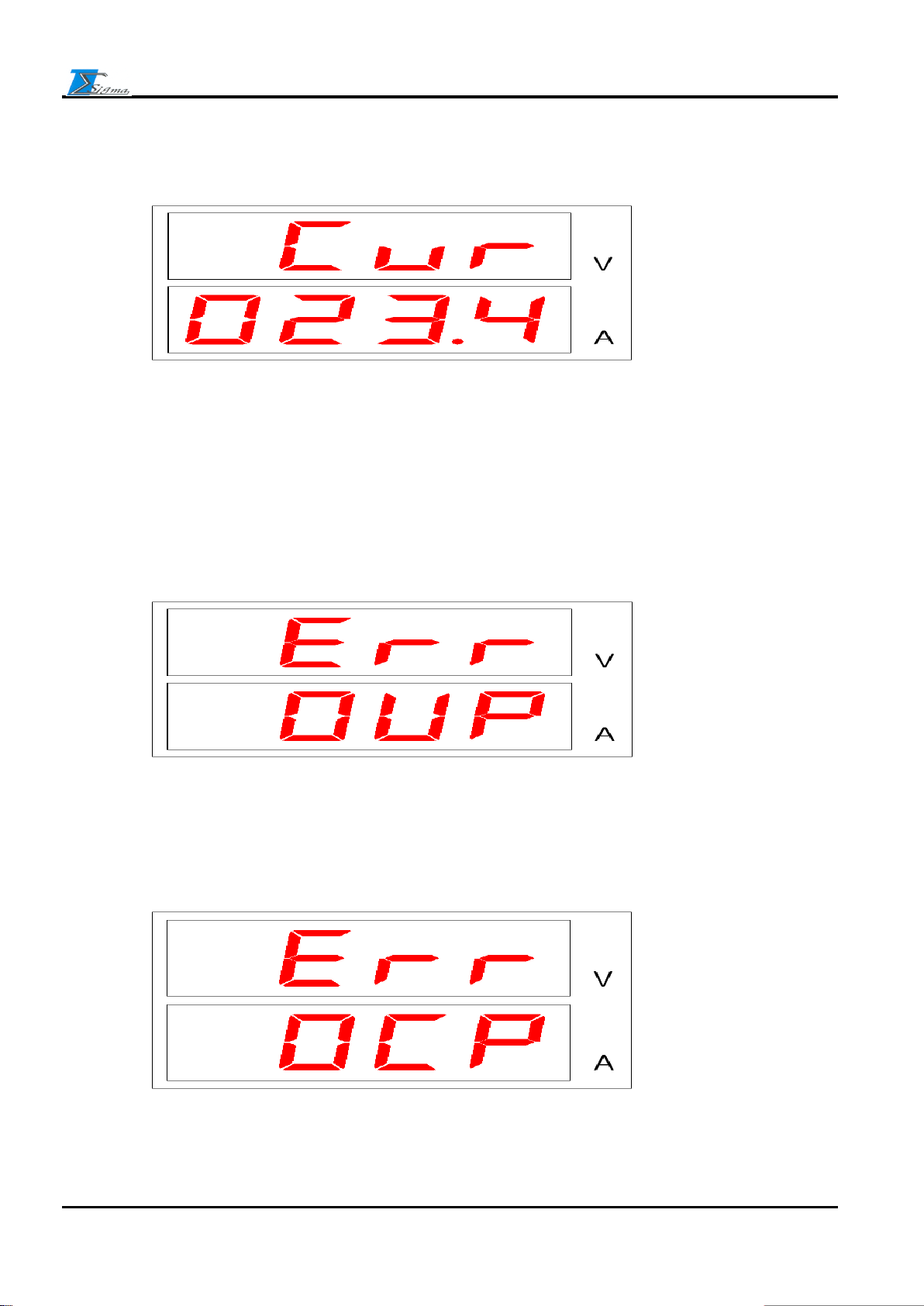
B. Err FND configuration
Over Current Protect (OCP) Err
Over Voltage Protect (OVP) Err
Sigma-tech
4.Current (CUR) setting (Don't use)
Table des matières