
Sigma Designs ZIRC Manuel utilisateur
USER MANUAL
ZIRC
All information are correct at the time of release. Sigma Designs owns the proprietary rights to the information contained herein this document. It may not e
edited, copied or circulated without prior written agreement y Sigma Designs.
© 2011 Sigma Designs, Inc.
ZIRC
Z-Wave/Infra-Red Audio Video Remote Control
User Manual
Version 1.1

USER MANUAL
ZIRC
All information are correct at the time of release. Sigma Designs owns the proprietary rights to the information contained herein this document. It may not e
edited, copied or circulated without prior written agreement y Sigma Designs.
© 2011 Sigma Designs, Inc.
CONTENTS
QUICK START GUIDE 3
Using ZIRC in Z-Wave Mode with STB.......................................................................................................3
Using ZIRC in Infra-Red Mode with STB ....................................................................................................3
INTRODUCTION 4
SYMBOLS 5
RESET TO FACTORY DEFAULT 6
LEARN INTO A NETWORK 7
UPDATE ASSOCIATION 8
SWITCHING BETWEEN Z-WAVE AND INFRA-RED MODES 9
Switching ZIRC from Z-Wave Mode to IR Mode .......................................................................................9
Switching ZIRC from IR Mode to Z-Wave Mode .......................................................................................9
STATUS INDICATORS 10
TEST MODES 11
Carrier Frequency ...................................................................................................................................11
Modulated Signal ....................................................................................................................................12
FCC NOTICE TO USERS 13

USER MANUAL
ZIRC
All information are correct at the time of release. Sigma Designs owns the proprietary rights to the information contained herein this document. It may not e
edited, copied or circulated without prior written agreement y Sigma Designs.
© 2011 Sigma Designs, Inc.
QUICK START GUIDE
Using ZIRC in Z-Wave Mode with STB
Step 1. Ena le STB Z-Wave Add-Node (refer to STB User Manual)
Step 2. Insert 2 x AAA atteries into ZIRC.
ZIRC in Factory Default state will e Z-Wave Learn Mode once attery is
inserted.
Step 3. Wait for indication.
GREEN Light flashes 3 times indicating Successful operation.
X 3
Flashes 3 times for Successful operation
OR
RED Light flashes 3 times indicating Fail operation.
X 3
Flashes 3 times for Fail operation
If operation fail, RESET ZIRC to Factory Default (refer to section “RESET
TO FACTORY DEFAULT”), and repeat Step 1 to 3 in this section.
Using ZIRC in Infra-Red Mode with STB
Step 1. Insert 2 x AAA atteries into ZIRC.
Step 2. Press-and-Hold SETUP and RED for 5 sec
Step 3. Wait for indication.
GREEN Light flashes 1 times indicating Successful operation.
X 1
Flashes 1 time for Successful operation
Step 4. YELLOW Light flashes 1 times with any key pressed on ZIRC indicating
ZIRC is in Infra-Red Mode.
X 1
Flashes 1 time for any key pressed
indicating ZIRC is in Infra-Red Mode
USER MANUAL
ZIRC
All information are correct at the time of release. Sigma Designs owns the proprietary rights to the information contained herein this document. It may not e
edited, copied or circulated without prior written agreement y Sigma Designs.
© 2011 Sigma Designs, Inc.
INTRODUCTION
ZIRC is a Z-Wave
TM
ena led Remote Control. ZIRC is mainly to e used as the AV (Audio Video)
remote control for a Sigma Designs Media SetTop Box which is also supporting Z-Wave
TM
;
allowing user to remotely control the SetTop Box using RF instead of the conventional infra red
technology. Having said that, ZIRC also supports Infra-red remote feature; demonstrating the
uild-in IR ready feature of Z-Wave 400 series chip set.
Besides controlling Sigma Designs Media SetTop Box, ZIRC is also compati le with any Z-Wave
TM
ena led network and devices (supporting AV Command Class) from a range of manufacturers.
Z-Wave is an interopera le two way RF mesh networking technology.
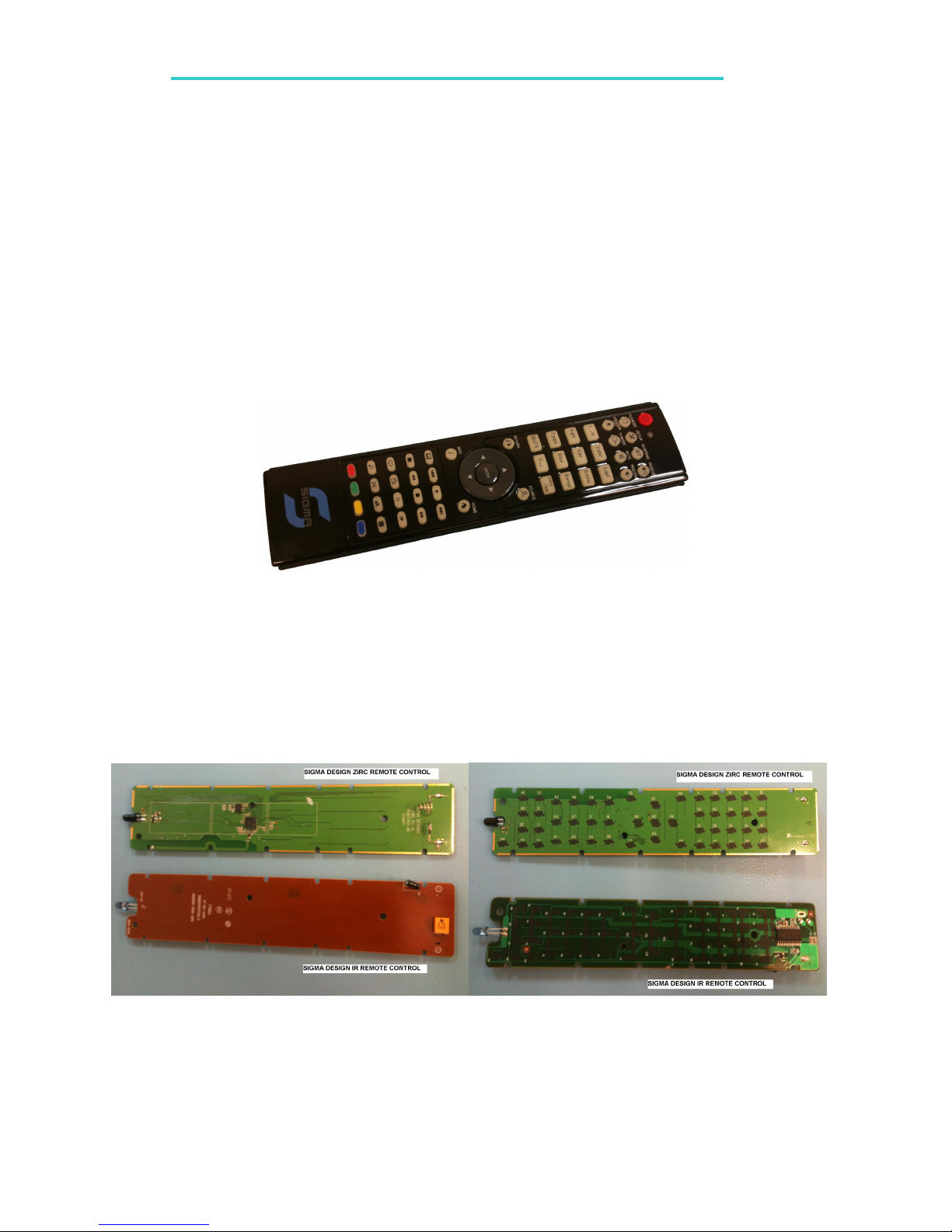
Figure 1 ZIRC Z-Wave / Infra-Red Rem te C ntr l
ZIRC is adopting an old casing of a Sigma Designs Infra-Red (IR) Remote Control to demonstrate
the possi ility of converting an existing IR remote control to a Z-Wave
TM
ena led Remote
Control. ZIRC also retain the infra-red capa ility, in which it can e used to remote control
older series of Sigma Design Set Top oxes supporting only the conventional infra-red remote
control.
Figure 2 Sigma Design C nventi nal IR Rem te C ntr l & ZIRC (Z-Wave / IR Rem te C ntr l)

USER MANUAL
ZIRC
All information are correct at the time of release. Sigma Designs owns the proprietary rights to the information contained herein this document. It may not e
edited, copied or circulated without prior written agreement y Sigma Designs.
© 2011 Sigma Designs, Inc.
SYMBOLS
The following sym ols are used in this document:
Flashing Green Light
Flashing Red Light
Flashing Yellow Light
Press-and-Hold Button 1 for 5 sec
Press-and-Hold
Button 1 & Button 2 for 5 sec
Press-and-Hold Button 1, Button 2,
Button 3 & Button 4 for 10 sec

USER MANUAL
ZIRC
All information are correct at the time of release. Sigma Designs owns the proprietary rights to the information contained herein this document. It may not e
edited, copied or circulated without prior written agreement y Sigma Designs.
© 2011 Sigma Designs, Inc.
RESET TO FACTORY DEFAULT
When set to Factory Default state, ZIRC is not in any network and is in Z-Wave mode. This
feature is generally used to remove ZIRC from its existing network.
Step 1. Press-and-Hold SETUP and INFO for 10 sec
Step 2. Wait for indication.
GREEN Light flashes 3 times indicating Successful operation. ZIRC is now
set to Factory Default.
X3
Flashes 1 time for Successful operation
Step 3. ZIRC is now ready to Learn into a new network. It will transmit up to 17
Frames of Node Info Frame continuously and then stop transmitting.
ZIRC will again transmit up to 17 Frames of Node Info with any key
pressed.
Note:
If ZIRC is not in a network OR in factory default, re-inserting attery OR any key pressed with
activate or deactivate Learn Mode where Node Info will e transmitted continuously. ZIRC will
stop transmitting Node Info if:
-it successfully learned into a successfully, or
-any key is pressed to stop Inclusion Mode, or
-up to 17 frames of Node Info has een transmitted.

USER MANUAL
ZIRC
All information are correct at the time of release. Sigma Designs owns the proprietary rights to the information contained herein this document. It may not e
edited, copied or circulated without prior written agreement y Sigma Designs.
© 2011 Sigma Designs, Inc.
LEARN INTO A NETWORK
Before ZIRC can e used to control a STB, it needs to e added into the STB Z-Wave network.
Step 1. Reset ZIRC to Factory Default (Refer to “RESET TO FACTORY DEFAULT”).
Remove Battery (removing attery is optional).
Step 2. Ena le STB Z-Wave Add-Node (refer to STB User Manual)
(a) Insert 2 x AAA atteries into ZIRC.
ZIRC in Factory Default state will e Z-Wave Learn Mode once attery is
inserted.
OR
( ) Press any key to activate / de-activate Z-Wave Learn Mode
Step 3. Wait for indication.
GREEN Light flashes 3 times indicating Successful operation.
X 3
Flashes 3 times for Successful operation
OR
RED Light flashes 3 times indicating Fail operation.
X 3
Flashes 3 times for Fail operation
If operation fail, RESET ZIRC to Factory Default (refer to section RESET TO
FACTORY DEFAULT), and repeat Step 1 to 3 in this section.

USER MANUAL
ZIRC
All information are correct at the time of release. Sigma Designs owns the proprietary rights to the information contained herein this document. It may not e
edited, copied or circulated without prior written agreement y Sigma Designs.
© 2011 Sigma Designs, Inc.
UPDATE ASSOCIATION
STB may create associations with other STBs using Z-Wave network features to allow
simultaneous control from a single ZIRC.
To support this feature, ZIRC will o tain this information (if any) from its current STB.
Step 1. Press-and-Hold SETUP and YELLOW for 5 sec.
Flashes 3 times for Successful operation
Step 4. Wait for indication.
GREEN Light flashes 3 times indicating Successful operation.
X 3
Flashes 3 times for Successful operation
OR
RED Light flashes 3 times indicating Fail operation.
X 3
Flashes 3 times for Fail operation
If operation fails, repeat from Step 1 to 4 in this section.

USER MANUAL
ZIRC
All information are correct at the time of release. Sigma Designs owns the proprietary rights to the information contained herein this document. It may not e
edited, copied or circulated without prior written agreement y Sigma Designs.
© 2011 Sigma Designs, Inc.
SWITCHING BETWEEN Z-WAVE AND INFRA-RED MODES
The Infra- Red standard supported y ZIRC is NEC format with address of 0xCB04.
Switching ZIRC from Z-Wave Mode to IR Mode
Step 1. Press-and-Hold SETUP and RED for 5 sec
Step 2. Wait for indication.
GREEN Light flashes 1 times indicating Successful operation.
X 1
Flashes 1 time for Successful operation
Step 3. YELLOW Light flashes 1 times with any key pressed on ZIRC indicating
ZIRC is in Infra-Red Mode.
X 1
Flashes 1 time for any key pressed
indicating ZIRC is in Infra-Red Mode
Switching ZIRC from IR Mode to Z-Wave Mode
Step 1. Press-and-Hold SETUP and RED for 5 sec
Step 2. Wait for indication.
GREEN Light flashes 1 times indicating Successful operation.
X 1
Flashes 1 time for Successful operation
Step 3. GREEN OR RED Light flashes 1 times with any key pressed on ZIRC
indicating ZIRC is in Z-Wave Mode
X 1
OR
GREEN Flashes 1 time for any key pressed
indicating success in Z-Wave communication
RED Flashes 1 time for any key pressed
indicating failure in Z-Wave communication

USER MANUAL
ZIRC
All information are correct at the time of release. Sigma Designs owns the proprietary rights to the information contained herein this document. It may not e
edited, copied or circulated without prior written agreement y Sigma Designs.
© 2011 Sigma Designs, Inc.
STATUS INDICATORS
The light indicator on ZIRC provides the following information
Event Light Indicator Description
IR Mode ZIRC is in IR Mode
Test Mode … Test Mode is in progress
Z-Wave network operation is successful
Z-Wave network
management activities:
(a) Learn into network
( ) Update Association Z-Wave network operation is successful
ZIRC successfully control STB through Z-
Wave
ZIRC controlling STB
through Z-Wave
ZIRC fails to control STB through Z-Wave
Reset ZIRC to factory
default
ZIRC is reset to factory default
successfully.
Switching etween Z-wave
and IR Mode Mode switching is successful
Table des matières
Manuels Télécommande populaires d'autres marques

Panasonic
Panasonic EUR7622KB0 Manuel utilisateur

Bang & Olufsen
Bang & Olufsen Beo4 Manuel utilisateur

Sunwave Tech.
Sunwave Tech. RemoteComm SRC-7000 Manuel utilisateur

Multiplex
Multiplex PROFI TX 9 Manuel utilisateur

One Remote
One Remote RMB4 Manuel utilisateur

FUTABA
FUTABA 9ZAP - PART2 Manuel utilisateur


