
Shurco ShurLink PRO Manuel utilisateur
READ BEFORE INSTALLING
2309 SHUR-LOK STREET • YANKTON, SD 57078-0713
PHONE: 1-800-SHUR-LOK (1-800-474-8756) • FAX: 1-605-665-0501
www.SHURCO.com
SHOP ONLINE: www.SHOPSHURCO.com
Wireless ShurLink PRO™ Remote
P/N 1131495 Rev.A
SHUR-CO®HELP LINE: 1-866-748-7435
P/N 1131495 Rev. A
2
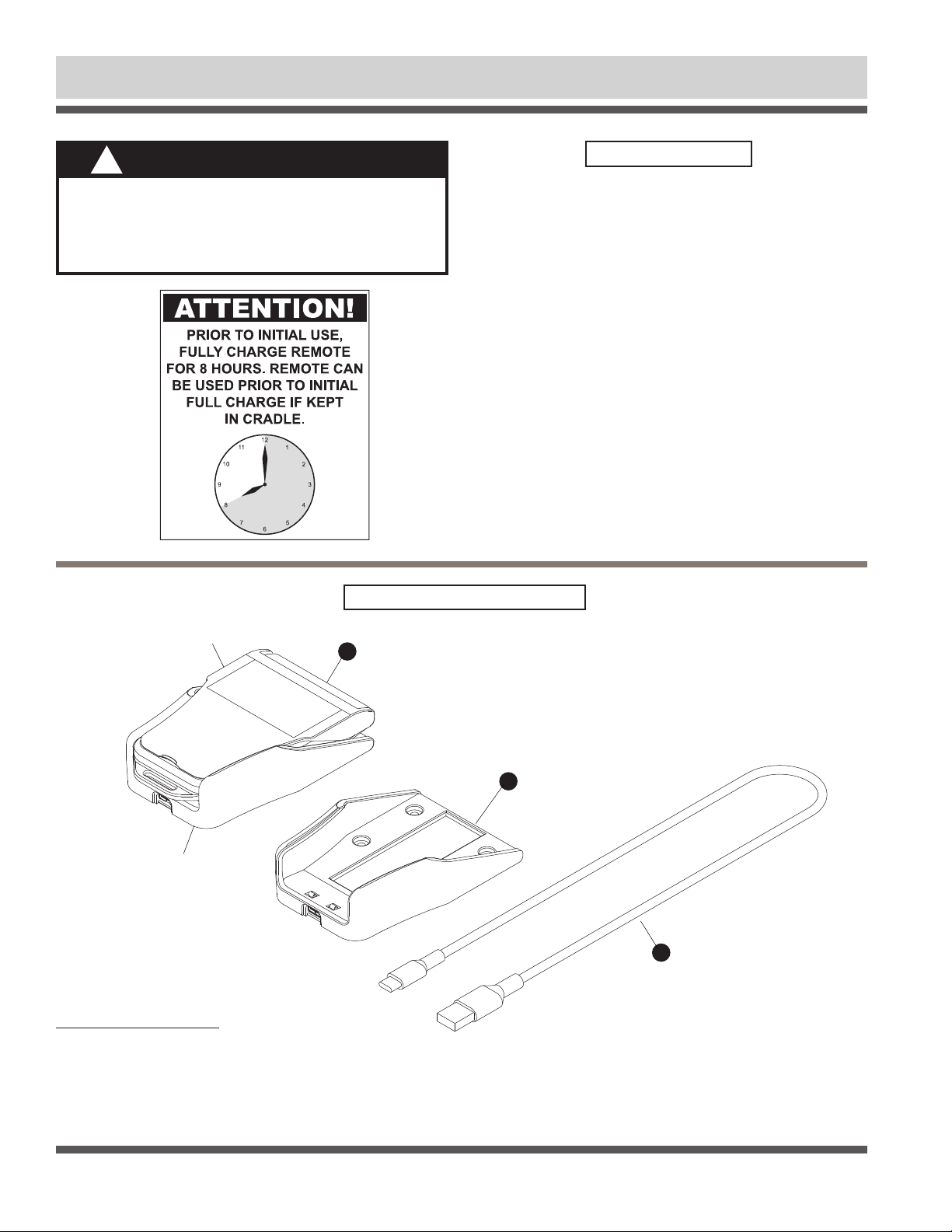
Item Part # Description
1. 1131575 SHURLINK PRO™ Transmitter Remote Kit
(includes remote, cradle and charging cable)
2. 1706751 SHURLINK PRO™ Replacement Cradle
3. 1706836 USB Charging Cable Type A to C
TRANSMITTER REMOTE
CHARGER CRADLE
1
3
2
SHURLINK PRO™ COMPONENTS
NOTICE
Do not power ShurLink™ or any Shur-Co®wireless
system with battery charger alone, as this will likely
cause system abnormalities and/or system malfunc-
tion. Instead, use 12-volt truck/automotive battery
to provide power to system.
!
Wireless ShurLink PRO™ Remote
Components .......................................................................................2
Power Up/Down..................................................................................3
Screen Layout ....................................................................................4
Pair Devices (Introduce remote to Receivers).................................5-6
Standard Operation .......................................................................7-12
Delete Device ...................................................................................12
Standard Operation Dual Output......................................................13
Clear Memory...................................................................................14
ShurLink™ app.................................................................................14
Troubleshooting...........................................................................15-16
TABLE OF CONTENTS
SHUR-CO®HELP LINE: 1-866-748-7435
P/N 1131495 Rev. A Remote & Screen Layout
3
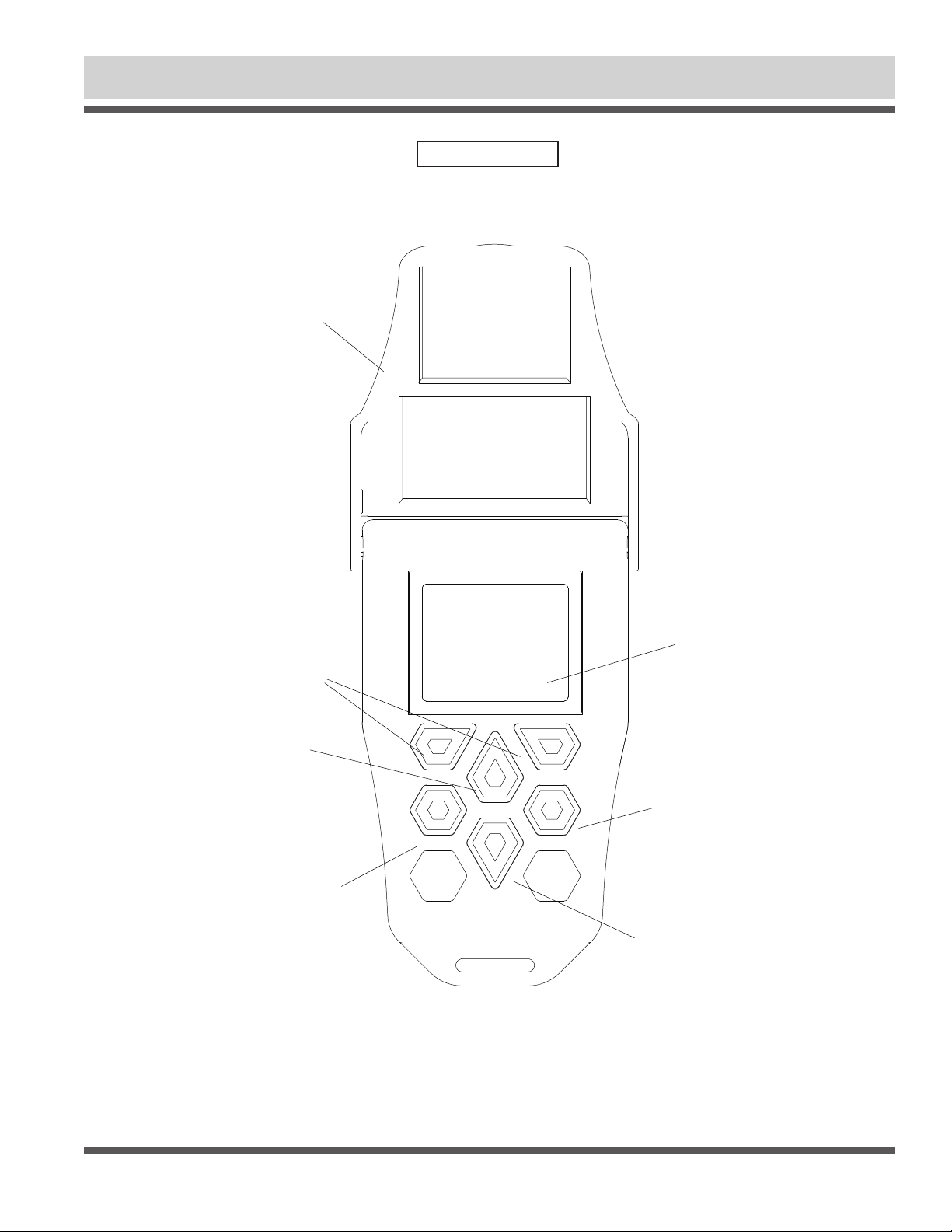
Remote will power up when cover is opened. If cover is already open and remote is off, power up remote by pressing either opera-
tional button. Remote will power down when cover is closed or left open for default three minutes after last button is pushed. You can
adjust the timer by using the ShurLink™ app in the Apple App Store.
POWER UP/DOWN
ALT BUTTON
(Press and hold for 5 seconds
for main menu)
UP ARROW BUTTON
OPERATIONAL BUTTONS
COVER LID
MAIN MENU SCREEN
SELECT BUTTON
DOWN ARROW BUTTON
SHUR-CO®HELP LINE: 1-866-748-7435
P/N 1131495 Rev. A
4
Wireless ShurLink PRO™ Remote
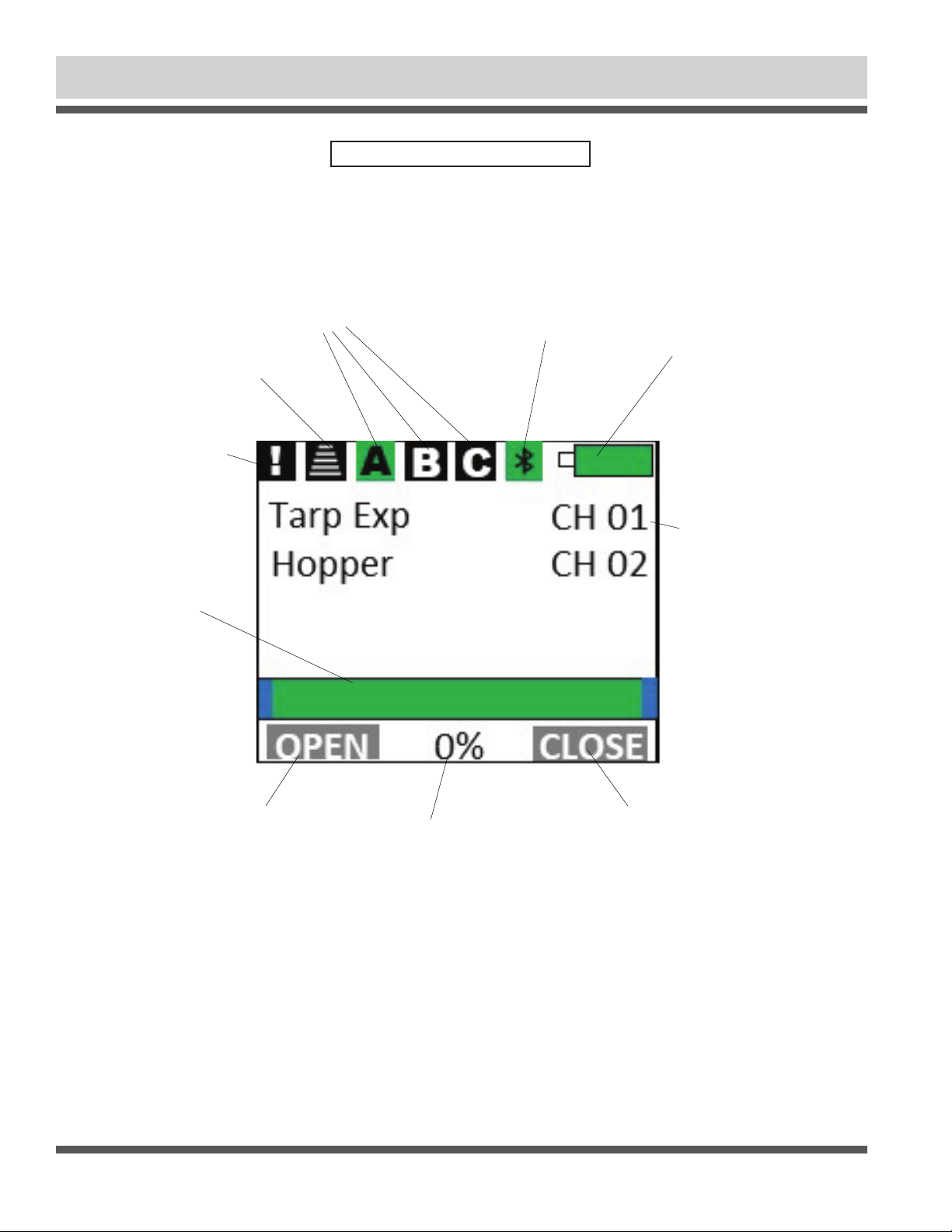
(Each page can operate 10 devices per
page. Active page will be highlighted
in “green” with “black” text. Non-Active
pages will be highlighted in “black” with
“white” text.)
CHANNEL PAGES
SHURLINK™ PRO SCREEN LAYOUT
PAIRING INDICATOR
(Indicator will flash blue
when in pairing mode)
CHANNEL SIGNAL STRENGTH
Red Box with no icon = no device in range
Green Box with icon = Good Signal
Yellow Box with icon = Medium Signal
Red Box with icon = Poor Signal
BATTERY
Green = Full
Yellow = Half
Red = Empty
Charge Icon = Charging
ACTIVE FAULT
INDICATOR
(indicator will flash
yellow when system
fault occurs)
OPERATION STATUS
(indicates progress
when system is
operating in express
mode with travel
stops set)
OPERATION COMMAND
(indicates system
operation)
OPERATION STATUS
(indicates system %
progress when stops
have been set)
OPERATION COMMAND
(indicates system
operation)
CHANNEL DESCRIPTION
(indicates paired
devices)
SHUR-CO®HELP LINE: 1-866-748-7435
P/N 1131495 Rev. A
5
Pair Devices (Introduce Remote to Receivers) - continued
STEP 2:
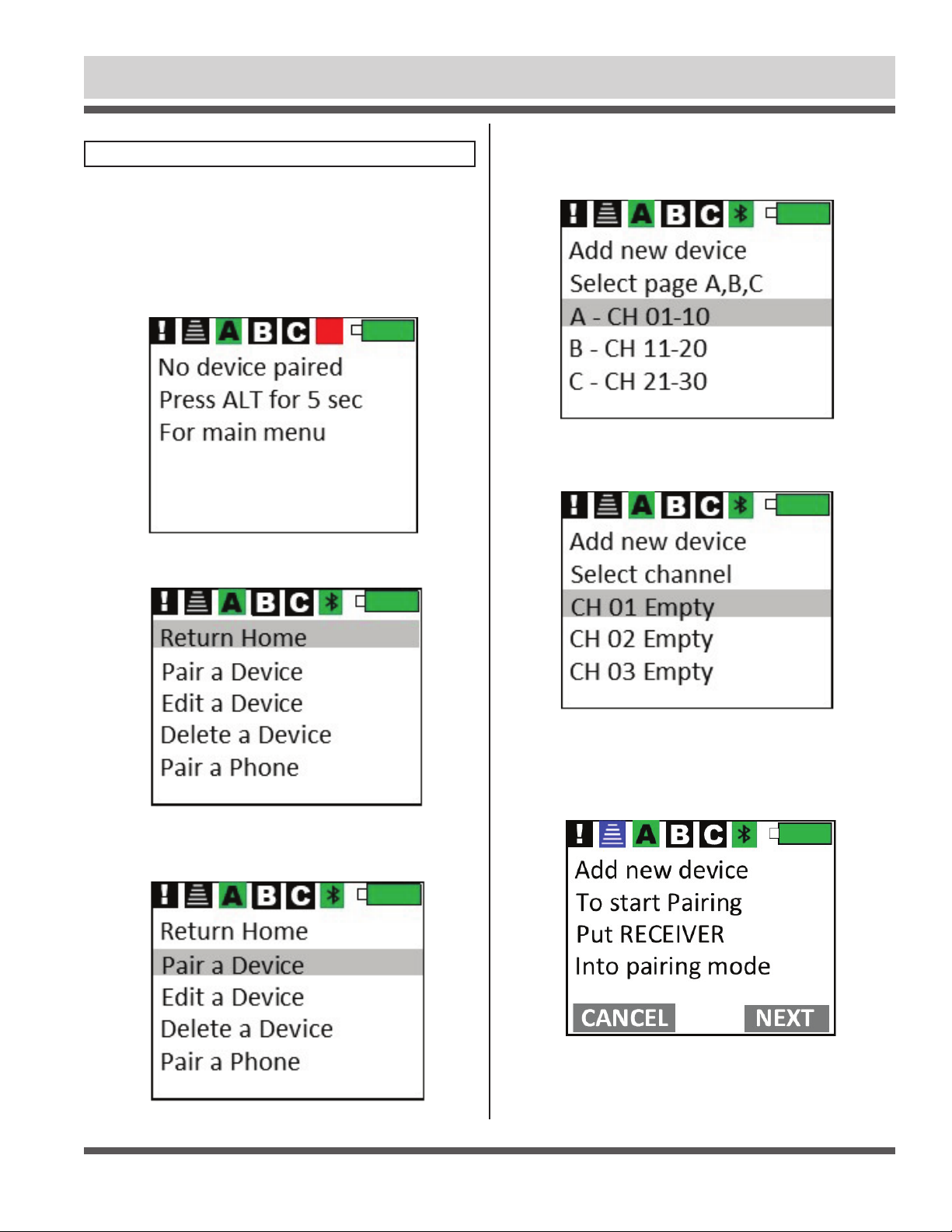
Arrow to Pair a Device and Press Select.
STEP 3:
Arrow to desired page A, B, C, to pair new device to, then
press Select. Ten devices can be paired to each page.
STEP 1: From home screen on remote, press and hold ALT button
for 5 seconds. The remote menu screen will display.
PAIR DEVICES (INTRODUCE REMOTE TO RECEIVERS)
Each remote and receiver has a unique encryption code to prevent
unauthorized operation. Before remote can operate receiver mod-
ule, they must be paired or introduced.
STEP 4:
Arrow to desired channel,then press Select.
STEP 5A:
Remote is now ready to pair with module. Press opera-
tional button CANCEL to exit pairing mode. Proceed to step 5b to
place receiver into pairing mode.
MENU SCREEN
SHUR-CO®HELP LINE: 1-866-748-7435
P/N 1131495 Rev. A
6
Pair Devices (Introduce Remote to Receivers) - continued
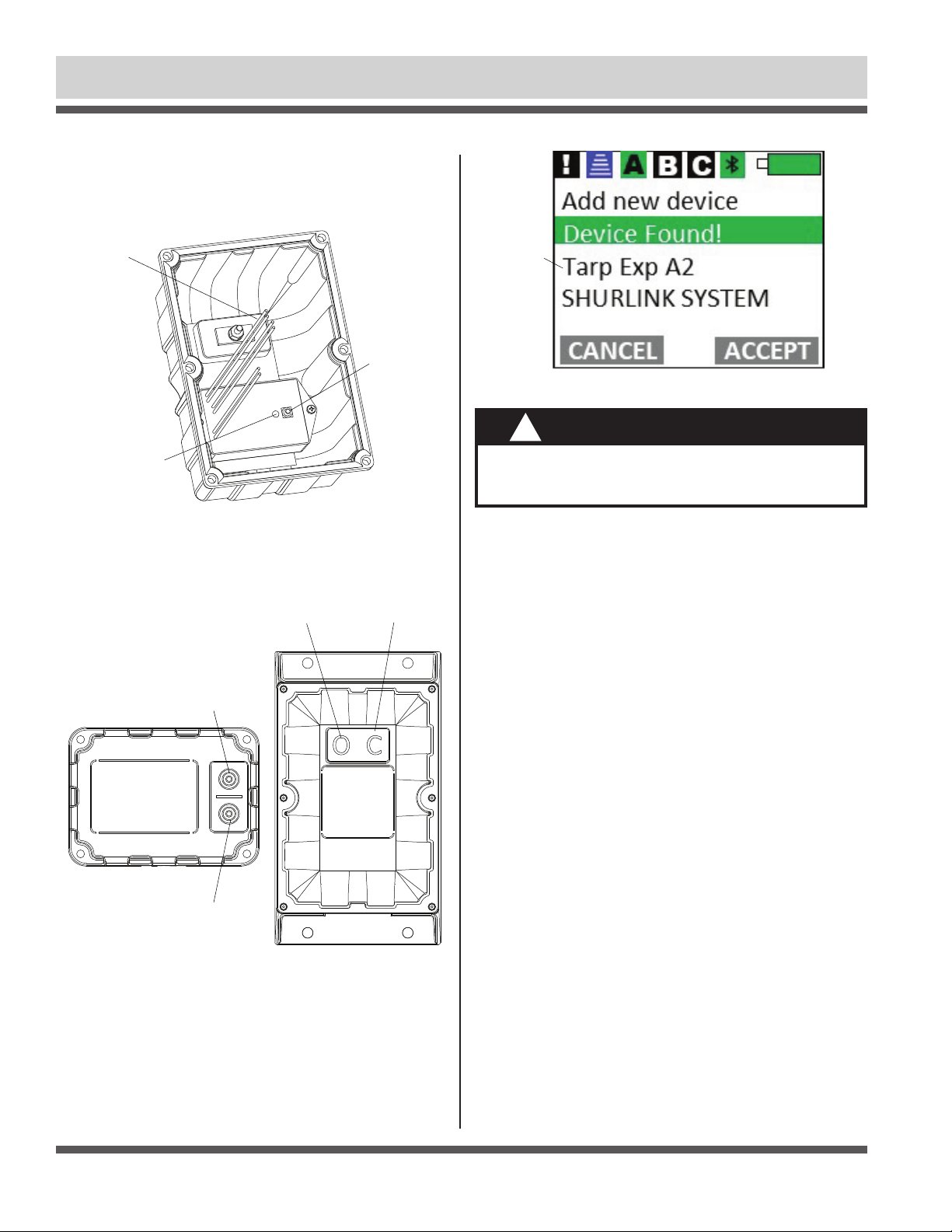
STEP 5B: For receiver cover shown below (tarp, hopper, etc.),
reach programming button near LED light inside gray cover.
Press and hold button beside red LED light for approximately 5
seconds. Release after buzzer sounds and red LED flashes off.
STEP 5C: For Mini Modules shown below and front of standard
receiver covers shown above, press and hold both buttons for
approximately 5 seconds. Release after buzzer sounds.
STEP 7: If you have additional ShurLink™ devices on your trailer
that need to be paired, repeat process for remaining devices.
When you are done, all new devices should show up on Main
Screen of remote within a few seconds after opening cover.
STEP 8: Refasten plastic cover onto receiver assembly (applies
only to receiver shown in step 5b).
NOTICE
If device type is incorrect, call Shur-Co®Help Line.
You can damage system if you operate wrong
device-type receiver.
!
DEVICE TYPE
CAN BE TARP,
HOPPER,
LIGHTS, ETC.
BUTTON A
BUTTON A BUTTON B
BUTTON B
SHURLINK™
MINI-MODULE
WIRES
CONNECTED
TO SOLENOID
RED LED
PROGRAMMING
BUTTON
SHUR-CO®HELP LINE: 1-866-748-7435
P/N 1131495 Rev. A Standard Operation (Express Mode - Motorized Devices)
STEP 1: Press and hold ATL button on PRO remote until menu
screen appears.
NOTE: If additional devices are paired on page B or C, press
ALT button to toggle between pages to show additional
devices.
7
STANDARD OPERATION (EXPRESS MODE)
SET TRAVEL STOPS
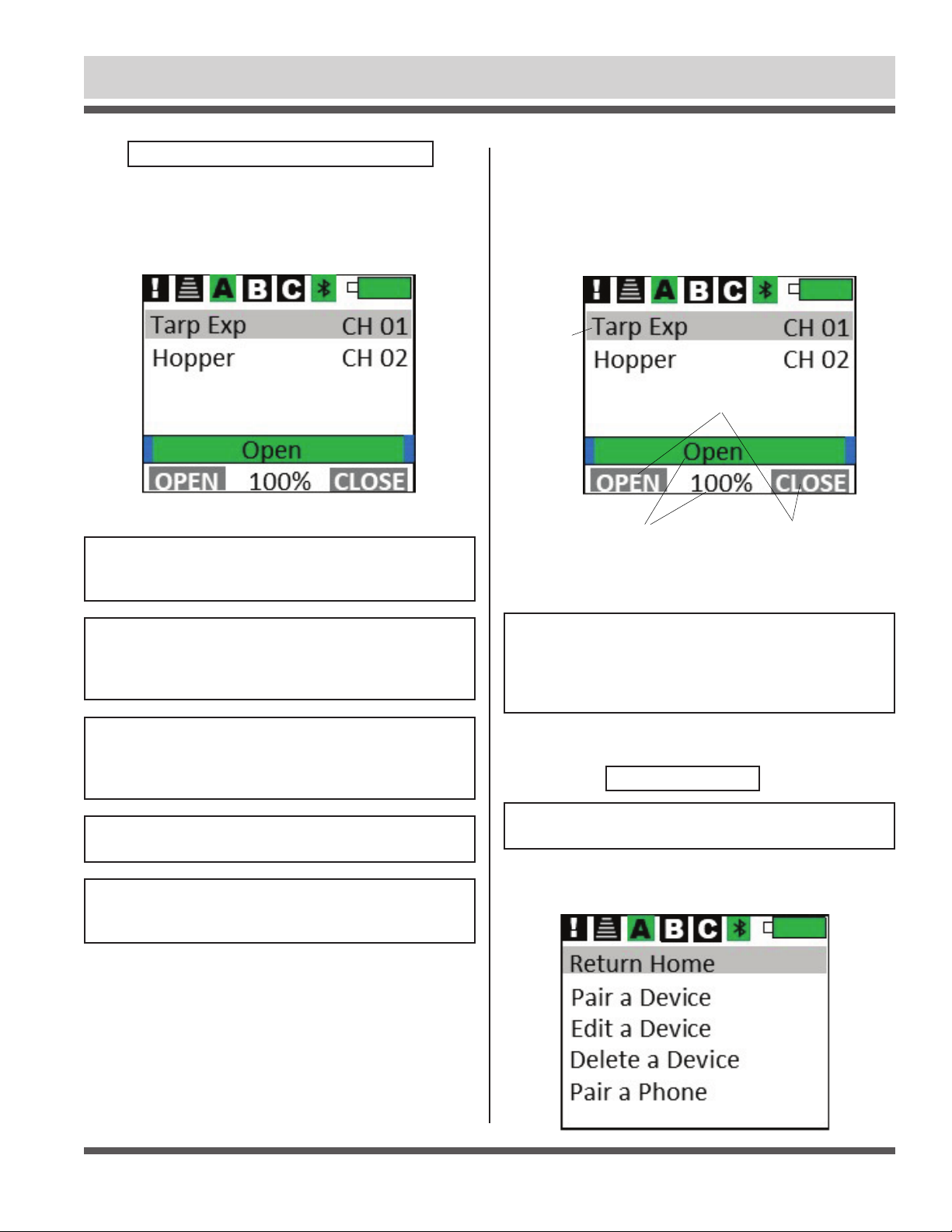
When cover is opened, remote will default to Main Screen.
Any paired (introduced) devices on page A will appear on
Main Screen within a few seconds if connected to power and
within range.
NOTE: When devices are paired with remote, they will show
up with default names like Tarp EXP XXX. Rename each
device as you choose (example: TRLR4 or Front Hopper) by
using ShurLink™ App in Apple App Store.
NOTE: Systems with Express labeled on the receiver and
Exp.description on the remote are factory set to run in
express mode during operation. End and Mid stops can be
set for operational display on Pro Remote.
NOTE: System will not operate in EXPRESS MODE unless
encoder wire between motor and control box are connected.
NOTE: Some Shur-Co®products are not compatible with
EXPRESS MODE. If motor does not have encoder wire or
other feedback, system will operate in MOMENTARY only.
Use up/down arrow buttons to highlight device you wish to
operate. In figure below Tarp Exp system is highlighted. Use
operational buttons to control selected device. For motorized
devices, selected device will operate in whatever mode (Man-
ual or Express) you have set as default. See ShurLink™ App
in Apple App store for setting default operating mode.
NOTE: Tarping system ships from factory defaulted to
EXPRESS MODE, for operational display to provide status,
travel stops must be set first.
Tarping systems will also
operate in EXPRESS MODE when operated from buttons on
trailer mounted control module.
NOTE: If system motor does not have an encoder wire, SET
TRAVEL STOPS will not be accepted.
SCREEN LABELS
FOR OPERATIONAL
BUTTONS OF
SELECTED DEVICE
DEVICE STATUS
POSITION INDICATOR
IF STOPS ARE SET
(IF AVAILABLE)
HIGHLIGHTED
ITEM WILL BE
SHADED
SHUR-CO®HELP LINE: 1-866-748-7435
P/N 1131495 Rev. A
Standard Operation (Express Mode - Motorized Devices)
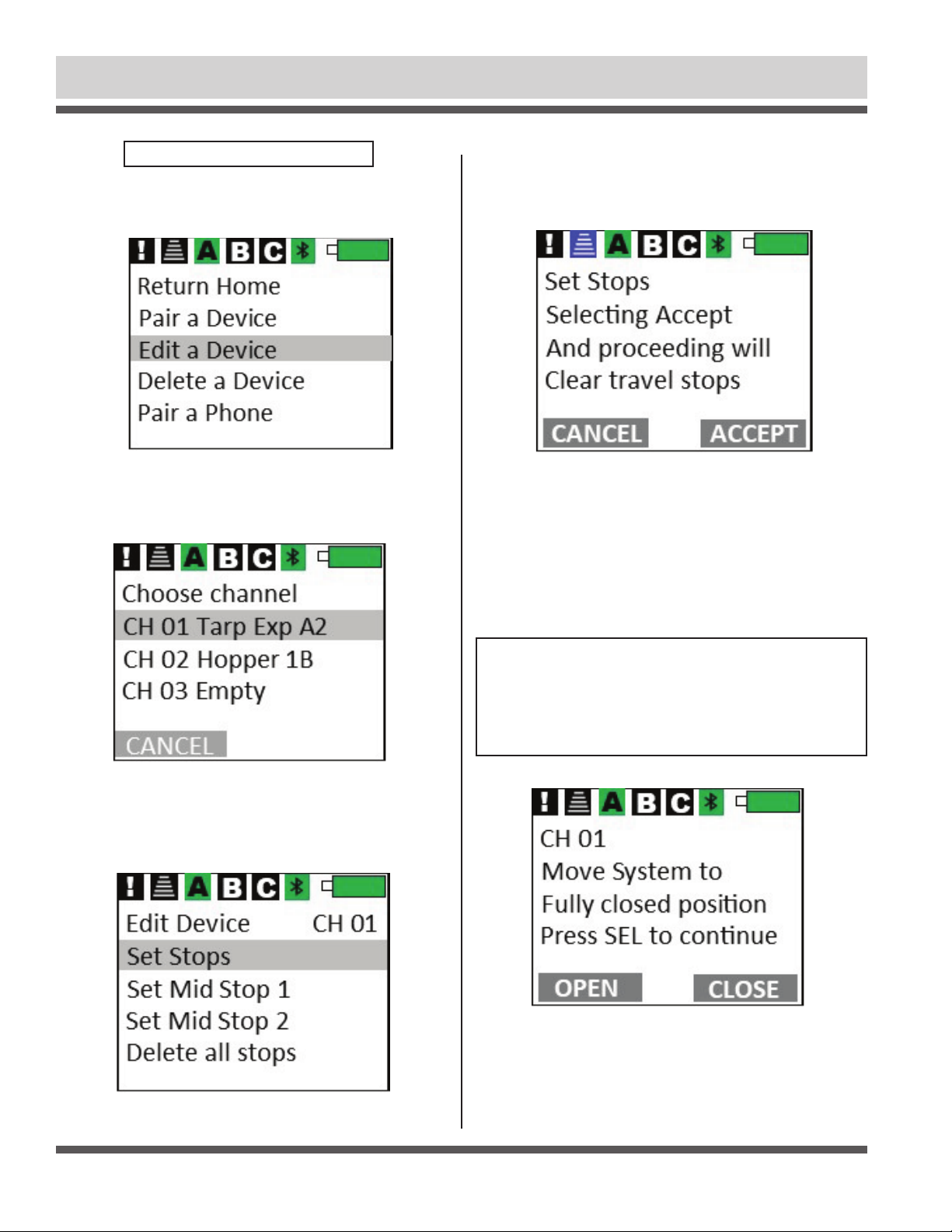
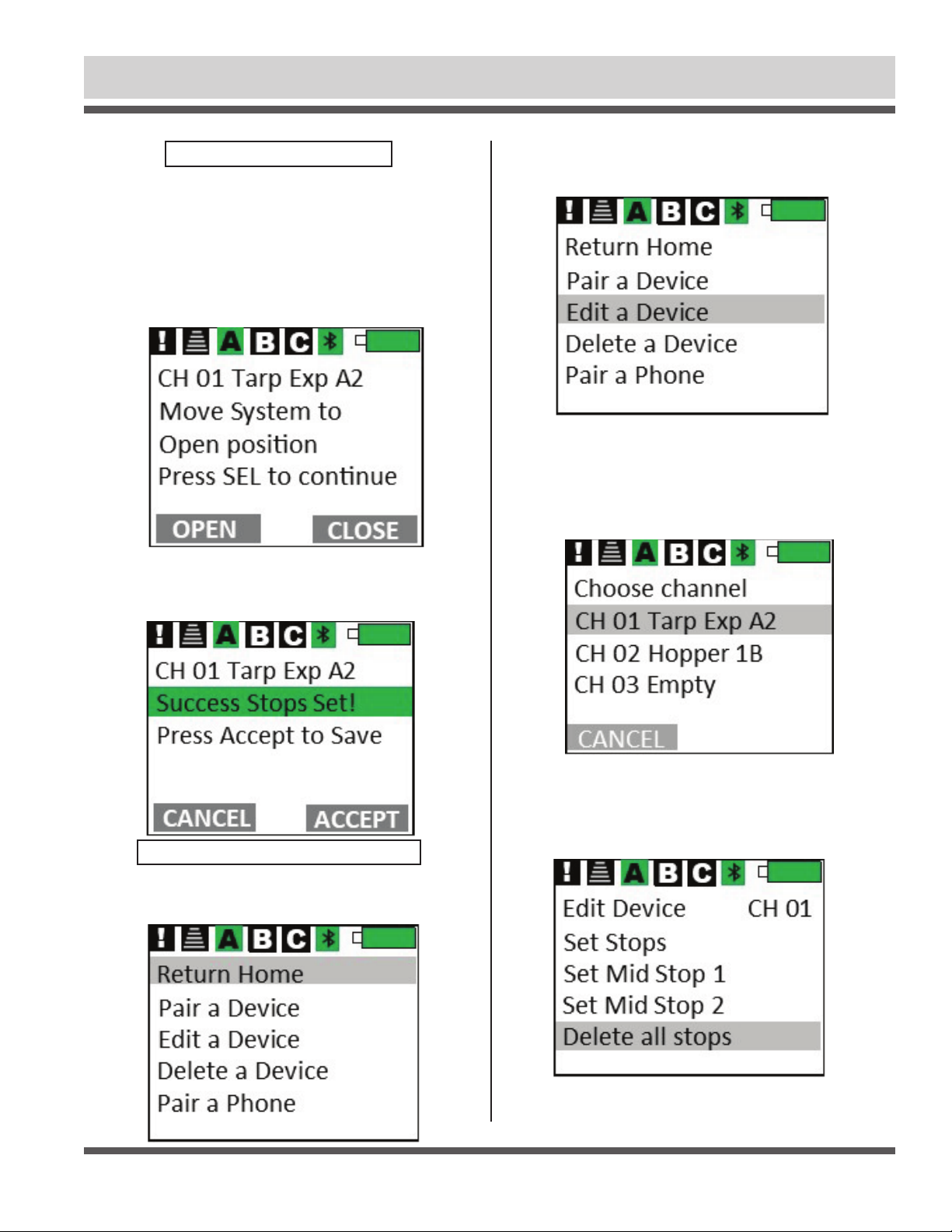
STEP 2: Use down arrow button until Edit a Device is highlighted,
then press Select button.
8
SET TRAVEL STOPS - CONTINUED
STEP 3: Use down arrow button until channel you want to edit is
highlighted. Press Select button. Use operational button CANCEL
to exit or close lid.
STEP 4: Press down arrow until Set Stops on screen is high-
lighted. Press Select button.
Pressing ALT button will return to main screen.
STEP 5: Menu will prompt you to clear existing travel stops by
pressing operational button SELECT. To cancel, press operational
button CANCEL or close lid.
STEP 6: Press operational button CLOSE to move device
(tarp, hopper, door, etc.) to fully closed position. Continue
holding button until motor automatically turns off. Make
sure there are no abnormal conditions that might stop device
from fully closing, like heaped load or ice buildup on trap door.
Verify device (tarp, hopper, door, etc.) is fully closed. Press Select
button to save this position.
NOTE: System will automatically turn off within
approximately one second of tightening on closed side. Do
not attempt to set closed side stop just before point where
system tightens up. During operation, control module will
always look for system to tighten up (partially “stall”) before
system will turn off and display CLOSED.
SHUR-CO®HELP LINE: 1-866-748-7435
P/N 1131495 Rev. A
9
STEP 3: Use Up/Down buttons to locate device. If device is on
page B, or C, use ALT button to change page. Press Select once
device has been highlighted.
STEP 2: Use Up/Down buttons to highlight Edit a Device. Press
Select button.
STEP 7: Press operational button OPEN to move device to
desired open side location. Open stops should be set so device
will stop prior to making contact with any mechanical stop (tarp
stop, hopper door stop, etc.)
Example: Stop tarp roll approximately 3" to 4" from tarp stops.
This also helps with seasonal events that impact the tarp rolling
up. This will save on system wear and tear. Press Select to save
this position.
Standard Operation (Express Mode - Motorized Devices) - continued
SET TRAVEL STOPS - continued
STEP 8: Press operational button ACCEPT to complete Set
Stops procedure if you accept responsibility to operating system
in Express Mode. Press operational button CANCEL or close
lid to cancel.
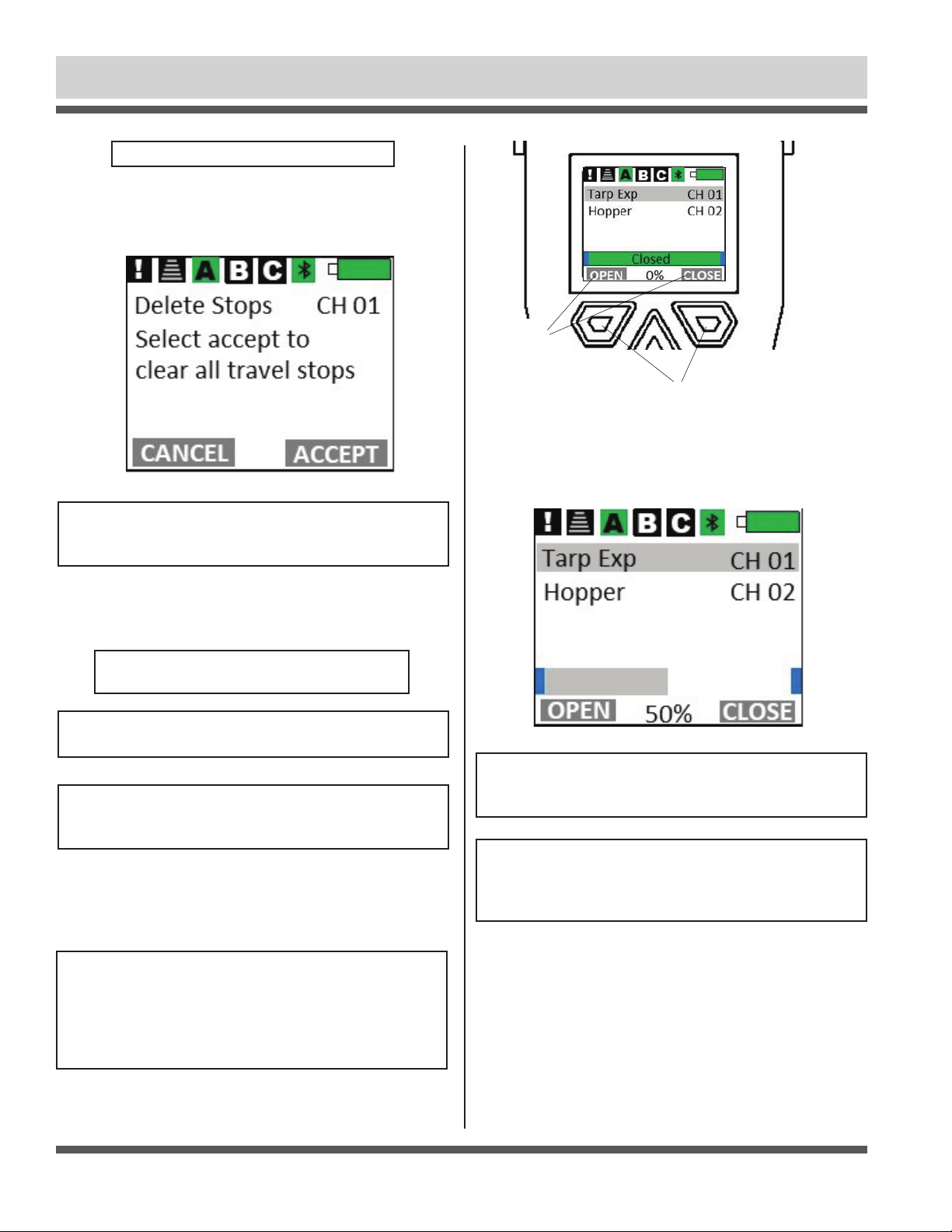
STEP 1: To delete stops if you do not plan to operate system in
Express Mode with Positional Feedback, press and hold ALT
button for five seconds, Main Menu page will appear.
STEP 4: Use Up/Down buttons to locate Delete all stops. Press
Select button to delete all stops on this device
CLEARING (DELETING) TRAVEL STOPS
SHUR-CO®HELP LINE: 1-866-748-7435
P/N 1131495 Rev. A
10
Standard Operation (Express Mode - Motorized Devices) - continued
STEP 5: To accept clearing travel stops, press ACCEPT on op-
eration button, Press CANCEL operation button or close cover
to revert back to current settings.
CLEARING (DELETING) TRAVEL STOPS
NOTE: System can be operated in Momentary Mode.
Device settings can be found using ShurLink™ iOS app in
Apple App Store.
STANDARD OPERATION
(EXPRESS MODE-MOTORIZED DEVICES)
NOTE: Set travel stops before Express Mode with positional
feedback can be used.
NOTE: Travel stops can only be set on Shur-Co®motors
that have encoder cable, such as 4500 Series HD,
ProTrap®, MaxxTrap™ and SMARTDrive motors.
In Express Mode, simply press and release operational button
labeled Open or Close. If you need to stop an operation before it
reaches travel stop, just press any button or close cover.
NOTE: If tarp system is commanded to operate in EXPRESS
MODE from push-buttons on trailer-mounted receiver
or Mini-Module, remote will only stop system if OPEN or
CLOSE buttons are pressed and device is highlighted on
screen. Remote will not stop system if SELECT or arrow
buttons are pressed or if remote cover is closed.
While motorized device is operating, current position of device
will be displayed on screen. Once motor reaches end of travel,
motor will shut off and screen will show device as fully open
or closed.
NOTE: Many devices (including tarp and standard hopper
controllers) expect system to tighten (or partially “stall”) on
closed side before remote will display CLOSED status.
NOTE: If motor cannot travel to full open or closed position
(due to heaped load or other obstruction), motor will travel
as far as it can and stop automatically. Display will then
show system partially open.
OPEN/CLOSE
LABELS FOR
OPERATIONAL
BUTTONS
OPERATIONAL BUTTONS
Table des matières
Autres manuels Shurco Télécommande


Manuels Télécommande populaires d'autres marques

Panasonic
Panasonic EUR7622KB0 Manuel utilisateur

Bang & Olufsen
Bang & Olufsen Beo4 Manuel utilisateur

Sunwave Tech.
Sunwave Tech. RemoteComm SRC-7000 Manuel utilisateur

Multiplex
Multiplex PROFI TX 9 Manuel utilisateur

One Remote
One Remote RMB4 Manuel utilisateur

FUTABA
FUTABA 9ZAP - PART2 Manuel utilisateur


