
Shunzao S9 Manuel utilisateur

Shunzao Cordless Stick Vacuum Cleaner · 01
Shunzao Aspirateur-balai sans l · 12

01
IMPORTANT SAFETY INSTRUCTIONS
When using an electrical appliance, basic precautions should always be followed, including the following:
READ ALL INSTRUCTIONS BEFORE USING (THIS APPLIANCE). Failure to follow the warnings and instructions may result in electric shock, re and/or
serious injury.
WARNING–To reduce the risk of re, electric shock, or injury:
• Do not use outdoors or on wet surfaces.
• Do not allow to be used as a toy. Close attention is necessary when used by or near children, pets or plants.
• Use only as described in this manual. Use only manufacturer’s recommended attachments.
• Do not use with damaged cord or plug. If appliance is not working as it should, has been dropped, damaged, left outdoors, or dropped into water, return it to a service
center.
• Do not pull or carry by cord, use cord as a handle, close a door on cord, or pull cord around sharp edges or corners. Do not run appliance over cord. Keep cord away from
heated surfaces.
• Do not unplug by pulling on cord. To unplug, grasp the plug, not the cord.
• Do not handle charger, including charger plug, and charger terminals with wet hands.
• Do not put any object into openings. Do not use with any opening blocked; keep free of dust, lint, hair, and anything that may reduce air ow.
• Keep hair, loose clothing, ngers, and all parts of body away from openings and moving parts.
• Use extra care when cleaning on stairs.
• Do not use to pick up ammable or combustible liquids, such as gasoline, or use in areas where they may be present.
• Do not pick up anything that is burning or smoking, such as cigarettes, matches, or hot ashes.
• Do not use without lter in place.
• Turn o all controls before unplugging.
• Always turn o this appliance before connecting or disconnecting motorized nozzle.
• Prevent unintentional starting. Ensure the switch is in the o-position before connecting to battery pack, picking up or carrying the appliance. Carrying the appliance with
your nger on the switch or energizing appliance that have the switch on invites accidents.
• Disconnect the battery pack from the appliance before making any adjustments, changing accessories, or storing appliance. Such preventive safety measures reduce the
risk of starting the appliance accidentally.
• Have servicing performed by a qualied repair person using only identical replacement parts.This will ensure that the safety of the product is maintained.
• Do not modify or attempt to repair the appliance or the battery pack (as applicable) except as indicated in the instructions for use and care.
• In order to prevent burnout of the machine due to short circuit, please do not pour or spill water or other liquids into the machine.
• When using a new battery or using a battery for the rst time after long-term storage, please fully charge the battery. When the machine is not used for a long time
during storage, please make sure that it is charged and discharged at least once every three months. When your vacuum cleaner is fully charged and needs cleaning or
maintenance, please unplug the power adapter in time, and do not pull the power line.
• When cleaning the vacuum cleaner, just wipe it with a dry cloth and do not use gasoline/lacquer thinner or other detergents that are easy to crack or discolor the housing.
• Please do not use or store the vacuum cleaner in unfavorable conditions such as high temperature and low temperature. It is recommended to use it indoor at the ambient
temperature of 32°F-104°F (0°C-40°C). Please store it in a cool and dry place and keep it away from long-time sunlight exposure.
• If the fully charged vacuum cleaner cannot work, it shall be sent to the designated repair point for testing and repair. Please do not disassemble the machine without
authorization.
Battery Pack and Charging
• Recharge only with the charger specied by the manufacturer. A charger that is suitable for one type of battery pack may create a risk of re when used with another
battery pack.
• Use appliances only with specically designated battery packs. Use of any other battery packs may create a risk of injury and re.
• When battery pack is not in use, keep it away from other metal objects, like paper clips, coins, keys, nails, screws or other small metal objects, that can make a connection
from one terminal to another. Shorting the battery terminals together may cause burns or a re.
• Under abusive conditions, liquid may be ejected from the battery; avoid contact. If contact accidentally occurs, ush with water. If liquid contacts eyes, additionally seek
medical help. Liquid ejected from the battery may cause irritation or burns.
• Do not use a battery pack or appliance that is damaged or modied. Damaged or modied batteries may exhibit unpredictable behavior resulting in re, explosion or risk
of injury.
• Do not expose a battery pack or appliance to re or excessive temperature. Exposure to re or temperature above 266°F (130°) may cause explosion.

02
• Follow all charging instructions and do not charge the battery pack or appliance outside of the temperature range specied in the instructions. Charging improperly or at
temperatures outside of the specied range may damage the battery and increase the risk of re.
• Battery charging can only be performed at the ambient temperature between 32°F (0°C) and 104°F (40°C). Excessively high or low temperature may extend the battery
charging time, and even damage the battery. The normal charging of this product takes about 3-5 hours, and it is best to perform 1-3 complete charging and discharging
processes for the rst use, so as to fully activate the battery.
• For use only with Yinli YLS0241A-T300080 Charger.
• For use only with Suntone A017ZBP Battery pack.
• Waste battery packs shall be recycled safely and disposed rather than being thrown away.
• If the power cord of the power adapter is damaged, it must be replaced by a professional from the manufacturer's local after-service department or similar departments
to avoid dangers. Do not turn on the power supply of the vacuum cleaner during charging! Do not remove the battery pack when the vacuum cleaner is connected for
charging!
• If the product is not used for a long time, it is recommended that the machine shall be completely charged and discharged once every 3 months or so to avoid the
passivation of the battery electrodes due to prolonged non-use.
• Disconnect the battery pack from the appliance before making any adjustments, changing accessories, or storing appliance. Such preventive safety measures reduce the
risk of starting the appliance accidentally.
• Do not disassemble, strike, crush or expose the battery to re.
• Do not leave in a high-temperature environment.
• Do not use the product if the battery shows signs of serious swelling.
• Do not use the product if the battery is exposed to water.
Transportation
It is recommended to transport the vacuum cleaner in its original packaging.
SAVE THESE INSTRUCTIONS
Household use only.
03
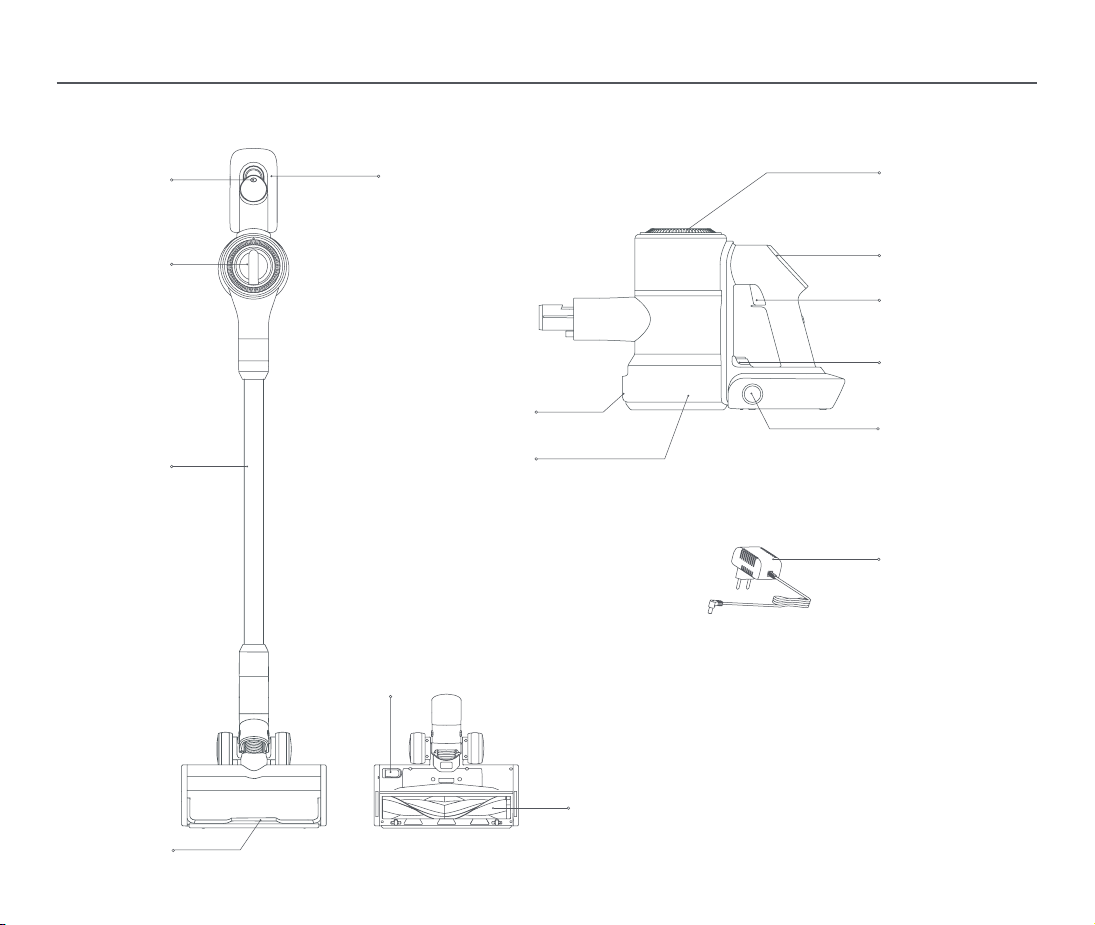
Product Introduction
Vacuum Cleaner
Mode switch
button
Dust empty button
Dust Container
Battery pack Air outlet
Dust container
release button
Battery pack
release button
Adapter
Display screen
Power switch
Roller brush
release button
Roller brush
Motor Cover
Extension tube
Protective strip
04
Product Introduction
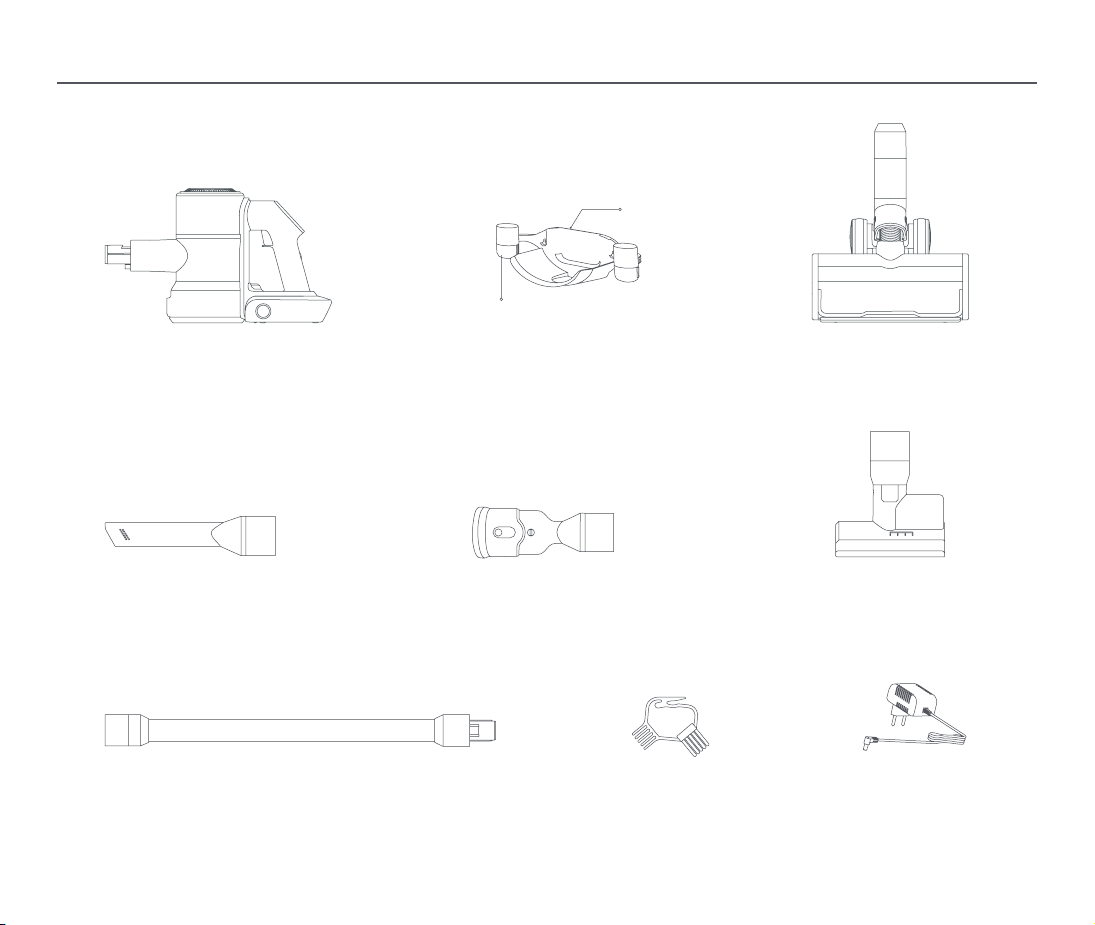
Component List
Vacuum Cleaner
Crevice Nozzle
Extension Tube
Docking Station
2-In-1 Brush
Hair Cleaning Brush
Accessories
Docking Station
Vacuum Cleaner
Docking Station
Electric Floor Brush
Motorized Mini-Brush*
Adapter
* Optional accessory, depends on the conrguration
05
Installation
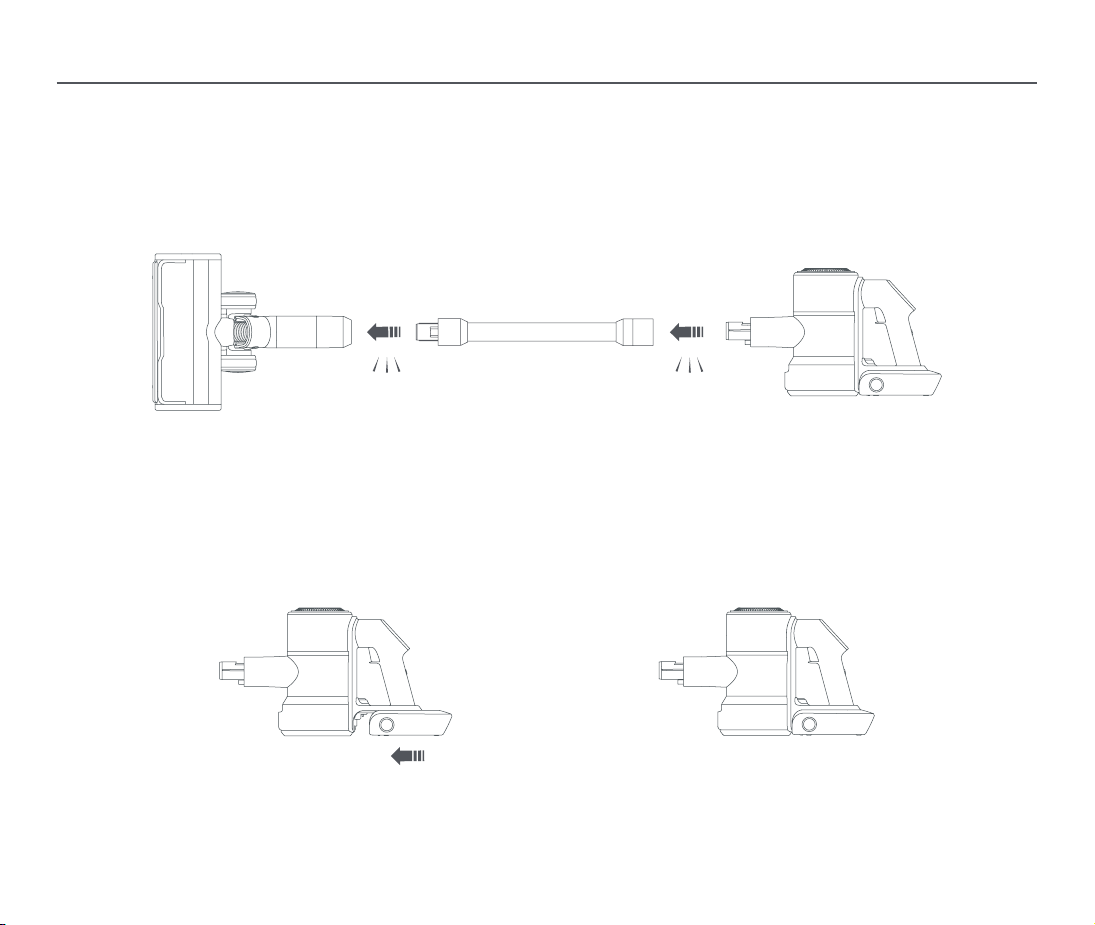
Installing the Accessories onto the Vacuum Cleaner
Precautions
Please turn o the power supply of the vacuum cleaner before installing and replacing accessories.
This product cannot remain upright without a xed support. When storing, please place the machine and accessories on separate docking stations.
Align the extension tube with the electric oor brush joint, insert it and clip it in place, as shown in Fig. 1;
Clip the suction port end of the vacuum cleaner into the connecting end of the extension tube in place, as shown in Fig. 2.
Battery Installation
Align the battery pack with the rear end of the vacuum cleaner, slip it in and clip it in place, as shown in Fig. 3.
Insert until it clicks into place Insert until it clicks into place
Fig. 1 Fig. 2
Fig. 3
06
Battery and Charging
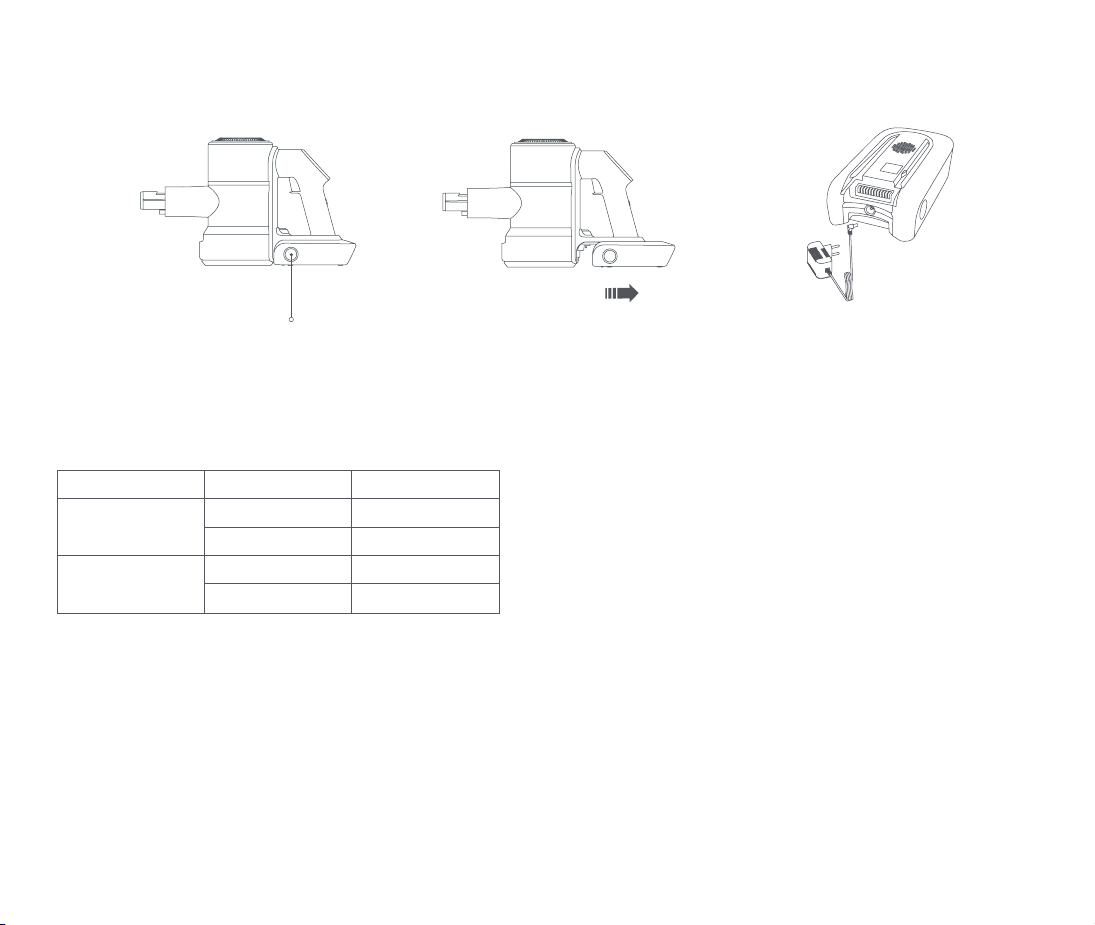
①. Turn o the power switch, press the release button on the bottom of the battery pack and remove it, then plug in the power adapter connector, as shown in Fig. 4.
②. Connect the power adaptor to the power supply.
Warnings
①. Do not turn on the power supply of the vacuum cleaner during charging!
②. Do not remove the battery pack when the vacuum cleaner is connected for charging!
③. Battery charging can only be performed at the ambient temperature between 32°F (0°C) and 104°F (40°C).
④. Excessively high or low temperature may extend the battery charging time, and even damage the battery.
⑤. The normal charging of this product takes about 3-5 hours, and it is best to perform 1-3 complete charging and discharging processes for the
⑥. rst use, so as to fully activate the battery.
⑦. If the product is not used for a long time, it is recommended that the machine shall be completely charged and discharged once every 3 months
⑧. or so to avoid the passivation of the battery electrodes due to prolonged non-use!
Battery LED Indication Dene
Release button
Fig. 4
Status Battery capacity Battery LED indication
Charging
Charging Ongoing Flashing
Charging Completed Bright
Discharging
Battery Capacity≤10% Flashing
Battery Capacity>10% Bright
07
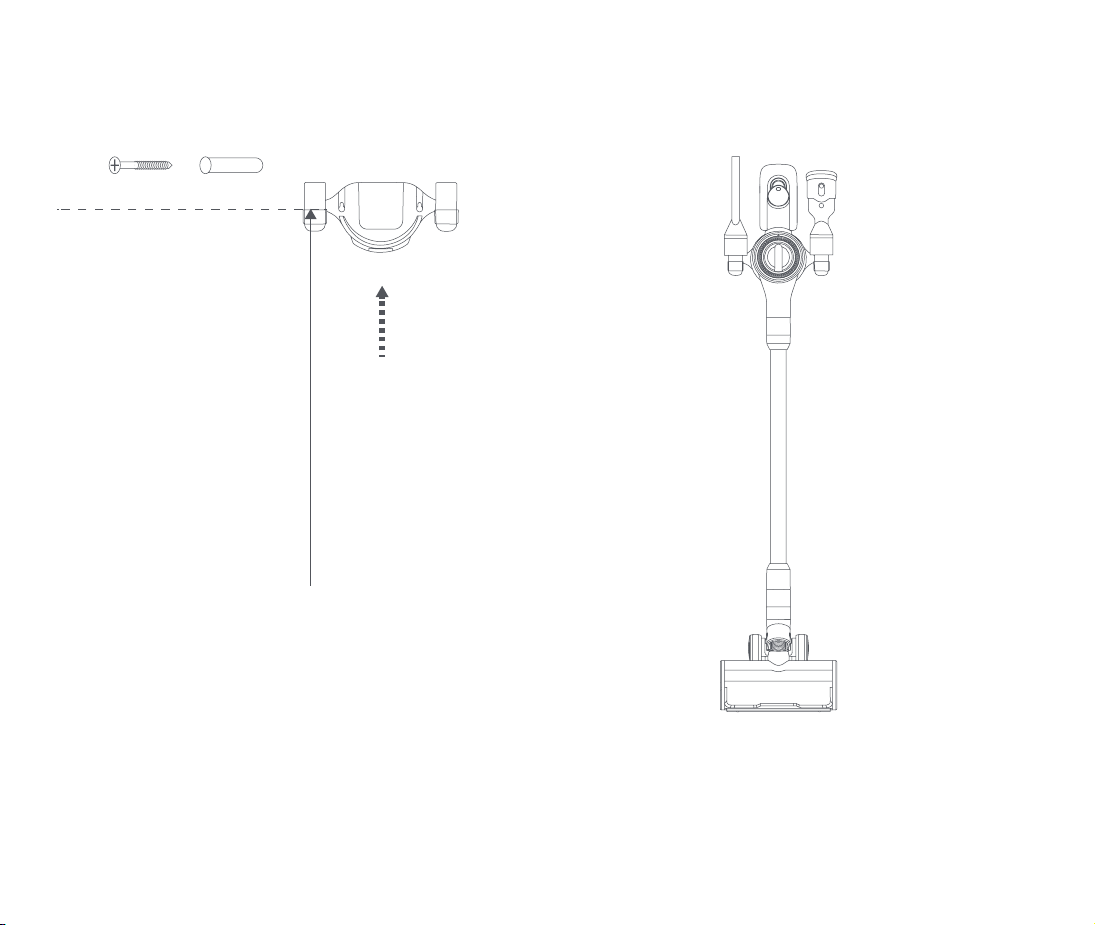
Docking Station Installation Method
The docking station shall be xed on the wall by screw, and the height from the ground shall be higher than the overall height of the vacuum cleaner, as shown in Fig. 5.
Hang the vacuum cleaner and accessories on the docking stations, as shown in Fig. 6.
Screw Wall Plug
Recommended height is at least
35.5 inch (90cm) from the ground
Fig. 5
Fig. 6
08
Use of Product
Please fully charge the battery when using it for the rst time.
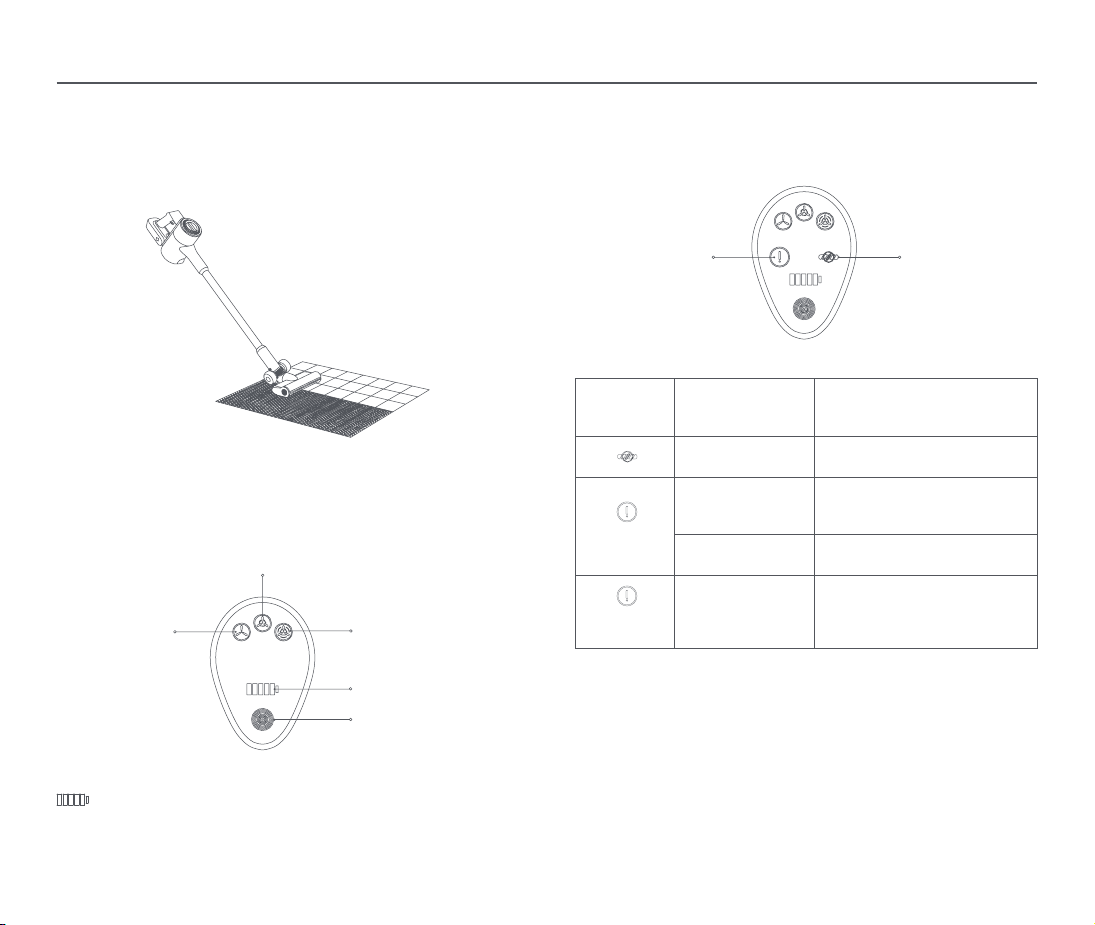
1. It is suitable for cleaning the hard oors, tile oors, carpet and so on. Tilt the
vacuum cleaner back, press the power switch, push the vacuum cleaner back
and forth to work, and press the power switch to stop working. When the
electric oor brush is working, the LED light at the front will be turned on at the
same time.
Precautions
The electric oor brush will keep rotating at high speed when it is used for
vacuuming assistance. Do not stay at the same place on the oor for too long
when vacuuming, as this may damage the oor surface.
2.Standard mode is the factory default mode, working modes can be adjusted
by pressing mode swith button with the cycle of Standard- Turbo - Eco. The
default mode when it is turned on again is the last mode when it is turned o.
The battery level indicators will drop in turn when the battery capacity
decreaes. In the case of low battery, the last remaining battery level
indicator will keep ashing till automatic power-o. In this case, please
charge in time.
Standard
Eco
Fault notications
Turbo
Battery capacity
indication
Mode switch button
Floor brush blocked
Notications
des
défaillances
Fault causes Solutions
Floor brush blocked Clean up the brous matter and the
hair tangled on the roller brush.
Trouble light
ashes
Air duct blocked
Check whether the dust container/
metal connecting rod/ roller brush
nozzle is blocked.
Overheated battery Wait until the battery temperature
normalizes before resuming use.
Trouble light
remains on
Fault Please contact our after-sales
service department for repair.
09
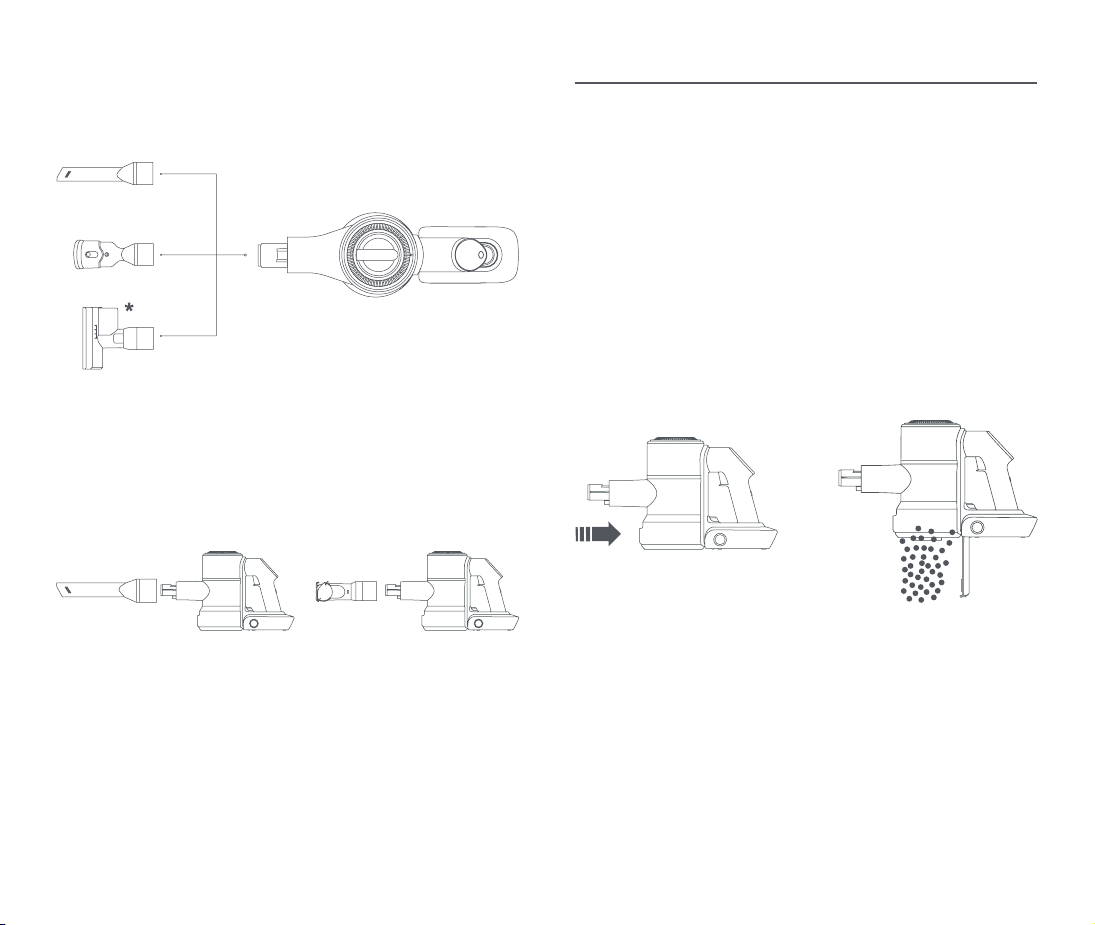
Using as Handheld Vacuum Cleaner
Cleaning & Maintenance
Removal of the blocked items
(* Optional accessory, depends on the conguration)
The 2-in-1 brush/electric mite brush/electric oor brush/extension tube can be
connected as required, and then, press the power switch to start the machine.
(Fig. 7).
Cleaning of Dust Container
Note:
When the dust drawn into the dust container reaches the marked MAX position,
please clean the dust container in time to ensure optimal vacuuming eect.
(Fig. 8)
①. Turn o the power supply and remove accessories.
②. Align the bottom of the dust container of the vacuum cleaner with a dust
bin, press the release button on the bottom of the dust container bottom,
and then,the bottom cover of the dust container will be opened. At this time,
shake the dust container gently to empty the dust, afterwards, close the
bottom cover and lock it.
When the air duct is tangled or clogged by foreign matter, the protection
program will cut o the power of the electric oor brush, and the electric oor
brush will stop rotation. In this case, please immediately turn o the machine
power, check and clean the electric oor brush or the extension tube, remove the
blockage and cool down for a period of time before using again.
Warnings
Please turn o before switch any machine components!
Fig. 7
Fig. 8
Table des matières
Langues :


