
Shineway Tech OLT-55 Manuel utilisateur

OLT-55
Intelligent Optical Loss Tester
User’s Manual
Shineway Technologies, Inc.
All rights reserved.

OLT-55 User’s Manual
Shineway Technologies, Inc. - 2 -
Safety Instructions
Safety Terms Used in This Manual
The WARNING sign denotes a hazard. It calls attention to a
procedure which could result in personnel injury.
The CAUTION sign denotes a hazard. It calls attention to an
operating procedure if not correctly performed or adhered to, could
result in damage to or destruction of part or the entire product.
The NOTE sign information that may be beneficial during the use
and maintenance of the instrument.
OLT-55 series Optical Loss Tester is a laser device, user should
always avoid direct eye exposure to the laser output. Using
microscope or magnifier to observe the laser output should also be
avoided: laser beam may converge on the retina and cause permanent
eye injury.
Battery: OLT-55 battery type is lithium battery.
Battery Power Supply: Do not expose battery to fire or intense heat.
Do not open or mutilate battery. Avoid touching the electrolyte in the
battery, which is corrosive and may cause injuries to eyes, skin or
damage to clothes.
External Power Supply: OLT-55 support external power supply: 5V
DC/750mA. External power supply is optional.

OLT-55 User’s Manual
Shineway Technologies, Inc. - 3 -
Laser Radiation: To avoid serious eye injury, never look directly
into the optical outputs of fiber optic network equipment, test
equipment,
Always avoid looking directly into the optical output port,
when the instrument is working
Always replace protective dust cap on the detector port when
the instrument is not in use.
Always avoid looking directly at unconnected end of optic
fiber in testing and make the unconnected end pointing at a
non-reflective object.

OLT-55 User’s Manual
Shineway Technologies, Inc. - 1 -
Contents
SAFETY INSTRUCTIONS................................................................................2
SAFETY TERMS USED IN THIS MANUAL..................................................2
1. GENERAL INFORMATION.........................................................................3
1.1 SCOPE OF THIS MANUAL ................................................................................................3
1.2 UNPACKING AND INSPECTION ........................................................................................3
1.3 INTRODUCTION ..............................................................................................................4
2. BASIC OPERATION......................................................................................6
2.1 FOREWORD.....................................................................................................................6
2.2 INSTRUMENT DETAILS....................................................................................................6
2.2.1 External Interfaces .................................................................................................6
2.2.2 Keypad Operation ..................................................................................................7
2.2.3 Indicator.................................................................................................................7
2.3 USE OF BATTERY............................................................................................................8
2.4 CONNECTOR CLEANING .................................................................................................8
3. OPERATION...................................................................................................9
3.1 POWER ON.....................................................................................................................9
3.2 STABILIZED LASER SOURCE (SLS)...............................................................................11
3.2.1 SLS-Laser On/Off .................................................................................................12
3.2.2 SLS-Reference Setting...........................................................................................12
3.2.3 SLS-Setup..............................................................................................................13
3.3 OPTICAL POWER METER (OPM)..................................................................................14
3.3.1 OPM-Reference Setting.................................................................................14
3.3.2 OPM-Save Record................................................................................................15
3.3.3 OPM-Recall..........................................................................................................15
3.3.3 OPM-Trace...........................................................................................................16
3.3.4 OPM-Setup...........................................................................................................16
3.4 OPTICAL LOSS TEST (OLT) ..........................................................................................17
3.4.1 OLT-Reference Setting..........................................................................................18
3.4.2 OLT-Bi-directional Test ........................................................................................19
3.4.3 OLT-Save Record..................................................................................................19
3.4.4 OLT-Recall............................................................................................................20
3.4.5 OLT-Threshold Setting..........................................................................................20
3.4.6 OLT-Setup.............................................................................................................21
3.5 OPTICAL RETURN LOSS TEST (ORL)-OPTION..............................................................23
3.5.1 ORL-ORL Test ......................................................................................................23
3.5.2 ORL-Save Record.................................................................................................24
3.5.3 ORL-Recall...........................................................................................................24

OLT-55 User’s Manual
Shineway Technologies, Inc. - 2 -
3.5.4 ORL-Setup............................................................................................................25
4. MAINTENANCE AND CALIBRATION....................................................25
4.1 CLEANING OF THE CONNECTORS..................................................................................25
4.2 CALIBRATION REQUIREMENT.......................................................................................26
5. WARRANTY INFORMATION ...................................................................27
5.1TERMS OF WARRANTY .................................................................................................27
5.2 EXCLUSIONS.................................................................................................................27
5.3 WARRANTY REGISTRATION..........................................................................................27
5.4 RETURNING INSTRUMENTS ..........................................................................................27
5.5 CONTACT CUSTOMER SERVICE ....................................................................................28

OLT-55 User’s Manual
Shineway Technologies, Inc. - 3 -
1. General Information
1.1 Scope of this Manual
Thank you for purchasing ShinewayTechinstrument. Please read this manual carefully
before using ShinewayTechfiber optic instrument. Always be aware of the Warning and
Caution sign appearing throughout this manual.
This manual contains the information necessary for proper operation and maintenance of
ShinewayTechinstrument, troubleshooting instructions as well as information regarding
maintenance services.
All ShinewayTechinstruments are carefully assembled and undergo rigorous mechanical,
electrical, and optical inspection prior to shipment. Beside the instrument, the package also
includes a lithium battery pack, a charging/data transfer cable, a power adapter, a FC/PC
flange and this user's manual. For detailed information, please refer to the packing list.
Upon receiving the instrument, please check for any obvious signs of physical damage that
may have occurred during shipment. Report any damage to the shipping agent or the
representative of Shineway Technologies Inc. immediately. Retain the original packing
materials in case reshipment is necessary.
1.2 Unpacking and Inspection
This instrument has been carefully packed in accordance with standard shipping procedures.
Examine the instrument for damage that may have occurred during shipment. If you find
any damage or the instrument is not working, or if any of the following items are not
included, please contact your representative of Shineway Technologies, Inc.
If necessary, you may contact Shineway Technologies, Inc via this email:
support@shinewaytech.com.
To return the instrument in the case of repair, calibration or other
maintenance, please note the following:
Be sure to pack the instrument with soft cushion like Polyethylene, so as to protect
the shell of the instrument.
Please use the original hard packing box. If use other packing material, please

OLT-55 User’s Manual
Shineway Technologies, Inc. - 4 -
ensure at least 3 cm soft material around the instrument.
Be sure to correctly fill out and return the warranty registration card, which should
include the following information: company name, postal address, contact, phone
number, email address and problem description.
Be sure to seal the packing box with exclusive tape.
Be sure to ship to your representative or the agent of the Company in a reliable
way.
way.
1.3 Introduction
ShinewayTechOLT-55 Intelligent Optical Loss Tester combines stabilized laser source and
optical power meter which can perform automatic bidirectional loss test on single fiber with
Pass/Fail assessment to offer user-friendly operation and avoid potential operational mistake.
The rugged and easy-to-use OLT-55 is the ideal optical loss tester for FTTx, LAN and
CATV application.
Features:
All-in-one: SLS + OPM + OLT + ORL + Length test
Optical power monitoring (Auto power trace)
Bidirectional loss test on single fiber
ORL test
Pass/Fail assessment
Automatic wavelength identification/switch (AutoID)
Remote reference value setting
Internal clock & fiber S/N editable
1000 test records (CSV) storage & management
Data transfer to PC via USB (Driver-free)
Auto test records save in local unit/remote unit/both units
USB power charging
Over 35 hours continuous operation
Multilanguage support
No warm-up, quick start
High resolution color LCD
Pocketsize, lightweight and easy-to-use

OLT-55 User’s Manual
Shineway Technologies, Inc. - 5 -
Automatic Wavelength Identification
Compatible with the digital encryption protocols of its laser source module and
Shineway SLS-50 Series Stabilized Laser Source, OLT-55 can automatically identify
the wavelength of the input optical signal and switch to the corresponding test mode,
which greatly reduces the workload at both ends and avoids potential error.
Automatic Bidirectional Loss Test on Single Fiber
Two OLT-55 at both ends of a single optical fiber can perform bidirectional loss test by
just pressing one and can automatically measure and display the entire fiber
attenuation to help users acquire complete and accurate optical fiber loss information.
Applicable to FTTx/PON testing
OLT-55 can be applied to measure Triple-play signals (1310nm, 1490nm and 1550nm)
on Passive Optical Network (PON)
OLT-55 User’s Manual
Shineway Technologies, Inc. - 6 -
2. Basic Operation
2.1 Foreword
This part introduces the basic operation on OLT-55. Specific operations are elaborated in Chapter 3 of this
manual. Please read this manual carefully for optimal operation. If you encounter any problems during
operation, you are welcome to contact the technical staff of our company or representatives.
2.2 Instrument Details
2.2.1 External Interfaces
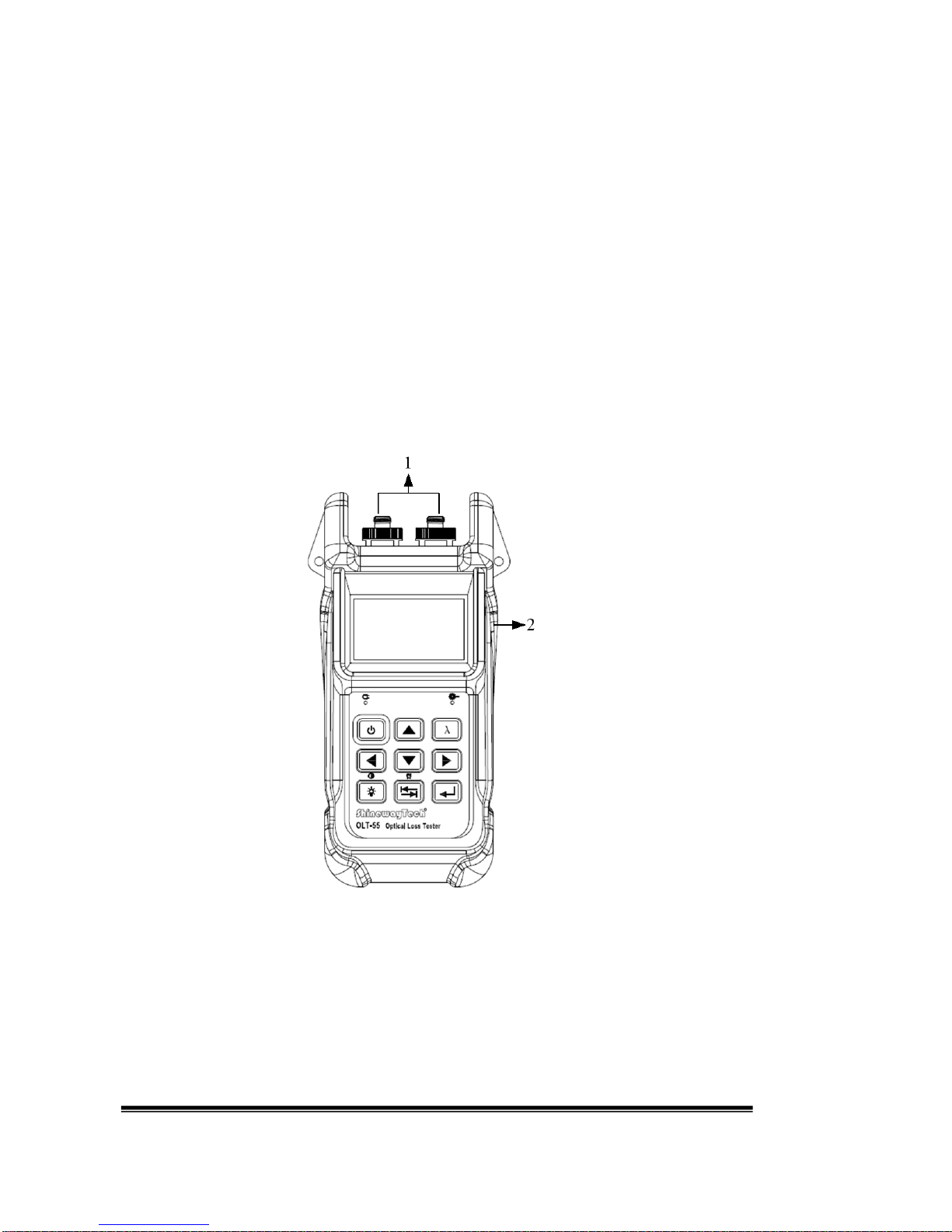
1. Optical Input & Output
OLT-55 is available with FC connector (Interchangeable SC/ST).
Note: Output port is marked with “LS”; Input port is marked with “PM”.

OLT-55 User’s Manual
Shineway Technologies, Inc. - 7 -
2. USB Power /Data Port
OLT-55 can be charged by external power adapter (5V DC, 750mA).
2.2.2 Keypad Operation
Power on/off.
Toggle between wavelengths.
Toggle between setup items;
Adjust value in setup mode.
Toggle between sub-interfaces in working mode;
Shift digit positions in setup mode.
Toggle between working modes: SLS, OPM, OLT & ORL;
Long press to enable/disableAuto Power Off.
Enter setup mode;
Execute or toggle between setup values;
Confirm.
Short press to turn backlight on/off;
Long press to set contrast.
2.2.3 Indicator
Charging indicator.
Laser Indicator (Illuminate when laser emits).
Autres manuels pour OLT-55
1
Table des matières
Autres manuels Shineway Tech Équipement de test


Manuels Équipement de test populaires d'autres marques

SMART
SMART KANAAD SBT XTREME 3G Series Manuel utilisateur

Agilent Technologies
Agilent Technologies BERT Serial Manuel utilisateur

Agilent Technologies
Agilent Technologies N3280A Manuel utilisateur

Vernier
Vernier Go Direct Voltage Manuel utilisateur

Lifeloc
Lifeloc R.A.D.A.R. Manuel utilisateur

Fluke
Fluke T5-600 Instructions d'utilisation et d'installation


