7
lPrepare ahigh speed SDcard to save your record data.
lAvideo image and OSD will appear on the screen ofthe display device,you can select aTVor LCD as
the display device by pressing the LCD/TVSwitch Button onWireless Remote Controller,press
the button toswitch the display as the following: LCD-->TVPAL-->TVNTSCLCD,
2. Howto capturethevideo and audio:
lPush theRecord /Stopswitch to Rec”side to startarecording,thered power led
lamp and thered dot icon on the leftup cornerofscreen will flash atonce per second until the switch
be pushto Stop”side to stop recording; the continued recording time will be shown onthe right up
corner,as shown in recording figure,ifthe switch is set on Rec”sidebefore power on,the DVR will
record directly iftheSD card is available
lOne buttonforyourrecording task.: ,Press down thered buttontoturn
ontheDVRtorecording,andrelease thebuttontostoprecording,then theDVRwill
power off after savingrecorddate automatically. (the trigger Cable ispluggedinto the AV port.
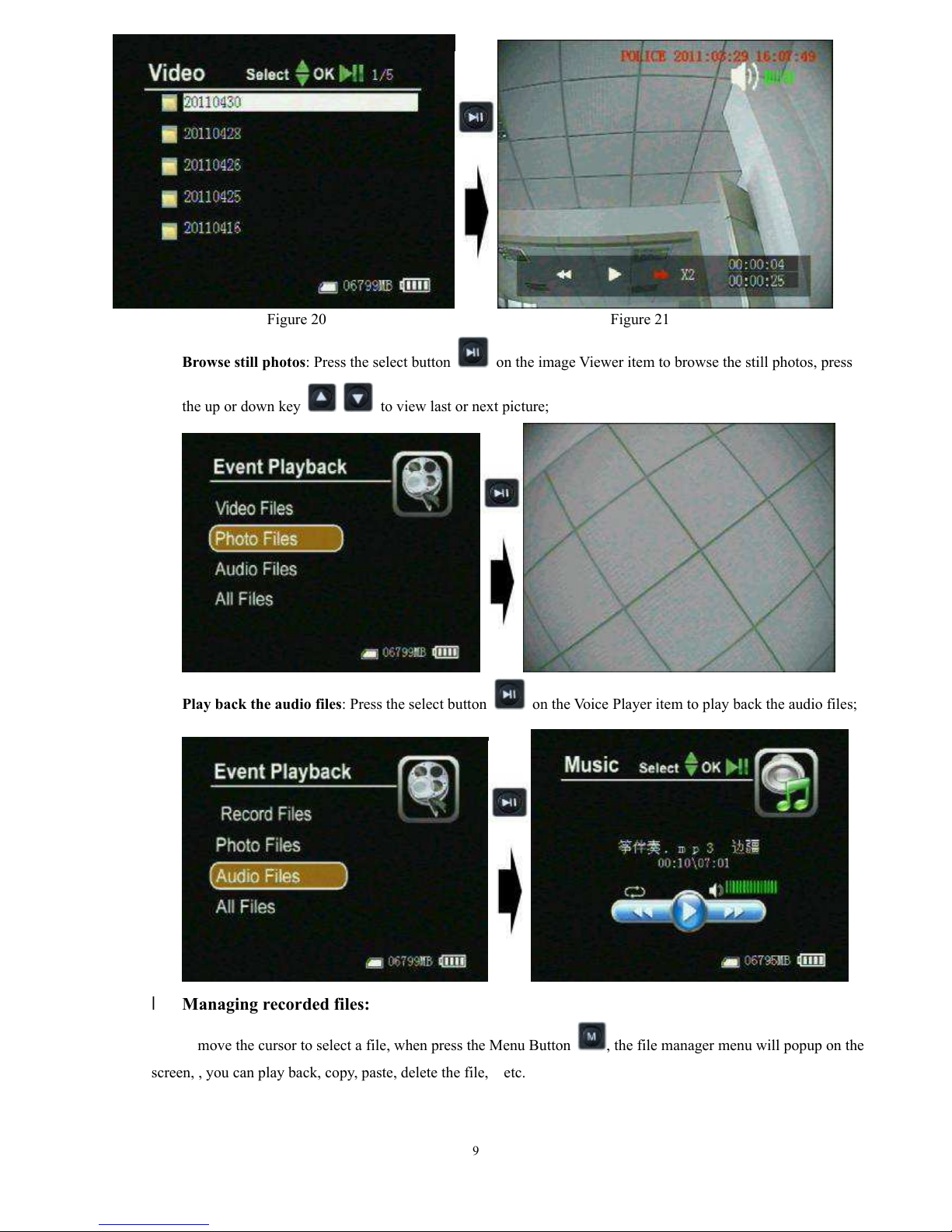
Recording
l
Motion detect recording,the DVRwill be triggered to record when only the videoimage is changed
in the motiondetect red area covered by the redblock, ashow in Figure13,14.
Whenthemotion detectfunctionis on, you canselectthemotionsensitivity (showedasthe
following figure)