
Shellman & Co 6890 Manuel utilisateur

20
21
■Important instructions that should be followed are classied with the following symbol.
• Before using the watch, read this instruction manual carefully
for safe and correct use.
• After reading this manual, keep it handy for future reference.
Safety precautions (Instructions to be followed at all times)
This manual contains the following the instruction that should be strictly followed at all
times to prevent injury to yourself and other persons as well as damage to property.
■Injuries and damages which might be caused by using the watch improperly,
neglecting any of the instructions or precautions contained in this manual are
classied with the following symbols.
CAUTION
Can cause serious injury or death
Can or will cause minor or moderate injury or damage
CAUTION
Warning (caution) symbol followed by instructions that you should be followed
or precautions that you should be observed
WARNING
CONTENTS
1. Features ....................................................................................................... 22
2. Names of Components ............................................................................... 22
3. Before Use ................................................................................................... 23
4. Setting the Time ......................................................................................... 24
5. Using the Repeater (Time Notication) Function ................................... 25
6. Reference Position Alignment ................................................................... 27
7. In the following cases ................................................................................. 29
8. Care of your watch ..................................................................................... 30
9. Specications .............................................................................................. 36
10.Guarantee and After Service ................................................................... 37

22
23
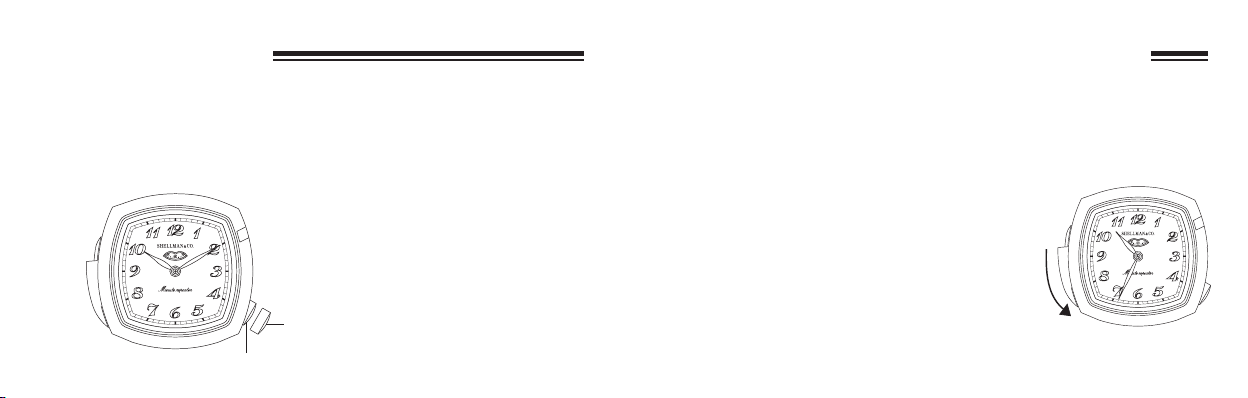
Before using the watch, make sure to check whether or not the hand reference
position (initial positions of hour and minute hands) is aligned correctly. If the
reference position is not aligned correctly, the repeater function of this watch
will not operate properly.
3. Before Use
<Reference Position Confirmation
Method>
Continuously press button (B) until the hands
start to move with the crown in the normal
position. The hour and minute hands rapidly
advance to 12:00 (reference position) and
stop.
* If the hour and minute hands are not at
12:00, refer to “6. Reference Position
Alignment” to realign the hands to the
reference position.
[Reference Position]
Press button
(B) for
at least
2 seconds
Crown
12:00
1. Features
This watch is an analog quartz watch equipped with a “repeater (time notication)
function” that informs the wearer of the current time (hours, minutes) using an electronic
tone by sliding button(A).
2. Names of Components
Seconds
Hours
Button (A)
(side sliding lever)
Button (B)
Minutes
Crown
24
25
5. Using the Repeater (Time Notication) Function
The repeater function noties the wearer of the current time (hours, minutes) with an
electronic tone by sliding button(A).
<Operating Procedure>
When button (A) is slid with the crown in the normal position, the wearer is notied of the
current time with an electronic tone.
(A)
4. Setting the Time
(1) Pull the crown out when the seconds reach 0 seconds (when either 60 or 0 reaches the
center of the seconds window).
(2) Slide button (A) or press button (B) and set the hour and minute hands to the current
time. Each time a button is slid (or pressed), the minute hand can be corrected by 1
minute. Pressing button(A) or (B) continuously causes the hand to advance rapidly.
Return the crown to the normal position in synchronization with a telephone time
signal or other time service.
Note: Always make sure to pull the
crown out when the seconds are at
0 seconds. If the crown is pulled
out when the seconds are not at 0,
the positional relationship between
the hour and minute hands will be
incorrect, and the time shown by
the hour and minute hands and the
time indicated by the electronic
tone will not agree.
Button (A):
Counter-
clockwise
Button (B):
Clockwise
Crown
Correction
position
Normal position
<Distinguishing the Type of Tone>
Tone pitch for hours: A high pitch tone is produced 1-12 times
corresponding to the current hour.
*
There is no distinction made between
AM and PM.
Tone pitch for minutes: A combination high pitch and low
pitch tone sounds in 15 minute
units, while a low pitch tone sounds
for a number of times corresponding
to the number of minutes after the
most recent 15 minute period.
26
27
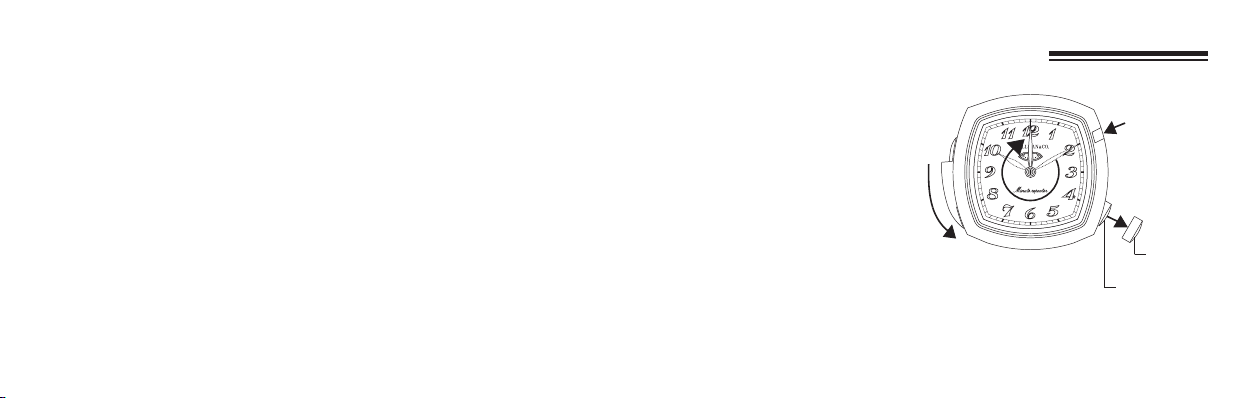
6. Reference Position Alignment
After replacing the battery or in the
cases described below, align the hour
and minute hands at their reference
positions according to the procedure
described below.
* After replacing the battery
* When the time indicated by the
hands and time notied by the
electronic tone do not agree
* When the minute hand is moving
backwards
Crown
Correction
position
Normal position
(A)
(B)
Example: Current time is 10:34
The high pitch tone sounds 10 times corresponding to 10:00, the combination
high pitch and low pitch tone sounds twice corresponding to two 15 minute
periods, or 30 minutes, and the low pitch tone sounds 4 times corresponding
to 4 minutes past the most recent 15 minute period, namely 30 minutes in this
example.

28
29
<Procedure>
(1) Pull the crown out.
(2) Press button (A) and button (B) simultaneously. A conrmation tone sounds after the
hands move by 10 minutes in the counter-clockwise direction.
(3) Press button (B) to align the hour and minute hands at 12:00.
Each time button (B) is pressed, the hands can be corrected in 1/3 minute increments in the
clockwise direction. Pressing button (B) continuously causes the hands to advance rapidly.
* Correction can be made in the counter-clockwise direction by sliding button (A). In
the case of correcting with button (A) however, always make sure to rst advance
the hands to several minutes before 12:00 and nally align the hands at 12:00 in the
clockwise direction by pressing button (B).
(4) Return the crown to the normal position.
This completes reference position alignment. After performing the reference position
alignment procedure, properly reset the time before using the watch.
<Incomplete Reference Position Alignment Procedure Warning Function>
If the crown is pushed in without pressing either of the buttons following the procedure
of step (2), the minute hand moves backwards indicating that the reference position
alignment procedure has not been performed properly. In this case, perform the “Reference
Position Alignment” procedure again by following the procedure described above.
7. In the following cases
1. The time as indicated by the electronic tone and by the hand is off.
The Reference position of the hand could possibly be off the mark.
Please refer to “6. Standard Position Adjustment” to correct the Reference position.
2. The watch’s display is abnormal or it behaves strangely.
When exposing the watch to static electricity or violent impact, in rare cases it could
show an abnormal display or strange behavior (hand keeps rotating, electronic tone
keeps sounding, etc.).
In this case, please refer to “6. Reference Position Alignment” to correct the Reference
position.
3. The minute hand rotates in the opposite direction.
When Reference position adjustment is correctly performed, the warning function
indicating the Reference position adjustment is not yet set, is in operation. Please refer
to “6. Reference Position Alignment” to correct the Reference position once more.

30
31
8. Care of your watch
WARNING
About water resistant
• This watch is not water resistant. It can not be used in an environment under or exposed
to water. Please take precautions when using water, washing your face, in the rain, etc.
• If the crown of the watch or the side slide lever is operated while there is moisture on the
watch, water may penetrate the watch leading to defects.
4. After replacing the battery.
After replacing the battery, be sure to always correct the Reference position by referring
to “6. Reference Position Alignment”.
If this precaution is not exercised, the repeater function of this watch will not operate
properly.
CAUTION
When Wearing your Watch
• Be particularly careful when wearing your watch while holding a small child, to avoid
injury.
• Be particularly careful when engaged in strenuous exercise or work, to avoid injury to
yourself and others.
• Do not wear your watch while in a sauna or other location where your watch may
become excessively hot, since there is the risk of burns.
CAUTION
Handling the Belt (Putting on and Taking off Belt)
• Be careful when putting on and taking off your watch, since there is the risk of damaging
your ngernails, depending on the manner in which the belt is fastened.
WARNING
Handling of Battey
• Keep the battery out of the reach of small children.
• In the event a battery is swallowed, immediately consult a physician.

32
33
CAUTION
Battery Replacement
• If a depleted battery is left in your watch, damage may caused leakage of battery uid.
Be sure to replace the battery promptly.
• Always be sure to select a battery of the correct specications when replacing the
battery.
CAUTION
Always Keep your Watch Clean
• Small amounts of dirt may become trapped in the tiny gap between the crown and case,
making it difcult to pull out the crown. It is recommended to occasionally turn the
crown in its normal position to remove any dirt.
• The case and belt of the watch come into direct contact with the skin in the same manner
as undergarments. Corrosion of the metal or unnoticed soiling such as that caused by
perspiration and dirt can soil sleeves and other portions of clothing.
Keep your watch clean at all times
• Wearing this watch may cause itchiness or rash if you have sensitive skin or certain
physical conditions. If you think there is something wrong, discontinue wearing the
watch immediately and consult your physician.
Possible causes of rashes include:
1. Allergy to certain metal or leather
2. Rust, dirt or perspiration present on the watch's body or belt
• Leather belts may become discolored by perspiration or dirt. Always keep your leather
belt clean by wiping with a dry cloth.
• Do not wear the belt too tightly. Try to leave enough space between the belt and your
skin to allow adequate ventilation.
<Caring for your Watch>
• Wipe any dirt or moisture such as perspiration from the case and glass with a soft cloth.
• Remove any dirt from a leather belts with a dry cloth.
• For a metallic, plastic or rubber watchbelts, wash any dirt off with water. Remove the
small amounts of dirt trapped between the crevices of the metallic belt with a soft brush.
• Do not use solvents (such as paint thinner or benzene) for cleaning, since they may mar
the surface of the belt.

34
35
<Temperature>
• The function of the watch may impaired or the watch may even or stop if the ambient
temperature is outside the range of -10°C to 60°C.
• If the watch is left for an extended period under temperatures outside the normal range
(+5°C to +35°C), uid may leak from the battery, resulting in a considerable shortening
of battery life.
<Magnetism>
• Do not allow the watch to come into close proximity to magnets. If the watch is used
near a magnetic health devices (magnetic necklaces, magnetic elastic bands, etc.) or the
magnets used in the latches of refrigerator doors, earphone of a mobile phone, and so
forth, it will not keep time accurately. If this should happen, move the watch away from
the magnet and reset the watch to the correct time.
<Static Electricity>
• The integrated circuits used in the watch are sensitive to static electricity. If exposed to
intense static electricity, the watch's display may become incorrect.
<Strong Shocks>
• Avoid dropping the watch or subjecting to other strong impacts.
<Chemicals, Corrosive Gases and Mercury>
• If paint thinner, benzene or other solvents or products containing these solvents (including
gasoline, nail-polish remover, cresol, bathroom cleaners and adhesives) are allowed to
come into contact with the watch, they may discolor, dissolve or crack the materials.
Be careful when handling these chemicals. Contact with mercury such as that used in
thermometers may also cause discoloration of the belt and case.
<Storage>
• If you will not be using your watch for an extended period of time, carefully wipe off any
perspiration, dirt or moisture and store in a proper location, avoiding locations subject to
excessively high or low temperatures and high humidity. Don't leave a depleted battery
in the watch for a long time. Be sure to replace it with new one. If battery uid leaks out,
it is likely to damage the watch.

36
37
10. Guarantee and After Service
1. Free guarantee
We guarantee repair free service and adjustment in accordance with the provisions of the
attached guarantee, provided the product has been used normally, for a period of one year
from the date of purchase.
2. Stock period of repair parts
Shellman's standard period for stocking repair parts for each model is generally seven
years. When an exterior parts such as a watchcase, glass, face, hand and crown is
damaged, a spare parts with a different appearance may sometimes be used.
3. Repair perlod
You can make use of fee-charging repair within the parts stock period after expiration of
free guarantee. Please take the watch to the store where you bought it and ask whether it
can be repaired because various use conditions may result in much difference in damage.
Moreover, there wil be cases that the recovery of the original high accuracy is difcult
when the accuracy of the watch is reduced after a long period of use.
9. Specications
1. Caliber No.: 6890
2. Type: Analog quartz watch
3. Time-keeping accuracy:
Within ±20 seconds per month on average (when worn at
normal temperatures of +5ºC to +35ºC/41ºF to 95ºF)
4. Operating temperature range: -10ºC to +60ºC/14ºF to 140ºF
5. Display functions: Hours, minutes, seconds
6. Additional functions
* Repeater (time notication) function
* Incomplete reference position alignment procedure warning function
7. Battery: 280-44 (SR927W)
8. Battery life: Approx. 2 years (when the repeater is sounded for 18 seconds per day on
average)
* Battery life varies according to the number of times the repeater is used.
* Specications are subject to change without notice.
Table des matières


