
Shanling BA1 Manuel utilisateur

BA1
快速入门指南
Quick Start Guide
简体中文
安全指示
4. 不要使用化学剂或清洁剂清洁本产品,这样会损伤产品表面。
3. 请调节适当音量欣赏音乐,以免损伤您的听觉和音响系统,在
插入耳机前,请先将音量调小,不要长时间使用耳机。
执行标准: GB8898-2011; GB/T13837-2012
5. 使用电源适配器,应购买获得CCC认证并满足标准要求。
1. 不可自行开启本机进行维修、拆卸或改造。
2. 请不要在特别热、冷、多尘或潮湿的环境中使用本产品,
要放在有液体的地方。
也不
OP TI CA L
L
R
AN AL OG
OUT
US B/D AC
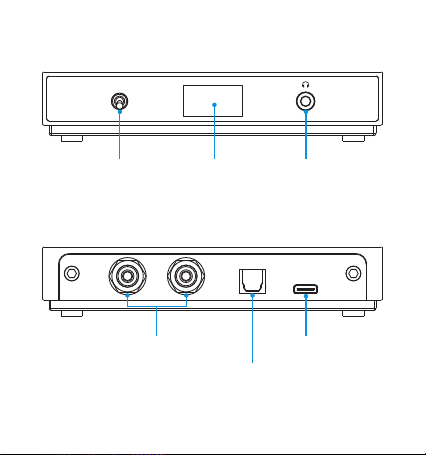
部件名称
Type-C USB数据接口
模拟左右音频输出接口
数字光纤输出接口
PO WE R
ON
OF F
BA 1
电源拨动开关 显示屏 3.5mm耳机插口

配对模式
接收器在开机后或者断开所有蓝牙连接后自动进入配对状态。
操作说明
开机/关机
1. 开机: 关机状态下向上拨动开关到"ON"开机,显示屏显示开机
界面。
2. 关机: 开机状态下向下拨动开关到"OFF"关机,显示屏熄灭。
连接成功
接收器在配对状态下,手机打开蓝牙搜索接收器 ( Shanling BA1)
并连接,连接成功后显示屏上的蓝牙图标显示已连接状态。
回连模式
1. 接收器
新进入配对状态。
失去连接后,重新接收到蓝牙信号可成功回连,否侧重
2. 接收器重新开机后会自动回连上一次连接设备。
1. 未启用USB DAC功能,显示屏显示"PAIRING"字符并闪烁。
2. 已启用USB DAC功能,显示屏蓝牙图标闪烁。

同时连接两个蓝牙设备
1.
备。
接收器在没有连接任何蓝牙设备情况下,方可配对连接蓝牙设
2. 接收器在已配对蓝牙设备情况下,最多可以连接两个蓝牙设备。
断开所有手机蓝牙连接,回到配对状态。
连接断开
音量控制
1. CA模拟音频输出口默认LINE OUT输出,需将手机音量调
大。
R到最
2. .5mm耳机输出口在蓝牙连接时或耳机插入时会限制不超
护音量。
3过保
4. USB DAC模式下调节音量是由软件或系统的音量控制。
注意: a. 使用RCA音频输出口时,先把后端连接的放大器音量
调小,避免音量过大。
b. 苹果手机默认开启蓝牙绝对音量。
c. 安卓手机开启蓝牙绝对音量方式(各品牌手机描述有
所不同):开发者选项 蓝牙绝对音量
3. 为了获取更大的音量,推荐开启蓝牙绝对音量。

注意:
当音频线连接到RCA模拟输出口时,模拟L/R音频有输出;
光纤线连接到数字光纤输出口时,数字光纤信号有输出;
当耳机插入到正面耳机输出口时,数字光纤信号同时有输出,
RCA模拟L/R音频没有输出。
USB DAC功能
当BA1作为USB DAC使用时,首先要使USB线材连接BA1与电脑,
打开BA1会自动进入USB DAC模式,电脑将会自动安装所需的驱
动软件。打开声音设置,在设备列表中把"扬声器 Shanling BA1"
设置为您的默认声音输出设备即可。
固件升级
请登录官网 进入BA1产品页进行相关下载,并
按操作说明进行升级。也可通过"山灵播控"APP进行OTA升级。
www.shanling.com
使用方法
1.
功放、组合音响的信号输入口相连接,或将耳机从正面插入到
接收器耳机输出口(用于立体身耳机输出)。
开机工作状态下,用音频线或数字光纤线将接收器与有源音箱、
2. 用手机、平板电脑或其他带有蓝牙功能的终端搜索 接收器
( Shanling BA1) 的蓝牙设备。
蓝牙
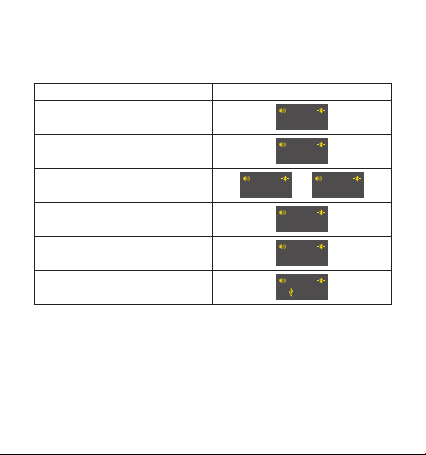
OLED显示屏
编码方式工作OLED屏显示(在播放状态)
状态 显示屏
SBC
AAC
aptX/aptX Low Latency
aptX HD
LDAC
USB DAC
SBC
AAC
APTX APTX LL
APTX HD
LDAC
48K

1. 推荐使用DC5V 1A适配器,使用适配器电压过高可能会损坏机器。
常见问题
2. 无法输出,请尝试更换音频连接线,并确保输出正常。
随机附件
快速入门指南:1份
保修卡:1份
USB A转Type-C线:1根
OP TI CA L
L
R
AN AL OG
OUT
US B/D AC
PO WE R
ON
OF F
BA 1
ENGLISH
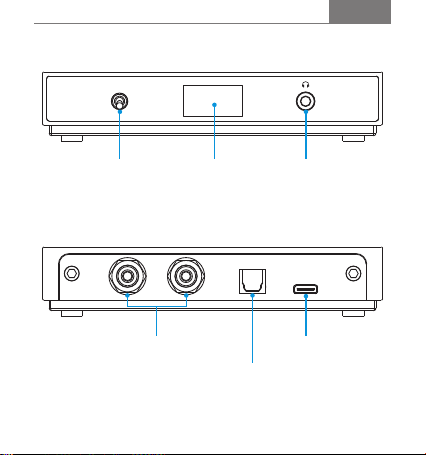
Names of Parts
Power Switch Status Display 3.5mm Jack
Analog RCA Output
Optical Digital Output
Type-C USB

Power On / Off
Operation Instructions
1. Connect the BA1 to a DC5V 1A USB charger or to a USB port on a
computer.
2. Power on: Flip the power switch up into "ON" position. Display will
light up.
3. Power Off: Flip the power switch down into "OFF" position. Display
will turn off.
Pairing mode
1. The BA1 will automatically enter the pairing mode after being
powered on.
- If the BA1 is connected to a USB charger, display will show PAIRING ." "
2. The BA1 will also enter the pairing mode automatically after all paired
Bluetooth devices are disconnected.
- If the BA1 is connected to computer's USB port, pairing mode will be
indicated by flashing Bluetooth icon.
Pairing process
While the BA1 is in pairing mode, go to Bluetooth settings on your
smartphone/tablet. Turn on Bluetooth and search for available devices.
Click on "Shanling BA1" to finish pairing process.
Table des matières
Autres manuels Shanling Convertisseur de média


