Seekr WX1603 Manuel utilisateur

Seekr VR-3D Camera WX1603
Accessories
Seekr VR-3D camera (including battery)×1
Micro USB cable×1
Instruction×1
Flocking protective bag×1
Parts Introduction
(1) WIFI function indicator lamp
(3) Photograph-video indicator lamp
(2)Power indicator lamp
(4) Startup & shutdown/ shutter button
(5) Microphone
(7) TF card slot
(6) HD lens
(8) iPhone interface
(9)Charging indicator lamp
(11) Micro USB interface
Using and Operations
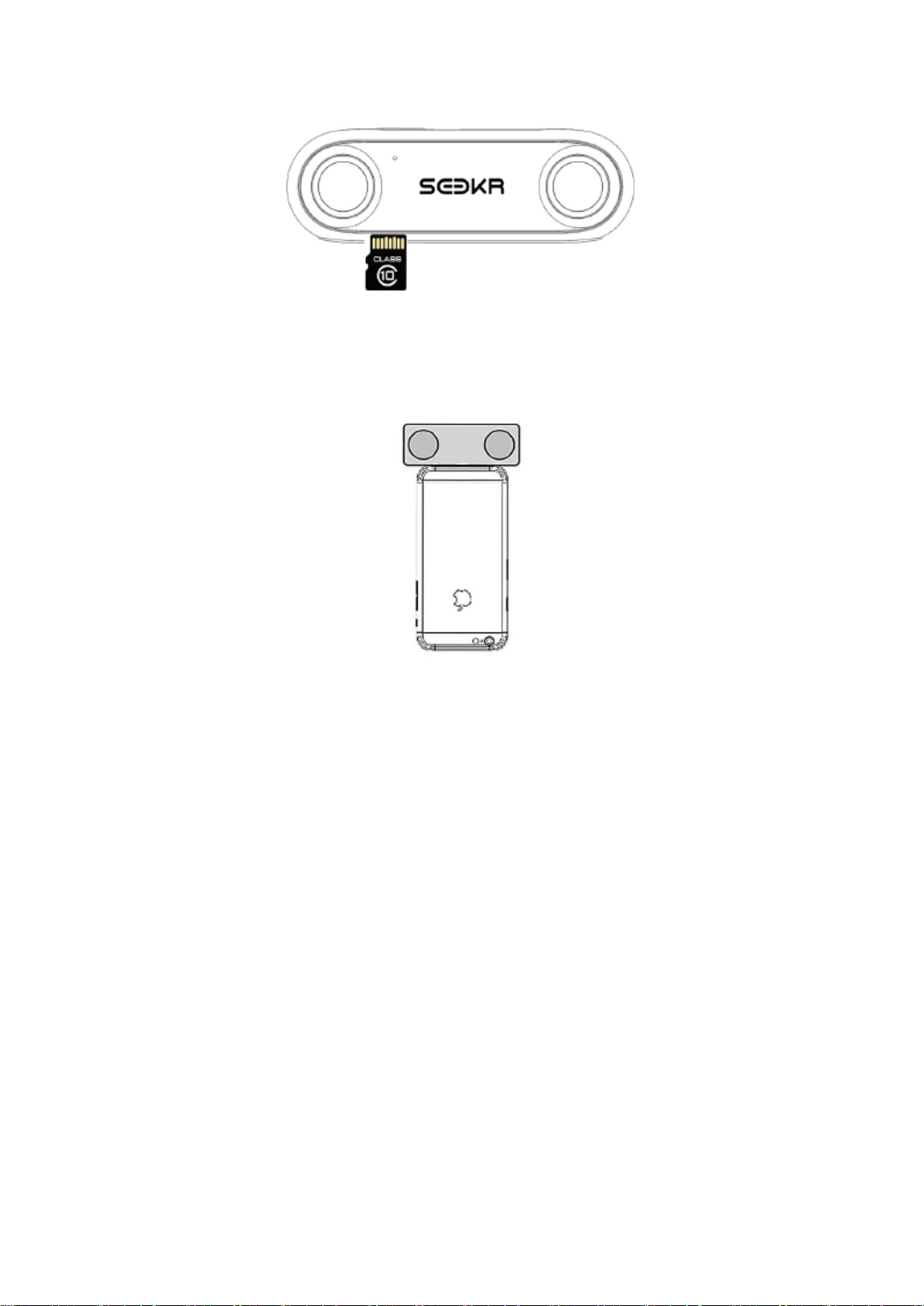
1. Operations of TF card
(10) Buzzer hole

Insert: push the TF card inward from the TF card slot from bottom of camera. (Please use the TF card of Class 10
and above)
Exit: TF card shall pop out the card slot by pressing the edge of the TF card.
2. The camera Startup:
Method 1:The camera can be started up by connecting the camera with your iPhone 7 Plus, iPhone 7, iPhone
6s Plus,
iPhone 6s, iPhone 6 Plus and iPhone 6 through the iPhone interface.
Method 2:The camera can be started up by pressing the "Startup & Shutdown/ shutter button" 2s when the
camera is powered off.
3. The camera Shutdown:
The camera can be shut down by pressing the "Startup & Shutdown/ shutter button" 2s when the camera is
powered on.
When the camera is keeping the “turning on” status, if no operation for 1 minute, the camera will
automatically shut down.
4. photograph/video mode settings
The camera mode can be switched between the photograph and video mode settings through the mobile APP ,
when the camera is connected with the mobile phone through the mobile interface or WIFI.
5. Photographing/videoing
One photo can be shot by pressing "Startup & Shutdown/ shutter button" momentarily when the camera is in the
photographing mode.
Videoing can be started or stopped by pressing "Startup & Shutdown/ shutter button" momentarily when the
camera is in the videoing mode.
6. WIFI switch

The WIFI shall be switched off automatically when the camera is connected with the iPhone through the mobile
interface; Otherwise , the WIFI is switched on.
7. WIFI connection
When the WIFI indicator light (blue)is on, open the mobile phone and set throughWiFiselect network
Seekr_xxx
input initial password 12345678,then,complete the connection. Wireless control can be carried out
by APP after being connected.
8. Battery charging
Battery can be charged through the USB Micro interface of the device. Equipment supports only 5V DC power
supply, can be used PC or 1A 5V DC charger for charging.
9. Forced outage of equipment
When the device unexpectedly crashes, The equipment can be powered off forcibly by pressing "Startup &
Shutdown/ shutter button" 10s.
10. TF card exception prompt
When the "Power / Shutter button" is activated, the buzzer sounds 3 beeps, indicating that your TF is abnormal.
11. Upgrade
When the camera APP receive an upgrade notification, clicking on the upgrade, then the Wi-Fi function indicator
lamp,power indicator lamp and photograph-video indicator lamp will bright out one by one.
Until the upgrade is complete and successfully, the camera will automatically restart.
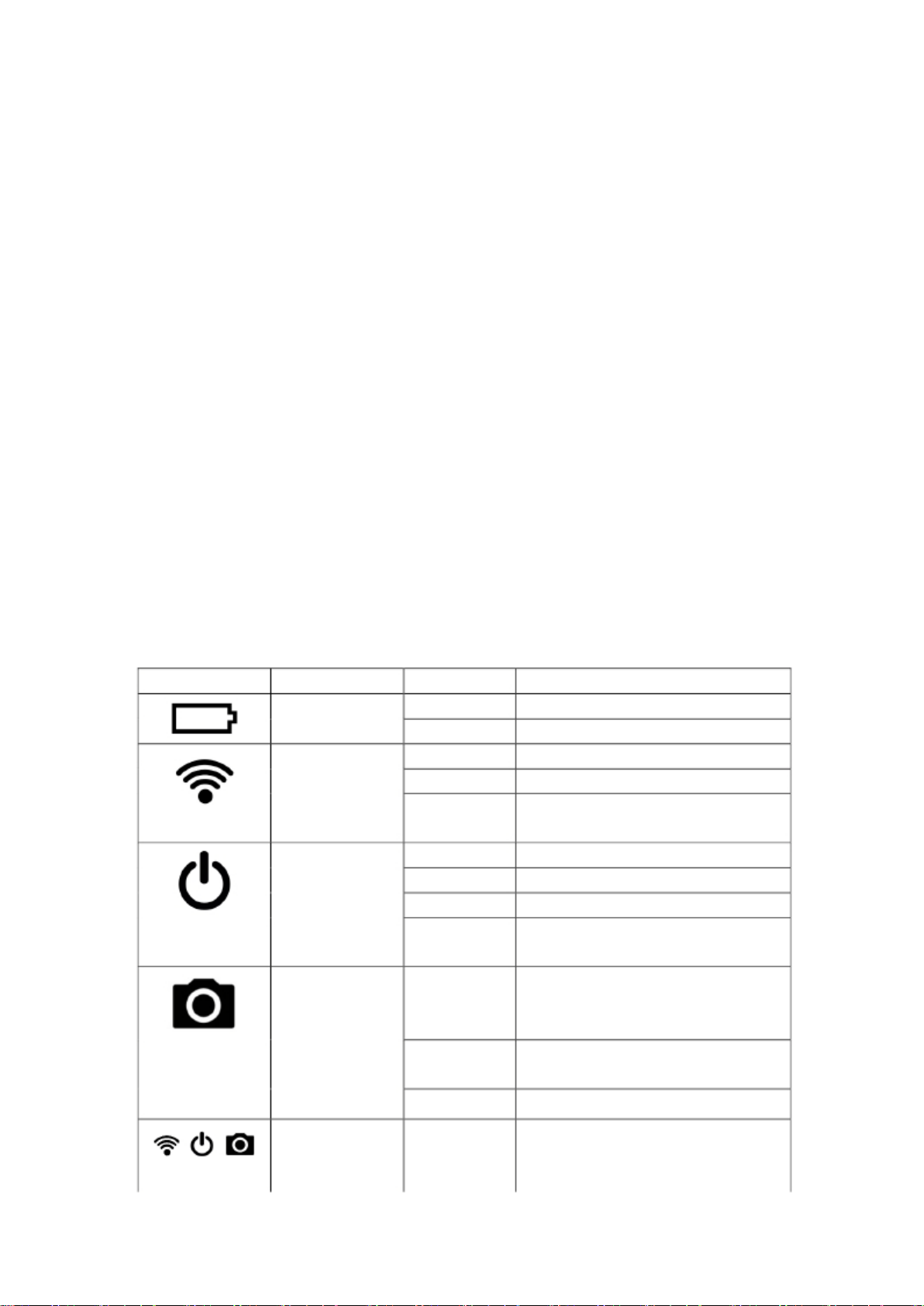
Introduction of light
Icon Categories State
light is on
In charging
Explain
Charging indicator lamp OFF
The blue light is on
Boot does not light
The battery is full.
Wi-Fi is turned on normally
Wi-Fi off
WIFI indicator lamp Blue light continues WIFI is abnormal.
to flash slowly
OFF
Yellow light is on
The device is not turned on
The device is initialized in power on
Power indicator lamp The blue light is on The device is operating normally
Red light continues Battery low
to flash slowly
One picture can be acquired by pressing "Startup &
The blue light Shutdown/ shutter button" momentarily in the
flashed
Photograph/video photographing mode.
indicator lamp
Upgrade indicator
Blue light continues
to flash slowly
OFF
Blue marquee
In videoing
The camera is in photographing or videoing.
The Wi-Fi function indicator lamp,power indicator
lamp and photograph-video indicator lamp will bright
out one by one until the upgrade is complete.

Specification and Parameters
CPU:
Lens:
Dual-core, clocked at up to 1.25GHz
7-layer all-glass, FOV 180°, F2.2
Photo resolution: 3K×3K(3D)
Video resolution:
WIFI:
Battery:
3K×3K@15fps(3D),4K×2K@15fps(3D),2K×1.5K@30fps(3D),1080p@60fps(3D)
802.11 b/g/n/ac
non-detachable, 1000mAH
Storage requirement: TF Class10, 32GB-128GB
Charging requirement:
DC 5V/1A
Product Supervision
Notes
The camera is not waterproof.
It is normal that the camera gives out heat during using.
The power consumption of the camera shall be quickened after turning on the WIFI function.
It is recommended to charge the camera once every two months if it would not be used for a long time to
prolong the service life of the battery.
After-sales service
Thank you for buying Seekr VR-3D camera of Shenzhen Onething Technologies Co. Ltd, Warranty service
depends on what you buy in the area and may be required to provide details of the purchase documents. Any
inquires for help please visit http://www.seekr.com.cn for more information or call 00864001098880.
Limited warranty service is only applicable for the sold goods from retail channels, and is not suitable for
refurbished products. Warranty service is not including the abuse or damage caused by people, the normal wear
usage and the transportation caused by accident damage. The highest liability is not more than the official purchase
price of the product. To view complete warranty terms please visit http://www.seekr.com.cn.