SCHOK FLIP SC3218B Manuel utilisateur

QUICK GUIDE
(Model number SC3218B / SC3218T)

2

3
Conventions used in this guide
In this user guide, we use the following symbols to indicate useful and important information:
NOTE: Notes, usage tips, or additional information.
Warning
Situations that could cause injury to yourself or others.
Caution
Situations that could cause damage to your device or other equipment.
Tips
Suggestions and advise that can help in the usage of the device.

4
Index:
Basics
Specifications
Inbox
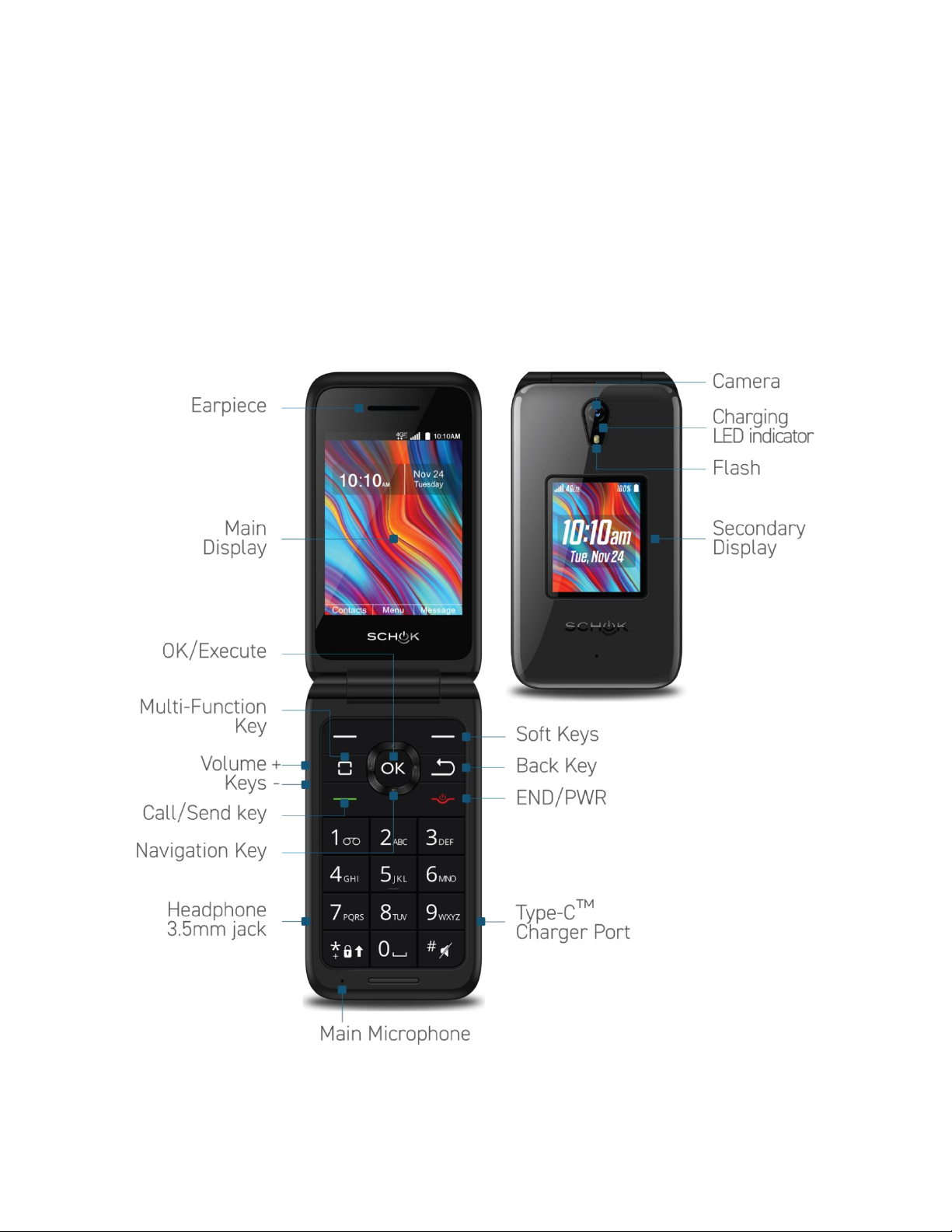
Phone overview
Basic operation
Battery
Inserting the battery
How to insert the device SIM card and Micro SD card
Turning phone On or Off
How to navigate the operating system of your Schok flip
The left and right soft keys
The home screen and Status bar
Daily operation use
How to make phone calls
To answer, accept or reject phone calls
To end or reject a phone call
To make a phone call from the contact list
The recent phone call window
Switching between current phone calls
Setting up your voice mail
Checking up your voice mail
Schok Virtual mouse
Safety and Precautions

5
Basics:
Specifications:
Model number: SC3218T
Operating system: AOSP Android™ 11 (Go edition)
Display Size & Resolution: 3.2” 320 x 240 (QVGA) (Color)
Secondary Display: 2” 176 x 220 (Color)
Processor: Qualcomm® QM215
Processor speed and number of core: 1.2GHz / Quad-Core
Graphic processing unit (GPU): Adreno 308 @ 485MHz
Memory (RAM): 1 GB DDR 3
System and User Memory: 8 GB
SD Card Slot max capacity: 128 GB
Sim card slots and SIM size: 1 Nano SIM card
Rear Camera (primary): 5MP with flash
Front Camera: Using rear camera and 2nd display as viewfinder
Rear camera video recording: VGA @ 30 FPS
Battery type: Lithium ION rechargeable
Battery capacity: 3.8V 2,000 mAh / 7.6Wh
Battery limited voltage: 4.35V
Battery standard: UL2054, 1/CP6/50/59
Wi-Fi and band: 802.11/a/b/g/n. 2.4GHz
GPS: GPS & AGPS
Bluetooth: 4.2 with BR/EDR + BLE
USB port: Type-C™ connector
G-Sensor: Yes
Barometer sensor: Yes
Light and Proximity sensor: Yes
Phone communication standards: 4GLTE/VoLTE
Phone bands 2G: 2G: GSM 850/900/1800/1900
Phone bands 3G: UMTS Band 2/4/5
Phone CDMA bands: BC0 / BC1 / BC10
Phone bands 4G: 2/4/5/12/13/17/25/26
Phone bands 4G: 28(A&B)/30/41/66/71
Hearing Aid Compatibility: M3 / T4
Water rating: IPX2
Dimensions: 4.53 x 2.44 x 0.81 inches
Phone weight with Battery: 5.50oz / 157g
Battery weight: 1.27oz / 36g
Structure outside & Inside: Plastic
Phone electric input: 5.0V ± 1.0A
USB Wall charger input: 100-240V ~ 50/60Hz 0.2A
USB Wall charger output: 5.0V ± 1.0A

6
In Box
The Schok flip comes with the following items included in the box:
1. Schok flip phone (SC3218)
2. Rechargeable Lithium-Ion battery (SB2000)
3. USB Type-C™ charging and sync cable (2.62ft / .8m)
4. Quick start guide
5. Safety precautions guide.
Phone Overview

7
Basic operation
Battery
TIP
Browsing the web frequently, extended data and GPS usage, being in a poor signal area, or
subjecting the device to extreme temperatures will cause the battery to discharge quicker than
normal. To increase battery life, limit your data usage, or turn off location, WiFi and Bluetooth
when not required. Battery operating time gradually decreases over time.
Your battery can be fully charged in less than three hours. In order to have the battery at
optimal operation, never leave the device charging for extended periods of time. As a good rule
of thumb, disconnect the charging cable after battery has been fully charged.
Warning
The battery of the Schok flip is removable. Only use a Schok authorized replacement battery,
otherwise it can damage your phone and will lose its warranty. The Schok battery replacement
model number for this device is SB2000.
Inserting the Battery
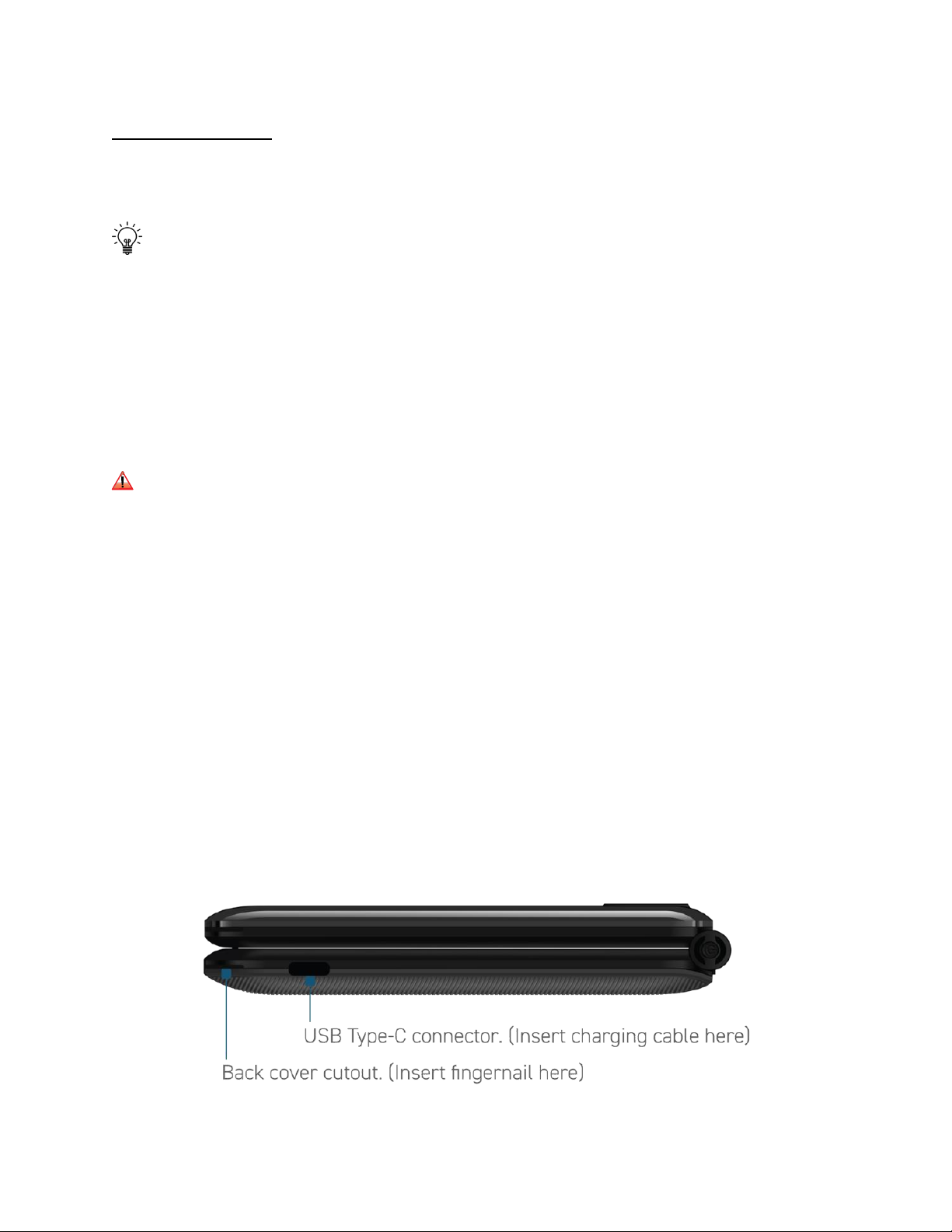
1. With the phone facing down, insert fingernail into the back cover cutout and gently but
firmly lift and remove the back cover.
2. Insert the removable battery making sure that the three gold connectors are lined up to
the phone gold connectors.
3. Put the back cover back in place, press down along all the edges of the phone, every
time there is a clicking sound, the back cover is being secured in place.
4. Connect the USB-Type-C side of the cable to the Schok Classic USB Type-C connector.
5. Connect the USB side (Larger connector) of the cable to the wall charger USB port.
6. Connect the phone wall charger to the electric outlet.
7. Charge your device for at least two hours.
How to insert the device SIM card and Micro SD card

8
1. With the phone facing down, insert fingernail into the back cover cutout (Image on page
7), gently but firmly lift and remove the back cover.
2. Remove the battery by inserting the fingernail at the bottom of the battery. It is marked
“Pull/Jale” and lift the battery out.
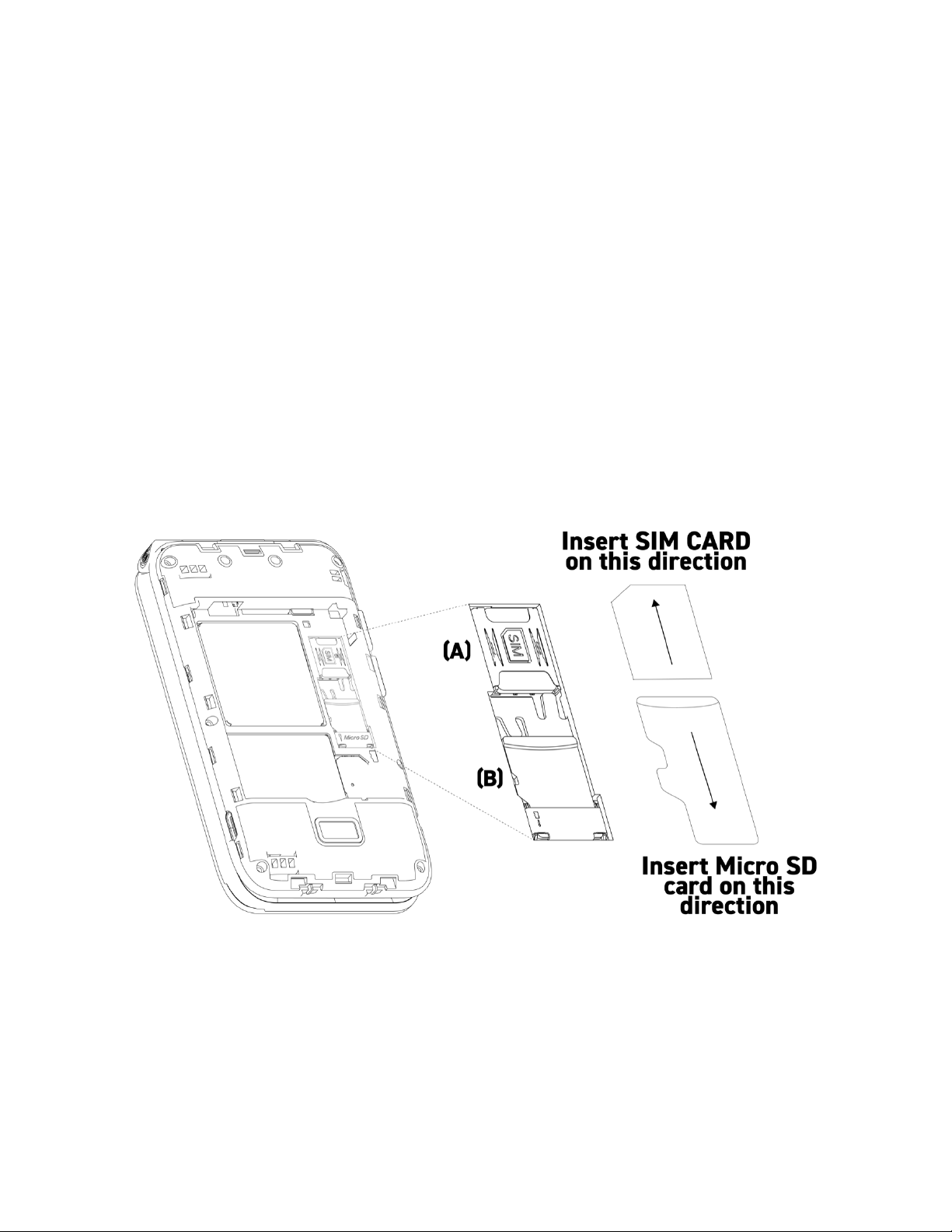
3. Locate the slot for the Nano SIM card (A) and slide it completely until there a natural
stop by reaching the end of the tray. The angled cut of the SIM card must be facing the
left space of the SIM card slot, the SIM card gold-colored connectors must be facing
down.
4. To insert or remove a Micro SD Memory Card please repeat number one and number
two of this list.
5. Locate the slot for the micro SD card (B)
6. Slide the Micro SD card until you feel a natural stop by reaching the end of the tray.

9
Turning phone On or Off
To turn ON; Firmly, “press and hold” the power button for three seconds.
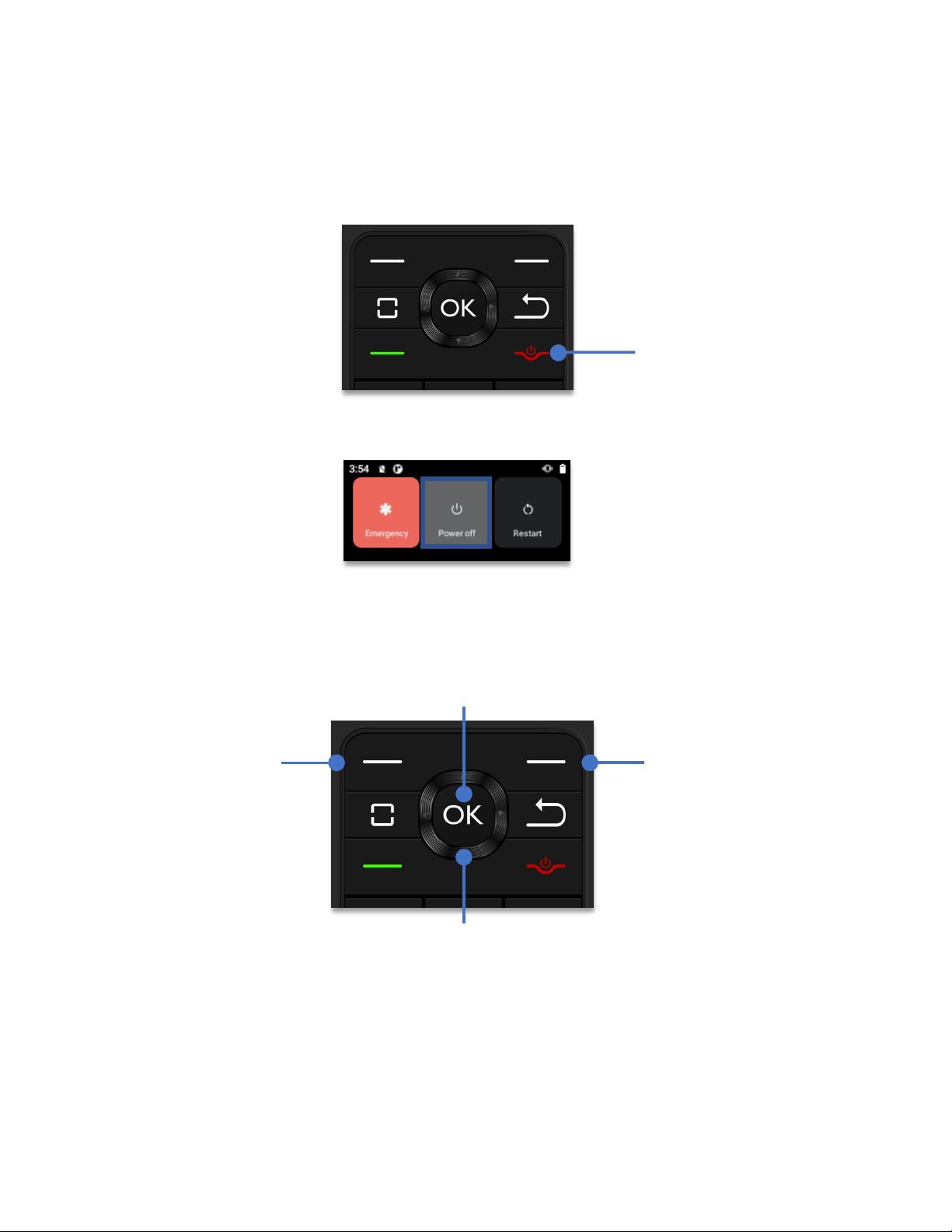
To turn OFF; Firmly, “press and hold” the power button for one second. A menu with three
options will appear, using the Navigation key, highlight the “Power off” icon, click the OK key.
How to navigate the operating system of your Schok flip
By pressing the 4-way Navigation Key you can scroll and select items. Think of it as a compass in
which you have UP, DOWN, LEFT and RIGHT. When the item is selected, simply press the OK
key.
The Left and Right soft keys
The soft key is an App or feature-driven multi-function key that when available, allows to select
certain applications or commands at either the left or the right bottom of the display.
Power ON / OFF
button
Right Soft Key
Left Soft Key
OK Key
Navigation Key

10
The Home screen and Status bar
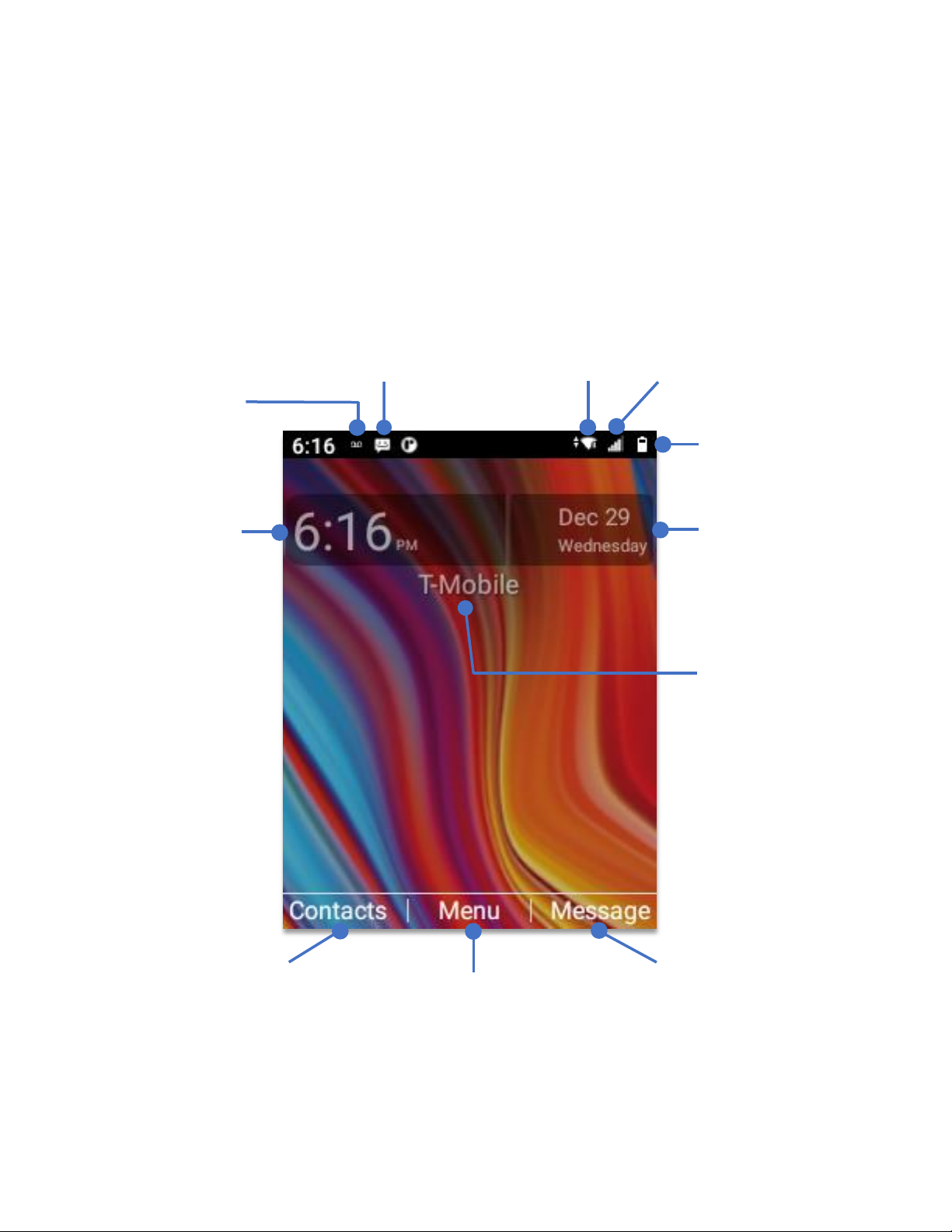
The Home Screen is where you can see the time, date, and access the shortcut to open
contacts, messages, or open the menu apps window.
The Status Bar which resides on top of the home screen shows the phone vitals such as battery
level, signal strength, time, and notifications such as alarms, messages, calendar events to
mention some.
Right Soft Key
Left Soft Key
OK Key
Time
Date
Battery level
Cellular signal
strength
WiFi signal strength
Message available
Voice mail
available
Phone is
connected to
cellular signal by
displayed carrier
Ce manuel convient aux modèles suivants
1
Table des matières
Autres manuels SCHOK Téléphone portable