
Sanyo ESR-T100 Manuel utilisateur

ESR-T100
SIRIUS Satellite Radio Tuner
User’s Manual

1
Thank you for purchasing this product.
Please read this user’s manual in its entirety before operating this equipment.
After reading this manual, be sure to keep it in a handy place (e.g., glove compartment).
Check the contents of the enclosed warranty card and keep it carefully with this manual.
Contents
1. FEATURES ................................................................................................................... 1
2. PRECAUTIONS ........................................................................................................... 2
3. INSTALLATION AND WIRING CONNECTIONS ................................................. 4
4. SYSTEM EXAMPLES................................................................................................. 7
5. CONTROLS.................................................................................................................. 8
6. SIRIUS OPERATION................................................................................................10
1. FEATURES
CD-Changer (CDC) Cable Connection
RCA Output
Single Antenna Terminal
18 Channel Presets
CD-Changer (CDC) Pass-through Function

2
2. PRECAUTIONS
1. Upon initial startup or when starting
after turning off the backup power
supply, the receiver will take longer to
play audio and may take up to 30
seconds after reception of the SIRIUS
signal before audio is heard.
2. Channel names are stored in memory
30 to 60 seconds after start of normal
operation. If the power is turned off
before the text data is written, it may
not be correctly displayed on the next
power up. Perform a reset operation if
no text data is displayed.
3. If the receiver ever stops functioning or
appears unresponsive, reset it.
Resetting: Disconnect the SIRIUS
Receiver power cable (the CDC cable
if connected to the CDC and the 4-pin
power cable during standalone
operation), wait 10 seconds and
connect it again. The last channel,
preset memory and other data stored
in the receiver are deleted returning it
to its default settings.
4. A CDC and standalone operation
switch is provided on the underside of
the receiver. The switch is set to CDC
position at the time of shipment. Do not
set this switch to the standalone
position when using the CDC cable
(headunit operation).
5. The receiver becomes warm during
operation; this is normal and not a
cause for concern.
6. Do not touch the connector pins on the
receiver as this may damage the ICs
inside the unit.
7. No station is selected when the [DSP]
button is pressed quickly after a
channel is changed. This is because
button operations are not accepted
until the channel is confirmed. It takes
between 1.5 to 5 seconds to change
channels.
This equipment has been tested to comply
with the limits for a Class B digital device,
pursuant to Part 15 of the FCC Rules.
These limits are designed to provide
reasonable protection against harmful
interference in a residential installation.
This equipment generates, uses, and can
radiate radio frequency energy and, if not
installed and used in accordance with the
instructions, may cause harmful
interference to radio communications.
However, there is no guarantee that
interference will not occur in a particular
installation.
If this equipment does cause harmful
interference to radio or television reception,
which can be determined by turning the
equipment off and on, the user is
encouraged to consult the dealer or an
experienced radio/TV technician for help.
CAUTION
USE OF CONTROLS, ADJUSTMENTS, OR
PERFORMANCE OF PROCEDURES OTHER
THAN THOSE SPECIFIED HEREIN, MAY
RESULT IN HAZARDOUS RADIATION
EXPOSURE.
THE COMPACT DISC PLAYER or
COMMANDER SHOULD NOT BE
ADJUSTED OR REPAIRED BY ANYONE
EXCEPT PROPERLY QUALIFIED SERVICE
TECHNICIANS.
CHANGES OR MODIFICATIONS NOT
EXPRESSLY APPROVED BY THE
MANUFACTURER FOR COMPLIANCE
COULD VOID THE USER’S AUTHORITY TO
OPERATE THE EQUIPMENT.
INFORMATION FOR USERS:
CHANGES OR MODIFICATIONS TO THIS
PRODUCT NOT APPROVED BY THE
MANUFACTURER WILL VOID THE
WARRANTY AND WILL VIOLATE FCC
APPROVAL.
3
What is SIRIUS Satellite
Radio?
Over 110 channels of the best
entertainment and completely
commercial-free music for your car,
home or office.
Only SIRIUS has over 60 original
music channels, from today’s hits to
R&B oldies to classical masterpieces.
From authentic country and real
bluegrass to cool jazz, hot latin, reggae,
rock, and many more. Best of all, it’s all
completely commercial free.
Sirius also has over 50 channels of
world-class sports, news and
entertainment. Included as part of your
subscription you get up to 16 NFL
games a week, up to 40 NBA games a
week and up to 40 NHL games a week.
Coupled with great sports news from
ESPN, the SIRIUS sports offering is
unrivaled. And don’t forget a host of
other great news and entertainment
like CNBC, Fox News, Radio Disney
and E! Entertainment Radio.
With SIRIUS, the emphasis is on the
music and entertainment you want.
The music is hosted by Sirius Jockeys,
who are true experts. They back up
the music with compelling information
about the song being played, and they
understand that sometimes it’s best to
just let the music speak for itself.
Rely on SIRIUS rocket science for
superior coverage
Only SIRIUS has three powerful
satellites that fly directly over the US
ensuring coast-to-coast coverage with
high elevation angles. This gives the
satellites a “clear line of sight” to your
car or home with much less concern for
buildings, trees or other objects that
might block conventional satellite
signals.
Once you experience over 110
channels of digital entertainment, you’ll
never want to leave your car. For more
information, visit www.sirius.com.
4
3. INSTALLATION AND WIRING CONNECTIONS
Before Installation
1. Before starting, be sure to disconnect the battery’s negative “–” terminal to
prevent accidents due to short-circuits.
2. Location – Consider safety and operability when selecting a place for installation.
Avoid the following.
• Locations where the unit will hamper or interfere with driving.
• Locations where the unit could injure passengers if the car stops suddenly.
• Locations exposed to direct sunlight or hot air from the heater, etc.
• Locations where the unit may be exposed to rain or water.
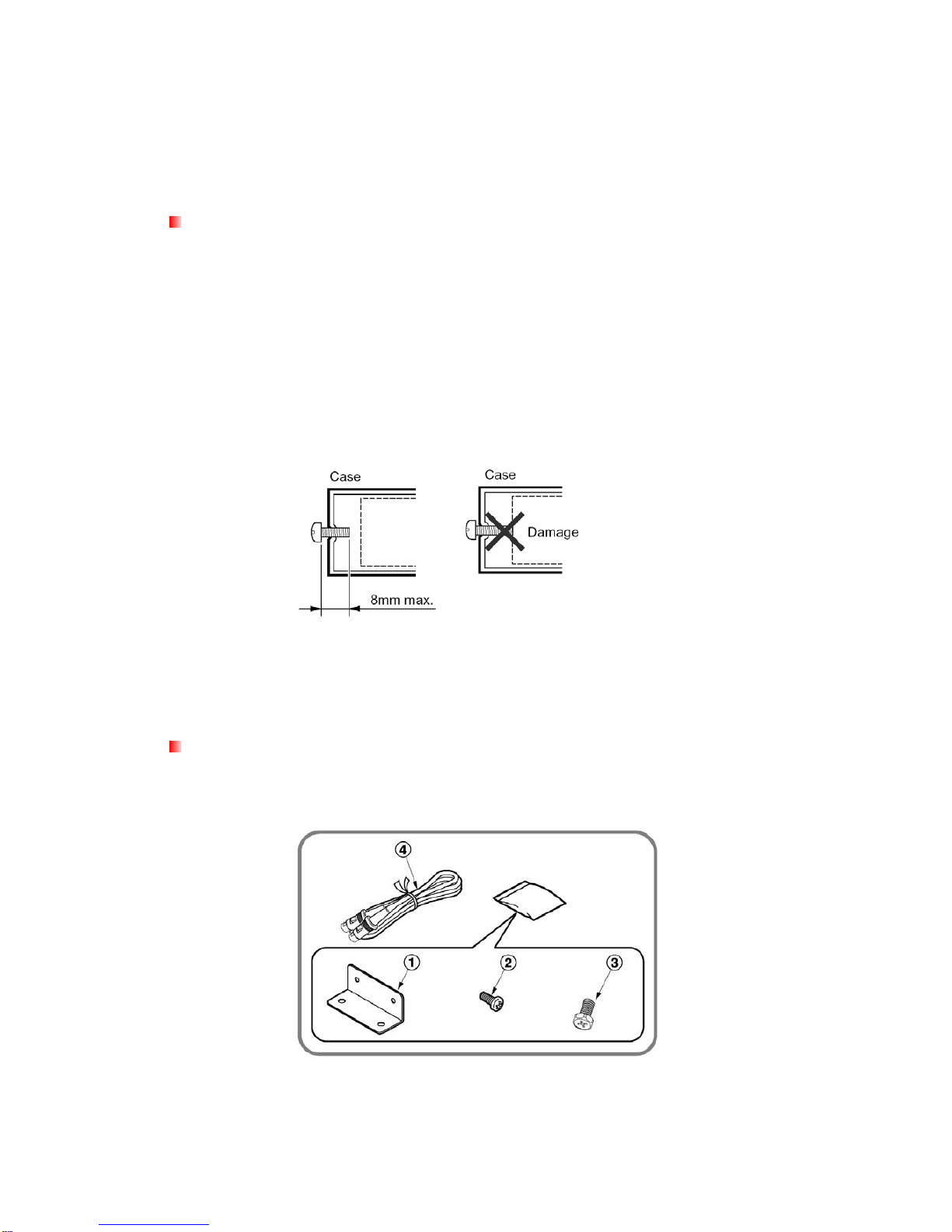
3. Be sure to use the included screws and brackets. Screws other than those
supplied could damage the unit.
4. When drilling holes to mount the receiver, be sure to check beforehand that
there are no obstructions or items on the other side that could be damaged (fuel
tank, wire harnesses or other electronic devices).
Accessories
Mounting bracket .............. 2 pieces
Mounting screw(M4).......... 4 pieces Screw(M6) ......................... 4 pieces
CDC cable ......................... 1 piece
5
Installation Example (Installing the unit under the driver’s seat)
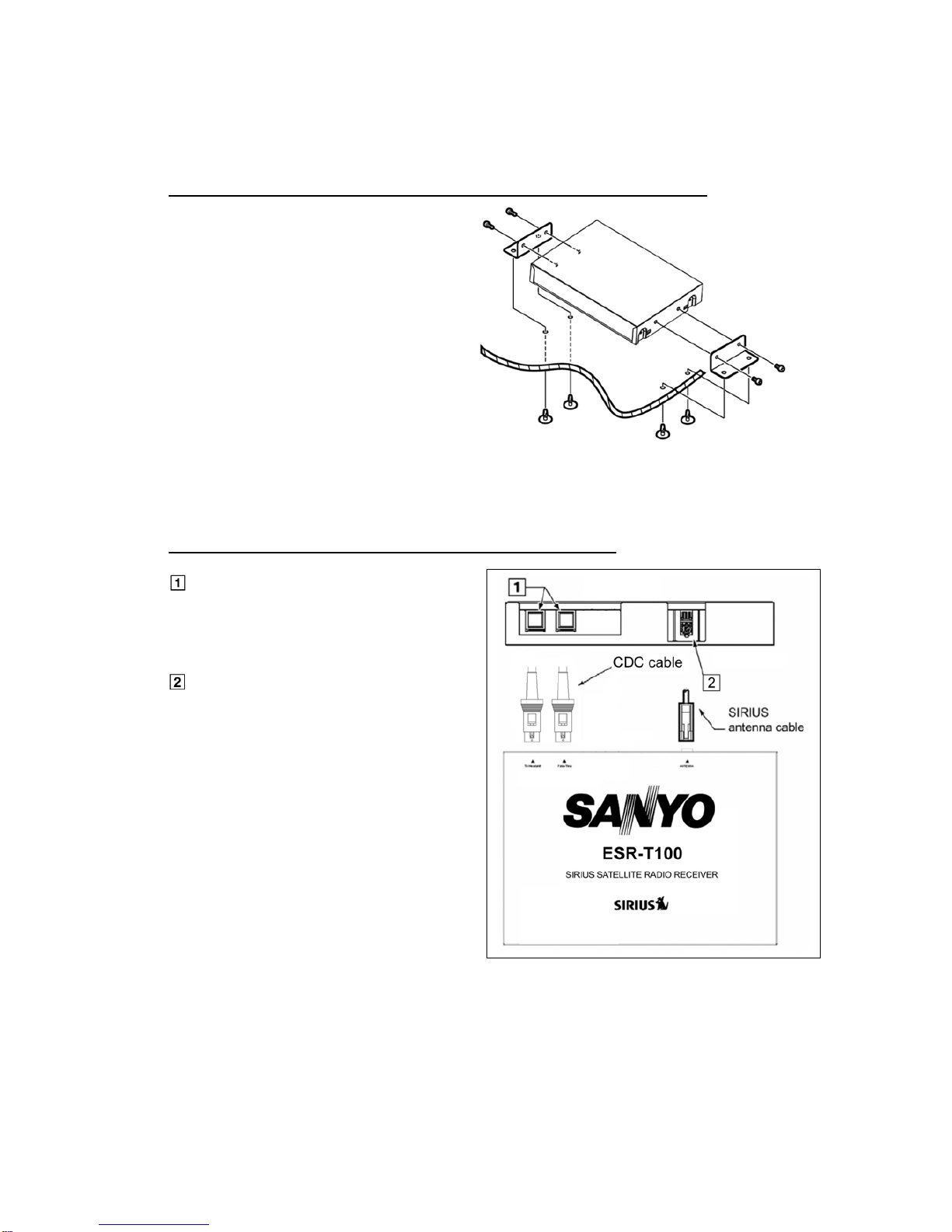
1. Attach the mounting bracketsto
the sides of the ESR-T100 using the
screwsprovided.
2. Select the location on the floor mat.
Drill holes in the floor mat to match
the positions of the holes in the
mounting brackets.
3. Insert the canoe clipsfrom the rear
of the floor mat and install the
SIR-CL1.
There are three mounting holes on
each side of the SIR-CL1. Select
the appropriate holes to match to
the installation location.
Connection Example and Identification of Parts
CDC input/output terminal
Connect to the main unit or CD/MD
changer using the CDC cable as
specified.
ANTENNA terminal
Connect to the SIRIUS antenna (sold
separately)
6
How to Connect
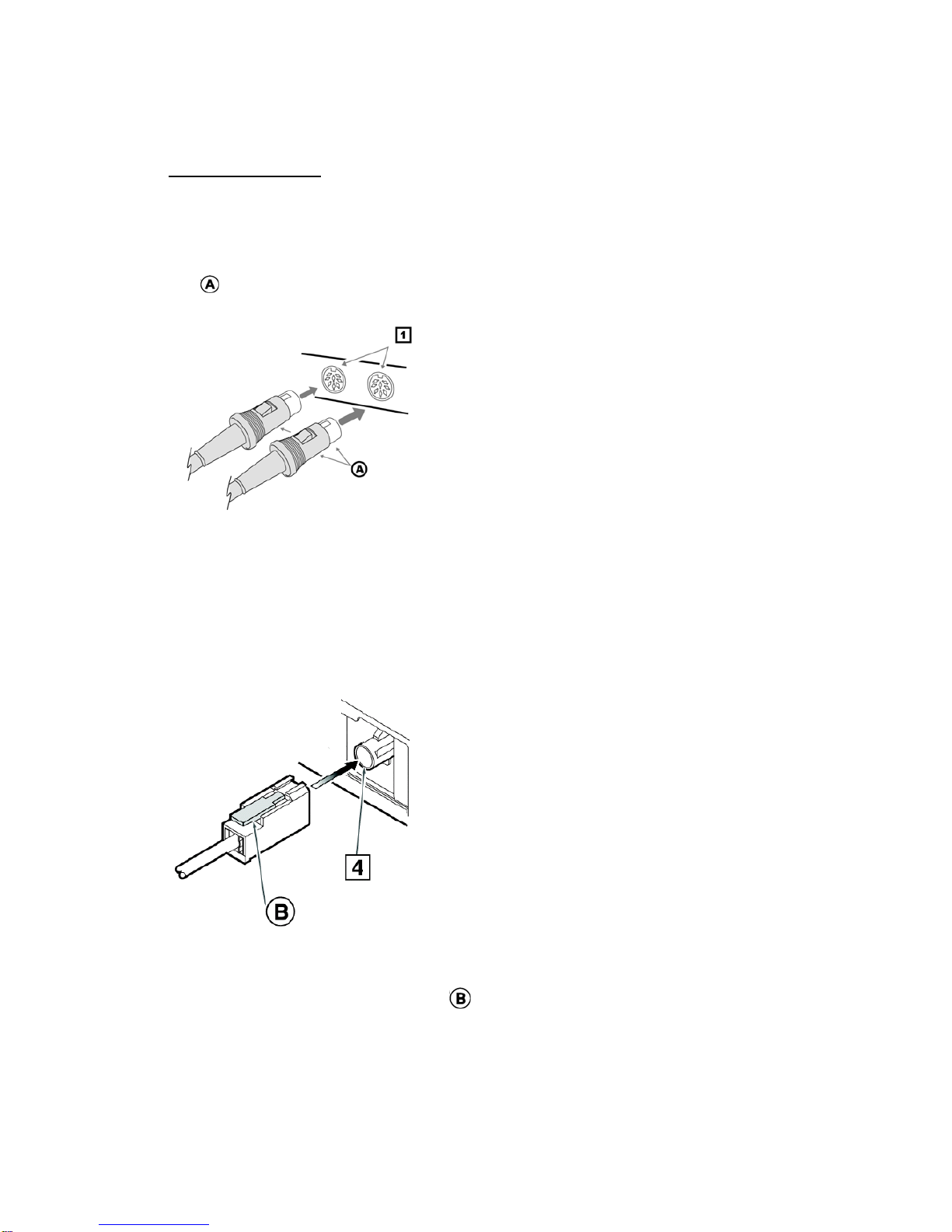
1. CDC Cable
Orient the CDC cable in the direction
shown in the figure and insert it until it is
locked in position. To remove the CDC
cable, pull it by lightly grasping the slide
cap in your fingers.
2. SIRIUS antenna
Make sure power is “Off”.
Connect a SIRIUS antenna (sold
separately) to the SIRIUS antenna
terminal and press until locking tab
engages.
To disconnect, make sure poweris “Off”,
then press the rear of the locking tab
to release.
7
4. SYSTEM EXAMPLE
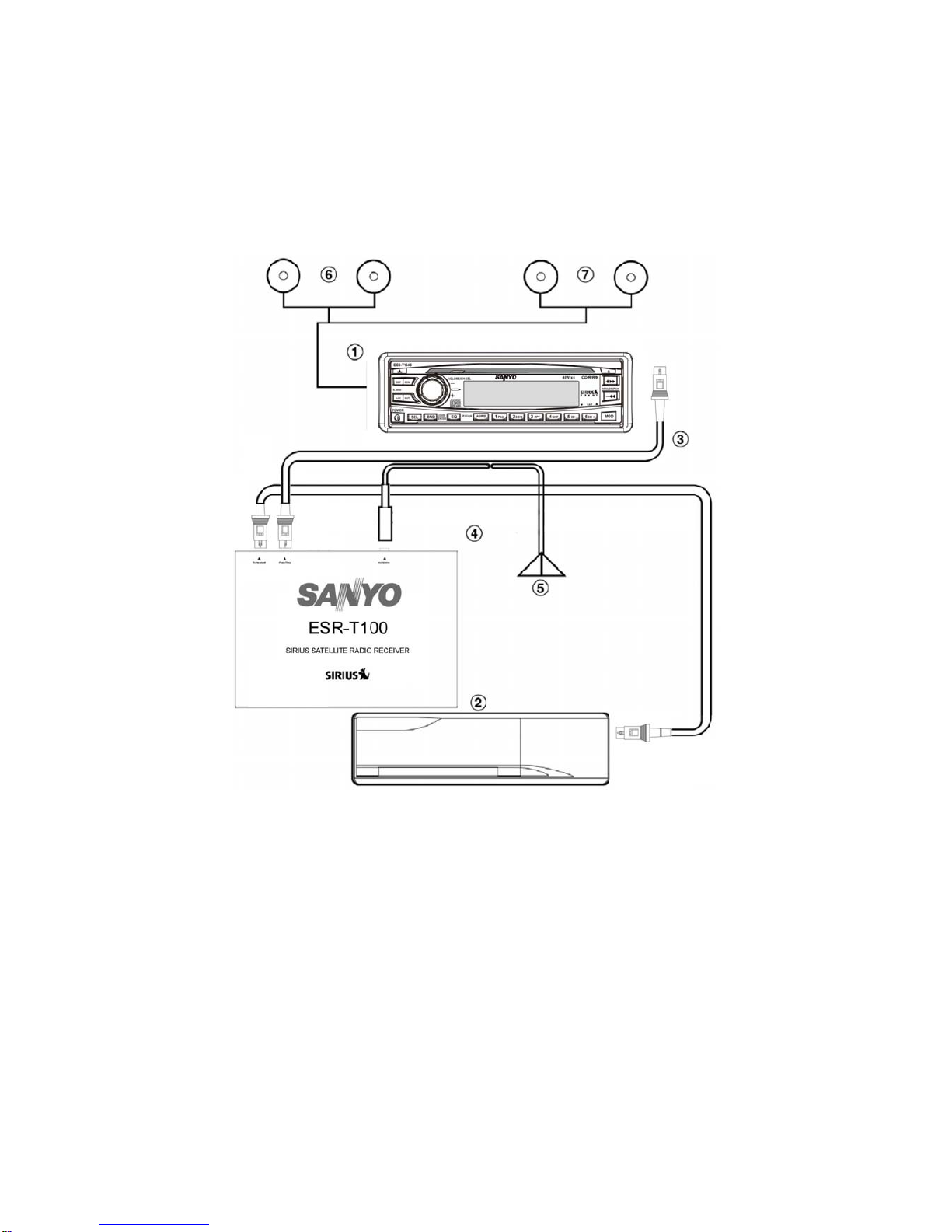
Main unit compatible with CDC
connection
CD changer compatible with CDC
connection
CDC cable (provided with the
SIR-CL1)
Using this cable, connect the
SIR-CL1 to the main unit.
CDC cable (provided with the CD
changer)
SIRIUS antenna (sold separately)
Front speakers
Rear speakers
8
5. CONTROLS
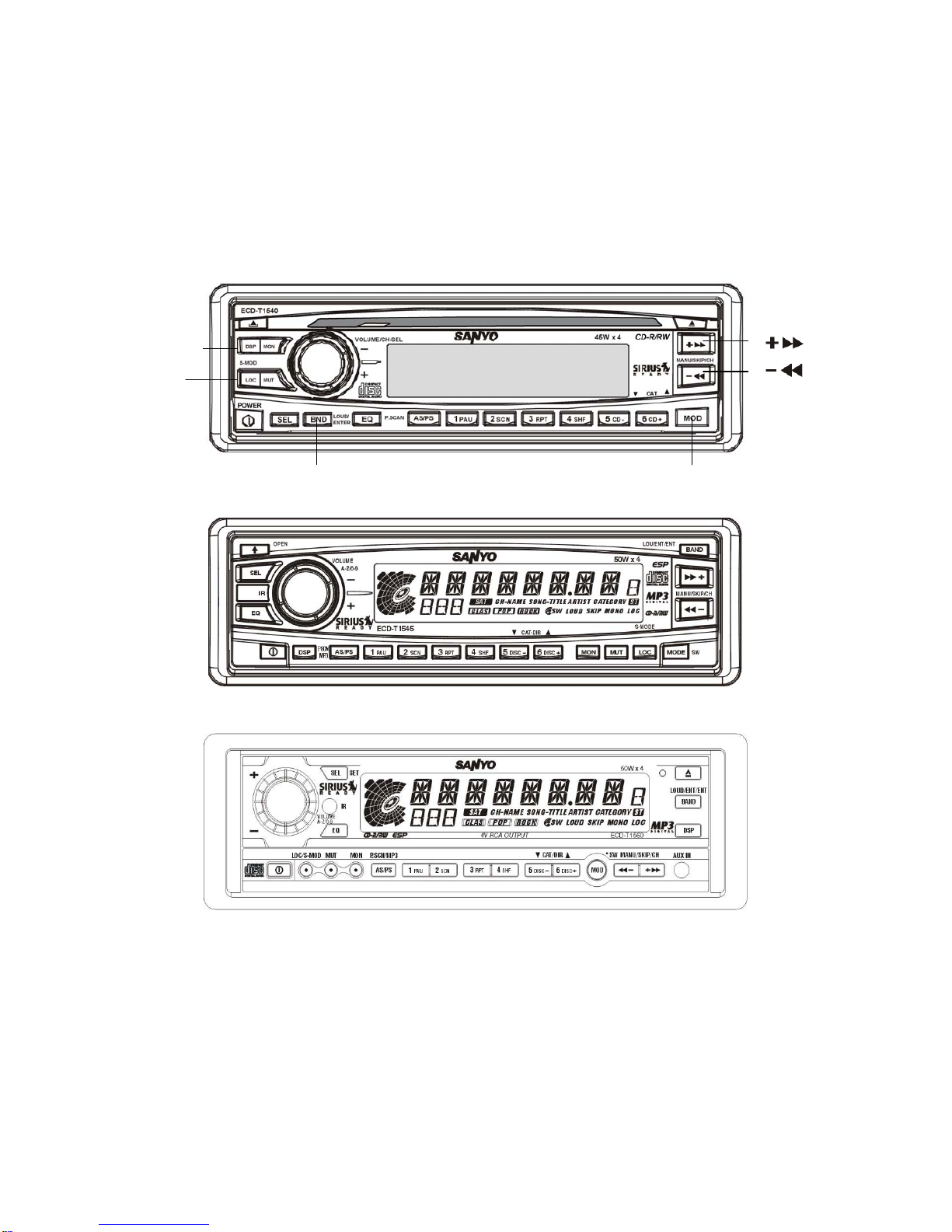
Source unit buttons, examples (ECD-T1540/ECD-T1545/ECD-T1560)
Notes:
•Since this manual covers several models, the names of some buttons vary by
model.
[BND]
[LOC]
[DSP]
[ ]
[ ]
[MOD]
9
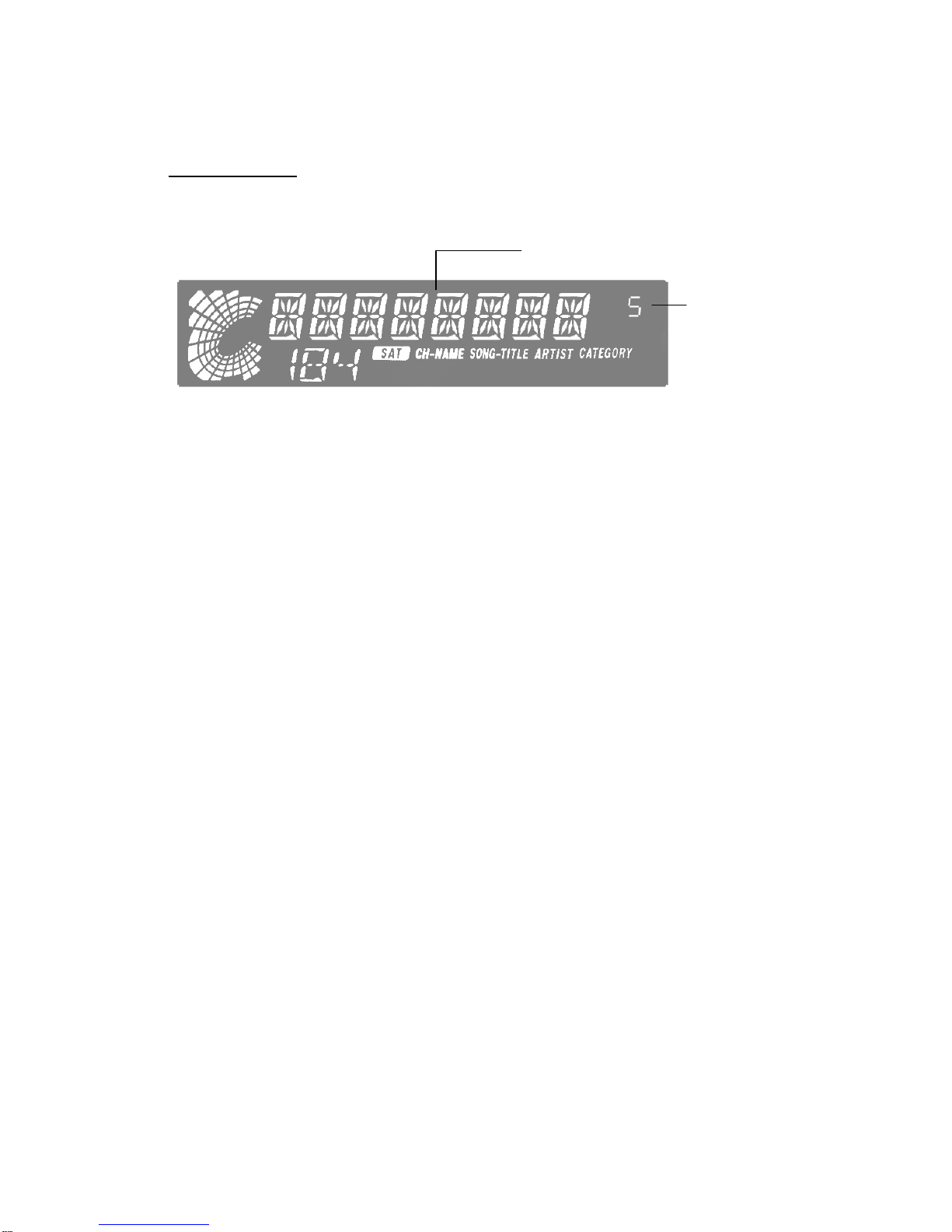
Display Items
Source unit display, example
Operation status indication
Preset channel
indication
Autres manuels pour ESR-T100
1
Table des matières
Autres manuels Sanyo Tuner

Sanyo
Sanyo VA-SW3050S Manuel utilisateur

Sanyo
Sanyo VA-SW3050LITE Manuel utilisateur

Sanyo
Sanyo JT250L Manuel utilisateur

Sanyo
Sanyo FMT 205L Manuel utilisateur

Sanyo
Sanyo CDF-MS11 Manuel utilisateur

Sanyo
Sanyo ESR-T100 Manuel utilisateur

Sanyo
Sanyo FMT 611LU Manuel utilisateur

Sanyo
Sanyo FMT-450K Manuel utilisateur

Sanyo
Sanyo t-9990 Manuel utilisateur

Sanyo
Sanyo FMT M15L Manuel utilisateur


