
Samsung S1060 Manuel utilisateur
ENGLISH
1
Getting to know your camera
Getting to know your camera
Identification of features / Contents of camera
Battery life & Number of shots (Recording time)
LCD monitor indicator
Mode dial
Taking a picture
Playing back / Deleting images
Downloading images
Specifications
1
4
5
6
7
8
9
10
11
Contents
Declaration of Conformity
Trade Name : SAMSUNG TECHWIN
Model No. : SAMSUNG S1060
Responsible Party : SAMSUNG ELECTRONICS AMERICA INC.
Address : 105 Challenger Road Ridgefield Park NJ
Telephone No. : 1-800-SAMSUNG(726-7864)
This device complies with Part 15 of the FCC Rules. Operation is subject to the
following two conditions: (1) This device may not cause harmful interference, and
(2) this device must accept any interference received, including interference that
may cause undesired operation.
NOTE :
This equipment has been tested and found to comply with the limits for a
Class B digital device, pursuant to part 15 of the FCC Rules. These limits
are designed to provide reasonable protection against harmful interfer-
ence in a residential installation.
This equipment generates, uses and can radiate radio frequency energy
and, if not installed and used in accordance with the instructions, may
cause harmful interference to radio communications. However, there is
no guarantee that interference will not occur in a particular installation.
If this equipment does cause harmful interference to radio or television
reception, which can be determined by turning the equipment off and on,
the user is encouraged to try to correct the interference by one or more of
the following measures:
- Reorient or relocate the receiving antenna.
- Increase the distance between the equipment and receiver.
- Connect the equipment to an outlet on a circuit different from that to
which the receiver is connected.
- Consult the dealer or an experienced radio/TV technician for help.
CAUTION :
Changes or modifications not expressly approved by the manufacturer
responsible for compliance could void the user’s authority to operate the
equipment.
FCC notice
Microsoft, Windows and Windows logo are registered trademarks
of Microsoft Corporation incorporated in the United States and/or
other countries
All brand and product names appearing in this manual are regis-
tered trademarks of their respective companies.
The contents and illustrations of this manual are subject to change
without prior notice for upgrading the camera functions.
Refer to the user manual included on the Software CD for more
information.
PDF documents of user manual are included in the Software
CD-ROM supplied with this camera. Search the PDF files with
Windows explorer. Before opening the PDF files, you must install
the Adobe Reader included in the Software CD-ROM.
2
Getting to know your camera
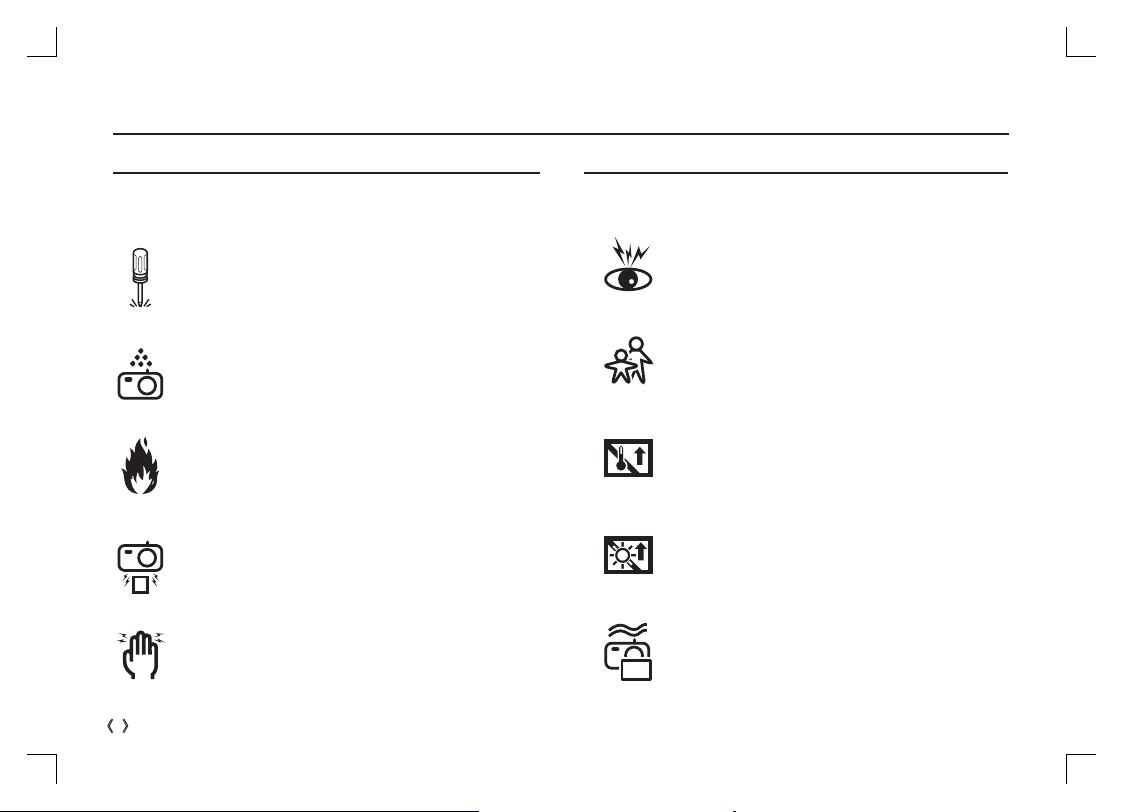
DANGER
Do not attempt to modify this camera in any way. To do so
may result in fire, injury, electric shock or severe damage to
you or your camera. Internal inspection, maintenance and
repairs should only be carried out by your dealer or Samsung
Camera Service centre.
Should any form of liquid or a foreign object enter the camera,
do not use it. Switch off the camera, and then disconnect the
power source. You must contact your dealer or Samsung
Camera Service centre. Do not continue to use the camera as
this may cause a fire or electric shock.
Please do not use this product in close proximity to flammable
or explosive gases, as this could increase the risk of explo-
sion.
Do not insert or drop metallic or inflammable foreign objects
into the camera through access points e.g. the memory card
slot and battery chamber. This may cause a fire or electric
shock.
Do not operate this camera with wet hands. This could pose a
risk of electric shock.
DANGER indicates an imminently hazardous situation which, if not
avoided, will result in death or serious injury.
WARNING
Do not use the flash in close proximity to people or animals.
Positioning the flash too close to your subject’s eyes may
cause eyesight damage.
For safety reasons keep this product and accessories out of
reach of children or animals to prevent accidents e.g.:
-Swallowing battery or small camera accessories. If an accident
should occur, please consult a doctor immediately.
- There is the possibility of injury from the camera’s moving
parts.
Battery and camera may become hot during prolonged use
and it may result in camera malfunction. Should this be the
case, allow the camera to sit idle for a few minutes to allow
it time to cool.
Do not leave this camera in places subject to extremely high
temperatures, such as a sealed vehicle, direct sunlight or
other places of extreme variances in temperature. Exposure
to extreme temperatures may adversely affect the camera’s
internal components and could cause a fire.
When in use, do not cover the camera or Charger. This may
cause heat to build up and distort the camera body or cause
a fire. Always use the camera and its accessories in a
well-ventilated area.
WARNING indicates a potentially hazardous situation which, if not
avoided, could result in death or serious injury.
ENGLISH
3
Getting to know your camera
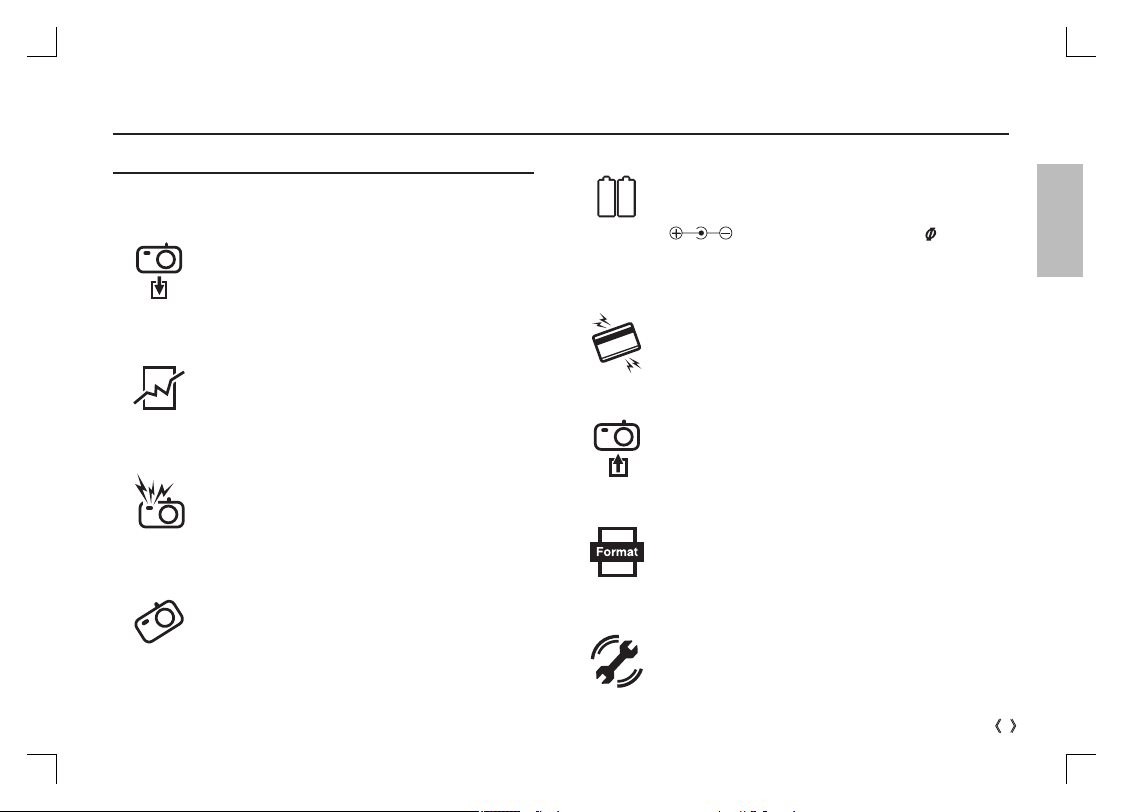
Take care not to touch the lens or lens cover to avoid taking
an unclear image and possibly causing camera malfunction.
Do not fire the flash while it is in contact with hands or
objects. Do not touch the flash after using it continuously. It
may cause burns.
Leaking, overheating, or damaged battery could result in fire
or injury.
- Use battery with the correct specification for the camera.
- Do not short circuit, heat or dispose of battery in fire.
- Do not insert the battery with the polarities reversed.
Remove the battery when not planning to use the camera
for a long period of time.
Otherwise the battery may leak corrosive electrolyte and
permanently damage the camera’s components.
CAUTION
CAUTION indicates a potentially hazardous situation which, if not
avoided, may result in a minor or moderate injury.
Before an important event or going on a trip, you should
check the camera condition. Samsung cannot be held
responsible for camera malfunctions.
Be sure to format the memory card if you are using a newly
purchased memory for the first time, if it contains data that
the camera cannot recognise, or if it contains images cap-
tured with a different camera.
Do not insert the memory card the wrong way round.
Credit cards may be demagnetized if left near a camera case.
Avoid leaving magnetic strip cards near the case.
Using an AC adapter that doesn’t match with the camera
specification may cause camera malfunction. We recom-
mend supplied battery or exclusive rechargeable battery.
ÄAvailable AC adapter :
Voltage: 3.3V, Ampere: 2.0A, Diameter: 2.35
- After turning on the camera, Check whether the battery
type and the camera setting set on the [Settings] > [Battery
Type] menu are same.
4
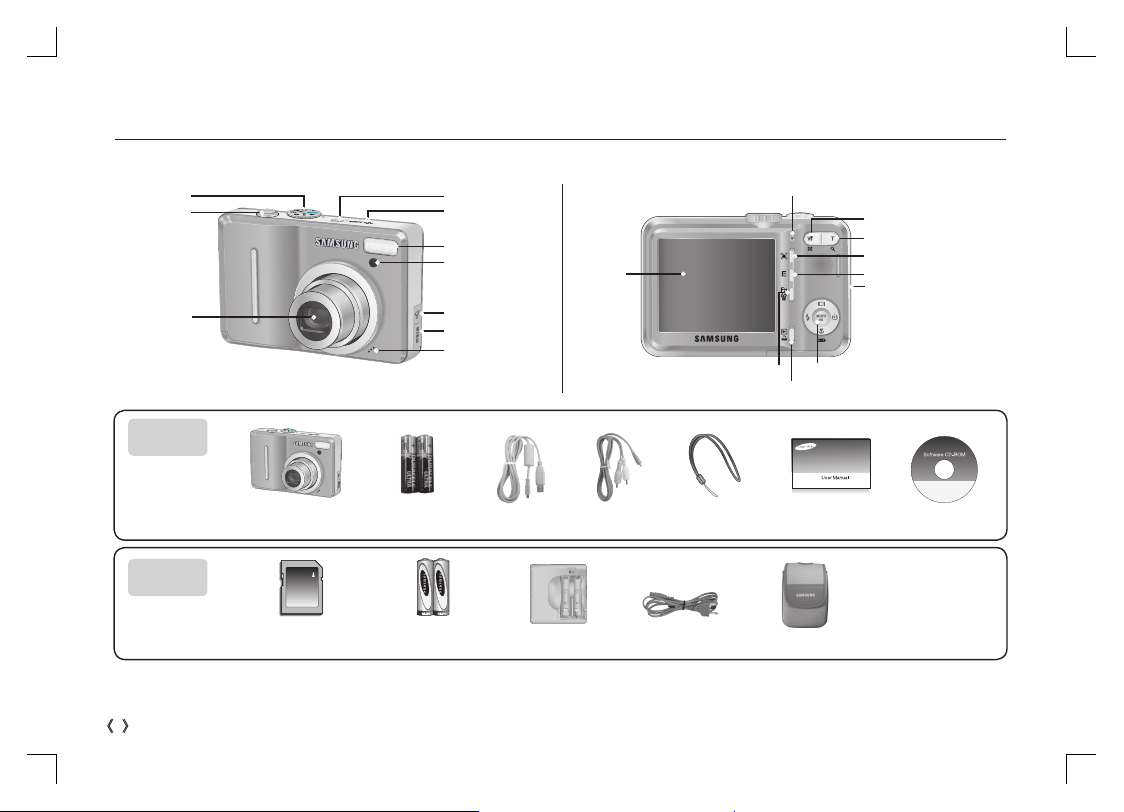
ÄPlease check that you have the correct contents before using this product. The contents can vary depending on the sales region. To buy the
optional equipment, contact your nearest Samsung dealer or Samsung service centre.
Identification of features / Contents of camera
Rechargeable Battery
(SNB-2512)
SD / SDHC memory card /
MMC
USB Cable AV Cable Camera strap
Camera AA Alkaline
Batteries
Charger (SBC-N2) AC Cord Camera case
Software CD
User manual,
Product warranty
Included
items
Optional
items
DC input connection port
Shutter button
Mode dial
Lens / Lens cover
Speaker
Power button
Flash
AF sensor/
Self-timer lamp
USB / AV connection terminal
Microphone
Zoom T button (Digital zoom)
Zoom W button (Thumbnail)
E (Effects) button
Strap eyelet
LCD monitor
5 function button
Play mode / Printer button
Fn / Delete button
Camera status lamp
Face Detection(FD) button
ENGLISH
5
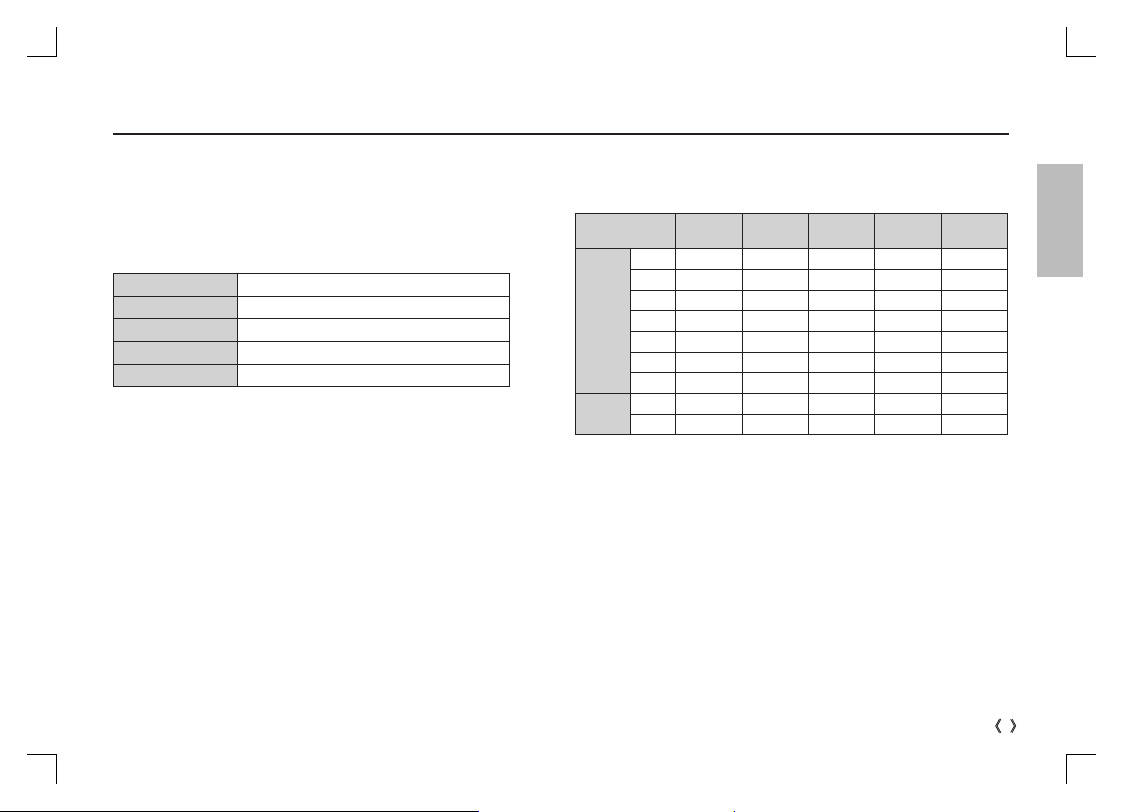
Battery life & Number of shots (Recording time)
When using a 256MB MMC memory, the specified shooting capacity will
be as follows. These figures are approximate as image capacities can be
affected by variables such as subject matter and memory card type.
ÄThe zoom button doesn't use during the movie recording.
The recording times can be changed by the zoom operation.
We recommend batteries for a digital camera (Within a year from the
date of manufacture). The batteries are listed below.
- Non rechargeable batteries : 2 X AA Alkaline (High Capacity)
- Rechargeable batteries (Optional) : SNB-2512 (Ni-MH)
SNB-2512 rechargeable battery Specification
Model SNB-2512
Type Ni-MH
Capacity
25
00mAh
Voltage 1.2V x 2
C
harging time
Approximately 300 Minutes (Use for SBC-N2)
ÄIncluded battery may vary depending on sales region.
Recorded image
size Super Fine Fine Normal 30 FPS 15 FPS
Still
image
,
About
59
About
82
About
141 - -
;
About
66
About
93
About
155 - -
.
About
79
About
109
About
183 - -
+
About
83
About
115
About
191 - -
✩
About
110
About
155
About
253 - -
✨
About
171
About
236
About
371 - -
About
479
About
553
About
607 - -
*Movie
clip
ì---
About 3'33" About 7'03"
❪---
About 13'13" About 25'32"

6
LCD monitor indicator
ÄRefer to the user manual included on the Software CD for more information.
Voice memo / Without Sound
Ï/ ÇÌ
Optical / Digital Zoom bar /
Digital Zoom rate Í
Recording mode
Face Detection / Self Portrait
/
Aperture Value / Shutter Speed
F2.8, 1/30
Flash
Self-timer
Macro
Sharpness
Color
Auto Focus Frame
Number of available shots remaining /
Remaining time
4/00:00:00
Memory card icon /
Internal memory icon Ö/×
Battery
Image Size
Image Quality / Frame Rate
Metering
Drive mode
ISO
White Balance
Exposure compensation
Date / Time
2008/02/01 01:00 PM
Camera shake Warning
ENGLISH
7
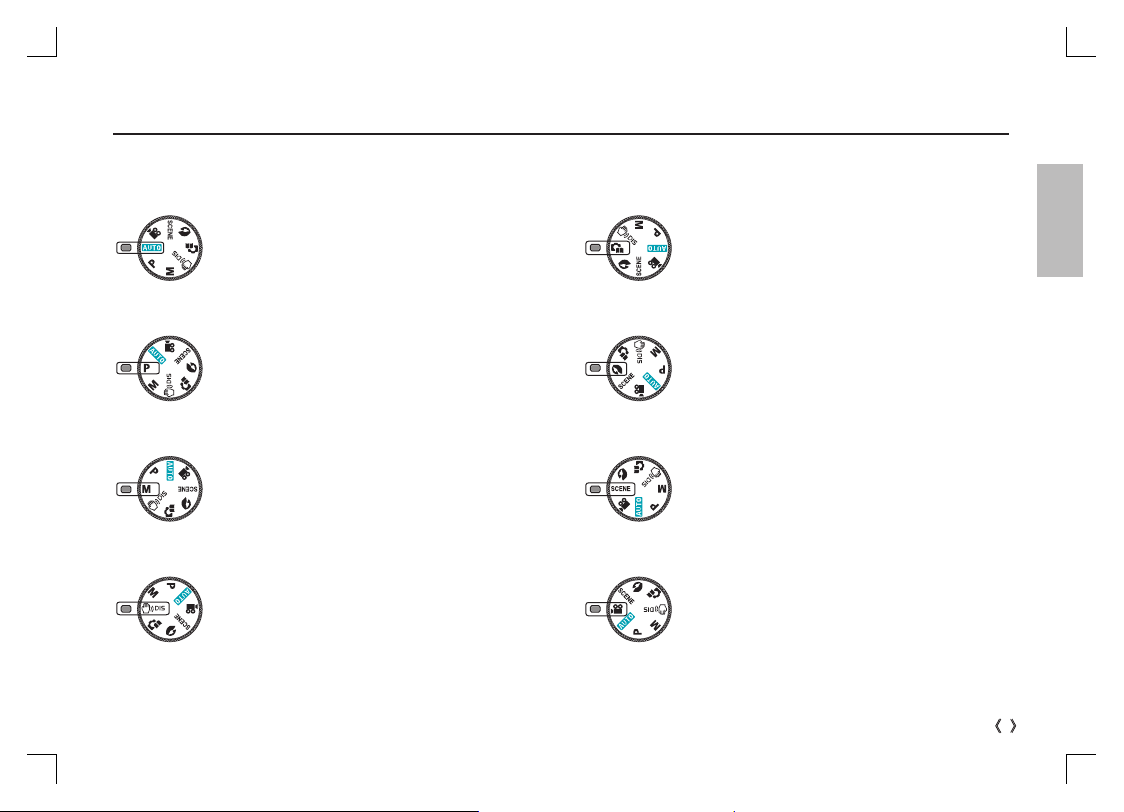
Mode dial
You can select a desired camera mode by using the Mode dial on the top of the camera.
AUTO
Selects this mode for quick and easy picture taking
with minimal user interaction.
PROGRAM
Selecting the program mode will configure the camera
with optimal settings. You can still manually configure
all functions except the aperture value and shutter
speed.
DIS
This mode will reduce the effect of camera shake and
help you get a well-exposed image in dim conditions.
MANUAL
You can manually configure all functions with the aper-
ture value and shutter speed.
SCENE
Use the menu to easily configure optimal settings for a
varisty of shooting situations.
PORTRAIT
Use this menu to take a picture of a person.
MOVIE CLIP
A movie clip can be recorded for as long as the avail-
able recording time.
PHOTO HELP GUIDE
Helps the user to learn the correct picture taking meth-
od. This includes solutions for potential problems that
may occur, and enables the user to practice shooting.
8
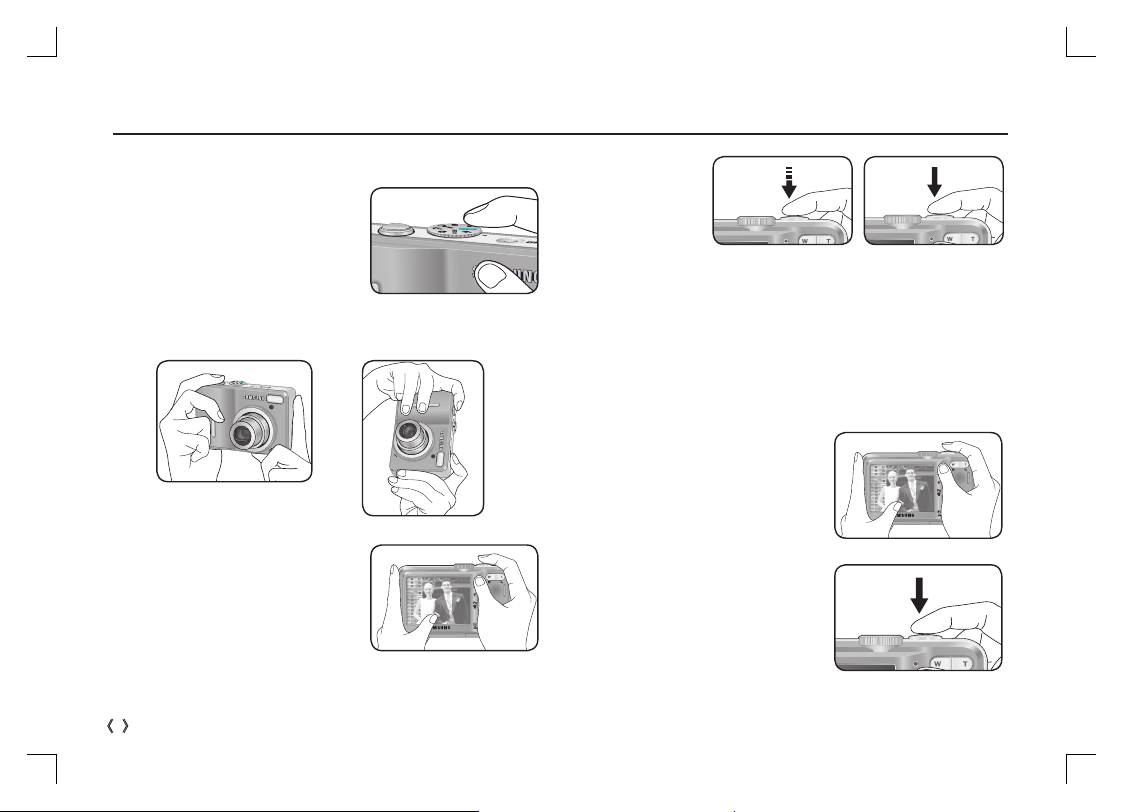
Taking a picture
How to take a picture
How to record a movie
Rotate the Mode dial and select ( ´).
1. Turn on the camera and select a
camera mode by rotating the mode
dial.
2. Hold the camera as shown
3. Confirm the composition
4. Take a picture.
Pressing halfway down
Focus and Flash status
are checked.
Pressing fully
Image is taken
1. Confirm the composition
2. Start the recording
Press the Shutter button and the
recording starts and press the
Shutter button again to stop the
recording.
ENGLISH
9
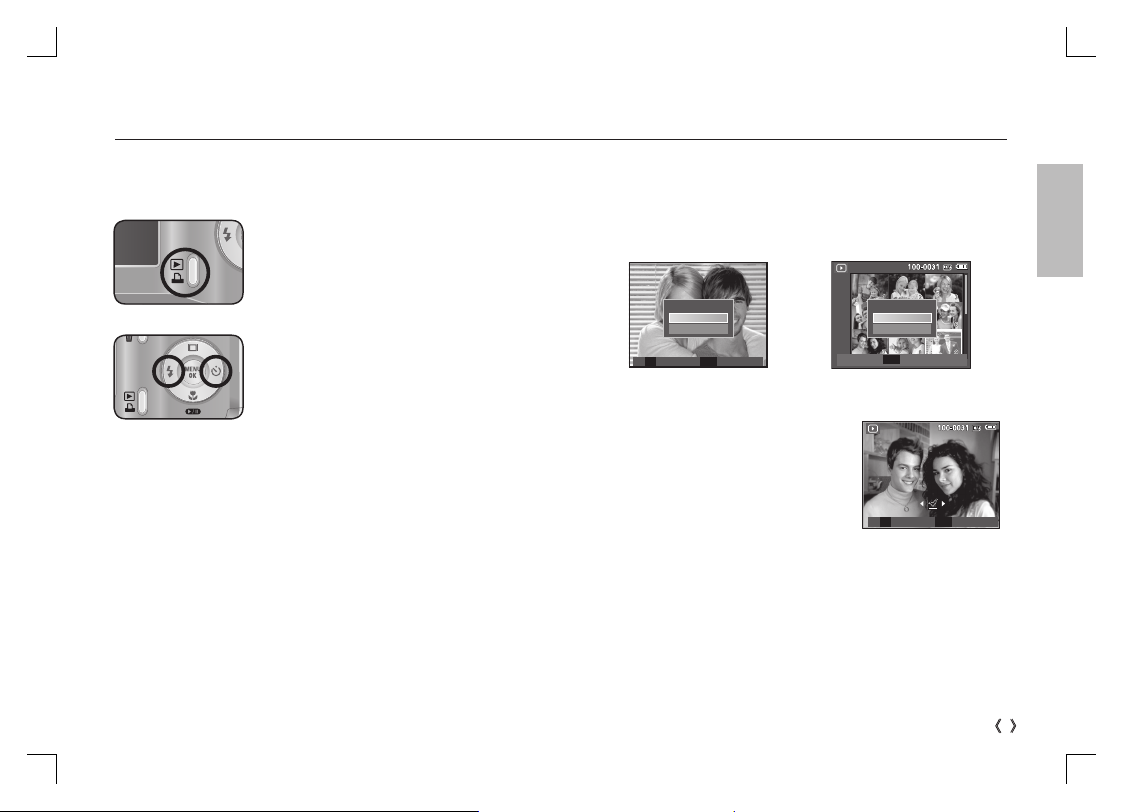
Deleting images
- This deletes images stored on the memory card.
1. Select an image that you want to delete by pressing the Left /
Right button and press the DELETE ( Õ) button.
Playing back / Deleting images
[Single Image] [Thumbnail Image]
2. To add images to delete, press the T
button.
- Left / Right button : Selects images
- T button : Checks for deletion
- OK button : deletes the selected
images.
3. Select the submenu values by pressing the Up / Down button and
then press the OK button.
- If [No] is selected : cancels "Delete Image".
- If [Yes] is selected : deletes the selected images.
Playingback the images
-The last image stored on the memory is displayed.
Press the play button ( Î).
Select an image that you want to play back
by pressing the Left/ Right button
ÄManner mode : Pressing the play mode button for more than 3
seconds changes the buzzer and start-up sound
setting to OFF, even though you may have set
these to ON.
Delete?
No
Yes
Comfirm
OK
Delete?
No
Yes
Select Confirm
T OK
Prev Next
Select Delete
T OK
Autres manuels pour S1060
4
Table des matières
Langues :