
Samsung EZON SHS-DS10 Manuel utilisateur
GC68-00349B ED:01
SEOUL COMMTECH CO., LTD.
448-11, Seongnea3dong, Kangdong-Ku, Seoul, Korea
Post Code : 133-034
Phone : +82-2-2225-6709
Fax : +82-2-2225-6073
Homepage : www.scommtech.co.kr
The safety precautions contained herein are served to protect the user and prevent material loss.
Please make sure to read this manual carefully to ensure proper product usage.
Intelligent Digital Door Lock EZOn SHS-DS10
Manual

Table of Contents
Prior to Use
User Instruction
Miscellaneous
Safety Precautions ................................................................................................................................ 4
Product Installation ................................................................................................................................ 7
Product Setup ........................................................................................................................................ 9
Product Name & Functions ................................................................................................................... 11
Prior to Use
Initialization (Password, Card, Key-Tag) .............................................................................................. 14
Registration (Modication) & Deletion
Password .................................................................................................................................................................... 15
Key-Tag (Card) ............................................................................................................................................................ 16
Usage
Password .................................................................................................................................................................... 18
Key-Tag (Card) ............................................................................................................................................................ 19
Automatic/Manual Lock Usage ............................................................................................................. 20
Sound Programming & Cancellation ................................................................................................... 21
Alarm/Emergency Sounds ................................................................................................................... 22
Dual Lock Usage .................................................................................................................................. 24
Opening the Door from the Inside ....................................................................................................... 25
Battery Usage ...................................................................................................................................... 26
Usage Summary .................................................................................................................................. 28
Usage Precautions ............................................................................................................................... 32
Troubleshooting .................................................................................................................................... 33
4
Prior to Use
5
Safety Precautions
Please review the content below to ensure safe and precise product usage.
WARNING
Do not disassemble, install, or repair this
product on your own accord.
●Contact the customer support center for
any repair needs. Unauthorized handling
can result in product damage and/or
malfunction.
Do not let the product subjected to any
heavy shock such as rapping against a
hard object (hammer, etc.).
●Doing so can result in product damage
and/or malfunction.
When cleaning the entry way, make
sure to prevent water from entering
the product.
●Water penetration can result in
product damage and/or malfunction.
Do not use pins or any sharp, pointy
objects to press buttons or insert into
holes.
●Doing so can result in product
damage and/or malfunction.
When cleaning, do not use wet cloths
or volatile substances such as alcohol,
benzene, thinner, etc.
●Doing so can result in product
damage and/or malfunction.
Do not allow water or any liquid enter
the product interior.
●Doing so can result in product
damage and/or malfunction.
WARNING
Safety Precautions
WARNING Neglect to follow directions can result in death or serious injury.
CAUTION Neglect to follow directions can result in injury or material loss.
6
Prior to Use
7
Safety Precautions
Be careful of the lower product portion
when standing up after sitting.
●Injury can be caused from bumping
of the head.
Do not hang or pull the product.
●In particular, do not allow young children
to hang from the product.
They may break off the product and
receive an injury from a fall.
CAUTION
After the service, make sure to ask the
technician to perform an operational
safety inspection of the product.
●Neglecting a safety inspection following
any repair can result in injury upon
operation.
When moving, make sure to pass
on this manual.
●To help the new resident, passing on
this manual can prevent incorrect usage.
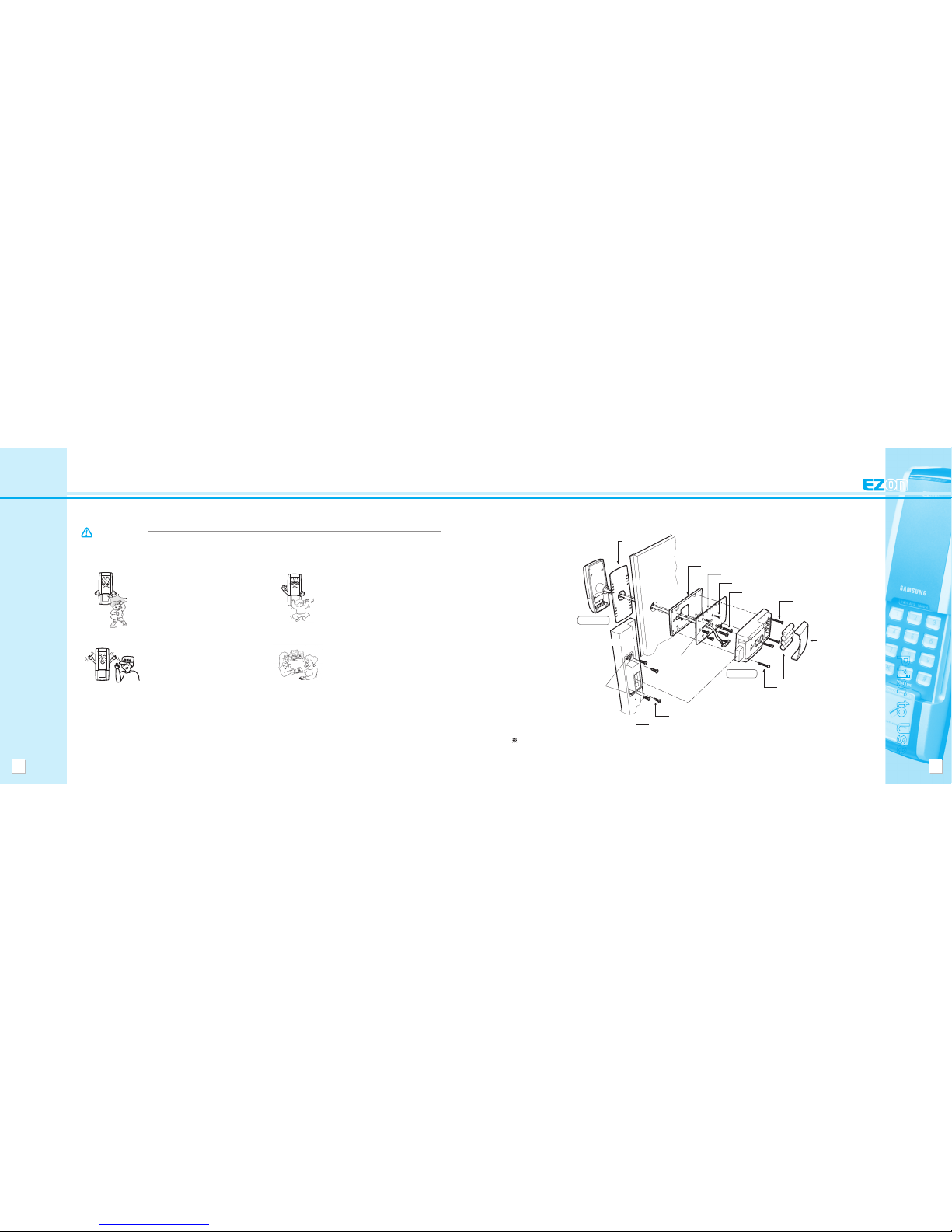
Product Installation
1. Assembly Diagram
Reference to the installation sheet provides information that may facilitate more careful and precise
installation.
Exterior Rubber
Pad
Interior Rubber Pad
Fixed Panel
Connecting Bolts BH, + 4.2x20 (5)
Bolts, TH + M5x30 (2)
Bolts, OH + M4x30 (2)
Battery Cover
Batteries, LR6 (4)
Hexagonal Rabbet Bolts,
M4x33 (2)
Connecting Bolts, BH + 4.2x20 (4)
Mounting Plate (Strike)
Wide Slot
Door
Doorframe
Exterior Unit
Wide Slot
Interior Unit
8
Prior to Use
9
Product Installation
1) Product installation must be performed by a sales agent and/or authorized installation technician.
( Self installation or disassemble, qualies as customer negligence.)
2) When moving, please contact the sales agent from where the product was purchased or the customer
service center.
2. Notes for Product Installation
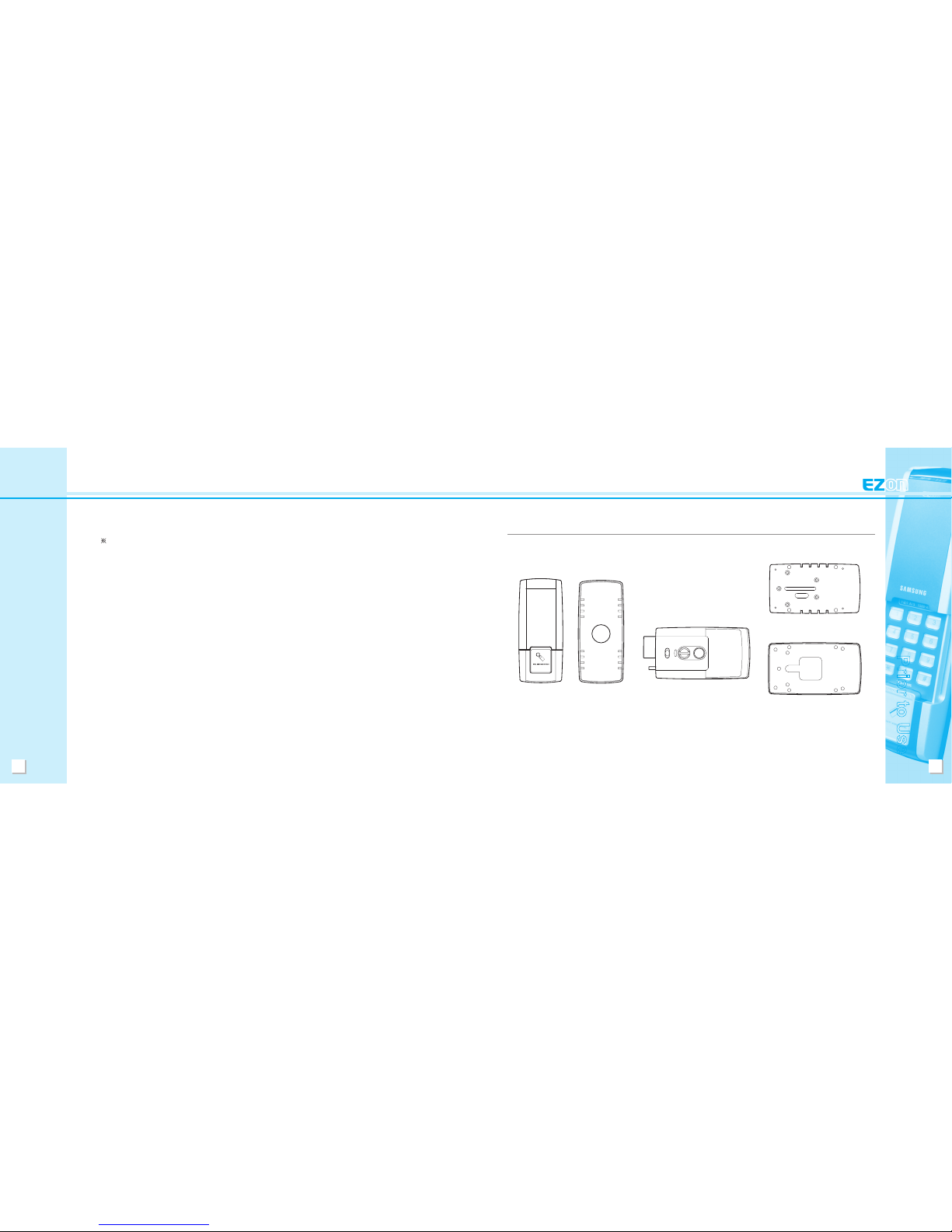
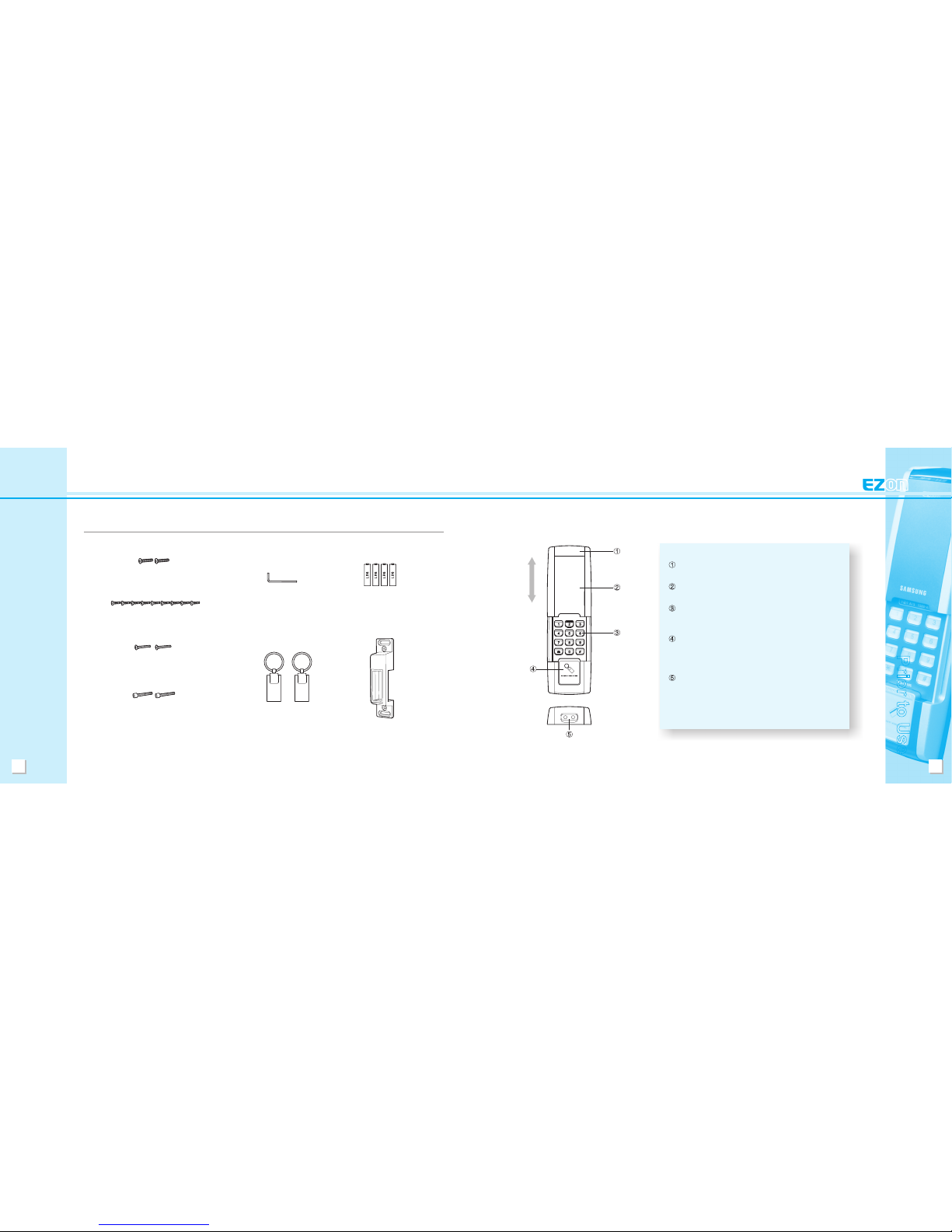
Product Setup
1. Main Unit
Exterior Unit Exterior Rubber Pad Interior Unit Interior Rubber Pad
Fixed Panel
10
Prior to Use
11
Fixed Panel and Exterior Unit Screws
(SCREW TH+ M5x30)
Key-Tags
Doorframe Mounting Plate
(Strike)
Product Setup
2. Fittings
Strike, Fixed Panel Connecting Screws
(SD-SCREW BH+ #8(4.2) x20)
Interior Unit Screws
(SCREW OH+ M4x30)
Interior Unit Screws
(SCREW Hexagonal Rabbet M4x33)
L-Wrench(3mm) ‘AA’ Batteries (LR6)
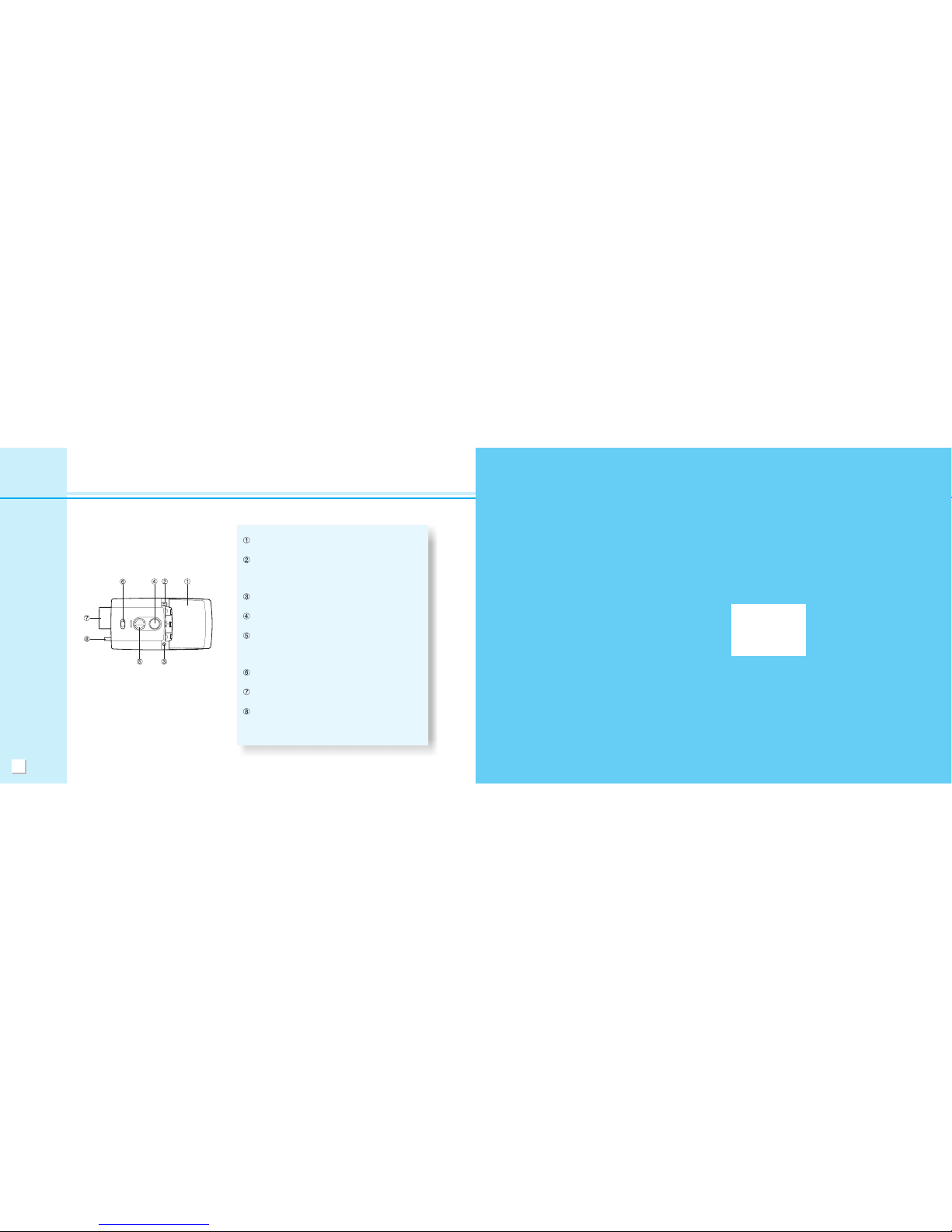
1. Exterior Unit
Product Name & Functions
Indication Lamp Cover - During card recognition
or operation, this lamp turns blue.
Keypad Protection Cover - This cover protects the
keypad.
Keypad - You can use this to register/modify/delete
your password. Inputting the registered password
releases the lock.
Card Recognition Device and Button -
After pressing the button, placing a registered card
or key-tag against the recognition device or inputting
the password releases the lock.
External Power Contacts - When batteries have
run out of power, placing an emergency battery on
the contacts can initiate operational power.
(for use with a DC 9V battery)
Close
Open
12
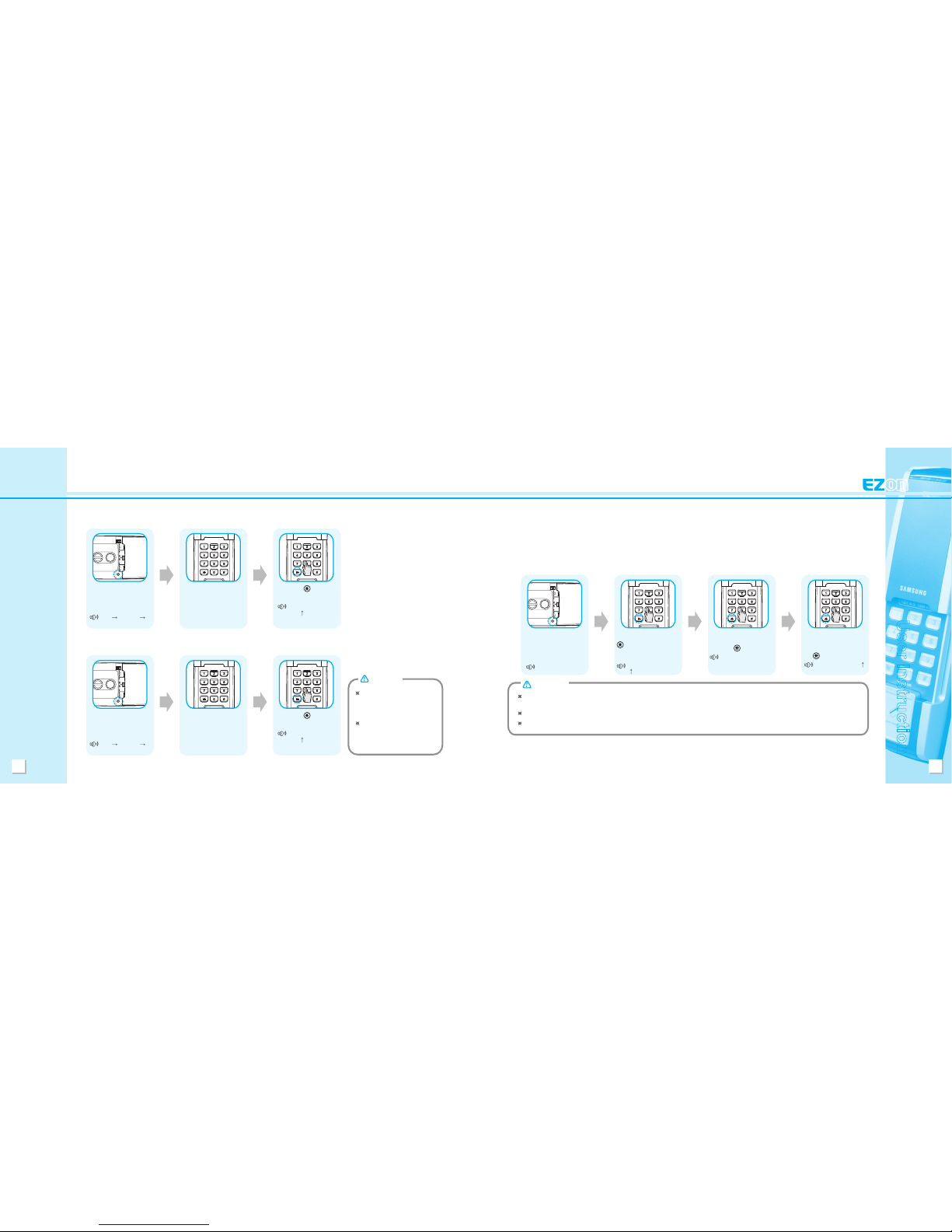
Product Name & Functions
2. Interior Unit
Battery Cover - This cover, covers the battery casing
and all registration buttons.
Auto / Manu switch - Placing this switch on
‘Automatic’, results in automatic door locking upon
closing the door. The door remains unlocked even
the door is closed if this switch is set on 'Manual'.
Registration Button - Use this button when
registering or cancelling passwords or cards.
OPEN Button - This one-touch button is used from
the inside to lock/unlock the door.
Emergency Open/Close Lever - This button can be
used in emergencies or when circuits are not
functioning to manually lock/unlock the door from the
inside. (left/right: locked, middle: unlocked)
Dual Lock Lever - Dual lock activation makes it
impossible to release the lock, both in & outside.
Deadbolt - The deadbolt fastens the door to the
doorframe, to provide a locking function.
Door Ajar Sensor - When set to automatic locking,
the door ajar sensor signals whether the door is open
or closed.
User Insturction
14
User Instruction
15
Registration (Modication) & Deletion
Original factory settings set the password to ‘1234’. For complete safety, clear all registration rst, and then program and use a new password.
(Refer to Initialization, P. 14)
Be careful not to reveal an active password to others.
Using the same password over a long period of time raise the issue of disclosure. It is recommended that passwords be changed on a periodic basis.
CAUTION
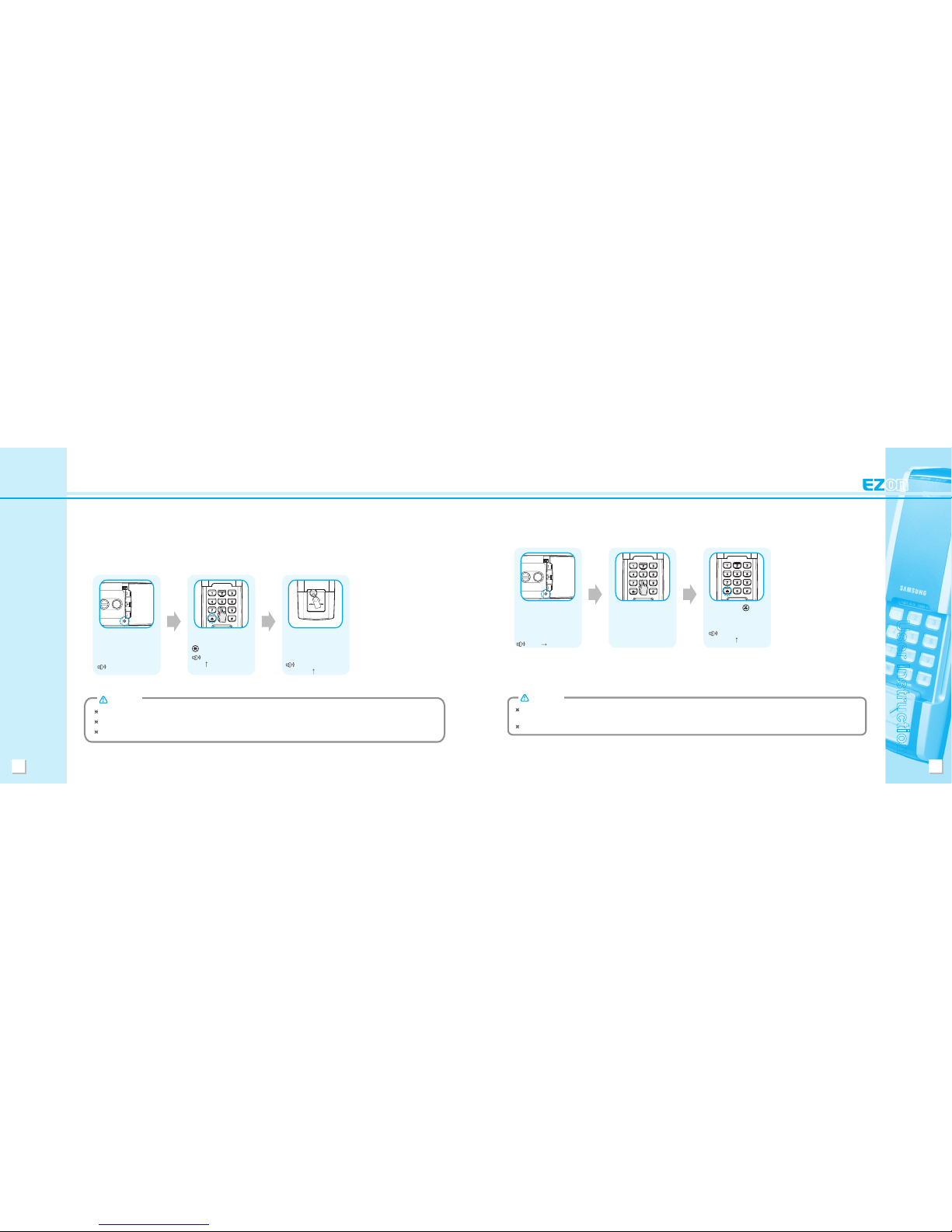
1. Password
1) Registration (Modication) Method
The password is used with the exterior keypad to release the door lock.
The password can be any single number of 4 ~ 12 digits in length.
Open the battery cover
in the interior unit and
press the registration
button once.
Beep
Input the previously registered
password, and then press the
(star) button. (If operating
for the rst time, the default
password is ‘1234’.)
Beep, Beep, Beep, Beep
( ) + Beep, Beep
Input the new password
for registration, and then
press the (star) button.
Beep, Beep
To complete registration,
input the new password
once again, and then press
the (star) button.
Beep, Beep, Beep, Beep ( )
Initialization (Password, Card, Key-Tag)
(1) Password Known
Press the (star)
button.
Beep, Beep, Beep,
Beep ( )
(2) Password Unknown
Open the battery cover in the
interior unit and press and
hold the registration button for
approximately ten seconds.
Beep Beep, Beep
Beep, Beep, Beep, Beep
Enter the code
‘4560852580’.
Press the (star)
button.
Beep, Beep, Beep,
Beep ( )
Initialization results in the deletion
of all registration information,
and the password is automatically
set to ‘1234’.
After selecting initialization,
please wait until the light turns
off. The memory clearing process
requires some time.
CAUTION
Open the battery cover in the
interior unit and press and
hold the registration button for
approximately ten seconds.
Beep Beep, Beep
Beep, Beep, Beep, Beep
Enter the password.
16
User Instruction
17
As deletion has been completed, all previously registered cards are rendered invalid and are not able to release the lock.
(after deletion, refer to P. 15 for registration procedures)
To release the lock from the outside, use the password.
CAUTION
Registration (Modication) & Deletion
2) Complete Card Deletion Method
Open the battery cover in
the interior unit and press
and hold the registration
button for approximately
ve seconds.
Beep Beep, Beep
Enter the password.
Pressing the (star)
button deletes all card
registration.
Beep, Beep, Beep,
Beep ( )
Registration (Modication) & Deletion
To register more than one card at once time, after registering the rst card, place the next card(s) on the card recognition device within ve seconds.
To conrm card registration, carry an emergency key, open the door, make sure the deadbolt is extended, and follow directions on card usage.
Follow the process outlined above to register additional card(s) at any time.
CAUTION
Open the battery cover
in the interior unit and
press the registration
button once.
Beep
After inputting the
password, press the
(star) button.
Beep, Beep, Beep, Beep
( ) + Beep, Beep
Place the key-tag to be
registered in contact with
the card recognition device
on the exterior unit.
Beep, Beep, Beep,
Beep ( )
2. Key-Tag (Card)
1) Registration Method
The card, key-tag is used from the outside to release the door lock. Only credit cards that can act as
transportation cards can be registered. A maximum of 20 cards, including key-tags, can be registered.
(Registration of certain T-money cards may not be possible.)
18
User Instruction
19
Usage
Make sure the keypad cover is fully closed before using a card to unlock the door.
For proper operation, hold a card within 30mm and a key-tag within 20mm of the card recognition device.
The distance from which recognition is possible may vary with card type and maker.
CAUTION
2. Key-Tag (Card)
After pressing the card recognition button, place a registered key-tag (card)
on the card recognition device of the exterior unit for about one second.
Placing an unregistered key-tag (card) or damaged key-tag (card) will
produce a prolonged “beep”. Successful recognition will release the lock
and emit the completion sound, Beep, Beep, Beep, Beep (in rising key).
Inputting the wrong password three times consecutively results in the sounding of a warning signal for ten seconds, and the unit shuts down for one minute.
During shutdown, a “beep” sound will be emitted every ten seconds.
The system returns to normal if a registered card is recognized or after a series of “beeps” signals the end of one minute.
If you make a mistake when inputting the password and would like to cancel, press the (sharp) button.
(Executing this procedure and pressing the # sharp button three times consecutively will activate the foul play prevention warning.)
The password must be entered while the keypad is lighted.
If you wish to enter the password after the light has gone out, you must rst press the (star) button.
CAUTION
Usage
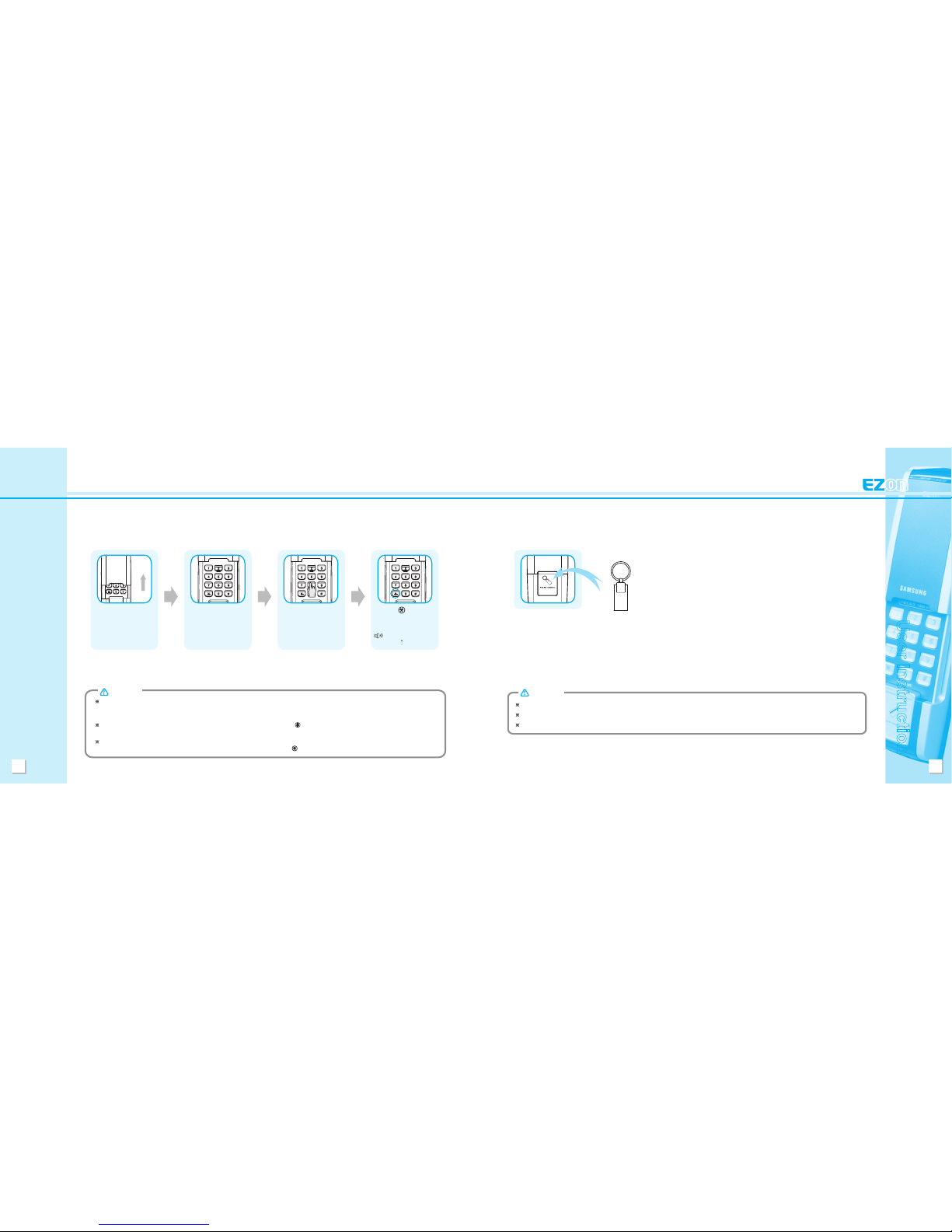
1. Password
Slide the keypad cover
upward.
The keypad
automatically turns
blue.
Enter the registered
password before the
light goes out.
Press the (star) button
or close the keypad cover
to release the door lock.
Beep, Beep, Beep,
Beep ( )
OPEN
Table des matières
Autres manuels Samsung Verrouillage


