saia-burgess PCD 7 Series Manuel utilisateur

Beginners’ manual Series xx7│Document 26/835; Version E 2│22.04.2005
Beginners’ manual
Hardware configuration Series xx7

Beginners’ manual Series xx7│Document 26/835; Version E 2│22.04.2004
Saia-Burgess Controls AG Contents
0-1
0
0.1 Document history ............................................................................................ 0-2
0.2 Trademarks ..................................................................................................... 0-2
1 Introduction
1.1 User community and user benefits ................................................................. 1-1
1.2 Differences from other Step®7-programmable controls .................................. 1-1
1.2.1 Portability and compatibility .......................................................................... 1-1
1.2.2 CPU comparison ........................................................................................... 1-2
1.2.3 How is the Saia® PCD Series xx7 configured? .............................................. 1-2
1.3 Documentation ................................................................................................ 1-2
1.3.1 Where can I find information on the Saia® PCD Series xx7? ........................ 1-2
1.3.2 Overview and structure of the documentation .............................................. 1-3
2. Fundamentals of hardware configuration
2.1 Introduction to hardware configuration ............................................................ 2-1
2.2 Basic procedure for hardware configuration ................................................... 2-2
2.3 Exporting a configuration ................................................................................ 2-5
2.4 Importing a configuration into STEP®7 ............................................................ 2-6
2.4.1 Generating a project in Simatic Manager ...................................................... 2-6
2.4.2 Importing a configuration .............................................................................. 2-8
2.5 Summary: procedure for configuring a Series xx7 PCD. ................................ 2-10
3 Configuring the hardware
3.1 Rules for the allocation of modules ................................................................. 3-1
3.2 Generating a configuration .............................................................................. 3-1
3.2.1 Allocation of modules .................................................................................... 3-2
3.2.2 Specifying the properties of modules/interfaces ........................................... 3-2
3.3 Configuring the CPU ....................................................................................... 3-3
3.4 Configuring digital input/output modules ......................................................... 3-9
3.5 Configuring analog input/output modules ....................................................... 3-10
3.6 Configuring special modules ........................................................................... 3-11
3.7 Configuring counter modules .......................................................................... 3-11
3.8 Configuring positioning modules ..................................................................... 3-14
3.9 Configuring communication modules .............................................................. 3-15
3.10 Configuring function modules ......................................................................... 3-15
4 Appendix
4.1 Icons ............................................................................................................... 4-1
4.2 Product and documentation concept .............................................................. 4-1
4.3 Technical support ............................................................................................ 4-2
4.4 Workshops, training literature ......................................................................... 4-3
4.5 Reliability and safety of electronic controllers ................................................. 4-3
4.6 About ourselves .............................................................................................. 4-4
4.7 Addresses of Saia-Burgess companies .......................................................... 4-5

Beginners’ manual Series xx7│Document 26/835; Version E 2│22.04.2004
Saia-Burgess Controls AG Contents
0-2
0
0.1 Document history
Document-no. Version Changed Published Remarks
26/835 E1 19.11.2004 Published version
26/835 E2 22.04.2005 Adapted the way of writing
0.2 Trademarks
Saia®, Saia® PCS and Saia®PCD are registered trademarks of Saia-Burgess Electro-
nics AG
STEP7® ,SIMATIC®, S7-300®, S7-400®, and Siemens® are registered trademarks of
Siemens AG
Technical modifications and changes are subject to the state of technology
SAIA-Burgess Controls AG, 2002.
© All rights reserved
Published in Switzerland

Beginners’ manual Series xx7│Document 26/835; Version E 2│22.04.2005
Saia-Burgess Controls AG
User community and user benefi ts
Introduction
1-1
1
1 Introduction
1.1 User community and user benefits
Manufacturers who see control technology as an opportunity to differentiate
themselves and sharpen their profile, and who also wish to take advantage of the
wide user acceptance the resource pool available for Step®7, are best served by the
Saia® PCD Series xx7 control system, as they can gain the most benefit from the
high level of service and performance of the Saia PCD and the flexibility and SPS
expertise that we can offer.
On the other hand, system integrators with no experience of Saia PCDs, who wish to
use the high level of service and performance of the Saia PCDs in one-off production
plant projects to replace a high-performance Siemens control system (S7-400)
for cost reasons, will gain little real benefit from our Saia® PCD Series xx7. This is
especially true where many other intelligent Siemens devices are installed, with
interfaces that are not based on open standards alone.
We put great effort into systematic testing to ensure compatibility with the Step®7/
Higraph/SCL tools and the like. However, we cannot and do not wish to copy and test
the characteristics and behavior of a high-performance Siemens SPS deployed as a
control for Siemens “Total Integrated Automation”.
1.2 Differences from other Step®7-programmable controls
Saia-Burgess has implemented all the CPU operating system functionality as
firmware components. We do not use any “miracle chips”. We are therefore
dependent on nobody, but our customers gain the advantage of rapid change/
enhancement to the operating system.
1.2.1 Portability and compatibility
The Saia® PCD Series xx7 operating system interprets the Step®7 AWL code. This
means that the Step®7 program can be executed in any AWL-based language such
as KOP, FUP, Higraph, SCL or S7-Graph. Calls to Siemens-specific system functions
(e.g. for special modules such as communication processors), or access to additional
peripherals, may require modifications to the program.
For more details on this and on the system functions themselves, refer to the
Technical Information document TI 26/353 (xx7 operating system).
There is not complete compatibility. However, the Saia® PCD Series xx7 controls
are Step®7 programmable. The main restrictions arise where specific local Simatic
modules, communication processors or functional modules are an absolute
requirement. Because of differences in hardware structure, these cannot be
integrated into the xx7 system. Saia-Burgess offers cost-effective alternative solutions
that involve little engineering effort to implement. The instruction sets and component
addresses for the xx7 controls roughly correspond to those of the Siemens
CPU412/414. It is important to check that any Siemens system functions used are
also available in the Series xx7 operating system. For more information, refer to the
Technical Information document TI 26/353 (xx7 operating system). More detailed
information on programming system functions can be found in manual “26/797 xx7
System functions”.

Beginners’ manual Series xx7│Document 26/835; Version E 2│22.04.2005
Saia-Burgess Controls AG
Documentation
Introduction
1-2
1
For applications that go beyond this, please contact us at:
1.2.2 CPU comparison
The instruction set and component addressing for the PCD1.M137 are comparable
with the Siemens CPU 412. With the PCD2.M127/M157/M177/M487 controls, the
instruction set is roughly equivalent to the Siemens CPU 414. There is generous
provision of user memory.
PCD1.M137 = 64 (default) / max. 128 kB (configurable)
PCD2.M127 = 128 kB
PCD1.M157 = 256 (default) / max. 512 kB (configurable)
PCD1.M177 = 512 (default) / max. 1 MB (configurable)
PCD2.M487 = 1 MB
PCD3.M5547= 512 kB
PCD3.M5447= 512 kB
Further information on memory settings can be found in manual “26/797 xx7 System
functions”, in the section on “System configuration”.
Because of the differing command execution times, operating speeds can only be
approximately compared. The PCD1.M137 and PCD2.M127 are about 3 times slower
than the PCD2.M157 and PCD2.M177, which themselves achieve roughly the same
cycle time as the Siemens CPU 315. The PCD2.M487 attains the operating speed of
the Siemens CPU 318.
1.2.3 How is the Saia® PCD Series xx7 configured?
Configuration of the CPU (MPI address, impulse byte, interrupt OBs, etc.) is handled
by Simatic Manager. Updated CPU settings take effect on the next STOP->RUN
transition.
Configuration of networks (Profibus, Ethernet) is also handled by Simatic Manager.
Further information can be found in manual “26/798 xx7 communication facilities”.
The addressing and configuration of local I/O modules, and SAIA-specific CPU
and interface settings, are handled by data blocks generated with a free-of-charge
software tool, the I/O Builder. You can download the I/O Builder from the Internet,
from http://www.sbc-support.ch/overview/xx7Configuration.htm. Detailed information
on the I/O Builder can be found in this manual, from section 2 onwards.
1.3 Documentation
1.3.1 Where can I find information on the Saia® PCD Series xx7?
You will find Technical Information documents (TIs) and various manuals on the
Saia® PCD Series xx7 on our support site. You can download these documents from
http://www.sbc-support.ch/xx7/xx7doc.htm.

Beginners’ manual Series xx7│Document 26/835; Version E 2│22.04.2005
Saia-Burgess Controls AG
Documentation
Introduction
1-3
1
1.3.2 Overview and structure of the documentation
The summary of Saia® PCD Series xx7 documentation given below should help you
to fi nd the information you need outside this manual.
Manual for
xx7 beginners
(26/835) Manual:
PCD3 Series hardware
(26/789)
Beginners
Manual:
PCD1/PCD2 Series
hardware (26/737)
Various other
documents at
www.sbc-support.ch
Manual: xx7-specifi c
aspects of the PCD3
hardware (26/836)
Manual:
xx7 communication
facilities (26/798)
Manual: xx7-specifi c
aspects of the PCD1/PCD2
hardware (26/757)
Manual:
xx7 system functions
(26/797)
Hardware
Detailed information
Manual:
Ethernet with xx7
(26/791)
Manual:
Serial communication
with xx7 (26/794)
Manual:
xx7 webserver
(26/775)
Manual:
xx7 modem library
(26/793)

Beginners’ manual Series xx7│Document 26/835; Version E 2│22.04.2005
Saia-Burgess Controls AG
Introduction to hardware confi guration
Fundamentals of hardware configuration
2-1
2
2. Fundamentals of hardware configuration
This manual provides an overview of hardware configuration with the xx7 I/O Builder
and the Siemens STEP®7 software.
2.1 Introduction to hardware configuration
Configuring
By “configuring”, we mean the allocation of PCD CPUs (incl. expansion devices, I/O
modules and interface modules) in a station window. CPUs and expansion devices
are represented by a configuration table that supports a fixed number of pluggable
modules, just like the “real” CPU.
In the configuration table, the xx7 I/O Builder automatically assigns an address to
each I/O module. You can change the addresses of I/O modules.
A hardware data block is then generated, which can be loaded into the PCDs with
the aid of STEP®7. You can import the configuration into STEP®7 as often as you like,
modify it if necessary, and load it into one or more existing systems.
At a Stop→Run transition in the CPU, the loaded configuration will be analyzed and
applied.
Parameterizing
By “parameterizing”, we mean:
• Setting properties for parameterizable modules for the central assembly and for a
network. Example: a PCD is a parameterizable module; the cycle monitoring time is
a parameter that you can set.
• Setting Bus parameters and DP Master and Slave parameters for a Master system
(PROFIBUS-DP).
You can use the xx7 I/O-Builder to parameterize SAIA-specific functions of CPUs and
communication modules (e.g. compiler functions, webserver serial interfaces etc.).
A Configuration Data Block (CDB) is then generated, which can be loaded into the
PCDs with the aid of STEP®7.
General CPU functions (cycle time monitoring, MPI addresses etc.) and communi-
cation settings (Profibus, TCP/IP communication etc.) are handled by the hardware
configurator or by NetPro under STEP®7.
Most parameters are read in and analyzed after a Power On of the CPU.

Beginners’ manual Series xx7│Document 26/835; Version E 2│22.04.2005
Saia-Burgess Controls AG
Basic procedure for hardware confi guration
Fundamentals of hardware confi guration
2-2
2
2.2 Basic procedure for hardware confi guration
Confi guration window
To confi gure a Series xx7 PCD, you use two windows in the xx7 I/O Builder:
• The Station window, where you place the modules for the station structure.
• The “Hardware Catalog” window, from which you select the required hardware
components, e.g. PCDs, I/O modules and interface modules.
Displaying the hardware catalog
If the “Hardware Catalog” window does not display, select Window > Hardware
Catalog. This menu option allows you to display or close down the hardware catalog.
2.2.1 Basic steps to confi gure a station
Regardless of the underlying technology for a station (PCD2 or PCD3), you always
follow the same steps to confi gure it:
1. Select a hardware component from the “Hardware Catalog” window.
2. Drag and drop the selected component into the Station window.
Alternatively, you can double-click on the component in the “hardware catalog”.
The screenshot below shows the basic operation:
Station window Catalog

Beginners’ manual Series xx7│Document 26/835; Version E 2│22.04.2005
Saia-Burgess Controls AG
Basic procedure for hardware confi guration
Fundamentals of hardware configuration
2-3
2
2.2.2 Structure of the Station window
The Station window provides a detailed view of the installed PCD. It displays order
numbers, a short description of the components and the addresses of the I/O
modules in tabular form.
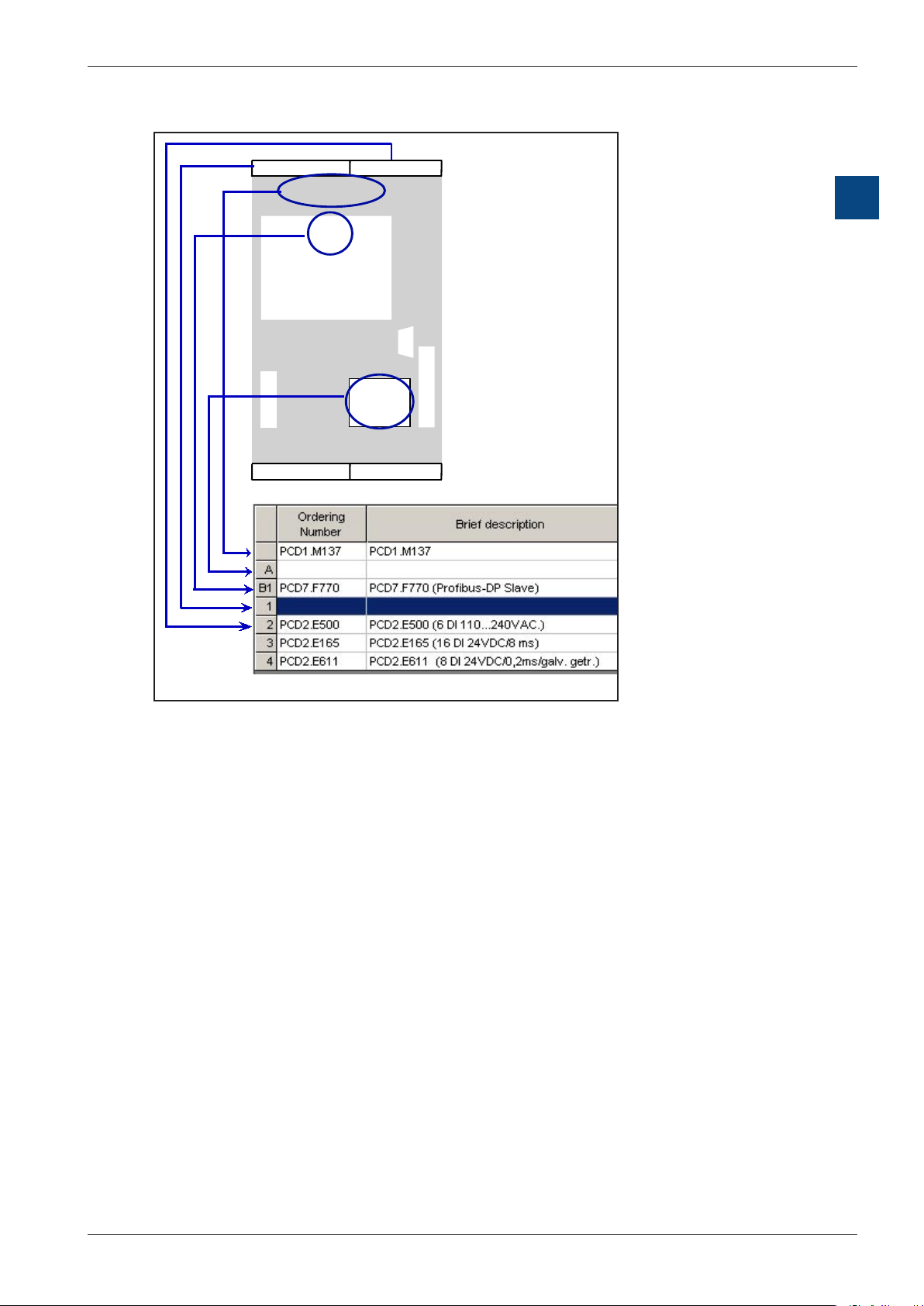
For a CPU equipped with I/O modules, the basic structure of the table is as follows:
2.2.3 Configuration table as the map of a PCD
For the central assembly, you allocate the I/O modules clockwise around the CPU
and then to the expansion device. The number of I/O modules that can be fitted is
dependent on the CPU used.
Just as in your real system, you use the xx7 I/O Builder to place I/O modules on
the PCD. The difference is that the CPU is represented in the xx7 I/O Builder by a
configuration table, which has one row for every I/O module that can be plugged into
the CPU.
The xx7 I/O Builder helps you to configure a station, in such a way that you generally
receive immediate feedback where e.g. a module cannot be plugged into the desired
socket. Address ranges are also checked automatically to ensure that the same
addresses are not used twice.
You should pay attention to the messages displayed, which provide information on
the causes and effects of an operation.
The screenshot below shows an example (PCD1.M137) of the implementation of a
real assembly in the configuration table. The configuration table matches the CPU
used.

Beginners’ manual Series xx7│Document 26/835; Version E 2│22.04.2005
Saia-Burgess Controls AG
Basic procedure for hardware confi guration
Fundamentals of hardware configuration
2-4
2
Please refer to the documentation and the latest product information on the modules.
2.2.4 Specifying the properties of components
When you have allocated the modules in the Station window, you can double-click
on the module to open a dialog box to change the preset properties (parameters or
addresses).
Properties of CPUs
The properties of the CPUs have a particular bearing on the behavior of the system.
In the dialog tabs for a CPU, you can set the Saia-specific functions such as memory/
compiler settings, webserver settings, MPI via modem, properties of serial interfaces
etc. These properties are stored in a CDB (Configuration Data Block). After every Po-
wer On, the CDB is re-analyzed and the parameterized system behavior is applied.
General CPU properties such as start-up behavior, local data areas and priorities for
alerts, memory ranges, remanence behavior, timer impulses etc. are set using the
hardware configurator within STEP®7.
Autres manuels pour PCD 7 Series
1
Ce manuel convient aux modèles suivants
7
Table des matières
Autres manuels saia-burgess Contrôleurs