
Safire SF-VIMOD-CAM-2 Manuel utilisateur

Door Station
Installation Guide

Door Station Installation Guide
i
Symbol Conventions
The symbols that may be found in this document are defined as follows.
Symbol
Description
Danger
Indicates a hazardous situation which, if not avoided, will or could
result in death or serious injury.
Caution
Indicates a potentially hazardous situation which, if not avoided,
could result in equipment damage, data loss, performance
degradation, or unexpected results.
Note
Provides additional information to emphasize or supplement
important points of the main text.

Door Station Installation Guide
ii
Contents
Chapter 1 Appearance.................................................................................................................... 1
Chapter 2 Terminal and Wiring ......................................................................................................3
2.1 Terminal Description......................................................................................................... 3
2.2 Wiring Description ............................................................................................................4
2.2.1 Power Supply Wiring.............................................................................................. 4
2.2.2 Door Lock Wiring.................................................................................................... 5
2.2.3 Door Magnetic Wiring............................................................................................ 6
2.2.4 Exit Button Wiring.................................................................................................. 7
Chapter 3 Installation..................................................................................................................... 8
3.1 Configure Sub Module Address......................................................................................... 8
3.2 One-Module Installation................................................................................................... 9
3.2.1 Surface Mounting................................................................................................... 9
3.2.2 Flush Mounting .................................................................................................... 12
3.3 Two-Module Installation................................................................................................. 17
3.3.1 Two-Module Surface Mounting ........................................................................... 17
3.3.2 Two-Module Flush Mounting............................................................................... 21
3.4 Three-Module Installation ..............................................................................................26
3.4.1 Three-Module Surface Installation....................................................................... 26
3.4.2 Three-Module Flush Mounting............................................................................. 31
3.5 More-Than-Three Module Installation ........................................................................... 35
3.5.1 More-than-Three Module Surface Mounting....................................................... 35
3.5.2 More-Than-Three Module Flush Mounting..........................................................41

Door Station Installation Guide
1
Chapter 1 Appearance
Front and Side Panel
Figure 1-1 Front and Side Panel
Table 1-1 Appearance Description
No.
Description
1
Microphone
2
Low Illumination IR Supplement Light
3
Built-in Camera
4
Loudspeaker
5
Call Button
6
Nametag
7
TAMPER
Door Station Installation Guide
2
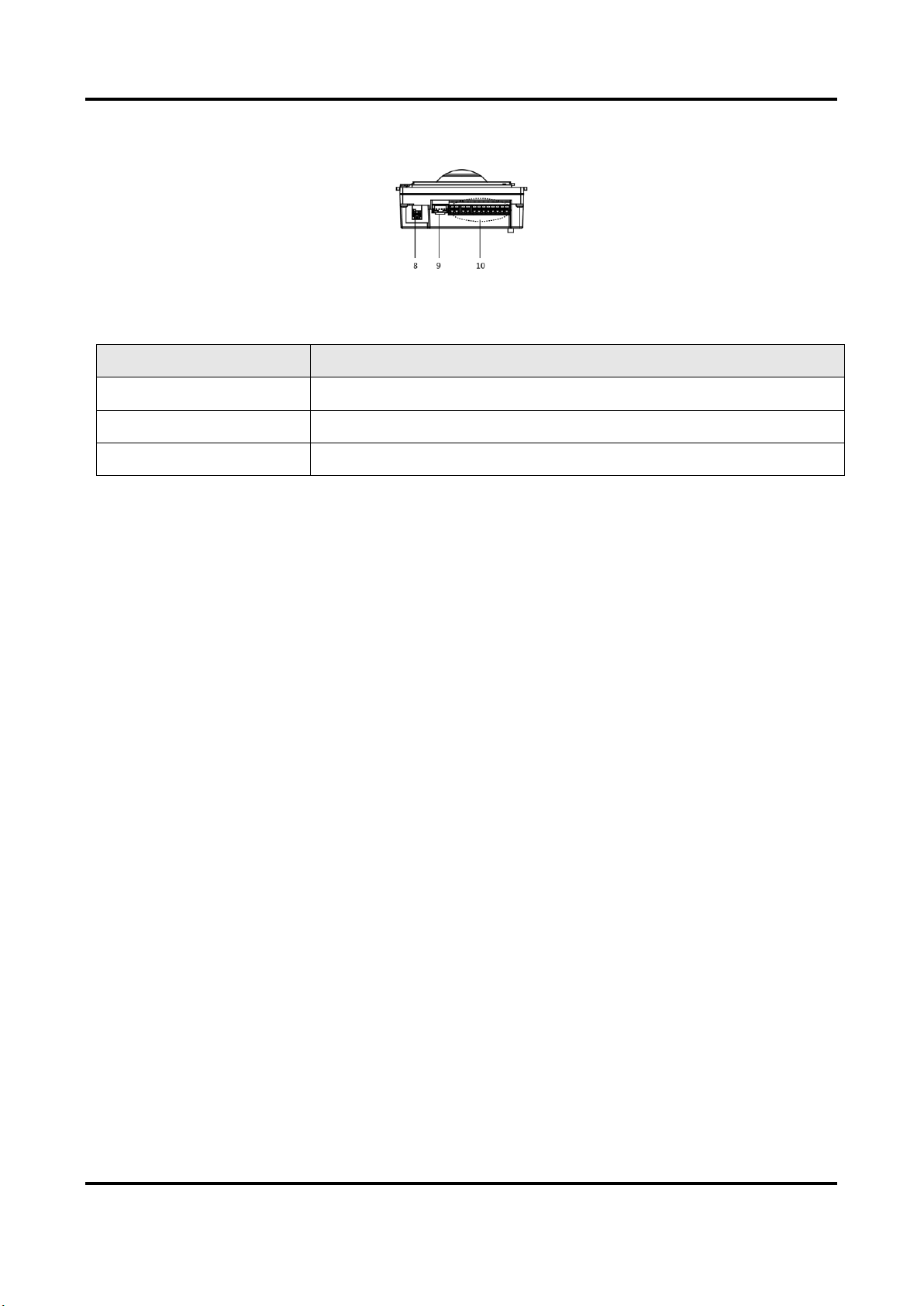
Bottom Panel
Figure 1-2 Bottom Panel
Table 1-2 Appearance Description
No.
Description
8
Network Interface
9
Module-connecting Interface (output)
10
Terminals

Door Station Installation Guide
3
Chapter 2 Terminal and Wiring
2.1 Terminal Description
Figure 2-1 Terminals and Interfaces
Table 2-1 Descriptions of Terminals and Interfaces
No.
Interface
Description
A1
NC1
Door Lock Relay Output (NC)
A2
NO1
Door Lock Relay Output (NO)
A3
COM
Common Interface
A4
NC2
Door Lock Relay Output (NC)
A5
NO2
Door Lock Relay Output (NO)
A6
GND
Grounding
A7
12 VDC
Power Supply Output
A8
GND
Grounding
B1
AIN1
For the access of Door Magnetic 2
B2
AIN2
For the access of Door Magnetic 1
B3
AIN3
For the access of Exit Button 1
B4
AIN4
For the access of Exit Button 2
B5
485-
Module-connecting Interface
B6
485+
B7
12 V OUT

Door Station Installation Guide
4
No.
Interface
Description
B8
GND
C
LAN
Power and Network Interface
2.2 Wiring Description
2.2.1 Power Supply Wiring
Caution
Make sure all the related equipment is power-off during the installation.
Wire the devices with power supply cables as picture shown below.
Door station should be connected to CH6 of the video/audio distributor with two-wire cables.
Indoor Station should be connected to any terminal of CH1 to CH5 of the video/audio distributor
with two-wire cables.
Figure 2-2 Wiring Description

Door Station Installation Guide
5
2.2.2 Door Lock Wiring
Figure 2-3 Door Lock Wiring
Note
●Terminal NC1/COM is set as default for accessing magnetic lock/electric bolt; terminal
NO2/COM is set as default for accessing electric strike.
●Lock should be powered by itself. Max. voltage and current for relay is 30V and 1A.

Door Station Installation Guide
6
2.2.3 Door Magnetic Wiring
Figure 2-4 Door Magnetic Wiring
Note
AIN1 and AIN2 are defaulted to connect door magnetic. Door magnetic connected to AIN1 detects
status of the lock that connected to NC1/NO1; Door magnetic connected to AIN2 detects the
status of the lock connected to NC2/NO2.

Door Station Installation Guide
7
2.2.4 Exit Button Wiring
Figure 2-5 Exit Button Wiring
Note
AIN3 and AIN4 are set as default for connecting exit button. Exit button connected to AIN3 opens
the lock connected to NC1/NO1; Exit button connected to AIN4 controls the lock that connected
to NC2/NO2.
Table des matières


